Page 121 of 494
TEXT MESSAGING (if so equipped)
Using the Bluetooth® Hands-Free Phone
System, a received text message can be
operated on the vehicle information dis-
play as well as on the touch-screen display.
To read/ignore an incoming text
1. When a new text message is received, apop-up window and operation keys will
appear with the sender’s name or phone
number on the vehicle information
display.
2. Use
orto highlight the pre-
ferred item and push OKto select the
item.
Available keys Action
[Read] View or hear the received message.
[Ignore] Ignore the received message.
Instruments and controls2-35
Page 122 of 494
To reply to/exit from a text
1. When a new text message is receivedand [Read] is selected, operation keys
are displayed on the vehicle information
display.
2. Use
orto highlight the pre-
ferred item and press the OK button to
select the item.
Available keys Action
[Reply] Available pre-determined messages will be displayed
on the vehicle information display if the steering
switch controls are used. Further operations, such as
voice recognition reply operation, is available when
using the touch-screen display.
[Exit] Ends text message operation and the vehicle infor-
mation display will show the previous screen.
INFO
A cellular phone device must be connected and selected from among other connected
Bluetooth® devices before hands-free operation. The paired phone must be able to
support the Bluetooth® requests for display. For additional information, refer to the sepa-
rate NissanConnect® Owner’s Manual.
2-36Instruments and controls
Page 127 of 494

The system helps deter vehicle thef t but
cannot prevent it, nor can it prevent the
thef t of interior or exterior vehicle compo-
nents in all situations. Always secure your
vehicle even if parking for a brief period.
Never leave your Intelligent Key in the ve-
hicle, and always lock the vehicle when un-
attended. Be aware of your surroundings,
and park in secure, well-lit areas whenever
possible.
Many devices offering additional protec-
tion, such as component locks, identifica-
tion markers, and tracking systems, are
available at auto supply stores and spe-
cialty shops. A NISSAN dealer may also offer
such equipment. Check with your insur-
ance company to see if you may be eligible
for discounts for various thef t protection
features.
How to arm the vehicle security
system
1. Close all windows.(The system can be
armed even if the windows are open.)
2. Remove the Intelligent Key from the vehicle. 3. Close all doors, hood and trunk. Lock all
doors. The doors can be locked with the
Intelligent Key or door handle request
switch.
4. Confirm that the
security indicator
light stays on for about 30 seconds. The
vehicle security system is now pre-
armed. The vehicle security system will
automatically shif t into the armed
phase. The
security light begins to
flash once every three seconds. If during
the pre-armed phase one of the follow-
ing occurs, the system will not arm:
• Any door is unlocked with the Intelligent Key or door request switch.
• Ignition switch is placed in ACC or ON position.
• Even when the driver and/or passen-
gers are in the vehicle, the system will
activate with all the doors, hood and
trunk lid locked with the ignition switch
placed in the LOCK position. When plac-
ing the ignition switch in the ACC or ON
position, the system will be released.
Vehicle security system activation
The vehicle security system will give the
following alarm:
• The headlights blink and the horn sounds intermittently but synchronously.
• The alarm automatically turns off af ter a period of time. However, the alarm reacti-
vates if the vehicle is tampered with
again.
The alarm is activated by:
• opening any door or hood without using the Intelligent Key (even if the door is un-
locked by releasing the door inside lock
knob).
How to stop an activated alarm
The alarm stops only by pressing thebutton on the Intelligent Key, or pushing the
request switch on the driver's or passen-
ger's door with the Intelligent Key in range
of the door handle.
Instruments and controls2-41
Page 128 of 494

NISSAN VEHICLE IMMOBILIZER
SYSTEM
The NISSAN Vehicle Immobilizer System
will not allow the engine to start without
the use of a registered key.
If the engine fails to start using a registered
key (for example, when interference is
caused by another registered key, an auto-
mated toll road device or automatic pay-
ment device on the key ring), restart the
engine using the following procedures:
1. Leave the ignition switch in the ON posi-tion for approximately 5 seconds.
2. Place the ignition switch in the OFF or LOCK position and wait approximately
10 seconds.
3. Repeat steps 1 and 2.
4. Restart the engine while holding the de- vice (which may have caused the inter-
ference) separate from the registered
key.
If the no start condition reoccurs, NISSAN
recommends placing the registered key on
a separate key ring to avoid interference
from other devices.
Never leave these keys in the vehicle. FCC Notice:
For USA:
This device complies with Part 15 of the
FCC Rules. Operation is subject to the fol-
lowing two conditions: (1) This device
may not cause harmful interference, and
(2) this device must accept any interfer-
ence received, including interference
that may cause undesired operation.
NOTE:
Changes or modifications not expressly
approved by the party responsible for
compliance could void the user's author-
ity to operate the equipment.
For Canada:
This device contains licence-exempt
transmitter(s)/receiver(s) that comply
with Innovation, Science and Economic
Development Canada’s licence-exempt
RSS(s). Operation is subject to the fol-
lowing two conditions: (1) This device
may not cause interference. (2) This de-
vice must accept any interference, in-
cluding interference that may cause un-
desired operation of the device.
Security indicator light
The security indicator light blinks whenever
the ignition switch is placed in the OFF/
LOCK/ACC position.
This function indicates the NISSAN Vehicle
Immobilizer System is operational.
If the NISSAN Vehicle Immobilizer System is
malfunctioning, the light will remain on
while the ignition switch is placed in the ON
position.
LIC0474
2-42Instruments and controls
Page 129 of 494

If the light still remains on and/or the
engine will not start, seek service for the
NISSAN Vehicle Immobilizer System ser-
vice as soon as possible. Please bring all
registered keys that you have. It is rec-
ommended that you visit a NISSAN
dealer for this service.
SWITCH OPERATION
The windshield wiper and washer operates
when the ignition switch is placed in the ON
position.
Push the lever down to operate the wiper
at the following speed:
�1Intermittent (INT) or (AUTO) — intermit-
tent operation can be adjusted by turn-
ing the knob
OA. Also, the intermittent
operation speed varies in accordance
with the vehicle speed (if so equipped).
(For example, when the vehicle speed is
high, the intermittent operation speed will be faster.) Further, the rain-sensing
auto wiper system (if so equipped) will
adjust the speed of the intermittent
operation. For additional information,
see “Rain-sensing auto wiper system”
(P. 2-44).
�2Low (LO) — continuous low speed
operation
�3High (HI) — continuous high speed
operation
Push the lever up
O4to have one sweep
operation (MIST) of the wiper.
WIC2748
Type A (if so equipped)
LIC3187
Type B (if so equipped)
WIPER AND WASHER SWITCH
Instruments and controls2-43
Page 131 of 494

– High — High sensitive operation
– Low — Low sensitive operation
To turn the rain-sensing auto wiper system
off, push up the lever to the OFF position, or
pull down the lever to the LO or HI position.
For additional information on disabling the
rain-sensing feature, see “Vehicle informa-
tion display” (P. 2-17).
CAUTION
• Do not touch the rain sensor and
around it when the wiper switch is in
the AUTO position and the ignition
switch is in the ON position. The wip-
ers may operate unexpectedly and
cause an injury or may damage a
wiper.
• The rain-sensing auto wipers are in-
tended for use during rain. If the
switch is lef t in the AUTO position, the
wipers may operate unexpectedly
when dirt, fingerprints, oil film or in-
sects are stuck on or around the sen-
sor. The wipers may also operate
when exhaust gas or moisture affect
the rain sensor. •
When the windshield glass is coated
with water repellent, the speed of the
rain-sensing auto wipers may be
higher even though the amount of
the rainfall is small.
• Be sure to turn off the rain-sensing
auto wiper system when you use a
car wash.
• The rain-sensing auto wipers may
not operate if rain does not hit the
rain sensor even if it is raining.
•
Using Genuine NISSAN wiper blades is
recommended for proper operation of
the rain-sensing auto wiper system.
For additional information, see “Wind-
shield wiper blades” (P. 8-18).
To defrost the rear window glass and out-
side mirror, start the engine and push the
rear window defroster switch on. The rear
window defroster indicator light on the
switch comes on. Push the switch again to
turn the defroster off.
The rear window defroster automatically
turns off af ter approximately 15 minutes.
CAUTION
When cleaning the inner side of the rear
window, be careful not to scratch or
damage the rear window defroster.
LIC2325
REAR WINDOW AND OUTSIDE
MIRROR DEFROSTER SWITCH
Instruments and controls2-45
Page 132 of 494
NOTE:
The top and bottom few rows of wires on
the rear window are not part of the rear
window defroster system. These wires
make up the antenna for the audio
system.
HEADLIGHT CONTROL SWITCH
Lighting
�1Rotate the switch to theposition,
and the front parking, tail, license plate,
and instrument panel lights will come
on.
�2Rotate the switch to theposition,
and the headlights will come on and all
the other lights remain on.
CAUTION
Use the headlights with the engine run-
ning to avoid discharging the vehicle
battery.
LIC3240
Type A (if so equipped)
LIC3241
Type B (if so equipped)
HEADLIGHT AND TURN SIGNAL
SWITCH
2-46Instruments and controls
Page 133 of 494
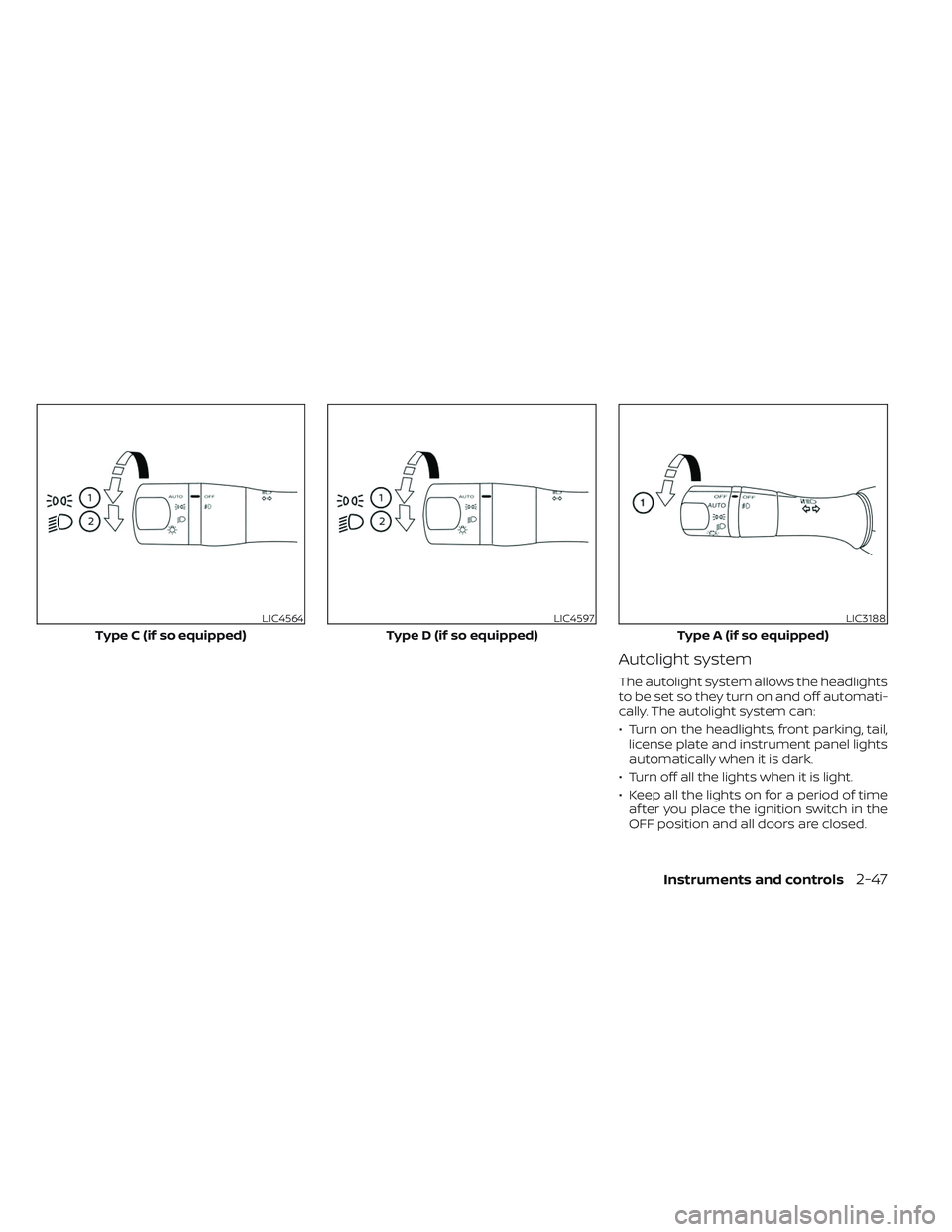
Autolight system
The autolight system allows the headlights
to be set so they turn on and off automati-
cally. The autolight system can:
• Turn on the headlights, front parking, tail,license plate and instrument panel lights
automatically when it is dark.
• Turn off all the lights when it is light.
• Keep all the lights on for a period of time af ter you place the ignition switch in the
OFF position and all doors are closed.
LIC4564
Type C (if so equipped)
LIC4597
Type D (if so equipped)
LIC3188
Type A (if so equipped)
Instruments and controls2-47

![NISSAN MAXIMA 2023 Owners Manual To reply to/exit from a text
1. When a new text message is receivedand [Read] is selected, operation keys
are displayed on the vehicle information
display.
2. Use
orto highlight the pre-
ferred item a](/manual-img/5/56781/w960_56781-121.png "NISSAN MAXIMA 2023 Owners Manual To reply to/exit from a text
1. When a new text message is receivedand [Read] is selected, operation keys
are displayed on the vehicle information
display.
2. Use
orto highlight the pre-
ferred item a")