Page 139 of 494
FOG LIGHT SWITCH (if so equipped)
To turn the fog lights on, turn the headlight
switch to theposition, then turn the
fog light switch to theposition.
To turn the fog lights on with the headlight
switch in the AUTO position, the headlights
must be on, then turn the fog light switch to
the
position.
To turn the fog lights off, turn the fog light
switch to the OFF position. The headlights must be on and the low
beams selected for the fog lights to
operate. The fog lights automatically turn
off when the high beam headlights are
selected.
To sound the horn, push near the center
pad of the steering wheel.
WARNING
Do not disassemble the horn. Doing so
could affect proper operation of the
supplemental front air bag system.
Tampering with the supplemental
front air bag system may result in seri-
ous personal injury.
WIC1440LIC3174
HORN
Instruments and controls2-53
Page 149 of 494

•Only certain power outlets are de-
signed for use with a cigarette lighter
unit. Do not use any other power out-
let for an accessory lighter. It is rec-
ommended that you visit a NISSAN
dealer for additional information.
• Do not use with accessories that ex-
ceed a 12 volt, 120W (10A) power draw.
• Do not use double adapters or more
than one electrical accessory.
• Use power outlets with the engine
running to avoid discharging the
vehicle battery.
• Avoid using power outlets when the
air conditioner, headlights, or rear
window defroster is on.
• Before inserting or disconnecting a
plug, be sure the electrical accessory
being used is turned off.
• Push the plug in as far as it will go. If
good contact is not made, the plug
may overheat or the internal tem-
perature fuse may open.
• When not in use, be sure to close the
cap. Do not allow water or any other
liquid to contact the outlet. The extended storage switch is used when
the vehicle is in transit from the factory. It is
located in the fuse panel to the lef t of the
steering wheel on the instrument panel. If
any electrical equipment does not operate,
ensure the extended storage switch is
pushed fully in place, as shown.
LDI2758LIC3266
Pulled position
EXTENDED STORAGE SWITCH
Instruments and controls2-63
Page 161 of 494

•Do not hang any object on the arm
rail as this may result in improper op-
eration or damage the screen.
• Do not forcefully pull the screen. Do-
ing so may elongate the screen. Im-
proper operation or damage to the
screen may result.
• To avoid personal injury, keep your
hands, fingers and head away from
the sunshade arm, arm rail and
screen inlet port.
•
Do not allow children near the rear sun-
shade system. They could be injured.
• Do not pull or push the rear sun-
shade. This could cause improper
operation or damage it.
�1The interior lights can be turned on re-
gardless of door position. The lights will
go off af ter a period of time unless the
ignition switch is placed in the ON posi-
tion when any door is opened.
�2The interior lights can be set to operate
when the doors are opened. To turn off
the interior lights when a is door open,
push the switch; the interior lights
will not illuminate, regardless of door
position. The lights will go off when the ignition
switch is placed in the ON position, or the
driver's door is closed and locked. The
lights will also go off af ter a period of time
when the doors are open.
NOTE:
The step lights illuminate when the
driver and passenger doors are opened
regardless of the interior light switch po-
sition. These lights will turn off auto-
matically af ter a period of time while
doors are open to prevent the battery
from becoming discharged.
CAUTION
Do not use for extended periods of time
with the engine stopped. This could re-
sult in a discharged battery.
LIC2302
INTERIOR LIGHTS
Instruments and controls2-75
Page 162 of 494
CONSOLE LIGHT
The console light will turn on whenever the
parking lights or headlights are illuminated.
The console light brightness can be ad-
justed with the illumination brightness
control in the vehicle information display.
MAP LIGHTS
To turn the map lights on, push the switches.
To turn them off, push the switches again.
CAUTION
Do not use for extended periods of time
with the engine stopped. This could re-
sult in a discharged battery.
PERSONAL LIGHTS
To turn the rear personal lights on, push the
switch. To turn them off, push the switch
again.
TRUNK LIGHT
The light illuminates when the trunk lid is
opened. When the trunk lid is closed, the
light goes off. For additional information,
see “Exterior and interior lights” (P. 8-25).
LIC2303LIC2304LIC3907
2-76Instruments and controls
Page 177 of 494

Locking doors
1. Move the shif t lever to the P (Park) posi-tion, place the ignition switch in the LOCK
position and make sure you carry the
Intelligent Key with you.
2. Close driver’s door.
3.
Push any door handle request switchO1
while carrying the Intelligent Key with you.
4. All doors and trunk will lock.
5. The hazard indicator lights flash twice, a chime sounds twice, and the front and
tail lights may turn on for 10 seconds.
NOTE:
• Request switches for all doors can bedeactivated when the Ext. Door Switch
feature is switched to OFF using the
“Vehicle Settings” menu on the vehicle
information display. For additional in-
formation, see “Vehicle information
display ” (P. 2-17).
• Doors lock with the door handle re- quest switch
O1while the ignition
switch is not in the LOCK position. • Doors do not lock by pushing the door
handle request switch while the driv-
er’s door is open. However, the driver
door locks with the mechanical key
even if any door is open.
• Doors do not lock with the door handle request switch with the Intelligent Key
inside the vehicle and a beep sounds to
warn you. However, when an Intelligent
Key is inside the vehicle, doors can be
locked with another Intelligent Key.
CAUTION
• Af ter locking the doors using the re-
quest switch, make sure that the
doors have been securely locked by
operating the door handles.
• When locking the doors using the re-
quest switch, make sure to have the
Intelligent Key in your possession
before operating the request switch
to prevent the Intelligent Key from
being lef t in the vehicle.
• The request switch is operational
only when the Intelligent Key has
been detected by the Intelligent Key
system.
LPD2347LPD3135
Pre-driving checks and adjustments3-9
Page 178 of 494
Lockout protection
To prevent the Intelligent Key from being
accidentally locked in the vehicle, lockout
protection is equipped with the Intelligent
Key system.
When any door is open, the doors are
locked, and then the Intelligent Key is put
inside the vehicle and all the doors are
closed, a warning chime will sound and the
doors will automatically unlock.
NOTE:
The doors may not lock when the Intelli-
gent Key is in the same hand that is op-
erating the request switch to lock the
door. Put the Intelligent Key in a purse,
pocket or your other hand.
CAUTION
The lockout protection may not func-
tion under the following conditions:
• When the Intelligent Key is placed on
top of the instrument panel.
• When the Intelligent Key is placed in-
side the glove box or a storage bin.
• When the Intelligent Key is placed in-
side the door pockets.
• When the Intelligent Key is placed in-
side or near metallic materials.
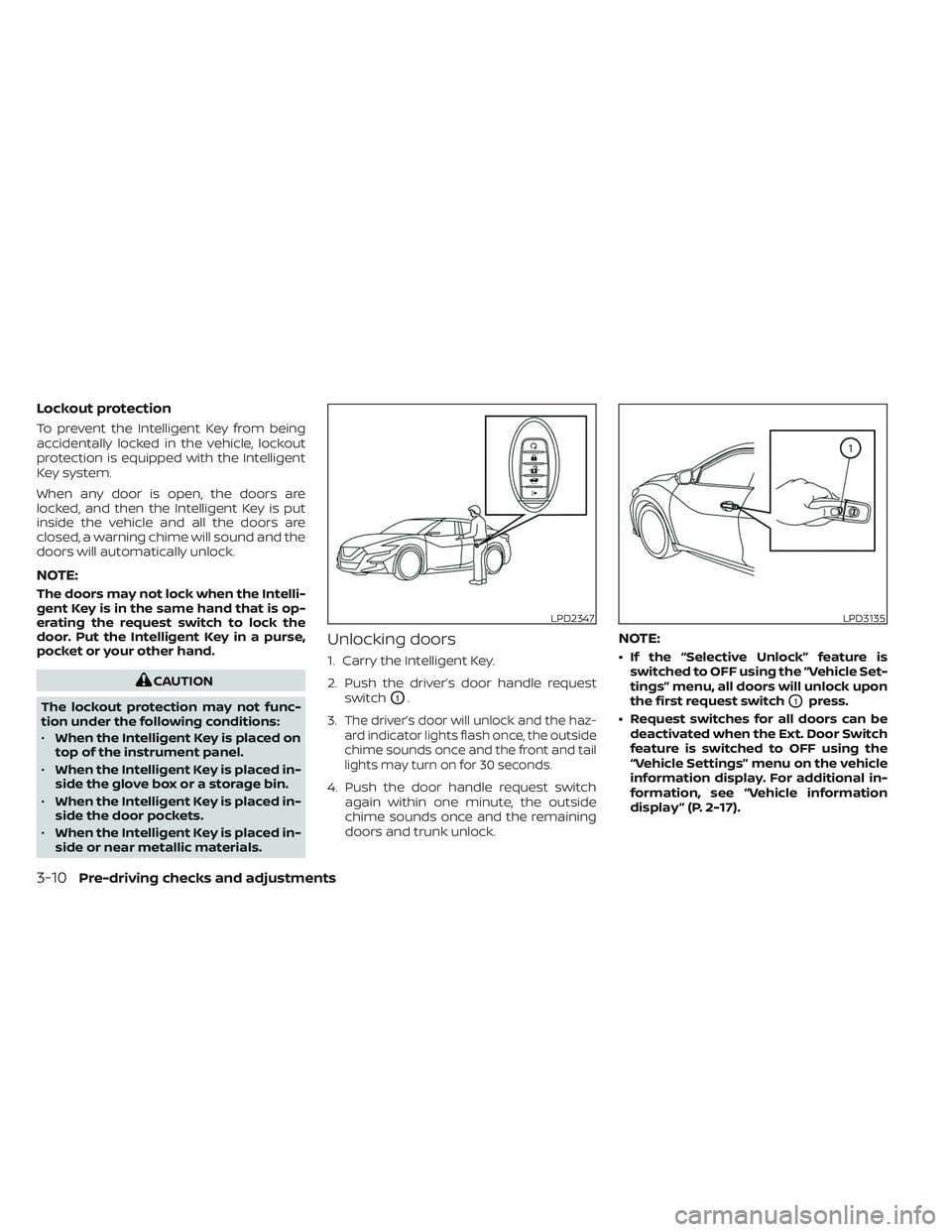
Unlocking doors
1. Carry the Intelligent Key.
2. Push the driver’s door handle request
switch
O1.
3.
The driver’s door will unlock and the haz-
ard indicator lights flash once, the outside
chime sounds once and the front and tail
lights may turn on for 30 seconds.
4. Push the door handle request switch again within one minute, the outside
chime sounds once and the remaining
doors and trunk unlock.
NOTE:
• If the “Selective Unlock” feature isswitched to OFF using the “Vehicle Set-
tings” menu, all doors will unlock upon
the first request switch
O1press.
• Request switches for all doors can be deactivated when the Ext. Door Switch
feature is switched to OFF using the
“Vehicle Settings” menu on the vehicle
information display. For additional in-
formation, see “Vehicle information
display ” (P. 2-17).
LPD2347LPD3135
3-10Pre-driving checks and adjustments
Page 179 of 494

If a door handle is pulled while unlocking
the doors, that door may not be unlocked.
Returning the door handle to its original
position will unlock the door. If the door
does not unlock af ter returning the door
handle, push the door handle request
switch to unlock the door.
All doors will be locked automatically un-
less one of the following operations is per-
formed within one minute af ter pushing
the request switch.
• Opening any door.
• Pushing the ignition switch.
Using the interior lights
The interior lights illuminate for a period of
time when a door is unlocked and the inte-
rior lights switch is not in the OFF position.
The lights can be turned off without wait-
ing by performing one of the following
operations:
• Placing the ignition switch in the ONposition.
• Locking the doors with the Intelligent Key. • Switching the interior lights switch to the
OFF position. For additional information,
see “Interior lights” (P. 2-75).
• Switching the Auto Room Lamp feature to the OFF position in the “Vehicle Set-
tings” menu on the vehicle information
display. For additional information, see
“Vehicle information display” (P. 2-17).Opening the trunk lid
1. Push the trunk opener request switchOA
for more than 1 second while carrying
the Intelligent Key with you.
2. The trunk will unlatch. A chime will sound four times.
3. Raise the trunk lid to open the trunk.
LPD2968
Pre-driving checks and adjustments3-11
Page 180 of 494

Lockout protection
To prevent the Intelligent Key from being
accidentally locked in the trunk, lockout
protection is equipped with the Intelligent
Key system.
When all doors are locked and the trunk lid
is closed with the Intelligent Key inside the
trunk, a chime will sound and the trunk will
open.
HOW TO USE THE REMOTE
KEYLESS ENTRY FUNCTION
The remote keyless entry function can
operate all door locks using the remote
keyless function of the Intelligent Key. Theremote keyless function can operate at a
distance of 33 f t (10 m) away from the
vehicle. The operating distance depends
upon the conditions around the vehicle.
The remote keyless entry function will not
function under the following conditions:
• When the Intelligent Key is not within the
operational range.
• When the Intelligent Key battery is dis- charged.
CAUTION
When locking the doors using the Intel-
ligent Key, be sure not to leave the key
in the vehicle.
Locking doors
1. Place the ignition switch in the LOCK position.
2. Close all doors.
3. Press the
button on the Intelli-
gent Key.
4. The hazard indicator lights flash twice and the horn beeps once.
5. All doors and the trunk will be locked.
LPD3603
1.(remote engine start) button
2.
(lock) button
3.
(unlock) button
4.
(trunk) button
5.
(panic) button
3-12Pre-driving checks and adjustments

