2023 NISSAN LEAF interior lights
[x] Cancel search: interior lightsPage 178 of 612
Immediate Charge switch......................2-61
Dynamic driver assistance switch
(for vehicles without ProPILOT Assist)
(if so equipped) ................................. 2-61
Steering Assist switch (for models with
ProPILOT Assist) (if so equipped) ................2-62
Rear Door Alert ................................. 2-62
Power outlet ................................... 2-64
USB/iPod® charging ports ......................2-64
Storage ........................................ 2-65
Seatback Pocket (if so equipped) ............2-65
Storagetray................................. 2-65
Glovebox ................................... 2-66Console box
................................. 2-66
Overhead sunglasses storage ...............2-66
Cup holders ................................. 2-67
Tonneau cover (if so equipped) ..............2-68
Stowing golf bags ........................... 2-69
Windows ....................................... 2-69
Power windows ............................. 2-69
Interior lights ................................... 2-72
Console light (if so equipped) ................2-72
Map lights ................................... 2-73
Room light .................................. 2-73
Cargo light .................................. 2-73
Page 222 of 612
The system helps deter vehicle thef t but
cannot prevent it, nor can it prevent the
thef t of interior or exterior vehicle compo-
nents in all situations. Always secure your
vehicle even if parking for a brief period.
Never leave your keys in the vehicle, and
always lock it when it is lef t unattended. Be
aware of your surroundings, and park in
secure, well-lit areas whenever possible.
Many devices offering additional protec-
tion, such as component locks, identifica-
tion markers, and tracking systems, are
available at auto supply stores and spe-
cialty shops. A NISSAN certified LEAF dealer
may also offer such equipment. Check with
your insurance company to see if you may
be eligible for discounts for various thef t
protection features.
How to arm the vehicle security
system
1. Close all windows.The system can be armed even if the
windows are open.
2. Place the power switch in the LOCK or OFF position and remove the Intelligent
Key from the vehicle. 3. Close all doors. Lock all doors. The doors
can be locked with:
• the LOCK
button on the Intelli-
gent Key
• any request switch
• the power door lock switch
4. Confirm that the security indicator light illuminates. The security indicator light
stays on for about 30 seconds. The ve-
hicle security system is now pre-armed.
Af ter about 30 seconds the vehicle se-
curity system automatically shif ts into
the armed phase. The security light be-
gins to flash once every approximately 3
seconds. If, during this 30-second pre-
arm time period, the door is unlocked, or
the power switch is placed in the ACC or
ON position, the system will not arm.
Even when the driver and/or passengers
are in the vehicle, the system will acti-
vate with all doors locked and the power
switch in the OFF position. When placing
the power switch to the ACC or ON posi-
tion, the system will be released.
Vehicle security system activation
The vehicle security system will give the
following alarm:
• The headlights blink and the horn sounds intermittently.
• The alarm automatically turns off af ter approximately 50 seconds. However, the
alarm reactivates if the vehicle is tam-
pered with again.
The alarm is activated by:
• Unlocking the door without using the In- telligent Key or the request switch. (Even if
the door is opened by releasing the door
inside lock knob, the alarm will activate.)
• Opening the hood.
How to stop an activated alarm
The alarm will stop when a door is un-
locked by pushing the UNLOCKbut-
ton on the Intelligent Key, door handle re-
quest switch, or when the power switch is
pushed in the ACC or ON position.
If the system does not operate as de-
scribed above, have it checked. It is rec-
ommended that you visit a NISSAN certi-
fied LEAF dealer for this service.
Instruments and controls2-45
Page 232 of 612
If the ambient image sensor is damaged
due to an accident, it is recommended that
you visit a NISSAN certified LEAF dealer for
this service.
Battery saver system
• When the headlight switch is in theorposition while the power switch
is in the ON position, the lights will auto-
matically turn off 45 seconds af ter the
power switch has been placed in the OFF
position.
• When the headlight switch remains in the
orposition af ter the lights
automatically turn off, the lights will turn
on when the power switch is placed in the
ON position.
CAUTION
• When you turn on the headlight
switch again af ter the lights auto-
matically turn off, the lights will not
turn off automatically. Be sure to turn
the light switch to the AUTO or OFF
position when you leave the vehicle
for extended periods of time, other-
wise the battery will be discharged. •
Never leave the light switch on when
the power switch is in the OFF, ACC or
ON position for extended periods of
time even if the headlights turn off
automatically.
LED DAYTIME RUNNING LIGHTS
(DRL) SYSTEM (Type A) (if so
equipped)
The LED portion of the headlights auto-
matically illuminates at 100% intensity
when the power switch is in the READY to
drive position with the parking brake re-
leased. The LED DRL system operates with
the headlight switch in the OFF (if so
equipped) or
position. Turn headlight
switch to theposition for full illumina-
tion when driving at night.
If the parking brake is applied before the
power switch is in the READY to drive posi-
tion, the LED DRL system does not operate.
The LED DRL system illuminates once the
parking brake is released. The LED DRL sys-
tem will remain on until the power switch is
pushed to the OFF position.
WARNING
When the LED DRL system is active, tail
lights on your vehicle are not on. It is
necessary at dusk to turn on your
headlights. Failure to do so could cause
an accident injuring yourself and
others.
LED DAYTIME RUNNING LIGHTS
(DRL) SYSTEM (Type B) (if so
equipped)
The LED DRL automatically illuminate at
100% intensity when the power switch is in
the READY to drive position. The LED Day-
time Running Lights (DRL) operate with the
headlight switch in the OFF (if so equipped)
or
position. When you turn the head-
light switch to theposition for full
illumination, the LED lights switch from LED
DRL to the park function.
The LED DRL will remain on until the power
switch is placed in the OFF position.
It is necessary at dusk to turn the headlight
switch ON for interior controls and
switches to illuminate, as those remain
OFF while the switch is in the OFF position.
Instruments and controls2-55
Page 249 of 612
If the windows do not close
automatically
If the power window automatic function
(closing only) does not operate properly,
perform the following procedure to initial-
ize the power window system.
1. Place the power switch in the ONposition.
2. Close the door.
3. Open the window completely by operat- ing the power window switch.
4. Pull the power window switch and hold it to close the window, and then hold the
switch more than 3 seconds af ter the
window is closed completely.
5. Release the power window switch. Op- erate the window by the automatic
function to confirm the initialization is
complete.
If the power window automatic function
does not operate properly af ter perform-
ing the procedure above, have your vehicle
serviced. It is recommended that you visit a
NISSAN certified LEAF dealer for this
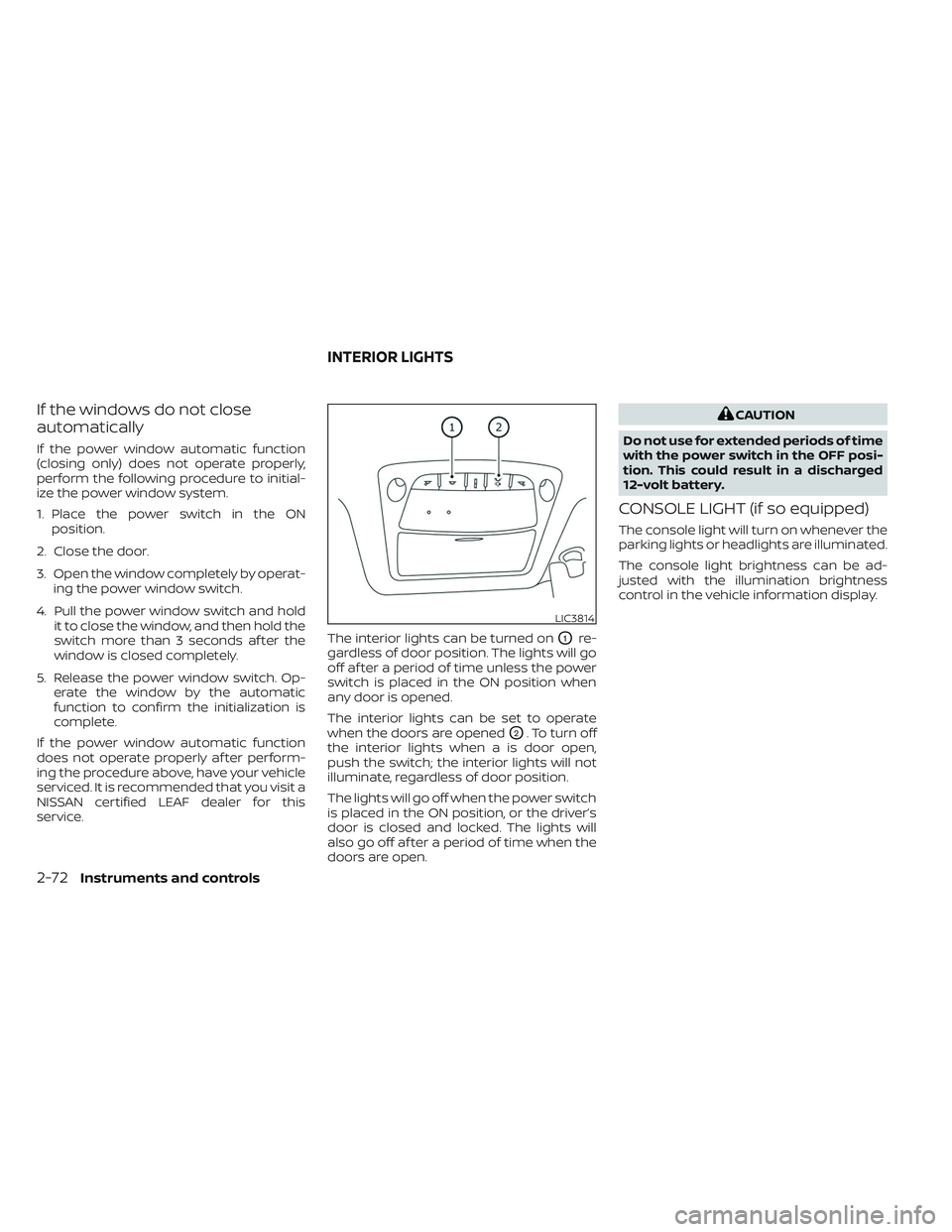
service. The interior lights can be turned on
O1re-
gardless of door position. The lights will go
off af ter a period of time unless the power
switch is placed in the ON position when
any door is opened.
The interior lights can be set to operate
when the doors are opened
O2. To turn off
the interior lights when a is door open,
push the switch; the interior lights will not
illuminate, regardless of door position.
The lights will go off when the power switch
is placed in the ON position, or the driver’s
door is closed and locked. The lights will
also go off af ter a period of time when the
doors are open.
CAUTION
Do not use for extended periods of time
with the power switch in the OFF posi-
tion. This could result in a discharged
12-volt battery.
CONSOLE LIGHT (if so equipped)
The console light will turn on whenever the
parking lights or headlights are illuminated.
The console light brightness can be ad-
justed with the illumination brightness
control in the vehicle information display.
LIC3814
INTERIOR LIGHTS
2-72Instruments and controls
Page 250 of 612
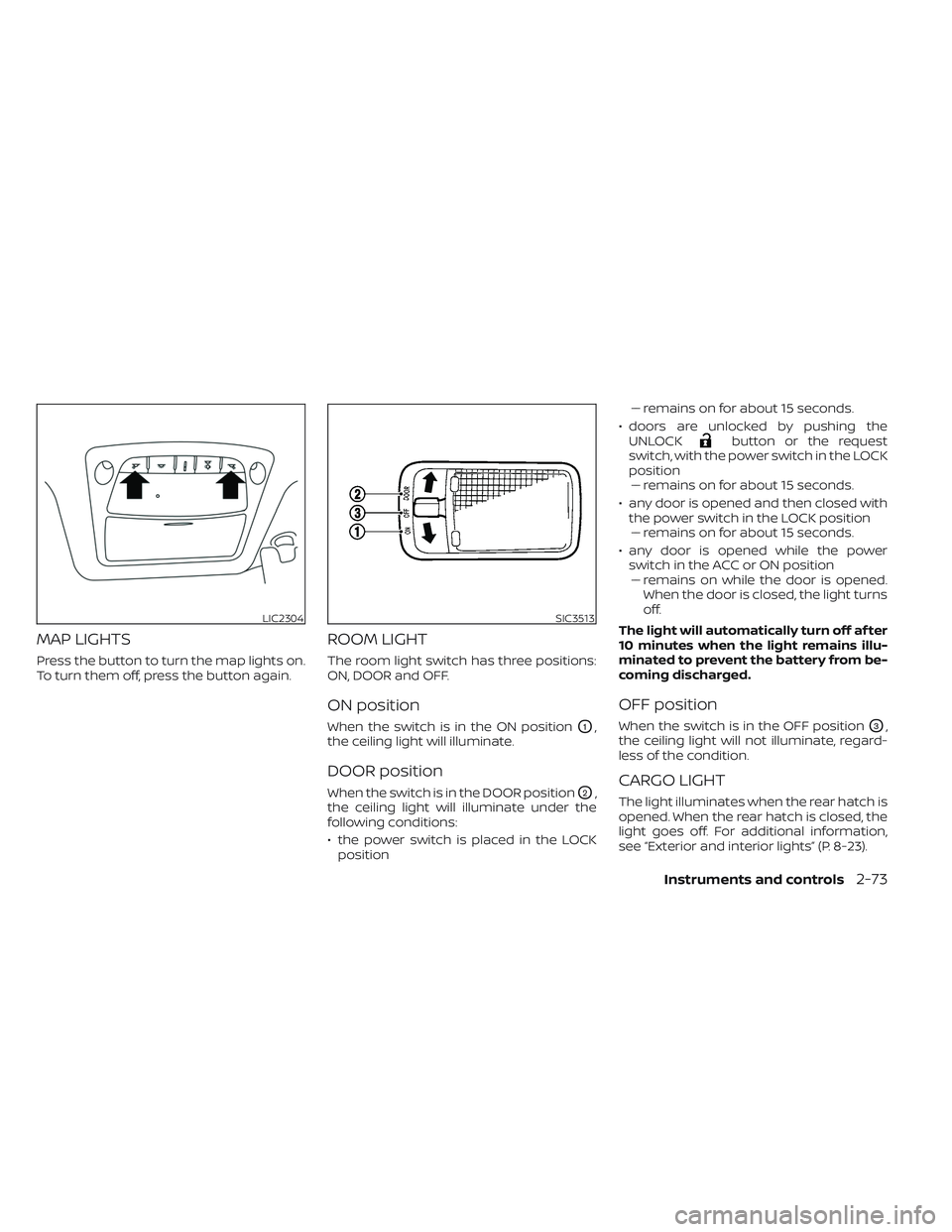
MAP LIGHTS
Press the button to turn the map lights on.
To turn them off, press the button again.
ROOM LIGHT
The room light switch has three positions:
ON, DOOR and OFF.
ON position
When the switch is in the ON positionO1,
the ceiling light will illuminate.
DOOR position
When the switch is in the DOOR positionO2,
the ceiling light will illuminate under the
following conditions:
• the power switch is placed in the LOCK position –– remains on for about 15 seconds.
• doors are unlocked by pushing the UNLOCK
button or the request
switch, with the power switch in the LOCK
position –– remains on for about 15 seconds.
• any door is opened and then closed with the power switch in the LOCK position–– remains on for about 15 seconds.
• any door is opened while the power switch in the ACC or ON position– – remains on while the door is opened.
When the door is closed, the light turns
off.
The light will automatically turn off af ter
10 minutes when the light remains illu-
minated to prevent the battery from be-
coming discharged.
OFF position
When the switch is in the OFF positionO3,
the ceiling light will not illuminate, regard-
less of the condition.
CARGO LIGHT
The light illuminates when the rear hatch is
opened. When the rear hatch is closed, the
light goes off. For additional information,
see “Exterior and interior lights” (P. 8-23).
LIC2304SIC3513
Instruments and controls2-73
Page 262 of 612
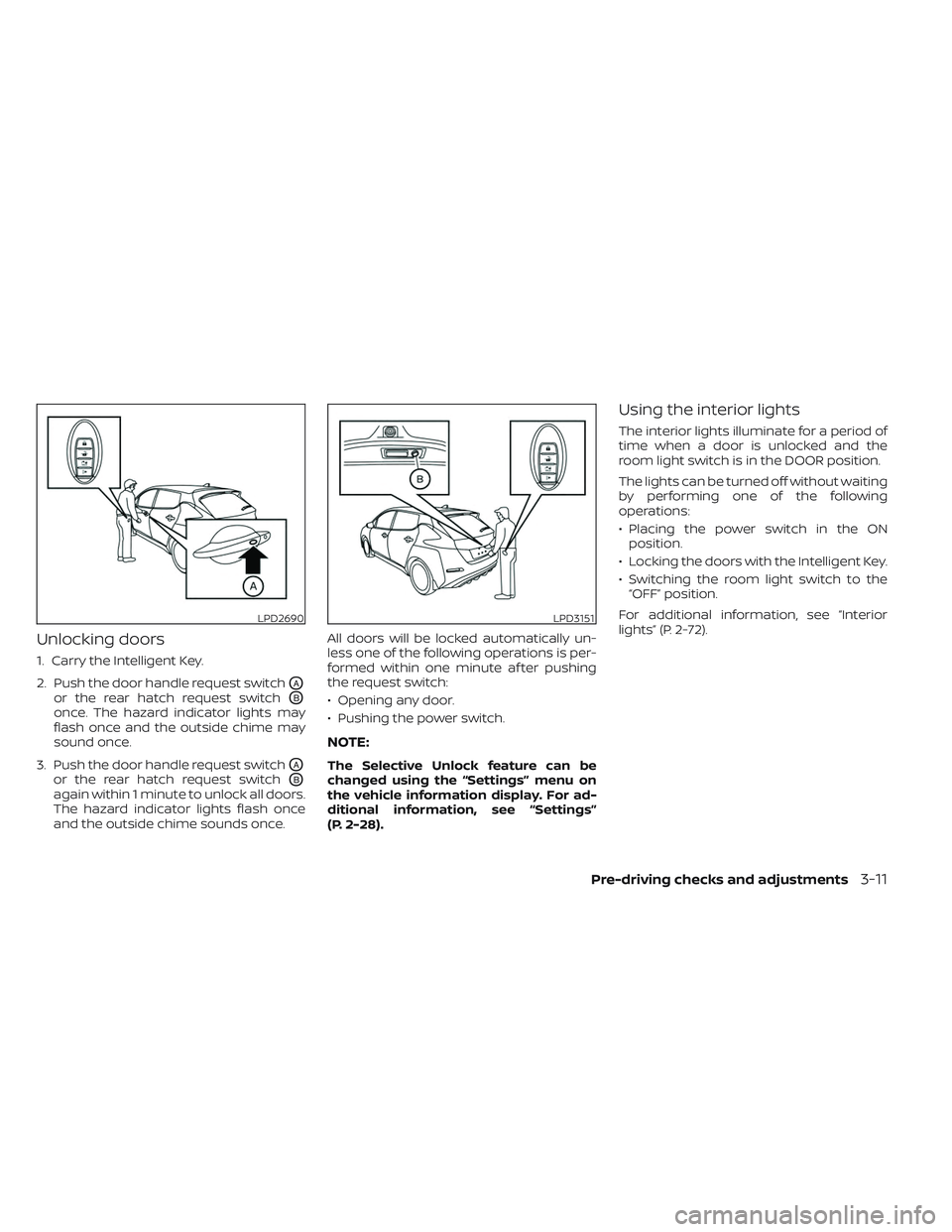
Unlocking doors
1. Carry the Intelligent Key.
2. Push the door handle request switch
OA
or the rear hatch request switchOB
once. The hazard indicator lights may
flash once and the outside chime may
sound once.
3. Push the door handle request switch
OA
or the rear hatch request switchOB
again within 1 minute to unlock all doors.
The hazard indicator lights flash once
and the outside chime sounds once. All doors will be locked automatically un-
less one of the following operations is per-
formed within one minute af ter pushing
the request switch:
• Opening any door.
• Pushing the power switch.
NOTE:
The Selective Unlock feature can be
changed using the “Settings” menu on
the vehicle information display. For ad-
ditional information, see “Settings”
(P. 2-28).
Using the interior lights
The interior lights illuminate for a period of
time when a door is unlocked and the
room light switch is in the DOOR position.
The lights can be turned off without waiting
by performing one of the following
operations:
• Placing the power switch in the ON
position.
• Locking the doors with the Intelligent Key.
• Switching the room light switch to the “OFF” position.
For additional information, see “Interior
lights” (P. 2-72).
LPD2690LPD3151
Pre-driving checks and adjustments3-11
Page 264 of 612
CAUTION
• Do not allow the Intelligent Key,
which contains electrical compo-
nents, to come into contact with wa-
ter or salt water. This could affect the
system function.
• Do not drop the Intelligent Key.
• Do not strike the Intelligent Key
sharply against another object.
• Do not change or modif y the Intelli-
gent Key.
• Wetting may damage the Intelligent
Key. If the Intelligent Key gets wet,
immediately wipe until it is com-
pletely dry.
• Do not place the Intelligent Key for an
extended period in an area where
temperatures exceed 140°F (60°C).
• Do not attach the Intelligent Key with
a key holder that contains a magnet.
• Do not place the Intelligent Key near
equipment that produces a magnetic
field, such as a TV, audio equipment,
personal computers or cellular
phone.
• When locking the doors using the In-
telligent Key, be sure not to leave the
key in the vehicle.Locking doors
1. Place the power switch in the LOCK position.
2. Close all doors.
3. Press the
button on the Intelli-
gent Key.
4. The hazard indicator lights flash twice and the horn beeps once.
5. All doors and the rear hatch will be locked.
WARNING
Af ter locking the doors using the Intel-
ligent Key, be sure that the doors have
been securely locked by operating the
door handles. Failure to follow these in-
structions may result in inadvertently
unlocking the doors, which may de-
crease the safety and security of your
vehicle.
Unlocking doors
1. Press thebutton on the Intelligent
Key to unlock the driver’s door.
2. The hazard indicator lights flash once.
3.
Press thebutton again within 1 min-
ute to unlock all doors and rear hatch.
All doors and rear hatch will be locked au-
tomatically unless one of the following op-
erations is performed within 1 minute af ter
pressing the
button:
• Opening any doors or rear hatch.
• Pushing the power switch.
Using the interior lights
The interior lights illuminate for a period of
time when a door is unlocked and the
room light switch is in the DOOR position.
The lights can be turned off without waiting
by performing one of the following
operations:
• Placing the power switch in the ON position.
• Locking the doors with the Intelligent Key.
• Switching the room light switch to the “OFF” position.
For additional information, see “Interior
lights” (P. 2-72).
Pre-driving checks and adjustments3-13
Page 317 of 612
5. Press thebutton to select “De-
parture time” and then press the OK
button.
6. Press the
button to set “Hour”
and then press the OK button.
7. Press the
button to set “Minute”
and then press the OK button. The set-
ting can be changed with an increment
step of 10 minutes.
8. Press the
button to select
“Climate Temperature” and then press
the OK button.
9. Press the
button to set Cli-
mate Temperature and then press the
OK button.
10. * Press the
button to select
"Days" and then press the OK button.
The current day of the week is dis-
played with an underline.
Press the
button to select the
days of the week you wish to activate
the Climate Control system and then
press the OK button. The indicator light
of the selected button will turn on. 11. * Af ter setting the day of the week, press
the Back button and return to the pre-
vious screen.
The set day of the week is lit in white.
12. Af ter the setting is complete, place the power switch in the OFF position, and
then connect the charge connector to
the vehicle.
* models with Navigation System
Info
The Climate Ctrl. Timer does not activate if
the charge connector is not connected to
the vehicle. When the “Battery Operation
OK” is turned on and the charging connec-
tor is not connected to the vehicle, the Cli-
mate Ctrl. Timer will activate for 15 minutes.
When the outside temperature is high, the
interior temperature may not reach the set
temperature within the 15 minutes.
Turn "Battery Operation OK" to OFF when it
is not necessary to operate air condition-
ing timer in order to prevent Li-ion battery
from discharging.
For models without Navigation System, the
Climate Ctrl. Timer operates repeatedly ev-
ery day once it is turned on.
Operating tips for using Climate
Ctrl. Timer
• The Climate Ctrl. Timer will only start when the power switch is in the LOCK/
OFF or ACC position.
• To turn off the Climate Ctrl. Timer func- tion, turn off the “Climate Ctrl. Timer1” and
"Climate Ctrl. Timer2" setting in the video
information display using the
button on the steering wheel. The start
and stop time settings will not be deleted
even if the Climate Ctrl. Timer function is
turned off.
• While the Climate Ctrl. Timer is operating, the Climate Ctrl. Timer indicator and the
charging status indicator lights flash. If
the Climate Ctrl. Timer is set to activate,
the Climate Ctrl. Timer indicator
illuminates.*
• If the Climate Ctrl. Timer starts operating while the vehicle is being charged, the
time required for charging will be longer.
• Operating the Climate Ctrl. Timer or re- mote climate control in an environment
where the temperature is low may de-
crease the rate of battery charge.
4-40Monitor, climate, audio, phone and voice recognition systems