2023 NISSAN LEAF fuse
[x] Cancel search: fusePage 16 of 612
11. Lower instrument panel switchesCharge port lid switch (P. 2-61)
Immediate charge switch (P. 2-61)
Heated steering wheel switch
(if so equipped) (P. 2-60)
Steering Assist switch (if so equipped)
(P. 2-62)
Dynamic driver assistance switch
(if so equipped) (P. 5-25, 5-30, 5-45, 2-61)
12. Fuse box cover (P. 8-15)
*For additional information, refer to the
NissanConnect® Manual
Illustrated table of contents0-7
Page 19 of 612
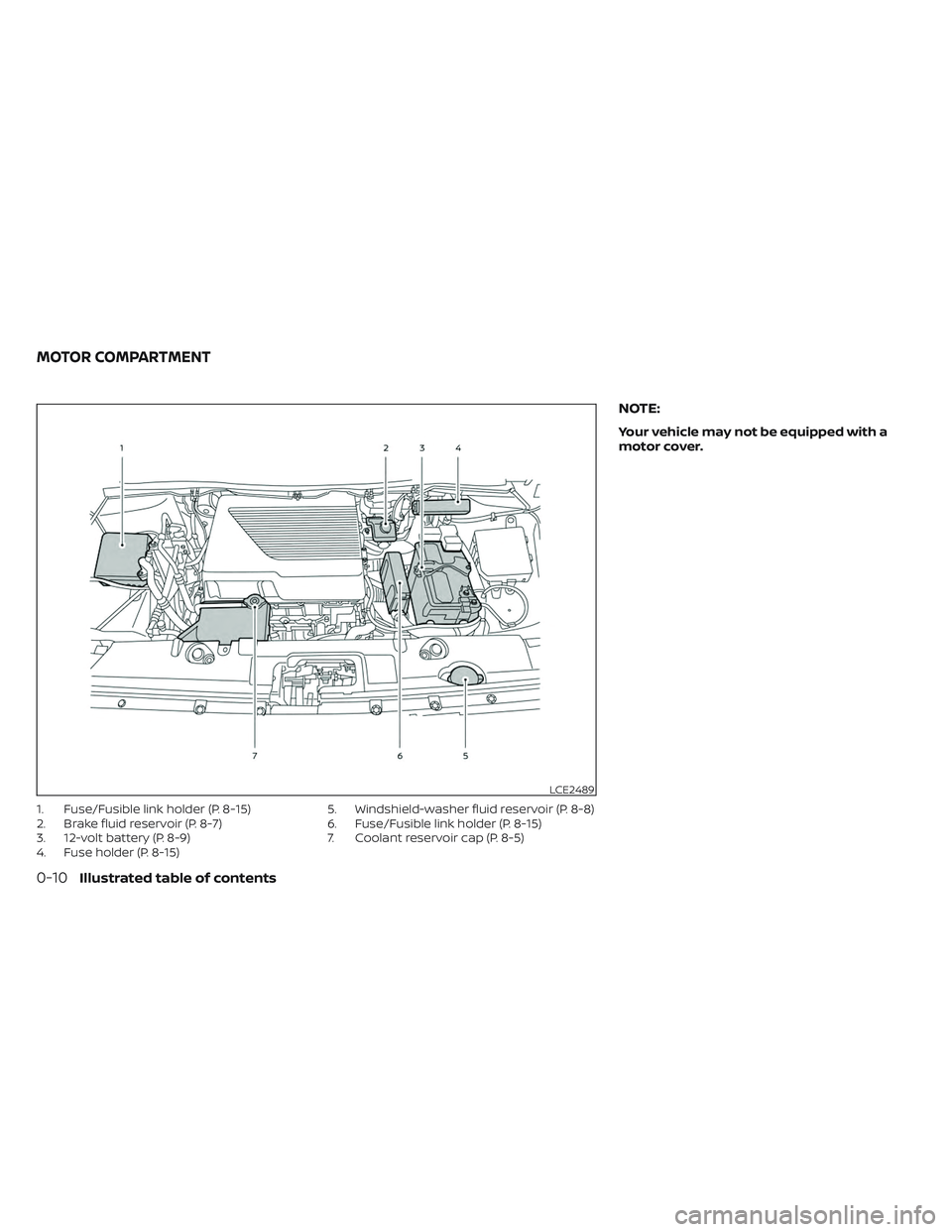
1. Fuse/Fusible link holder (P. 8-15)
2. Brake fluid reservoir (P. 8-7)
3. 12-volt battery (P. 8-9)
4. Fuse holder (P. 8-15)5. Windshield-washer fluid reservoir (P. 8-8)
6. Fuse/Fusible link holder (P. 8-15)
7. Coolant reservoir cap (P. 8-5)
NOTE:
Your vehicle may not be equipped with a
motor cover.
LCE2489
MOTOR COMPARTMENT
0-10Illustrated table of contents
Page 63 of 612
–Do not use the EVSE in structures
using fuse-based circuit protec-
tion. Use only with electrical cir-
cuits protected by circuit
breakers.
– Do not use the EVSE on electrical
circuits with two-prong outlets.
– Do not use the EVSE if other de-
vices are plugged into the same
circuit.
– When unplugging, be sure to pull
by the plug or the EVSE, not the
cord.
– Do not pull, twist, bend, step on or
drag the cable.
– Do not attach or detach the
Genuine NISSAN Adapter while
the Genuine NISSAN Adapter is in-
serted into an outlet.
– Do not use the Genuine NISSAN
Adapter if the plug is not fully in-
serted and not locked.
– If you use the EVSE holder, handle
it with care to avoid injuries due to
contact with its edges or other
parts. –
Do not use the EVSE if the cable or
cord is frayed, has broken insula-
tion, or shows any other indica-
tions of damage.
– Stop using the EVSE immediately
if charging stops before comple-
tion when you move the plug or
cord.
– Do not use the EVSE if the control
box, plug, the EVSE or charge con-
nector is broken, cracked, open,
corroded or shows any other indi-
cations of damage.
– Do not use the EVSE if the plug has
a loose connection with the outlet
or if the outlet is damaged or
rusted.
– Before you connect the EVSE, be
sure to check the rated current
shown on the EVSE to ensure that
the outlet and circuit have enough
current capacity to charge your
vehicle safely. If the capacity of
the outlet and circuit is not
enough, wiring may cause over-
heating or a fire. –
If in any doubt about the outlet
and circuit, consult a qualified
electrician.
– The EVSE has parts that may
spark inside. Do not use it where
gasoline, paint, or flammable liq-
uids are used or stored.
– Do not use if a malfunction occurs
or if the EVSE has been damaged
in any manner. It is recommended
that you visit a NISSAN certified
LEAF dealer for replacement.
– The EVSE contains no user ser-
viceable parts. Do not attempt to
repair the EVSE, doing so will void
your warranty.
• Pass the lower side belt of the EVSE
case securely through the fastener
on the bottom of the luggage board.
If the case suddenly becomes loose,
it may cause serious injury or death.
CH-12Charging
Page 69 of 612
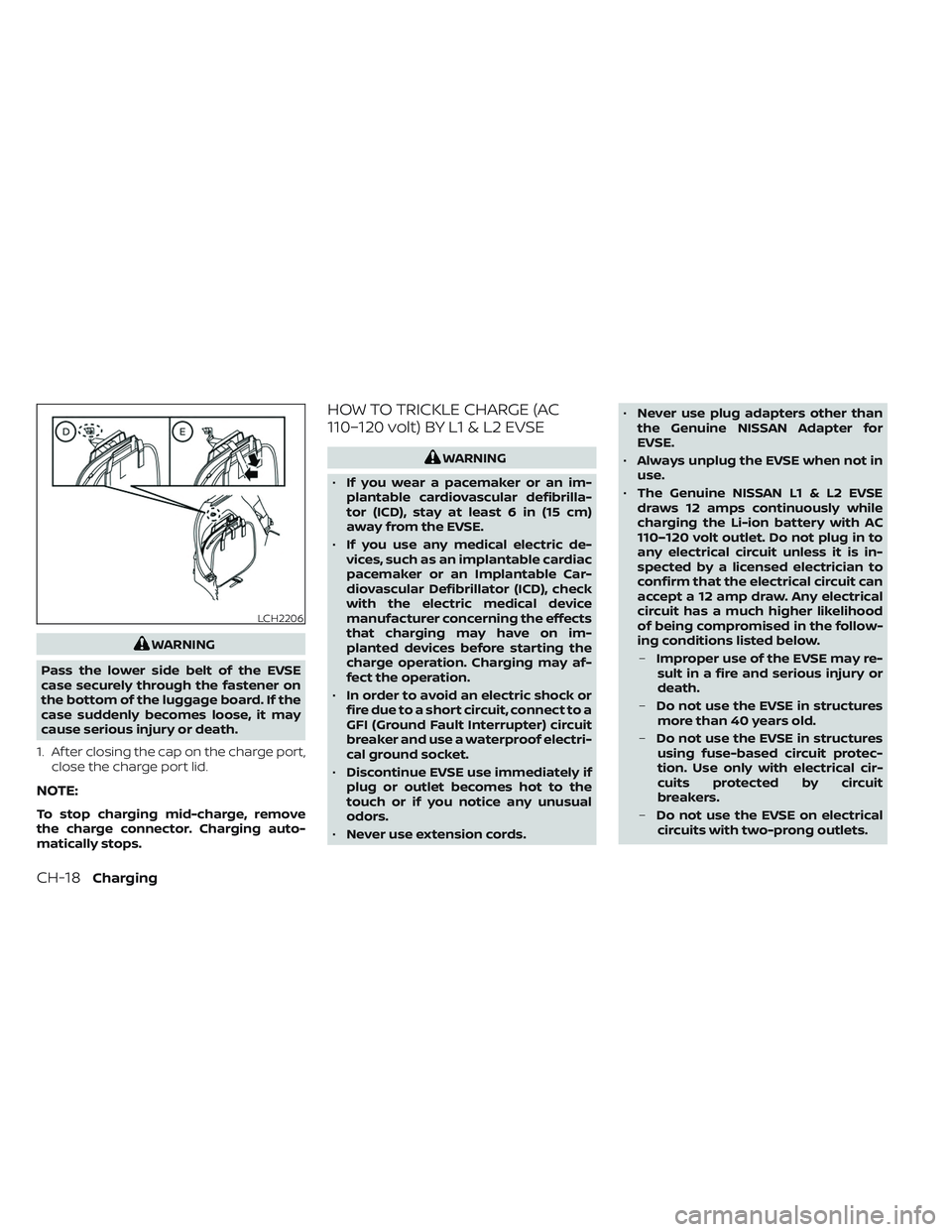
WARNING
Pass the lower side belt of the EVSE
case securely through the fastener on
the bottom of the luggage board. If the
case suddenly becomes loose, it may
cause serious injury or death.
1. Af ter closing the cap on the charge port, close the charge port lid.
NOTE:
To stop charging mid-charge, remove
the charge connector. Charging auto-
matically stops.
HOW TO TRICKLE CHARGE (AC
110–120 volt) BY L1 & L2 EVSE
WARNING
• If you wear a pacemaker or an im-
plantable cardiovascular defibrilla-
tor (ICD), stay at least 6 in (15 cm)
away from the EVSE.
• If you use any medical electric de-
vices, such as an implantable cardiac
pacemaker or an Implantable Car-
diovascular Defibrillator (ICD), check
with the electric medical device
manufacturer concerning the effects
that charging may have on im-
planted devices before starting the
charge operation. Charging may af-
fect the operation.
• In order to avoid an electric shock or
fire due to a short circuit, connect to a
GFI (Ground Fault Interrupter) circuit
breaker and use a waterproof electri-
cal ground socket.
• Discontinue EVSE use immediately if
plug or outlet becomes hot to the
touch or if you notice any unusual
odors.
• Never use extension cords. •
Never use plug adapters other than
the Genuine NISSAN Adapter for
EVSE.
• Always unplug the EVSE when not in
use.
• The Genuine NISSAN L1 & L2 EVSE
draws 12 amps continuously while
charging the Li-ion battery with AC
110–120 volt outlet. Do not plug in to
any electrical circuit unless it is in-
spected by a licensed electrician to
confirm that the electrical circuit can
accept a 12 amp draw. Any electrical
circuit has a much higher likelihood
of being compromised in the follow-
ing conditions listed below.
– Improper use of the EVSE may re-
sult in a fire and serious injury or
death.
– Do not use the EVSE in structures
more than 40 years old.
– Do not use the EVSE in structures
using fuse-based circuit protec-
tion. Use only with electrical cir-
cuits protected by circuit
breakers.
– Do not use the EVSE on electrical
circuits with two-prong outlets.
LCH2206
CH-18Charging
Page 77 of 612
NOTE:To stop charging mid-charge, remove
the charge connector. Charging auto-
matically stops.
HOW TO NORMAL CHARGE (AC
220–240 volt) BY L1 & L2 EVSE
WARNING
Please be sure to follow the warnings
below. Failure to do so may result in
serious injury or death.
• If you wear a pacemaker or an im-
plantable cardiovascular defibrilla-
tor (ICD), stay at least 6 in (15 cm)
away from the EVSE.
• If you use a pacemaker or an Im-
plantable Cardiovascular Defibrilla-
tor (ICD), check with the electric
medical device manufacturer con-
cerning the effects that charging
may have on implanted devices be-
fore starting the charge operation.
Charging may affect the operation.
• In order to avoid an electric shock or
fire due to a short circuit, connect to a
GFI (Ground Fault Interrupter) circuit
breaker and use a waterproof electri-
cal ground socket. •
Discontinue EVSE use immediately if
plug or outlet becomes hot to the
touch or if you notice any unusual
odors.
• Never use extension cords or plug
adapters with EVSE.
• Never use plug adapters other than
the Genuine NISSAN Adapter for
EVSE.
• Always unplug the EVSE when not in
use.
• The Genuine NISSAN L1 & L2 EVSE
draws 30 amps continuously while
charging the Li-ion battery with AC
220–240 volt outlet. Do not plug in to
any electrical circuit unless it is in-
spected by a licensed electrician to
confirm that the electrical circuit can
accept a 30 amp draw. Any electrical
circuit has a much higher likelihood
of being compromised in the follow-
ing conditions listed below.
– Improper use of the EVSE may re-
sult in a fire and serious injury or
death.
– Do not use the EVSE in structures
more than 40 years old. –
Do not use the EVSE in structures
using fuse-based circuit protec-
tion. Use only with electrical cir-
cuits protected by circuit
breakers.
– Do not use the EVSE on electrical
circuits with two-prong outlets.
– Do not use the EVSE if other de-
vices are plugged into the same
circuit.
– When unplugging, be sure to pull
by the plug and not the cord.
– Do not pull, twist, bend, step on or
drag the cable.
– If you use the EVSE holder, handle
it with care to avoid injuries due to
contact with its edges or other
parts.
– Do not use the EVSE if the cable or
cord is frayed, has broken insula-
tion, or shows any other indica-
tions of damage.
– Stop using the EVSE immediately
if charging stops before comple-
tion when you move the plug or
the cord.
CH-26Charging
Page 180 of 612
11. Lower instrument panel switchesCharge port lid switch (P. 2-61)
Immediate charge switch (P. 2-61)
Heated steering wheel switch
(if so equipped) (P. 2-60)
Steering Assist switch (if so equipped)
(P. 2-62)
Dynamic driver assistance switch
(if so equipped) (P. 5-25, 5-30, 5-45, 2-61)
12. Fuse box cover (P. 8-15)
*For additional information, refer to the
NissanConnect® Manual
Instruments and controls2-3
Page 217 of 612

Shipping Mode On Push Storage Fuse
This warning may appear if the extended
storage switch is not pushed in. When this
warning appears, push in the extended
storage switch to turn off the warning.
For additional information, see “Extended
storage switch” (P. 8-19).
Tire Pressure Low - Add Air
This warning appears when the low tire
pressure warning light in the meter illumi-
nates and low tire pressure is detected. The
warning appears each time the power
switch is placed in the ON position as long
as the low tire pressure warning light re-
mains illuminated.
If this warning appears, stop the vehicle
and adjust the tire pressure to the recom-
mended COLD tire pressure shown on the
Tire and Loading Information label. For ad-
ditional information, see “Low tire pressure
warning light” (P. 2-21) and “Tire Pressure
Monitoring System (TPMS)” (P. 5-4).
T/M system malfunction Visit dealer
This warning appears if there is a malfunc-
tion in the electric shif t control system but
operation of the electric shif t control is still
possible. The master warning light (yellow)
also illuminates and the chime sounds.When this occurs, check the shif t position
indicator by the shif t lever or in the vehicle
information display to make sure that
shif ting has been performed properly. It is
recommended that you contact a NISSAN
certified LEAF dealer as soon as possible.
When Parked Apply Parking
Brake
This warning appears if there is a malfunc-
tion in the electric shif t control system. This
warning appears when the parking brake
is not applied, even af ter the vehicle has
been parked. The master warning light
(red) also illuminates and the chime
sounds.
If the power switch cannot be placed in the
OFF position, apply the parking brake and
then place the power switch in the OFF
position. The warning turns off and the
chime stops.
If this warning appears, have your system
checked. It is recommended that you visit a
NISSAN certified LEAF dealer for this
service.
Automatic Emergency
Braking with Pedestrian
Detection warning
indicator
This indicator appears along, with an au-
dible warning, when the system detects
the possibility of a forward collision.
For additional information, see “Automatic
Emergency Braking (AEB) with Pedestrian
Detection” (P. 5-130) and “Intelligent For-
ward Collision Warning (I-FCW)” (P. 5-141).
Blind Spot Warning (BSW)
indicator
This indicator appears when the BSW/I-BSI
systems are engaged.
For additional information, see “Blind Spot
Warning (BSW)” (P. 5-36) or “Intelligent Blind
Spot Intervention (I-BSI)” (P. 5-45).
Cruise control indicator
This indicator shows the cruise control sys-
tem status.
When cruise control is activated, a green
circle will appear to indicate it is set. The
vehicle information display will also display
the speed the cruise control was set at. If
you accelerate past the set speed, the
speed will blink until you either cancel
2-40Instruments and controls
Page 241 of 612
CAUTION
• The outlet and plug may be hot dur-
ing or immediately af ter use.
• Do not use with accessories that ex-
ceed a 12-volt, 120W (10A) power
draw.
• Do not use double adapters or more
than one electrical accessory.
• Use the power outlet with the power
switch is in the ON or READY to Drive
position to avoid discharging the 12-
volt battery. •
Avoid using the power outlet when
the air conditioner, headlights or rear
window defroster are on.
• This power outlet is not designed for
use with a cigarette lighter unit.
• Push the plug in as far as it will go. If
good contact is not made, the plug
may overheat or the internal tem-
perature fuse may open.
• Before inserting or disconnecting a
plug, make sure that the electrical
accessory being used is turned OFF.
• When not in use, be sure to close the
cap. Do not allow water to contact
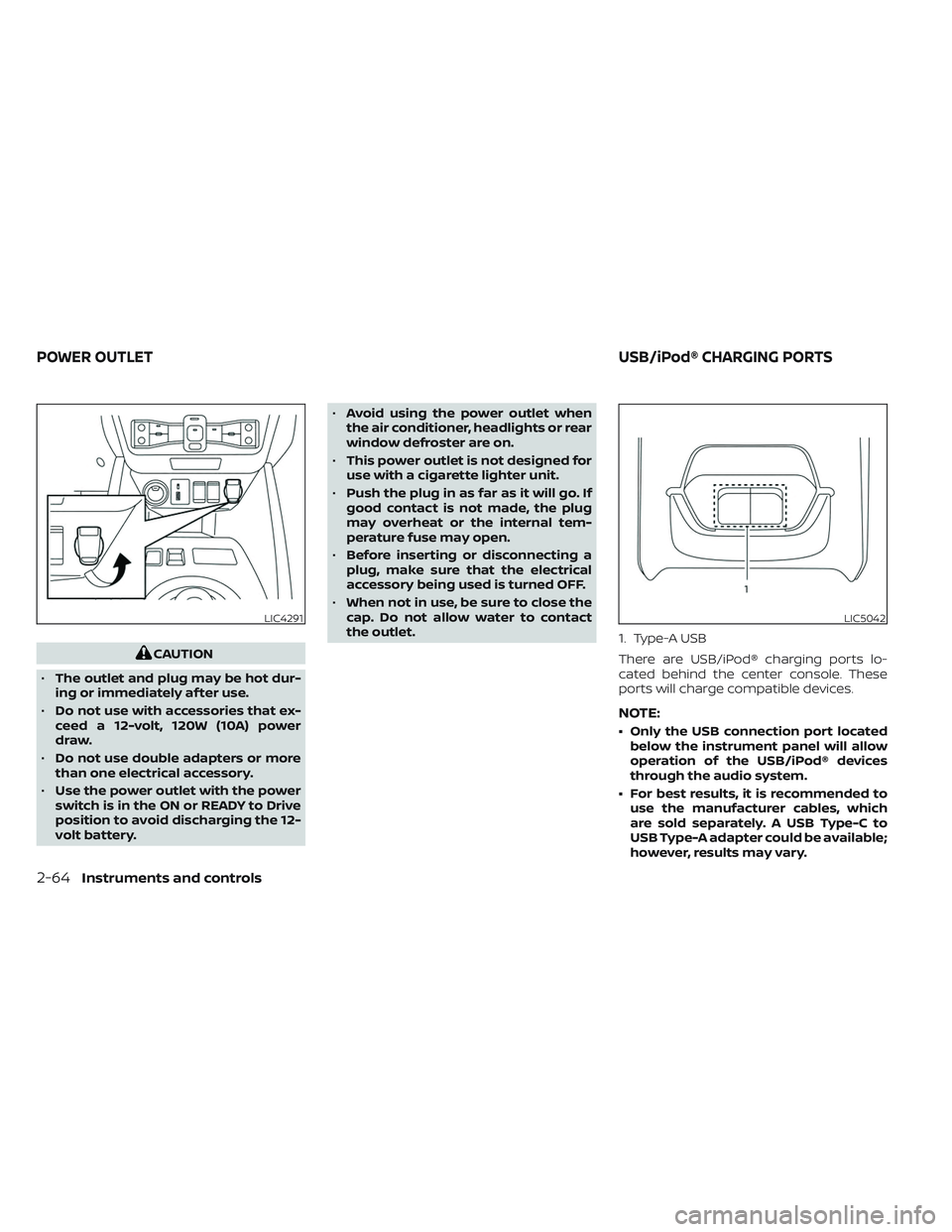
the outlet. 1. Type-A USB
There are USB/iPod® charging ports lo-
cated behind the center console. These
ports will charge compatible devices.
NOTE:
• Only the USB connection port located
below the instrument panel will allow
operation of the USB/iPod® devices
through the audio system.
• For best results, it is recommended to use the manufacturer cables, which
are sold separately. A USB Type-C to
USB Type-A adapter could be available;
however, results may vary.
LIC4291LIC5042
POWER OUTLET USB/iPod® CHARGING PORTS
2-64Instruments and controls