2023 NISSAN LEAF lock
[x] Cancel search: lockPage 141 of 612
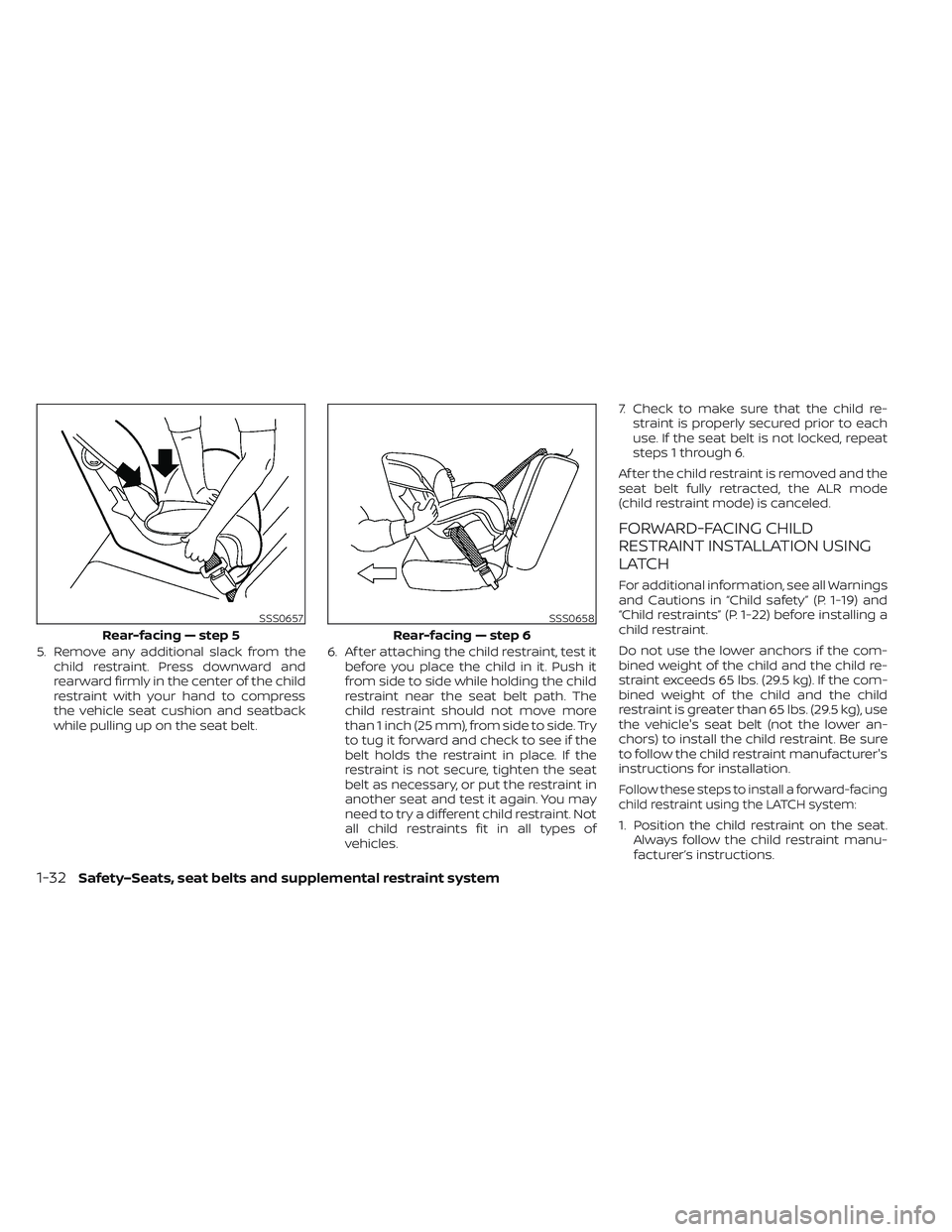
5. Remove any additional slack from thechild restraint. Press downward and
rearward firmly in the center of the child
restraint with your hand to compress
the vehicle seat cushion and seatback
while pulling up on the seat belt. 6. Af ter attaching the child restraint, test it
before you place the child in it. Push it
from side to side while holding the child
restraint near the seat belt path. The
child restraint should not move more
than 1 inch (25 mm), from side to side. Try
to tug it forward and check to see if the
belt holds the restraint in place. If the
restraint is not secure, tighten the seat
belt as necessary, or put the restraint in
another seat and test it again. You may
need to try a different child restraint. Not
all child restraints fit in all types of
vehicles. 7. Check to make sure that the child re-
straint is properly secured prior to each
use. If the seat belt is not locked, repeat
steps 1 through 6.
Af ter the child restraint is removed and the
seat belt fully retracted, the ALR mode
(child restraint mode) is canceled.
FORWARD-FACING CHILD
RESTRAINT INSTALLATION USING
LATCH
For additional information, see all Warnings
and Cautions in “Child safety” (P. 1-19) and
“Child restraints” (P. 1-22) before installing a
child restraint.
Do not use the lower anchors if the com-
bined weight of the child and the child re-
straint exceeds 65 lbs. (29.5 kg). If the com-
bined weight of the child and the child
restraint is greater than 65 lbs. (29.5 kg), use
the vehicle's seat belt (not the lower an-
chors) to install the child restraint. Be sure
to follow the child restraint manufacturer's
instructions for installation.
Follow these steps to install a forward-facing
child restraint using the LATCH system:
1. Position the child restraint on the seat. Always follow the child restraint manu-
facturer’s instructions.
SSS0657
Rear-facing — step 5
SSS0658
Rear-facing — step 6
1-32Safety–Seats, seat belts and supplemental restraint system
Page 145 of 612
4. Refer to the appropriate child restraintinstallation procedure steps in this sec-
tion before tightening the tether strap.
If you have any questions when install-
ing a top tether strap, it is recommended
that you visit a NISSAN certified LEAF
dealer for details.
WARNING
Child restraint anchorages are de-
signed to withstand only those loads
imposed by correctly fitted child re-
straints. Under no circumstances are
they to be used to attach adult seat
belts, or other items or equipment to
the vehicle. Doing so could damage the
child restraint anchorages. The child
restraint will not be properly installed
using the damaged anchorage, and a
child could be seriously injured or killed
in a collision.
FORWARD-FACING CHILD
RESTRAINT INSTALLATION USING
THE SEAT BELTS
WARNING
The three-point seat belt with Auto-
matic Locking Retractor (ALR) must be
used when installing a child restraint.
Failure to use the ALR mode will result
in the child restraint not being properly
secured. The restraint could tip over or
be loose and cause injury to a child in a
sudden stop or collision. Also, it can
change the operation of the front pas-
senger air bag. For additional informa-
tion, see “Front passenger air bag and
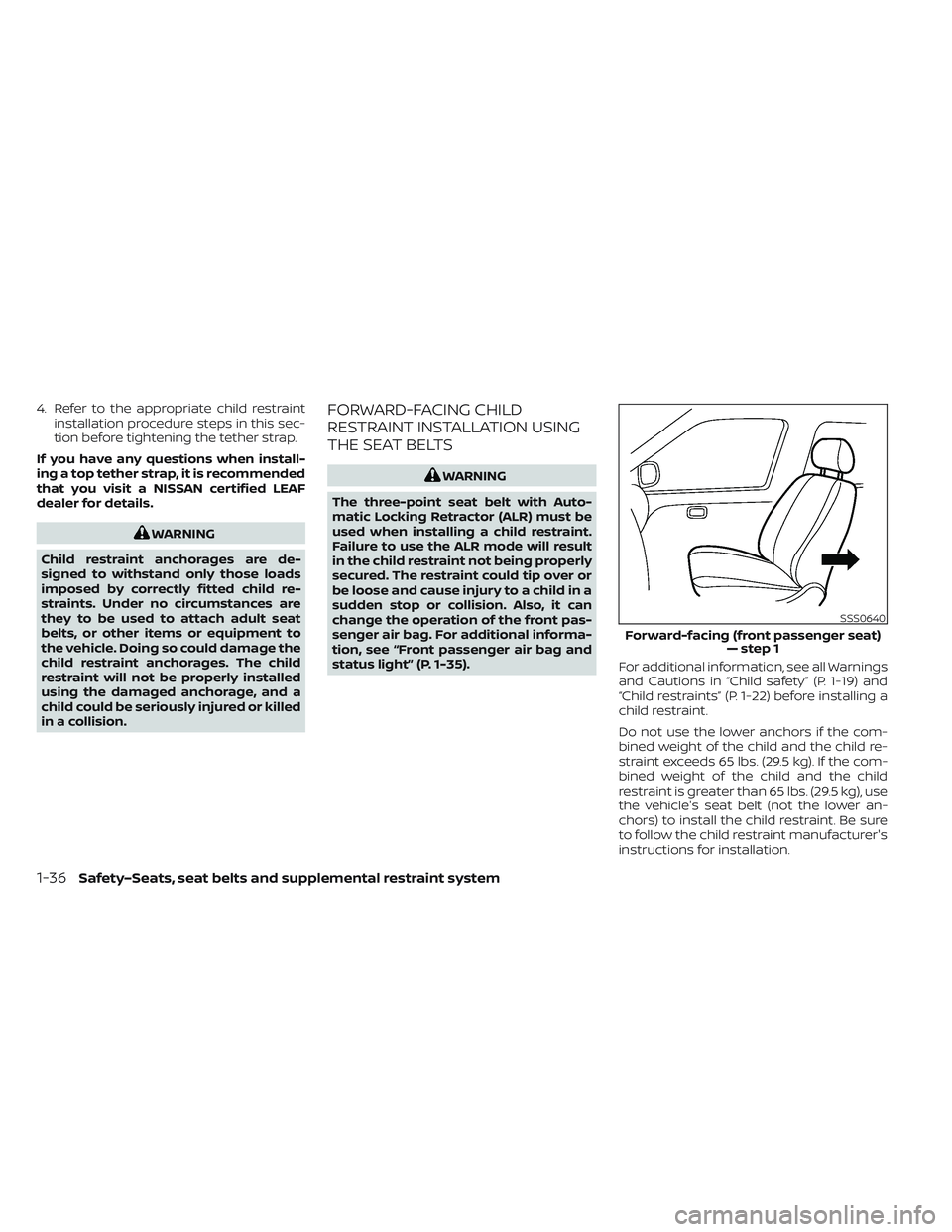
status light” (P. 1-35). For additional information, see all Warnings
and Cautions in “Child safety” (P. 1-19) and
“Child restraints” (P. 1-22) before installing a
child restraint.
Do not use the lower anchors if the com-
bined weight of the child and the child re-
straint exceeds 65 lbs. (29.5 kg). If the com-
bined weight of the child and the child
restraint is greater than 65 lbs. (29.5 kg), use
the vehicle's seat belt (not the lower an-
chors) to install the child restraint. Be sure
to follow the child restraint manufacturer's
instructions for installation.
SSS0640
Forward-facing (front passenger seat)
— step 1
1-36Safety–Seats, seat belts and supplemental restraint system
Page 148 of 612
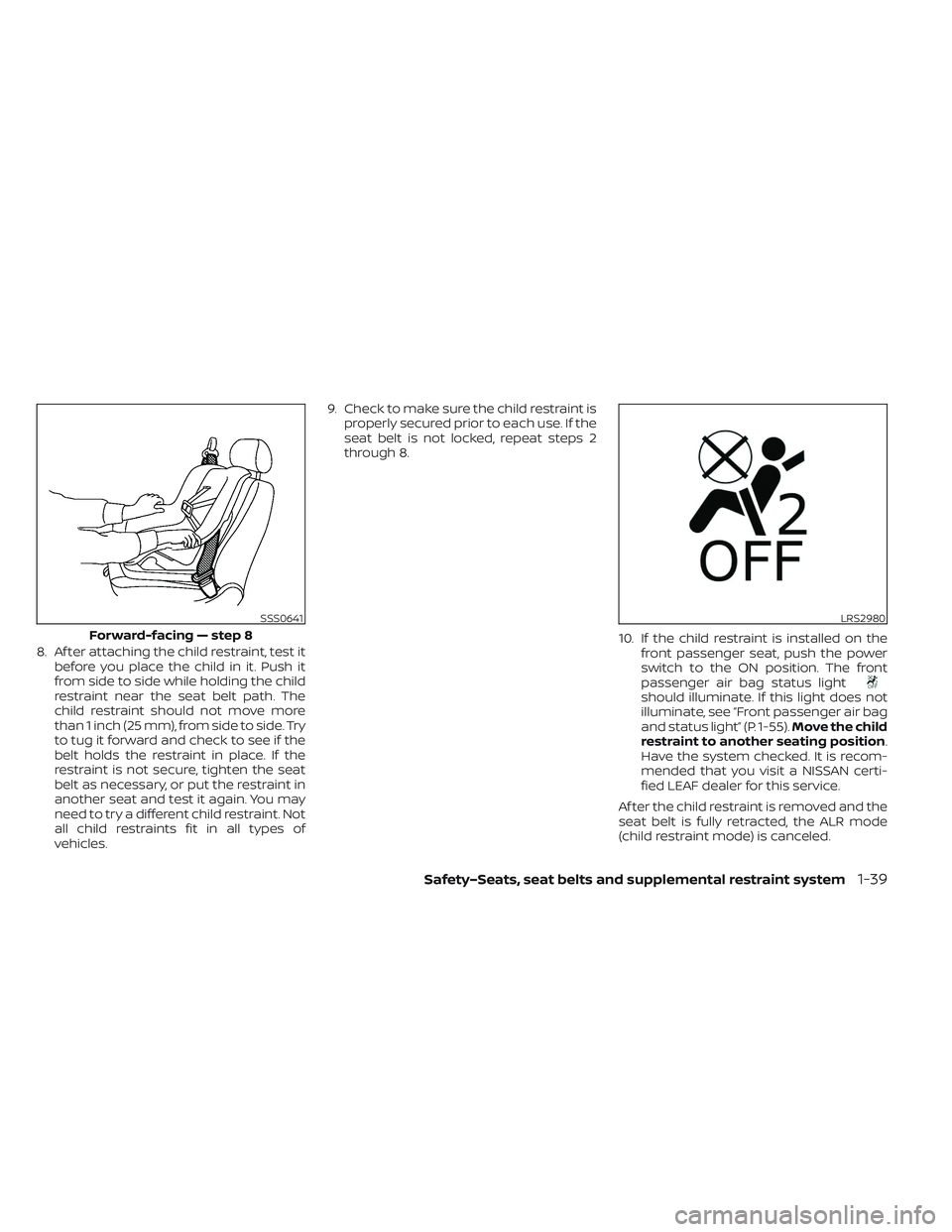
8. Af ter attaching the child restraint, test itbefore you place the child in it. Push it
from side to side while holding the child
restraint near the seat belt path. The
child restraint should not move more
than 1 inch (25 mm), from side to side. Try
to tug it forward and check to see if the
belt holds the restraint in place. If the
restraint is not secure, tighten the seat
belt as necessary, or put the restraint in
another seat and test it again. You may
need to try a different child restraint. Not
all child restraints fit in all types of
vehicles. 9. Check to make sure the child restraint is
properly secured prior to each use. If the
seat belt is not locked, repeat steps 2
through 8.
10. If the child restraint is installed on thefront passenger seat, push the power
switch to the ON position. The front
passenger air bag status light
should illuminate. If this light does not
illuminate, see “Front passenger air bag
and status light” (P. 1-55). Move the child
restraint to another seating position.
Have the system checked. It is recom-
mended that you visit a NISSAN certi-
fied LEAF dealer for this service.
Af ter the child restraint is removed and the
seat belt is fully retracted, the ALR mode
(child restraint mode) is canceled.
SSS0641
Forward-facing — step 8
LRS2980
Safety–Seats, seat belts and supplemental restraint system1-39
Page 151 of 612
Booster seat installation
WARNING
To avoid injury to child, do not use the
lap/shoulder belt in the Automatic
Locking Retractor (ALR) mode when us-
ing a booster seat with the seat belts.
For additional information, see all Warnings
and Cautions in “Child safety” (P. 1-19),“Child
restraints” (P. 1-22) and “Booster seats”
(P. 1-40) before installing a child restraint.
Follow these steps to install a booster seat
in the rear seats or in the front passenger
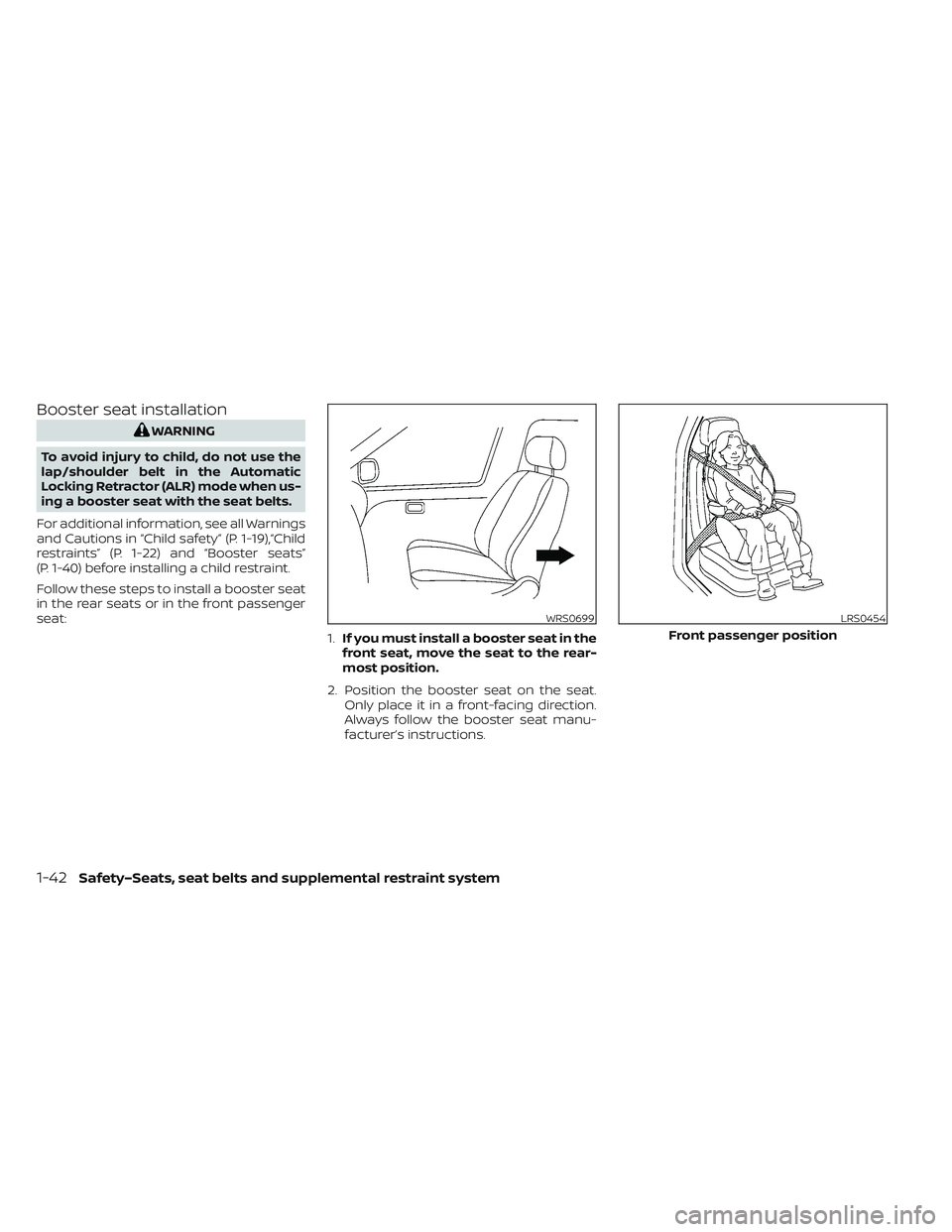
seat: 1.If you must install a booster seat in the
front seat, move the seat to the rear-
most position.
2. Position the booster seat on the seat. Only place it in a front-facing direction.
Always follow the booster seat manu-
facturer’s instructions.
WRS0699LRS0454
Front passenger position
1-42Safety–Seats, seat belts and supplemental restraint system
Page 167 of 612

3. Fasten the seat belt as outlined in the“Seat belts” (P. 1-11) section of this
manual. Front passenger seat belt
buckle status is monitored by the occu-
pant classification system and is used
as an input to determine occupancy
status. So, it is highly recommended that
the front passenger fasten their seat
belt.
4. Remain in this position for 30 seconds allowing the system to classif y the front
passenger before the vehicle is put into
motion.
5. Ensure proper classification by checking the front passenger air bag status light.
NOTE:
This vehicle’s occupant classification
sensor system generally keeps the clas-
sification locked during driving, so it is
important that you confirm that the
front passenger is properly classified
prior to driving. However, the occupant
classification sensor may recalculate the
weight of the occupant under some con-
ditions (both while driving and when
stopped), so front passenger seat occu-
pants should continue to remain seated
as outlined above. Troubleshooting
If you think the front passenger air bag
status light is incorrect:
1. If the light is ON with an adult occupying
the front passenger seat:
• Occupant is a small adult — the air bag light is functioning as intended. The
front passenger air bag and front pas-
senger supplemental knee air bag are
suppressed.
However, if the occupant is not a small
adult, then this may be due to the following
conditions that may be interfering with the
weight sensors: • Occupant is not sitting upright, lean-ing against the seatback, and cen-
tered on the seat cushion with his/her
feet comfortably extended to the floor.
• A child restraint or other object press- ing against the rear of the seatback.
• A rear passenger pushing or pulling on the back of the front passenger seat.
• Forcing the front seat or seatback against an object on the seat or floor
behind it.
• An object placed under the front pas- senger seat. • An object placed between the seat
cushion and center console or be-
tween the seat cushion and the door.
If the vehicle is moving, please come to a
stop when it is safe to do so. Check and
correct any of the above conditions. Re-
start the vehicle and wait 1 minute.
NOTE:
A system check will be performed during
which the front passenger air bag status
light will remain lit for about 7 seconds
initially.
If the light is still ON af ter this, the person
should be advised not to ride in the front
passenger seat and the vehicle should be
checked as soon as possible. It is recom-
mended that you visit a NISSAN certified
LEAF dealer for this service.
2. If the light is OFF with a small adult, child or child restraint occupying the front
passenger seat.
This may be due to the following condi-
tions that may be interfering with the
weight sensors:
•
Small adult or child is not sitting upright,
leaning against the seatback, and cen-
tered on the seat cushion with his/her
feet comfortably extended to the floor.
1-58Safety–Seats, seat belts and supplemental restraint system
Page 176 of 612
When maintenance work is required on the
vehicle, the front air bags, side air bags,
curtain air bags, knee air bags and preten-
sioner(s) and related parts should be
pointed out to the person performing the
maintenance. The power switch should al-
ways be in the LOCK position when work-
ing under the hood or inside the vehicle.
WARNING
• Once a front air bag, side air bag, cur-
tain air bag or knee air bag has in-
flated, the air bag module will not
function again and must be replaced.
Additionally, the activated preten-
sioner(s) must also be replaced. The
air bag module and pretensioner(s)
should be replaced. It is recom-
mended that you visit a NISSAN cer-
tified LEAF dealer for this service. The
air bag modules and pretensioner
system cannot be repaired.
• The front air bag, side air bag, curtain
air bag and knee air bag systems,
and pretensioner system should be
inspected if there is any damage to
the front end or side portion of the
vehicle. It is recommended that you
visit a NISSAN certified LEAF dealer
for this service. •
If you need to dispose of a supple-
mental air bag or pretensioner sys-
tem or scrap the vehicle, it is recom-
mended that you visit a NISSAN
certified LEAF dealer for this service.
Correct supplemental air bag and
pretensioner system disposal proce-
dures are set forth in the appropriate
NISSAN Service Manual. Incorrect
disposal procedures could cause
personal injury.
• If there is an impact to your vehicle
from any direction, your Occupant
Classification Sensor (OCS) should be
checked. It is recommended that you
visit a NISSAN certified LEAF dealer to
verif y it is still functioning correctly.
The OCS should be checked even if no
air bags deploy as a result of the im-
pact. Failure to verif y proper OCS
function may result in an improper
air bag deployment resulting in in-
jury or death.
Safety–Seats, seat belts and supplemental restraint system1-67
Page 177 of 612
2 Instruments and controls
Cockpit.........................................2-2
Instrument Panel ................................2-4
Meters and Gauges .............................2-5
Speedometer and odometer .................2-5
Li-ion battery temperature gauge ............ 2-7
Power meter ................................. 2-7
Driving range .................................2-8
Li-ion battery available charge gauge ........2-9
Li-ion battery capacity level gauge ..........2-12
Outside air temperature .....................2-12
Clock ........................................ 2-12
ECO mode indicator ......................... 2-13
e-Pedal system indicator ....................2-13
Warning lights, indicator lights and audible
reminders ...................................... 2-14
Checking lights .............................. 2-16
Warning/Indicator lights (red) ...............2-16
Warning/Indicator lights (yellow) ............2-19
Warning/Indicator lights (other) .............2-24
Audible reminders ........................... 2-25
Vehicle information display .....................2-26
How to use the vehicle information
display ...................................... 2-27
Startup display .............................. 2-27
Settings ..................................... 2-28
Vehicle information display warnings
and indicators ............................... 2-36Warning information displays
(models with a navigation system)
..........2-44
Security systems ............................... 2-44
Vehicle security system .....................2-44
NISSAN Vehicle Immobilizer System .........2-46
Wiper and washer switch .......................2-47
Washer operation ........................... 2-48
Rear wiper operation ........................ 2-48
Rear window and outside mirror
(if so equipped) defroster switch ...............2-49
Headlight and turn signal switch ...............2-50
Headlight switch ............................ 2-50
LED Daytime Running Lights (DRL)
system (Type A) (if so equipped) .............2-55
LED Daytime Running Lights (DRL)
system (Type B) (if so equipped) .............
2-55
Instrument
brightness control ..............2-56
Turn signal switch ........................... 2-56
Fog light switch (if so equipped) .............2-57
Emblem Light ............................... 2-57
Horn ........................................... 2-58
ECO switch ..................................... 2-58
Heated seat switches (if so equipped) ..........2-58
Heated steering wheel switch (if so equipped) . . 2-60
Emergency call (SOS) button (if so equipped) . . . 2-60
Charge port lid switch .......................... 2-61
Page 182 of 612
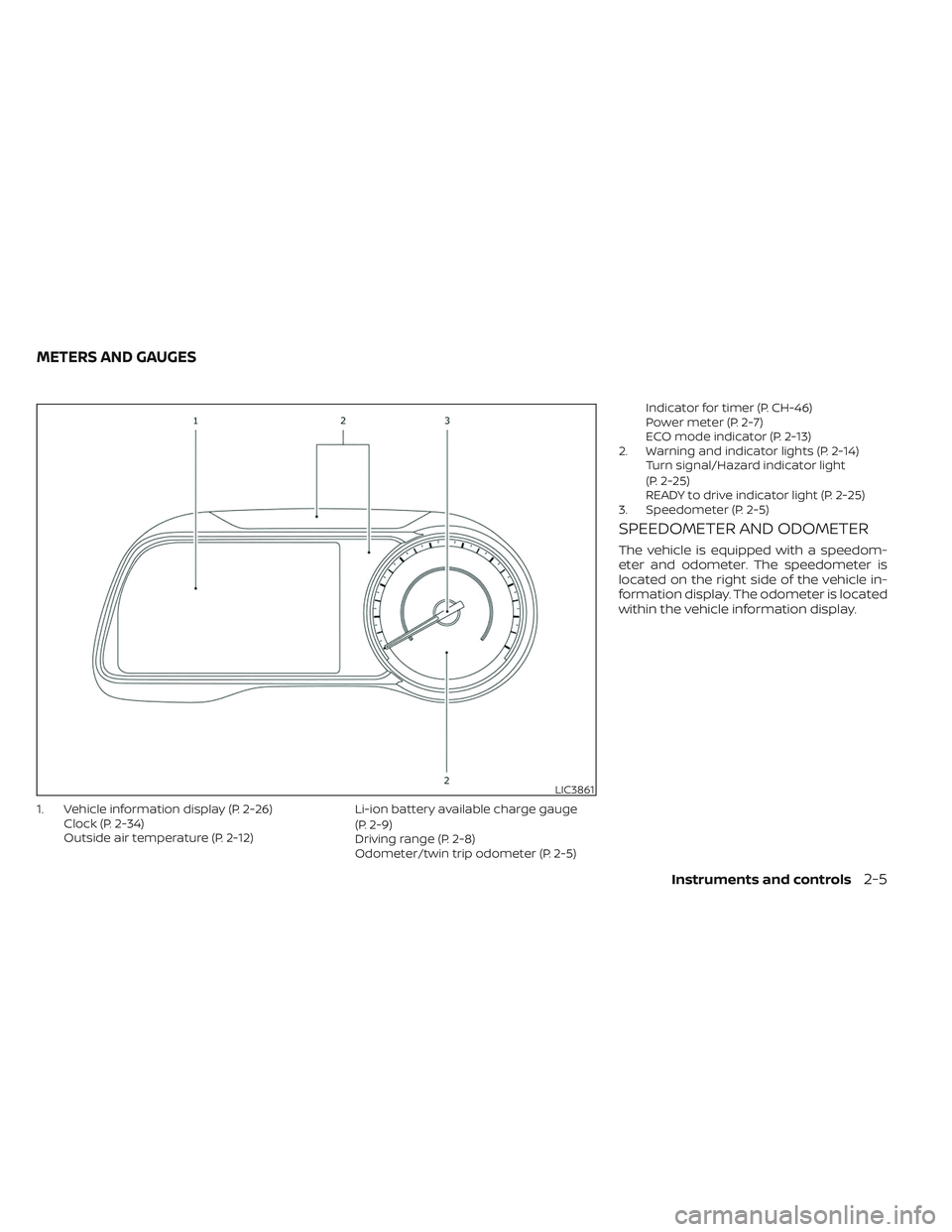
1. Vehicle information display (P. 2-26)Clock (P. 2-34)
Outside air temperature (P. 2-12) Li-ion battery available charge gauge
(P. 2-9)
Driving range (P. 2-8)
Odometer/twin trip odometer (P. 2-5)Indicator for timer (P. CH-46)
Power meter (P. 2-7)
ECO mode indicator (P. 2-13)
2. Warning and indicator lights (P. 2-14) Turn signal/Hazard indicator light
(P. 2-25)
READY to drive indicator light (P. 2-25)
3. Speedometer (P. 2-5)
SPEEDOMETER AND ODOMETER
The vehicle is equipped with a speedom-
eter and odometer. The speedometer is
located on the right side of the vehicle in-
formation display. The odometer is located
within the vehicle information display.
LIC3861
METERS AND GAUGES
Instruments and controls2-5