2023 NISSAN LEAF maintenance
[x] Cancel search: maintenancePage 462 of 612

SYSTEM MALFUNCTION
If the AEB with Pedestrian Detection sys-
tem malfunctions, it will be turned off auto-
matically, a chime will sound, the AEB with
Pedestrian Detection system warning light
(orange) will illuminate and the warning
message “Malfunction: See Owner’s
Manual” will appear in the vehicle informa-
tion display.Action to take
If the warning light (orange) comes on, stop
the vehicle in a safe location, turn the EV
system off and restart the EV system. If the
warning light continues to illuminate, have
the AEB with Pedestrian Detection system
checked. It is recommended that you visit a
NISSAN certified LEAF dealer for this
service.
SYSTEM MAINTENANCE
The radar sensor is located on the front of
the vehicle
OB. The camera is located on
the upper side of the windshield
OA).
To keep the AEB with Pedestrian Detection
system operating properly, be sure to ob-
serve the following:
• Always keep sensor areas of the front bumper/emblem and windshield clean.
• Do not strike or damage the areas around the sensors (e.g., bumper,
windshield).
LSD3956LSD2861
Starting and driving5-139
Page 475 of 612

Action to take:
If the warning light (orange) comes on, stop
the vehicle in a safe location, turn the EV
system off and restart the EV system. If the
warning light continues to illuminate, have
the AEB with Pedestrian Detection system
checked. It is recommended that you visit a
NISSAN certified LEAF dealer for this service
SYSTEM MAINTENANCE
The sensorOAis located on the front of the
vehicle.
To keep the system operating properly, be
sure to observe the following:
• Always keep the sensor area of the front bumper/emblem clean.
• Do not strike or damage the areas around the sensor.
• Do not cover or attach stickers or similar objects on the front bumper near the
sensor area. This could cause failure or
malfunction. • Do not attach metallic objects near the
sensor area (brush guard, etc.). This could
cause failure or malfunction.
• Do not alter, remove or paint the front bumper. Before customizing or restoring
the front bumper, it is recommended that
you visit a NISSAN certified LEAF dealer.
Radio frequency statement
For USA
FCC ID OAYARS4B
This device complies with Part 15 of the
FCC Rules. Operation is subject to the fol-
lowing two conditions:
1. This device may not cause harmful in-
terference, and
2. This device must accept any interfer-
ence received, including interference
that may cause undesired operation.
FCC Warning
Changes or modifications not expressly
approved by the party responsible for
compliance could void the user’s author-
ity to operate the equipment.
LSD2859
5-152Starting and driving
Page 481 of 612
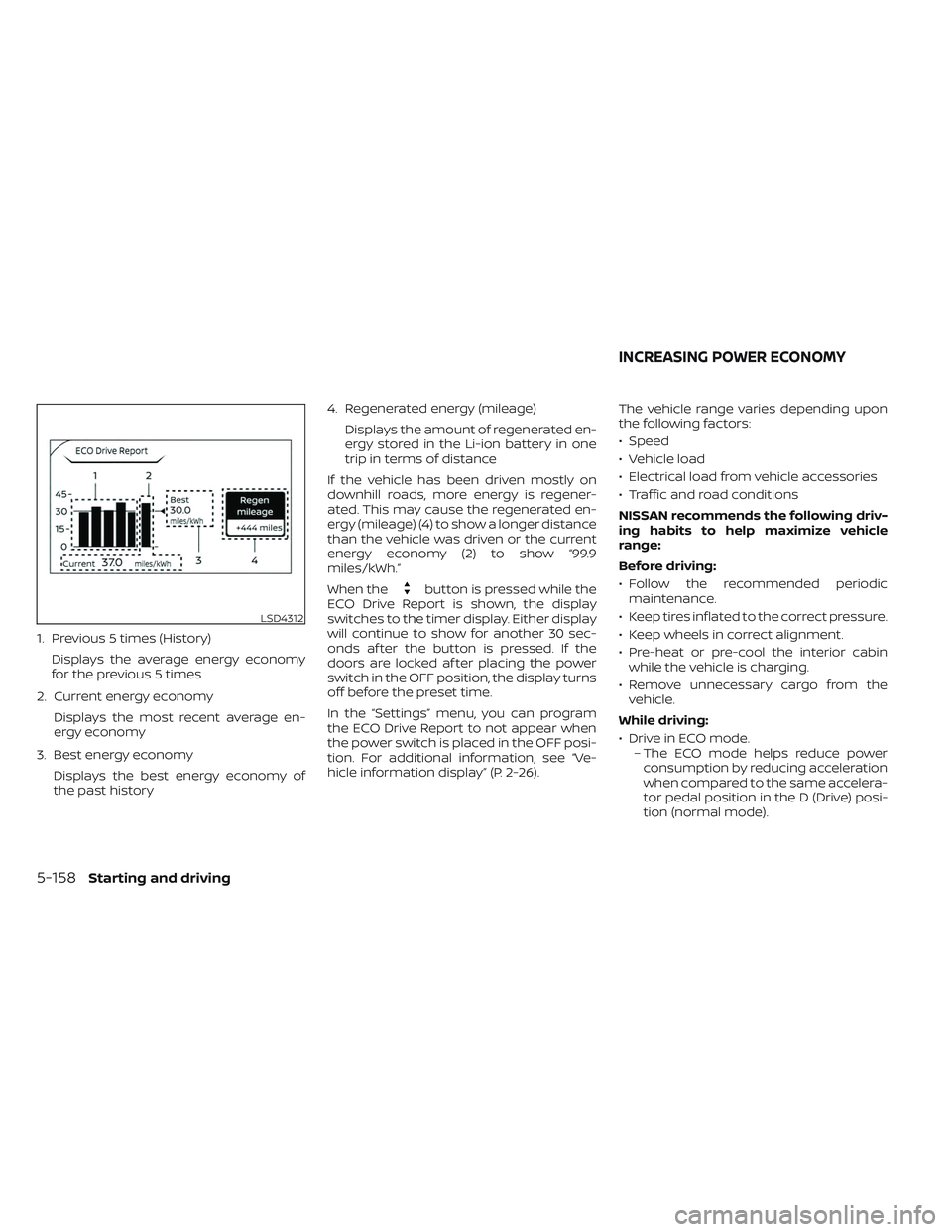
1. Previous 5 times (History)Displays the average energy economy
for the previous 5 times
2. Current energy economy Displays the most recent average en-
ergy economy
3. Best energy economy Displays the best energy economy of
the past history 4. Regenerated energy (mileage)
Displays the amount of regenerated en-
ergy stored in the Li-ion battery in one
trip in terms of distance
If the vehicle has been driven mostly on
downhill roads, more energy is regener-
ated. This may cause the regenerated en-
ergy (mileage) (4) to show a longer distance
than the vehicle was driven or the current
energy economy (2) to show “99.9
miles/kWh.”
When the
button is pressed while the
ECO Drive Report is shown, the display
switches to the timer display. Either display
will continue to show for another 30 sec-
onds af ter the button is pressed. If the
doors are locked af ter placing the power
switch in the OFF position, the display turns
off before the preset time.
In the “Settings” menu, you can program
the ECO Drive Report to not appear when
the power switch is placed in the OFF posi-
tion. For additional information, see “Ve-
hicle information display” (P. 2-26). The vehicle range varies depending upon
the following factors:
• Speed
• Vehicle load
• Electrical load from vehicle accessories
• Traffic and road conditions
NISSAN recommends the following driv-
ing habits to help maximize vehicle
range:
Before driving:
• Follow the recommended periodic
maintenance.
• Keep tires inflated to the correct pressure.
• Keep wheels in correct alignment.
• Pre-heat or pre-cool the interior cabin while the vehicle is charging.
• Remove unnecessary cargo from the vehicle.
While driving:
• Drive in ECO mode. – The ECO mode helps reduce powerconsumption by reducing acceleration
when compared to the same accelera-
tor pedal position in the D (Drive) posi-
tion (normal mode).
LSD4312
INCREASING POWER ECONOMY
5-158Starting and driving
Page 496 of 612

SYSTEM MAINTENANCE
The sonar sensorsO1are located on the
rear bumper. Always keep the area near
the sonar sensors clean.
The sonar sensors may be blocked by tem-
porary ambient conditions such as splash-
ing water, mist or fog.
The blocked condition may also be caused
by objects such as ice, frost or dirt ob-
structing the sonar sensors.
Check for and remove objects obstructing
the area around the sonar sensors. Do not attach stickers (including transpar-
ent material), install accessories or apply
additional paint near the sonar sensors.
Do not strike or damage the area around
the sonar sensors. It is recommended that
you visit a NISSAN dealer if the area around
the sonar sensors is damaged due to a
collision.
CAUTION
To prevent damage to the Li-ion bat-
tery: Do not store the vehicle in tem-
peratures below -13°F (-25°C) for over
seven days. If the outside temperature
is -13°F (-25°C) or less, the Li-ion battery
may freeze and it cannot be charged or
provide power to run the vehicle. Move
the vehicle to a warm location.
NOTE:
• Connect the charger to the vehicle and place the power switch in the OFF po-
sition when parking the vehicle if tem-
peratures may go below -4°F (-20°C).
For models with 40 kWh battery
model, this provides external power to
the Li-ion battery warmer (if so
equipped) when it operates and does
not discharge the Li-ion battery. Ve-
hicle driving range is reduced if the Li-
ion battery warmer (if so equipped) op-
erates (Li-ion battery temperature
approximately -4°F (-20°C) or colder)
while driving the vehicle. You may need
to charge the Li-ion battery sooner
than in warmer temperatures.
• The Li-ion battery requires more time to charge when the Li-ion battery
warmer (if so equipped) operates.
LSD2843
COLD WEATHER DRIVING
Starting and driving5-173
Page 524 of 612
8 Do-it yourself
Maintenance precautions.......................8-2
Motor compartment check locations ...........8-4
Cooling system .................................8-5
Checking coolant level .......................8-6
Changing coolant ............................8-6
Reduction gear fluid .............................8-7
Brake fluid .......................................8-7
Windshield-washer fluid .........................8-8
12-volt battery ...................................8-9
Jump starting ................................ 8-11
Windshield wiper blades ........................8-12
Cleaning .................................... 8-12
Replacing ................................... 8-12
Rear window wiper blade ...................8-14
Brakes ......................................... 8-14
Brake pad wear warning ....................8-14Fuses
.......................................... 8-15
Motor compartment ........................ 8-15
Passenger compartment ...................8-18
NISSAN Intelligent Key® battery replacement . . . 8-19
Lights .......................................... 8-21
Headlights .................................. 8-22
Fog lights (if so equipped) ...................8-22
Exterior and interior lights ...................8-23
Wheels and tires ............................... 8-25
Tire pressure ................................ 8-25
Tire labeling ................................. 8-29
Types of tires ................................ 8-33
Tire chains .................................. 8-34
Changing wheels and tires ..................8-35
Emergency tire puncture repair kit ..........8-38
Page 525 of 612
When performing any inspection or main-
tenance work on your vehicle, always take
care to prevent serious accidental injury to
yourself or damage to the vehicle. The fol-
lowing are general precautions that should
be closely observed.
WARNING
• The EV system uses high voltage up
to approximately DC 400 volt. The
system can be hot during and af ter
starting and when the vehicle is shut
off. Be careful of both the high volt-
age and the high temperature. Obey
the labels that are attached to the
vehicle.
• Never disassemble, remove or re-
place high-voltage parts and cables
as well as their connectors. High-
voltage cables are colored orange.
• Disassembling, removing or replac-
ing those parts or cables can cause
severe burns or electric shock that
may result in serious injury or death.
The vehicle high-voltage system has
no user serviceable parts. It is recom-
mended that you visit a NISSAN cer-
tified LEAF dealer for any necessary
maintenance. •
Park the vehicle on a level surface,
apply the parking brake securely and
chock the wheels to prevent the ve-
hicle from moving. Push the P (Park)
position switch on the shif t lever or
place the vehicle into the N (Neutral)
position.
• If you must work with the EV (Electric
Vehicle) system is turned on, keep
hands, clothing, hair and tools away
from moving fans and any other
moving parts.
• Make sure that the power switch is in
the OFF or LOCK position when per-
forming any part replacement or
repairs.
• It is advisable to secure or remove
any loose clothing and remove any
jewelry, such as rings, watches, etc.
before working on your vehicle.
• Always wear eye protection when-
ever you work on your vehicle.
• Never get under the vehicle while it is
supported only by a jack. If it is nec-
essary to work under the vehicle,
support it with safety stands.
• Keep smoking materials, flames and
sparks away from the 12-volt battery.
CAUTION
• Do not work under the hood while
the motor compartment is hot. Push
the power switch in the OFF position
and wait until it cools down.
• Avoid direct contact with used cool-
ant. Improperly disposed coolant
and/or other vehicle fluids can dam-
age the environment. Always con-
form to local regulations for the dis-
posal of vehicle fluids.
• Never connect or disconnect the bat-
tery or any transistorized compo-
nent while the power switch is in the
ON position.
• Your vehicle is equipped with an au-
tomatic cooling fan. It may come on
at any time without warning, even if
the power switch is not in the ACC, ON
or READY to drive position. To avoid
injury, always disconnect the nega-
tive 12-volt battery cable before
working near the fan.
• Before performing any electrical
maintenance work on the vehicle
such as the battery, fuses or bulb re-
placement, confirm the following:
– The charge connector is removed
from the vehicle.
MAINTENANCE PRECAUTIONS
8-2Do-it yourself
Page 537 of 612
REAR WINDOW WIPER BLADE
It is recommended that you visit a NISSAN
certified LEAF dealer if checking or replace-
ment is required.If the brakes do not operate properly, have
the brakes checked. It is recommended
that you visit a NISSAN certified LEAF dealer
for this service.
WARNING
Do not adjust the height of the brake
pedal. Doing so could alter the effec-
tiveness of the brakes, which could re-
sult in a serious accident and personal
injury. If adjustment is required, it is
recommended that you visit a NISSAN
certified LEAF dealer for this service.
BRAKE PAD WEAR WARNING
The disc brake pads have audible wear
warnings. When a brake pad requires re-
placement, it will make a high–pitched
scraping sound when the vehicle is in mo-
tion. This scraping sound will first occur
only when the brake pedal is depressed.
Af ter more wear of the brake pad, the
sound will always be heard even if the
brake pedal is not depressed. Have the
brakes checked as soon as possible if the
wear warning sound is heard. Under some driving or climate conditions,
occasional brake squeak, squeal or other
noise may be heard. Occasional brake
noise during light to moderate stops is nor-
mal and does not affect the function or
performance of the brake system.
Proper brake inspection intervals should
be followed.
For additional information, re-
fer to the “Maintenance and schedules”
section of this manual.
BRAKES
8-14Do-it yourself
Page 562 of 612
9 Maintenance and schedules
Maintenance requirements.....................9-2
General maintenance ........................9-2
Scheduled maintenance .....................9-2
Where to go for service .......................9-2
General maintenance ...........................9-2
Explanation of general maintenance
items ........................................9-2
Explanation of scheduled maintenance items . . . 9-5 Explanation of scheduled maintenance
items
........................................9-5
Chassis and Body Maintenance: ..............9-6
Maintenance schedules .........................9-6
Additional Maintenance Items for
severe operating conditions ..................9-6
EV Maintenance schedules
(EM57 electric motor) .........................9-7