2023 NISSAN LEAF height
[x] Cancel search: heightPage 372 of 612
Perform the following steps to enable or
disable the I-BSI system:
1. Press the
button until “Settings” dis-
plays in the vehicle information display.
Use the
button to select “Driver As-
sistance.” Then press the OK button.
2. Select “Blind Spot” and press the OK button.
3. Select “Blind Spot Intervention” and use the OK button to turn the system on or
off.
4. Push the ProPILOT Assist switch (mod- els with ProPILOT Assist) or the dynamic
driver assistance switch (models with-
out ProPILOT Assist) to turn the system
on or off.
NOTE:
When Blind Spot Intervention is ON in the
settings menu, turning the ProPILOT As-
sist switch (if so equipped) ON will acti-
vate the Intelligent Blind Spot Interven-
tion (I-BSI) system at the same time. For
additional information, see “Intelligent
Lane Intervention (I-LI)” (P. 5-30).
I-BSI SYSTEM LIMITATIONS
WARNING
Listed below are the system limitations
for the I-BSI system. Failure to operate
the vehicle in accordance with these
system limitations could result in seri-
ous injury or death.
• The I-BSI system cannot detect all
vehicles under all conditions.
• The radar sensors may not be able to
detect and activate I-BSI when cer-
tain objects are present such as:
– Pedestrians, bicycles, or animals.
– Vehicles such as motorcycles, low
height vehicles, or high ground
clearance vehicles.
– Vehicles remaining in the detec-
tion zone when you accelerate
from a stop. For additional infor-
mation, see “BSI driving situa-
tions” (P. 5-50).
– Oncoming vehicles.
– A vehicle merging into an adjacent
lane at a speed approximately the
same as your vehicle.
– A vehicle approaching rapidly
from behind. –
A vehicle which your vehicle over-
takes rapidly.
– A vehicle that passes through the
detection zone quickly.
• The radar sensors’ detection zone is
designed based on a standard lane
width. When driving in a wider lane,
the radar sensors may not detect ve-
hicles in an adjacent lane. When driv-
ing in a narrow lane, the radar sen-
sors may detect vehicles driving two
lanes away.
• The radar sensors are designed to ig-
nore most stationary objects; how-
ever, objects such as guardrails,
walls, foliage and parked vehicles
may occasionally be detected. This is
a normal operation condition.
• The camera may not detect lane
markers in the following situations
and the I-BSI system may not oper-
ate properly.
– On roads where there are multiple
parallel lane markers; lane mark-
ers that are faded or not painted
clearly; yellow painted lane mark-
ers; non-standard lane markers;
lane markers covered with water,
dirt, snow, etc.
Starting and driving5-49
Page 452 of 612

•Once the automatic brake control
operates, it does not operate again if
the vehicle approaches the same
obstacle.
• The automatic brake control can only
operate for a short period of time.
Therefore, the driver must depress
the brake pedal.
• In the following situations, the RAB
system may not operate properly or
may not function sufficiently:
– The vehicle is driven in bad
weather (rain, fog, snow, etc.).
– The vehicle is driven on a steep
hill.
– The vehicle’s posture is changed
(e.g., when driving over a bump).
– The vehicle is driven on a slippery
road.
– The vehicle is turned sharply by
turning the steering wheel fully.
– Snow chains are used.
– Wheels or tires other than NISSAN
recommended are used.
– The brakes are cold at low ambi-
ent temperatures or immediately
af ter driving has started. –
The braking force becomes poor
due to wet brakes af ter driving
through a puddle or washing the
vehicle.
• Turn the RAB system off in the follow-
ing conditions to prevent the occur-
rence of an unexpected accident re-
sulting from sudden system
operation:
– The vehicle is towed.
– The vehicle is carried on a flatbed
truck.
– The vehicle is on the chassis
dynamometer.
– The vehicle drives on an uneven
road surface.
– The vehicle is towing an object (if
so equipped).
– Suspension parts other than
those designated as Genuine
NISSAN parts are used. (If the ve-
hicle height or the vehicle body in-
clination is changed, the system
may not detect an obstacle
correctly.)
– If the vehicle is using an accessory
like a bike rack, or cargo carrier
that blocks the sensors. •
Excessive noise (e.g., audio system
volume, an open vehicle window) will
interfere with the chime sound, and it
may not be heard.
SYSTEM MALFUNCTION
If the RAB system malfunctions, it will be
turned off automatically, the RAB warning
light will illuminate, and the “Malfunction:
See Owner’s Manual” warning message will
appear in the vehicle information display.
Action to take
If the warning light illuminates, park the ve-
hicle in a safe location, turn the EV system
off, and restart the EV system. If the
warning light continues to illuminate, have
the RAB system checked. It is recom-
mended that you visit a NISSAN certified
LEAF dealer for this service.
NOTE:
If the RAB system cannot be operated
temporarily, the RAB warning light
blinks.
Starting and driving5-129
Page 458 of 612

–When your vehicle or the vehicle or
pedestrian ahead moves quickly
or significantly such that the sys-
tem cannot detect and react in
time (for example, pedestrian
moving quickly toward the vehicle
at close range, vehicle cutting in,
changing lanes, making a turn,
steering abruptly, sudden accel-
eration or deceleration).
– When the vehicle or pedestrian is
offset from the vehicle’s forward
path.
– If the speed difference between
the two vehicles is small.
–
The pedestrian’s profile is partially obscured or unidentifiable; for ex-
ample, due to transporting lug-
gage, pushing a stroller, wearing
bulky or very loose-fitting clothing
or accessories, or being in a unique
posture (such as raising hands).
– There is poor contrast of a person
to the background, such as having
clothing color or pattern which is
similar to the background.
– For approximately 15 seconds af-
ter starting the EV system. –
If the vehicle ahead has a unique
or unusual shape, extremely low
or high clearance heights, or un-
usual cargo loading or is narrow
(for example, a motorcycle).
– When the vehicle or pedestrian is
located near a traffic sign, a reflec-
tive area (for example, water on
road), or is in a shadow.
– When multiple pedestrians are
grouped together.
– When the view of the pedestrian is
obscured by a vehicle or other
object.
• The system performance may be de-
graded in the following conditions:
– The vehicle is driven on a slippery
road.
– The vehicle is driven on a slope.
– Excessively heavy baggage is
loaded in the rear seat or the
cargo area of your vehicle.
• The system is designed to automati-
cally check the sensor (radar and
camera)’s functionality, within cer-
tain limitations. The system may not
detect some forms of obstruction of
the sensor area such as ice, snow or
stickers, for example. In these cases, the system may not be able to warn
the driver properly. Be sure that you
check, clean and clear sensor areas
regularly.
• In some road and traffic conditions,
the AEB with Pedestrian Detection
system may unexpectedly apply par-
tial braking. When acceleration is
necessary, depress the accelerator
pedal to override the system.
• The AEB with Pedestrian Detection
system may operate when a pattern,
object, shadow or lights are detected
that are similar to the outline of ve-
hicles or pedestrians, or if they are
the same size and position as a ve-
hicle or motorcycle’s tail lights.
• The system may keep operating
when the vehicle ahead is turning
right or lef t.
• The system may operate when your
vehicle is approaching and passing a
vehicle ahead.
• Depending on the road shape
(curved road, entrance and exit of the
curve, winding road, lane regulation,
under construction, etc.), the system
may operate temporarily for the on-
coming vehicle in front of your
vehicle.
Starting and driving5-135
Page 537 of 612
REAR WINDOW WIPER BLADE
It is recommended that you visit a NISSAN
certified LEAF dealer if checking or replace-
ment is required.If the brakes do not operate properly, have
the brakes checked. It is recommended
that you visit a NISSAN certified LEAF dealer
for this service.
WARNING
Do not adjust the height of the brake
pedal. Doing so could alter the effec-
tiveness of the brakes, which could re-
sult in a serious accident and personal
injury. If adjustment is required, it is
recommended that you visit a NISSAN
certified LEAF dealer for this service.
BRAKE PAD WEAR WARNING
The disc brake pads have audible wear
warnings. When a brake pad requires re-
placement, it will make a high–pitched
scraping sound when the vehicle is in mo-
tion. This scraping sound will first occur
only when the brake pedal is depressed.
Af ter more wear of the brake pad, the
sound will always be heard even if the
brake pedal is not depressed. Have the
brakes checked as soon as possible if the
wear warning sound is heard. Under some driving or climate conditions,
occasional brake squeak, squeal or other
noise may be heard. Occasional brake
noise during light to moderate stops is nor-
mal and does not affect the function or
performance of the brake system.
Proper brake inspection intervals should
be followed.
For additional information, re-
fer to the “Maintenance and schedules”
section of this manual.
BRAKES
8-14Do-it yourself
Page 553 of 612
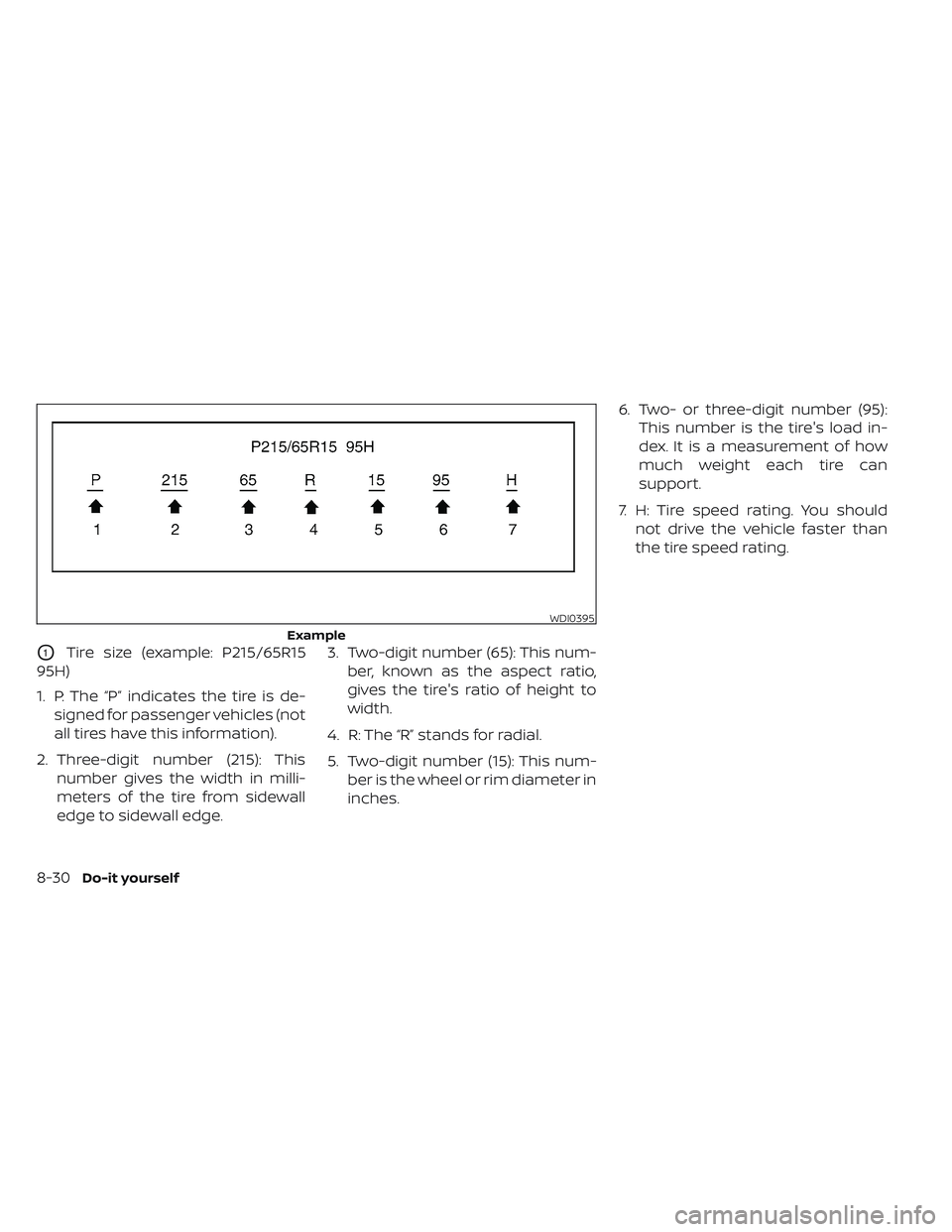
O1Tire size (example: P215/65R15
95H)
1. P: The “P” indicates the tire is de- signed for passenger vehicles (not
all tires have this information).
2. Three-digit number (215): This number gives the width in milli-
meters of the tire from sidewall
edge to sidewall edge. 3. Two-digit number (65): This num-
ber, known as the aspect ratio,
gives the tire's ratio of height to
width.
4. R: The “R” stands for radial.
5. Two-digit number (15): This num- ber is the wheel or rim diameter in
inches. 6. Two- or three-digit number (95):
This number is the tire's load in-
dex. It is a measurement of how
much weight each tire can
support.
7. H: Tire speed rating. You should not drive the vehicle faster than
the tire speed rating.
WDI0395
Example
8-30Do-it yourself
Page 559 of 612
WARNING
•Tires should be periodically in-
spected for wear, cracking,
bulging or objects caught in
the tread. If excessive wear,
cracks, bulging or deep cuts
are found, the tire(s) should be
replaced.
• The original tires have built-in
tread wear indicators. When
wear indicators are visible, the
tire(s) should be replaced.
• Tires degrade with age and
use. Have tires, over 6 years old
checked by a qualified techni-
cian, because some tire dam-
age may not be obvious. Re-
place the tires as necessary to
prevent tire failure and pos-
sible personal injury. •
For additional information re-
garding tires, refer to “Impor-
tant Tire Safety Information”
(US) or “Tire Safety Informa-
tion” (Canada) in the Warranty
Information Booklet.
Replacing wheels and tires
When replacing a tire, use the same size,
tread design, speed rating and load carry-
ing capacity as originally equipped. For ad-
ditional information, see “Wheels and tires”
(P. 10-5) for recommended types and sizes
of tires and wheels.
WARNING
• The use of tires other than those rec-
ommended or the mixed use of tires
of different brands, construction
(bias, bias-belted or radial), or tread
patterns can adversely affect the
ride, braking, handling, Vehicle Dy-
namic Control (VDC) system, ground
clearance, body-to-tire clearance,
tire chain clearance, speedometer
calibration, headlight aim and bum-
per height. Some of these effects
may lead to accidents and could re-
sult in serious personal injury.
• If your vehicle was originally
equipped with four tires that were
the same size and you are only re-
placing two of the four tires, install
the new tires on the rear axle. Placing
new tires on the front axle may cause
loss of vehicle control in some driving
conditions and cause an accident
and personal injury.
8-36Do-it yourself
Page 583 of 612
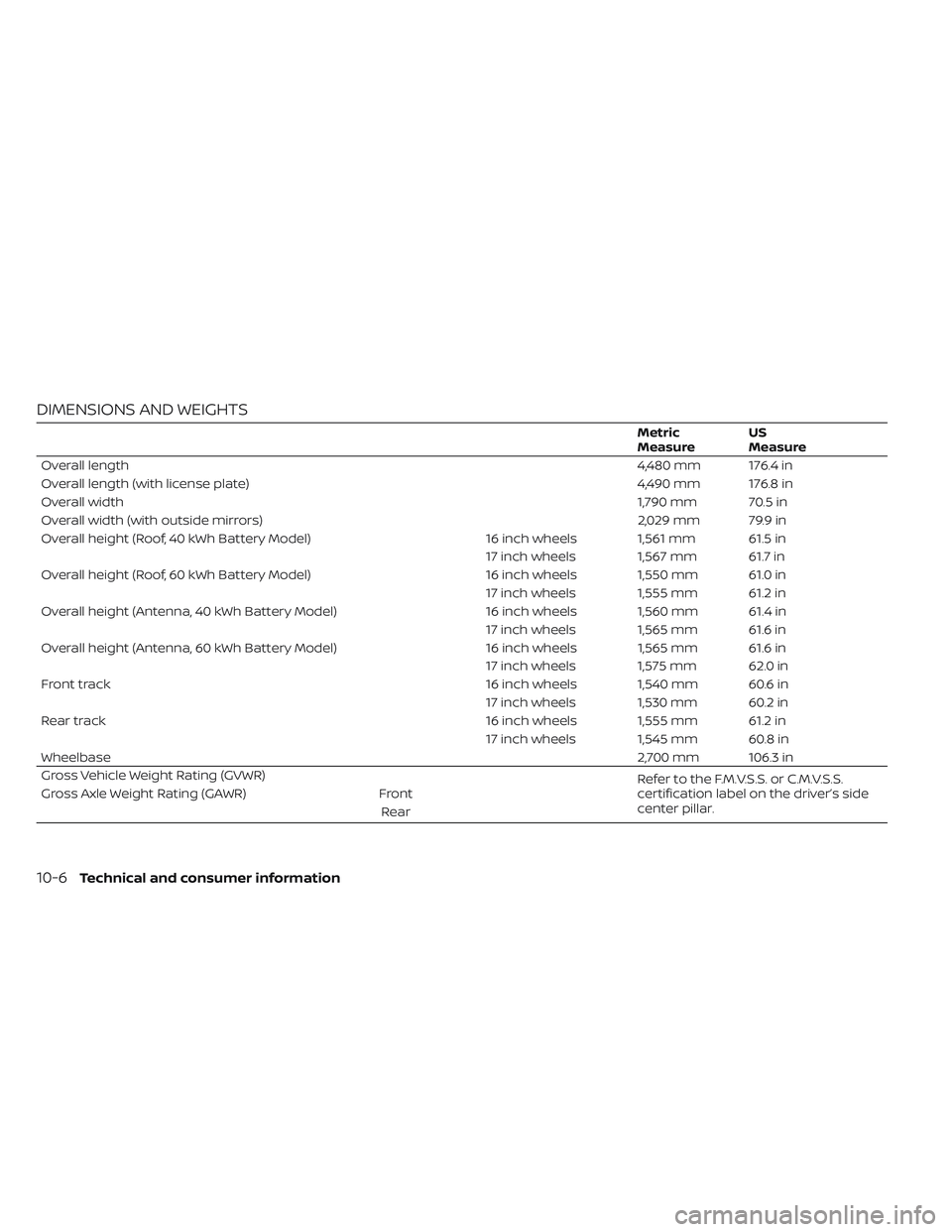
DIMENSIONS AND WEIGHTS
Metric
MeasureUS
Measure
Overall length 4,480 mm 176.4 in
Overall length (with license plate) 4,490 mm 176.8 in
Overall width 1,790 mm 70.5 in
Overall width (with outside mirrors) 2,029 mm 79.9 in
Overall height (Roof, 40 kWh Battery Model) 16 inch wheels 1,561 mm 61.5 in
17 inch wheels 1,567 mm 61.7 in
Overall height (Roof, 60 kWh Battery Model) 16 inch wheels 1,550 mm 61.0 in
17 inch wheels 1,555 mm 61.2 in
Overall height (Antenna, 40 kWh Battery Model) 16 inch wheels 1,560 mm 61.4 in
17 inch wheels 1,565 mm 61.6 in
Overall height (Antenna, 60 kWh Battery Model) 16 inch wheels 1,565 mm 61.6 in
17 inch wheels 1,575 mm 62.0 in
Front track 16 inch wheels 1,540 mm 60.6 in
17 inch wheels 1,530 mm 60.2 in
Rear track 16 inch wheels 1,555 mm 61.2 in
17 inch wheels 1,545 mm 60.8 in
Wheelbase 2,700 mm 106.3 in
Gross Vehicle Weight Rating (GVWR) Refer to the F.M.V.S.S. or C.M.V.S.S.
certification label on the driver’s side
center pillar.
Gross Axle Weight Rating (GAWR)
Front
Rear
10-6Technical and consumer information
Page 609 of 612
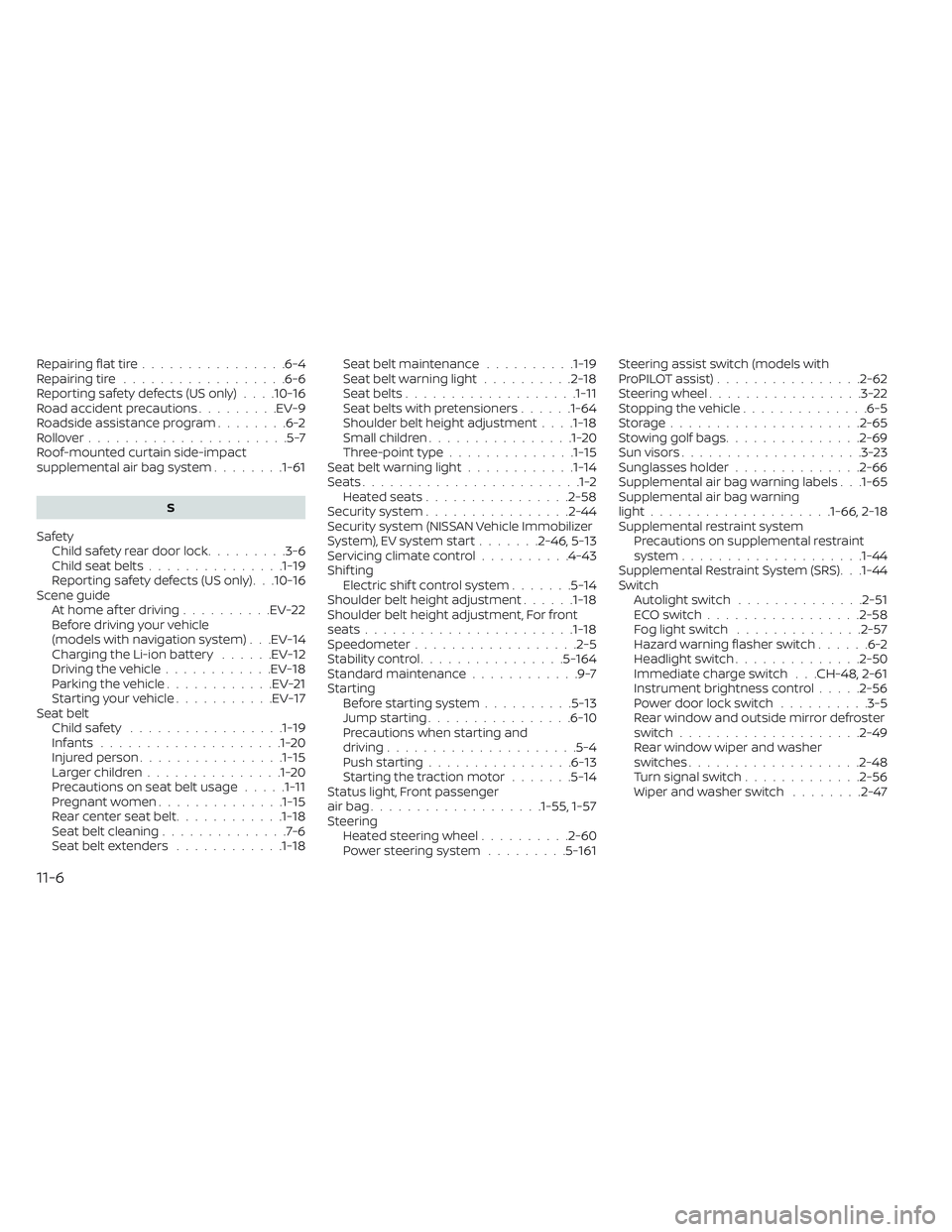
Repairing flat tire................6-4Repairing tire..................6-6Reporting safety defects (US only). . . .10-16Road accident precautions.........EV-9Roadside assistance program........6-2Rollover......................5-7Roof-mounted curtain side-impact
supplemental air bag system........1-61
S
Safety
Child safety rear door lock.........3-6Child seat belts...............1-19Reporting safety defects (US only). . .10-16Scene guideAt home af ter driving..........EV-22Before driving your vehicle
(models with navigation system). . .EV-14Charging the Li-ion battery......EV-12Driving the vehicle............EV-18Parking the vehicle............EV-21Starting your vehicle...........EV-17Seat beltChild safety.................1-19Infants....................1-20Injured person................1-15Larger children...............1-20Precautions on seat belt usage.....1-11Pregnant women..............1-15Rear center seat belt............1-18Seat belt cleaning..............7-6Seat belt extenders............1-18
Seat belt maintenance..........1-19Seat belt warning light..........2-18Seat belts...................1-11Seat belts with pretensioners......1-64Shoulder belt height adjustment. . . .1-18Small children................1-20Three-point type..............1-15Seat belt warning light............1-14Seats........................1-2Heated seats................2-58Security system................2-44Security system (NISSAN Vehicle Immobilizer
System), EV system start.......2-46, 5-13Servicing climate control..........4-43Shif tingElectric shif t control system.......5-14Shoulder belt height adjustment......1-18Shoulder belt height adjustment, For front
seats.......................1-18Speedometer................. .2-5Stability control................5-164Standard maintenance............9-7Starting
Before starting system..........5-13Jump starting................6-10Precautions when starting and
driving.................... .5-4Push starting................6-13Starting the traction motor.......5-14Status light, Front passenger
air bag...................1-55, 1-57Steering
Heated steering wheel..........2-60Power steering system.........5-161
Steering assist switch (models with
ProPILOT assist)................2-62Steering wheel.................3-22Stopping the vehicle..............6-5Storage.................... .2-65Stowing golf bags...............2-69Sun visors....................3-23Sunglasses holder..............2-66Supplemental air bag warning labels. . .1-65Supplemental air bag warning
light....................1-66, 2-18Supplemental restraint system
Precautions on supplemental restraint
system
................... .1-44Supplemental Restraint System (SRS). . .1-44Switch
Autolight switch..............2-51ECO switch................ .2-58Fog light switch..............2-57Hazard warning flasher switch......6-2Headlight switch..............2-50Immediate charge switch. . .CH-48, 2-61Instrument brightness control.....2-56Power door lock switch..........3-5Rear window and outside mirror defroster
switch................... .2-49Rear window wiper and washer
switches...................2-48Turn signal switch.............2-56Wiper and washer switch........2-47
11-6