2023 NISSAN LEAF eco mode
[x] Cancel search: eco modePage 55 of 612
• For your safety, if the charge connectoris connected to the vehicle while the
power switch is in the READY to drive,
the vehicle will automatically switch to
the ON position. Because charging will
not be started while the power switch
is in this position, be sure to place the
power switch in the OFF position.
• When the ambient temperature is 32°F (0°C) or less, charging time may be lon-
ger than normal and the level to which
the Li-ion battery can be charged may
be less than at higher temperatures.
• Do not operate the charging timer re- peatedly while the charge connector is
connected to the vehicle af ter the Li-
ion battery charging is completed. Do-
ing so may discharge the 12-volt bat-
tery. For additional information, see
“Charging timer” (P. CH-43). If the Li-ion
battery becomes discharged, charge it
immediately. • The power switch can be set to the ON
position and the climate control and
navigation system (if so equipped) can
be used while the Li-ion battery is
charging. However, because these op-
erations consume Li-ion battery
power, it will take longer for the Li-ion
battery to become fully charged. Place
the power switch in the OFF position to
help reduce Li-ion battery charge time.
• If electrical power is interrupted while charging, charging restarts automati-
cally when the electrical power is
restored.
• It is recommended to keep the charge cable connected to save Li-ion battery
power, when the heater and air condi-
tioner are operating with remote op-
eration (models with Navigation
System).
• If the charge port is frozen, melt the ice using a hair dryer. Af ter the ice has
melted, charge the Li-ion battery. Forc-
ing the charge connector to connect
may cause a malfunction. • If foreign materials have entered the
charge connector and charge port and
it is not possible to connect it, do not
attempt to force the connection. It is
recommended that you visit a NISSAN
certified LEAF dealer. Forcing the
charge connector to connect may
cause damage to the charging equip-
ment and vehicle.
• There is a hole on the charge port for water drainage. If the water drainage
hole becomes blocked, or if water gets
trapped inside the charge port, do not
charge. It is recommended that you
visit a NISSAN certified LEAF dealer.
CH-4Charging
Page 60 of 612
Charging stations or V2X charging/
discharging devices using this standard
are UL certified and safe to use in the US.
While supported by NISSAN, this connector
may not become the US SAE standard. V2X
charging/discharging is possible (even
several times a day). If the battery tempera-
ture is near the red zone, in order to protect
the battery, power of the V2X charging/
discharging will be limited.
For additional information, consult a V2X
device manufacturer or a V2X charging/
discharging service provider.
Power limitation mode
This mode protects the health and opera-
tion of the vehicle's Li-ion battery. This
mode operates in certain extreme condi-
tions (heat, cold, low state of charge). Power
available to vehicle systems, including its
traction motor, is limited resulting in limited
performance, acceleration and top speed.
Charging may be automatically termi-
nated, especially with repeated quick
charging in extreme hot weather.Checking Li-ion battery charge
The three methods for checking the
amount of charge are as follows:
• Check by using the Li-ion battery avail-
able charge gauge on the vehicle infor-
mation display when the power switch is
placed in the ON position. For additional
information, see “Li-ion battery available
charge gauge” (P. 2-9) and “Low battery
charge indicator” (P. 2-38).
• Check by using an internet enabled smart phone or personal computer. For
additional information, refer to the
“NissanConnect® Manual”.
• Check by using the charging status indi- cator light. For additional information, see
“Charging status indicator lights”
(P. CH-49).
NOTE:
• During the charge operation, charge continues when the power switch is
placed in the ON position.
• The Li-ion battery cannot be charged if the quick charge connector and the
normal charge connector are con-
nected at the same time. If another
charge connector is connected mid-
charge, charging will stop. • For safety reasons, it is not possible to
switch to the READY to drive position
while a charge connector is connected.
• During charging, it is possible that the radio may be inaudible due to noise by
the electromagnetic wave.
HOW TO NORMAL CHARGE (AC
220–240 volt) BY CHARGING
DEVICE
WARNING
• If you use any medical electric de-
vices, such as an implantable cardiac
pacemaker or an implantable cardio-
vascular defibrillator, check with the
electric medical device manufac-
turer concerning the effects that
charging may have on implanted de-
vices before starting the charge op-
eration. Charging may affect the
operation.
• Be sure to follow the precautions for
using the charging device that can be
installed in your home. Failing to do
so could result in serious injury or
death.
ChargingCH-9
Page 61 of 612
CAUTION
Do not use any charging equipment
that is not compatible with the LEAF.
Doing so could prevent the Li-ion bat-
tery from charging properly or could
result in damage to the vehicle or Li-ion
battery.
• Normal charge uses the charging device (AC 220 - 240 volt, 16A or 32A) that can be
installed in your home to charge the Li-
ion battery.
• Immediate charge, charging timer and remote charge (models with Navigation
System) can be performed in the normal
charge mode. For additional information,
see “Charging methods” (P. CH-43).
• The charging equipment communicates with the vehicle before Li-ion battery
charging starts. If this communication
does not occur because other equip-
ment is used, the Li-ion battery will not
charge. • NISSAN recommends that you connect
the charging device when getting out of
the vehicle, even if it is not going to be
used. By doing this, you can get the most
out of the remote climate control (mod-
els with Navigation System) and Climate
Ctrl. Timer functions the next time you
use the vehicle.
To start normal charge:
1. Push the P (Park) position switch to place the vehicle in the P (Park) position and
apply the parking brake.
2. When charging the Li-ion battery, place the power switch in the OFF position.
When the power switch is in the ON po-
sition, the Li-ion battery will not start
charging.
3. Open the charge port lid and charge port cap. For additional information, see
“Charge port lid” (P. 3-20) and “Charge
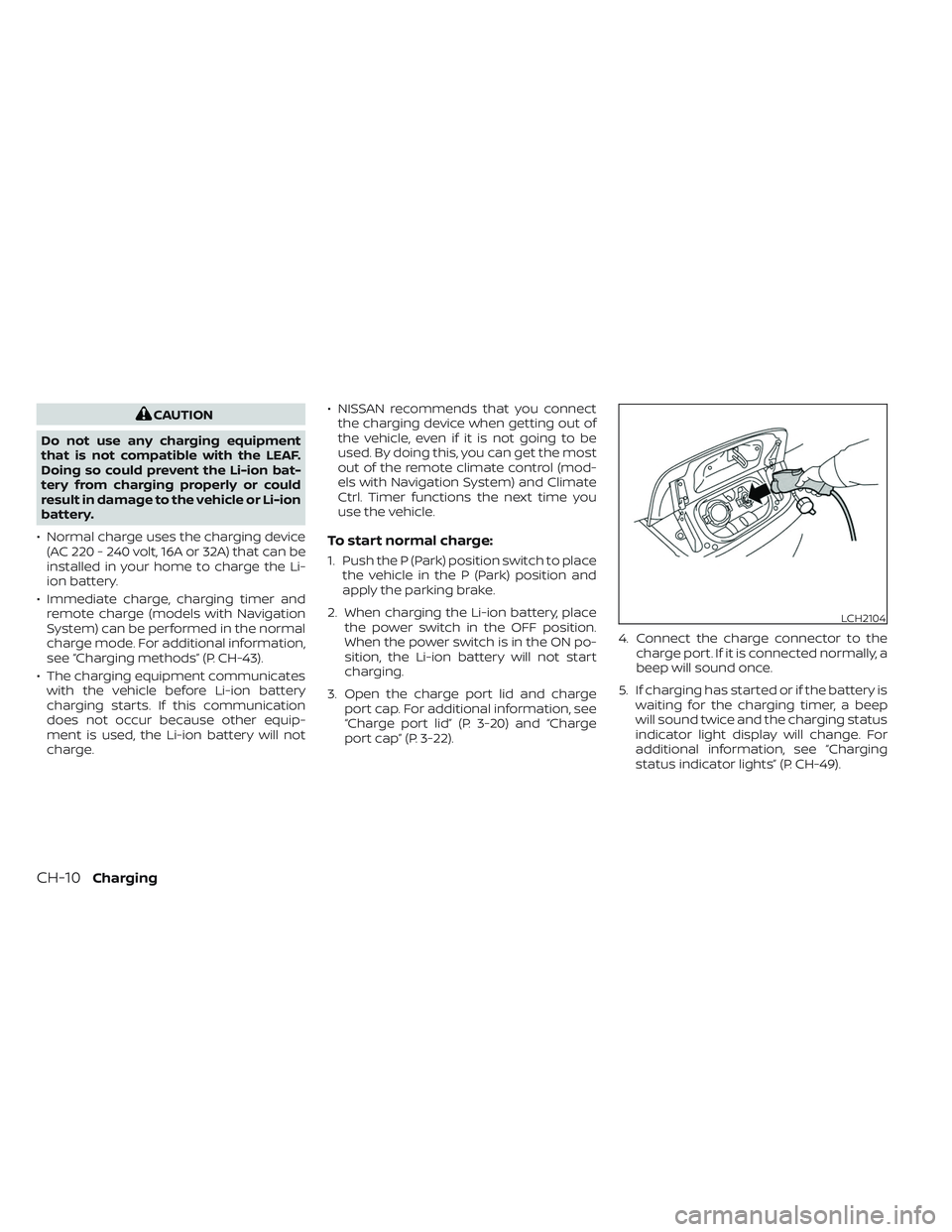
port cap” (P. 3-22). 4. Connect the charge connector to the
charge port. If it is connected normally, a
beep will sound once.
5. If charging has started or if the battery is waiting for the charging timer, a beep
will sound twice and the charging status
indicator light display will change. For
additional information, see “Charging
status indicator lights” (P. CH-49).
LCH2104
CH-10Charging
Page 86 of 612
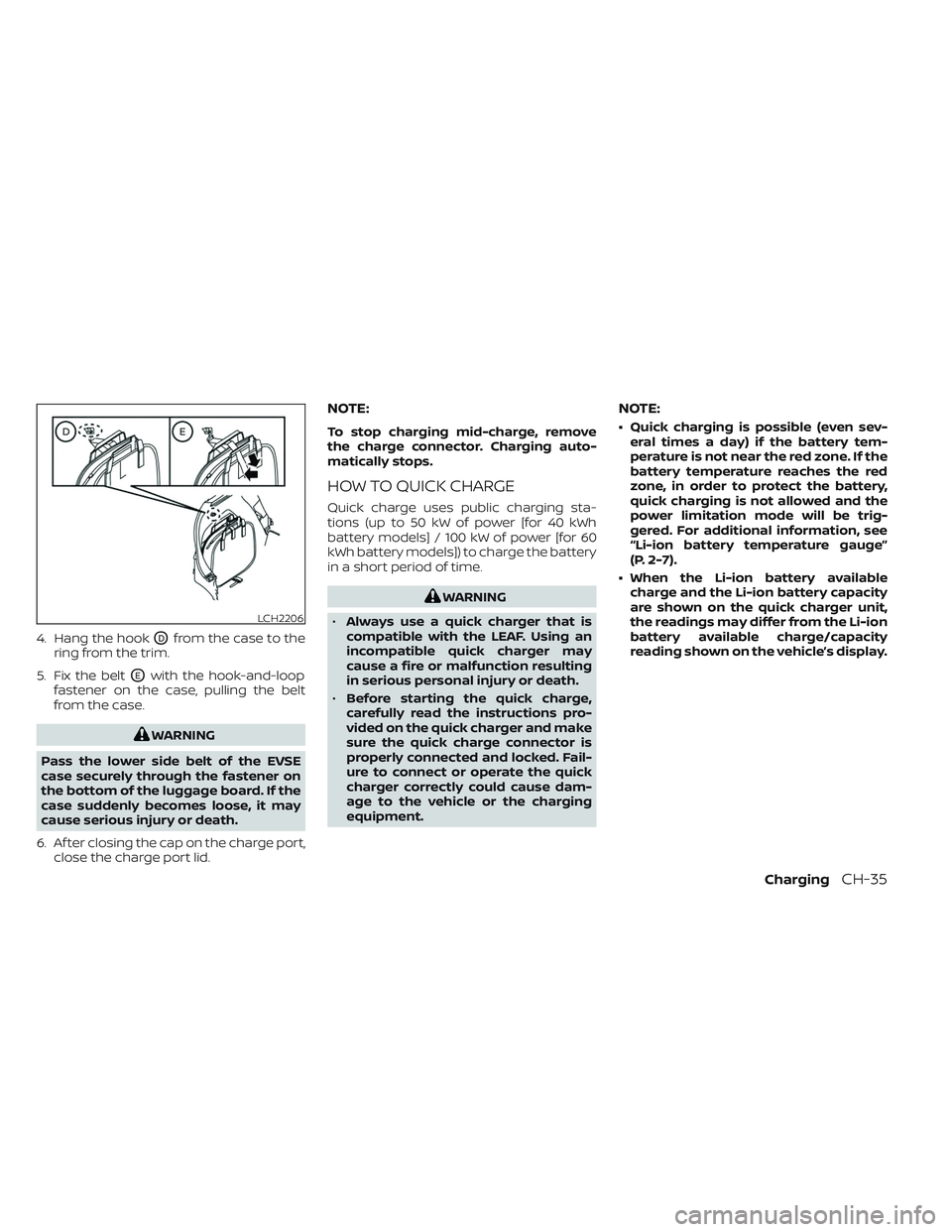
4. Hang the hookODfrom the case to the
ring from the trim.
5. Fix the belt
OEwith the hook-and-loop
fastener on the case, pulling the belt
from the case.
WARNING
Pass the lower side belt of the EVSE
case securely through the fastener on
the bottom of the luggage board. If the
case suddenly becomes loose, it may
cause serious injury or death.
6. Af ter closing the cap on the charge port, close the charge port lid.
NOTE:
To stop charging mid-charge, remove
the charge connector. Charging auto-
matically stops.
HOW TO QUICK CHARGE
Quick charge uses public charging sta-
tions (up to 50 kW of power [for 40 kWh
battery models] / 100 kW of power [for 60
kWh battery models]) to charge the battery
in a short period of time.
WARNING
• Always use a quick charger that is
compatible with the LEAF. Using an
incompatible quick charger may
cause a fire or malfunction resulting
in serious personal injury or death.
• Before starting the quick charge,
carefully read the instructions pro-
vided on the quick charger and make
sure the quick charge connector is
properly connected and locked. Fail-
ure to connect or operate the quick
charger correctly could cause dam-
age to the vehicle or the charging
equipment.
NOTE:
• Quick charging is possible (even sev- eral times a day) if the battery tem-
perature is not near the red zone. If the
battery temperature reaches the red
zone, in order to protect the battery,
quick charging is not allowed and the
power limitation mode will be trig-
gered. For additional information, see
“Li-ion battery temperature gauge”
(P. 2-7).
• When the Li-ion battery available charge and the Li-ion battery capacity
are shown on the quick charger unit,
the readings may differ from the Li-ion
battery available charge/capacity
reading shown on the vehicle’s display.
LCH2206
ChargingCH-35
Page 97 of 612
NOTE:
If “Full charge has priority ” is turned on, it
is possible that the battery is not
charged fully by the charge end time due
to the operating condition of Climate
Ctrl. Timer and the tolerance of charging
time, etc. In that case, the charging con-
tinues until the Li-ion battery is fully
charged.
TIMER DISPLAY
The timer display appears for approxi-
mately 30 seconds when the power switch
is placed in the OFF position.
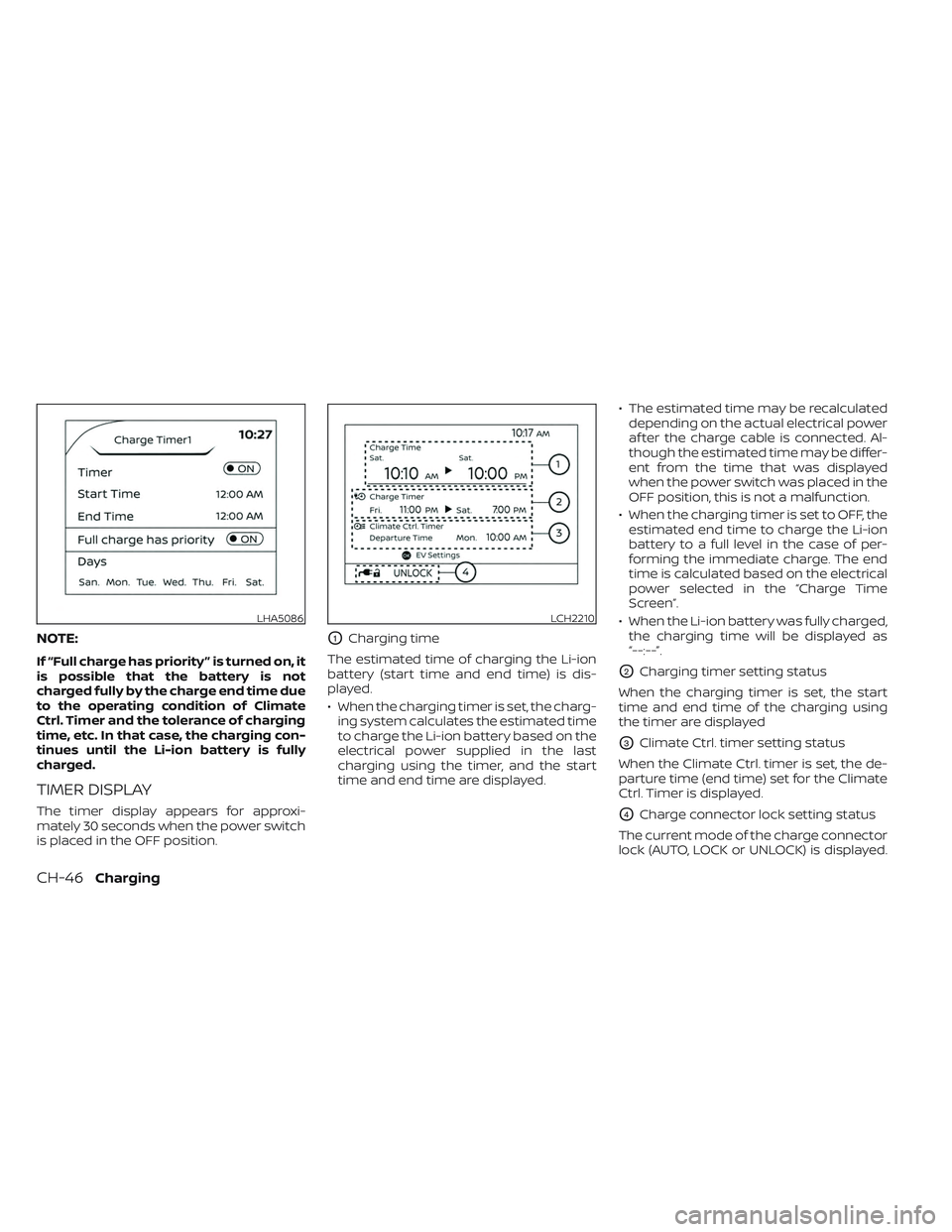
O1Charging time
The estimated time of charging the Li-ion
battery (start time and end time) is dis-
played.
• When the charging timer is set, the charg- ing system calculates the estimated time
to charge the Li-ion battery based on the
electrical power supplied in the last
charging using the timer, and the start
time and end time are displayed. • The estimated time may be recalculated
depending on the actual electrical power
af ter the charge cable is connected. Al-
though the estimated time may be differ-
ent from the time that was displayed
when the power switch was placed in the
OFF position, this is not a malfunction.
• When the charging timer is set to OFF, the estimated end time to charge the Li-ion
battery to a full level in the case of per-
forming the immediate charge. The end
time is calculated based on the electrical
power selected in the “Charge Time
Screen”.
• When the Li-ion battery was fully charged, the charging time will be displayed as
“--:--”.
O2Charging timer setting status
When the charging timer is set, the start
time and end time of the charging using
the timer are displayed
O3Climate Ctrl. timer setting status
When the Climate Ctrl. timer is set, the de-
parture time (end time) set for the Climate
Ctrl. Timer is displayed.
O4Charge connector lock setting status
The current mode of the charge connector
lock (AUTO, LOCK or UNLOCK) is displayed.
LHA5086LCH2210
CH-46Charging
Page 98 of 612
For additional information, see “Charge
connector lock system” (P. CH-41).
When the OK button on the steering wheel
is pressed, the display will be switched to
the “EV Settings” menu. In the EV Settings,
the setting of the charging timer, Climate
Ctrl. timer and charge connector lock
mode can be changed. For additional infor-
mation, see “Vehicle information display”
(P. 2-26).
When the
button on the steering
wheel is pressed while the timer display is
shown, the display is switched to the ECO
Drive Report (if the vehicle was driven).
Either display will continue to be displayed
for another 30 seconds when the button is
operated. If the doors are locked af ter the
power switch was placed in the OFF posi-
tion, the display will turn off before the pre-
set time.
For models with Navigation System, the
day of the week is displayed with the time
(hour and minute) in each information
O1–
O3.
In addition to the above, note the following
conditions for the charging time
O1infor-
mation: • The charging time is displayed by the 10
minutes. If the estimated charging time is
longer than 24 hours, “Over 24h” is
displayed.
• When the charging is set to start imme- diately af ter connecting the charge con-
nector to the vehicle, the start time is
displayed as “Charge Now”.
• While being charged, the time when the charging has actually started is displayed
as the start time. The end time is dis-
played according to the estimated
charging time that was calculated based
on the electrical power being supplied.
• For models with Li-ion battery warmer, the charging system calculates the elec-
trical power used by the battery warmer
when the Li-ion battery temperature is
low, and longer charging time will be
displayed.
• When “Chg. Timer Only at HOME” is set to ON (models with Navigation System) in
the EV Settings, the start time is displayed
only when the power switch is placed in
the OFF position at home. If the power
switch is placed in the OFF position other
than at home, the immediate charge
mode is selected and “Charge Now” will
appear as the start time. • When “Full charge has priority” is set to ON
in the EV Settings and the Li-ion battery
cannot be charged to a full level within
the hours between the scheduled start
time and end time of the charging timer,
the charging time shows the time that
exceeds the scheduled hours in the
charging timer.
• If you need to confirm the estimated charging time depending on the avail-
able electrical power (supplied to the
charger), see the Estimated Charge Time
display. For additional information, see
“Meters and gauges” (P. 2-5).
NOTE:
• The displayed end time of charging is an estimation. The Li-ion battery may
not be charged to a full level by the
estimated end time.
• If the charging timer and the Climate Ctrl. timer are set to operate at the
same time, longer charging time will be
displayed or the Li-ion battery may not
be charged to a full level at the sched-
uled end time.
ChargingCH-47
Page 101 of 612
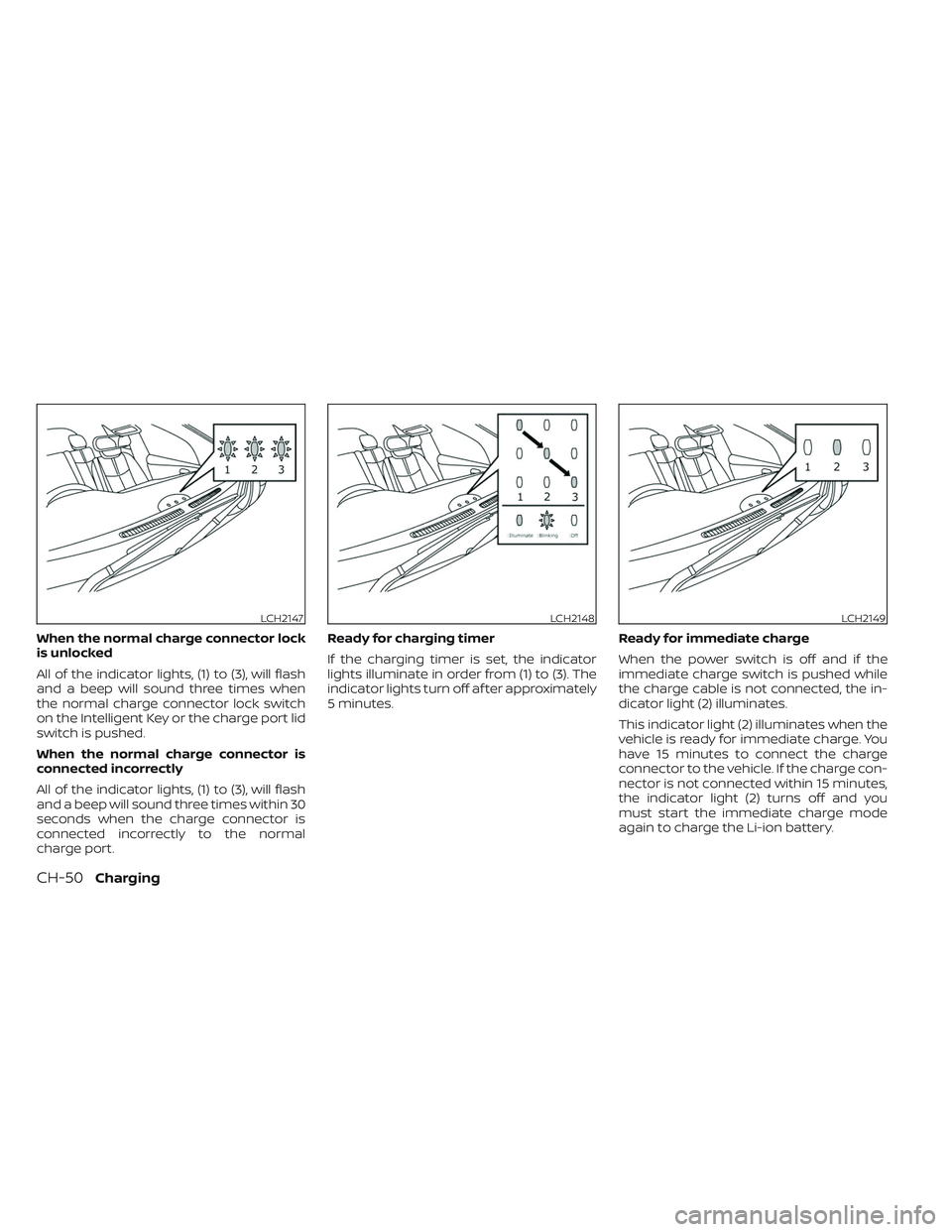
When the normal charge connector lock
is unlocked
All of the indicator lights, (1) to (3), will flash
and a beep will sound three times when
the normal charge connector lock switch
on the Intelligent Key or the charge port lid
switch is pushed.
When the normal charge connector is
connected incorrectly
All of the indicator lights, (1) to (3), will flash
and a beep will sound three times within 30
seconds when the charge connector is
connected incorrectly to the normal
charge port.Ready for charging timer
If the charging timer is set, the indicator
lights illuminate in order from (1) to (3). The
indicator lights turn off af ter approximately
5 minutes.
Ready for immediate charge
When the power switch is off and if the
immediate charge switch is pushed while
the charge cable is not connected, the in-
dicator light (2) illuminates.
This indicator light (2) illuminates when the
vehicle is ready for immediate charge. You
have 15 minutes to connect the charge
connector to the vehicle. If the charge con-
nector is not connected within 15 minutes,
the indicator light (2) turns off and you
must start the immediate charge mode
again to charge the Li-ion battery.
LCH2147LCH2148LCH2149
CH-50Charging
Page 113 of 612
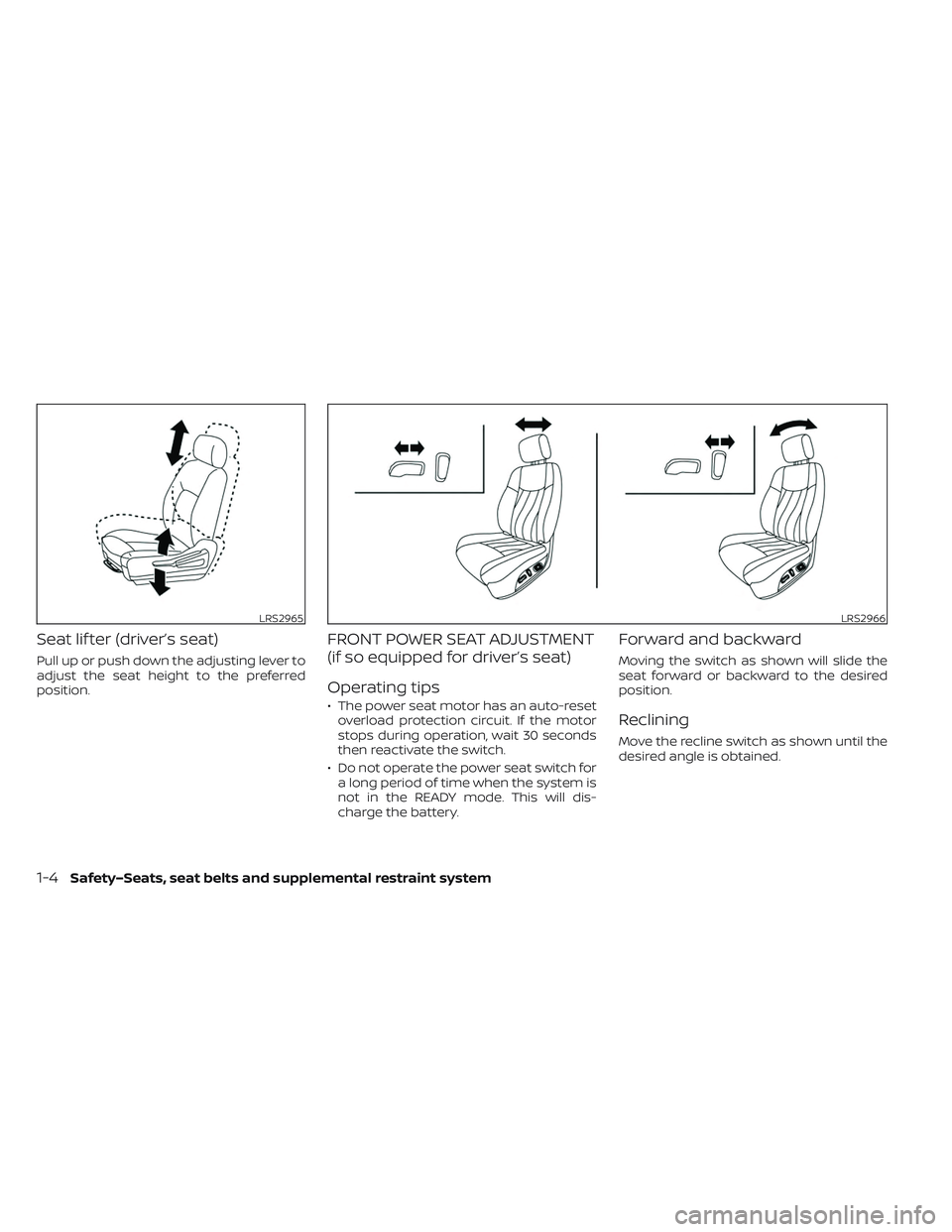
Seat lif ter (driver’s seat)
Pull up or push down the adjusting lever to
adjust the seat height to the preferred
position.
FRONT POWER SEAT ADJUSTMENT
(if so equipped for driver’s seat)
Operating tips
• The power seat motor has an auto-resetoverload protection circuit. If the motor
stops during operation, wait 30 seconds
then reactivate the switch.
• Do not operate the power seat switch for a long period of time when the system is
not in the READY mode. This will dis-
charge the battery.
Forward and backward
Moving the switch as shown will slide the
seat forward or backward to the desired
position.
Reclining
Move the recline switch as shown until the
desired angle is obtained.
LRS2965LRS2966
1-4Safety–Seats, seat belts and supplemental restraint system