2023 NISSAN LEAF console
[x] Cancel search: consolePage 235 of 612
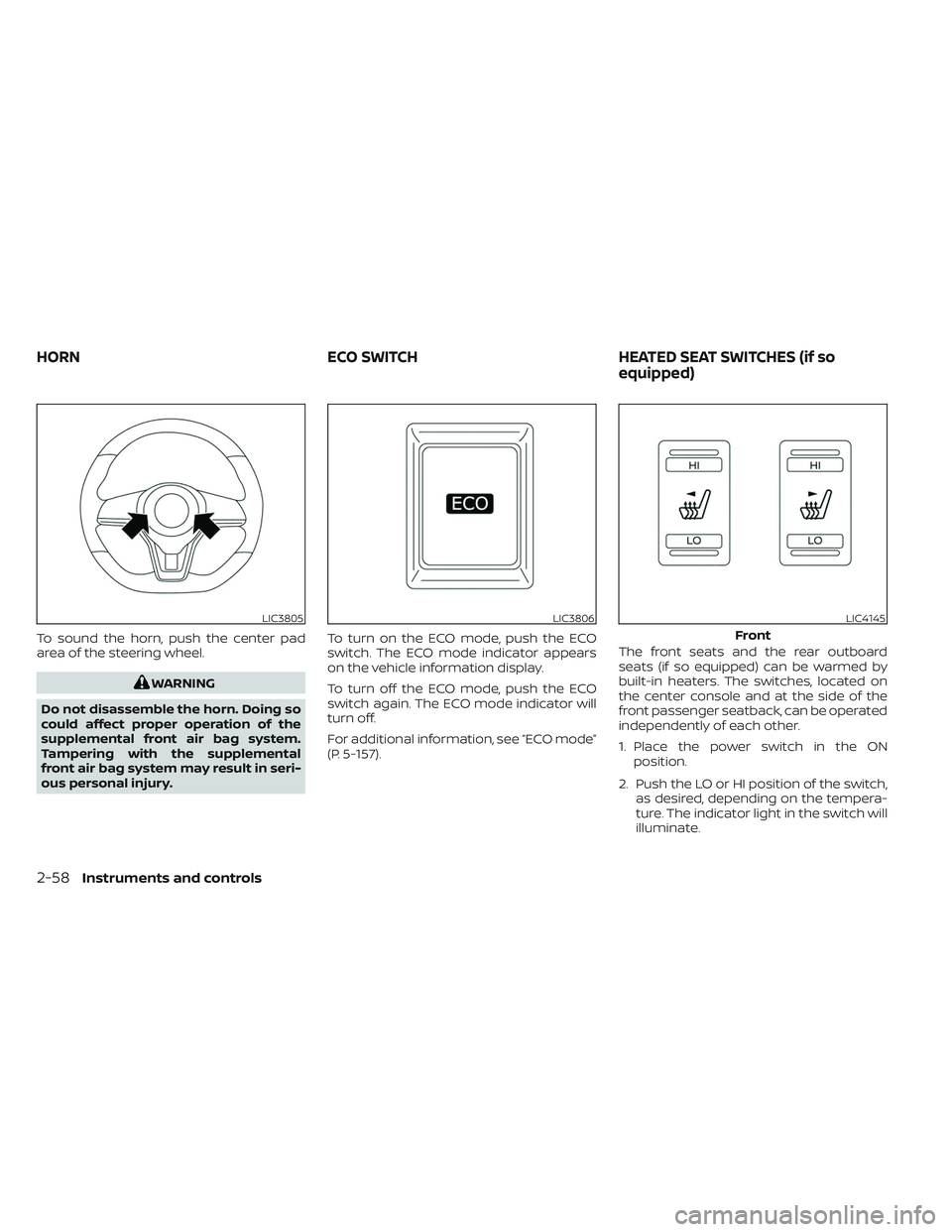
To sound the horn, push the center pad
area of the steering wheel.
WARNING
Do not disassemble the horn. Doing so
could affect proper operation of the
supplemental front air bag system.
Tampering with the supplemental
front air bag system may result in seri-
ous personal injury. To turn on the ECO mode, push the ECO
switch. The ECO mode indicator appears
on the vehicle information display.
To turn off the ECO mode, push the ECO
switch again. The ECO mode indicator will
turn off.
For additional information, see “ECO mode”
(P. 5-157).
The front seats and the rear outboard
seats (if so equipped) can be warmed by
built-in heaters. The switches, located on
the center console and at the side of the
front passenger seatback, can be operated
independently of each other.
1. Place the power switch in the ON
position.
2. Push the LO or HI position of the switch, as desired, depending on the tempera-
ture. The indicator light in the switch will
illuminate.
LIC3805LIC3806LIC4145
Front
HORN ECO SWITCHHEATED SEAT SWITCHES (if so
equipped)
2-58Instruments and controls
Page 241 of 612
CAUTION
• The outlet and plug may be hot dur-
ing or immediately af ter use.
• Do not use with accessories that ex-
ceed a 12-volt, 120W (10A) power
draw.
• Do not use double adapters or more
than one electrical accessory.
• Use the power outlet with the power
switch is in the ON or READY to Drive
position to avoid discharging the 12-
volt battery. •
Avoid using the power outlet when
the air conditioner, headlights or rear
window defroster are on.
• This power outlet is not designed for
use with a cigarette lighter unit.
• Push the plug in as far as it will go. If
good contact is not made, the plug
may overheat or the internal tem-
perature fuse may open.
• Before inserting or disconnecting a
plug, make sure that the electrical
accessory being used is turned OFF.
• When not in use, be sure to close the
cap. Do not allow water to contact
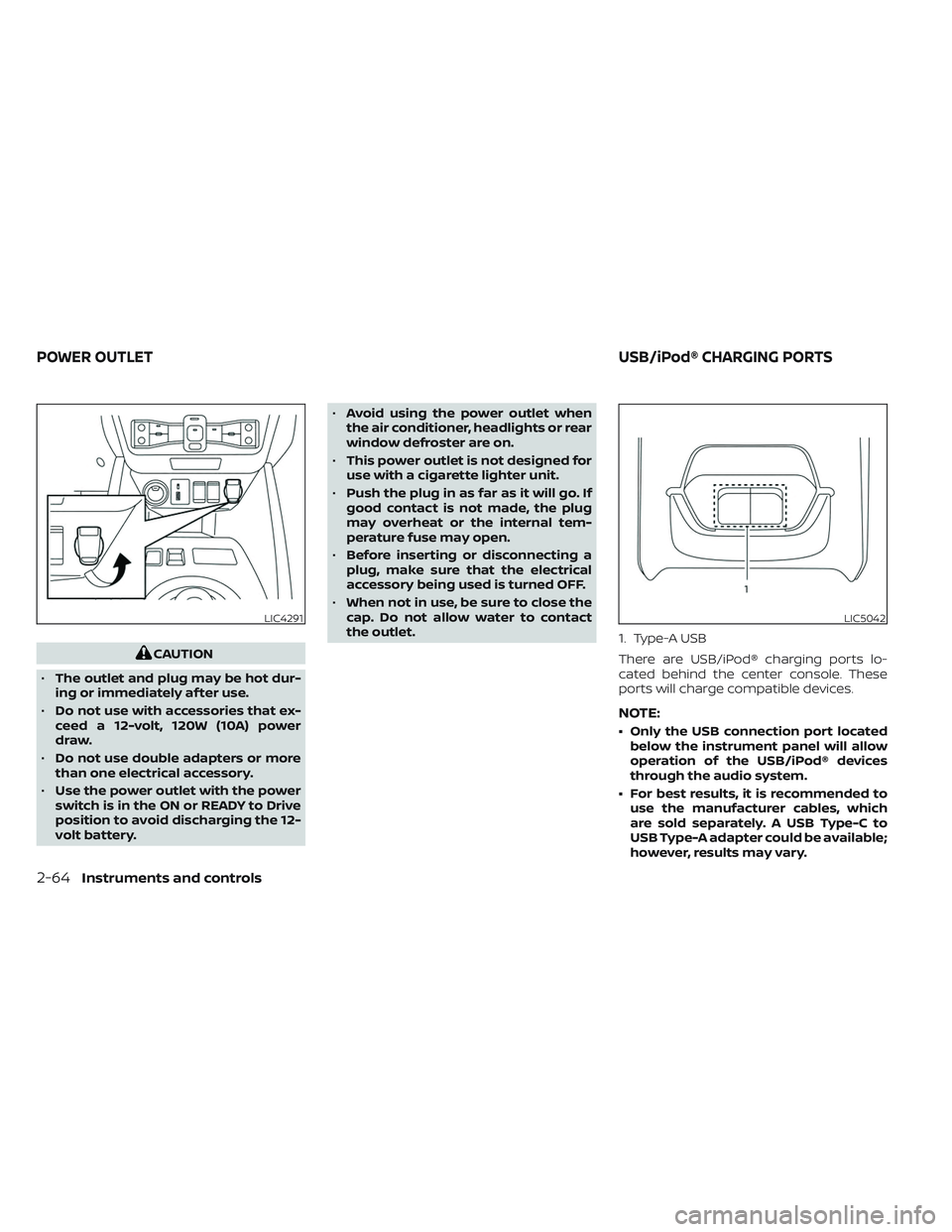
the outlet. 1. Type-A USB
There are USB/iPod® charging ports lo-
cated behind the center console. These
ports will charge compatible devices.
NOTE:
• Only the USB connection port located
below the instrument panel will allow
operation of the USB/iPod® devices
through the audio system.
• For best results, it is recommended to use the manufacturer cables, which
are sold separately. A USB Type-C to
USB Type-A adapter could be available;
however, results may vary.
LIC4291LIC5042
POWER OUTLET USB/iPod® CHARGING PORTS
2-64Instruments and controls
Page 243 of 612
GLOVE BOX
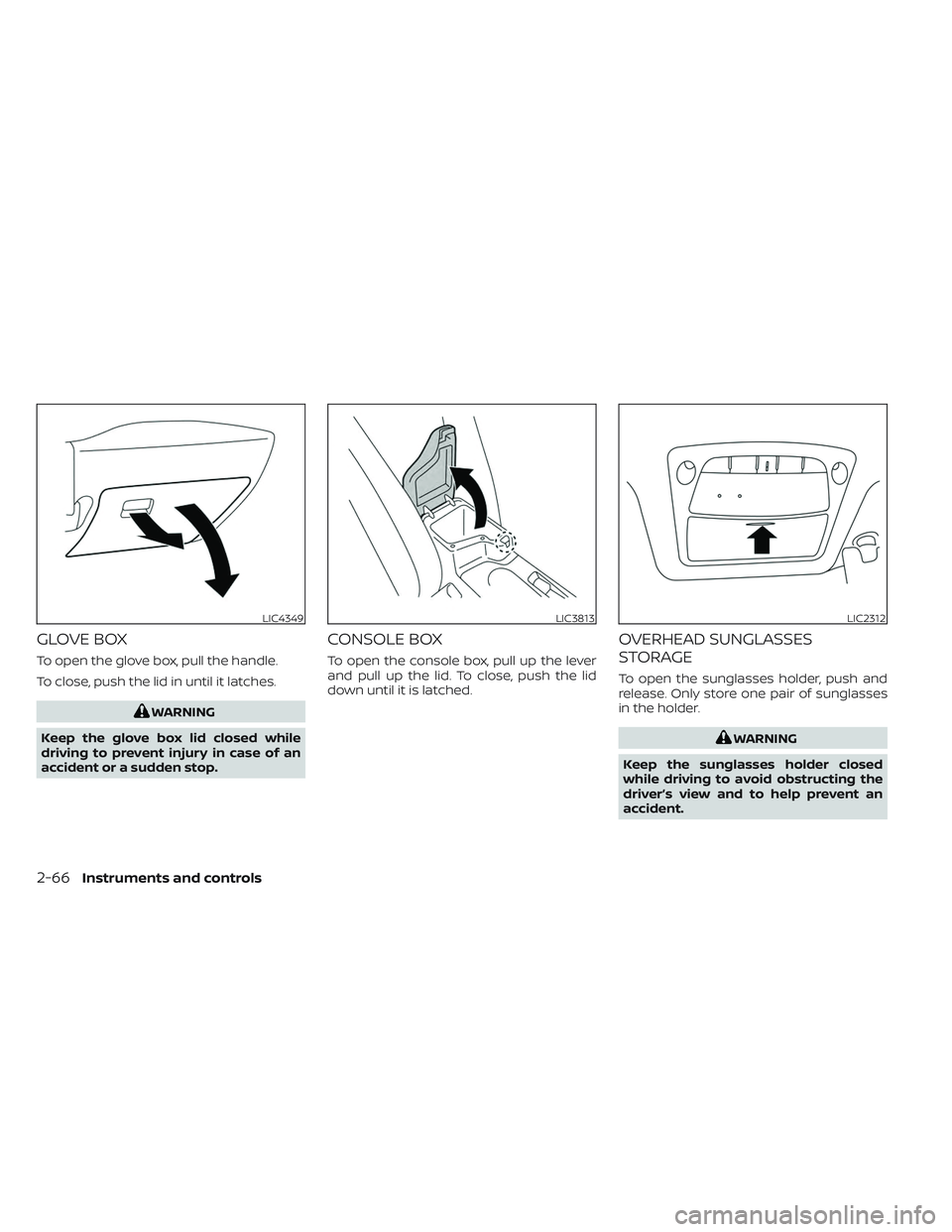
To open the glove box, pull the handle.
To close, push the lid in until it latches.
WARNING
Keep the glove box lid closed while
driving to prevent injury in case of an
accident or a sudden stop.
CONSOLE BOX
To open the console box, pull up the lever
and pull up the lid. To close, push the lid
down until it is latched.
OVERHEAD SUNGLASSES
STORAGE
To open the sunglasses holder, push and
release. Only store one pair of sunglasses
in the holder.
WARNING
Keep the sunglasses holder closed
while driving to avoid obstructing the
driver’s view and to help prevent an
accident.
LIC4349LIC3813LIC2312
2-66Instruments and controls
Page 249 of 612
If the windows do not close
automatically
If the power window automatic function
(closing only) does not operate properly,
perform the following procedure to initial-
ize the power window system.
1. Place the power switch in the ONposition.
2. Close the door.
3. Open the window completely by operat- ing the power window switch.
4. Pull the power window switch and hold it to close the window, and then hold the
switch more than 3 seconds af ter the
window is closed completely.
5. Release the power window switch. Op- erate the window by the automatic
function to confirm the initialization is
complete.
If the power window automatic function
does not operate properly af ter perform-
ing the procedure above, have your vehicle
serviced. It is recommended that you visit a
NISSAN certified LEAF dealer for this
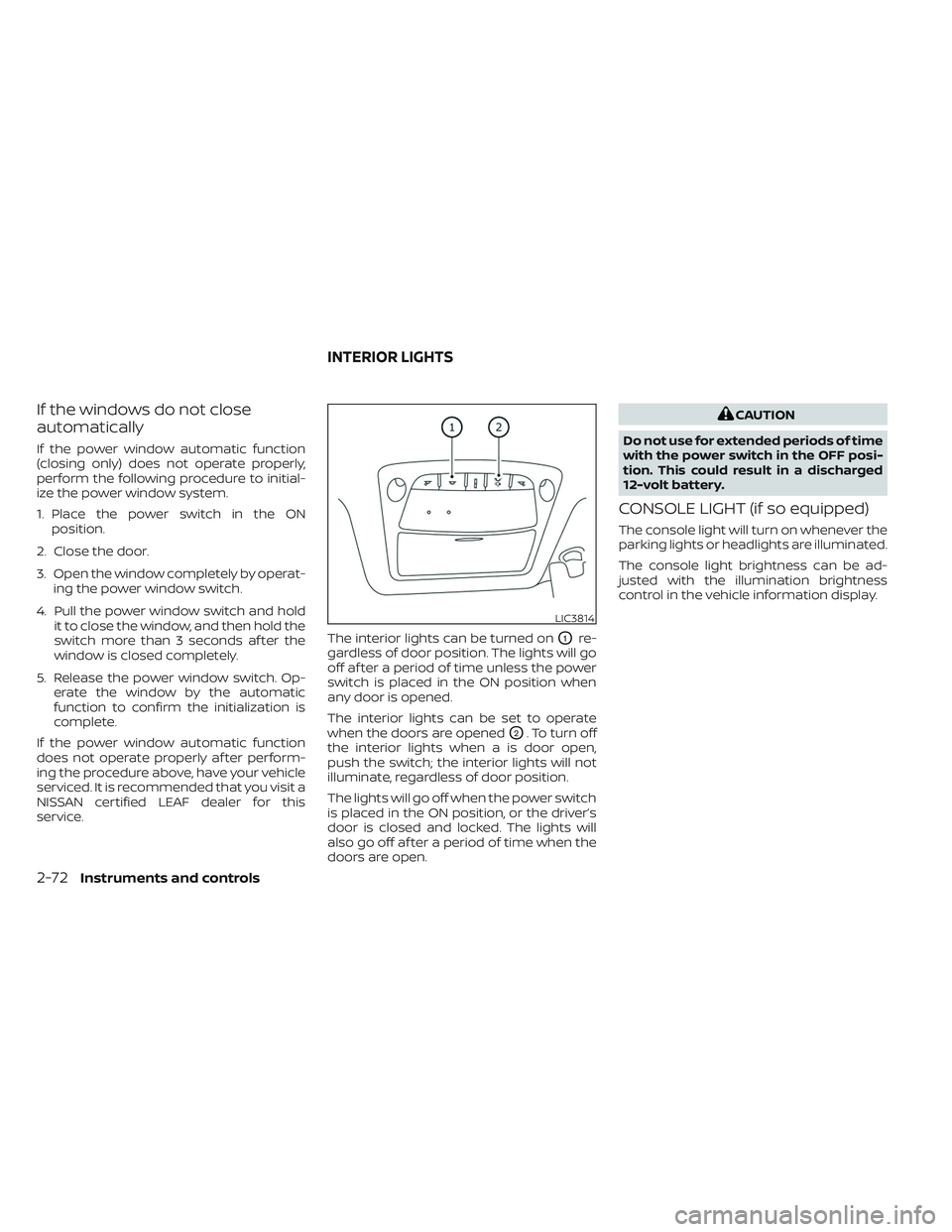
service. The interior lights can be turned on
O1re-
gardless of door position. The lights will go
off af ter a period of time unless the power
switch is placed in the ON position when
any door is opened.
The interior lights can be set to operate
when the doors are opened
O2. To turn off
the interior lights when a is door open,
push the switch; the interior lights will not
illuminate, regardless of door position.
The lights will go off when the power switch
is placed in the ON position, or the driver’s
door is closed and locked. The lights will
also go off af ter a period of time when the
doors are open.
CAUTION
Do not use for extended periods of time
with the power switch in the OFF posi-
tion. This could result in a discharged
12-volt battery.
CONSOLE LIGHT (if so equipped)
The console light will turn on whenever the
parking lights or headlights are illuminated.
The console light brightness can be ad-
justed with the illumination brightness
control in the vehicle information display.
LIC3814
INTERIOR LIGHTS
2-72Instruments and controls
Page 345 of 612
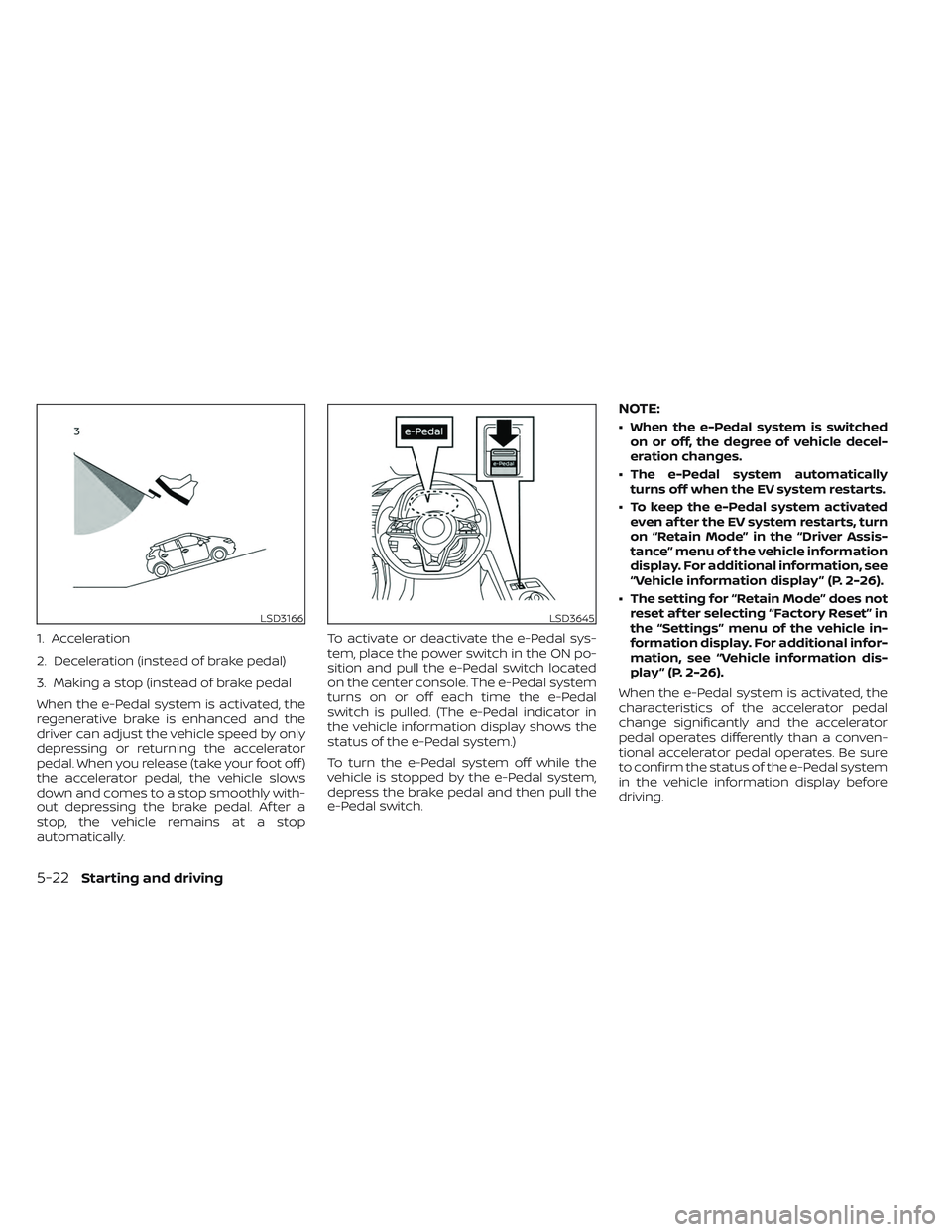
1. Acceleration
2. Deceleration (instead of brake pedal)
3. Making a stop (instead of brake pedal
When the e-Pedal system is activated, the
regenerative brake is enhanced and the
driver can adjust the vehicle speed by only
depressing or returning the accelerator
pedal. When you release (take your foot off )
the accelerator pedal, the vehicle slows
down and comes to a stop smoothly with-
out depressing the brake pedal. Af ter a
stop, the vehicle remains at a stop
automatically.To activate or deactivate the e-Pedal sys-
tem, place the power switch in the ON po-
sition and pull the e-Pedal switch located
on the center console. The e-Pedal system
turns on or off each time the e-Pedal
switch is pulled. (The e-Pedal indicator in
the vehicle information display shows the
status of the e-Pedal system.)
To turn the e-Pedal system off while the
vehicle is stopped by the e-Pedal system,
depress the brake pedal and then pull the
e-Pedal switch.
NOTE:
• When the e-Pedal system is switched
on or off, the degree of vehicle decel-
eration changes.
• The e-Pedal system automatically turns off when the EV system restarts.
• To keep the e-Pedal system activated even af ter the EV system restarts, turn
on “Retain Mode” in the “Driver Assis-
tance” menu of the vehicle information
display. For additional information, see
“Vehicle information display ” (P. 2-26).
• The setting for “Retain Mode” does not reset af ter selecting “Factory Reset” in
the “Settings” menu of the vehicle in-
formation display. For additional infor-
mation, see “Vehicle information dis-
play ” (P. 2-26).
When the e-Pedal system is activated, the
characteristics of the accelerator pedal
change significantly and the accelerator
pedal operates differently than a conven-
tional accelerator pedal operates. Be sure
to confirm the status of the e-Pedal system
in the vehicle information display before
driving.
LSD3166LSD3645
5-22Starting and driving
Page 605 of 612
Ceiling light...................2-73Center console................2-66Charge port lid.................3-20Charge port lid switch............2-61ChargingCharge port lid...............3-20Charging related indicator light. . .CH-49Normal charge..............CH-9Precautions on charging........CH-2Quick charge..........CH-35, CH-38Specifications................10-4Trickle charge...............CH-11Charging information............10-23Charging methods.............CH-43Charging related indicator light.....CH-49Charging related remote function. . .CH-48Charging status indicator light.....CH-49Charging the Li-ion battery........EV-12Charging troubleshooting guide. . . .CH-56CheckingChecking bulbs...............2-16Checking coolant level...........8-6Child restraint with top tether strap. . . .1-27Child restraints..............1-22,1-24Booster seats................1-40LATCH (Lower Anchors and Tethers for
CHildren) System..............1-24Precautions on child restraints.....1-22Top tether strap...............1-27Child safety...................1-19Child safety rear door lock..........3-6Chimes, audible reminders.........2-25Circuit breaker, fusible link..........8-17Cleaning exterior and interior......7-2,7-4
ClimateClimate control system refrigerant and
lubricant recommendations
......4-43Climate controlClimate control service..........4-43Climate control systemAir conditioner...............4-29Climate control operation........4-29Heater....................4-29Climate Ctrl. Timer..............4-38Clock.......................2-12Cold tire pressures..............10-25Cold weather driving............5-173ConsoleCenter console...............2-66CoolantCapacities and recommended
fuel/lubricants
...............10-2Changing coolant..............8-6Checking coolant level...........8-6Cooling system................ .8-5Corrosion protection..............7-7Cruise control.................5-65Cup holders................. .2-67
D
Defroster switch
Rear window and outside mirror defroster
switch
................... .2-49Dimensions and weights..........10-6Dimmer switch for instrument panel. . .2-56
Display
Information display............2-26Door locks................... .3-4Driving
Cold weather driving...........5-173Driving vehicle...............5-14Precautions when starting and
driving.................... .5-4Driving range..................2-8Driving the vehicle..............EV-18Driving vehicle.................5-14Dynamic driver assistance switch.....2-61e-Pedal......................2-13e-Pedal system................5-21
E
ECO
ECO switch................ .2-58Eco Drive Report...............5-157ECO mode...............2-13,5-157ECO switch.................. .2-58Efficient use of your vehicle........EV-23Electric shif t control system........5-14Electronic parking brake...........5-19Emblem light..................2-57Emergency call (SOS) button........2-60Emergency charge.............CH-11Emergency EV (Electric Vehicle)
shut off...................5-12,6-3Emergency shutoff system........EV-10Emission control information label. . . .10-8EV Characteristics..............EV-11
11-2