2023 NISSAN LEAF warning light
[x] Cancel search: warning lightPage 306 of 612
WARNING
• The air conditioning cooling function
operates only when the power
switch is in the ON position or when
the READY to drive indicator light is
ON.
• Do not leave children or adults who
would normally require the assis-
tance of others alone in your vehicle.
Pets should also not be lef t alone.
They could accidentally injure them-
selves or others through inadvertent
operation of the vehicle. Also, on hot,
sunny days, temperatures in a closed
vehicle could quickly become high
enough to causes severe or possibly
fatal injuries to people or animals. •
Do not use the recirculation mode for
long periods as it may cause the inte-
rior air to become stale and the win-
dows to fog up.
NOTE:
• Odors from inside and outside the ve- hicle can build up in the air conditioner
unit. Odor can enter the passenger
compartment through the vents.
• When parking, set the heater or air conditioner controls to turn off air re-
circulation to allow fresh air into the
passenger compartment. This should
help reduce odors inside the vehicle. The climate control system (air conditioner
and heater functions) can be operated
when the READY to drive indicator light is
illuminated. However, while charging, the
climate control system can be used when
the power switch is in the ON position.
The fan, heater and air conditioning can be
turned on manually, using the timer func-
tion and using the remote climate control
function.
These functions operate in the following
conditions.
Power switch position
LOCK/OFFACCON READY to drive
Fan --Available Available
Heater and air conditioner --Available*1 Available
Timer (Climate Ctrl. Timer) AvailableAvailable- -
Remote control*2 AvailableAvailable- -
*1: The climate control system will only start when charging is being performed. Af ter charging is complete, it will continue to operate if the EVSE (El ectric Vehicle
Supply Equipment) is connected.
*2: Models with Navigation System.
HEATER AND AIR CONDITIONER
(automatic)
Monitor, climate, audio, phone and voice recognition systems4-29
Page 315 of 612
Temperature control
Press the temperature control buttons to
set the desired temperature.
Air recirculation
Press the
intake air control button to
change the air circulation mode. When the
indicator light illuminates, the flowing air is
recirculated inside the vehicle.
When the outside temperature exceeds
70°F (21°C) the air conditioning system may
default to air recirculation mode automati-
cally to reduce overall power consumption.
To exit air recirculation mode, deselect the
air recirculation button (indicator will turn
off ) to enter fresh mode.
Outside air circulation
Press the
intake air control button to
change the air circulation mode. When the
indicator light does not illuminate, the flow-
ing air is drawn from outside the vehicle.
Automatic air intake control
In the AUTO mode, the intake air will be
controlled automatically. When the outside
temperature exceeds 70°F (21°C), the air
conditioning system may default to air re-
circulation mode automatically to reduce
overall power consumption. To set the automatic control mode, press
and hold the
intake air control button.
The indicator light will blink twice and the
inside/outside circulation will then be con-
trolled automatically. When in automatic
mode, the indicator light will come on when
inside air recirculation is active.
Rear window and outside mirror (if so
equipped) defroster switch
For additional information, see “Rear win-
dow and outside mirror (if so equipped)
defroster switch” (P. 2-49).
To turn the system off
To turn off the climate control, press the
Climate control system ON·OFF button.
The same operating mode (Heater or A/C)
that was active when the system is turned
off is active when system is turned back on.
CLIMATE CTRL. TIMER
This function pre-heats or pre-cools the
passenger compartment of the vehicle to
the temperature before driving. This helps
reduce power consumption from the Li-ion
battery.
The Climate Ctrl. Timer operates the air
conditioner using power from the charger
or the Li-ion battery. While the charging connector is connected to the vehicle,
electric power from the Li-ion battery is not
used.
The Climate Ctrl. Timer function allows two
timer settings.
Once the Climate Ctrl. Timer is set, it will
complete air conditioning by the time that
is set. It is not necessary to set the Climate
Ctrl. Timer every day.
WARNING
Even if the Climate Ctrl. Timer is set, the
temperature in the passenger com-
partment may become high or low if
the system automatically stops. Do not
leave children or adults who would nor-
mally require the support of others
alone in your vehicle. Pets should not
be lef t alone either. On hot, sunny days,
temperatures in a closed vehicle could
quickly become high enough to cause
severe or possibly fatal injuries to
people or animals. Also on cold days,
temperature in a vehicle could become
low enough to cause severe or possible
fatal injuries to people or animals.
4-38Monitor, climate, audio, phone and voice recognition systems
Page 328 of 612
• The low tire pressure warning light doesnot automatically turn off when the tire
pressure is adjusted. Af ter the tire is in-
flated to the recommended pressure, the
vehicle must be driven at speeds above
16 mph (25 km/h) to activate the TPMS
and turn off the low tire pressure warning
light. Use a tire pressure gauge to check
the tire pressure.
• The “Tire Pressure Low - Add Air” warning also appears on the vehicle information
display when the low tire pressure
warning light is illuminated and low tire
pressure is detected. The “Tire Pressure
Low - Add Air” warning turns off when the
low tire pressure warning light turns off.
• The “Tire Pressure Low - Add Air” warning appears each time the power switch is
placed in the ON position as long as the
low tire pressure warning light remains
illuminated.
• The “Tire Pressure Low - Add Air” warning does not appear if the low tire pressure
warning light illuminates to indicate a
TPMS malfunction. • Tire pressure rises and falls depending on
the heat caused by operation of the ve-
hicle and the outside temperature. Do
not reduce the tire pressure af ter driving
because the tire pressure rises af ter driv-
ing. Low outside temperature can lower
the temperature of the air inside the tire,
which can cause a lower tire inflation
pressure. This may cause the low tire
pressure warning light to illuminate. If the
warning light illuminates in low ambient
temperature, check the tire pressure for
all four tires.
• The pressure of all tires can also be checked on the display screen. The order
of the tire pressure figures displayed on
the screen does not correspond with the
actual order of the tire position.
For additional information, see “Low tire
pressure warning light” (P. 2-21) and “Tire
Pressure Monitoring System (TPMS)” (P. 6-3).WARNING
• Radio waves could adversely affect
electric medical equipment. Those
who use a pacemaker should contact
the electric medical equipment
manufacturer for the possible influ-
ences before use.
• If the low tire pressure warning light
illuminates while driving, avoid sud-
den steering maneuvers or abrupt
braking, reduce vehicle speed, pull
off the road to a safe location and
stop the vehicle as soon as possible.
Driving with under-inflated tires may
permanently damage the tires and
increase the likelihood of tire failure.
Serious vehicle damage could occur
and may lead to an accident and
could result in serious personal in-
jury. Check the tire pressure for all
four tires. Adjust the tire pressure to
the recommended COLD tire pres-
sure shown on the Tire and Loading
Information label to turn the low tire
pressure warning light off. If the tire is
flat, repair it as soon as possible. For
additional information, see “Flat tire”
(P. 6-3).
Starting and driving5-5
Page 329 of 612
•When using a wheel without the
TPMS such as the spare tire, the TPMS
will not function and the low tire
pressure warning light will flash for
approximately 1 minute. The light will
remain on af ter 1 minute. Have your
tires replaced and/or TPMS system
reset as soon as possible. It is recom-
mended that you visit a NISSAN cer-
tified LEAF dealer for this service.
• Replacing tires with those not origi-
nally specified by NISSAN could af-
fect the proper operation of the
TPMS.
• Do not inject any tire liquid or aerosol
tire sealant into the tires, as this may
cause a malfunction of the tire pres-
sure sensors.
CAUTION
• The TPMS may not function properly
when the wheels are equipped with
tire chains or the wheels are buried in
snow. •
Do not place metalized film or any
metal parts (antenna, etc.) on the
windows. This may cause poor re-
ception of the signals from the tire
pressure sensors, and the TPMS will
not function properly.
Some devices and transmitters may tem-
porarily interfere with the operation of the
TPMS and cause the low tire pressure
warning light to illuminate. Some examples
are:
• Facilities or electric devices using similar radio frequencies that are near the
vehicle.
• If a transmitter set to similar frequencies is being used in or near the vehicle.
• If a computer (or similar equipment) or a DC/AC converter is being used in or near
the vehicle.
The low tire pressure warning light may
illuminate in the following cases:
• If the vehicle is equipped with a wheel and tire without TPMS.
• If the TPMS has been replaced and the ID has not been registered.
• If the wheel is not originally specified by NISSAN. FCC Notice:
For USA:
This device complies with Part 15 of the
FCC Rules. Operation is subject to the fol-
lowing two conditions: (1) This device
may not cause harmful interference, and
(2) this device must accept any interfer-
ence received, including interference
that may cause undesired operation.
NOTE:
Changes or modifications not expressly
approved by the party responsible for
compliance could void the user’s author-
ity to operate the equipment.
For Canada:
This device contains licence-exempt
transmitter(s)/receiver(s) that comply
with Innovation, Science and Economic
Development Canada’s licence exempt
RSS(s). Operation is subject to the fol-
lowing two conditions: (1) this device
may not cause interference, and (2) this
device must accept any interference, in-
cluding interference that may cause un-
desired operation of the device.
5-6Starting and driving
Page 330 of 612
TPMS with Easy-Fill Tire Alert
When tire pressure is low, the low tire pres-
sure warning light illuminates.
This vehicle provides visual and audible
signals to help you inflate the tires to the
recommended COLD tire pressure.
Vehicle set-up:
1. Park the vehicle in a safe and level place.
2. Apply the parking brake and push the P(Park) position switch on the shif t lever.
3. Place the power switch in the ON posi- tion. Do not place in the READY to drive
mode.
Operation:
1. Add air to the tire.
2. Af ter a few seconds, the hazard indica- tors will start flashing.
3. When the designated pressure is reached, the horn beeps once and the
hazard indicators stop flashing.
4. Perform the above steps for each tire. • If the tire is over-inflated more thanapproximately 4 psi (30 kPa), the horn
beeps and the hazard indicators flash
three times. To correct the pressure,
push the core of the valve stem on the tire briefly to release pressure. When
the pressure reaches the designated
pressure, the horn beeps once.
• If the hazard indicator does not flash within approximately 15 seconds af ter
starting to inflate the tire, it indicates
that the Easy-Fill Tire Alert is not
operating.
• The TPMS will not activate the Easy-Fill Tire Alert under the following
conditions:– If there is interference from an exter- nal device or transmitter.
– The air pressure from the inflation device is not sufficient to inflate the
tire, such as those using a power
socket.
– If electrical equipment is being used in or near the vehicle.
– There is a malfunction in the TPMS.
– There is a malfunction in the horn or hazard indicators.
– If the Easy-Fill Tire Alert does not op- erate due to TPMS interference,
move the vehicle about 3 f t (1 m)
backward or forward and try again.
If the Easy-Fill Tire Alert is not working, use a
tire pressure gauge.
AVOIDING COLLISION AND
ROLLOVER
WARNING
Failure to operate this vehicle in a safe
and prudent manner may result in loss
of control or an accident.
Be alert and drive defensively at all times.
Obey all traffic regulations. Avoid excessive
speed, high speed cornering, or sudden
steering maneuvers because these driving
practices could cause you to lose control of
your vehicle.
As with any vehicle, loss of control could
result in a collision with other vehicles or
objects or cause the vehicle to roll over,
particularly if the loss of control causes
the vehicle to slide sideways.
Be attentive at all times, and avoid driving
when tired. Never drive when under the in-
fluence of alcohol or drugs (including pre-
scription or over-the-counter drugs which
may cause drowsiness). Always wear your
seat belt as outlined in “Seat belts” (P. 7-6),
and also instruct your passengers to do so.
Seat belts help reduce the risk of injury in
collisions and rollovers.
Starting and driving5-7
Page 332 of 612
4. Gradually steer the vehicle to a safe lo-cation off the road and away from traffic
if possible.
5. Lightly apply the brake pedal to gradu- ally stop the vehicle.
6. Turn on the hazard warning flashers and contact a roadside emergency service
to change the tire. For additional infor-
mation, see “Flat tire” (P. 6-3).
DRINKING ALCOHOL/DRUGS AND
DRIVING
WARNING
Never drive under the influence of alco-
hol or drugs. Alcohol in the blood-
stream reduces coordination, delays
reaction time and impairs judgement.
Driving af ter drinking alcohol increases
the likelihood of being involved in an
accident injuring yourself and others.
Additionally, if you are injured in an ac-
cident, alcohol can increase the sever-
ity of the injury. NISSAN is committed to safe driving. How-
ever, you must choose not to drive under
the influence of alcohol. Every year thou-
sands of people are injured or killed in
alcohol-related accidents. Although the lo-
cal laws vary on what is considered to be
legally intoxicated, the fact is that alcohol
affects all people differently and most
people underestimate the effects of
alcohol.
Remember, drinking and driving don’t mix!
That is true for drugs, too (over-the-
counter, prescription, and illegal drugs). Do
not drive if your ability to operate your ve-
hicle is impaired by alcohol, drugs, or some
other physical condition.
WARNING
• Do not operate the power switch
while driving the vehicle except in an
emergency. (The EV system shuts
down when the power switch is
pushed three consecutive times or
the power switch is pushed and held
for more than 2 seconds.) If the EV
system stops while the vehicle is be-
ing driven, this could lead to a crash
and serious injury.
• When turning off the power switch,
make sure to push the P (Park) posi-
tion switch on the shif t lever even if
the vehicle is maintaining a stop and
hold using the e-pedal. This will pre-
vent the vehicle from moving or roll-
ing unexpectedly, which could result
in serious personal injury or property
damage.
Before operating the power switch, make
sure the vehicle is in the P (Park) position.
PUSH-BUTTON POWER SWITCH
Starting and driving5-9
Page 336 of 612
4. Push the power switch while depressingthe brake pedal within 10 seconds af ter
the chime sounds. The power switch
position changes to the READY to drive
mode.
Af ter step 3 is performed, if the power
switch is pushed without depressing the
brake pedal, the power switch position will
change to ACC.
NOTE:
• When the power switch is placed in the ACC or ON position or READY to drive
mode by the above procedure, the EV
system operation for discharged Intel-
ligent Key system indicator appears on
the vehicle information display even if
the Intelligent Key is inside the vehicle.
This is not a malfunction. To stop the
warning indicator from blinking, touch
the power switch with the Intelligent
Key again.
• If the Intelligent Key battery discharge indicator appears on the vehicle infor-
mation display, replace the battery as
soon as possible. For additional infor-
mation, see “NISSAN Intelligent Key®
battery replacement” (P. 8-19).
NISSAN VEHICLE IMMOBILIZER
SYSTEM
The NISSAN Vehicle Immobilizer System
will not allow the power switch to be placed
in the READY to drive position without the
use of the registered key.
If the power switch fails to place the vehicle
into the READY to drive position using the
registered key, it may be due to interfer-
ence caused by another registered key, an
automated toll road device or automated
payment device on the key ring. Restart the
EV system using the following procedure:
1. Leave the power switch in the ON posi- tion for approximately 5 seconds.
2. Place the power switch in the OFF posi- tion and wait approximately 10 seconds.
3. Repeat steps 1 and 2 again.
4. Place the power switch in the READY to drive position while holding the device
(which may have caused the interfer-
ence) separate from the registered key.
If this procedure allows the power
switch to be placed in the READY to drive
mode, NISSAN recommends placing the
registered key on a separate key ring to
avoid interference from other devices. • Make sure that the area around the ve-
hicle is clear.
• Check fluid levels such as coolant, brake fluid, and windshield-washer fluid as fre-
quently as possible.
• Check that all windows and lights are clean.
• Visually inspect tires for their appearance and condition. Also check tires for proper
inflation.
• Check that all doors are closed.
• Position the seat and adjust the head restraints/headrests.
• Adjust the inside and outside mirrors.
• Fasten seat belts and ask all passengers to do likewise.
• Check the operation of the warning lights when the power switch is pushed to the
ON position. For additional information,
see “Warning lights, indicator lights and
audible reminders” (P. 2-14).
BEFORE STARTING THE EV SYSTEM
Starting and driving5-13
Page 342 of 612
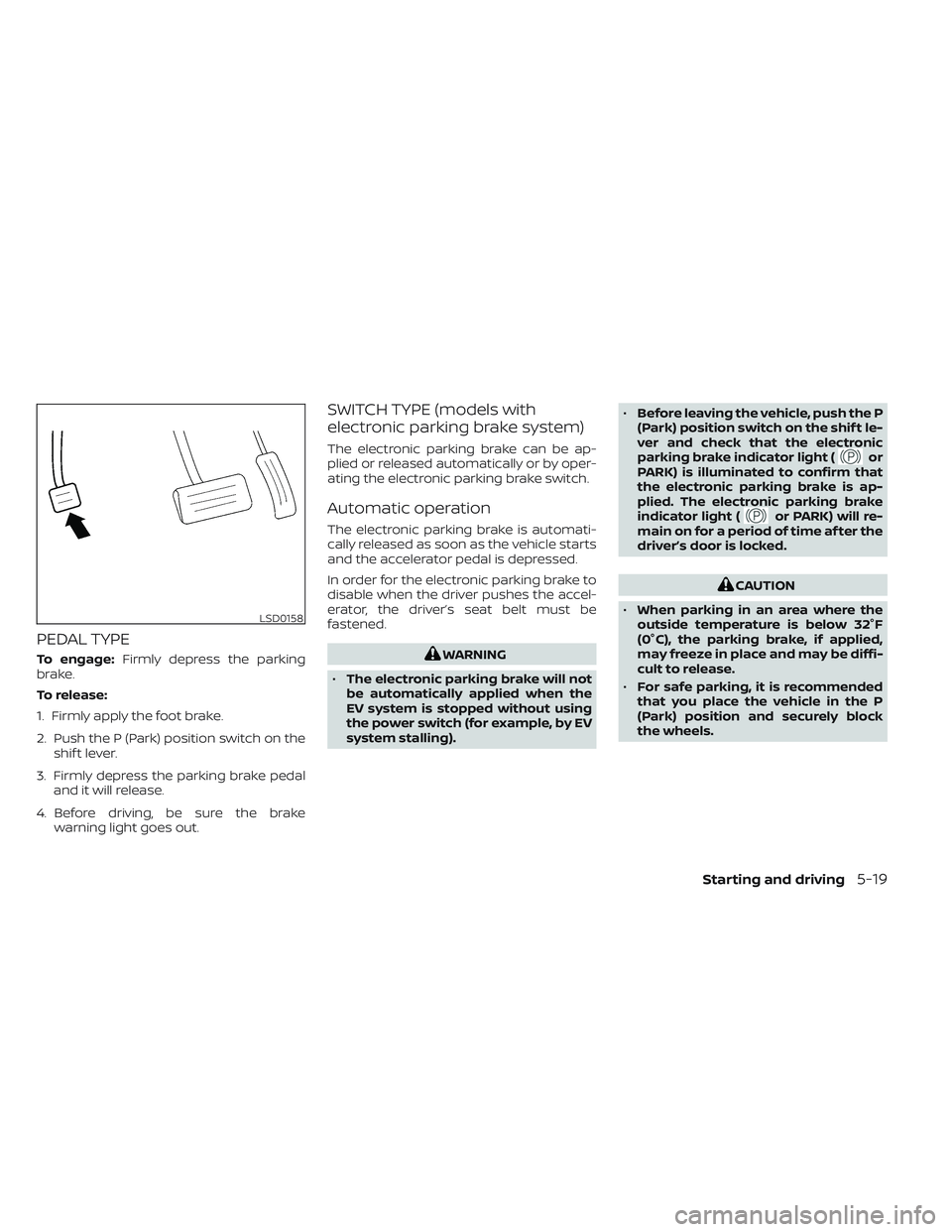
PEDAL TYPE
To engage:Firmly depress the parking
brake.
To release:
1. Firmly apply the foot brake.
2. Push the P (Park) position switch on the shif t lever.
3. Firmly depress the parking brake pedal and it will release.
4. Before driving, be sure the brake warning light goes out.
SWITCH TYPE (models with
electronic parking brake system)
The electronic parking brake can be ap-
plied or released automatically or by oper-
ating the electronic parking brake switch.
Automatic operation
The electronic parking brake is automati-
cally released as soon as the vehicle starts
and the accelerator pedal is depressed.
In order for the electronic parking brake to
disable when the driver pushes the accel-
erator, the driver’s seat belt must be
fastened.
WARNING
• The electronic parking brake will not
be automatically applied when the
EV system is stopped without using
the power switch (for example, by EV
system stalling). •
Before leaving the vehicle, push the P
(Park) position switch on the shif t le-
ver and check that the electronic
parking brake indicator light (
or
PARK) is illuminated to confirm that
the electronic parking brake is ap-
plied. The electronic parking brake
indicator light (
or PARK) will re-
main on for a period of time af ter the
driver’s door is locked.
CAUTION
• When parking in an area where the
outside temperature is below 32°F
(0°C), the parking brake, if applied,
may freeze in place and may be diffi-
cult to release.
• For safe parking, it is recommended
that you place the vehicle in the P
(Park) position and securely block
the wheels.
LSD0158
Starting and driving5-19