2023 NISSAN KICKS lock
[x] Cancel search: lockPage 146 of 558
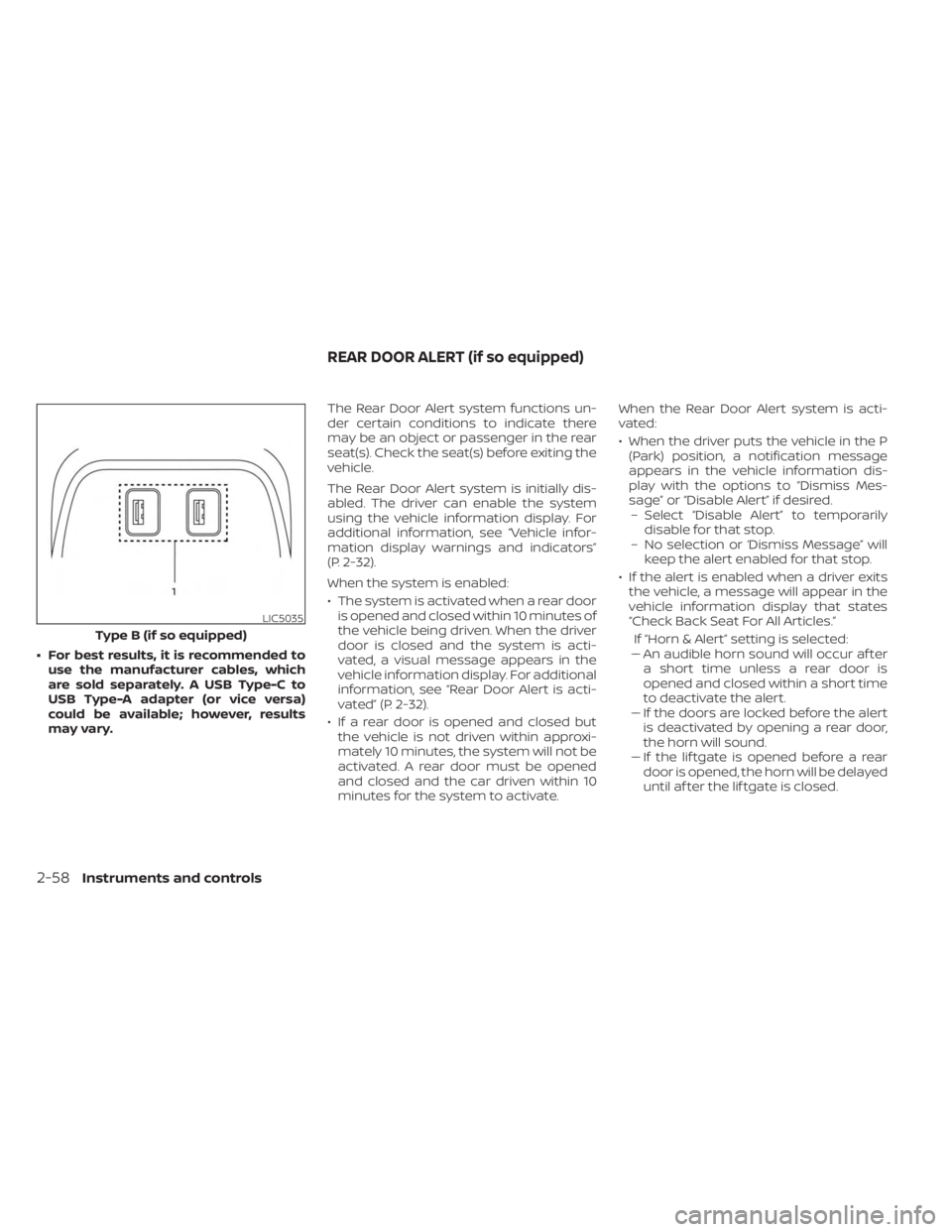
• For best results, it is recommended touse the manufacturer cables, which
are sold separately. A USB Type-C to
USB Type-A adapter (or vice versa)
could be available; however, results
may vary. The Rear Door Alert system functions un-
der certain conditions to indicate there
may be an object or passenger in the rear
seat(s). Check the seat(s) before exiting the
vehicle.
The Rear Door Alert system is initially dis-
abled. The driver can enable the system
using the vehicle information display. For
additional information, see “Vehicle infor-
mation display warnings and indicators”
(P. 2-32).
When the system is enabled:
• The system is activated when a rear door
is opened and closed within 10 minutes of
the vehicle being driven. When the driver
door is closed and the system is acti-
vated, a visual message appears in the
vehicle information display. For additional
information, see “Rear Door Alert is acti-
vated” (P. 2-32).
• If a rear door is opened and closed but the vehicle is not driven within approxi-
mately 10 minutes, the system will not be
activated. A rear door must be opened
and closed and the car driven within 10
minutes for the system to activate. When the Rear Door Alert system is acti-
vated:
• When the driver puts the vehicle in the P
(Park) position, a notification message
appears in the vehicle information dis-
play with the options to “Dismiss Mes-
sage” or “Disable Alert” if desired.– Select “Disable Alert” to temporarily disable for that stop.
– No selection or ‘Dismiss Message” will keep the alert enabled for that stop.
• If the alert is enabled when a driver exits the vehicle, a message will appear in the
vehicle information display that states
“Check Back Seat For All Articles.”
If “Horn & Alert” setting is selected:
– – An audible horn sound will occur af ter
a short time unless a rear door is
opened and closed within a short time
to deactivate the alert.
–– If the doors are locked before the alert is deactivated by opening a rear door,
the horn will sound.
–– If the lif tgate is opened before a rear door is opened, the horn will be delayed
until af ter the lif tgate is closed.
LIC5035
Type B (if so equipped)
REAR DOOR ALERT (if so equipped)
2-58Instruments and controls
Page 152 of 558
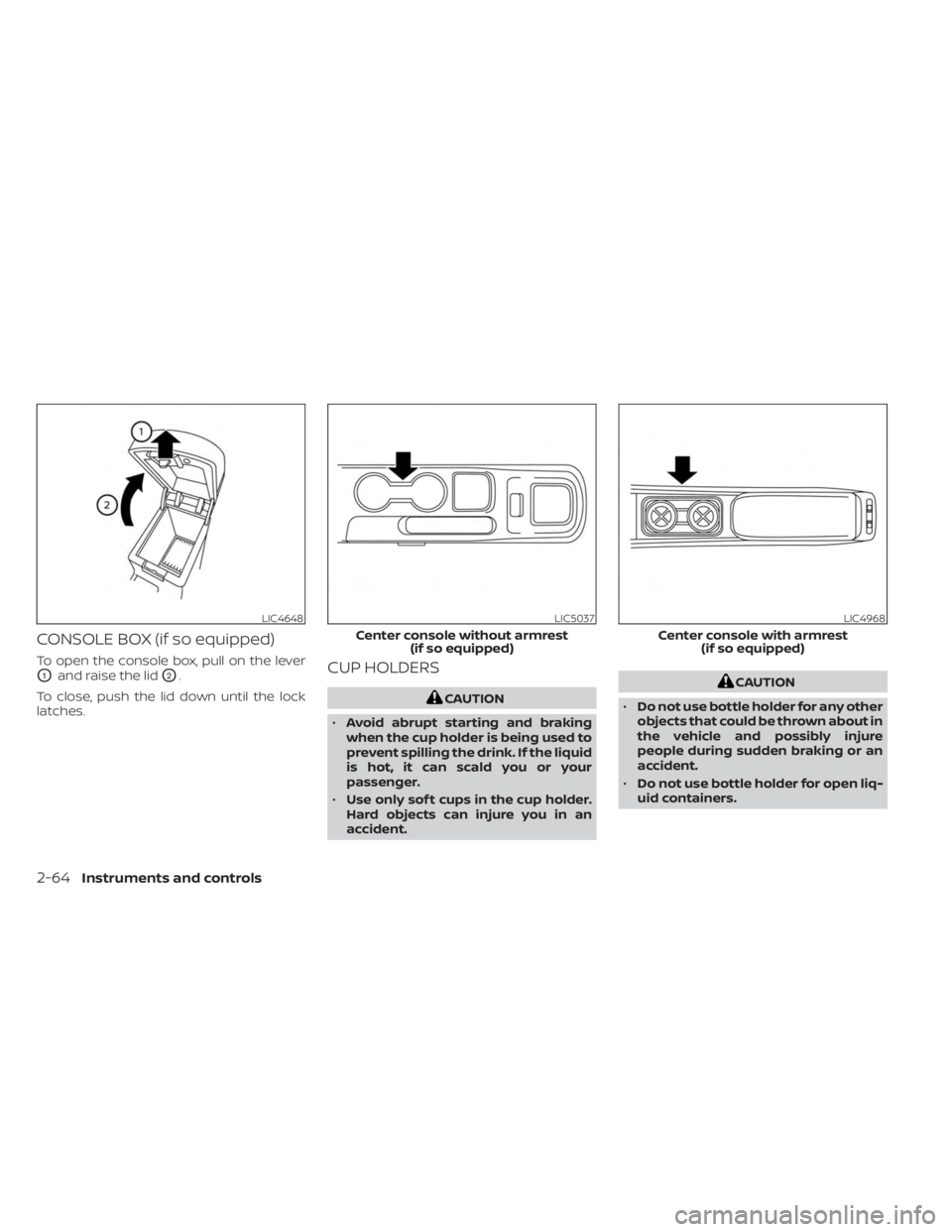
CONSOLE BOX (if so equipped)
To open the console box, pull on the lever
O1and raise the lidO2.
To close, push the lid down until the lock
latches.CUP HOLDERS
CAUTION
• Avoid abrupt starting and braking
when the cup holder is being used to
prevent spilling the drink. If the liquid
is hot, it can scald you or your
passenger.
• Use only sof t cups in the cup holder.
Hard objects can injure you in an
accident.
CAUTION
• Do not use bottle holder for any other
objects that could be thrown about in
the vehicle and possibly injure
people during sudden braking or an
accident.
• Do not use bottle holder for open liq-
uid containers.
LIC4648LIC5037
Center console without armrest (if so equipped)
LIC4968
Center console with armrest(if so equipped)
2-64Instruments and controls
Page 159 of 558
WARNING
• Please locate max load label on
crossbar end support.
• Do not load more than 100 lbs. (45kg).
• Be careful that your vehicle does not
exceed the Gross Vehicle Weight Rat-
ing (GVWR) or its Gross Axle Weight
Rating (GAWR Front and Rear). The
GVWR and GAWR are located on the
Safety Compliance Certification La-
bel. For more information regarding
GVWR and GAWR, see “Dimensions
and weights” (P. 10-9).
• Always evenly distribute the luggage
and appropriate crossbar attach-
ment on the crossbar.POWER WINDOWS
WARNING
• Make sure that all passengers have
their hands, etc., inside the vehicle
while it is in motion and before clos-
ing the windows. Use the window
lock switch to prevent unexpected
use of the power windows.
• To help avoid risk of injury or death
through unintended operation of the
vehicle and/or its systems, including
entrapment in windows or inadver-
tent door lock activation, do not
leave children, people who require
the assistance of others or pets unat-
tended in your vehicle. Additionally,
the temperature inside a closed ve-
hicle on a warm day can quickly be-
come high enough to cause a signifi-
cant risk of injury or death to people
and pets.
The power windows operate when the ig-
nition switch is placed in the ON position or
for a period of time af ter the ignition switch
is placed in the OFF position. If the driver's
or passenger's door is opened during this
period of time, the power to the windows is
canceled.
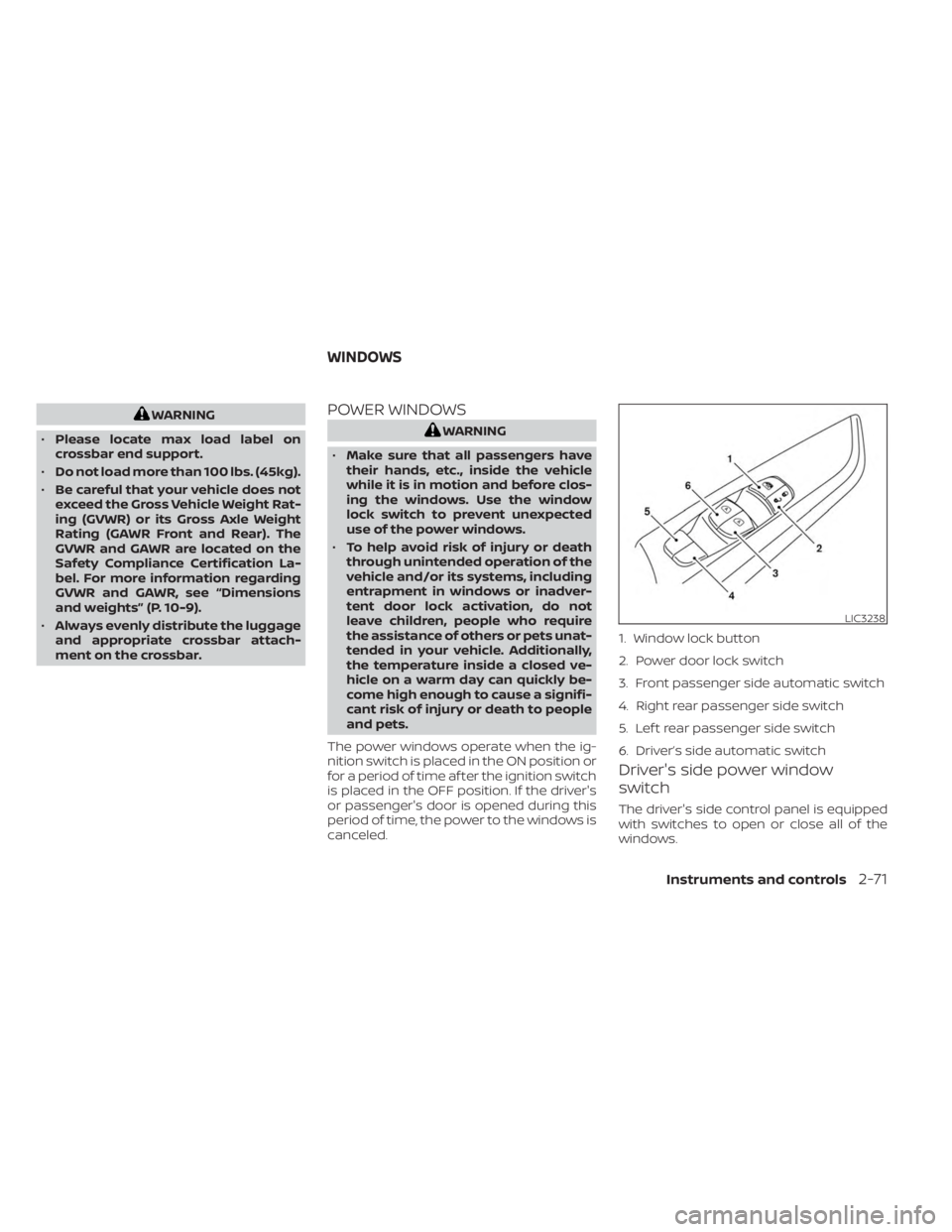
Driver's side power window
switch
The driver's side control panel is equipped
with switches to open or close all of the
windows.
LIC3238
1. Window lock button
2. Power door lock switch
3. Front passenger side automatic switch
4. Right rear passenger side switch
5. Lef t rear passenger side switch
6. Driver’s side automatic switch
WINDOWS
Instruments and controls2-71
Page 160 of 558
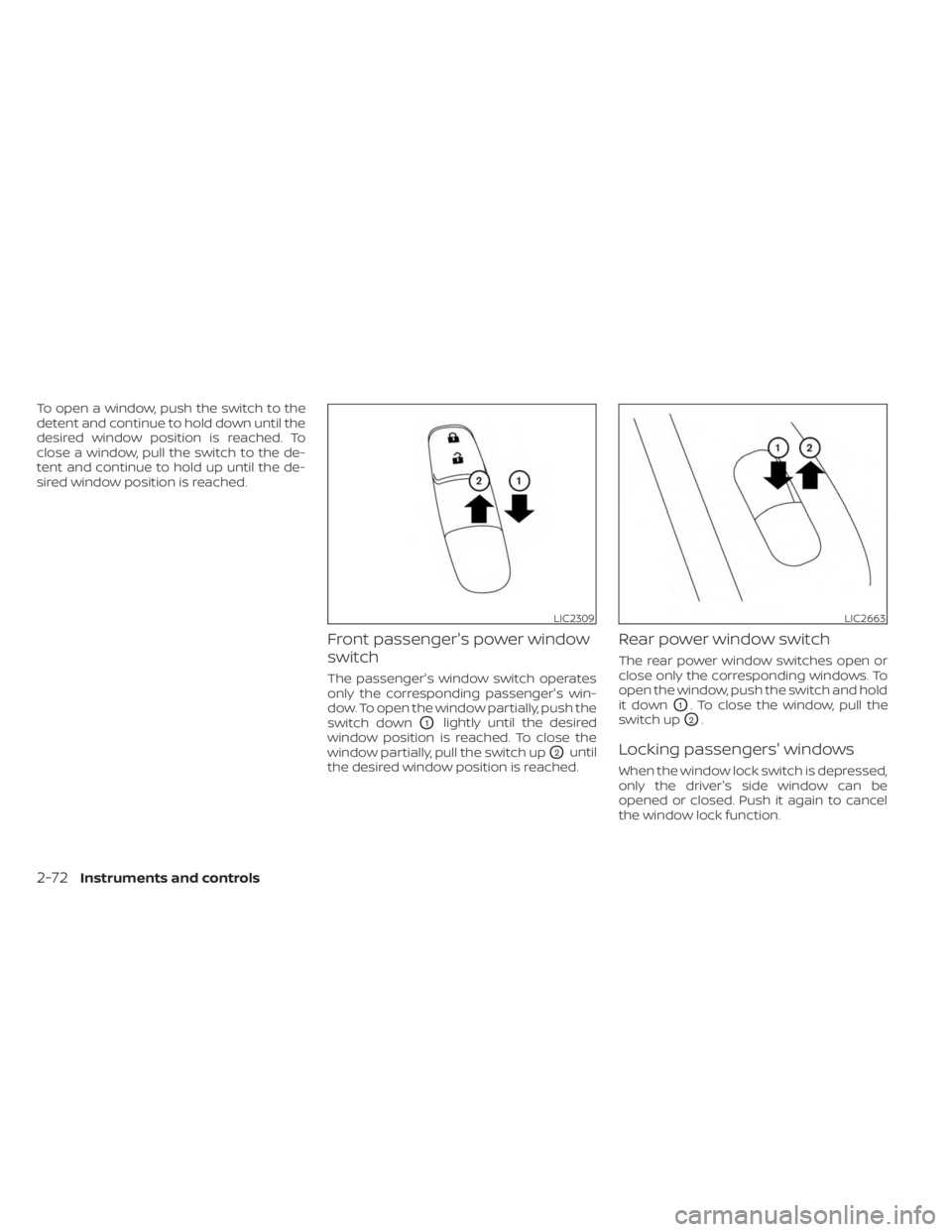
To open a window, push the switch to the
detent and continue to hold down until the
desired window position is reached. To
close a window, pull the switch to the de-
tent and continue to hold up until the de-
sired window position is reached.
Front passenger's power window
switch
The passenger's window switch operates
only the corresponding passenger's win-
dow. To open the window partially, push the
switch down
O1lightly until the desired
window position is reached. To close the
window partially, pull the switch up
O2until
the desired window position is reached.
Rear power window switch
The rear power window switches open or
close only the corresponding windows. To
open the window, push the switch and hold
it down
O1. To close the window, pull the
switch up
O2.
Locking passengers' windows
When the window lock switch is depressed,
only the driver's side window can be
opened or closed. Push it again to cancel
the window lock function.
LIC2309LIC2663
2-72Instruments and controls
Page 162 of 558
If the power window function does not op-
erate properly af ter performing the above
procedure have the system checked and
repaired. It is recommended that you visit a
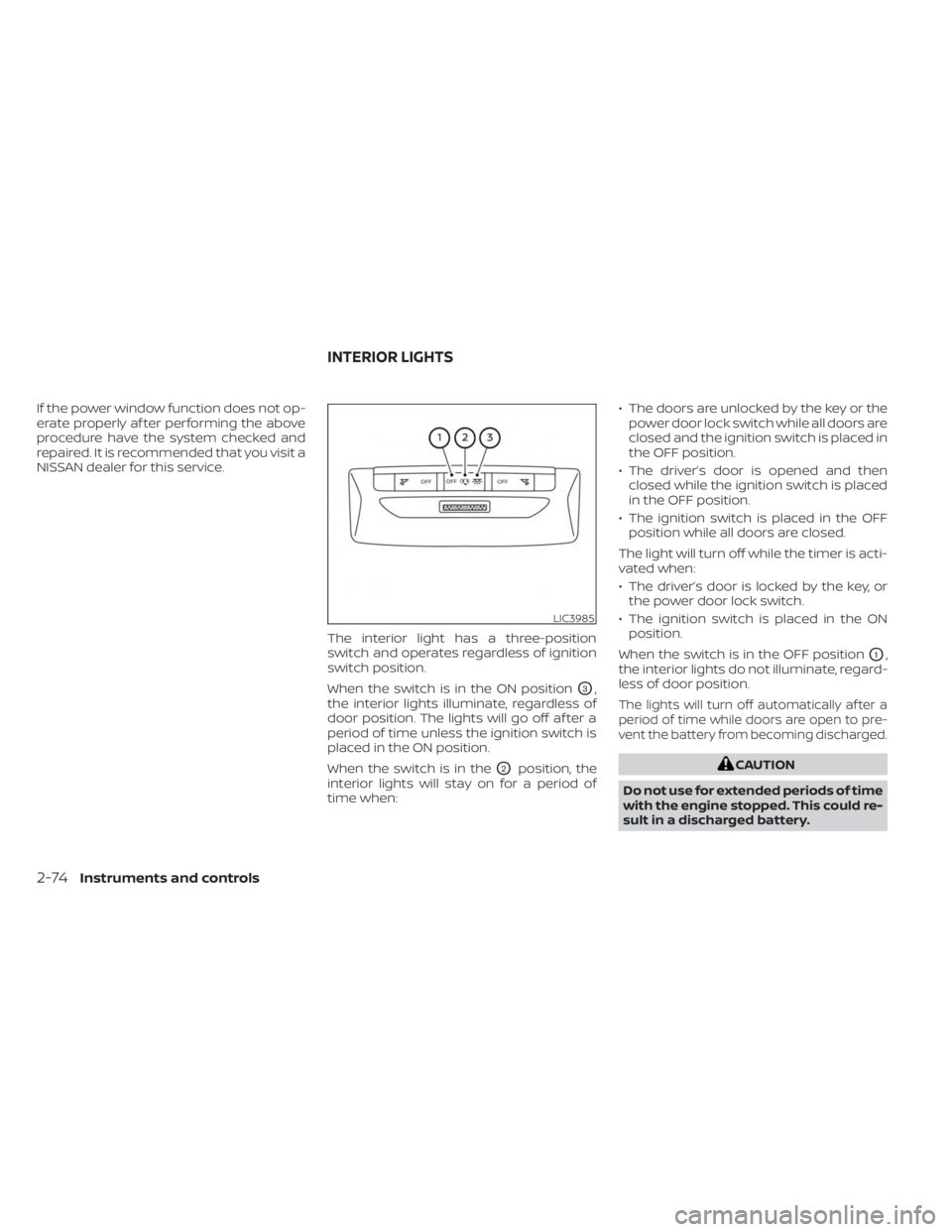
NISSAN dealer for this service.The interior light has a three-position
switch and operates regardless of ignition
switch position.
When the switch is in the ON position
O3,
the interior lights illuminate, regardless of
door position. The lights will go off af ter a
period of time unless the ignition switch is
placed in the ON position.
When the switch is in the
O2position, the
interior lights will stay on for a period of
time when: • The doors are unlocked by the key or the
power door lock switch while all doors are
closed and the ignition switch is placed in
the OFF position.
• The driver’s door is opened and then closed while the ignition switch is placed
in the OFF position.
• The ignition switch is placed in the OFF position while all doors are closed.
The light will turn off while the timer is acti-
vated when:
• The driver’s door is locked by the key, or the power door lock switch.
• The ignition switch is placed in the ON position.
When the switch is in the OFF position
O1,
the interior lights do not illuminate, regard-
less of door position.
The lights will turn off automatically af ter a
period of time while doors are open to pre-
vent the battery from becoming discharged.
CAUTION
Do not use for extended periods of time
with the engine stopped. This could re-
sult in a discharged battery.
LIC3985
INTERIOR LIGHTS
2-74Instruments and controls
Page 163 of 558
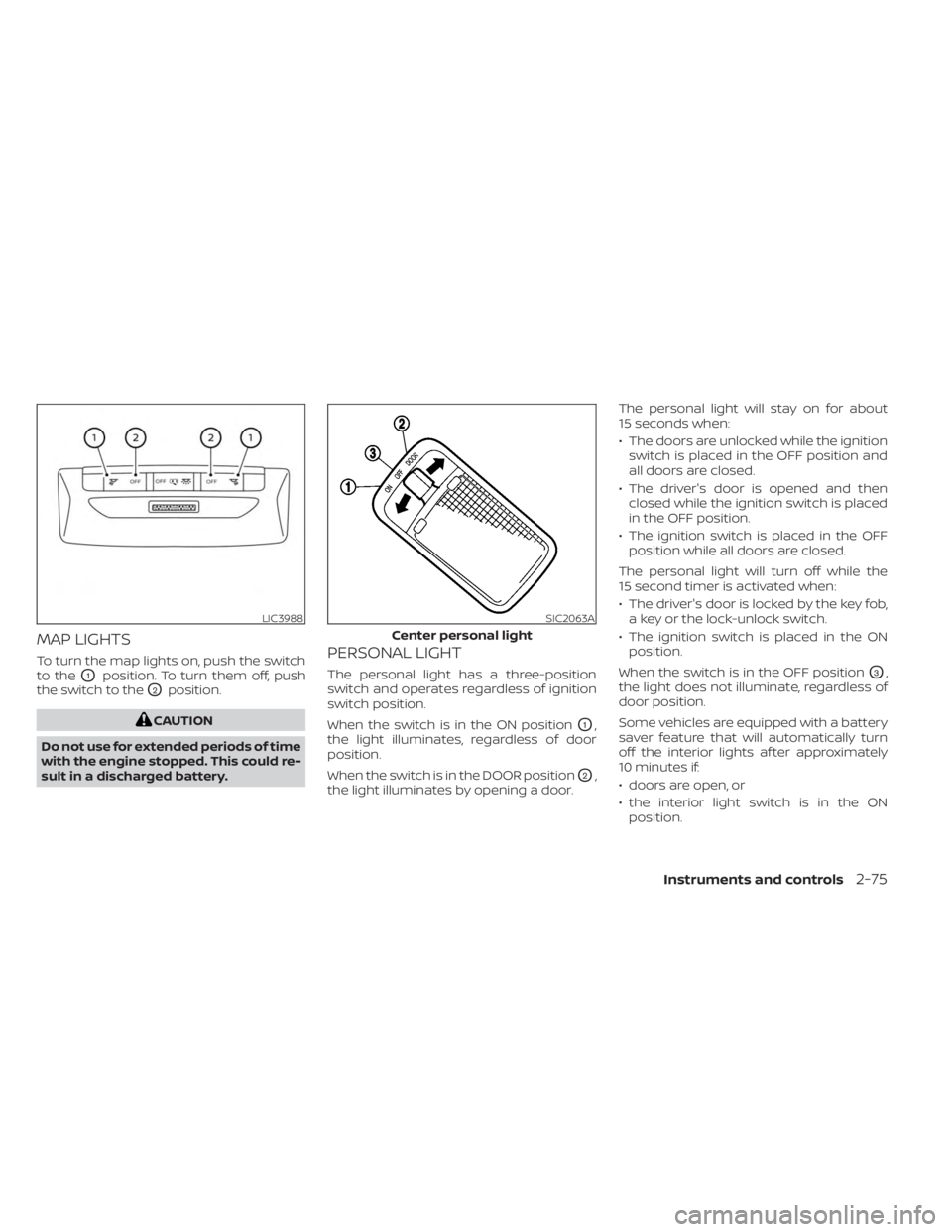
MAP LIGHTS
To turn the map lights on, push the switch
to the
O1position. To turn them off, push
the switch to the
O2position.
CAUTION
Do not use for extended periods of time
with the engine stopped. This could re-
sult in a discharged battery.
PERSONAL LIGHT
The personal light has a three-position
switch and operates regardless of ignition
switch position.
When the switch is in the ON position
O1,
the light illuminates, regardless of door
position.
When the switch is in the DOOR position
O2,
the light illuminates by opening a door. The personal light will stay on for about
15 seconds when:
• The doors are unlocked while the ignition
switch is placed in the OFF position and
all doors are closed.
• The driver's door is opened and then closed while the ignition switch is placed
in the OFF position.
• The ignition switch is placed in the OFF position while all doors are closed.
The personal light will turn off while the
15 second timer is activated when:
• The driver's door is locked by the key fob, a key or the lock-unlock switch.
• The ignition switch is placed in the ON position.
When the switch is in the OFF position
O3,
the light does not illuminate, regardless of
door position.
Some vehicles are equipped with a battery
saver feature that will automatically turn
off the interior lights af ter approximately
10 minutes if:
• doors are open, or
• the interior light switch is in the ON position.
LIC3988SIC2063A
Center personal light
Instruments and controls2-75
Page 165 of 558
3 Pre-driving checks and adjustments
Keys.............................................3-2NISSAN Intelligent Key® .......................3-2
NISSAN Vehicle Immobilizer System
keys..........................................3-3
Doors ...........................................3-4
Locking with key .............................3-4
Locking with inside lock knob ................3-5
Locking with power door lock switch .........3-5
Automatic door locks ........................3-5
Child safety rear door lock ....................3-6
NISSAN Intelligent Key® system ..................3-6
Operating range ............................. 3-7
Door locks/unlocks precaution ...............3-8
NISSAN Intelligent Key® Operation ............3-9
How to use the remote keyless entry
function ..................................... 3-12
Warning signals ............................. 3-15
Troubleshooting guide ......................3-15
Remote Engine Start (if so equipped) ...........3-18
Remote Engine Start operating range .......3-18
Remote starting the vehicle .................3-19
Extending engine run time ..................3-19
Canceling a Remote Engine Start ...........3-19 Conditions the Remote Engine Start will
notwork ....................................
3-20
Hood ........................................... 3-21
Lif tgate ........................................ 3-22
Opening the lif tgate ......................... 3-23
Closing the lif tgate .......................... 3-23
Secondary lif tgate unlock ...................3-24
Fuel-filler door .................................. 3-25
Opening the fuel-filler door ..................3-25
Fuel-filler cap ................................ 3-25
Steering wheel ................................. 3-26
Tilt and telescopic operation ................3-27
Sun visors ...................................... 3-27
Vanity mirrors ............................... 3-28
Card holder (driver's side only) ...............3-28
Mirrors ......................................... 3-28
Manual anti-glare rearview mirror
(if so equipped) .............................. 3-28
Automatic anti-glare rearview mirror
(if so equipped) .............................. 3-29
Outside mirrors .............................
3-29
Page 167 of 558
•Do not place the Intelligent Key for an
extended period in a place where
temperatures exceed 140°F (60°C).
• Do not attach the Intelligent Key with
a key holder that contains a magnet.
• Do not place the Intelligent Key near
equipment that produces a magnetic
field, such as a TV, audio equipment
and personal computers.
If an Intelligent Key is lost or stolen, NISSAN
recommends erasing the ID code of that
Intelligent Key from the vehicle. This may
prevent the unauthorized use of the Intelli-
gent Key to operate the vehicle. For infor-
mation regarding the erasing procedure, it
is recommended that you visit a NISSAN
dealer.
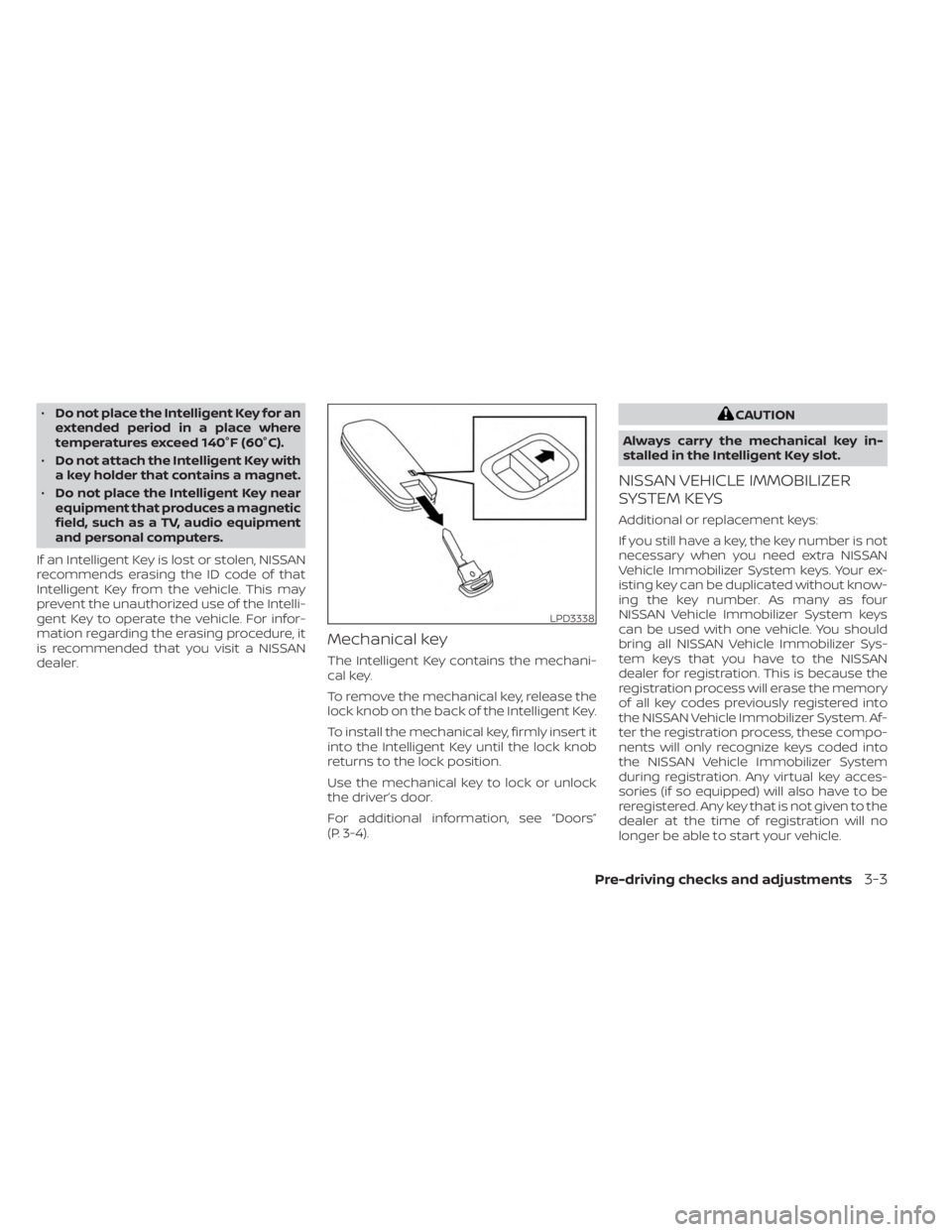
Mechanical key
The Intelligent Key contains the mechani-
cal key.
To remove the mechanical key, release the
lock knob on the back of the Intelligent Key.
To install the mechanical key, firmly insert it
into the Intelligent Key until the lock knob
returns to the lock position.
Use the mechanical key to lock or unlock
the driver’s door.
For additional information, see “Doors”
(P. 3-4).
CAUTION
Always carry the mechanical key in-
stalled in the Intelligent Key slot.
NISSAN VEHICLE IMMOBILIZER
SYSTEM KEYS
Additional or replacement keys:
If you still have a key, the key number is not
necessary when you need extra NISSAN
Vehicle Immobilizer System keys. Your ex-
isting key can be duplicated without know-
ing the key number. As many as four
NISSAN Vehicle Immobilizer System keys
can be used with one vehicle. You should
bring all NISSAN Vehicle Immobilizer Sys-
tem keys that you have to the NISSAN
dealer for registration. This is because the
registration process will erase the memory
of all key codes previously registered into
the NISSAN Vehicle Immobilizer System. Af-
ter the registration process, these compo-
nents will only recognize keys coded into
the NISSAN Vehicle Immobilizer System
during registration. Any virtual key acces-
sories (if so equipped) will also have to be
reregistered. Any key that is not given to the
dealer at the time of registration will no
longer be able to start your vehicle.
LPD3338
Pre-driving checks and adjustments3-3