2023 NISSAN FRONTIER steering wheel
[x] Cancel search: steering wheelPage 250 of 572

Rear-wide view
The rear-wide view shows a wider area on
the entire screen and allows the checking
of the blind corners on right and lef t sides.
The rear-wide view displays an approxi-
mately 180-degree area. The predicted
course lines are not displayed when using
the rear-wide view.Distance guide lines
Indicates distances from the vehicle body:
• Red line
O1: approximately 1.5 f t (0.5 m)
• Yellow line
O2: approximately 3 f t (1 m)
• Green line
O3: approximately 7 f t (2 m)
Vehicle width guide lines
O4
Indicate the vehicle width when backing
up.
Predicted course lines
O5
Indicate the predicted course when oper-
ating the vehicle. The predicted course
lines will be displayed on the monitor when
the steering wheel is turned. The predicted
course lines will move depending on how
much the steering wheel is turned and will
not be displayed while the steering wheel is
in the straight-ahead position.
Center guide lines
O6
Indicates the vehicle’s center.
DIFFERENCE BETWEEN PREDICTED
AND ACTUAL DISTANCES
The displayed guidelines and their loca-
tions on the ground are for approximate
reference only. Objects on uphill or downhill
surfaces or projecting objects will be actu-
ally located at distances different from
those displayed in the monitor relative to
the guidelines (refer to illustrations). When
in doubt, turn around and view the objects
as you are backing up, or park and exit the
vehicle to view the positioning of objects
behind the vehicle.
LHA6431
Rear-wide view
4-16Monitor, climate, audio, phone and voice recognition systems
Page 252 of 572
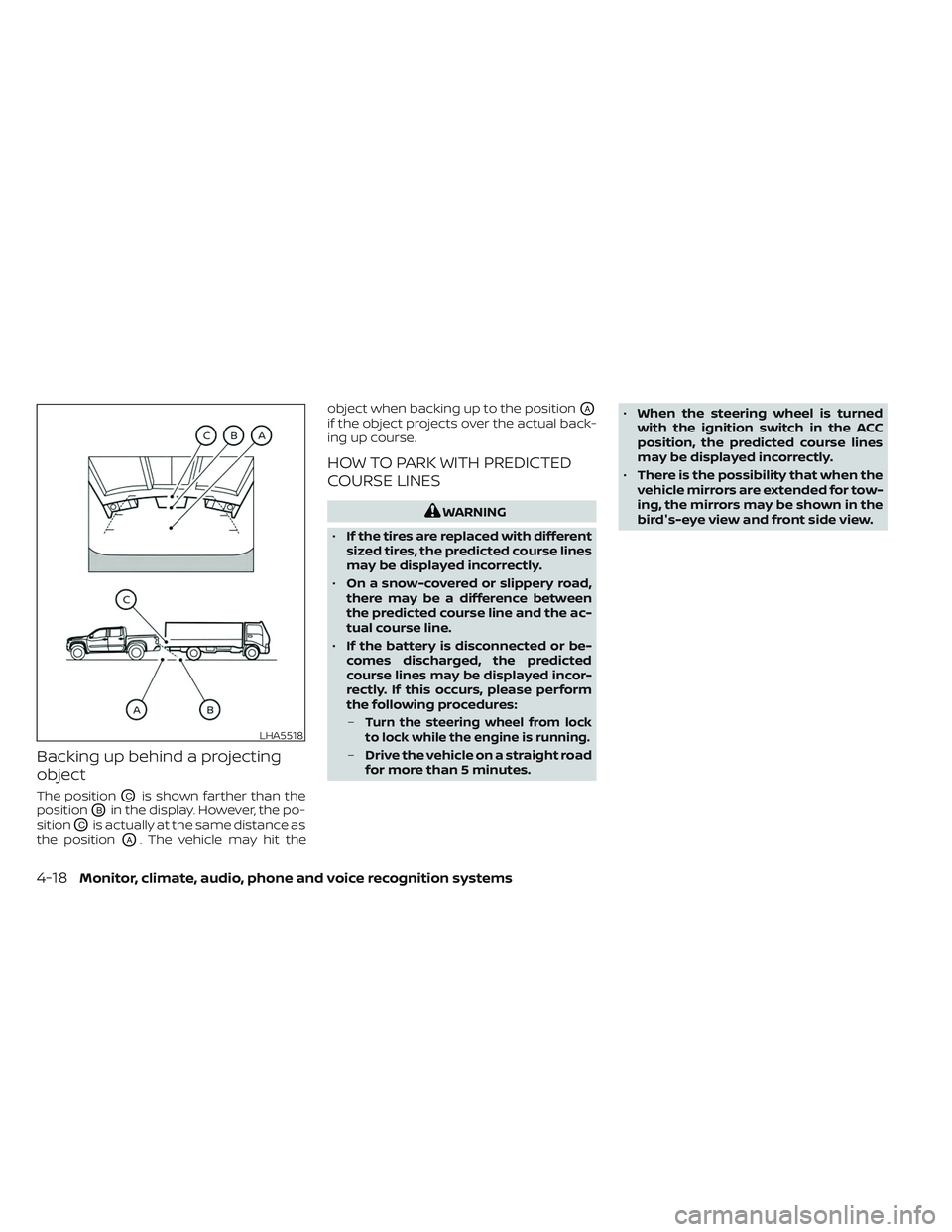
Backing up behind a projecting
object
The positionOCis shown farther than the
position
OBin the display. However, the po-
sition
OCis actually at the same distance as
the position
OA. The vehicle may hit the object when backing up to the position
OA
if the object projects over the actual back-
ing up course.
HOW TO PARK WITH PREDICTED
COURSE LINES
WARNING
• If the tires are replaced with different
sized tires, the predicted course lines
may be displayed incorrectly.
• On a snow-covered or slippery road,
there may be a difference between
the predicted course line and the ac-
tual course line.
• If the battery is disconnected or be-
comes discharged, the predicted
course lines may be displayed incor-
rectly. If this occurs, please perform
the following procedures:
–
Turn the steering wheel from lock
to lock while the engine is running.
– Drive the vehicle on a straight road
for more than 5 minutes. •
When the steering wheel is turned
with the ignition switch in the ACC
position, the predicted course lines
may be displayed incorrectly.
• There is the possibility that when the
vehicle mirrors are extended for tow-
ing, the mirrors may be shown in the
bird's-eye view and front side view.
LHA5518
4-18Monitor, climate, audio, phone and voice recognition systems
Page 253 of 572

1. Visually check that the parking space issafe before parking your vehicle.
2. The rear view of the vehicle is displayed on the screen
OAwhen the shif t lever is
moved to the R (Reverse) position. 3. Slowly back up the vehicle adjusting the
steering wheel so that the predicted
course lines
OBenter the parking space
OC. 4. Maneuver the steering wheel to make
the vehicle width guide lines
ODparallel
to the parking space
OCwhile referring
to the predicted course lines.
5. When the vehicle is parked in the space completely, move the shif t lever to the P
(Park) position and apply the parking
brake.
HOW TO SWITCH THE DISPLAY
With the ignition switch in the ON position,
press the CAMERA button or move the shif t
lever to the R (Reverse) position to operate
the Intelligent Around View® Monitor.
The Intelligent Around View® Monitor dis-
plays different split screen views depend-
ing on the position of the shif t lever. Press
the CAMERA button to switch between the
available views.
If the shif t lever is in the R (Reverse) position,
the available views are:
• Rear view/bird’s-eye view split screen
• Rear view/front-side view split screen
• Rear-wide view
LHA6435LHA6436
Monitor, climate, audio, phone and voice recognition systems4-19
Page 260 of 572

The MOD system does not detect moving
objects in the front-side view. The MOD
icon is not displayed on the screen when in
this view.
When the MOD system detects moving ob-
jects near the vehicle, a chime will be heard
and a yellow frame will be displayed on the
view where the objects are detected. While
the MOD system continues to detect mov-
ing objects, the yellow frame continues to
be displayed.NOTE:
While the RCTA chime is beeping, the
MOD system will not chime.
In the bird’s-eye view, the yellow frame
O1is
displayed on each camera image (front,
rear, right, lef t) depending on where mov-
ing objects are detected.
The yellow frame
O2is displayed on each
view in the front view and rear view modes. A blue MOD icon
O3is displayed in the view
where the MOD system is operative. A gray
MOD icon is displayed in the view where the
MOD system is not operative.
If the MOD system is turned off, the MOD
icon
O3is not displayed.
TURNING MOD ON AND OFF (if so
equipped)
Some vehicles include the option to allow
the MOD system to be turned on or off.
To turn the MOD system on or off:
1. Press the
orbutton on the
steering wheel to navigate to the “Set-
tings” screen.
2. Using the
buttons, select “Driver
Assistance” and press the ENTER button.
3. Select “Parking Aids” and press the EN- TER button.
4. Toggle ON or OFF “Moving Object” using the ENTER button.
You can also turn the MOD on or off by
pressing the Parking Aids system switch (if
so equipped).
LHA4997
Rear and front-side views
LHA4998
Rear-wide view
4-26Monitor, climate, audio, phone and voice recognition systems
Page 274 of 572

2. Turn the temperature control dial to thelef t or the right to set the desired tem-
perature. Driver and passenger tem-
peratures can be set independently.
Press the DUAL button to activate dual
climate control functions. Turn the pas-
senger’s side temperature control dial
to the lef t or right to set the desired
passenger’s temperature.
• The temperature of the passenger com- partment will be maintained automati-
cally. Air flow distribution and fan speed
are also controlled automatically.
• Do not set the temperature lower than the outside air temperature. Otherwise,
the system may not work properly.
• Not recommended if windows fog up.
Dehumidified defrosting or
defogging
1. Press thedefroster control button
to turn the system on. The indicator light
in the button will illuminate.
2. The fan will automatically change to blower speed 5. Blower speed can be
changed by pressing the
fan speed
control button. Increase the fan to 6
or 7 for more aggressive defogging
performance. 3. Turn the temperature dial to the lef t or
right to set the desired temperature.
• To quickly remove ice from the outside of the windows, press the
fan speed
control button to the maximum position.
• As soon as possible af ter the windshield is clean, press the AUTO button to return
to the auto mode.
• When the
control is activated, the air
conditioner will automatically be turned
on. This dehumidifies the air which helps
defog the windshield. Under this condi-
tion, the indicator light on the A/C button
indicator will not turn on if the user had
selected A/C off prior to entering this
mode. Turning off the air condition via the
A/C button is not allowed in this mode.
If the A/C button indicator was on when
entering this mode, and the A/C button is
selected in this mode, the A/C compres-
sor will still be automatically enabled.
The air recirculation mode automatically
turns off, allowing outside air to be drawn
into the passenger compartment to
further improve the defogging perfor-
mance.
Remote Engine Start with
Intelligent Climate Control (if so
equipped)
Vehicles equipped with automatic climate
controls and Remote Engine Start function
may go into automatic heating or cooling
mode when Remote Engine Start is acti-
vated depending on outside and cabin
temperatures. During this period, the cli-
mate control display and buttons will be
inoperable until the ignition switch is
placed in the ON position. In Remote
Engine Start defrosting mode, the outside
mirror defroster (if so equipped) and
heated steering wheel (if so equipped) may
be activated automatically.
Voice Recognition logic (if so
equipped)
When the climate control system is on, the
front and rear (if so equipped) fan speeds
may be automatically lowered so that
commands are more easily recognized.
Fan speed can be adjusted using the
fan speed
decrease andin-
crease buttons, if desired.
4-40Monitor, climate, audio, phone and voice recognition systems
Page 283 of 572

System malfunction........................ 5-102
System maintenance ......................5-103
Intelligent Driver Alertness (I-DA) ...............5-104
Intelligent Driver Alertness system
operation .................................. 5-105
How to enable/disable the Intelligent
Driver Alertness (I-DA) system ..............5-106
Intelligent Driver Alertness (I-DA)
system limitations ......................... 5-107
Break-in schedule ............................. 5-107
Fuel efficient driving tips .......................5-108
Increasing fuel economy ......................5-109
Using 4–wheel drive (4WD)
(if so equipped) ................................ 5-109
Transfer case shif ting procedures ..........5-110
Electronic locking rear differential (E-Lock)
system (if so equipped) ........................ 5-115
Parking/parking on hills .......................5-116
Power steering ................................. 5-117
Brake system ................................. 5-118
Brake precautions .......................... 5-118
Anti-lock Braking System (ABS) .............5-118
Active Brake Limited Slip (ABLS) system .......5-120 Vehicle Dynamic Control (VDC) system
........5-121
Brake force distribution ....................5-122
Hill descent control system (if so equipped) . . . 5-123
Hill start assist system ........................5-124
Rear Sonar System (RSS) (if so equipped) ......5-124
System operation .......................... 5-125
How to enable/disable the RSS .............5-127
Sonar limitations ........................... 5-128
System temporarily unavailable ............5-128
System maintenance ......................5-128
Idling Stop System (if so equipped) ............5-129
Retrograde movement control function ....5-131
Idling Stop System display ..................5-131
Idling Stop OFF switch ......................5-133
Cold weather driving .......................... 5-134
Freeing a frozen door lock ..................5-134
Antifreeze .................................. 5-134
Battery..................................... 5-134
Draining of coolant water ..................5-134
Tire equipment ............................. 5-134
Special winter equipment ..................5-135
Driving on snow or ice ......................5-135
Engine block heater (if so equipped) ........5-135
Page 287 of 572

WARNING
• Radio waves could adversely affect
electric medical equipment. Those
who use a pacemaker should contact
the electric medical equipment
manufacturer for the possible influ-
ences before use.
• If the low tire pressure warning light
illuminates while driving, avoid sud-
den steering maneuvers or abrupt
braking, reduce vehicle speed, pull
off the road to a safe location and
stop the vehicle as soon as possible.
Driving with under-inflated tires may
permanently damage the tires and
increase the likelihood of tire failure.
Serious vehicle damage could occur
and may lead to an accident and
could result in serious personal in-
jury. Check the tire pressure for all
four tires. Adjust the tire pressure to
the recommended COLD tire pres-
sure shown on the Tire and Loading
information label to turn the low tire
pressure warning light off. If you have
a flat tire, replace it with a spare tire
as soon as possible. For additional
information, see “Flat tire” (P. 6-3) for
changing a flat tire. •
When using a wheel without the
TPMS such as a spare tire, when a
spare tire is mounted or a wheel is
replaced, the TPMS will not function
and the low tire pressure warning
light will flash for approximately 1
minute. The light will remain on af ter
1 minute. Have your tires replaced
and/or TPMS system reset as soon as
possible. It is recommended that you
visit a NISSAN dealer for this service.
• Replacing tires with those not origi-
nally specified by NISSAN could af-
fect the proper operation of the
TPMS.
• Do not inject any tire liquid or aerosol
tire sealant into the tires, as this may
cause a malfunction of the tire pres-
sure sensors.
CAUTION
Do not place metalized film or any
metal parts (antenna, etc.) on the win-
dows. This may cause poor reception of
the signals from the tire pressure sen-
sors, and the TPMS will not function
properly. Some devices and transmitters may tem-
porarily interfere with the operation of the
TPMS and cause the low tire pressure
warning light to illuminate.
Some examples are:
• Facilities or electric devices using similar
radio frequencies are near the vehicle.
• If a transmitter set to similar frequencies is being used in or near the vehicle.
• If a computer (or similar equipment) or a DC/AC converter is being used in or near
the vehicle.
The low tire pressure warning light may
illuminate in the following cases:
• If the vehicle is equipped with a wheel and tire without TPMS.
• If the TPMS has been replaced and the ID has not been registered.
• If the wheel is not originally specified by NISSAN.
Starting and driving5-7
Page 289 of 572

– The battery of the tire pressure sen-sor is low.
• If the Easy-Fill Tire Alert does not oper- ate due to TPMS interference, move
the vehicle about 3 f t (1 m) backward
or forward and try again.
If the Easy-Fill Tire Alert is not working, use a
tire pressure gauge.
ON-PAVEMENT AND OFF-ROAD
DRIVING PRECAUTIONS
Utility vehicles have a significantly
higher rollover rate than other types of
vehicles.
They have higher ground clearance than
passenger cars to make them capable of
performing in a variety of on-pavement
and off-road applications. This gives them
a higher center of gravity than ordinary ve-
hicles. An advantage of higher ground
clearance is a better view of the road, allow-
ing you to anticipate problems. However,
they are not designed for cornering at the
same speeds as conventional 2-Wheel
Drive vehicles any more than low-slung
sports cars are designed to perform satis-
factorily under off-road conditions. If at all
possible, avoid sharp turns at high speeds.
As with other vehicles of this type, failure to operate this vehicle correctly may result in
loss of control or vehicle rollover.
In a rollover crash, an unbelted person is
significantly more likely to die than a per-
son wearing a seat belt.
For additional information, see “Driving
safety precautions” (P. 5-11).
AVOIDING COLLISION AND
ROLLOVER
WARNING
Failure to operate this vehicle in a safe
and prudent manner may result in loss
of control or an accident.
Be alert and drive defensively at all times.
Obey all traffic regulations. Avoid excessive
speed, high speed cornering, or sudden
steering maneuvers, because these driving
practices could cause you to lose control of
your vehicle.
As with any vehicle, loss of control could
result in a collision with other vehicles or
objects or cause the vehicle to roll over,
particularly if the loss of control causes
the vehicle to slide sideways.
Be attentive at all times, and avoid driving
when tired. Never drive when under the in- fluence of alcohol or drugs (including pre-
scription or over-the-counter drugs which
may cause drowsiness). Always wear your
seat belt as outlined in the “Safety – Seats,
seat belts and supplemental restraint sys-
tem” section of this manual, and also in-
struct your passengers to do so.
Seat belts help reduce the risk of injury in
collisions and rollovers.
In a rollover crash, an unbelted person is
significantly more likely to die than a
person wearing a seat belt.
OFF-ROAD RECOVERY
While driving, the right side or lef t side
wheels may unintentionally leave the road
surface. If this occurs, maintain control of
the vehicle by following the procedure be-
low. Please note that this procedure is only
a general guide. The vehicle must be driven
as appropriate based on the conditions of
the vehicle, road and traffic.
1. Remain calm and do not overreact.
2. Do not apply the brakes.
3. Maintain a firm grip on the steering
wheel with both hands and try to hold a
straight course.
Starting and driving5-9