Page 277 of 644
When installing a CB, ham radio or car
phone in your vehicle, be sure to observe
the following precautions; otherwise, the
new equipment may adversely affect the
engine control system and other electronic
parts.
WARNING
• A cellular phone should not be used
for any purpose while driving so full
attention may be given to vehicle op-
eration. Some jurisdictions prohibit
the use of cellular phones while
driving.
• If you must make a call while your
vehicle is in motion, the hands free
cellular phone operational mode is
highly recommended. Exercise ex-
treme caution at all times so full at-
tention may be given to vehicle
operation.
• If you are unable to devote full atten-
tion to vehicle operation while talk-
ing on the phone, pull off the road to
a safe location and stop your vehicle.
CAUTION
• Keep the antenna as far away as pos-
sible from the electronic control
modules.
• Keep the antenna wire more than 8 in
(20 cm) away from the electronic
control system harnesses. Do not
route the antenna wire next to any
harness.
• Adjust the antenna standing-wave
ratio as recommended by the
manufacturer.
• Connect the ground wire from the CB
radio chassis to the body.
• For additional information, it is rec-
ommended that you visit a NISSAN
dealer for servicing.WARNING
• Use a phone af ter stopping your ve-
hicle in a safe location. If you have to
use a phone while driving, exercise
extreme caution at all times so full
attention may be given to vehicle
operation.
• If you are unable to devote full atten-
tion to vehicle operation while talk-
ing on the phone, pull off the road to
a safe location and stop your vehicle.
CAUTION
To avoid discharging the vehicle bat-
tery, use a phone af ter starting the
engine.
CAR PHONE OR CB RADIO BLUETOOTH® HANDS-FREE PHONE
SYSTEM
Monitor, climate, audio, phone and voice recognition systems4-67
Page 502 of 644
WARNING
Always follow the instructions below.
Failure to do so could result in damage
to the charging system and cause per-
sonal injury.
1. If the booster battery is in another ve- hicle, position the two vehicles to bring
their batteries near each other.
Do not allow the two vehicles to touch.
2. Apply the parking brake. Move the shif t lever to P (Park). Switch off all unneces-
sary electrical systems (lights, heater, air
conditioner, etc.). 3. Place the ignition switch in the LOCK
position.
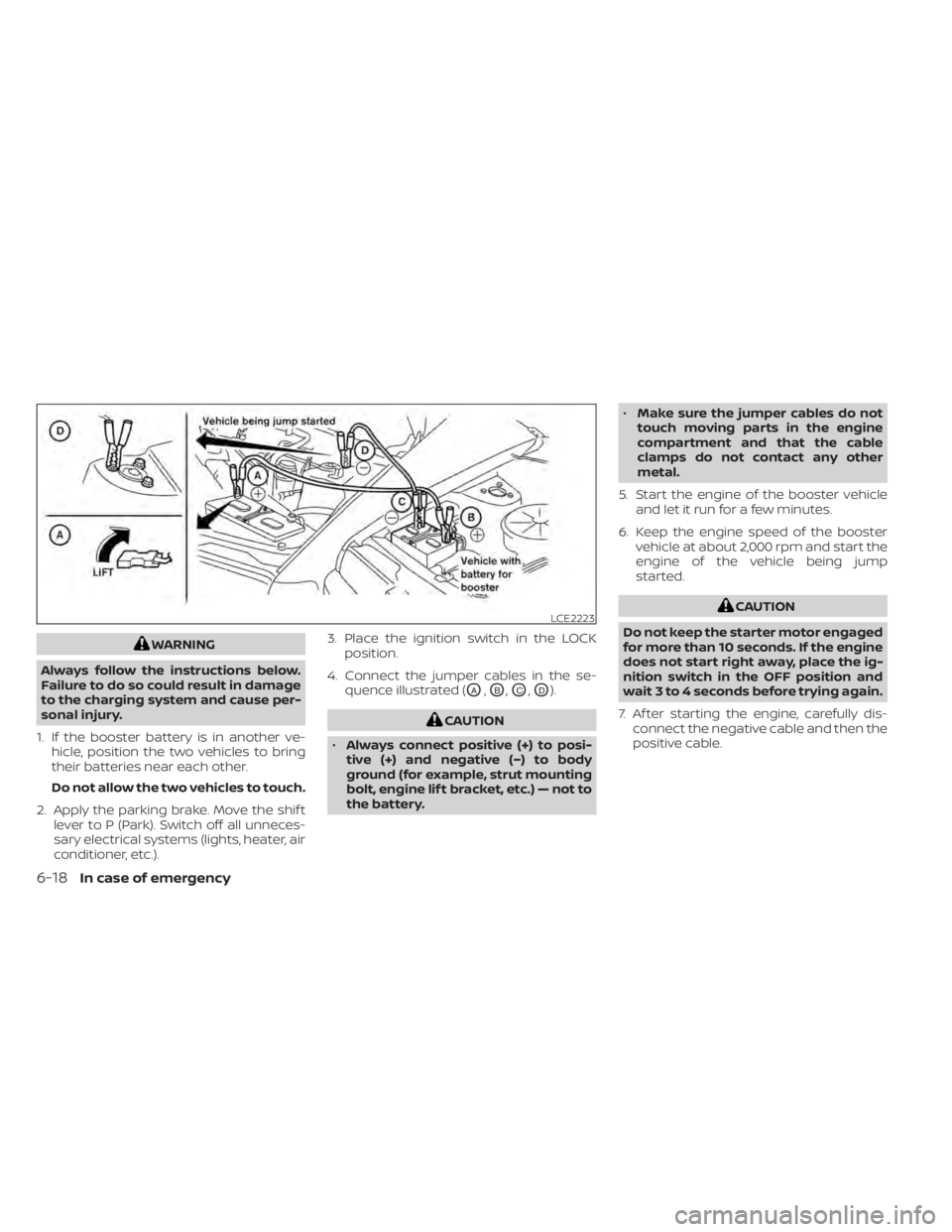
4. Connect the jumper cables in the se- quence illustrated (
OA,OB,OC,OD).
CAUTION
• Always connect positive (+) to posi-
tive (+) and negative (−) to body
ground (for example, strut mounting
bolt, engine lif t bracket, etc.) — not to
the battery. •
Make sure the jumper cables do not
touch moving parts in the engine
compartment and that the cable
clamps do not contact any other
metal.
5. Start the engine of the booster vehicle and let it run for a few minutes.
6. Keep the engine speed of the booster vehicle at about 2,000 rpm and start the
engine of the vehicle being jump
started.
CAUTION
Do not keep the starter motor engaged
for more than 10 seconds. If the engine
does not start right away, place the ig-
nition switch in the OFF position and
wait 3 to 4 seconds before trying again.
7. Af ter starting the engine, carefully dis- connect the negative cable and then the
positive cable.LCE2223
6-18In case of emergency
Page 532 of 644
CAUTION
• Do not ground accessories directly to
the battery terminal. Doing so will
bypass the variable voltage control
system and the vehicle battery may
not charge completely.
• Use electrical accessories with the
engine running to avoid discharging
the vehicle battery. Your vehicle is equipped with a variable
voltage control system. This system mea-
sures the amount of electrical discharge
from the battery and controls voltage gen-
erated by the generator.
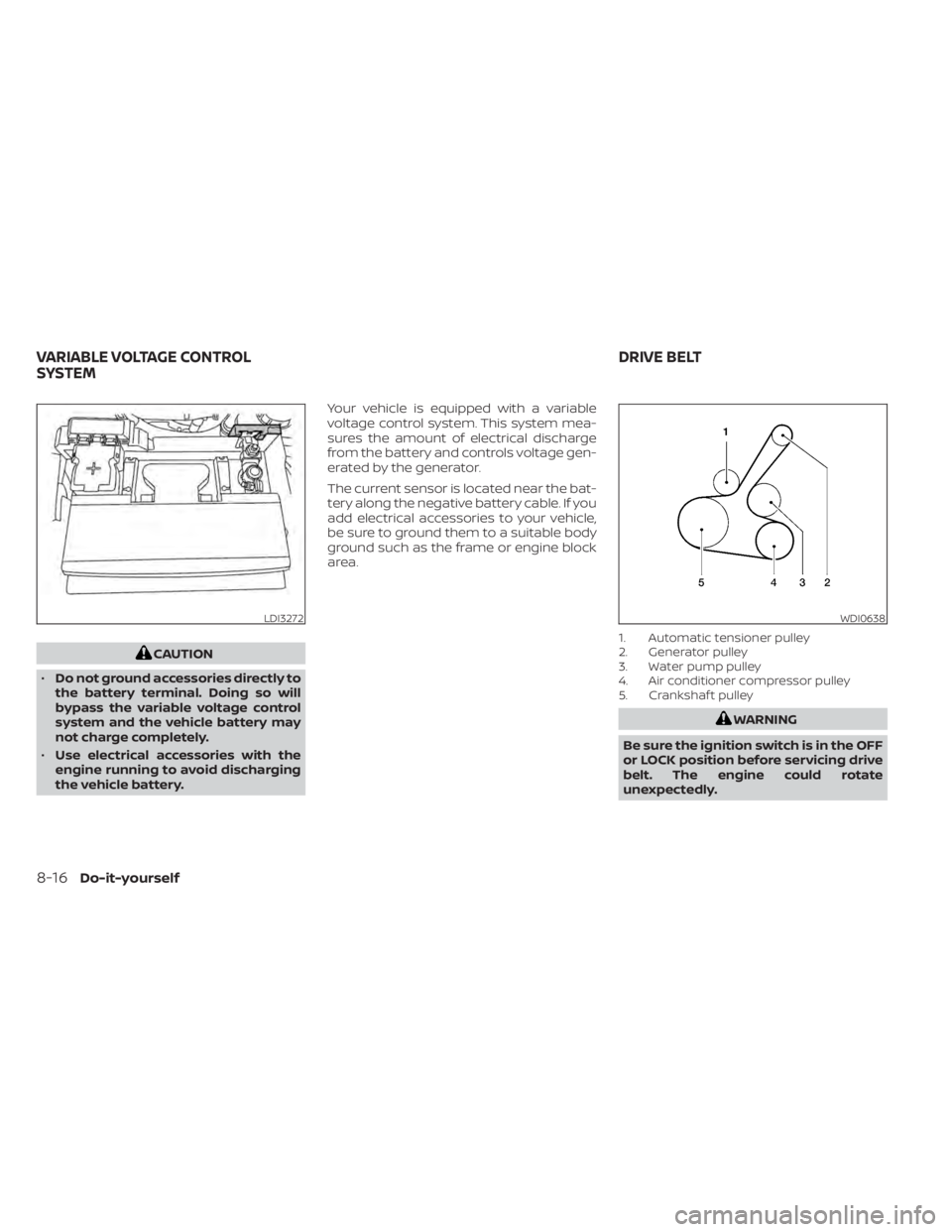
The current sensor is located near the bat-
tery along the negative battery cable. If you
add electrical accessories to your vehicle,
be sure to ground them to a suitable body
ground such as the frame or engine block
area.
1. Automatic tensioner pulley
2. Generator pulley
3. Water pump pulley
4. Air conditioner compressor pulley
5. Crankshaf t pulley
WARNING
Be sure the ignition switch is in the OFF
or LOCK position before servicing drive
belt. The engine could rotate
unexpectedly.
LDI3272WDI0638
VARIABLE VOLTAGE CONTROL
SYSTEM DRIVE BELT
8-16Do-it-yourself
Page 633 of 644
Precautions on supplemental restraint
system....................1-47Supplemental restraint system
(Supplemental air bag system).......1-47Switch
Autolight switch..............2-58Automatic power window switch. . .2-76Fog light switch..............2-63Hazard warning flasher switch......6-2Headlight and turn signal switch. . . .2-57Headlight control switch.........2-57Instrument brightness control.....2-62Power door lock switch..........3-6Rear window and outside mirror defroster
switch................... .2-56Turn signal switch.............2-63
T
Tachometer...................2-6Temperature gauge
Engine coolant temperature gauge. . .2-6Thef t (NISSAN Vehicle Immobilizer System),
engine start...............2-54, 5-16Three-way catalyst...............5-4TiltTelescopic steering............3-27TireFlat tire................. .6-3, 6-4Spare tire...............6-5, 8-42Tire and Loading Information label. .10-14Tire chains..................8-37Tire pressure................8-29
Tire rotation.................8-39Types of tires................8-36Uniform tire quality grading.......10-21Wheel/tire size...............10-10Wheels and tires..............8-29Tire pressure
Low tire pressure warning light.....2-13Tire Pressure Monitoring System
(TPMS)................... .5-5, 6-3Towing
2-wheel drive models...........6-22All-wheel drive models..........6-21Flat towing................ .10-20Trailer towing...............10-20Towing a trailer................10-20Towing your vehicle..............6-20Traffic Sign Recognition (TSR)........5-30Transceiver
HomeLink® Universal
Transceiver
..........2-81, 2-83, 2-84TransmissionContinuously Variable Transmission (CVT)
fluid
......................8-12Driving with Continuously Variable
Transmission (CVT)............5-18Transmission shif t lever lock release. . .5-22Travel (See registering a vehicle in another
country)................... .10-12Trip odometer..................2-5Trunk access through the rear
seat.................... .1-6, 3-24Trunk lid.....................3-22Trunk lid lock opener lever..........3-22Trunk light...................2-80
Turn signal switch...............2-63
U
Uniform tire quality grading........10-21USB interface.................4-54USB/iPod® Charging Ports.........2-70
V
Vanity mirror..................3-29Variable voltage control system......8-16Vehicle dimensions and weights.....10-11Vehicle Dynamic Control (VDC)
system.....................5-175Vehicle identification.............10-12Vehicle identification number (VIN)
(Chassis number)...............10-12Vehicle identification number (VIN)
plate...................... .10-12Vehicle immobilizer system.....2-54, 5-16Vehicle information display.....2-18,2-34Vehicle loading information........10-16Vehicle recovery............6-22,6-23Vehicle security system...........2-52Vehicle security system
(NISSAN Vehicle Immobilizer System),
engine start
...............2-54, 5-16Ventilators.................. .4-31Visors......................3-28Voice Prompt Interrupt............4-70
11-7