2023 MAZDA MAZDA lights
[x] Cancel search: lightsPage 487 of 623
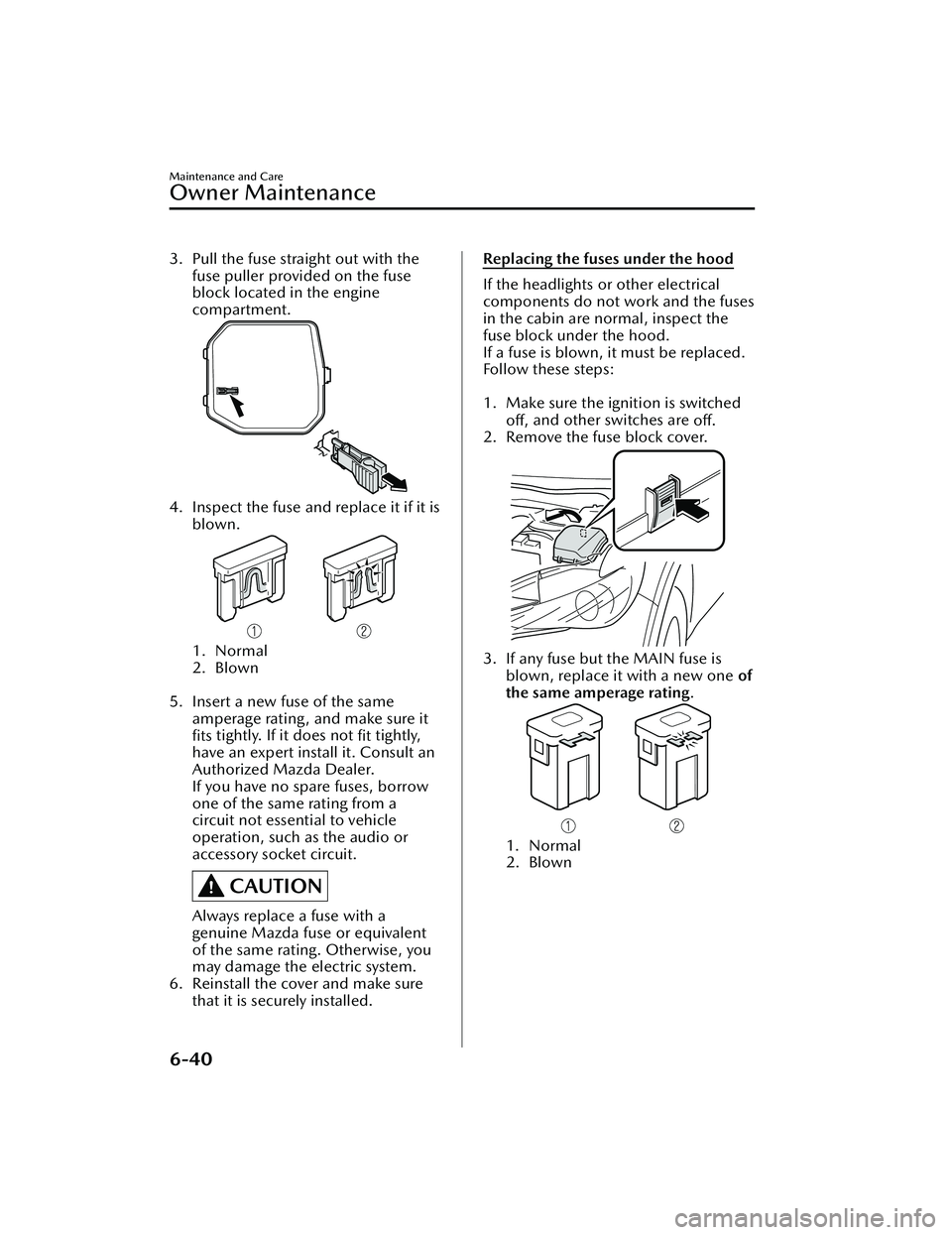
3. Pull the fuse straight out with thefuse puller provided on the fuse
block located in the engine
compartment.
4. Inspect the fuse and replace it if it is
blown.
1. Normal
2. Blown
5. Insert a new fuse of the same
amperage rating, and make sure it
fits tightly. If it does not
fit tightly,
have an expert install it. Consult an
Authorized Mazda Dealer.
If you have no spare fuses, borrow
one of the same rating from a
circuit not essential to vehicle
operation, such as the audio or
accessory socket circuit.
CAUTION
Always replace a fuse with a
genuine Mazda fuse or equivalent
of the same rating. Otherwise, you
may damage the electric system.
6. Reinstall the cover and make sure that it is securely installed.
Replacing the fuses under the hood
If the headlights or other electrical
components do not work and the fuses
in the cabin are normal, inspect the
fuse block under the hood.
If a fuse is blown, it must be replaced.
Follow these steps:
1. Make sure the ignition is switched
off, and other switches are
off.
2. Remove the fuse block cover.
3. If any fuse but the MAIN fuse is blown, replace it with a new one of
the same amperage rating .
1. Normal
2. Blown
Maintenance and Care
Owner Maintenance
6-40
Mazda3_8LC2-EA-22G_Edition1_new 2022-5-20 11:26:10
Page 493 of 623
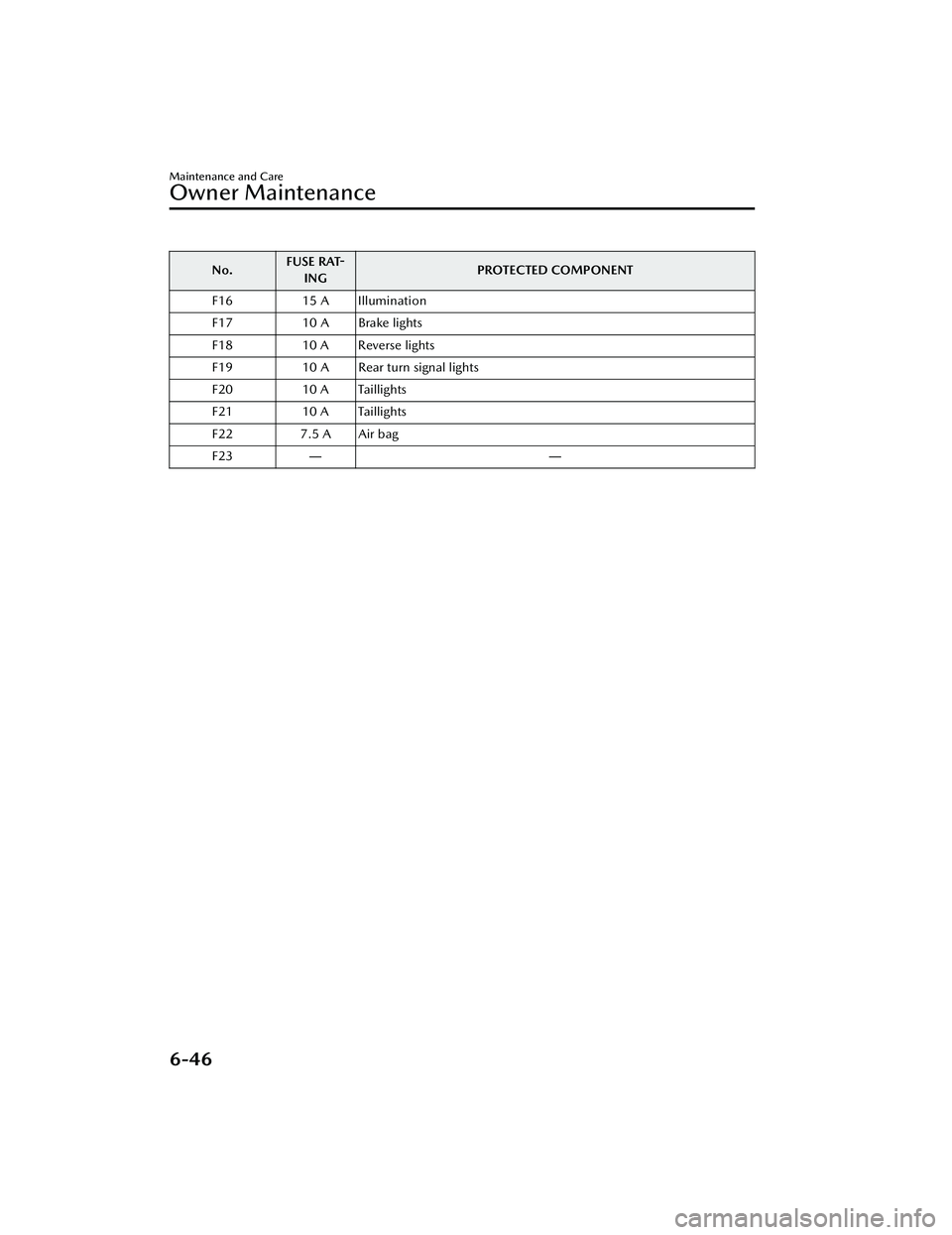
No.FUSE RAT-
ING PROTECTED COMPONENT
F16 15 A Illumination
F17 10 A Brake lights
F18 10 A Reverse lights
F19 10 A Rear turn signal lights
F20 10 A Taillights
F21 10 A Taillights
F22 7.5 A Air bag
F23 ――
Maintenance and Care
Owner Maintenance
6-46
Mazda3_8LC2-EA-22G_Edition1_new 2022-5-20 11:26:10
Page 499 of 623
▼Aluminum Wheel Maintenance*
A protective coating is provided over
the aluminum wheels. Special care is
needed to protect this coating.
CAUTION
Do not use any detergent other than
mild detergent. Before using any
detergent, verify the ingredients.
Otherwise, the product could discolor
or stain the aluminum wheels.
NOTE
Do not use a wire brush or any
abrasive cleaner, polishing
compound, or solvent on aluminum
wheels. They may damage the
coating.
Always use a sponge or soft cloth to
clean the wheels.
Rinse the wheels thoroughly with
lukewarm or cold water. Also, be
sure to clean the wheels after driving
on dusty or salted roads to help
prevent corrosion.
Avoid washing your vehicle in an
automatic car wash that uses
high-speed or hard brushes.
▼ Plastic Part Maintenance
When cleaning the plastic lenses of
the lights, do not use gasoline,
kerosene, rectified spirit, paint,
thinner, highly acidic detergents, or
strongly alkaline detergents.
Otherwise, these chemical agents
can discolor or damage the surfaces
resulting in a significant loss in
functionality. If plastic parts become
inadvertently exposed to any of these
chemical agents, flush with water
immediately.
If plastic parts such as the bumpers
become inadvertently exposed to
chemical agents or fluids such as
gasoline, oil, engine coolant, or
battery fluid, it could cause
discoloration, staining, or paint
peeling. Wipe off any such chemical
agents or fluids using a soft cloth
immediately.
High water temperature and high
water pressure car washers are
available depending on the type of
high pressure car washer device. If
the car washer nozzle is put too
close to the vehicle or aimed at one
area for an extended period of time,
it could deform plastic parts or
damage the paint.
Do not use wax containing
compounds (polish). Otherwise, it
could result in paint damage.
In addition, do not use an electrical
or air tool to apply wax. Otherwise,
the frictional heat generated could
result in deformation of plastic parts
or paint damage.
Maintenance and Care
Appearance Care
6-52*Some models.
Mazda3_8LC2-EA-22G_Edition1_new
2022-5-20 11:26:10
Page 504 of 623

7If Trouble Arises
Helpful information on what to do if a problem arises with the
vehicle.
Parking in an Emergency............ 7-2 Parking in an Emergency......... 7-2
Flat Tire................................... 7-3 Spare Tire and Tool Storage ..........
............................................ 7-3
Changing a Flat Tire................7-7
Battery Runs Out..................... 7-17 Jump-Starting...................... 7-17
Emergency Starting................. 7-20 Starting a Flooded Engine..... 7-20
Push-Starting....................... 7-20
Overheating........................... 7-21 Overheating........................ 7-21
Emergency Towing.................. 7-23 Towing Description.............. 7-23
Tiedown Hooks
*.................. 7-24
Warning/Indicator Lights and
Warning Sounds..................... 7-27If a Warning Light Turns On or
Flashes................................ 7-27
Message Indicated on Multi-
information Display............. 7-40
Warning Sound is
Activated.............................7-43
When Liftgate/Trunk Lid Cannot be
Opened................................. 7-49 When Liftgate/Trunk Lid Cannot
be Opened..........................7-49
Active Driving Display Does Not
Operate................................. 7-51 If the Active Driving Display Does
Not Operate
*....................... 7-51
Windshield Wipers Operate at High
Speed.................................... 7-52 Windshield Wipers Operate at
High Speed......................... 7-52
*Some models.7-1
Mazda3_8LC2-EA-22G_Edition1_new 2022-5-20 11:26:10
Page 505 of 623
Parking in an Emergency
▼Parking in an Emergency
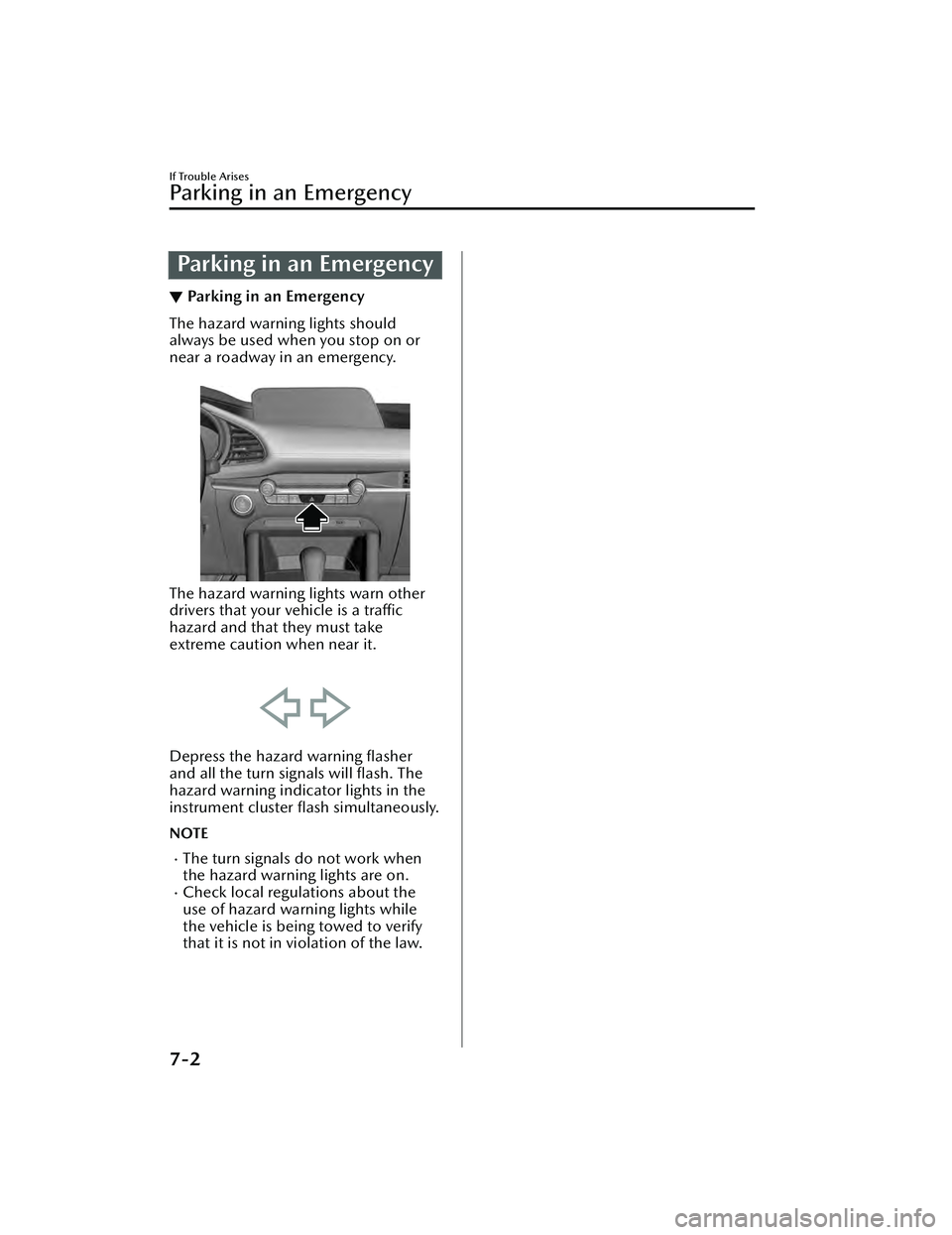
The hazard warning lights should
always be used when you stop on or
near a roadway in an emergency.
The hazard warning lights warn other
drivers that your vehicle is a traffic
hazard and that they must take
extreme caution when near it.
Depress the hazard warning flasher
and all the turn signals will
flash. The
hazard warning indicator lights in the
instrument cluster flash simultaneously.
NOTE
The turn signals do not work when
the hazard warning lights are on.
Check local regulations about the
use of hazard warning lights while
the vehicle is being towed to verify
that it is not in violation of the law.
If Trouble Arises
Parking in an Emergency
7-2
Mazda3_8LC2-EA-22G_Edition1_new
2022-5-20 11:26:10
Page 521 of 623
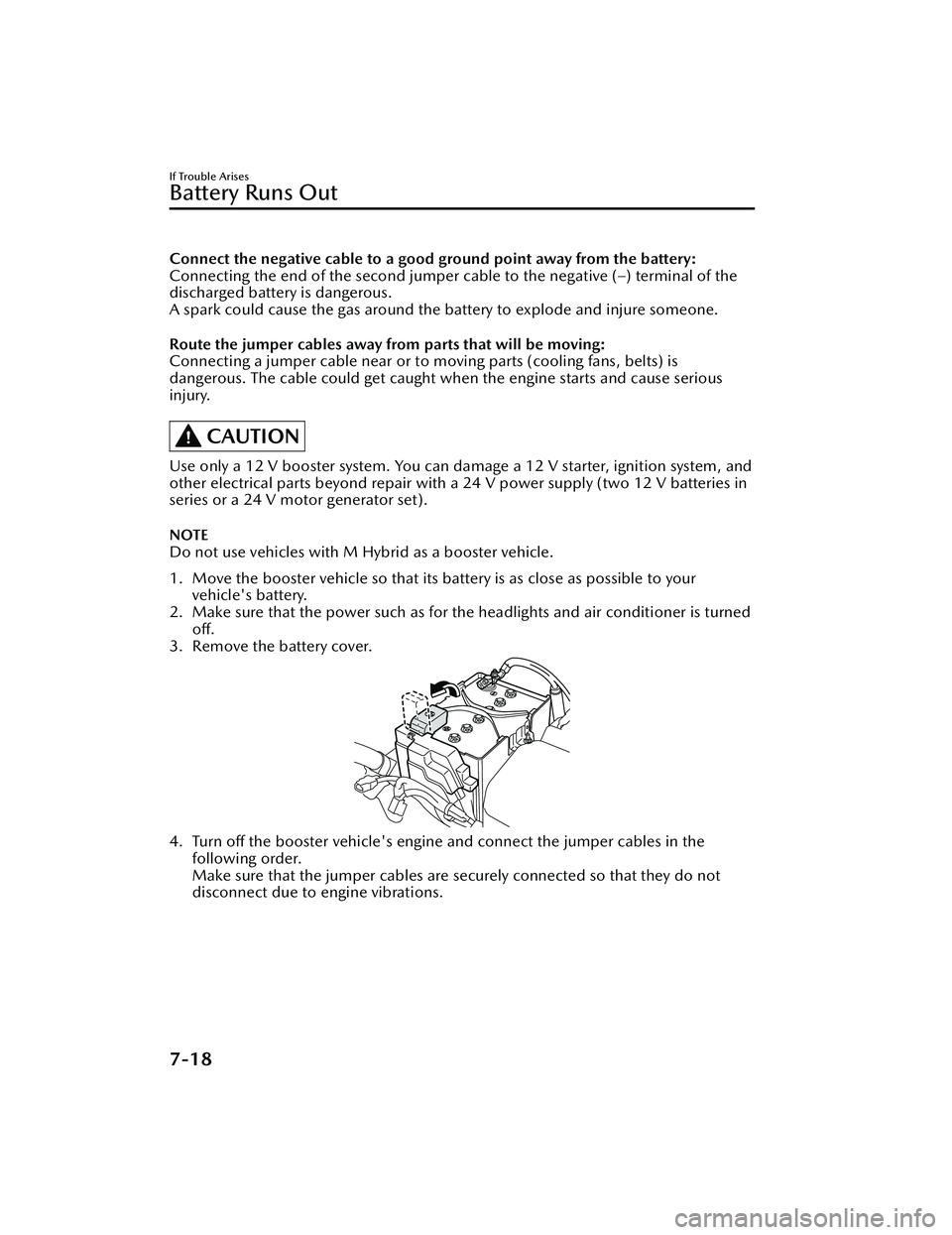
Connect the negative cable to a good ground point away from the battery:
Connecting the end of the second jumper cable to the negative (–) terminal of the
discharged battery is dangerous.
A spark could cause the gas around the battery to explode and injure someone.
Route the jumper cables away fr om parts that will be moving:
Connecting a jumper cable near or to moving parts (cooling fans, belts) is
dangerous. The cable could get caught when the engine starts and cause serious
injury.
CAUTION
Use only a 12 V booster system. You can dama ge a 12 V starter, ignition system, and
other electrical parts beyond repair with a 24 V power supply (two 12 V batteries in
series or a 24 V motor generator set).
NOTE
Do not use vehicles with M Hybrid as a booster vehicle.
1. Move the booster vehicle so that its battery is as close as possible to your
vehicle's battery.
2. Make sure that the power such as for th e headlights and air conditioner is turned
off.
3. Remove the battery cover.
4. Turn off the booster vehicle's engine and connect the jumper cables in the following order.
Make sure that the jumper cables are se curely connected so that they do not
disconnect due to engine vibrations.
If Trouble Arises
Battery Runs Out
7-18
Mazda3_8LC2-EA-22G_Edition1_new 2022-5-20 11:26:10
Page 530 of 623

If a Warning Light TurnsOn or Flashes
▼If a Warning Light Turns On or
Flashes
If any warning light turns on/flashes,
take appropriate action for each light.
There is no problem if the light turns
off, however if the light does not turn
off
or turns
on/flashes again, consult
an Authorized Mazda Dealer.
The details for some warnings can be
viewed on the center display or
multi-information display in the
instrument cluster.
Center display
1. Select “Information” on the home screen.
2. Select “Vehicle Status Monitor”.
3. Select the applicable warning to view the warning details.
NOTE
You can also display the currently
occurring warning by sliding the
commander knob to the left while on
the home screen of the center display.
Multi-information display
1. Press the INFO switch on thesteering switch to display the
warning indication screen.
Refer to Multi-information Display
on page 4-20.
▼Brake System Warning Indication/
Warning Light
This warning has the following
functions:
Warning light inspection
For an operation check, make sure that
the light turns on when the ignition is
switched on, and turns off a few
seconds later or when the engine is
started.
When the light turns on
If the brake system warning light
remains illuminated the brake fluid
may be low or there could be a
problem with the brake system. Park
the vehicle in a safe place immediately
and contact an Authorized Mazda
Dealer.
Refer to Inspecting Brake/Clutch Fluid
Level on page 6-20.
WARNING
Do not drive with the brake system
warning light illuminated. Contact an
Authorized Mazda Dealer to have the
brakes inspected as soon as possible:
Driving with the brake system warning
light illuminated is dangerous. It
indicates that your brakes may not
work at all or that they could
completely fail at any time. If this light
remains illuminated, after checking
that the parking brake is fully released,
have the brakes inspected
immediately.
If Trouble Arises
Warning/Indicator Lights and Warning Sounds
7-27
Mazda3_8LC2-EA-22G_Edition1_new
2022-5-20 11:26:10
Page 531 of 623

CAUTION
In addition, the
effectiveness of the
braking may diminish so you may
need to depress the brake pedal
more strongly than normal to stop
the vehicle.
(With M Hybrid)
When starting the engine, the brake
system warning light may turn on and
the warning indication may be
displayed. In this case, park the
vehicle in a safe location and release
the brake pedal.
If the brake system warning light/
warning indication does not turn
off
even after parking the vehicle, have
the vehicle inspected by an
Authorized Mazda Dealer.
▼ Electronic Brake Force Distribution
System Warning
If the electronic brake force
distribution control unit determines
that some components are operating
incorrectly, the control unit may
illuminate the brake system warning
light and the ABS warning light
simultaneously. The problem is likely to
be the electronic brake force
distribution system.
WARNING
Do not drive with both the brake
system warning light and ABS warning
light illuminated. Have the vehicle
towed to an Authorized Mazda
Dealer to have the brakes inspected as
soon as possible:
Driving when the brake system warning
light and ABS warning light are
illuminated simultaneously is
dangerous.
When both lights are illuminated, the
rear wheels could lock more quickly in
an emergency stop than under normal
circumstances.
▼ Charging System Warning
Indication/Warning Light
If the warning light illuminates while
driving , it indicates a malfunction of
the alternator or of the charging
system.
Drive to the side of the road and park
off the right-of-way. Consult an
Authorized Mazda Dealer.
CAUTION
Do not continue driving when the
charging system warning light is
illuminated because the engine could
stop unexpectedly.
▼Engine Oil Warning Indication/
Warning Light
This warning light indicates low engine
oil pressure.
CAUTION
Do not run the engine if the oil
pressure is low. Otherwise, it could
result in extensive engine damage.
If Trouble Arises
Warning/Indicator Lights and Warning Sounds
7-28
Mazda3_8LC2-EA-22G_Edition1_new
2022-5-20 11:26:10