Page 367 of 623
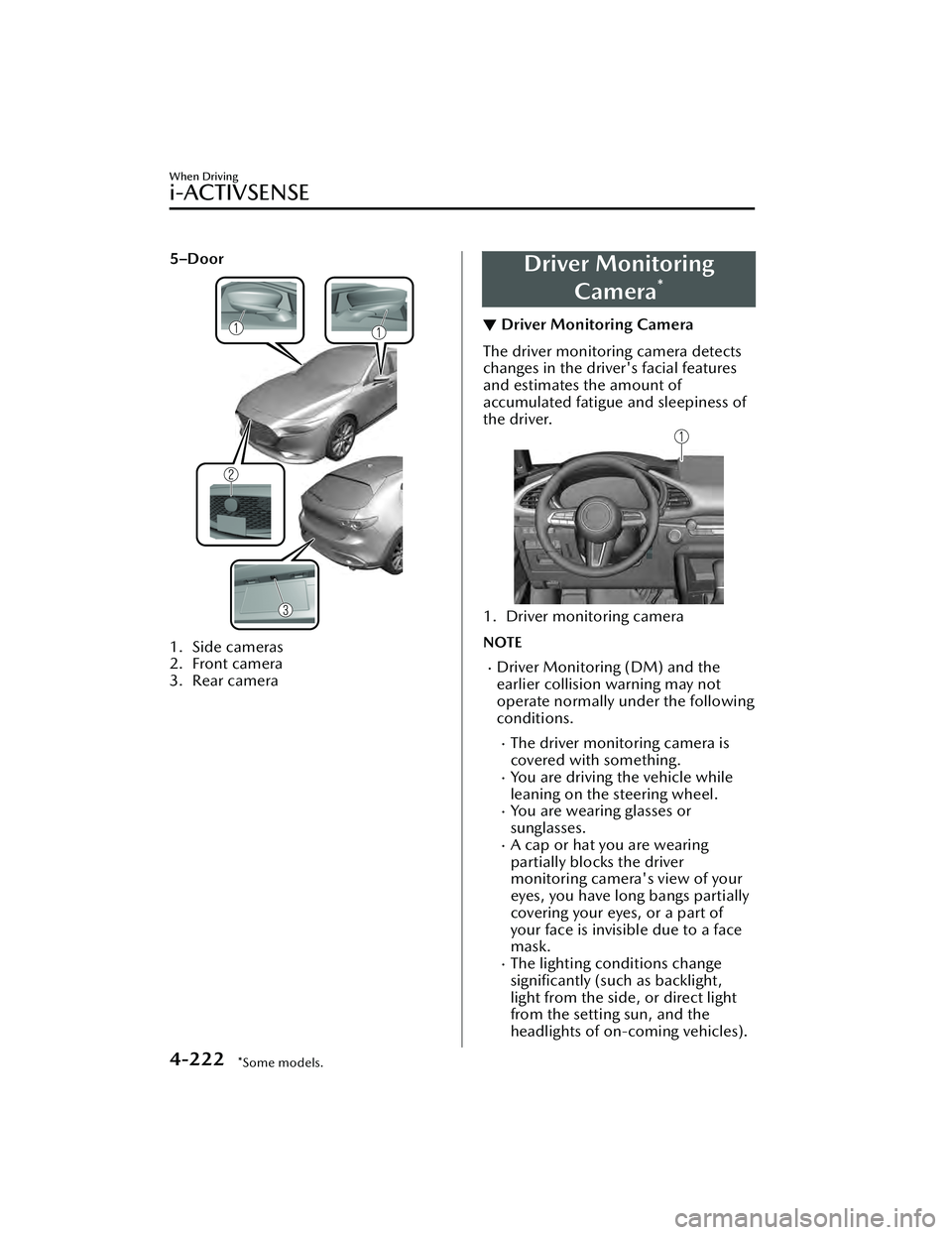
5–Door
1. Side cameras
2. Front camera
3. Rear camera
Driver MonitoringCamera
*
▼Driver Monitoring Camera
The driver monitoring camera detects
changes in the driver's facial features
and estimates the amount of
accumulated fatigue and sleepiness of
the driver.
1. Driver monitoring camera
NOTE
Driver Monitoring (DM) and the
earlier collision warning may not
operate normally under the following
conditions.
The driver monitoring camera is
covered with something.
You are driving the vehicle while
leaning on the steering wheel.
You are wearing glasses or
sunglasses.
A cap or hat you are wearing
partially blocks the driver
monitoring camera's view of your
eyes, you have long bangs partially
covering your eyes, or a part of
your face is invisible due to a face
mask.
The lighting conditions change
significantly (such as backlight,
light from the side, or direct light
from the setting sun, and the
headlights of on-coming vehicles).
When Driving
i-ACTIVSENSE
4-222*Some models.
Mazda3_8LC2-EA-22G_Edition1_new
2022-5-20 11:26:10
Page 369 of 623
Cruise Control*
▼Cruise Control
With cruise control, you can set and
automatically maintain any speed of
more than about 30 km/h (19 mph).
WARNING
Do not use the cruise control under
the following conditions:
Using the cruise control under the
following conditions is dangerous and
could result in loss of vehicle control.
Hilly terrain
Steep inclines
Heavy or unsteady traffic
Slippery or winding roads
Similar restrictions that require
inconsistent speed
The vehicle speed may exceed the
set speed during sudden acceleration
or on steep down slopes.
In this case, depress the brake pedal
to adjust the vehicle speed.
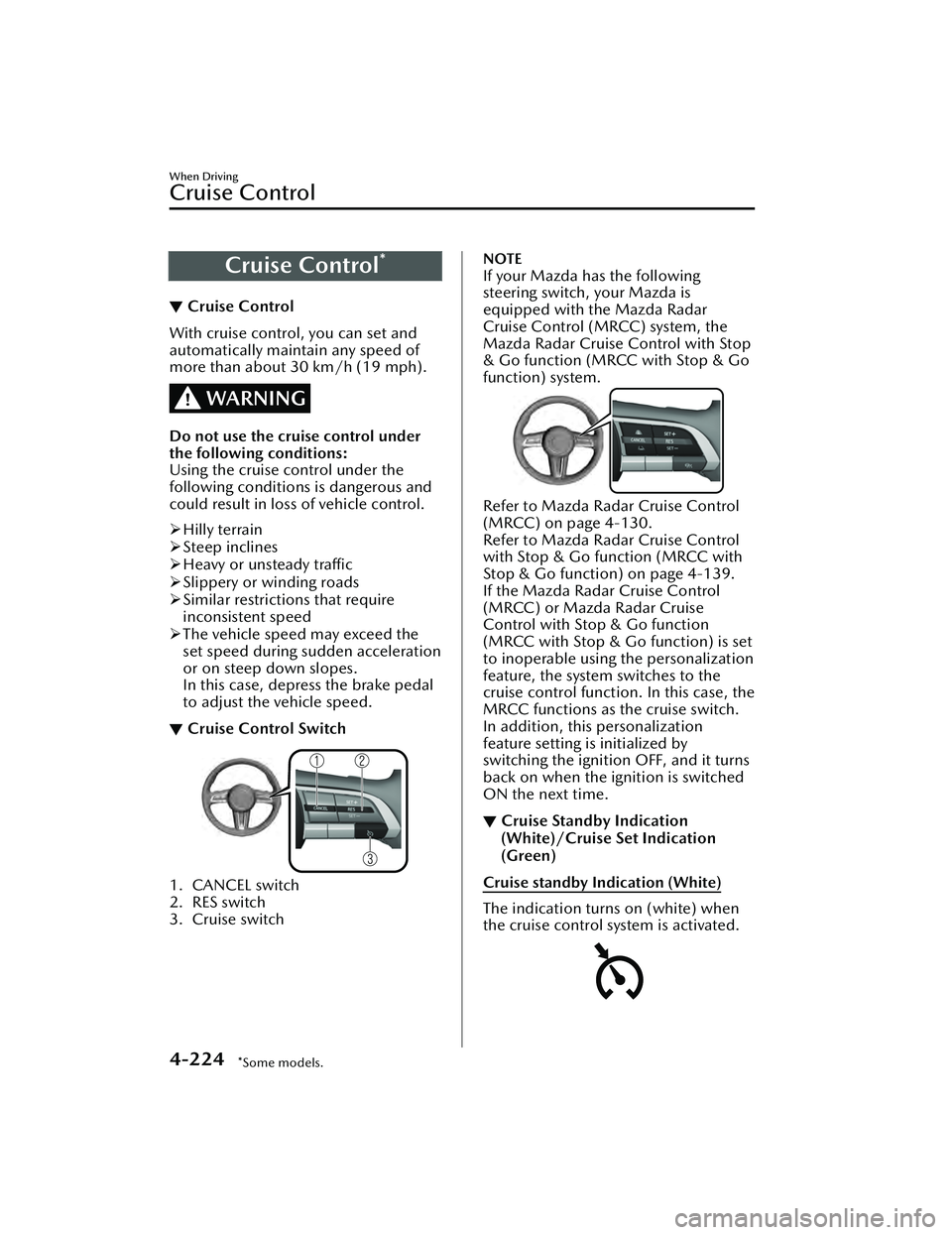
▼ Cruise Control Switch
1. CANCEL switch
2. RES switch
3. Cruise switch
NOTE
If your Mazda has the following
steering switch, your Mazda is
equipped with the Mazda Radar
Cruise Control (MRCC) system, the
Mazda Radar Cruise Control with Stop
& Go function (MRCC with Stop & Go
function) system.
Refer to Mazda Rada
r Cruise Control
(MRCC) on page 4-130.
Refer to Mazda Rada r Cruise Control
with Stop & Go function (MRCC with
Stop & Go function) on page 4-139.
If the Mazda Radar Cruise Control
(MRCC) or Mazda Radar Cruise
Control with Stop & Go function
(MRCC with Stop & Go function) is set
to inoperable using the personalization
feature, the system switches to the
cruise control function. In this case, the
MRCC functions as the cruise switch.
In addition, this personalization
feature setting is initialized by
switching the ignition OFF, and it turns
back on when the ignition is switched
ON the next time.
▼ Cruise Standby Indication
(White)/Cruise Set Indication
(Green)
Cruise standby Indication (White)
The indication turns on (white) when
the cruise control system is activated.
When Driving
Cruise Control
4-224*Some models.
Mazda3_8LC2-EA-22G_Edition1_new
2022-5-20 11:26:10
Page 378 of 623
If “No camera signal.” is indicated in
the display, there could be a
problem with the camera. Have your
vehicle inspected at an Authorized
Mazda Dealer.
(Predicted vehicle path assist lines
display type)
If force is applied to the steering
wheel, the guide lines may not
display. Loosen your grip on the
steering wheel to allow the guide
lines to display.
▼Rear View Parking Camera
Location
4–Door
1. Rear view parking camera
5–Door
1. Rear view parking camera
When Driving
Rear View Monitor
4-233
Mazda3_8LC2-EA-22G_Edition1_new
2022-5-20 11:26:10
Page 380 of 623

The distance appearing in the displayed image is different from the actual distance
because the rear view parking camera is equipped with a specific lens.
Images displayed on the monitor from the rear view parking camera are reversed
images (mirror images).
Some optionally installed vehicle accessories may be picked up by the camera. Do
not install any optional parts that can interfere with the camera view, such as
illuminating parts or parts made of reflective material.
It may be difficult to see the display under the following conditions, however, it
does not indicate a malfunction.
In darkened areas.When the temperature around the lens is high/low.When the camera is wet such as on a rainy day or during periods of high
humidity.
When foreign material such as mud is stuck around the camera.When the camera lens reflects sunlight or headlight beams.The surroundings are illuminated by vehi cle lights, fluorescent lights, or LED
lights (display may flicker).
Extremely small dark or white dots appear on the screen (dots may flicker).An object is close to a camera.Image display may be delayed if the temperature around the camera is low.
▼Viewing the Display
Predicted vehicle path assist lines display type
The projected path guidance mode displays
the predicted path of the vehicle after
you turn the steering wheel.
Use this mode for parking your vehi cle in a parking space or garage.
a) Projected vehicle path (yellow)
These lines are displayed as a reference for the projected path of the vehicle.
The lines displaying the projected vehicle path change after you turn the steering
wheel.
b) Extended vehicle width lines (blue)
These lines indicate the vehicle's extended width.
When Driving
Rear View Monitor
4-235
Mazda3_8LC2-EA-22G_Edition1_new 2022-5-20 11:26:10
Page 381 of 623

These lines are not displayed when the vehicle's wheels are in the straight-ahead
position.
c) Distance guide lines (red) These lines indicate the approximate distance to a point measured from the
vehicle's rear (from the end of the bumper).
The blue line indicates the point about 0.5 m (19 in) from the rear bumper.
The red and yellow lines, which change position after you turn the steering wheel,
indicate the points about 0.5 m (19 in) for the red line and 1.0 m (39 in) and 2.0
m (78 in) for the yellow lines from the rear bumper (at the center point of each of
the lines).
A degree of error occurs when the wheels are not in the straight-ahead position.
In the above illustration, the right side of the vehicle is in a position closer to the
actual distance displayed by the distance guide lines (red: about 0.5 m (19 in)
point, yellow: about 1.0 m (39 in), and yellow: about 2.0 m (78 in) point behind
the rear bumper), whereas the left side is in a position farther away.
CAUTION
The indicated position of the guide lines on the display changes depending on the
vehicle conditions (such as the number of occupants/cargo load) and the road
conditions (such as a steep gradient to the rear of the vehicle).
Always check the area to the vehicle's rear and the surrounding area directly with
your eyes while backing up.
Fixed assist lines display type
Guide lines which indicate the width of the vehicle are displayed on the screen as a
reference to the approximate width of the vehicle in comparison to the width of the
parking space you are about to back into.
Use this display view for parking your vehicle in a parking space or garage.
a) Vehicle width guide lines
Guide lines serve as a reference to the approximate width of the vehicle.
b) Distance guide lines These guide lines indicate the approximate distance to a point measured from the
vehicle's rear (from the end of the bumper).
The red line indicates the point about 0.5 m (19 in) from the rear bumper.
When Driving
Rear View Monitor
4-236
Mazda3_8LC2-EA-22G_Edition1_new 2022-5-20 11:26:10
Page 382 of 623

The yellow lines indicate the points about 1.0 m (39 in) and 2.0 m (78 in) from
the rear bumper.
CAUTION
The guide lines on the screen are fixed li nes. They are not synced to the driver's
turning of the steering wheel. Always be careful and check the area to the vehicle's
rear and the surrounding area directly with your eyes while backing up.
▼ Rear View Monitor Operation
The operation of the rear view monitor when reversing the vehicle varies depending
on the traffic, road, and vehicle conditions. The amount of steering and the timing
also varies depending on conditions, so confirm the surrounding conditions directly
with your eyes and steer the vehicle in accordance with the conditions.
Be well aware of the above cautions prior to using the rear view monitor.
Predicted vehicle path assist lines display type
NOTE
The following shows an example of vehicle parking in which the steering wheel is
turned to the right when backing up the vehicle. The operation is reversed when
backing up the vehicle from the opposite direction.
1. Shift the shift lever (manual transmission) or the selector lever (automatic
transmission) to reverse (R) position to switch the display to the rear view
monitor display.
When Driving
Rear View Monitor
4-237
Mazda3_8LC2-EA-22G_Edition1_new 2022-5-20 11:26:10
Page 383 of 623
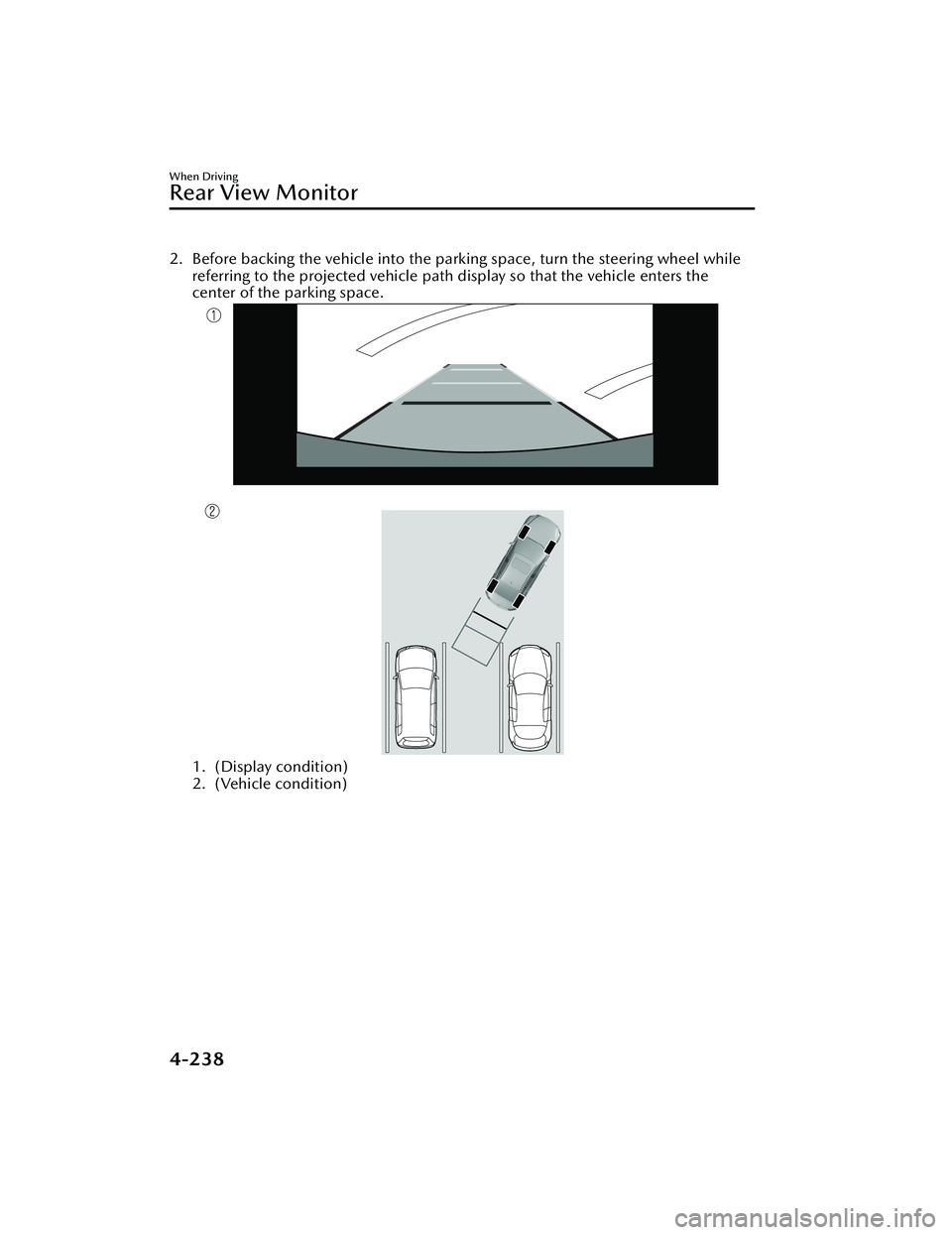
2. Before backing the vehicle into the parking space, turn the steering wheel whilereferring to the projected vehicle path display so that the vehicle enters the
center of the parking space.
1. (Display condition)
2. (Vehicle condition)
When Driving
Rear View Monitor
4-238
Mazda3_8LC2-EA-22G_Edition1_new 2022-5-20 11:26:10
Page 384 of 623
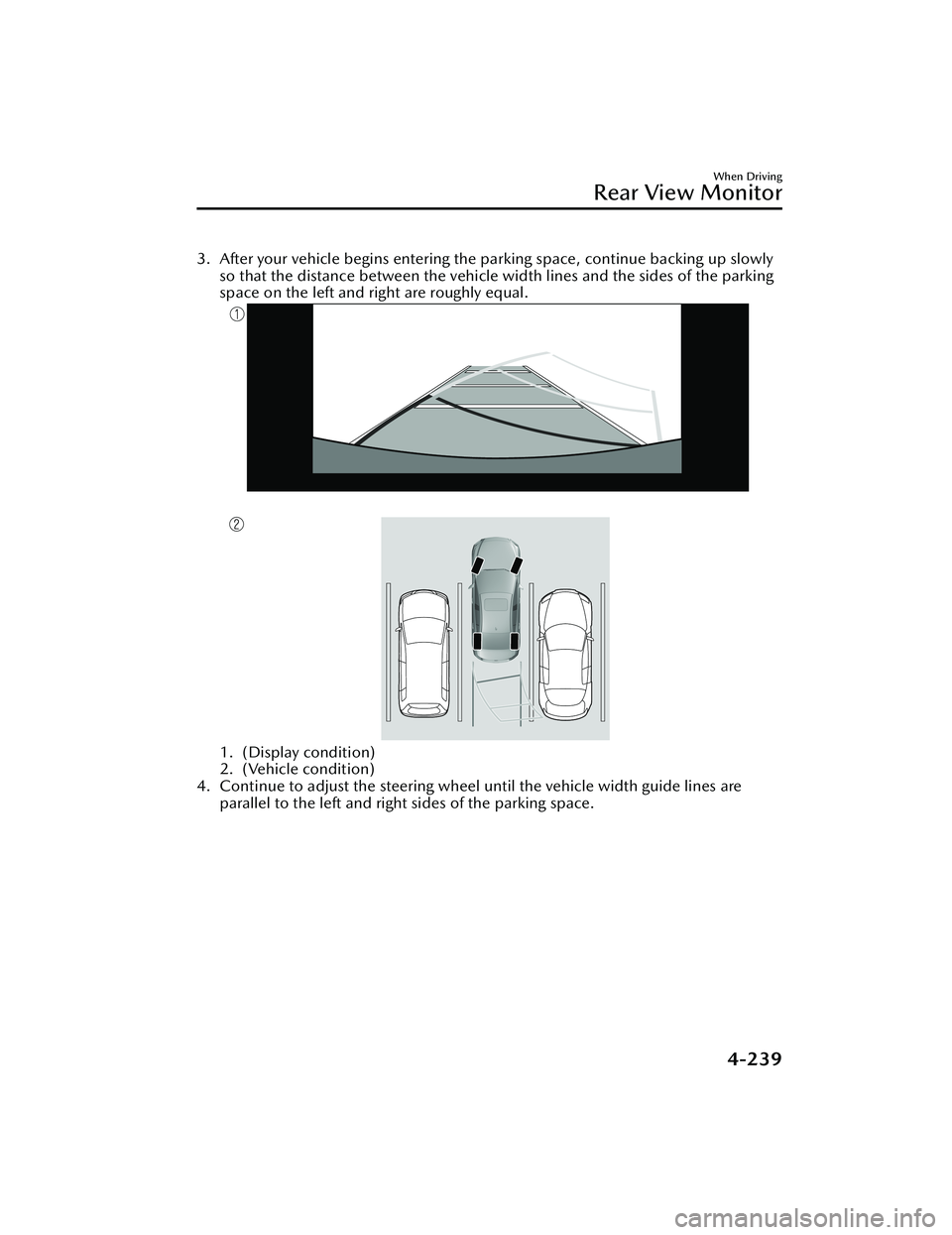
3. After your vehicle begins entering the parking space, continue backing up slowlyso that the distance between the vehicle width lines and the sides of the parking
space on the left and right are roughly equal.
1. (Display condition)
2. (Vehicle condition)
4. Continue to adjust the steering wheel until the vehicle width guide lines are parallel to the left and right sides of the parking space.
When Driving
Rear View Monitor
4-239
Mazda3_8LC2-EA-22G_Edition1_new 2022-5-20 11:26:10