2023 MAZDA MAZDA instrument cluster
[x] Cancel search: instrument clusterPage 505 of 623
Parking in an Emergency
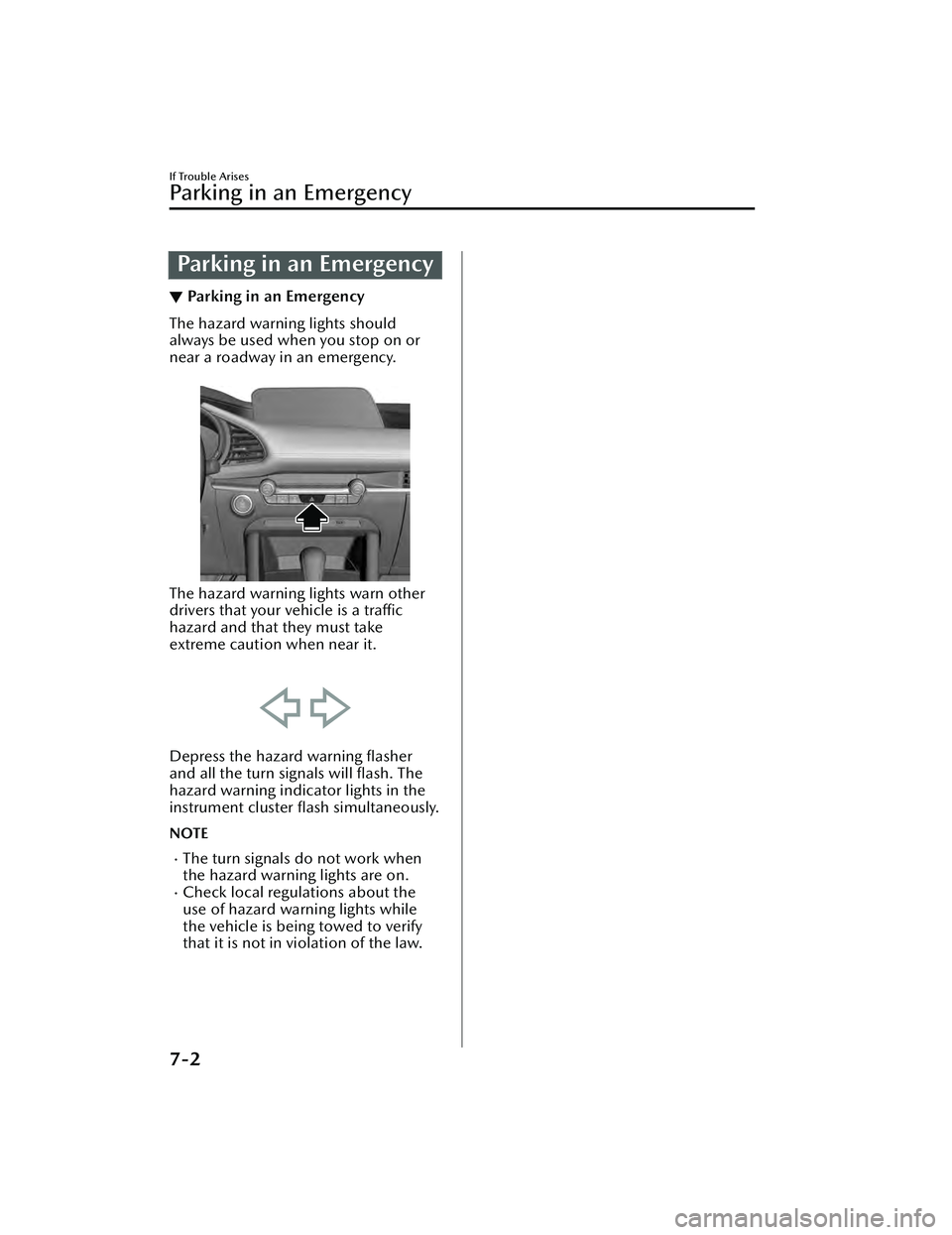
▼Parking in an Emergency
The hazard warning lights should
always be used when you stop on or
near a roadway in an emergency.
The hazard warning lights warn other
drivers that your vehicle is a traffic
hazard and that they must take
extreme caution when near it.
Depress the hazard warning flasher
and all the turn signals will
flash. The
hazard warning indicator lights in the
instrument cluster flash simultaneously.
NOTE
The turn signals do not work when
the hazard warning lights are on.
Check local regulations about the
use of hazard warning lights while
the vehicle is being towed to verify
that it is not in violation of the law.
If Trouble Arises
Parking in an Emergency
7-2
Mazda3_8LC2-EA-22G_Edition1_new
2022-5-20 11:26:10
Page 530 of 623

If a Warning Light TurnsOn or Flashes
▼If a Warning Light Turns On or
Flashes
If any warning light turns on/flashes,
take appropriate action for each light.
There is no problem if the light turns
off, however if the light does not turn
off
or turns
on/flashes again, consult
an Authorized Mazda Dealer.
The details for some warnings can be
viewed on the center display or
multi-information display in the
instrument cluster.
Center display
1. Select “Information” on the home screen.
2. Select “Vehicle Status Monitor”.
3. Select the applicable warning to view the warning details.
NOTE
You can also display the currently
occurring warning by sliding the
commander knob to the left while on
the home screen of the center display.
Multi-information display
1. Press the INFO switch on thesteering switch to display the
warning indication screen.
Refer to Multi-information Display
on page 4-20.
▼Brake System Warning Indication/
Warning Light
This warning has the following
functions:
Warning light inspection
For an operation check, make sure that
the light turns on when the ignition is
switched on, and turns off a few
seconds later or when the engine is
started.
When the light turns on
If the brake system warning light
remains illuminated the brake fluid
may be low or there could be a
problem with the brake system. Park
the vehicle in a safe place immediately
and contact an Authorized Mazda
Dealer.
Refer to Inspecting Brake/Clutch Fluid
Level on page 6-20.
WARNING
Do not drive with the brake system
warning light illuminated. Contact an
Authorized Mazda Dealer to have the
brakes inspected as soon as possible:
Driving with the brake system warning
light illuminated is dangerous. It
indicates that your brakes may not
work at all or that they could
completely fail at any time. If this light
remains illuminated, after checking
that the parking brake is fully released,
have the brakes inspected
immediately.
If Trouble Arises
Warning/Indicator Lights and Warning Sounds
7-27
Mazda3_8LC2-EA-22G_Edition1_new
2022-5-20 11:26:10
Page 550 of 623

▼Vehicle Problem Warning Beep
If any of the following problems occur,
a warning beep is activated. Check the
information regarding the warning
indication in the instrument cluster or
on the center display.
Automatic transmission problemIncrease in automatic transmission
internal temperature
M Hybrid problemBrake fluid amount decreaseEngine oil level sensor problemElectric Parking Brake (EPB) problemEngine hydraulic pressure decreaseEngine coolant temperature increaseEngine system problem
▼Blind Spot Monitoring (BSM)
System Warning Beep*
The Blind Spot Monitoring (BSM)
warning beep operates when the turn
signal lever is operated to the side
where the Blind Spot Monitoring
(BSM) warning light is illuminated.
▼Front Cross
Tra ffi c Alert (FCTA)
War n in g Be ep*
The Front Cross Traffic Alert (FCTA)
warning beep is activated if there is a
possibility of collision with a vehicle
approaching from the front on the left
and right sides of the vehicle.
▼ Rear Cross Traffic Alert (RCTA)
War n in g Be ep*
The Rear Cross Traffic Alert (RCTA)
warning beep is activated if there is a
possibility of collision with a vehicle
approaching from the rear on the left
and right sides of the vehicle.
▼
Lane Departure Warning Sound*
While the system is operating, if the
system determines that the vehicle may
depart from the lane, it sounds a
warning sound.
NOTE
The volume of the Lane Departure
Warning System (LDWS) warning
sound can be changed.
Refer to the Settings section in the
Mazda Connect Owner's Manual.
▼Mazda Radar Cruise Control
(MRCC) System Warnings*
The Mazda Radar Cruise Control
(MRCC) system warnings notify the
driver of system malfunctions and
cautions on use when required.
Check based on the beep sound.
Warning beep type Notification content
The beep sounds 1
time while the Mazda
Radar Cruise Control
(MRCC) is operating The vehicle speed is
slower than 25 km/h
(16 mph) and the
Mazda Radar Cruise
Control (MRCC) sys-
tem has been can-
celed.
The beep sounds in-
termittently while the
Mazda Radar Cruse
Control (MRCC) is op-
erating. The distance between
your vehicle and the
vehicle ahead is too
close. Check the safety
of the surrounding
area and reduce vehi-
cle speed.
If Trouble Arises
Warning/Indicator Lights and Warning Sounds
*Some models.7-47
Mazda3_8LC2-EA-22G_Edition1_new
2022-5-20 11:26:10
Page 551 of 623

▼Mazda Radar Cruise Control with
Stop & Go function (MRCC with
Stop & Go function) System
Warnings
*
The Mazda Radar Cruise Control with
Stop & Go function (MRCC with Stop
& Go function) system warnings notify
the driver of system malfunctions and
cautions on use when required.
Check based on the beep sound.
Warning beep type Notification content
The beep sounds 1
time while the Mazda
Radar Cruise Control
with Stop & Go func-
tion (MRCC with Stop
& Go function) is op-
erating. If a malfunction occurs
in the system, make
sure that the Mazda
Radar Cruise Control
with Stop & Go func-
tion (MRCC with Stop
& Go function) has
been canceled.
The beep sounds in-
termittently while the
Mazda Radar Cruise
Control with Stop &
Go function (MRCC
with Stop & Go func-
tion) is operating. The distance between
your vehicle and the
vehicle ahead is too
close. Check the safety
of the surrounding
area and reduce vehi-
cle speed.
▼
Excessive Speed Warning*
If the vehicle speed exceeds the speed
limit sign displayed in the active driving
display/instrument cluster, the area
around the speed limit sign flashes in
amber and the warning sound is
activated at the same time. If the
vehicle speed continues to exceed the
displayed speed limit sign, the
indication stops flashing and remains
on.
▼Collision warning*
If there is a possibility of a collision
with a vehicle ahead, a warning sound
is activated at the same time as the
warning indications are displayed in
the instrument cluster or active driving
display.
▼ Door-ajar Warning Beep
A warning beep is activated if the
vehicle is driven with any door or
liftgate ajar. Drive the vehicle after
closing the doors and liftgate.
▼Battery Saving Mode Warning
Sound
A warning sound is activated when the
vehicle goes into Battery Saving Mode.
Refer to Message Indicated on
Multi-information Display on page
7-40.
The warning sound will stop just after
starting the engine.
If Trouble Arises
Warning/Indicator Lights and Warning Sounds
7-48*Some models.
Mazda3_8LC2-EA-22G_Edition1_new
2022-5-20 11:26:10
Page 617 of 623

Index
F
FlasherHazard warning.................... 4-71
Headlights............................4-57
Flat Tire Changing a flat tire................. 7-7
Mounting the spare tire........ 7-12
Removing a flat tire................ 7-8
Floor Mat................................. 3-48
Fluids Brake/Clutch........................6-20
Classification.......................... 9-5
Washer................................ 6-21
Foot Brake................................ 4-76
Forward Sensing Camera (FSC) ..........
.............................................. 4-211
Front Camera/Side Cameras/Rear
Camera.................................. 4-221
Front Cross Traffic Alert (FCTA) ..........
.............................................. 4-123
Front Cross Tra ffi c Alert (FCTA)
Warning Beep........................... 7-47
Front Radar Sensor.................. 4-215
Front Side Radar Sensor........... 4-218
Fuel Filler lid and cap...................3-28
Requirements....................... 3-26
Tank capacity......................... 9-5
Fuses........................................ 6-39 Panel description.................. 6-42
Replacement........................ 6-39
G
Gauges..................................... 4-18
Glove Compartment..................5-47
H
Hazardous Driving.....................3-47
Hazard Warning Flasher............. 4-71
HeadlightsComing home light...............4-61
Flashing................................4-60
High-low beam.................... 4-60
Leaving home light............... 4-61
Leveling................................4-62
Head Restraint.......................... 2-17
High Beam Control System
(HBC)..................................... 4-101 High Beam Control System (HBC)
indicator light (green)......... 4-102
Hill Launch Assist (HLA)............. 4-87
HomeLink Wireless Control
System...................................... 4-71
Hood Release........................... 6-12
Horn........................................ 4-70
I
If a Warning Light Turns On or
Flashes......................................7-27
If the Active Driving Display Does Not
Operate.................................... 7-51
Ignition Not Switched Off (STOP)
Warning Beep........................... 7-44
Ignition Switch............................ 4-4
Illuminated Entry System............ 5-42
Immobilizer System................... 3-42
Inside Trunk Release Lever......... 3-24
Inspecting Brake/Clutch Fluid
Level.........................................6-20
Inspecting Coolan t Level............ 6-19
Inspecting Engine Oil Level.........6-18
Inspecting Washer Fluid Level..... 6-21
Instrument Cluster..................... 4-18 Average fuel economy...........4-26
Compass display.................. 4-28
Current fuel economy........... 4-27
Dashboard illumination........ 4-24
Deceleration regeneration charge
display................................. 4-27
10-4
Mazda3_8LC2-EA-22G_Edition1_new 2022-5-20 11:26:10