Page 382 of 623

The yellow lines indicate the points about 1.0 m (39 in) and 2.0 m (78 in) from
the rear bumper.
CAUTION
The guide lines on the screen are fixed li nes. They are not synced to the driver's
turning of the steering wheel. Always be careful and check the area to the vehicle's
rear and the surrounding area directly with your eyes while backing up.
▼ Rear View Monitor Operation
The operation of the rear view monitor when reversing the vehicle varies depending
on the traffic, road, and vehicle conditions. The amount of steering and the timing
also varies depending on conditions, so confirm the surrounding conditions directly
with your eyes and steer the vehicle in accordance with the conditions.
Be well aware of the above cautions prior to using the rear view monitor.
Predicted vehicle path assist lines display type
NOTE
The following shows an example of vehicle parking in which the steering wheel is
turned to the right when backing up the vehicle. The operation is reversed when
backing up the vehicle from the opposite direction.
1. Shift the shift lever (manual transmission) or the selector lever (automatic
transmission) to reverse (R) position to switch the display to the rear view
monitor display.
When Driving
Rear View Monitor
4-237
Mazda3_8LC2-EA-22G_Edition1_new 2022-5-20 11:26:10
Page 385 of 623
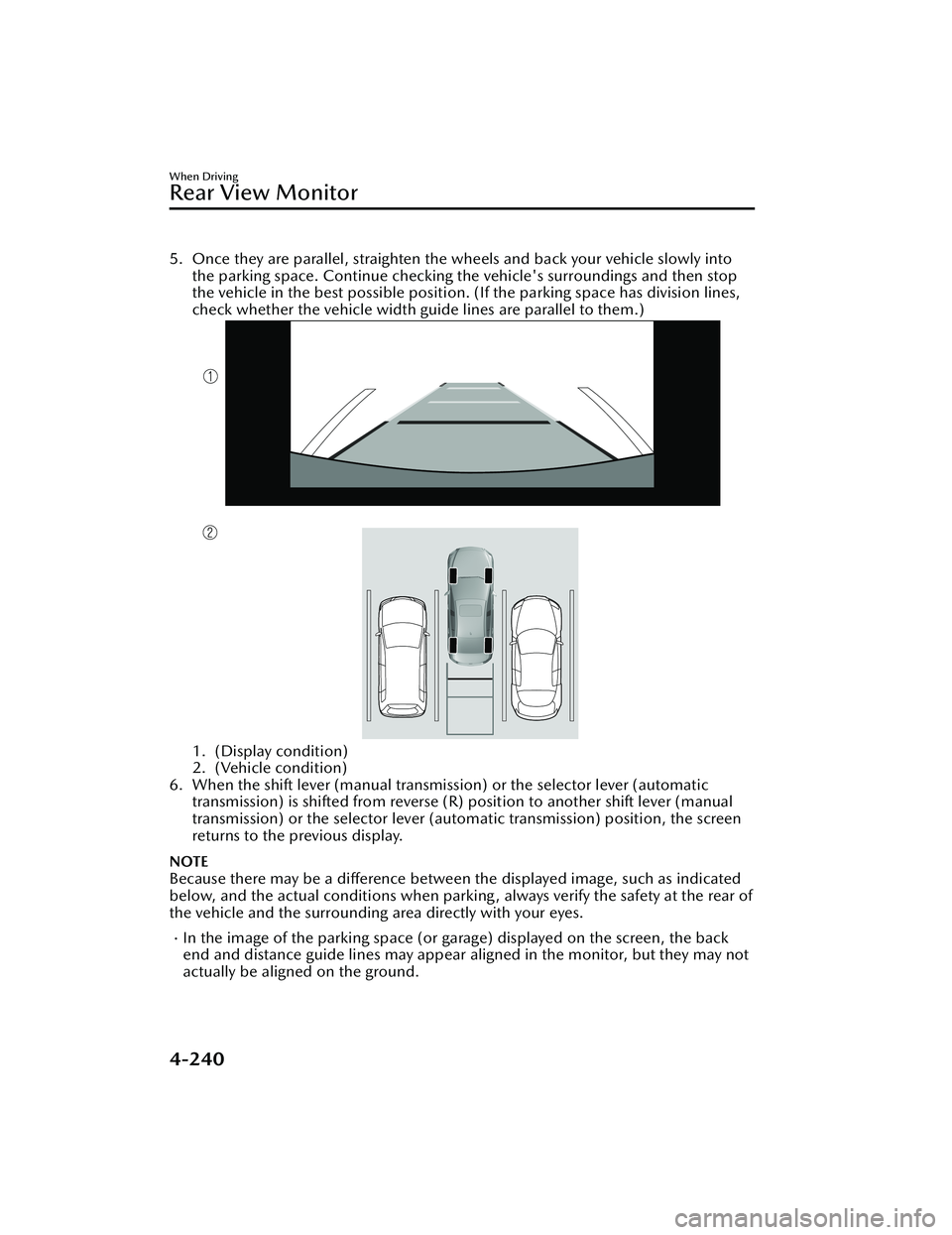
5. Once they are parallel, straighten the wheels and back your vehicle slowly intothe parking space. Continue checking the vehicle's surroundings and then stop
the vehicle in the best possible position. (If the parking space has division lines,
check whether the vehicle width guide lines are parallel to them.)
1. (Display condition)
2. (Vehicle condition)
6. When the shift lever (manual transmission) or the selector lever (automatic transmission) is shifted from reverse (R) position to another shift lever (manual
transmission) or the select or lever (automatic transmission) position, the screen
returns to the previous display.
NOTE
Because there may be a difference between the displayed image, such as indicated
below, and the actual conditions when parkin g , always verify the safety at the rear of
the vehicle and the surrounding area directly with your eyes.
In the image of the parking space (or garage) displayed on the screen, the back
end and distance guide lines may appear aligned in the monitor, but they may not
actually be aligned on the ground.
When Driving
Rear View Monitor
4-240
Mazda3_8LC2-EA-22G_Edition1_new 2022-5-20 11:26:10
Page 386 of 623
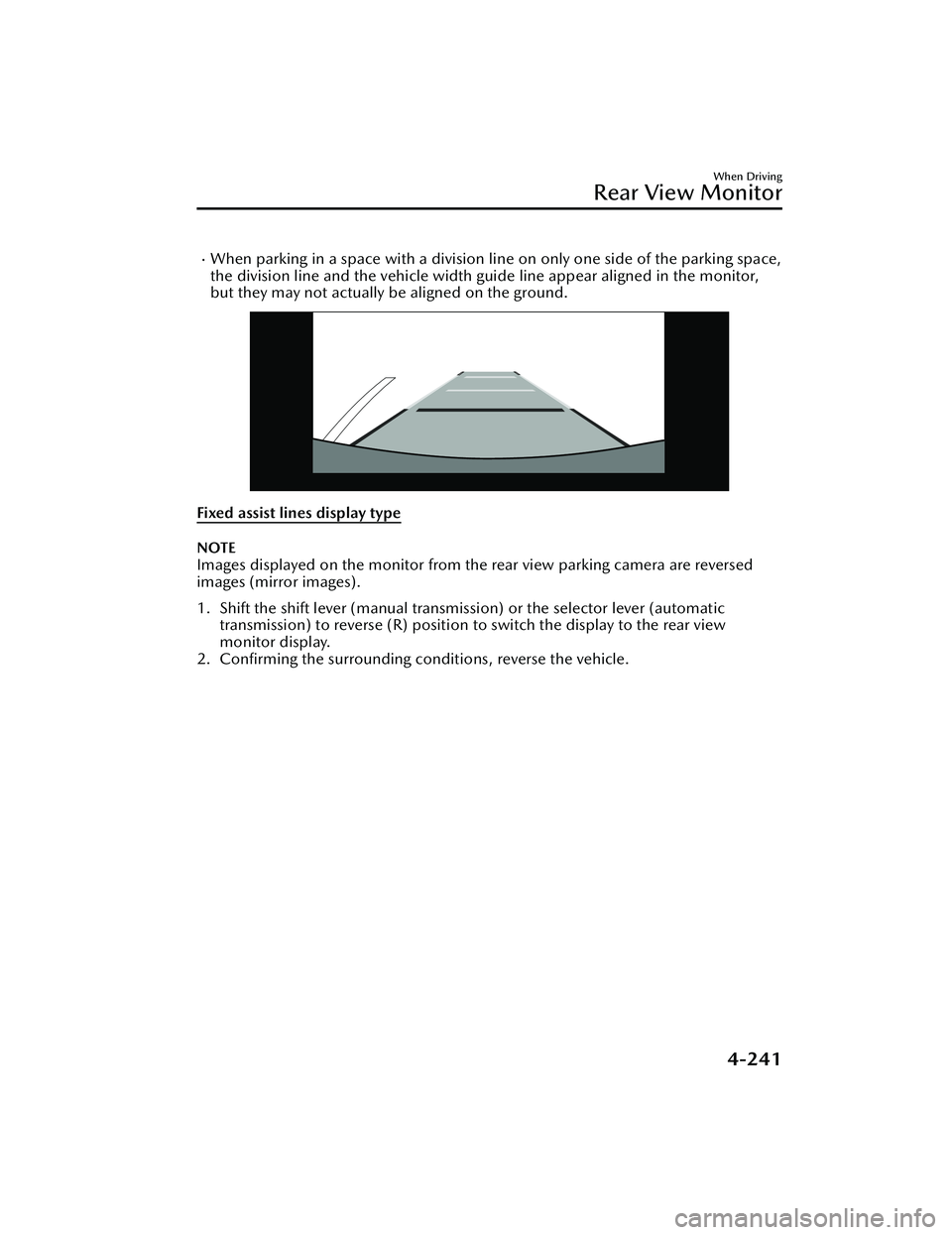
When parking in a space with a division line on only one side of the parking space,
the division line and the vehicle width guide line appear aligned in the monitor,
but they may not actually be aligned on the ground.
Fixed assist lines display type
NOTE
Images displayed on the monitor from the rear view parking camera are reversed
images (mirror images).
1. Shift the shift lever (manual transmission) or the selector lever (automatic
transmission) to reverse (R) position to switch the display to the rear view
monitor display.
2. Confirming the surrounding conditions, reverse the vehicle.
When Driving
Rear View Monitor
4-241
Mazda3_8LC2-EA-22G_Edition1_new 2022-5-20 11:26:10
Page 388 of 623
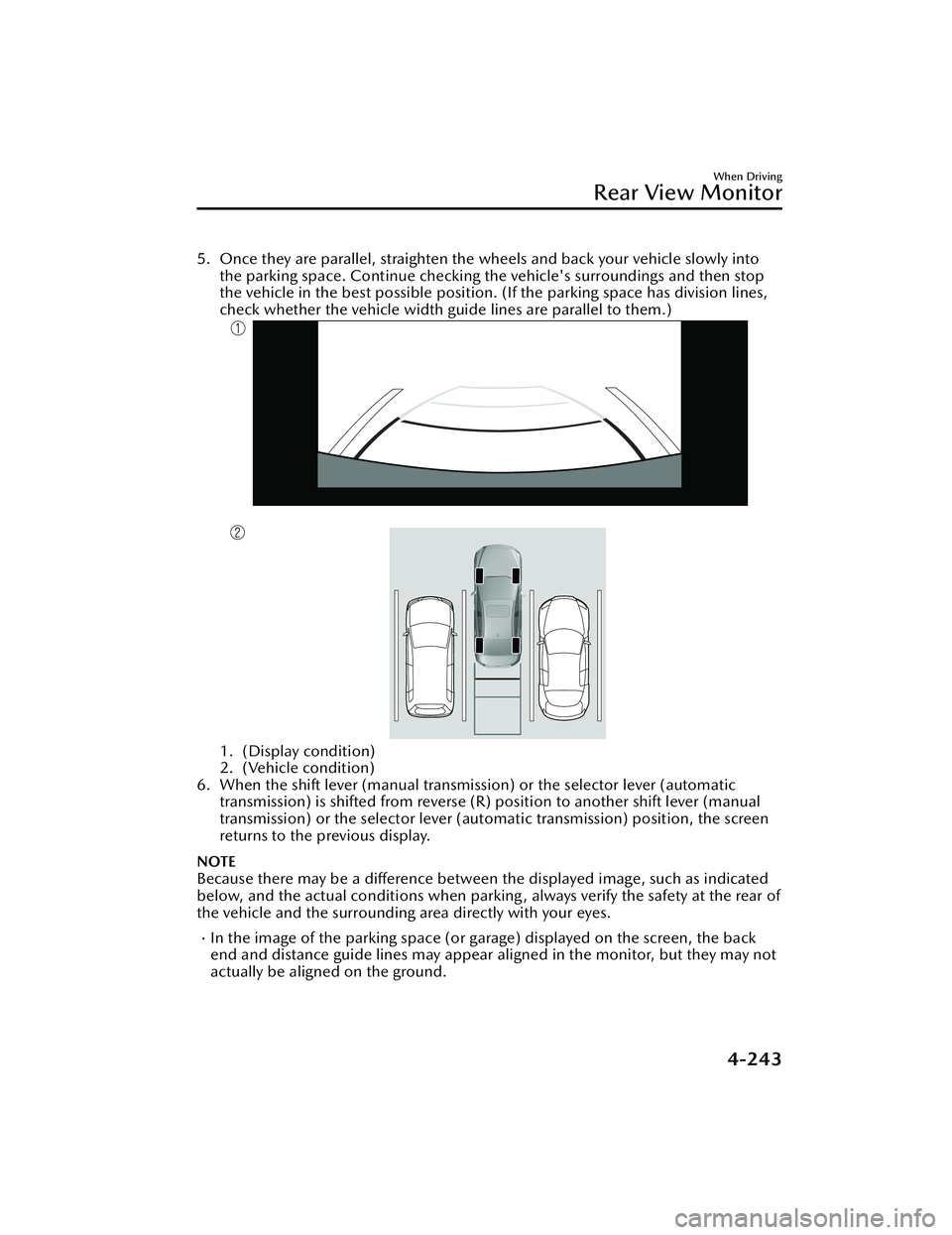
5. Once they are parallel, straighten the wheels and back your vehicle slowly intothe parking space. Continue checking the vehicle's surroundings and then stop
the vehicle in the best possible position. (If the parking space has division lines,
check whether the vehicle width guide lines are parallel to them.)
1. (Display condition)
2. (Vehicle condition)
6. When the shift lever (manual transmission) or the selector lever (automatic transmission) is shifted from reverse (R) position to another shift lever (manual
transmission) or the selector lever (aut omatic transmission) position, the screen
returns to the previous display.
NOTE
Because there may be a difference between the displayed image, such as indicated
below, and the actual conditions when parkin g , always verify the safety at the rear of
the vehicle and the surrounding area directly with your eyes.
In the image of the parking space (or garage) displayed on the screen, the back
end and distance guide lines may appear aligned in the monitor, but they may not
actually be aligned on the ground.
When Driving
Rear View Monitor
4-243
Mazda3_8LC2-EA-22G_Edition1_new 2022-5-20 11:26:10
Page 416 of 623

No. MenuExplanation
(6) Settings You can change the settings for the Mazda Connect screen, sound set-
tings, and the vehicle functions.
In-Vehicle Displays:
Configures settings and content for all in-vehicle displays.
Sound Settings:
Configures
the in-vehicle listening experience.
Safety Settings:
Configures safety and driver assistance features.
Ve h i c l e S e t t i n g s :
Configures vehicle convenience features.
Connectivity Settings:
Configures Bluetooth and other device connectivity settings.
System Settings:
Configures language, time, and other general settings.
(7) Apple CarPlay You can use Apple CarPlay™ by connecting an iPhone
® compatible with
Apple CarPlay™ to the USB slot.
(8) Android Auto You can use Android Auto™ by connecting an Android™ Smartphone
compatible with Android Auto™ to the USB port.
WARNING
Always adjust Mazda Connect while the vehicle is stopped:
Do not adjust Mazda Connect with th
e Commander switch while driving the
vehicle. Adjusting Mazda Connect with the Commander switch while driving the
vehicle is dangerous as it could distract your attention from the vehicle operation
which could lead to a serious accident.
Even if the audio remote control switches are equipped on the steering wheel, learn
to use the switches without looking down at them so that you can keep your
maximum attention on the road while driving the vehicle.
Do not allow the connection plug cord to get tangled with the shift lever (manual
transmission)/selector leve r (automatic transmission):
Allowing the plug cord to become tangled with the shift lever (manual
transmission)/selector lever (automatic transmission) is dangerous as it could
interfere with driving, resulting in an accident.
Interior Features
Mazda Connect
5-17
Mazda3_8LC2-EA-22G_Edition1_new 2022-5-20 11:26:10
Page 511 of 623

1. Park on a hard, level surface off theright-of-way and firmly set the
parking brake.
2. Put a vehicle with an automatic transmission in Park (P), a manual
transmission in Reverse (R) or 1,
and turn off the engine.
3. Turn on the hazard warning flasher.
4. Have passengers get out of the vehicle and away from the vehicle
and traffic.
5. Remove any luggage, the jack, tools, and spare tire (page 7-3).
6. Block the wheel diagonally opposite the flat tire. When
blocking a wheel, place a tire block
both in front and behind the tire.
NOTE
When blocking a tire, use rocks or
wood blocks of sufficient size if
possible to hold the tire in place.
▼Removing a Flat Tire
WARNING
When jacking-up a vehicle, always
shift the shift lever to 1st or R position
(manual transmission vehicle) or shift
the selector lever to P position
(automatic transmission vehicle),
apply the parking brake, and place
wheel blocks in the position
diagonally opposed to the jack:
Changing a
flat tire without using
wheel blocks is dangerous because the
vehicle may move and fall off the jack
even with the shift lever in 1st or R
position, or the selector lever is in P
position, which could result in an
accident.
1. If your vehicle is equipped with a wheel cover, pry off the wheel
cover with the beveled end of the
jack lever.
NOTE
Force the end of the jack lever
firmly between wheel and cover, or
removal will be difficult.
If Trouble Arises
Flat Tire
7-8
Mazda3_8LC2-EA-22G_Edition1_new 2022-5-20 11:26:10
Page 523 of 623
Starting a Flooded Engine
▼Starting a Flooded Engine
If the engine fails to start, it may be
flooded
(excessive fuel in the engine).
Follow this procedure:
1. If the engine does not start within 5 seconds on the first try, wait 10
seconds and try again.
2. Make sure the parking brake is on.
3. Depress the accelerator all the way
and hold it there.
4. Depress the clutch pedal (manual
transmission) or the brake pedal
(automatic transmission), then
press the push button start. If the
engine starts, release the
accelerator immediately because
the engine will suddenly rev up.
5. If the engine fails to start, crank it
without depressing the accelerator.
If the engine still does not start using
the previous procedure, have your
vehicle inspected by an Authorized
Mazda Dealer.
Push-Starting
▼ Push-Starting
Do not push-start your Mazda.
WARNING
Never tow a vehicle to start it:
Towing a vehicle to start it is
dangerous. The vehicle being towed
could surge forward when its engine
starts, causing the 2 vehicles to collide.
The occupants could be injured.
CAUTION
Do not push-start a vehicle that has a
manual transmission. It can damage
the emission control system.
NOTE
You cannot start a vehicle with an
automatic transmissi
on by pushing it.
If Trouble Arises
Emergency Starting
7-20
Mazda3_8LC2-EA-22G_Edition1_new 2022-5-20 11:26:10
Page 524 of 623

Overheating
▼Overheating
If the engine coolant temperature
gauge indicates overheating and the
high engine coolant temperature
warning indication is displayed, the
vehicle loses power or you hear a loud
knocking or pinging noise, the engine
is probably too hot.
WARNING
Pull over to a safe location, then
switch the ignition off and make sure
the fan is not running before
attempting to work near the cooling
fan:
Working near the cooling fan when it is
running is dangerous. The fan could
continue running indefinitely even if
the engine has stopped and the engine
compartment temperature is high. You
could be hit by the fan and seriously
injured.
Do not remove either
cooling system cap when the engine
and radiator are hot:
When the engine and radiator are hot,
scalding coolant and steam may shoot
out under pressure and cause serious
injury.
Open the hood ONLY after steam is
no longer escaping from the engine:
Steam from an overheated engine is
dangerous. The escaping steam could
seriously burn you.
If the engine coolant temperature
gauge indicates overheating and the
high engine coolant temperature
warning indication is displayed:
1. Drive safely to the side of the road and park off the right-of-way.
2. Put a vehicle with an automatic transmission in park (P), a manual
transmission in neutral.
3. Apply the parking brake.
4. Turn off the air conditioner.
5. Check whether coolant or steam is escaping from the engine
compartment.
If steam is coming from the engine
compartment:
Do not go near the front of the
vehicle. Stop the engine.
Wait until the steam dissipates,
then open the hood and start the
engine.
If neither coolant nor steam is
escaping:
Open the hood and idle the engine
until it cools.
CAUTION
If the cooling fan does not operate
while the engine is running, the
engine temperature will increase.
Stop the engine and call an
Authorized Mazda Dealer.
If Trouble Arises
Overheating
7-21
Mazda3_8LC2-EA-22G_Edition1_new 2022-5-20 11:26:10