2023 MAZDA MAZDA ignition
[x] Cancel search: ignitionPage 179 of 623

*1 The light turns on when the ignition is switched on for an operation check, andturns off a few seconds later or when the engine is started. If the light does not
turn on or remains turned on, have the vehicle inspected at an Authorized
Mazda Dealer.
*2 The light turns on continuously when the parking brake is applied.
When Driving
Instrument Cluster and Display
4-34
Mazda3_8LC2-EA-22G_Edition1_new 2022-5-20 11:26:10
Page 184 of 623

When the shift lever is shifted to the
R position with the ignition switched
ON, the parking sensor system is
activated and a beep sound is heard.
Refer to Parking Sensor System on
page 4-247.
▼Gear Shift Indicator (GSI)
The GSI supports you to obtain
optimum fuel economy and smooth
driving. It displays the selected gear
position in the instrument cluster as
well as notifies the driver to change to
the most suitable gear position
corresponding to the actual driving
condition.
1. Selected gear position
2. Suitable gear position
Indication
Condition
Numeral The selected gear position is
displayed.
and numer-
al Shift up or down to the indi-
cated gear position is recom-
mended.
CAUTION
Do not rely solely on the shift-up/
shift-down recommendations by
indications. The actual driving situation
might require shift operations
different
from indication. To avoid the risk of
accidents, the road and traffic
conditions have to be judged correctly
by the driver before shifting.
NOTE
The GSI turns off when the following
operations are performed.
The vehicle is stopped.The vehicle is put in neutral.The vehicle is driven in reverse.The clutch is not fully engaged when
accelerating from a stop.
The clutch pedal remains depressed
for 2 seconds or longer while driving.
▼ Recommendations for Shifting
Upshifting
For normal acceleration, Mazda
recommends these shift points:
(U.S.A. and Canada)
Gear
Vehicle speed
1 to 2 24 km/h (15 mph)
2 to 3 42 km/h (26 mph)
3 to 4 60 km/h (37 mph)
4 to 5 75 km/h (46 mph)
5 to 6 79 km/h (49 mph)
For cruising, Mazda recommends these
shift points:
(U.S.A. and Canada)
Gear Vehicle speed
1 to 2 13 km/h (8 mph)
2 to 3 29 km/h (18 mph)
3 to 4 49 km/h (30 mph)
4 to 5 63 km/h (39 mph)
5 to 6 70 km/h (43 mph)
Downshifting
When you must slow down in heavy
traffic or on a steep upgrade ,
downshift before the engine starts to
overwork. This reduces the chance of
stalling and gives better acceleration
when you need more speed.
When Driving
Manual Transmission Operation
4-39
Mazda3_8LC2-EA-22G_Edition1_new 2022-5-20 11:26:10
Page 187 of 623

Shift-Lock System
▼Shift-Lock System
The shift-lock system prevents shifting
out of P unless the brake pedal is
depressed.
To s h i f t f r o m
P:
1. Depress and hold the brake pedal.
2. Start the engine.
3. Press and hold the lock-release button.
4. Move the selector lever.
NOTE
When the ignition is switched to
ACC or the ignition is switched off,
the selector lever cannot be shifted
from P position.
The ignition cannot be switched to
OFF if the selector lever is not in P
position.
▼ Shift-Lock Override
If the selector lever will not move from
P position using the proper shift
procedure, continue to hold down the
brake pedal.
1. Remove the shift-lock override
cover using a cloth-wrapped flat
head screwdriver.
2. Insert a flat screwdriver and push it down.
1. Cover
3. Press and hold the lock-release button.
4. Move the selector lever.
Take the vehicle to an Authorized
Mazda Dealer to have the system
checked.
When Driving
Automatic Transmission
4-42
Mazda3_8LC2-EA-22G_Edition1_new 2022-5-20 11:26:10
Page 188 of 623

Tra n s m i s s i o n R a n ge s
▼Transmission Ranges
The shift position indication in the
instrument cluster illuminates.
Refer to Shift Position Indication on
page 4-44.
Shift the selector lever to the P or N
position to start the engine.
P (Park)
P locks the transmission and prevents
the front wheels from rotating.
WARNING
Always set the selector lever to P
position and set the parking brake:
Only setting the selector lever to the P
position without using the parking
brake to hold the vehicle is dangerous.
If P fails to hold, the vehicle could
move and cause an accident.
CAUTION
Shifting into P, N or R while the
vehicle is moving can damage your
transmission.
Shifting into a driving gear or reverse
when the engine is running faster
than idle can damage the
transmission.
R (Reverse)
In position R, the vehicle moves only
backward. You must be at a complete
stop before shifting to or from R,
except under rare circumstances as
explained in Rocking the Vehicle (page
3-48).
NOTE
(With parking sensor system)
When the selector lever is shifted to
the R position with the ignition
switched ON, the parking sensor
system is activated and a beep sound is
heard.
Refer to Parking Sensor System on page
4-247.
N (Neutral)
In N, the wheels and transmission are
not locked. The vehicle will roll freely
even on the slightest incline unless the
parking brake or brakes are on.
WARNING
If the engine is running faster than
idle, do not shift from N or P into a
driving gear:
It's dangerous to shift from N or P into
a driving gear when the engine is
running faster than idle. If this is done,
the vehicle could move suddenly,
causing an accident or serious injury.
Do not shift into N when driving the
vehicle:
Shifting into N while driving is
dangerous. Engine braking cannot be
applied when decelerating which
could lead to an accident or serious
injury.
CAUTION
Do not shift into N when driving the
vehicle. Doing so can cause
transmission damage.
NOTE
Apply the parking brake or depress the
brake pedal before moving the selector
lever from N position to prevent the
vehicle from moving unexpectedly.
When Driving
Automatic Transmission
4-43
Mazda3_8LC2-EA-22G_Edition1_new 2022-5-20 11:26:10
Page 189 of 623

D (Drive)
D is the normal driving position. From
a stop, the transmission will
automatically shift through a 6-gear
sequence.
M (Manual)
M is the manual shift mode position.
Gears can be shifted up or down by
operating the selector lever.
Refer to Manual Shift Mode on page
4-45.
▼Shift Position Indication
1. Shift position indication
The selector position is indicated when
the ignition is switched ON.
Gear position indication
In manual shift mode, the “M” of the
shift position indication illuminates
and the numeral for the selected gear
is displayed.
▼ Active Adaptive Shift (AAS)
Active Adaptive Shift (AAS)
automatically controls the transmission
shift points to best suit the road
conditions and driver input. This
improves driving feel. The transmission
may switch to AAS mode when driving
up and down slopes, cornering, driving
at high elevations, or depressing the
accelerator pedal quickly while the
selector lever is in the D position.
Depending on the road and driving
conditions/vehicle operations, gear
shifting could be delayed or not occur,
however, this does not indicate a
problem because the AAS mode will
maintain the optimum gear position.
When Driving
Automatic Transmission
4-44
Mazda3_8LC2-EA-22G_Edition1_new
2022-5-20 11:26:10
Page 199 of 623

The engine is running.
The selector lever is in a position other than P or N.
If there is a problem with M Hybrid, a warning indication is displayed.
M Hybrid operation status is displayed on the system operation status display of
the fuel efficiency monitor.
Refer to the Information section in the Mazda Connect Owner's Manual.
▼Unique M Hybrid Handling
M Hybrid vehicles have a unique
sound and vibration which differ from
normal vehicles. The following may
o cc u r, h o we v e r, t h i s i s u n i q u e t o M
Hybrid and it does not indicate a
problem.
Characteristic Occurrence status/loca-
tion
Operation sound of
deceleration regen-
eration An operational sound
can be heard from the
engine compartment
during deceleration.
Relay operation
sound of M Hybrid
battery An operational sound
can be heard from the
vehicle underfloor when
the engine is started and
stopped.
Operation sound of
brake system Sound can be heard from
the front of the vehicle
under the following con-
ditions:
The driver's door is
opened.
The ignition is switch-
ed ON.
The brake pedal is op-
erated.
The brake system op-
erates automatically.
Several minutes have
passed since the en-
gine was stopped.
Characteristic
Occurrence status/loca-
tion
Operational feed-
back through brake
pedal Operational feedback
through brake pedal
might be felt under the
following conditions.
The ignition is switch-
ed ON.
The brake pedal is op-
erated.
▼
M Hybrid battery
M Hybrid is equipped with a special
battery.
WARNING
Heed the following cautions to
prevent burns and electrical shock:
Never remove and disassemble the
brackets and connectors securing the
terminal part, wiring harness, and
the M Hybrid battery.
Never touch the M Hybrid battery
because it becomes extremely hot
under direct sunlight or after driving.
Because the M Hybrid battery is
especially dangerous when wet,
never touch it.
NOTE
The M Hybrid battery has a certain
battery life. Battery life
differs
depending on how the vehicle is used
and the driving conditions.
When Driving
M Hybrid
4-54
Mazda3_8LC2-EA-22G_Edition1_new 2022-5-20 11:26:10
Page 202 of 623
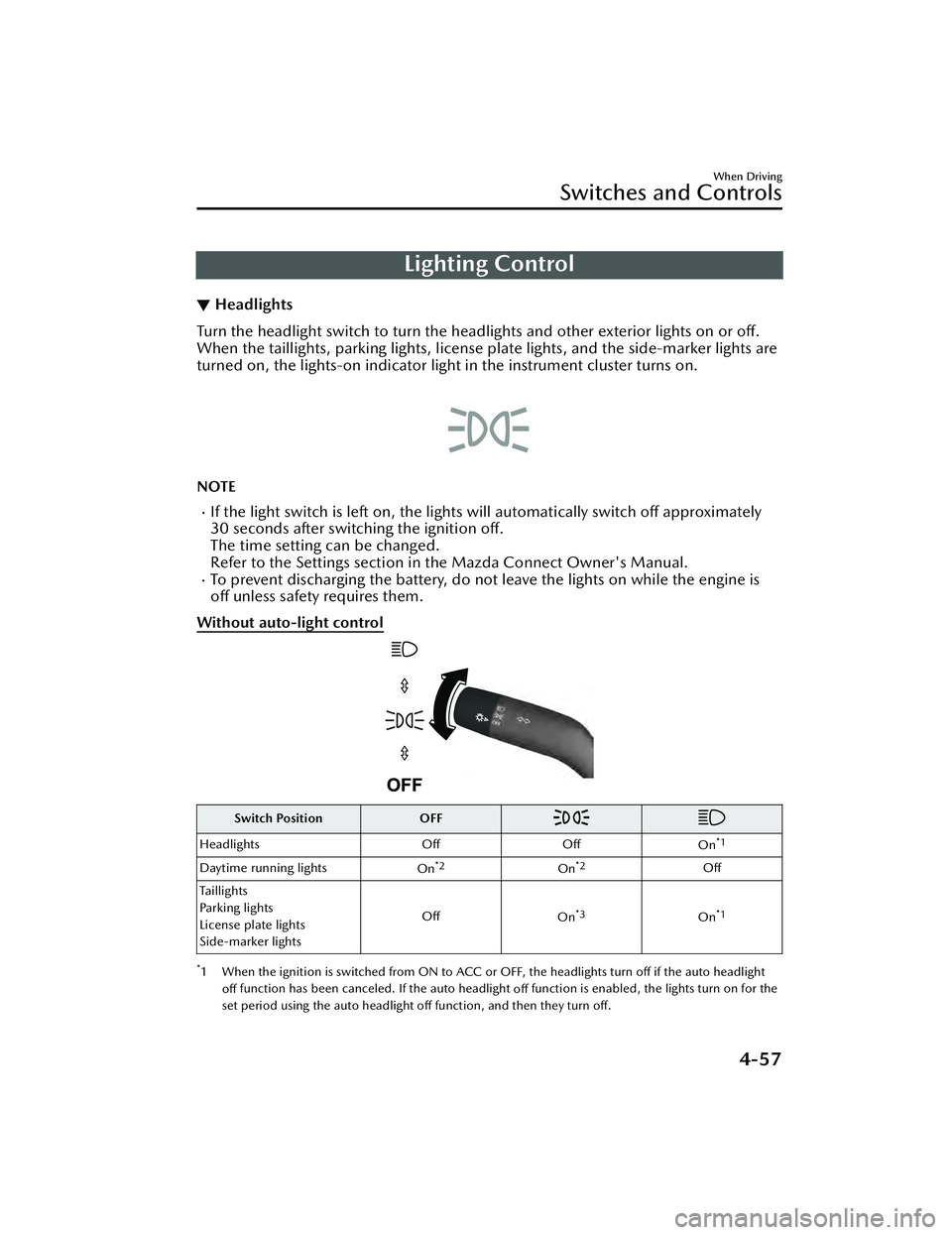
Lighting Control
▼Headlights
Turn the headlight switch to turn the headli
ghts and other exterior lights on or off.
When the taillights, parking lights, license plate lights, and the side-marker lights are
turned on, the lights-on indicator ligh t in the instrument cluster turns on.
NOTE
If the light switch is left on, the lights will automatically switch off approximately
30 seconds after switching the ignition off.
The time setting can be changed.
Refer to the Settings section in the Mazda Connect Owner's Manual.
To prevent discharging the battery, do not leave the lights on while the engine is
off unless safety requires them.
Without auto-light control
Switch Position OFF
Headlights OffOff
On*1
Daytime running lights On*2On*2Off
Taillights
Parking lights
License plate lights
Side-marker lights Off
On
*3On*1
*1 When the ignition is switched from ON to ACC or OFF, the headlights turn off if the auto headlight
off function has been canceled. If the auto headlight
off function is enabled, the lights turn on for the
set period using the auto headlight off function, and then they turn
off.
When Driving
Switches and Controls
4-57
Mazda3_8LC2-EA-22G_Edition1_new 2022-5-20 11:26:10
Page 203 of 623

*2 When the light switch is switched to a different position from the OFF, position while the
vehicle is stopped, the daytime running lights turn off. When starting to drive the vehicle, the daytime
running lights turn on again.
*3 When the ignition is switched from ON to ACC or OFF, the headlights remain on if the auto headlight off function has been canceled. If the auto headlight
off function is enabled, the lights turn on for the
set period using the auto headlight off function, and then they turn off.
With auto-light control
Switch Position OFF*1
AUTO
Surround-
ings are
bright
*2
Surround- ings are
dark
*3
Surround- ings are
bright
*2
Surround- ings are
dark
*3
Headlights Off Off On Off
On*4*5On*6
Daytime running lights OffOn*7OffOn*8Off Off
Taillights
Parking lights
License plate lights
Side-marker lights Off Off
On
On
*9On*9On*6
*1 When the light switch is switched to OFF while the vehicle is stopped, the lights turn off. The light
switch returns automatically to the AUTO position and the headlights change to AUTO operation
when you start driving the vehicle.
*2 The level of brightness around the vehicle is of a sufficient level.*3 The level of brightness around the vehicle is of an insufficient level.*4 The daytime running lights can be disabled usin g the personalization features (page 4-62). If the
daytime running lights are disabled, the headlights turn off directly after starting the engine. The
headlights turn on when you begin driving the vehicle.
*5 When the light switch is switched from the OFF, AUTO, or position to the position while
the vehicle is stopped, the headlights turn off. When starting to drive the vehicle, the headlights turn
on again.
*6 When the ignition is switched from ON to ACC or OFF, the headlights turn off if the auto headlight off function has been canceled. If the auto headlight off function is enabled, the lights turn on for the
set period using the auto headlight off function, and then they turn off.
When Driving
Switches and Controls
4-58
Mazda3_8LC2-EA-22G_Edition1_new 2022-5-20 11:26:10