Page 185 of 623
On a steep downgrade , downshifting
helps maintain safe speed and
prolongs brake life.
When Driving
Manual Transmission Operation
4-40
Mazda3_8LC2-EA-22G_Edition1_new 2022-5-20 11:26:10
Page 186 of 623
Automatic TransmissionControls
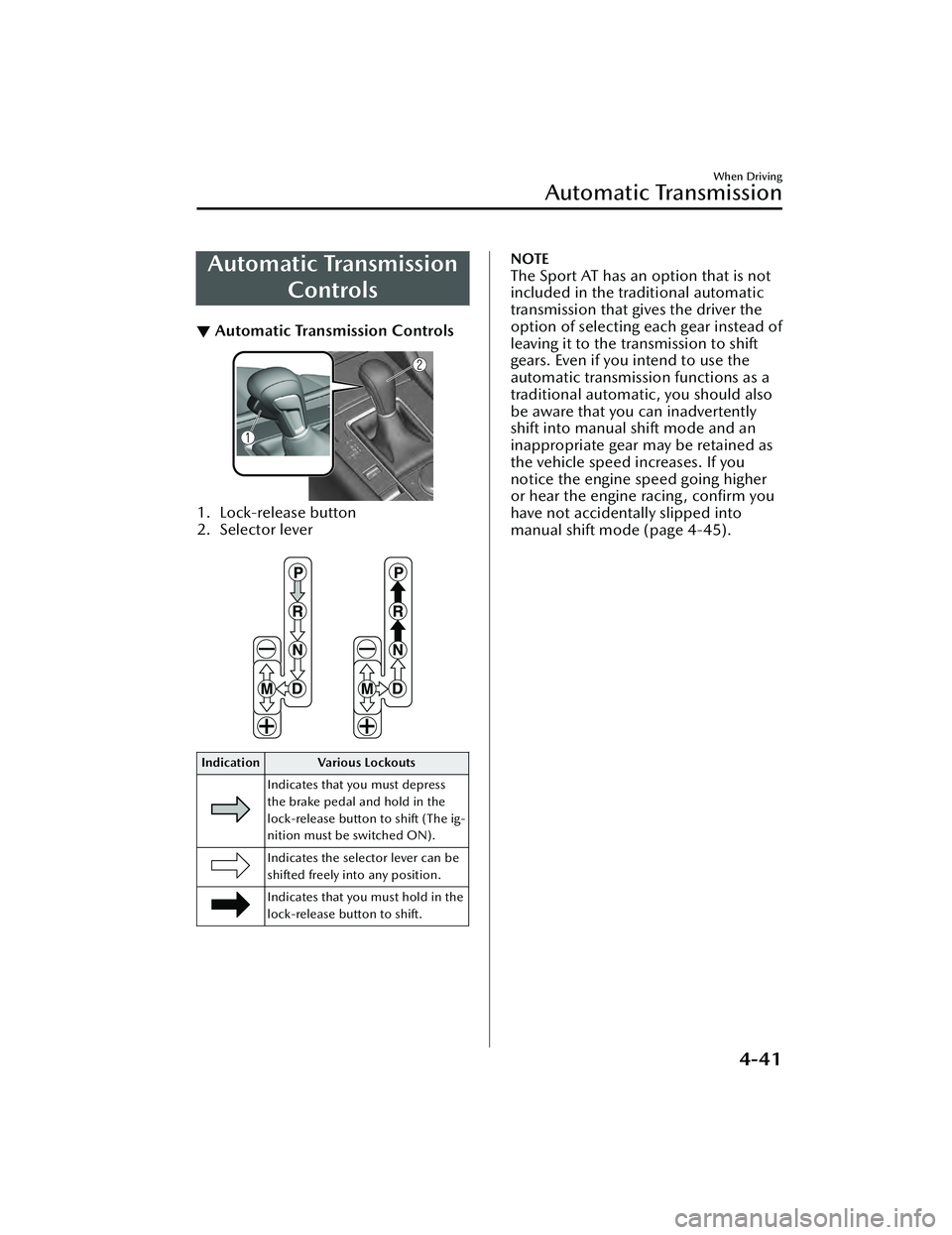
▼Automatic Transmission Controls
1. Lock-release button
2. Selector lever
Indication Various Lockouts
Indicates that you must depress
the brake pedal and hold in the
lock-release button to shift (The ig-
nition must be switched ON).
Indicates the selector lever can be
shifted freely into any position.
Indicates that you must hold in the
lock-release button to shift.
NOTE
The Sport AT has an option that is not
included in the traditional automatic
transmission that gives the driver the
option of selecting each gear instead of
leaving it to the tr ansmission to shift
gears. Even if you intend to use the
automatic transmission functions as a
traditional automatic, you should also
be aware that you can inadvertently
shift into manual shift mode and an
inappropriate gear may be retained as
the vehicle speed increases. If you
notice the engine speed going higher
or hear the engine racing, confirm you
have not accidentally slipped into
manual shift mode (page 4-45).
When Driving
Automatic Transmission
4-41
Mazda3_8LC2-EA-22G_Edition1_new 2022-5-20 11:26:10
Page 187 of 623

Shift-Lock System
▼Shift-Lock System
The shift-lock system prevents shifting
out of P unless the brake pedal is
depressed.
To s h i f t f r o m
P:
1. Depress and hold the brake pedal.
2. Start the engine.
3. Press and hold the lock-release button.
4. Move the selector lever.
NOTE
When the ignition is switched to
ACC or the ignition is switched off,
the selector lever cannot be shifted
from P position.
The ignition cannot be switched to
OFF if the selector lever is not in P
position.
▼ Shift-Lock Override
If the selector lever will not move from
P position using the proper shift
procedure, continue to hold down the
brake pedal.
1. Remove the shift-lock override
cover using a cloth-wrapped flat
head screwdriver.
2. Insert a flat screwdriver and push it down.
1. Cover
3. Press and hold the lock-release button.
4. Move the selector lever.
Take the vehicle to an Authorized
Mazda Dealer to have the system
checked.
When Driving
Automatic Transmission
4-42
Mazda3_8LC2-EA-22G_Edition1_new 2022-5-20 11:26:10
Page 188 of 623

Tra n s m i s s i o n R a n ge s
▼Transmission Ranges
The shift position indication in the
instrument cluster illuminates.
Refer to Shift Position Indication on
page 4-44.
Shift the selector lever to the P or N
position to start the engine.
P (Park)
P locks the transmission and prevents
the front wheels from rotating.
WARNING
Always set the selector lever to P
position and set the parking brake:
Only setting the selector lever to the P
position without using the parking
brake to hold the vehicle is dangerous.
If P fails to hold, the vehicle could
move and cause an accident.
CAUTION
Shifting into P, N or R while the
vehicle is moving can damage your
transmission.
Shifting into a driving gear or reverse
when the engine is running faster
than idle can damage the
transmission.
R (Reverse)
In position R, the vehicle moves only
backward. You must be at a complete
stop before shifting to or from R,
except under rare circumstances as
explained in Rocking the Vehicle (page
3-48).
NOTE
(With parking sensor system)
When the selector lever is shifted to
the R position with the ignition
switched ON, the parking sensor
system is activated and a beep sound is
heard.
Refer to Parking Sensor System on page
4-247.
N (Neutral)
In N, the wheels and transmission are
not locked. The vehicle will roll freely
even on the slightest incline unless the
parking brake or brakes are on.
WARNING
If the engine is running faster than
idle, do not shift from N or P into a
driving gear:
It's dangerous to shift from N or P into
a driving gear when the engine is
running faster than idle. If this is done,
the vehicle could move suddenly,
causing an accident or serious injury.
Do not shift into N when driving the
vehicle:
Shifting into N while driving is
dangerous. Engine braking cannot be
applied when decelerating which
could lead to an accident or serious
injury.
CAUTION
Do not shift into N when driving the
vehicle. Doing so can cause
transmission damage.
NOTE
Apply the parking brake or depress the
brake pedal before moving the selector
lever from N position to prevent the
vehicle from moving unexpectedly.
When Driving
Automatic Transmission
4-43
Mazda3_8LC2-EA-22G_Edition1_new 2022-5-20 11:26:10
Page 195 of 623
▼Recommendations for Shifting
Upshifting
For normal acceleration and cruising, Mazda recommends these shift points:
(U.S.A. and Canada)
Gear
Vehicle speed*1
M1 to M224 km/h (15 mph)
M2 to M3 40 km/h (25 mph)
M3 to M4 65 km/h (40 mph)
M4 to M5 73 km/h (45 mph)
M5 to M6 81 km/h (50 mph)
*1 Always observe local speed limit regulations.
Downshifting
When you must slow down in heavy traffic or on a steep upgrade, downshift before
the engine starts to overwork. This give s better acceleration when you need more
speed.
On a steep downgrade, downshifting helps maintain safe speed and prolongs brake
life.
When Driving
Automatic Transmission
4-50
Mazda3_8LC2-EA-22G_Edition1_new 2022-5-20 11:26:10
Page 197 of 623
Driving Tips
▼Driving Tips
WARNING
Do not let the vehicle move in a
direction opposite to the direction
selected by the selector lever:
Do not let the vehicle move backward
with the selector lever in a forward
position, or do not let the vehicle
move forward with the selector lever in
the reverse position. Otherwise, the
engine may stop, causing the loss of
the power brake and power steering
functions, and make it difficult to
control the vehicle which could result
in an accident.
Pa s s i n g
For extra power when passing another
vehicle or climbing steep grades,
depress the accelerator fully. The
transmission will shift to a lower gear,
depending on vehicle speed.
NOTE
The accelerator pedal may initially
feel heavy as it is being depressed,
then feel lighter as it is depressed
further. This change in pedal force
aids the engine control system in
determining how much the
accelerator pedal has been
depressed for performing kickdown,
and functions to control whether or
not kickdown should be performed.
The manual shift mode does not
switch to automatic shift mode while
the DSC is turned off when the
selector lever is in the M position.
Shift the selector lever.
Climbing steep grades from a stop
To climb a steep grade from a stopped
position:
1. Depress the brake pedal.
2. Shift to D or M1, depending on the
load weight and grade steepness.
3. Release the brake pedal while
gradually accelerating.
Descending steep grades
When descending a steep grade, shift
to lower gears, depending on load
weight and grade steepness. Descend
slowly, using the brakes only
occasionally to prevent them from
overheating.
When Driving
Automatic Transmission
4-52
Mazda3_8LC2-EA-22G_Edition1_new 2022-5-20 11:26:10
Page 199 of 623

The engine is running.
The selector lever is in a position other than P or N.
If there is a problem with M Hybrid, a warning indication is displayed.
M Hybrid operation status is displayed on the system operation status display of
the fuel efficiency monitor.
Refer to the Information section in the Mazda Connect Owner's Manual.
▼Unique M Hybrid Handling
M Hybrid vehicles have a unique
sound and vibration which differ from
normal vehicles. The following may
o cc u r, h o we v e r, t h i s i s u n i q u e t o M
Hybrid and it does not indicate a
problem.
Characteristic Occurrence status/loca-
tion
Operation sound of
deceleration regen-
eration An operational sound
can be heard from the
engine compartment
during deceleration.
Relay operation
sound of M Hybrid
battery An operational sound
can be heard from the
vehicle underfloor when
the engine is started and
stopped.
Operation sound of
brake system Sound can be heard from
the front of the vehicle
under the following con-
ditions:
The driver's door is
opened.
The ignition is switch-
ed ON.
The brake pedal is op-
erated.
The brake system op-
erates automatically.
Several minutes have
passed since the en-
gine was stopped.
Characteristic
Occurrence status/loca-
tion
Operational feed-
back through brake
pedal Operational feedback
through brake pedal
might be felt under the
following conditions.
The ignition is switch-
ed ON.
The brake pedal is op-
erated.
▼
M Hybrid battery
M Hybrid is equipped with a special
battery.
WARNING
Heed the following cautions to
prevent burns and electrical shock:
Never remove and disassemble the
brackets and connectors securing the
terminal part, wiring harness, and
the M Hybrid battery.
Never touch the M Hybrid battery
because it becomes extremely hot
under direct sunlight or after driving.
Because the M Hybrid battery is
especially dangerous when wet,
never touch it.
NOTE
The M Hybrid battery has a certain
battery life. Battery life
differs
depending on how the vehicle is used
and the driving conditions.
When Driving
M Hybrid
4-54
Mazda3_8LC2-EA-22G_Edition1_new 2022-5-20 11:26:10
Page 221 of 623
Brake System
▼Foot Brake
This vehicle has power-assisted brakes
that adjust automatically through
normal use.
Should power-assist fail, you can stop
by applying greater force than normal
to the brake pedal. But the distance
required to stop will be greater than
usual.
WARNING
Do not coast with the engine stalled
or turned off, find a safe place to stop:
Coasting with the engine stalled or
turned
off is dangerous. Braking will
require more effort, and the brake's
power-assist could be depleted if you
pump the brake. This will cause longer
stopping distances or even an
accident.
Shift to a lower gear when going
down steep hills:
Driving with your foot continuously on
the brake pedal or steadily applying
the brakes for long distances is
dangerous. This causes overheated
brakes, resulting in longer stopping
distances or even total brake failure.
This could cause loss of vehicle control
and a serious accident. Avoid
continuous application of the brakes.
Dry off brakes that have become wet
by driving slowly, releasing the
accelerator pedal and lightly applying
the brakes several times until the
brake performance returns to normal:
Driving with wet brakes is dangerous.
Increased stopping distance or the
vehicle pulling to one side when
braking could result in a serious
accident. Light braking will indicate
whether the brakes have been
affected.
CAUTION
Do not drive with your foot held on
the clutch pedal or brake pedal, or
hold the clutch pedal depressed
halfway unnecessarily. Doing so
could result in the following:
The clutch and brake parts will
wear out more quickly.
The brakes can overheat and
adversely
affect brake
performance.
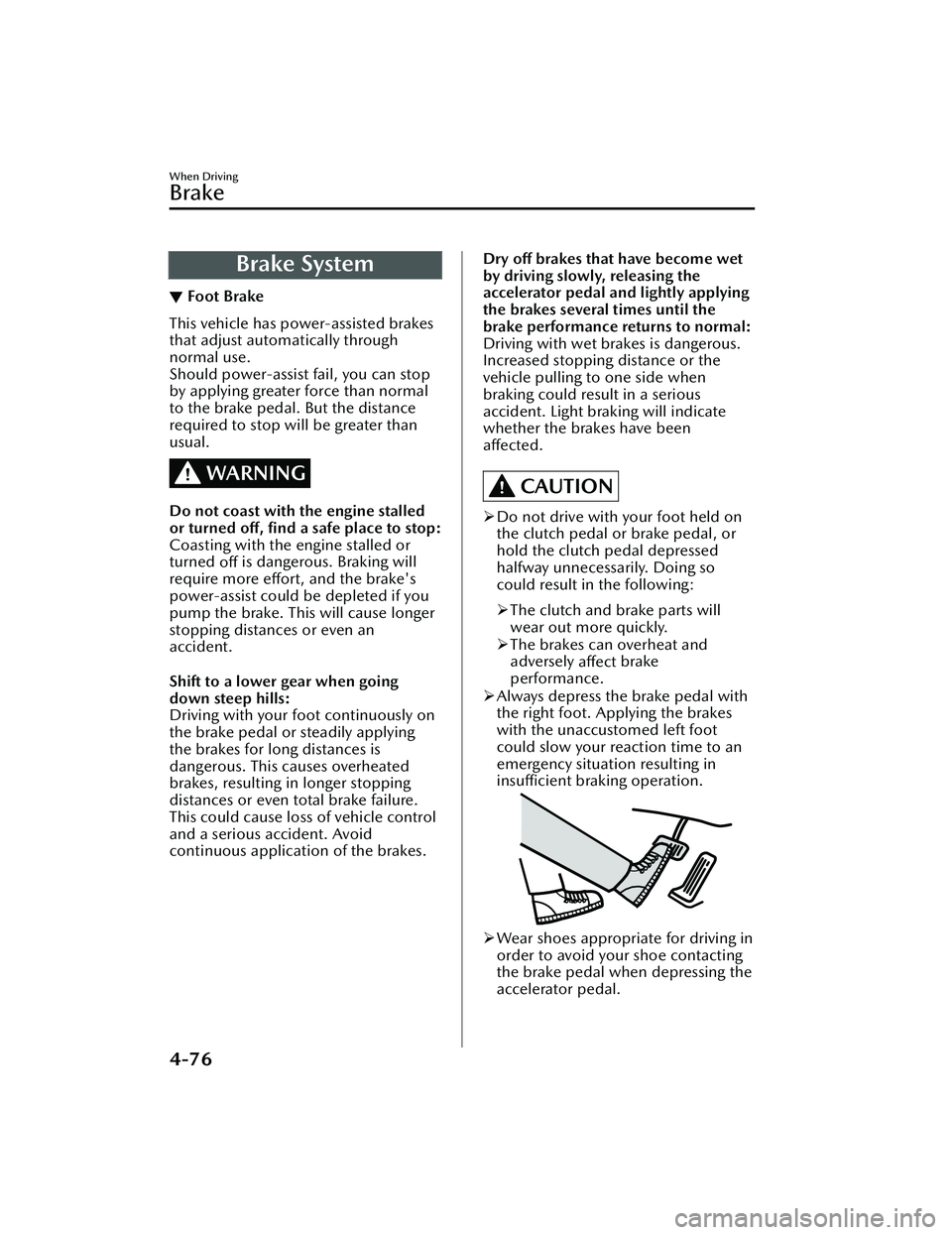
Always depress the brake pedal with
the right foot. Applying the brakes
with the unaccustomed left foot
could slow your reaction time to an
emergency situation resulting in
insufficient braking operation.
Wear shoes appropriate for driving in
order to avoid your shoe contacting
the brake pedal when depressing the
accelerator pedal.
When Driving
Brake
4-76
Mazda3_8LC2-EA-22G_Edition1_new 2022-5-20 11:26:10