Page 162 of 623

When the light is turned on
The light turns on while engine idling is
stopped and turns off when the engine
is restarted.Cylinder Deactivation*
▼Cylinder Deact ivat ion
The cylinder deactivation is a function
designed to reduce fuel consumption
and improve fuel economy by
deactivating 2 out of the 4 cylinders
while driving. The function constantly
determines which is better for driving;
4 cylinders or 2 cylinders, regardless of
the driver's operations, and it performs
the switching automatically.
When the cylinder deactivation
function does not operate
The cylinder deactivation function
does not operate under the following
conditions.
(Manual Transmission)
The selector lever is in the N or R
position.
(Automatic Transmission)
The selector lever is in the P, N, or R
position.
The gear is in 1st gear.The engine oil temperature or engine
coolant temperature is low.
After disconnecting the battery
terminals for some reason, such as
for battery replacement.
When Driving
Start/Stop Engine
*Some models.4-17
Mazda3_8LC2-EA-22G_Edition1_new
2022-5-20 11:26:10
Page 174 of 623
▼Warning Indication/Warning Lights
These lights turn on or flash to notify th
e user of the system operation status or a
system malfunction.
Signal Warning Refer to
Brake System Warning Indication/Warning Light*17-27
ABS Warning Indication/Warning Light*1
Electronic
Brake Force
Distribution
System Warn- ing
7-28
ABS warning 7-30
Charging System Warning Indication/Warning Light*17-28
Engine Oil Warning Indication/Warning Light*17-28
High Engine Coolant Temperature Warning Indication 7-29
Power Steering Malfunction Indication/Indicator Light*17-29
Master Warning Indication 7-30
Brake Control System Warning Indication/Warning Light*17-30
Brake Override Warning Indication 7-31
Check Engine Indication/Light*17-31
(Amber)
*i-stop Warning Indication/Warning Light*17-31
*Automatic Transmission Warning Indication/Warning Light*17-31
When Driving
Instrument Cluster and Display
*Some models.4-29
Mazda3_8LC2-EA-22G_Edition1_new 2022-5-20 11:26:10
Page 183 of 623

Manual TransmissionShift Pattern
▼Manual Transmission Shift Pattern
1. Neutral position
The shift pattern of the transmission is
conventional, as shown.
Depress the clutch pedal all the way
down while shifting; then release it
slowly.
Your vehicle is equipped with a device
to prevent shifting to R (reverse) by
mistake. Push the shift lever downward
and shift to R.
WARNING
Do not use sudden engine braking on
slippery road surfaces or at high
speeds:
Shifting down while driving on wet,
snowy, or frozen roads, or while
driving at high speeds causes sudden
engine braking , which is dangerous.
The sudden change in tire speed could
cause the tires to skid. This could lead
to loss of vehicle control and an
accident.
Always leave the shift lever in 1 or R
position and set the parking brake
when leaving the vehicle unattended:
Otherwise the vehicle could move and
cause an accident.
CAUTION
Keep your foot off the clutch pedal
except when shifting gears. Also, do
not use the clutch to hold the vehicle
on an upgrade. Riding the clutch will
cause needless clutch wear and
damage.
Do not apply any excessive lateral
force to the shift lever when
changing from 5th to 4th gear. This
could lead to the accidental
selection of 2nd gear, which could
result in damage to the transmission.
Make sure the vehicle comes to a
complete stop before shifting to R.
Shifting to R while the vehicle is still
moving may damage the
transmission.
NOTE
If shifting to R is
difficult, shift back
into neutral, release the clutch pedal,
and try again.
(With parking sensor system)
When Driving
Manual Transmission Operation
4-38
Mazda3_8LC2-EA-22G_Edition1_new 2022-5-20 11:26:10
Page 184 of 623

When the shift lever is shifted to the
R position with the ignition switched
ON, the parking sensor system is
activated and a beep sound is heard.
Refer to Parking Sensor System on
page 4-247.
▼Gear Shift Indicator (GSI)
The GSI supports you to obtain
optimum fuel economy and smooth
driving. It displays the selected gear
position in the instrument cluster as
well as notifies the driver to change to
the most suitable gear position
corresponding to the actual driving
condition.
1. Selected gear position
2. Suitable gear position
Indication
Condition
Numeral The selected gear position is
displayed.
and numer-
al Shift up or down to the indi-
cated gear position is recom-
mended.
CAUTION
Do not rely solely on the shift-up/
shift-down recommendations by
indications. The actual driving situation
might require shift operations
different
from indication. To avoid the risk of
accidents, the road and traffic
conditions have to be judged correctly
by the driver before shifting.
NOTE
The GSI turns off when the following
operations are performed.
The vehicle is stopped.The vehicle is put in neutral.The vehicle is driven in reverse.The clutch is not fully engaged when
accelerating from a stop.
The clutch pedal remains depressed
for 2 seconds or longer while driving.
▼ Recommendations for Shifting
Upshifting
For normal acceleration, Mazda
recommends these shift points:
(U.S.A. and Canada)
Gear
Vehicle speed
1 to 2 24 km/h (15 mph)
2 to 3 42 km/h (26 mph)
3 to 4 60 km/h (37 mph)
4 to 5 75 km/h (46 mph)
5 to 6 79 km/h (49 mph)
For cruising, Mazda recommends these
shift points:
(U.S.A. and Canada)
Gear Vehicle speed
1 to 2 13 km/h (8 mph)
2 to 3 29 km/h (18 mph)
3 to 4 49 km/h (30 mph)
4 to 5 63 km/h (39 mph)
5 to 6 70 km/h (43 mph)
Downshifting
When you must slow down in heavy
traffic or on a steep upgrade ,
downshift before the engine starts to
overwork. This reduces the chance of
stalling and gives better acceleration
when you need more speed.
When Driving
Manual Transmission Operation
4-39
Mazda3_8LC2-EA-22G_Edition1_new 2022-5-20 11:26:10
Page 185 of 623
On a steep downgrade , downshifting
helps maintain safe speed and
prolongs brake life.
When Driving
Manual Transmission Operation
4-40
Mazda3_8LC2-EA-22G_Edition1_new 2022-5-20 11:26:10
Page 186 of 623
Automatic TransmissionControls
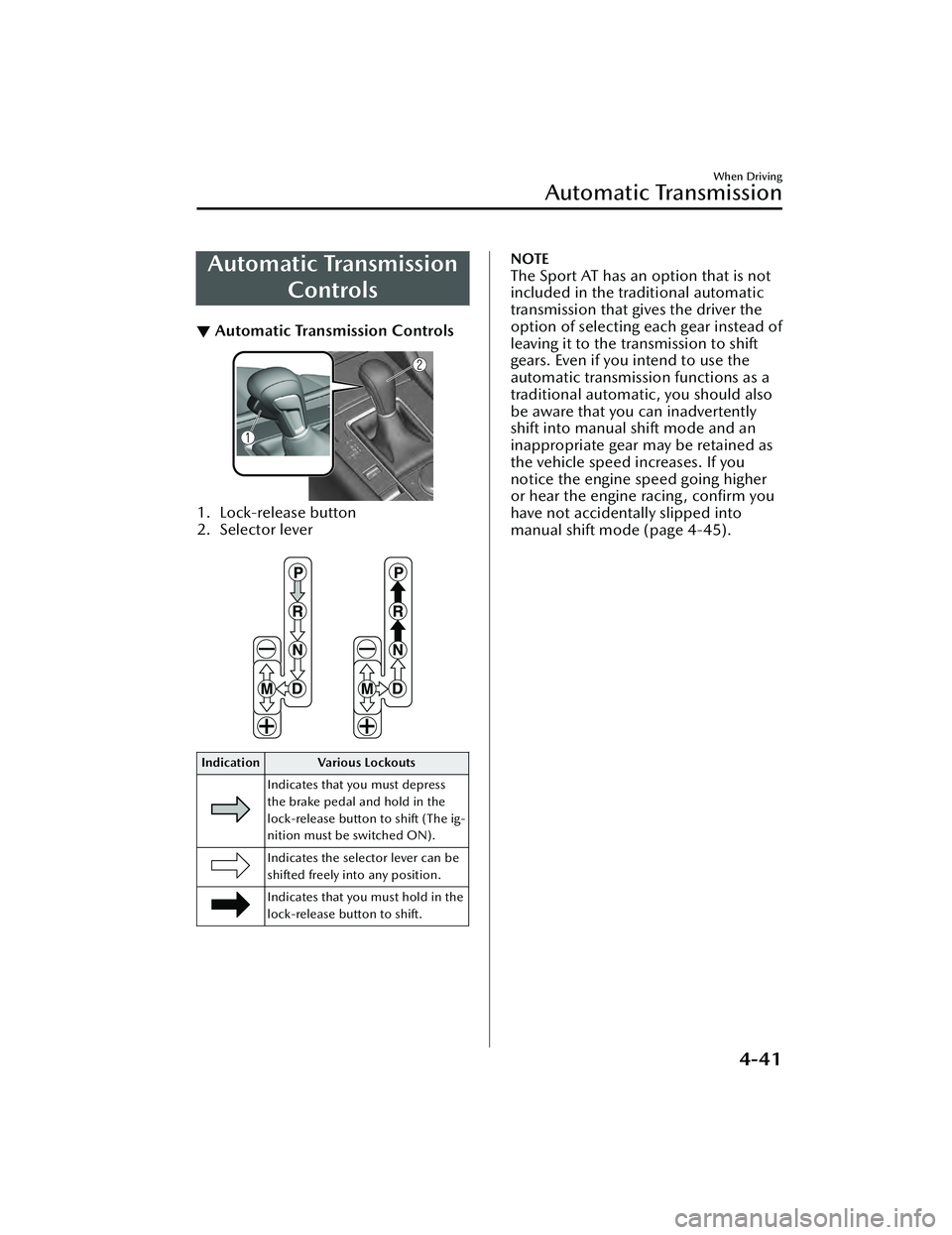
▼Automatic Transmission Controls
1. Lock-release button
2. Selector lever
Indication Various Lockouts
Indicates that you must depress
the brake pedal and hold in the
lock-release button to shift (The ig-
nition must be switched ON).
Indicates the selector lever can be
shifted freely into any position.
Indicates that you must hold in the
lock-release button to shift.
NOTE
The Sport AT has an option that is not
included in the traditional automatic
transmission that gives the driver the
option of selecting each gear instead of
leaving it to the tr ansmission to shift
gears. Even if you intend to use the
automatic transmission functions as a
traditional automatic, you should also
be aware that you can inadvertently
shift into manual shift mode and an
inappropriate gear may be retained as
the vehicle speed increases. If you
notice the engine speed going higher
or hear the engine racing, confirm you
have not accidentally slipped into
manual shift mode (page 4-45).
When Driving
Automatic Transmission
4-41
Mazda3_8LC2-EA-22G_Edition1_new 2022-5-20 11:26:10
Page 187 of 623

Shift-Lock System
▼Shift-Lock System
The shift-lock system prevents shifting
out of P unless the brake pedal is
depressed.
To s h i f t f r o m
P:
1. Depress and hold the brake pedal.
2. Start the engine.
3. Press and hold the lock-release button.
4. Move the selector lever.
NOTE
When the ignition is switched to
ACC or the ignition is switched off,
the selector lever cannot be shifted
from P position.
The ignition cannot be switched to
OFF if the selector lever is not in P
position.
▼ Shift-Lock Override
If the selector lever will not move from
P position using the proper shift
procedure, continue to hold down the
brake pedal.
1. Remove the shift-lock override
cover using a cloth-wrapped flat
head screwdriver.
2. Insert a flat screwdriver and push it down.
1. Cover
3. Press and hold the lock-release button.
4. Move the selector lever.
Take the vehicle to an Authorized
Mazda Dealer to have the system
checked.
When Driving
Automatic Transmission
4-42
Mazda3_8LC2-EA-22G_Edition1_new 2022-5-20 11:26:10
Page 188 of 623

Tra n s m i s s i o n R a n ge s
▼Transmission Ranges
The shift position indication in the
instrument cluster illuminates.
Refer to Shift Position Indication on
page 4-44.
Shift the selector lever to the P or N
position to start the engine.
P (Park)
P locks the transmission and prevents
the front wheels from rotating.
WARNING
Always set the selector lever to P
position and set the parking brake:
Only setting the selector lever to the P
position without using the parking
brake to hold the vehicle is dangerous.
If P fails to hold, the vehicle could
move and cause an accident.
CAUTION
Shifting into P, N or R while the
vehicle is moving can damage your
transmission.
Shifting into a driving gear or reverse
when the engine is running faster
than idle can damage the
transmission.
R (Reverse)
In position R, the vehicle moves only
backward. You must be at a complete
stop before shifting to or from R,
except under rare circumstances as
explained in Rocking the Vehicle (page
3-48).
NOTE
(With parking sensor system)
When the selector lever is shifted to
the R position with the ignition
switched ON, the parking sensor
system is activated and a beep sound is
heard.
Refer to Parking Sensor System on page
4-247.
N (Neutral)
In N, the wheels and transmission are
not locked. The vehicle will roll freely
even on the slightest incline unless the
parking brake or brakes are on.
WARNING
If the engine is running faster than
idle, do not shift from N or P into a
driving gear:
It's dangerous to shift from N or P into
a driving gear when the engine is
running faster than idle. If this is done,
the vehicle could move suddenly,
causing an accident or serious injury.
Do not shift into N when driving the
vehicle:
Shifting into N while driving is
dangerous. Engine braking cannot be
applied when decelerating which
could lead to an accident or serious
injury.
CAUTION
Do not shift into N when driving the
vehicle. Doing so can cause
transmission damage.
NOTE
Apply the parking brake or depress the
brake pedal before moving the selector
lever from N position to prevent the
vehicle from moving unexpectedly.
When Driving
Automatic Transmission
4-43
Mazda3_8LC2-EA-22G_Edition1_new 2022-5-20 11:26:10