2023 MAZDA MAZDA ignition
[x] Cancel search: ignitionPage 274 of 623

In the following cases, it may be
difficult to view the illumination/
flashing of the Blind Spot Monitoring
(BSM) warning indicator lights
equipped on the door mirrors.
Snow or ice adheres to the door
mirrors.
The front door glass is fogged or
covered in snow, frost or dirt.
Turn off the RCTA system while
pulling a trailer or while an accessory
such as a bicycle carrier is installed to
the rear of the vehicle. Otherwise,
the radio waves emitted by the radar
will be blocked causing the system to
not operate normally.
The rear side radar sensor of the
RCTA may be regulated under the
radio wave related laws of the
country where the vehicle is driven. If
this system is used abroad, it may be
necessary to turn off the system.
Refer to Rear Side Radar Sensor on
page 4-219.
▼ Canceling Operation of Rear Cross
Traffic Alert (RCTA)
The RCTA can be set to inoperable.
(If only the RCTA is turned
off)
Refer to the Settings section in the
Mazda Connect Owner's Manual.
(If the RCTA is turned off by
operating the i-ACTIVSENSE OFF
switch)
Refer to i-ACTIVSENSE OFF Switch
on page 4-100.
NOTE
If the ignition is switched OFF while
you have canceled the system using the
i-ACTIVSENSE OFF switch, the system
is automatically enabled the next time
the ignition is switched ON. However,
if the system is canceled using the
personalization features, the system is
not automatically enabled.
When Driving
i-ACTIVSENSE
4-129
Mazda3_8LC2-EA-22G_Edition1_new 2022-5-20 11:26:10
Page 279 of 623

▼Setting the System
The MRCC system operates when all of the following conditions are met.
Vehicle speed is 30 km/h (
19 mph) to 145 km/h (90 mph)The MRCC is turned on.The brake pedal is not depressed.The parking brake is released (Electric Parking Brake (EPB) indicator light is turned
off).
There is no problem with the DSC.All the doors are closed.The driver's seat belt is fastened.The shift lever is in a position other than reverse (R) or neutral (N).The clutch pedal is not depressed.
Turning on the system
1. CANCEL switch
2. RES switch
3. MRCC switch
When the MRCC switch is pressed once, the MRCC system turns on, and the MRCC
standby indication (white) turns on and the vehicle speed and the distance between
the vehicles while in headway control can be set.
In addition, the MRCC system display indication is displayed on the
multi-information display and the active driving display at the same time.
NOTE
If the ignition is switched off while the MRCC system is operating, the system will be
operable when the ignition is switched ON the next time.
When Driving
i-ACTIVSENSE
4-134
Mazda3_8LC2-EA-22G_Edition1_new 2022-5-20 11:26:10
Page 281 of 623

The distance-between-vehicles is set to a shorter distance by pressing the CANCEL
switch down. The distance-between-vehicles is set to a longer distance by pressing
the CANCEL switch up.
Distance-between-vehiclesguideline
(at 80 km/h (50 mph) vehicle speed) Indication on multi-information
display Indication on active driving dis-
play (vehicles with active driving
display)
*1
Long (about 50 m (164 ft))
Medium (about 40 m (131 ft))
Short (about 30 m (98 ft))
Extremely short (about 25 m (82
ft))
*1 Displays a pop-up image in the active driving display only when the driver operates the switch.
NOTE
The distance-between-vehicles differs depending on the vehicle speed, and the
slower the vehicle speed, the shorter the distance.
When the ignition is switched to ACC or OFF and then the engine is started again,
the system automatically sets the distance-between-vehicles to the previous
setting.
When Driving
i-ACTIVSENSE
4-136
Mazda3_8LC2-EA-22G_Edition1_new 2022-5-20 11:26:10
Page 290 of 623

When the MRCC switch is pressed once, the MRCC with Stop & Go function system
turns on, and the MRCC with Stop & Go function standby indication (white) turns
on and the vehicle speed and the distance between the vehicles while in headway
control can be set.
In addition, the MRCC with Stop & Go function system display indication is
displayed on the multi-information display and the active driving display at the same
time.
NOTE
If the ignition is switched off while the MRCC with Stop & Go function system is
operating, the system will be operable when the ignition is switched ON the next
time.
How to set the speed
Adjust the vehicle speed to the desired setting using the accelerator pedal and press
the RES switch up (SET+) or down (SET-) to start headway control.
The set speed is indicated on the display. At the same time, the MRCC standby
indication (white) changes to the MRCC set indication (green).
Tra ve l s t a t u sIndication on multi-information
display Indication on active driving dis-
play (vehicles with active driving
display)
During travel at constant speed
During travel under headway
control
When Driving
i-ACTIVSENSE
4-145
Mazda3_8LC2-EA-22G_Edition1_new 2022-5-20 11:26:10
Page 292 of 623

Distance-between-vehiclesguideline
(at 80 km/h (50 mph) vehicle speed) Indication on multi-information
display Indication on active driving dis-
play (vehicles with active driving
display)
*1
Extremely short (about 25 m (82
ft))
*1 Displays a pop-up image in the active driving display only when the driver operates the switch.
NOTE
The distance-between-vehicles differs depending on the vehicle speed, and the
slower the vehicle speed, the shorter the distance.
When the ignition is switched to ACC or OFF and then the engine is started again,
the system automatically sets the distance-between-vehicles to the previous
setting.
Changing the Set Vehicle Speed
(To accelerate/decelerate using the RES switch)
When the RES switch is pressed up (SET+), the vehicle accelerates and when the RES
switch is pressed down (SET-), it decelerates.
Press and release immediately: 1 km/h (1 mph)Press and hold: 10 km/h (5 mph)
(To increase speed using accelerator pedal)
Depress the accelerator pedal and press the RES switch up (SET+) or down (SET-) at
the desired speed. If the switch is not op erated, the system returns to the set speed
after you release your foot from the accelerator pedal.
NOTE
The warnings and brake control do not operate while the accelerator pedal is
depressed.
The setting speed can be changed by operating the RES switch up (SET+) or down
(SET-) during stop hold control.
When Driving
i-ACTIVSENSE
4-147
Mazda3_8LC2-EA-22G_Edition1_new 2022-5-20 11:26:10
Page 303 of 623

2. Adjust the vehicle speed to the desired setting using the accelerator pedal andpress the RES switch up (SET+) or down (SET-) to start headway control.
The set speed is indicated on the display. At the same time, the TJA standby
indication (white) changes to the TJA set indication (green).
3. The headway control is operable when all of the conditions for it to operate aremet, or the steering assist function is oper able when all of the conditions for it to
operate are met.
NOTE
If a vehicle ahead is detected while traveling at a constant speed, the
vehicle-ahead indication is displayed and headway control is performed.
Additionally, when a vehicle ahead is no longer detected, the vehicle-ahead
indication turns off and the system switches back to travel at constant speed.
Headway control is not possible if the vehicle ahead is driving faster than your
vehicle's set speed. Adjust the system to the desired vehicle speed using the
accelerator pedal.
When the ignition is switched OFF, the system status before it was turned off is
maintained. For example, if the ignition is switched OFF with the TJA operable, the
TJA remains operational the next time the ignition is switched ON.
When the TJA switch is pressed while the Mazda Radar Cruise Control (MRCC) or
Mazda Radar Cruise Control with Stop & Go function (MRCC with Stop & Go
function) system is operating, the TJA operates. In addition, when the MRCC
switch is pressed while the TJA is operating, the Mazda Radar Cruise Control
(MRCC) or Mazda Radar Cruise Control with Stop & Go function (MRCC with
Stop & Go function) system operates.
Changing the set vehicle speed
(To accelerate/decelerate using the RES switch)
When the RES switch is pressed up (SET+), the vehicle accelerates and when the RES
switch is pressed down (SET-), it decelerates.
Press and release immediately: 1 km/h (1 mph)Press and hold: 10 km/h (5 mph)
(To increase speed using accelerator pedal)
Depress the accelerator pedal and press the RES switch up (SET+) or down (SET-) at
the desired speed. If the switch is not operated, the system returns to the set speed
after you release your foot from the accelerator pedal.
When Driving
i-ACTIVSENSE
4-158
Mazda3_8LC2-EA-22G_Edition1_new 2022-5-20 11:26:10
Page 305 of 623
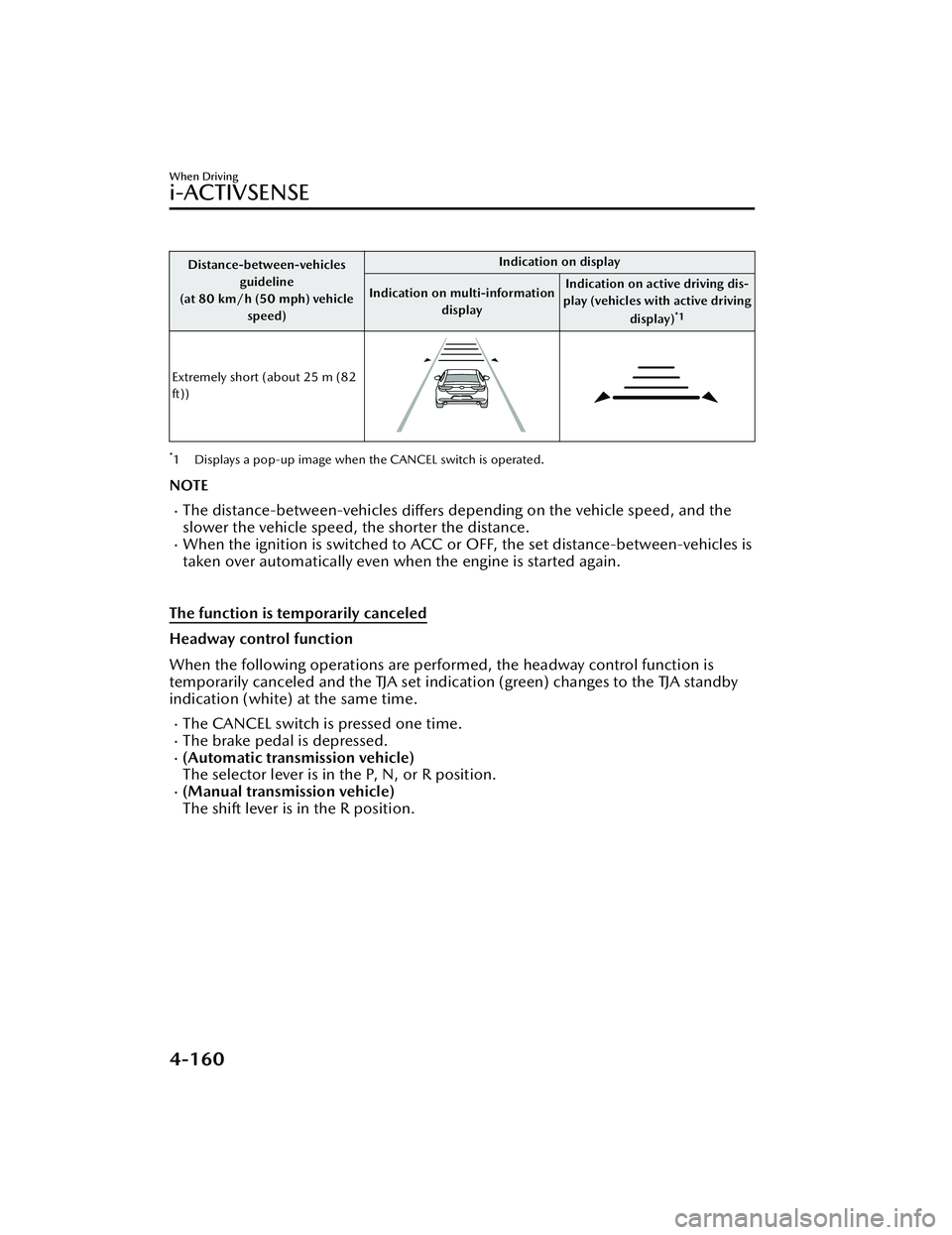
Distance-between-vehiclesguideline
(at 80 km/h (50 mph) vehicle
speed) Indication on display
Indication on multi-information display Indication on active driving dis-
play (vehicles with active driving
display)
*1
Extremely short (about 25 m (82
ft))
*1 Displays a pop-up image when the CANCEL switch is operated.
NOTE
The distance-between-vehicles differs depending on the vehicle speed, and the
slower the vehicle speed, the shorter the distance.
When the ignition is switched to ACC or OFF, the set distance-between-vehicles is
taken over automatically even when the engine is started again.
The function is temporarily canceled
Headway control function
When the following operations are performed, the headway control function is
temporarily canceled and the TJA set indication (green) changes to the TJA standby
indication (white) at the same time.
The CANCEL switch is pressed one time.The brake pedal is depressed.(Automatic transmission vehicle)
The selector lever is in the P, N, or R position.
(Manual transmission vehicle)
The shift lever is in the R position.
When Driving
i-ACTIVSENSE
4-160
Mazda3_8LC2-EA-22G_Edition1_new 2022-5-20 11:26:10
Page 311 of 623
▼System Operation
When the ignition is switched ON, the
i-ACTIVSENSE status symbol (warning/
risk avoidance support system) (white)
turns on and the system goes on
standby.
NOTE
If the i-ACTIVSENSE status symbol
(warning/risk avoidance support
system) (white) does not turn on, the
system is canceled using the
i-ACTIVSENSE OFF switch or the
personalization feature.
Operation conditions
When all of the following conditions
are met, the i-ACTIVSENSE status
symbol (warning
/risk avoidance
support system) on the
multi-information display changes
from white to green and the system
becomes operational.
The vehicle speed is about 64 km/h
(40 mph) or faster.
The system detects white (yellow)
lane lines.
NOTE
When the system does not detect a
white (yellow) lane line on one side
only, the system does not operate on
the side that is not being detected.
When temporarily canceling the
system
The LAS goes on standby in the
following cases: The LAS operation is
automatically restored when the
system's operation conditions are met.
The system cannot detect white
(yellow) lane lines.
The vehicle speed is less than about
56 km/h (35 mph).
The turn signal lever is operated.The accelerator pedal is depressed
abruptly.
The TCS/DSC is operating.The TCS/DSC is turned off.The steering wheel is operated.The brake pedal is operated.
The function is temporarily stopped.
The LAS stops functioning in the
following cases:
The temperature in the forward
sensing camera (FSC) is too high or
too low.
The windshield around the forward
sensing camera (FSC) is foggy.
The windshield around the forward
sensing camera (FSC) is blocked by
an obstruction, causing poor forward
visibility.
Strong light (such as sunlight, or
headlights (high-beam) of
on-coming vehicles) is directed at
the forward sensing camera (FSC).
When Driving
i-ACTIVSENSE
4-166
Mazda3_8LC2-EA-22G_Edition1_new 2022-5-20 11:26:10