2023 MAZDA CX5 rear wipers
[x] Cancel search: rear wipersPage 152 of 583

4When Driving
Information concerning safer driving and stopping.
Start/Stop Engine..................... 4-4 Ignition Switch.......................4-4
Starting the Engine................. 4-5
Turning the Engine Off............ 4-9
Cylinder Deact ivat ion
*..........4-10
i-stop
*................................. 4-11
Instrument Cluster and
Display.................................. 4-18 Instrument Cluster and
Display................................4-18
Instrument Cluster............... 4-18
Active Driving Display
*......... 4-35
Automatic Transmission........... 4-37 Automatic Transmission
Controls.............................. 4-37
Shift-Lock System................. 4-38
Transmission Ranges............ 4-39
Manual Shift Mode.............. 4-41
Direct Mode
*.......................4-47
Driving Tips......................... 4-48
Switches and Controls............. 4-49 Lighting Control................... 4-49
Turn and Lane-Change
Signals................................ 4-54
Windshield Wipers and
Washer............................... 4-55
Rear Window Wiper and
Washer............................... 4-58
Rear Window Defogger........ 4-59
Horn................................... 4-61
Hazard Warning Flasher....... 4-61
HomeLink Wireless Control
System
*............................... 4-62
Brake.....................................4-67 Brake System....................... 4-67
AUTOHOLD........................ 4-73
Hill Launch Assist (HLA)........4-77
ABS/TCS/DSC....................... 4-78 Antilock Brake System
(ABS).................................. 4-78
Tra c t i o n C o n t r o l Sy s t e m
(TCS).................................. 4-79
Dynamic Stability Control
(DSC)................................. 4-81
Mazda intelligent Drive Select (Mi-
Drive).................................... 4-82 Mazda intelligent Drive Select
(Mi-Drive) (FWD)
*............... 4-82
Mazda intelligent Drive Select
(Mi-Drive) (AWD)
*...............4-83
i-ACTIV AWD......................... 4-86 i-ACTIV AWD Operation
*..... 4-86
Power Steering....................... 4-88 Power Steering.....................4-88
i-ACTIVSENSE......................... 4-89 i-ACTIVSENSE
*..................... 4-89
Adaptive Front Lighting System
(AFS)
*................................. 4-93
*Some models.4-1
CX-50_8KB8-EA-22A_Edition2_new 2022-1-6 14:55:18
Page 209 of 583
If the headlight switch and the
windshield wiper switch are in
AUTO, and the wipers are operated
at low or high speed by the auto
wiper control for several seconds,
bad weather conditions are
determined and the headlights may
be turned on.
The auto-wiper control functions can
be turned off.
Refer to the Settings section in the
Mazda Connect Owner's Manual.
▼Windshield Washer
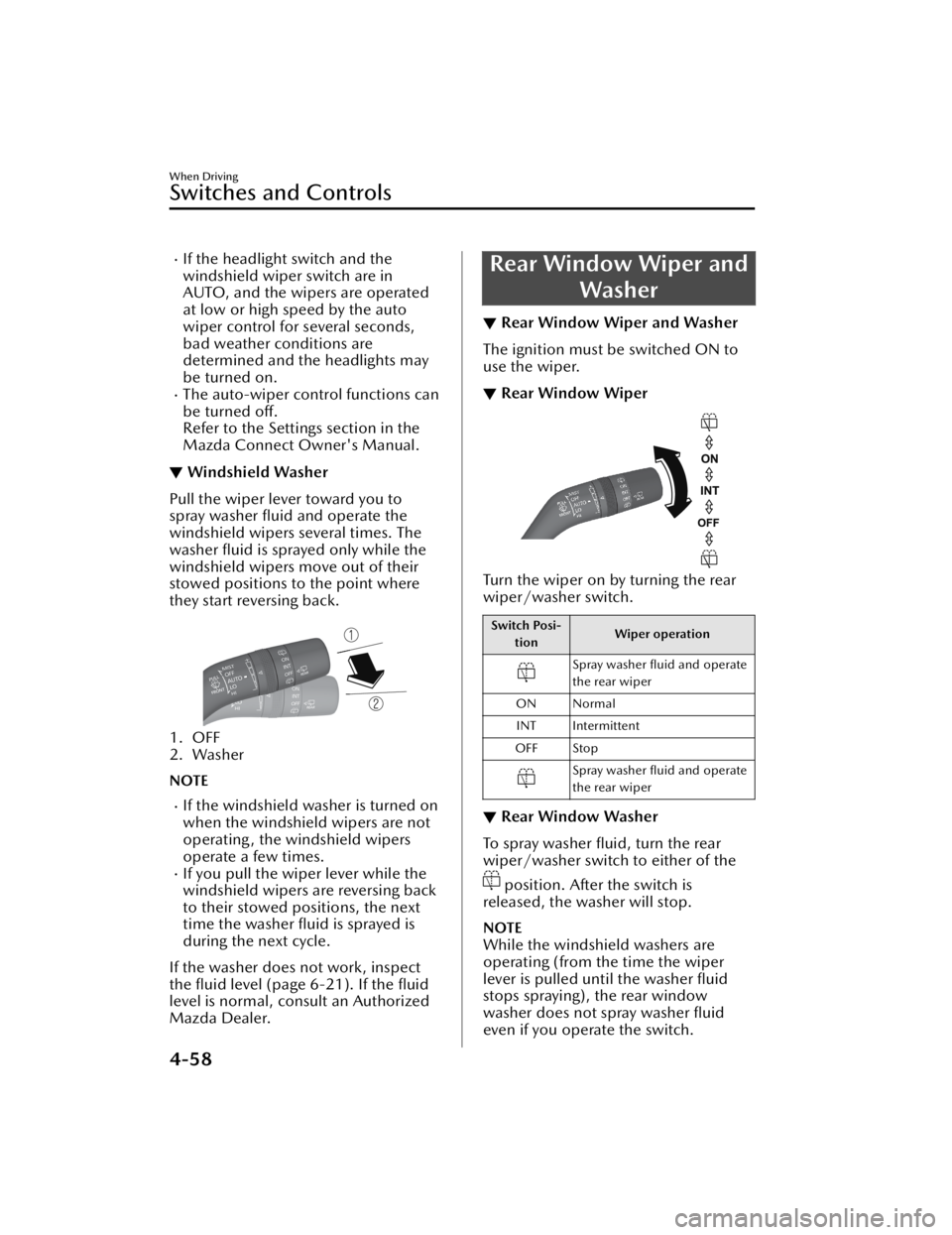
Pull the wiper lever toward you to
spray washer fluid and operate the
windshield wipers several times. The
washer fluid is sprayed only while the
windshield wipers move out of their
stowed positions to the point where
they start reversing back.
1. OFF
2. Washer
NOTE
If the windshield washer is turned on
when the windshield wipers are not
operating, the windshield wipers
operate a few times.
If you pull the wiper lever while the
windshield wipers are reversing back
to their stowed positions, the next
time the washer fluid is sprayed is
during the next cycle.
If the washer does not work, inspect
the fluid level (page 6-21). If the fluid
level is normal, consult an Authorized
Mazda Dealer.
Rear Window Wiper and Washer
▼Rear Window Wiper and Washer
The ignition must be switched ON to
use the wiper.
▼Rear Window Wiper
Turn the wiper on by turning the rear
wiper/washer switch.
Switch Posi-
tion Wiper operation
Spray washer fluid and operate
the rear wiper
ON Normal INT Intermittent
OFF Stop
Spray washer fluid and operate
the rear wiper
▼ Rear Window Washer
To spray washer fluid, turn the rear
wiper/washer switch to either of the
position. After the switch is
released, the washer will stop.
NOTE
While the windshield washers are
operating (from the time the wiper
lever is pulled until the washer fluid
stops spraying), the rear window
washer does not spray washer fluid
even if you operate the switch.
When Driving
Switches and Controls
4-58
CX-50_8KB8-EA-22A_Edition2_new 2022-1-6 14:55:18
Page 342 of 583

The height of the vehicle ahead is
low.
You drive your vehicle at the same
speed as the vehicle ahead.
Headlights are not turned on
during the night or when going
through a tunnel.
In the following cases, the Forward
Sensing Camera (FSC) may not be
able to detect target objects
correctly.
Under bad weather condition,
such as rain, fog and snow.
The window washer is being used
or the windshield wipers are not
used when it's raining.
Ice, fog , snow, frost, rainfall, dirt,
or foreign matter such as a plastic
bag is stuck on the windshield.
Trucks with low loading platforms
and vehicles with an extremely low
or high profile.
When driving next to walls with no
patterning (including fences and
longitudinally striped walls).
The taillights of the vehicle ahead
are turned off.
A vehicle is outside the
illumination range of the
headlights.
The vehicle is making a sharp turn,
or ascending or descending a steep
slope.
Entering or exiting a tunnel.Heavy luggage is loaded causing
the vehicle to tilt.
Strong light is shone at the front of
the vehicle (back light or
high-beam light from on-coming
vehicles).
There are many light emitters on
the vehicle ahead.
When the vehicle ahead is not
equipped with taillights or the
taillights are turned off at
nighttime.
Elongated luggage or cargo is
loaded onto installed roof rails and
covers the Forward Sensing
Camera (FSC).
Exhaust gas from the vehicle in
front, sand, snow, and water vapor
rising from manholes and grating,
and water splashed into the air.
When towing a malfunctioning
vehicle.
The vehicle is driven with tires
having significantly different wear.
The vehicle is driven on down
slopes or bumpy roads.
There are water puddles on the
road.
The surroundings are dark such as
during the night, early evening , or
early morning , or in a tunnel or
indoor parking lot.
The illumination brightness of the
headlights is reduced or the
headlight illumination is weakened
due to dirt or a deviated optical
axis.
The target object enters the blind
spot of the Forward Sensing
Camera (FSC).
A person or object bursts onto the
road from the shoulder or cuts
right in front of you.
You change lanes and approach a
vehicle ahead.
When driving extremely close to
the target object.
Tire chains or a temporary spare
tire is installed.
The vehicle ahead has a special
shape. For example, a vehicle
towing a trailer house or a boat, or
a vehicle carrier carrying a vehicle
with its front pointed rearward.
When Driving
i-ACTIVSENSE
4-191
CX-50_8KB8-EA-22A_Edition2_new2022-1-6 14:55:18
Page 450 of 583
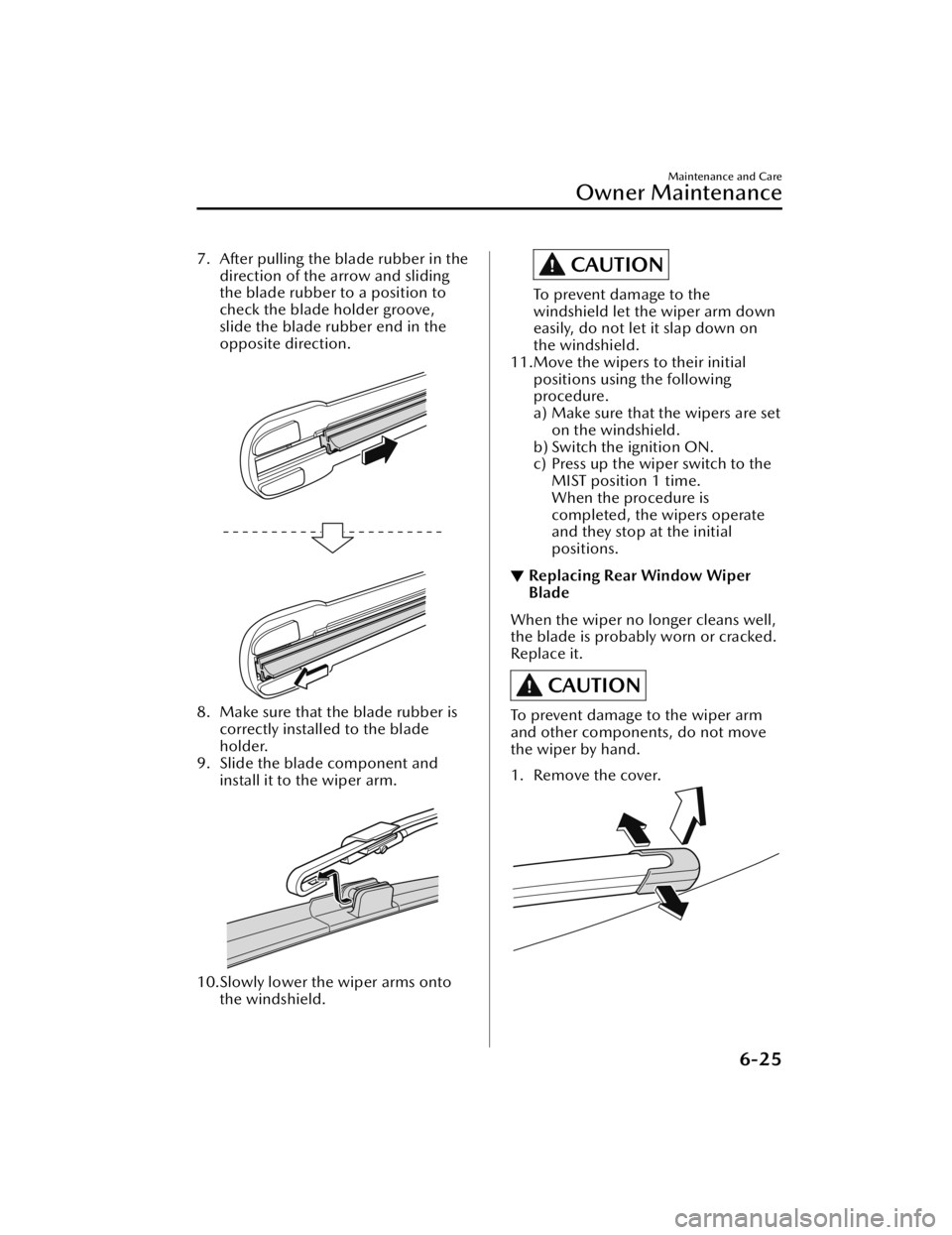
7. After pulling the blade rubber in thedirection of the arrow and sliding
the blade rubber to a position to
check the blade holder groove,
slide the blade rubber end in the
opposite direction.
8. Make sure that the blade rubber iscorrectly installed to the blade
holder.
9. Slide the blade component and
install it to the wiper arm.
10.Slowly lower the wiper arms ontothe windshield.
CAUTION
To prevent damage to the
windshield let the wiper arm down
easily, do not let it slap down on
the windshield.
11.Move the wipers to their initial positions using the following
procedure.
a) Make sure that the wipers are seton the windshield.
b) Switch the ignition ON.
c) Press up the wiper switch to the MIST position 1 time.
When the procedure is
completed, the wipers operate
and they stop at the initial
positions.
▼Replacing Rear Window Wiper
Blade
When the wiper no longer cleans well,
the blade is probably worn or cracked.
Replace it.
CAUTION
To prevent damage to the wiper arm
and other components, do not move
the wiper by hand.
1. Remove the cover.
Maintenance and Care
Owner Maintenance
6-25
CX-50_8KB8-EA-22A_Edition2_new
2022-1-6 14:55:18
Page 583 of 583

Index
Key left-in-vehicle warning beep
(With the advanced keyless
function).............................. 7-38
Key removed from vehicle warning
beep.................................... 7-37
Lane/Road Departure Warning
Beep.................................... 7-39
Liftgate Door-lock Switch
Inoperable Warning Beep...... 7-37
Lights-on reminder............... 7-36
Mazda Radar Cruise Control with
Stop & Go function (MRCC with
Stop & Go function) system
warnings.............................. 7-40
Power Liftgate Warning
Beep.................................... 7-38
Rear Cross Tra ffi c Alert (RCTA)
Warning Beep...................... 7-39
Seat belt warning beep......... 7-36
Shift position warning beep... 7-38
Touch sensor inoperable warning
beep (With the advanced keyless
function).............................. 7-37
Vehicle problem warning
beep.................................... 7-39
Warranty................................... 8-14
Weights...................................... 9-6
WindowsPower windows.................... 3-36
Windshield Washer................... 4-58
Windshield Wipers.................... 4-55
Windshield Wipers Operate at High
Speed....................................... 7-43
Windshield Wiper De-icer..........4-60
Winter Driving...........................3-49
Wiper Replacing Rear Window Wiper
Blade................................... 6-25
Replacing windshield wiper
blades..................................6-23
Wireless Charger (Qi)................ 5-43
0-9
360°View Monitor.................. 4-156 How to use the system........ 4-165
Margin of error between road
surface on screen and actual road
surface............................... 4-182
Side view........................... 4-173
Top view/front view............4-168
Top view/front wide view.... 4-171
Top view/rear view............. 4-176
Top view/rear wide view..... 4-181
Types of images displayed on the
screen................................ 4-160
10-10
CX-50_8KB8-EA-22A_Edition2_new 2022-1-6 14:55:18