Page 60 of 241

Airbag Safety InformationWARNING: Even with airbags, the
driver and occupants must always
wear their seat belts to minimize the
risk of severe injury or death in the
event of a collision.WARNING: Do not attach or place
objects on or near the front airbags,
the side of the front seats, the
headliner at the side of the vehicle, or
any other location that could interfere
with the inflation of an airbag. Objects
can cause serious injury if the vehicle
is in a collision severe enough to
cause the airbag to deploy.WARNING: For the curtain airbags
to deploy correctly, the roof lining
and A �)post trim must be undamaged
and installed correctly. Any damage
or suspect installation should be
referred to a Lucid Service Center for
inspection.WARNING: Front-seat occupants
should not place any part of their
arms, body against the steering wheel
or dashboard area, as an inflating
airbag can cause fractures or other injuries.WARNING: Do not use seat covers
in the vehicle. A seat cover could
interfere with the deployment of the
seat-mounted side airbags in the
event of a collision.WARNING: Airbags inflate with
considerable speed and force. To
reduce the risk of injuries, ensure that
all occupants are wearing seat belts
and are correctly seated, with seats
positioned as far back from any front
airbags as possible.WARNING: Never use a child safety
seat or seat young children on a seat
with an operational airbag in front of
it. Doing so can cause serious injury
or death if the airbag deploys.WARNING: To ensure correct inflation
of the side airbags, maintain
an unobstructed gap between an
occupant
Page 61 of 241
-Slow speed front impacts
- Side impacts
- Driving over bumps or potholes
Therefore, significant superficial damage can
occur to the vehicle without the airbags
inflating or, conversely, a relatively small
amount of not easily visualized structural
damage can cause airbags to inflate.
Types of Airbags
Front airbags
The front airbags are designed to protect
the head and chest of the driver and front passenger from impact with the steering
wheel and dashboard panel components.
The front airbags fitted to your vehicle are
advanced airbags. This type of airbag is
designed to reduce airbag-related injuries to small-statured adults.
An occupancy sensor is built into the
front passenger seat. If the sensor detects
the weight of an infant or small child,
the system will automatically turn off the
passenger
Page 79 of 241
Steering Wheel
Adjusting the Steering Wheel Position
Use the Pilot Panel to adjust steering wheel
position by touching
> .
Press the Up/Down/In/Out arrows to adjust.
Press RESTORE to return to the previous
position, or press SAVE TO PROFILE to save position to the current User Profile.
Press
to close.
Steering Feel and Sensitivity
The feel and sensitivity of the steering system
is determined by the current driving mode
selected for the vehicle. See Drive Modes.
Driving & Operating66
Page 80 of 241
Steering Wheel - Right Controls
1. For information about Left Controls, please see Steering Wheel - Left Controls on page 68
2. Controls the volume for all media, audio, and phone calls
Page 81 of 241
Steering Wheel - Left Controls
1. Cancel cruise control.Set and adjust Adaptive Cruise Control
(ACC) cruising speed:
Page 87 of 241
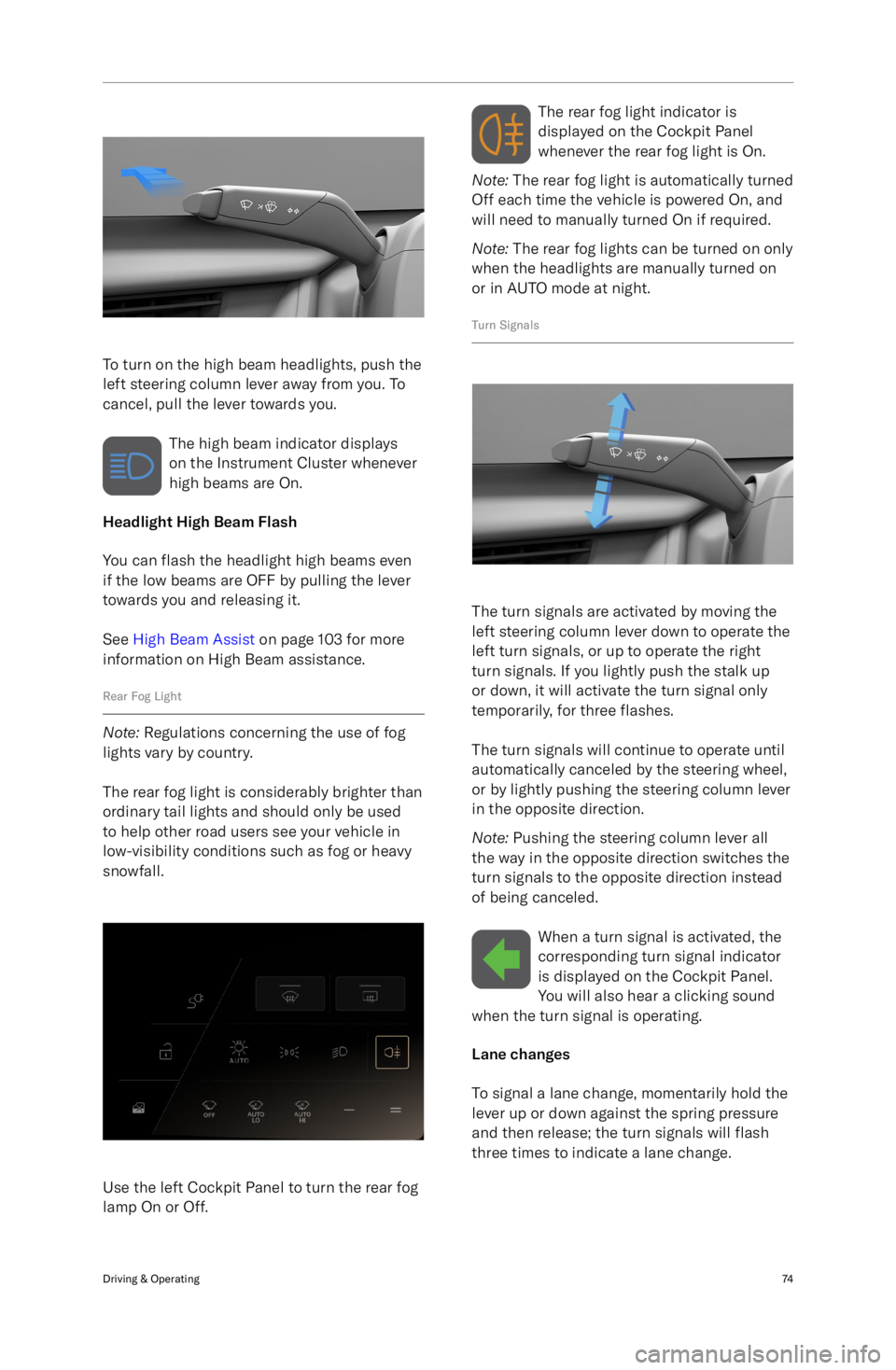
To turn on the high beam headlights, push the
left steering column lever away from you. To
cancel, pull the lever towards you.
The high beam indicator displays
on the Instrument Cluster whenever
high beams are On.
Headlight High Beam Flash
You can flash the headlight high beams even
if the low beams are OFF by pulling the lever
towards you and releasing it.
See High Beam Assist on page 103 for more
information on High Beam assistance.
Rear Fog Light
Note: Regulations concerning the use of fog
lights vary by country.
The rear fog light is considerably brighter than
ordinary tail lights and should only be used to help other road users see your vehicle in
low-visibility conditions such as fog or heavy
snowfall.
Use the left Cockpit Panel to turn the rear fog
lamp On or Off.
The rear fog light indicator is
displayed on the Cockpit Panel
whenever the rear fog light is On.
Note: The rear fog light is automatically turned
Off each time the vehicle is powered On, and
will need to manually turned On if required.
Note: The rear fog lights can be turned on only
when the headlights are manually turned on
or in AUTO mode at night.
Turn Signals
The turn signals are activated by moving the
left steering column lever down to operate the
left turn signals, or up to operate the right
turn signals. If you lightly push the stalk up
or down, it will activate the turn signal only
temporarily, for three flashes.
The turn signals will continue to operate until
automatically canceled by the steering wheel,
or by lightly pushing the steering column lever
in the opposite direction.
Note: Pushing the steering column lever all
the way in the opposite direction switches the
turn signals to the opposite direction instead
of being canceled.
When a turn signal is activated, thecorresponding turn signal indicator
is displayed on the Cockpit Panel.
You will also hear a clicking sound
when the turn signal is operating.
Lane changes
To signal a lane change, momentarily hold the
lever up or down against the spring pressure
and then release; the turn signals will flash
three times to indicate a lane change.
Driving & Operating74
Page 89 of 241

Interior Lights
Interior Lights
The interior lights automatically switch On
when a vehicle door is opened, and Off when all doors are closed.
Front seats
To turn the front interior light On or Off, use
the switch located on the overhead console or
touch either light individually.
Rear seats
To turn either of the two rear passenger
reading lights On or Off, press the center of
the lamp lens.
Ambient Lighting
Ambient lighting illuminates the footwells, cup
holders, and accent areas with your choice of colored lighting. To customize ambient
lighting, press
> THEMES on the Pilot
Panel.
Note: If enabled, the ambient lights come on
whenever the vehicle is On. If ambient lighting
is turned off, it will remain off until you turn it back on.
Tap an ambient lighting theme to select.
If desired, use the center color wheel to
customize brightness. The center section of
the color wheel has an ambient lighting on/off
switch. If turned off, the touch interface
disappears until you switch ambient lighting
back on.Driving & Operating76
Page 92 of 241

ABS warning indicatorThe ABS indicator displays on
the Cockpit Panel, along with a
notification message. If illuminated,
the ABS is disabled. Contact a Lucid
Service Center as soon as possible to have
the fault repaired.CAUTION: Even when ABS is disabled,
the pedal-operated braking system
remains operational. Be aware that
braking distances may increase and
wheels may lock under heavy braking.
Regenerative Braking
WARNING: If driving the vehicle in
reduced traction conditions (that is,
icy or snowy conditions), the use
of High regenerative braking level
may cause traction control to operate
more frequently. Lucid recommends
switching to Standard level when
driving in such conditions.
Whenever the vehicle is moving and your foot
is off the accelerator, regenerative braking
slows the vehicle and feeds energy back to
the high-voltage battery.
While you should still use the brake
pedal whenever needed to stop safely, you
can take advantage of regenerative braking
by anticipating your stops and reducing
accelerator pedal position.
Note: If regenerative braking is aggressively
slowing your vehicle (such as when your foot
is completely off the accelerator pedal at highway speeds), the brake lights turn on to
alert others that you are slowing down.
During regenerative braking, the charge/power
meter that arcs over the speedometer shows the current amount of energy being generated
and fed back to the high-voltage battery.
The amount of generated energy being fed
back to the high-voltage battery can vary
depending on the current state of the battery
and the regenerative braking setting being used. For example, regenerative braking maybe limited if the battery is extremely hot or
cold or if the battery is already charged to its
maximum allowable level.
Regenerative braking settings
On the Pilot Panel, press
> Vehicle
> Drive Settings, then press to select between
two levels of Regenerative Braking:
-Standard - Provides the standard
amount of regenerative braking.
When you release the accelerator, the
vehicle takes longer to slow down and
coasts further than if set to High.
- High - Provides the maximum amount of
regenerative braking.
When you release the accelerator, the
vehicle slows down faster, reducing the
need to use the brakes.
Note: Should regenerative braking levels be
limited, you


