Page 143 of 241
Navigating
To navigate to a location, open the smart
drawer on the right Cockpit Panel to select
a destination. Use Alexa voice commands
to navigate hands-free. Tap the search icon
of choose from one of the search category
shortcuts or recent destinations and search
terms.
Move the smart drawer into the Cockpit Panel
to access additional options:
-Use the Search bar to type in an address
via the on-screen keyboard.
- You can also select one of the six
categories. Swipe left or right to view
additional categories.
- You can also make your own shortcuts
for HOME and WORK: Select from your
saved home and work locations. See Setting Home and Work Destinations on
page 132.
- When you tap the search bar, by default
you will seeRECENTS: Select from a list
of recently-used destinations or search
terms. If you start typing something,
those will be replaced with search
matches.
- Search this Area (at another location on
the map if you pan the map)
When routing, you have 2 additional ways to
search:
-Along The Route
- Near Destination
Charging Category Search
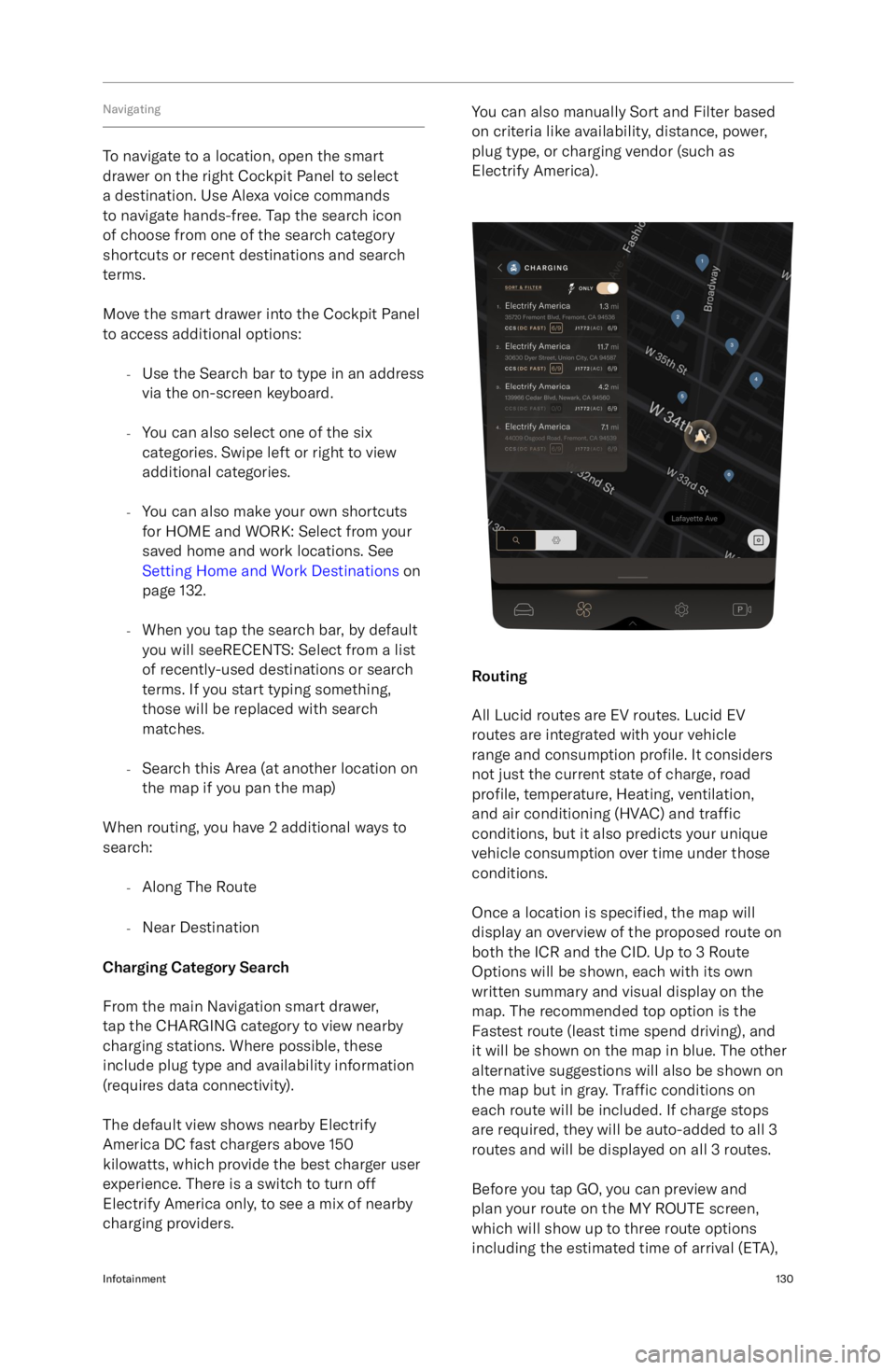
From the main Navigation smart drawer,
tap the CHARGING category to view nearby
charging stations. Where possible, these
include plug type and availability information
(requires data connectivity).
The default view shows nearby Electrify
America DC fast chargers above 150
kilowatts, which provide the best charger user
experience. There is a switch to turn off
Electrify America only, to see a mix of nearby
charging providers.
You can also manually Sort and Filter based
on criteria like availability, distance, power,
plug type, or charging vendor (such as
Electrify America).
Routing
All Lucid routes are EV routes. Lucid EV
routes are integrated with your vehicle
range and consumption profile. It considers
not just the current state of charge, road
profile, temperature, Heating, ventilation,
and air conditioning (HVAC) and traffic
conditions, but it also predicts your unique
vehicle consumption over time under those
conditions.
Once a location is specified, the map will
display an overview of the proposed route on
both the ICR and the CID. Up to 3 Route
Options will be shown, each with its own
written summary and visual display on the
map. The recommended top option is the
Fastest route (least time spend driving), and
it will be shown on the map in blue. The other
alternative suggestions will also be shown on
the map but in gray. Traffic conditions on
each route will be included. If charge stops
are required, they will be auto-added to all 3
routes and will be displayed on all 3 routes.
Before you tap GO, you can preview and
plan your route on the MY ROUTE screen,
which will show up to three route options
including the estimated time of arrival (ETA),
Infotainment130
Page 169 of 241

Multi-Point Inspection
Your vehicle should be given a full multi-point
inspection service every 12 months or 12,000
miles (19300 km), whichever comes first.
Note: A message displays on the Cockpit
Panel to remind you to service your vehicle.
This service includes inspections and checks
for the following systems:
-Steering alignment
- Battery (12V) condition
- Battery pack (HV) condition
- Coolant condition
- Brake
fluid condition
- Brake rotors and pads wear
- Chassis bolts torque
- Closures (doors, hood, and trunk)
operation
- Condenser (check for debris)
- Electronic parking brake operation
- Heating, ventilation, and air conditioning
operation
- Horn
- Interior and exterior lights
- Key fob operation
- Seat belts operation
- Tire pressure and tire wear
- Visual signs of fluid leaks
- Wipers and washers
- Charging system and charging cable
- Firmware
Your vehicle will also be given a road test to inspect its current driving condition (such
as pedal operation, vehicle handling, and
steering alignment) and to check for any abnormal operational noises.WARNING: Your vehicle is equipped
with two 12V batteries. It
Page 214 of 241

Vehicle Fire
FirefightingWARNING: When a fire is involved,
consider the entire vehicle to be
energized. Always wear full personal
protective equipment (PPE), including
a self-contained breathing apparatus
(SCBA).WARNING: Extinguishing any vehicle
fire is best accomplished by
firefighting professionals. Contact
your local authorities or fire
department for help.
A vehicle battery fire presents a risk of
exposure to high heat or toxic gases. It
can take copious amounts of water applied
directly to the battery to extinguish and cool a
battery fire. Establish or request an additional
water supply from nearby sources.
In the absence of a water supply, use dry
chemicals, such as Carbon dioxide (CO2), foam, or any other typical fire-extinguishing
agent, to fight the fire until a water supply is
available.
Extinguishing smaller fires that do not involve
a high-voltage battery follows the standard
firefighting procedures.
A burning or a heated battery releases toxic
vapors. Responders should always protect
themselves with full PPE (including a SCBA)
and take appropriate measures to protect
civilians from the incident. Use fog streams
or positive-pressure ventilation fans (PPV) to
direct smoke and vapors away from other
responders and civilians.
After knock down
Make sure any fires are knocked down before
entering a hot zone. Heat combined with
flames can compromise the airbag inflators,
stored gas inflation cylinders, gas struts, and
other components, resulting in an unexpected
explosion.
During vehicle inspections, always use
insulated tools and do not make contact with
any high-voltage components.
Use a thermal imaging camera to measure the temperature of the high-voltage battery
and monitor heating or cooling trends.
Before releasing the vehicle to second
responders (such as law enforcement or vehicle transporters) or otherwise leaving the
incident, completely cool the battery with no
fire, smoke, or heating present for at least one
hour. Always notify second responders of the
risk of battery re-ignition.Roadside Assistance & Emergency Information201
Page 240 of 241

Rear suspension specifications 193
Rear view camera 115
Regenerative braking 79
Reporting safety defects 212Rescue operationsFirefighting 201
S
Safety instructionsElectrical/high voltage safety 154
Obstruction of air bags 49Seat beltsFastening and releasing 38
In a collision 39
Reminders 38
Testing 40
Wearing correctly 37
Wearing when pregnant 39SeatsAdjustment 30
Folding (rear) 33
Heating (rear) 33
Heating and ventilation 31
Massage 31
Pass-through hatch 33ServiceData recording 213
Side airbags 48
Specifications12V battery 194
Brakes 191
Front suspension 192
High-voltage battery
194
Rear suspension 193
Steering 190
Tire pressures 189
Tires 188
Wheels 188
Steering specifications 190
Steering wheelMedia controls 123
Sunshades 22
T
Tire and loading information label 174
Tire care 176
Tire Identification Number (TIN) 171
Tire pressure checking 177
Tire Pressure Monitoring SystemMalfunction 181
Operation 181Tires 170Asymmetric 179
Chains 180
Degradation 177
Flat spots 178
Grading 173Tires (continued)Markings 170
Pressure label 174
Pressure monitoring 181
Pressures 177
Quality 173
Replacement of 179
Rotation 176
Run-flat 179
Socks 180
Specifications 188
Wear 176
Wheel alignment 176
Winter 180
TPMS 181
Traction control 82
Traffic Drive-Off Alert 102
Traffic Sign Recognition 101
Trailer towing 183
Trip information 55
Trunk 26Interior emergency release 27
U
Uniform tire quality grading 173
Unlocking your vehicle 16
User ProfileCreating 118
Loading preferences 120
Managing 120
Settings 119
Types 118
Using 16
V
VehicleAccessories and modifications 167
Certification label 10
Modifications 4
Vehicle Identification Number (VIN) 10
Vehicle lashing 198
Vehicle loading 183Determining correct load limit 183
Example load calculations 184
Vehicle weights 187
W
WashersChecking fluid level 158
Cleaning washer jets 159WheelsReplacement 179
Specifications 188
Wi-Fi 137
Window lock 22
Windows