2023 LINCOLN NAVIGATOR warning
[x] Cancel search: warningPage 349 of 660

CONNECTING A TRAILER
PRECAUTIONS
Do not tow a trailer until you drive yourvehicle at least 1,000 mi (1,600 km).
Consult your local motor vehicle laws fortowing a trailer.
See the instructions included with towingaccessories for the proper installation andadjustment specifications.
Service your vehicle more frequently if youtow a trailer. See Normal ScheduledMaintenance (page 533).
If you use a rental trailer, follow theinstructions the rental agency gives you.
When attaching the trailer wiring connectorto your vehicle, only use a proper fittingconnector that works with the vehicle andtrailer functions.
Account for the trailer coupler weight as partof your vehicle load when calculating thetotal vehicle weight.
Do not exceed the load limits. See NormalScheduled Maintenance (page 533).
HITCHES
INSTALLING A HITCH
WARNING: Do not cut, drill, weld ormodify the trailer hitch. Modifying the trailerhitch could reduce the hitch rating.
Do not use a hitch that either clamps ontothe bumper or attaches to the axle. You mustdistribute the load in your trailer so that10-15% of the total weight of the trailer is onthe tongue. Do not exceed the tongue loadrating indicated on the hitch receiver.
Trailer Hitch Cover
Your vehicle has a removable trailer hitchcover. To remove the trailer hitch cover:
1.Grab the trailer hitch cover at the bottomand pull towards the rear of the vehicleuntil the bottom of the trailer hitch coverunsnaps from the bumper.
2.Grab the trailer hitch cover at the edgeand rotate until the top of the trailer hitchcover unsnaps from the bumper, thenremove the trailer hitch cover.
To install the trailer hitch cover:
345
2023 Navigator (TB9) Canada/United States of America, enUSA, Edition date: 202207, DOMConnecting a TrailerE268259
Page 350 of 660

1.Line up the snaps on the trailer hitchcover to the holes on the bumper andpush forward until it snaps into place.
HOOKING UP A TRAILER USING AWEIGHT-DISTRIBUTING HITCH
WARNING: Do not adjust the springbars so that your vehicle's rear bumper ishigher than before attaching the trailer.Doing so will defeat the function of theweight-distributing hitch, which may causeunpredictable handling, and could resultin serious personal injury.
A weight-distributing hitch helps distributetongue load to all towing vehicle and trailerwheels. For more information, visit the linksin the following table.
WebsiteMarket
https://www.fleet.ford.com/towing-guides/
United States ofAmerica
https://www.fleet.ford.ca/towing-guides/
Canada
CONNECTING A TRAILER
Recognizing a Trailer
1.Attach the trailer and wiring connectorto your vehicle.
2.Switch on your vehicle.
3.Set up a profile for the trailer using thetouchscreen.
Note:If your vehicle does not recognize thetrailer, press and hold the brake pedal for afew seconds.
Note:Trailer profiles store trailer types,dimensions, preferences, trailer specificmileage and fuel economy.
Note:Disabling the trailer detectionnotification makes the default trailer profileactive when a connection is detected.
When attaching the trailer wiring connectorto your vehicle, only use a proper fittingconnector that works with the vehicle andtrailer functions.
346
2023 Navigator (TB9) Canada/United States of America, enUSA, Edition date: 202207, DOMConnecting a TrailerE268260 E163167
Page 351 of 660

Trailer Light Check
WARNING: Never connect any trailerlamp wiring to the vehicle's tail lamp wiring;this may damage the electrical systemresulting in fire. Contact your authorizeddealer as soon as possible for assistancein proper trailer tow wiring installation.Additional electrical equipment may berequired.
Most towed vehicles require trailer lamps.Make sure all running lights, brake lights, turnsignals and hazard lights are working.
Safety Chains
Install trailer safety chains to the trailer hitchas recommended by the manufacturer. Crossthe chains under the trailer coupler and allowenough slack for turning tight corners. Donot allow the chains to drag on the ground.
Note:Do not attach safety chains to thebumper. Always connect the safety chainsto the frame or hook retainers of your trailerhitch.
If the trailer safety chain hook has a latch,make sure to fully close the latch.
347
2023 Navigator (TB9) Canada/United States of America, enUSA, Edition date: 202207, DOMConnecting a TrailerE265060
Page 352 of 660

CONNECTING A TRAILER – TROUBLESHOOTING
CONNECTING A TRAILER – INFORMATION MESSAGES
DescriptionMessage
The system senses a trailer connection becomes disconnected, eitherintentionally or unintentionally, during a given ignition cycle.Trailer Disconnected
There are certain faults in your vehicle wiring and trailer wiring orbrake system.Trailer Wiring Fault
There is a fault with your trailer battery, or your trailer battery voltageis very low.Trailer Battery Not Charging See Manual
One or more tires on your trailer is below the specified tire pressure.Trailer Tire Low Specified:
Displays when one or more tires on the trailer is above the recom-mended temperature.Trailer Tire Over Temperature
A trailer tire pressure sensor is malfunctioning. If the warning stayson or continues to come on, have the system checked as soon aspossible.
Trailer Tire Pressure Sensor Fault
The trailer tire pressure monitoring system is malfunctioning. If thewarning stays on or continues to come on, have the system checked.Trailer Tire Pressure Monitor Fault
The system cannot detect the trailer tire pressure monitoring system.Trailer Tire Pressure Monitor Capability Not Detected
The trailer tire pressure monitoring system is not setup.Trailer Tire Pressure Indication Not Setup See Manual
348
2023 Navigator (TB9) Canada/United States of America, enUSA, Edition date: 202207, DOMConnecting a Trailer
Page 353 of 660

TOWING A TRAILER PRECAUTIONS
WARNING: Do not exceed theGVWR or the GAWR specified on thecertification label.
WARNING: Towing trailersbeyond the maximum recommendedgross trailer weight exceeds the limitof your vehicle and could result inengine damage, transmission damage,structural damage, loss of vehiclecontrol, vehicle rollover and personalinjury.
WARNING: Do not exceed thelowest rating capacity for your vehicleor trailer hitch. Overloading yourvehicle or trailer hitch can impair yourvehicle stability and handling. Failureto follow this instruction could resultin the loss of control of your vehicle,personal injury or death.
WARNING: Make sure that thevertical load on the tow ball is betweenthe minimum and maximumrecommended weight at all times.Failure to follow this instruction couldresult in the loss of control of yourvehicle, personal injury or death.
WARNING: Do not cut, drill, weldor modify the trailer hitch. Modifyingthe trailer hitch could reduce the hitchrating.
WARNING: The anti-lock brakesystem does not control the trailerbrakes.
TRAILER BRAKE PRECAUTIONS
WARNING: Do not connect a trailer'shydraulic brake system directly to yourvehicle's brake system. Your vehicle maynot have enough braking power and yourchances of having a collision greatlyincrease.
WARNING: Do not tow a trailer fittedwith electric trailer brakes unless yourvehicle is fitted with a compatibleaftermarket electronic trailer brakecontroller. Failure to follow this instructioncould result in the loss of control of yourvehicle, personal injury or death. Foradditional information and assistance, werecommend that you contact an authorizeddealer.
Electric brakes and manual, automatic orsurge-type trailer brakes are safe if you installthem properly and adjust them to themanufacturer's specifications. The trailerbrakes must meet local and federalregulations.
349
2023 Navigator (TB9) Canada/United States of America, enUSA, Edition date: 202207, DOMTowing a Trailer
Page 359 of 660
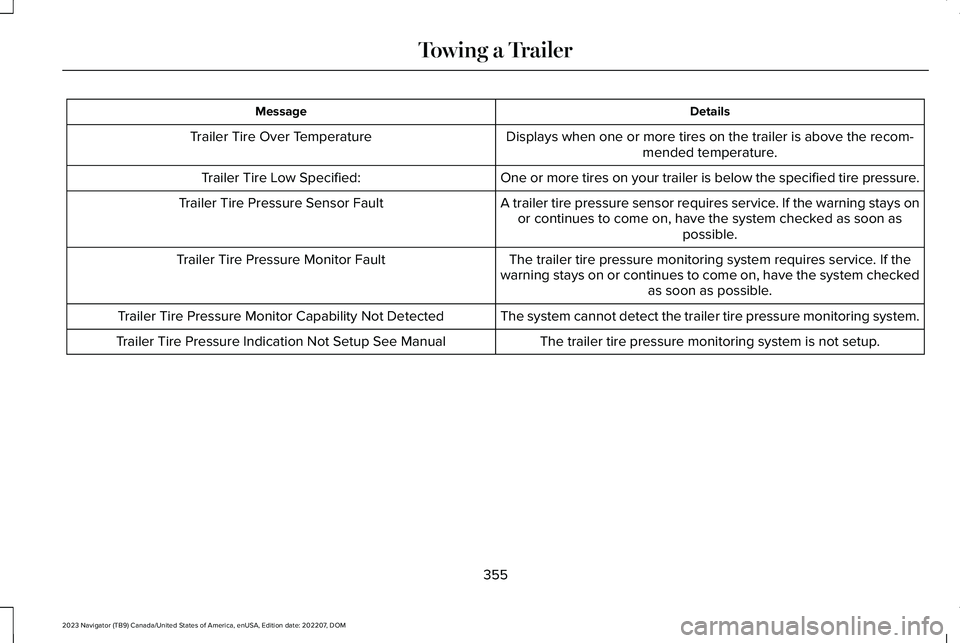
DetailsMessage
Displays when one or more tires on the trailer is above the recom-mended temperature.Trailer Tire Over Temperature
One or more tires on your trailer is below the specified tire pressure.Trailer Tire Low Specified:
A trailer tire pressure sensor requires service. If the warning stays onor continues to come on, have the system checked as soon aspossible.
Trailer Tire Pressure Sensor Fault
The trailer tire pressure monitoring system requires service. If thewarning stays on or continues to come on, have the system checkedas soon as possible.
Trailer Tire Pressure Monitor Fault
The system cannot detect the trailer tire pressure monitoring system.Trailer Tire Pressure Monitor Capability Not Detected
The trailer tire pressure monitoring system is not setup.Trailer Tire Pressure Indication Not Setup See Manual
355
2023 Navigator (TB9) Canada/United States of America, enUSA, Edition date: 202207, DOMTowing a Trailer
Page 360 of 660

WHAT IS THE INTEGRATED
TRAILER BRAKE CONTROLLER
The trailer brake controller assists in smoothand effective trailer braking based on thetowing vehicle’s brake pressure.
INTEGRATED TRAILER BRAKE
CONTROLLER PRECAUTIONS
WARNING: Use the integrated trailerbrake controller to properly adjust thetrailer brakes and check all connectionsbefore towing a trailer. Failure to followthis instruction could result in the loss ofcontrol of your vehicle, personal injury ordeath.
•Only use the manual control lever forproper adjustment of the gain duringtrailer setup. Misuse, such as applicationduring trailer sway, could cause instabilityof trailer or tow vehicle.
•Avoid towing in adverse weatherconditions. The trailer brake controllerdoes not provide anti-lock control of thetrailer wheels. Trailer wheels can lock upon slippery surfaces, resulting in reducedstability of trailer and tow vehicle.
•The trailer brake controller is only afactory-installed or dealer-installed item.Ford is not responsible for warranty orperformance of the controller due tomisuse or customer installation.
Note:Do not attempt removal of the trailerbrake controller without consulting theWorkshop Manual. Damage to the unit mayresult.
Note:Make sure to set the integrated trailerbrake controller gain to 0 if you are usingan aftermarket trailer brake controller.
USING THE INTEGRATED TRAILER
BRAKE CONTROLLER
1.Make sure the trailer brakes are in goodworking condition, functioning normallyand properly adjusted. See your trailerdealer if necessary.
Note:An authorized dealer can diagnosethe trailer brake controller to determineexactly which trailer fault has occurred. Yourvehicle warranty does not cover issues withyour trailer.
2.Hook up the trailer and make theelectrical connections according to thetrailer manufacturer's instructions.
Note:Select default mode if the trailer hassurge brakes, or no brakes at all. The systemhas no effect on the braking performance ofthe trailer in either of these cases.
Note:If a trailer is connected by a four-pinconnector, the trailer braking function willnot be supported.
356
2023 Navigator (TB9) Canada/United States of America, enUSA, Edition date: 202207, DOMIntegrated Trailer Brake Controller (If Equipped)
Page 365 of 660

HOW DOES TRAILER SWAY
CONTROL WORK
The system applies the brakes to theindividual wheels and reduces engine torqueto aid vehicle stability.
If the trailer begins to sway, the stabilitycontrol lamp flashes and the message TrailerSway Reduce Speed appears in theinformation display.
Stop your vehicle as soon as it is safe to doso. Check the vertical weight on the tow balland trailer load distribution.
TRAILER SWAY CONTROL
PRECAUTIONS
WARNING: Turning off trailer swaycontrol increases the risk of loss of vehiclecontrol, serious injury or death. Ford doesnot recommend disabling this featureexcept in situations where speed reductionmay be detrimental (such as hill climbing),the driver has significant trailer towingexperience, and can control trailer swayand maintain safe operation.
Note:This feature only activates whensignificant trailer sway occurs.
Note:This feature does not prevent trailersway, but reduces it once it begins.
Note:This feature cannot stop all trailersfrom swaying.
Note:In some cases, if vehicle speed is toohigh, the system may activate multiple times,gradually reducing vehicle speed.
SWITCHING TRAILER SWAY
CONTROL ON AND OFF
1.Press Features on the touchscreen.
2.Press Towing.
3.Switch Trailer Sway Control on or off.
The system turns on each time you start yourvehicle.
361
2023 Navigator (TB9) Canada/United States of America, enUSA, Edition date: 202207, DOMTrailer Sway Control