2023 LINCOLN NAVIGATOR mirror
[x] Cancel search: mirrorPage 266 of 660

360 DEGREE CAMERA
LIMITATIONS
Note:Use caution if a door is ajar. The 360degree camera could be out of position andthe image could be incorrect.
LOCATING THE 360 DEGREE
CAMERAS
Rear View Camera
The rear view camera is on the liftgate. Itprovides a video image of the area behindyour vehicle.
Front View Camera
The front view camera is in the grille. Itprovides a video image of the area in frontof your vehicle.
Side View Camera
The side view camera is on the outsidemirror. It provides a video image of the areaon the sides of your vehicle to aid you whenparking.
360 DEGREE CAMERA GUIDE
LINES
Note:Active guide lines are only availablewhen the transmission is in reverse (R).
Active guide lines.A
Centerline.B
Fixed guide line: Green zone.C
262
2023 Navigator (TB9) Canada/United States of America, enUSA, Edition date: 202207, DOM360 Degree CameraE306774
Page 267 of 660

Fixed guide line: Yellow zone.D
Fixed guide line: Red zone.E
Rear bumper.F
Active guide lines only show with fixed guidelines. Turn the steering wheel to point theguide lines toward an intended path. If thesteering wheel position changes whenreversing, your vehicle could deviate fromthe intended path.
The fixed and active guide lines fade in andout depending on the steering wheelposition. The active guide lines do notdisplay when the steering wheel position isstraight.
Objects in the red zone are closest to yourvehicle and objects in the green zone arefarther away. Objects get closer to yourvehicle as they move from the green zoneto the yellow or red zones. Use the side viewmirrors and rear view mirror to get bettercoverage on both sides and rear of yourvehicle.
Keep Out Zone
The keep out zone is represented by theyellow dotted lines running parallel to yourvehicle.
360 DEGREE CAMERA SETTINGS
SWITCHING THE 360 DEGREECAMERA ON AND OFF
The 360 degree camera systembutton is on the instrument paneland allows you to toggle the frontcamera on or off. The front and rear camerashave multiple screens which consist of:
•Normal view.
•Normal view with 360.
•Split view.
Note:The rear view camera activates whenyou switch into reverse (R). Additional viewsare then accessible on the touchscreen.
When in park (P), neutral (N) or drive (D), onlythe front images display when you press thebutton. When in reverse (R), only the rearimages display when you press the button.
Note:The 360 degree camera system turnsoff when your vehicle is in motion at lowspeed, except when in reverse (R).
263
2023 Navigator (TB9) Canada/United States of America, enUSA, Edition date: 202207, DOM360 Degree CameraE310341 E332186
Page 275 of 660

Hilly Condition Usage
Select a lower gear when the system isactive in situations such as prolongeddownhill driving on steep slopes, for examplein mountainous areas.
ADAPTIVE CRUISE CONTROL
LIMITATIONS
Sensor Limitations
WARNING: On rare occasions,detection issues can occur due to the roadinfrastructures, for example bridges,tunnels and safety barriers. In these cases,the system may brake late orunexpectedly. At all times, you areresponsible for controlling your vehicle,supervising the system and intervening, ifrequired.
WARNING: If the systemmalfunctions, have your vehicle checkedas soon as possible.
WARNING: Large contrasts in outsidelighting can limit sensor performance.
WARNING: The system only warnsof vehicles detected by the radar sensor.In some cases there may be no warningor a delayed warning. Apply the brakeswhen necessary. Failure to follow thisinstruction could result in personal injuryor death.
WARNING: The system may notdetect stationary or slow moving vehiclesbelow 6 mph (10 km/h).
WARNING: The system does notdetect pedestrians or objects in the road.
WARNING: The system does notdetect oncoming vehicles in the same lane.
WARNING: The system may notoperate properly if the sensor is blocked.Keep the windshield free from obstruction.
WARNING: The sensor mayincorrectly track lane markings as otherstructures or objects. This can result in afalse or missed warning.
Camera.1.
Radar sensor.2.
The camera is on the windshield behind theinterior mirror.
The radar sensor is in the lower grille.
Note:You cannot see the sensor. It is behinda fascia panel.
271
2023 Navigator (TB9) Canada/United States of America, enUSA, Edition date: 202207, DOMAdaptive Cruise ControlE253503
Page 310 of 660

The lane keeping aid warning lamp or redlane marking in your instrument clusterdisplay indicate blind spot assist activation.In addition, the blind spot information systemalert indicator flashes on the exterior mirroron the same side as the detection. See BlindSpot Information System (page 311).
BLIND SPOT ASSIST WITH TRAILER
COVERAGE
WHAT IS BLIND SPOT ASSIST WITHTRAILER COVERAGE
Blind spot assist with trailer coverage is anextension of the lane keeping system.
It may help you identify adjacent vehiclesduring a lane change.
Blind spot assist provides a blind spotwarning and steering assistance to helpduring lane changes.
When attaching a trailer, ensure you haveproperly set up the trailer coverage settings.See Blind Spot Information System WithTrailer Coverage (page 313).
HOW DOES BLIND SPOT ASSIST WITHTRAILER COVERAGE WORK
Activate and deactivate the systemusing the lane keeping systembutton on the steering wheel.
During lane changes, the design of the blindspot assist feature detects vehicles in, orapproaching, your blind spot and providesa warning, plus steering assistance to directyour vehicle back into your lane.
If a supported trailer is connected, thefunction is reduced to only detecting vehicleson both sides of your vehicle and trailer,extending rearward from the exterior mirrorsto the end of your trailer. See Blind SpotInformation System With Trailer Coverage(page 313).
When active, this system functions with orwithout the use of direction indicators andhazard flashers.
You must keep your hands on the steeringwheel at all times.
BLIND SPOT ASSIST WITH TRAILERCOVERAGE LIMITATIONS
All system limitations present in the basiclane keeping system also apply to blind spotassist.
Blind spot assist does not function under thefollowing conditions:
•The system does not detect lanemarkings.
•One or both rear radar sensors becomeblocked or faulty.
•You have not configured the attachedtrailer correctly in the trailer tow menusor you attached an unsupported trailer.The system only supports certain trailershapes and dimensions.
Note:Blind spot assist with trailer coveragecould have reduced performance if any ofthe above limitations are present.
Blind spot assist may have difficulty detectinghazards under the following conditions:
306
2023 Navigator (TB9) Canada/United States of America, enUSA, Edition date: 202207, DOMLane Keeping SystemE334922
Page 311 of 660
•If a vehicle is approaching in an adjacentlane at a relative speed much higher thanyour vehicle.
•Bad weather conditions are present thatobstruct the sensors.
•Attaching bike or cargo racks couldcause false alerts due to obstruction ofthe sensor.
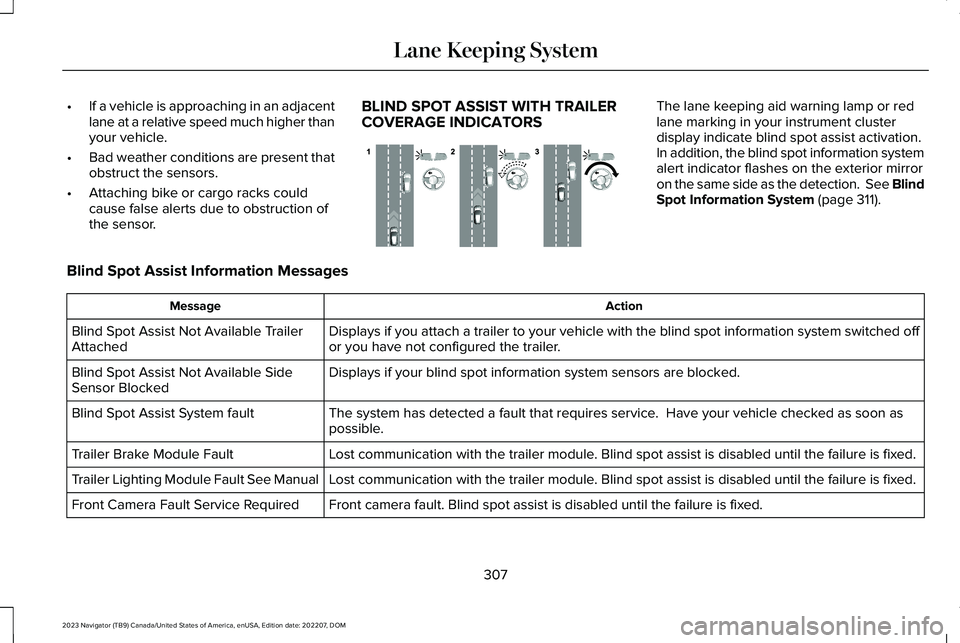
BLIND SPOT ASSIST WITH TRAILERCOVERAGE INDICATORS
The lane keeping aid warning lamp or redlane marking in your instrument clusterdisplay indicate blind spot assist activation.In addition, the blind spot information systemalert indicator flashes on the exterior mirroron the same side as the detection. See BlindSpot Information System (page 311).
Blind Spot Assist Information Messages
ActionMessage
Displays if you attach a trailer to your vehicle with the blind spot information system switched offor you have not configured the trailer.Blind Spot Assist Not Available TrailerAttached
Displays if your blind spot information system sensors are blocked.Blind Spot Assist Not Available SideSensor Blocked
The system has detected a fault that requires service. Have your vehicle checked as soon aspossible.Blind Spot Assist System fault
Lost communication with the trailer module. Blind spot assist is disabled until the failure is fixed.Trailer Brake Module Fault
Lost communication with the trailer module. Blind spot assist is disabled until the failure is fixed.Trailer Lighting Module Fault See Manual
Front camera fault. Blind spot assist is disabled until the failure is fixed.Front Camera Fault Service Required
307
2023 Navigator (TB9) Canada/United States of America, enUSA, Edition date: 202207, DOMLane Keeping SystemE310089
Page 315 of 660

WHAT IS BLIND SPOT
INFORMATION SYSTEM
Blind spot information system detectsvehicles that may have entered the blindspot zone.
HOW DOES BLIND SPOT
INFORMATION SYSTEM WORK
Blind spot information system uses sensorson both sides of your vehicle, detectingrearward from the exterior mirrors toapproximately 13 ft (4 m) beyond the rearbumper. The detection area extends toapproximately 59 ft (18 m) beyond the rearbumper when the vehicle speed is greaterthan 30 mph (48 km/h) to alert you of fasterapproaching vehicles.
BLIND SPOT INFORMATION
SYSTEM PRECAUTIONS
WARNING: Do not use the blind spotinformation system as a replacement forusing the interior and exterior mirrors orlooking over your shoulder beforechanging lanes. The blind spot informationsystem is not a replacement for carefuldriving.
WARNING: The system may notoperate properly during severe weatherconditions, for example snow, ice, heavyrain and spray. Always drive with due careand attention. Failure to take care mayresult in a crash.
Note: Blind spot information system doesnot prevent contact with other vehicles. Itdoes not detect parked vehicles,pedestrians, animals or other infrastructure.
BLIND SPOT INFORMATION
SYSTEM LIMITATIONS
Blind spot information system does notoperate in park (P) or reverse (R).
The system may not alert you if a vehiclequickly passes through the detection zone.
311
2023 Navigator (TB9) Canada/United States of America, enUSA, Edition date: 202207, DOMBlind Spot Information System (If Equipped)E255695
Page 317 of 660

If the sensors become blocked, a messageappears in the instrument cluster display.See Blind Spot Information System –Information Messages (page 316). The alertindicators illuminate but the system does notalert you.
BLIND SPOT INFORMATION SYSTEM
WITH TRAILER COVERAGE
WHAT IS BLIND SPOT INFORMATIONSYSTEM WITH TRAILER COVERAGE
Blind spot information system detectsvehicles that may have entered the blindspot zone. The detection area is on bothsides your vehicle and trailer, extendingrearward from the exterior mirrors to the endof your trailer.
BLIND SPOT INFORMATION SYSTEMWITH TRAILER COVERAGELIMITATIONS
Trailer coverage only supports conventionaltrailers. The system turns off if you select afifth wheel trailer type.
Make sure the trailer width is less than orequal to 8.5 ft (2.6 m) and the length is lessthan 33 ft (10.1 m). If you input values higher,the system turns off.
Some trailers could cause a slight change insystem performance:
•Large box trailers could cause false alertsto occur when driving next toinfrastructures or near parked cars. Afalse alert could also occur while makinga 90-degree turn.
•Trailers that have a width greater than8.5 ft (2.6 m) at the front and have a totallength greater than 20 ft (6 m) couldcause delayed alerts when a vehicle ispassing at high speeds.
•Box trailers that have a width greater than8.5 ft (2.6 m) at the front could causeearly alerts when you pass a vehicle.
•Clam shell or v-nose box trailers with awidth greater than 8.5 ft (2.6 m) at thefront could cause delayed alerts when avehicle traveling the same speed as yourvehicle merges lanes.
313
2023 Navigator (TB9) Canada/United States of America, enUSA, Edition date: 202207, DOMBlind Spot Information System (If Equipped)E225007
Page 319 of 660

SELECTING A TRAILER
When you connect a trailer to your vehicle,the trailer set up menu appears in thetouchscreen. This menu allows you to set upa new trailer or choose from a previously setup trailer. A warning message appears andthe system turns off if you do not choose oradd a new trailer.
Note:The warning message may not appearuntil your vehicle reaches 22 mph (35 km/h).
BLIND SPOT INFORMATION
SYSTEM INDICATORS
When blind spot informationsystem detects a vehicle, an alertindicator illuminates in the exteriormirror on the side the approaching vehicleis coming from. If you turn the turn signal onfor that side of your vehicle, the alertindicator flashes.
315
2023 Navigator (TB9) Canada/United States of America, enUSA, Edition date: 202207, DOMBlind Spot Information System (If Equipped)E309137 E249861E249861