2023 LINCOLN NAVIGATOR warning
[x] Cancel search: warningPage 248 of 660

Note:Under certain conditions, the systemcould apply the electric parking brake. Thebrake system warning lamp illuminates. Theelectric parking brake releases when youpress the accelerator pedal. SeeAutomatically Releasing the ElectricParking Brake (page 236).
Note:Auto hold cancels if you shift intoreverse (R), or neutral (N), and press thebrake pedal.
There could be actions that can cause theauto hold system not to work when thefollowing occur:
•When you use active park assist.
•The driver door is open.
•You shift into reverse (R), or neutral (N)before the system is active.
•Your vehicle is in temporary neutralmode.
AUTO HOLD INDICATORS
Illuminates when the system isactive.
Illuminates when the system is onbut cannot hold your vehicle at astandstill at this particular time.
244
2023 Navigator (TB9) Canada/United States of America, enUSA, Edition date: 202207, DOMAuto HoldE323448 E323449
Page 249 of 660

WHAT IS TRACTION CONTROL
The traction control system helps to avoiddrive wheel spin and loss of traction.
HOW DOES TRACTION CONTROL
WORK
If your wheels begin to spin, the loss oftraction can compromise steering controland stability of the vehicle. The tractioncontrol system applies the brakes toindividual wheels and when needed, reducesengine power at the same time to increasetraction.
SWITCHING TRACTION CONTROL
ON AND OFF
WARNING: Operating your vehiclewith the traction control disabled couldlead to an increased risk of loss of vehiclecontrol, vehicle rollover, personal injuryand death.
The system turns traction control and stabilitycontrol on each time you power on yourvehicle.
1.Press Features on the touchscreen.
2.Press Driver Assistance.
3.Switch Traction Control on or off.
Note:When you switch traction control off,a message and an illuminated icon appearon the information display.
Turn the system back on to return to normaloperation.
If your vehicle is stuck in mud or snow,switching traction control off may bebeneficial as this allows the wheels to spin.
Note:When you switch traction control off,stability control remains fully active.
Your vehicle could have MyKey restrictionsregarding this feature. See ConfigurableMyKey Settings (page 82).
TRACTION CONTROL INDICATOR
Stability and Traction Control Indicator
If the indicator does not illuminatewhen you switch the ignition on,or remains on when the engine isrunning, this indicates a malfunction. Haveyour vehicle checked by an authorizeddealer as soon as possible.
The traction control off indicatorilluminates when you switch thetraction control system off, or whenan alternative stability control mode isselected that requires the traction control offdepending on the drive mode selected.
245
2023 Navigator (TB9) Canada/United States of America, enUSA, Edition date: 202207, DOMTraction ControlE138639 E130458
Page 251 of 660

HOW DOES STABILITY CONTROL
WORK
WARNING: Vehicle modificationsinvolving braking system, aftermarket roofracks, suspension, steering system, tireconstruction and wheel and tire size maychange the handling characteristics of yourvehicle and may adversely affect theperformance of the electronic stabilitycontrol system. In addition, installing anystereo speakers may interfere with andadversely affect the electronic stabilitycontrol system. Reducing the effectivenessof the electronic stability control systemcould lead to an increased risk of loss ofvehicle control, vehicle rollover, personalinjury and death.
WARNING: Remember that evenadvanced technology cannot defy the lawsof physics. It's always possible to losecontrol of a vehicle due to inappropriatedriver input for the conditions. Aggressivedriving on any road condition can causeyou to lose control of your vehicle
increasing the risk of personal injury orproperty damage. Activation of theelectronic stability control system is anindication that at least some of the tireshave exceeded their ability to grip theroad; this could reduce the operator'sability to control the vehicle potentiallyresulting in a loss of vehicle control, vehiclerollover, personal injury and death.
WARNING: You are responsible forcontrolling your vehicle at all times. Thesystem is designed to be an aid and doesnot relieve you of your responsibility todrive with due care and attention. Failureto follow this instruction could result in theloss of control of your vehicle, personalinjury or death.
If a driving condition activates either thestability control or traction control you mayexperience the following conditions:
•The stability and traction control lightflashes.
•Your vehicle slows down.
•Reduced engine power.
The stability control system has severalfeatures built into it to help you maintaincontrol of your vehicle:
Electronic Stability Control
Electronic stability control enhances yourvehicle’s ability to prevent skids or lateralslides by applying brakes to one or more ofthe wheels individually and, if necessary,reducing engine power.
Roll Stability Control
Roll stability control enhances your vehicle’sability to prevent rollovers by detecting yourvehicle’s roll motion and the rate at which itchanges by applying the brakes to one ormore wheels individually.
Curve Control
Curve control enhances your vehicle’s abilityto follow the road when cornering severelyor avoiding objects in the roadway. Curvecontrol operates by reducing engine powerand, if necessary, applying brakes to one ormore of the wheels individually.
247
2023 Navigator (TB9) Canada/United States of America, enUSA, Edition date: 202207, DOMStability Control
Page 254 of 660

WHAT IS HILL DESCENT CONTROL
Hill descent control allows the driver to setand maintain vehicle speed whiledescending steep slopes in various surfaceconditions.
HOW DOES HILL DESCENT
CONTROL WORK
Hill descent control can maintain vehiclespeeds on downhill slopes between2–20 mph (3–32 km/h). Above 20 mph(32 km/h), the system remains on but thedescent speed cannot be set or maintained.
Note:The system does not function below2 mph (3 km/h).
The system requires a cool down intervalafter a period of sustained use. Hill descentcontrol provides a warning in the messagecenter and a tone sounds when the systemis about to disengage for cooling. At thistime, manually apply the brakes as neededto maintain descent speed.
Note:The amount of time that the systemcan remain active before cooling varies withconditions.
HILL DESCENT CONTROL
PRECAUTIONS
WARNING: The system does notcontrol speed in low traction conditions orextremely steep slopes. The system isdesigned to be an aid and does not relieveyou of your responsibility to drive with duecare and attention. Failure to follow thisinstruction could result in personal injury.
WARNING: Hill descent controlcannot control descent in all surfaceconditions and circumstances, such as iceor extremely steep grades. Hill descentcontrol is a driver assist system and cannotsubstitute for good judgment by the driver.Failure to do so may result in loss ofvehicle control, crash or serious injury.
WARNING: The system does notreplace the parking brake. When you leaveyour vehicle, always apply the parkingbrake and shift the transmission into park(P) for automatic transmission or first gearfor manual transmission.
SWITCHING HILL DESCENT
CONTROL ON AND OFF
1.Press Features on the touchscreen.
2.Press Driver Assistance.
3.Switch Hill Descent Control on or off.
Note:A message appears in the informationdisplay when the system is active.
250
2023 Navigator (TB9) Canada/United States of America, enUSA, Edition date: 202207, DOMHill Descent Control (If Equipped)
Page 256 of 660

ELECTRIC POWER STEERING
HOW DOES ELECTRIC POWERSTEERING WORK
The electric power steering system assiststhe brake system to help operate advancedstability control and accident avoidancesystems.
If your vehicle loses electrical power ordetects a concern when you are driving thesystem switches off and you retain normalsteering function. Additionally, whenever thebattery is disconnected or a new battery isinstalled, you must drive your vehicle a shortdistance before the system relearns thestrategy and reactivates all systems.
ELECTRIC POWER STEERINGPRECAUTIONS
WARNING: The electric powersteering system has diagnostic checks thatcontinuously monitor the system. If a faultis detected, a message displays in theinformation display. Stop your vehicle assoon as it is safe to do so. Switch thevehicle off. After at least 10 seconds, switchthe vehicle on and watch the informationdisplay for a steering system warningmessage. If a steering system warningmessage returns, have the system checkedas soon as possible.
WARNING: If the system detects anerror, you may not feel a difference in thesteering, however a serious condition mayexist. Have your vehicle checked as soonas possible. Failure to do so may result inloss of steering control.
Adapt your speed and driving behavioraccording to reduced steering assist.
Extreme continuous steering may increasethe effort to steer. This occurs to preventinternal overheating and damage to thesteering system. If this occurs, you will notlose the ability to steer your vehicle manuallynor will it cause damage to the system.Normal steering and driving allows thesystem to cool down and steering assistreturns to normal.
Note:There is no fluid reservoir to check orfill.
STEERING – TROUBLESHOOTING
STEERING – WARNING INDICATORS
The electric power steering systemindicator illuminates if the systemdetects a fault during thecontinuous diagnostic checks.
Note:If a red warning message displays,stop your vehicle as soon as it is safe to doso.
252
2023 Navigator (TB9) Canada/United States of America, enUSA, Edition date: 202207, DOMSteeringE223375
Page 259 of 660

PARKING AID PRECAUTIONS
WARNING: To help avoid personalinjury, always use caution when in reverse(R) and when using the sensing system.
WARNING: The system may notdetect objects with surfaces that absorbreflection. Always drive with due care andattention. Failure to take care may resultin a crash.
WARNING: Traffic control systems,fluorescent lamps, inclement weather, airbrakes, external motors and fans mayaffect the correct operation of the sensingsystem. This may cause reducedperformance or false alerts.
WARNING: The system may notdetect small or moving objects, particularlythose close to the ground.
WARNING: The parking aid systemcan only assist you to detect objects whenyour vehicle is moving at parking speeds.To help avoid personal injury you musttake care when using the parking aidsystem.
WARNING: The system may notfunction if the sensor is blocked.
WARNING: In cold and severeweather conditions the system may notfunction. Rain, snow and spray can all limitsensor performance.
WARNING: If damage occurs in theimmediate area surrounding the sensor,have your vehicle checked as soon aspossible.
Note:If your vehicle sustains damageleaving the sensors misaligned, this willcause inaccurate measurements or falsealerts.
When you connect a trailer to your vehicle,the rear parking aid detects the trailer andprovides an alert. Disable the parking aidwhen you connect a trailer to prevent thealert.
Note:Connected trailers might be detectedby the vehicle and parking aid turns offautomatically in those instances.
Note:Certain add-on devices installedaround the bumper or fascia may createfalse alerts, for example, large trailer hitches,bike or surfboard racks, license platebrackets, bumper covers or any other devicethat could block the normal detection zoneof the parking aid system. Aftermarket sparetires or spare tire covers mounted to the reartailgate could cause false alerts from thepark aid system. Remove the add-on deviceto prevent false alerts.
Note: Keep the sensors free from snow, iceand large accumulations of dirt. If thesensors are covered, the system's accuracycan be affected.
Do not clean the sensors with sharp objects.
255
2023 Navigator (TB9) Canada/United States of America, enUSA, Edition date: 202207, DOMParking Aids
Page 260 of 660

Note: When using a programmed MyKey,you cannot switch the parking aids off. SeeMyKey™ (page 82).
SWITCHING PARKING AID ON AND
OFF
Press the parking aid button anduse the menu to turn the systemon and off.
The system can also be turned off using thepop-up message that appears when you arein reverse (R).
REAR PARKING AID
WHAT IS THE REAR PARKING AID
Rear parking sensors detect objects behindyour vehicle when in reverse (R).
REAR PARKING AID LIMITATIONS
There is a decreased coverage area at theouter corners.
When using a programmed MyKey, youcannot switch the rear parking aid off.
The rear parking aid sensors are active whenyour vehicle is in reverse (R) and the vehiclespeed is less than 5 mph (8 km/h).
The sensor coverage area is up to 71 in(180 cm) from the rear bumper.
The rear parking aid detects large objectswhen you shift into reverse (R) and any ofthe following occur:
•Your vehicle is moving backward at a lowspeed.
•Your vehicle is stationary but an objectis approaching the rear of your vehicleat a low speed.
•Your vehicle is moving backward at a lowspeed and an object is moving towardsyour vehicle, for example another vehicleat a low speed.
The system shall provide no audible warningfor the object behind the vehicle when inneutral (N) gear.
LOCATING THE REAR PARKING AIDSENSORS
The rear parking aid sensors are in the rearbumper.
256
2023 Navigator (TB9) Canada/United States of America, enUSA, Edition date: 202207, DOMParking AidsPE326188 E130178
Page 261 of 660
REAR PARKING AID AUDIBLEWARNINGS
A warning tone sounds when your vehicleapproaches an object. As your vehiclemoves closer to an object, the rate of thetone increases. The warning tonecontinuously sounds when an object is 12 in(30 cm) or less from the rear bumper.
If your vehicle remains stationary for a fewseconds, the audible warning turns off. If yourvehicle moves backward the tone soundsagain.
Note:When the parking aid system soundsa tone, the audio system could reduce theset volume.
FRONT PARKING AID
WHAT IS THE FRONT PARKING AID
Front parking sensors detect objects in frontof your vehicle.
FRONT PARKING AID LIMITATIONS
The front parking aid sensors are activewhen your vehicle is in any position otherthan park (P) and the vehicle speed is lessthan 5 mph (8 km/h).
The sensor coverage area is up to 28 in(70 cm) from the bumper.
If your vehicle is in reverse (R), the frontparking aid detects objects when yourvehicle is moving at a low speed or an objectis moving toward your vehicle and providesan audible warning, for example anothervehicle at a low speed. If your vehicleremains stationary for a few seconds, theaudible warning turns off. Visual indicationis always active in reverse (R).
If your vehicle is in any forward gear, thefront parking aid provides audible warningsand visual indication when your vehicle ismoving at a speed of 5 mph (8 km/h) orbelow and the system detects an objectwithin the detection zone. If your vehicleremains stationary for a few seconds, thevisual indication and audible warning turnsoff.
If your vehicle is in neutral (N), the front andrear sensors provide visual indication onlywhen your vehicle is moving below a speedof 5 mph (8 km/h) and obstacles are detectedinside the detection areas. Once your vehiclestops, the visual indication and audiblewarning stops after a few seconds.
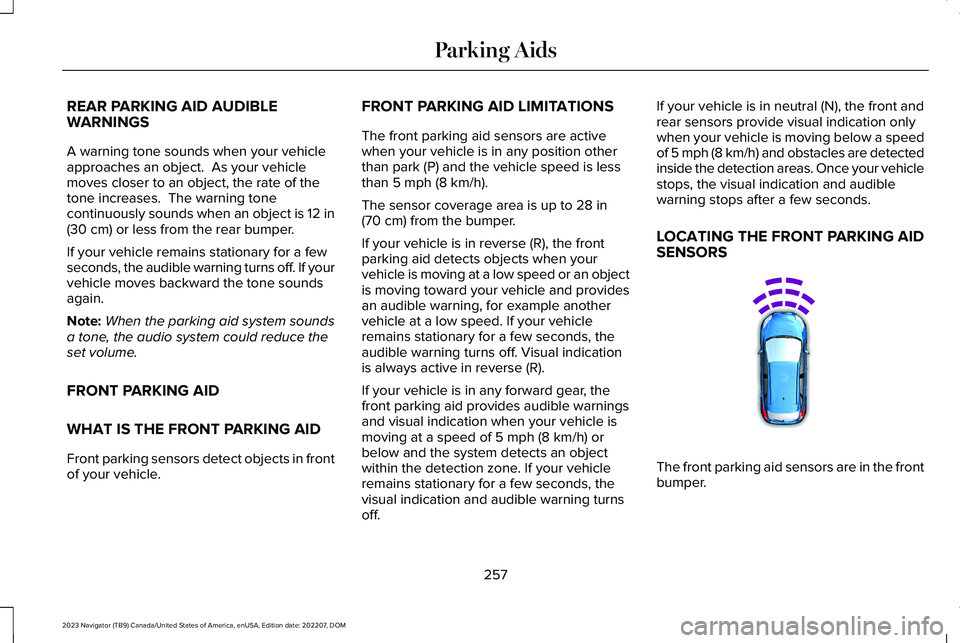
LOCATING THE FRONT PARKING AIDSENSORS
The front parking aid sensors are in the frontbumper.
257
2023 Navigator (TB9) Canada/United States of America, enUSA, Edition date: 202207, DOMParking AidsE187330