2023 LINCOLN CORSAIR Radio
[x] Cancel search: RadioPage 529 of 690
Note:There is an audio mute delay whenswitching to an HD2 or HD3 station becausethe system has to reacquire and decode thedigital signal.
DIGITAL RADIO LIMITATIONS
If you are outside the reception area, thesystem could not work.
If you are on the fringe of the reception area,the station could mute due to weak signalstrength.
Note:If you are listening to HD1, the systemchanges back to the analog broadcast untilthe digital broadcast is available again. Ifyou are listening to any other multicastchannels, the station mutes and stays mutedunless it is able to connect to the digitalsignal again.
Depending on the station quality, you couldhear a slight sound change when the stationchanges between analog and digital audio.
You cannot access a saved HD station if yourvehicle is outside the station’s receptionarea.
SWITCHING DIGITAL RADIORECEPTION ON AND OFF
1.Press Settings on the touchscreen.
2.Press Radio Settings.
3.Switch AM HD Radio or FM HD Radioon or off.
DIGITAL RADIO INDICATORS
HD Radio Indicator
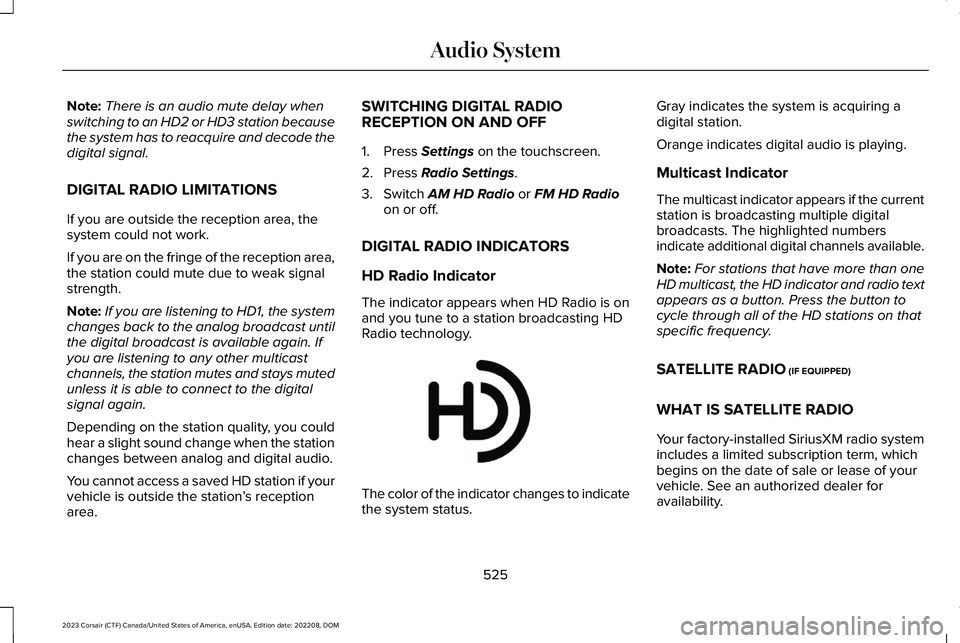
The indicator appears when HD Radio is onand you tune to a station broadcasting HDRadio technology.
The color of the indicator changes to indicatethe system status.
Gray indicates the system is acquiring adigital station.
Orange indicates digital audio is playing.
Multicast Indicator
The multicast indicator appears if the currentstation is broadcasting multiple digitalbroadcasts. The highlighted numbersindicate additional digital channels available.
Note:For stations that have more than oneHD multicast, the HD indicator and radio textappears as a button. Press the button tocycle through all of the HD stations on thatspecific frequency.
SATELLITE RADIO (IF EQUIPPED)
WHAT IS SATELLITE RADIO
Your factory-installed SiriusXM radio systemincludes a limited subscription term, whichbegins on the date of sale or lease of yourvehicle. See an authorized dealer foravailability.
525
2023 Corsair (CTF) Canada/United States of America, enUSA, Edition date: 202208, DOMAudio SystemE142616
Page 530 of 690

For additional information about extendedsubscription terms, visit www.SiriusXM.comin the United States, www.SiriusXM.ca inCanada, or call SiriusXM at 1-888-539-7474.
Note:SiriusXM reserves the unrestrictedright to change, rearrange, add or deleteprogramming including canceling, movingor adding particular channels, and its prices,at any time, with or without notice to you.Neither SiriusXM and its affiliates nor FordMotor Company and its affiliates will beliable to you or any third party for any suchmodification, suspension or termination.
SATELLITE RADIO LIMITATIONS
For optimal reception performance, keep theantenna clear of snow and ice build-up andkeep luggage and other material as far awayfrom the antenna as possible. Placingluggage over the antenna may reduceperformance. Factory-installed andaftermarket vehicle structures including, butnot limited to, roof racks and soft top roofsin a partially open position could reducereception performance.
Hills, mountains, tall buildings, bridges,tunnels, freeway overpasses, parkinggarages, dense tree foliage andthunderstorms can interfere with yourreception.
When you pass a ground-basedbroadcast-repeating tower, a stronger signalmay overtake a weaker one and could resultin the audio system muting. Your displaycould show an error message to indicate theinterference.
LOCATING THE SATELLITE RADIOIDENTIFICATION NUMBER
1.Select SiriusXM as the audio source.
2.Tune to channel 0.
SELECTING A CHANNEL
Manually Selecting a Channel
Press the button to find theprevious or next available radiochannel.
Linear Tuner
The linear tuner is displayed when manuallyselecting a channel. You can swipe left orright on the linear tuner carousel to navigatethrough the channel list. Tap on a channeltitle to listen to it.
Using Direct Tune
1.Press the channel up or down button toopen the linear tuner screen.
2.Press Direct Tune to open the numberpad.
3.Enter the channel you prefer.
Using Seek
Press either button.
Using the Channel List
1.Press Browse.
2.Select a channel.
526
2023 Corsair (CTF) Canada/United States of America, enUSA, Edition date: 202208, DOMAudio SystemE328569 E328570
Page 531 of 690
SATELLITE RADIO SETTINGS
Subscription
Your subscription status is displayed. Youcan subscribe or manage your subscriptiondirectly from the touchscreen.
SiriusXM Favorites
While you are listening to SiriusXM, you cansave favorites by:
•Tapping the currently tuned channel orshow logo on the SiriusXM audio screen.
•Tuning to a channel or show you want tosave as a favorite. Navigate to theSiriusXM Favorites screen and press theAdd Current button. The currently tunedchannel or show is saved as a favorite.
•Saving a radio preset. This saves thecurrently tuned SiriusXM channel or showas a favorite
Note:Requires a trial or active subscriptionto use.
Listening History
Listening history is a list of recently listenedto SiriusXM content. You can view, manageand reset the listening history using thecontrols on the touchscreen.
Note:Requires a trial or active subscriptionto use.
Help and Support
You can contact SiriusXM Customer Caredirectly from SYNC and view informationrequired to manage your SiriusXM account.
SETTING AN ALERT
Set a notification for the currentsong, artist, or sports team bypressing the icon. The systemalerts you when it plays again on anychannel. Selecting this button allows you toenable and edit alerts.
Note:Notifications can be switched on oroff and edited in the satellite radio settings.
527
2023 Corsair (CTF) Canada/United States of America, enUSA, Edition date: 202208, DOMAudio SystemE343640
Page 532 of 690
AUDIO SYSTEM – TROUBLESHOOTING (IF EQUIPPED)
AUDIO SYSTEM – INFORMATION MESSAGES
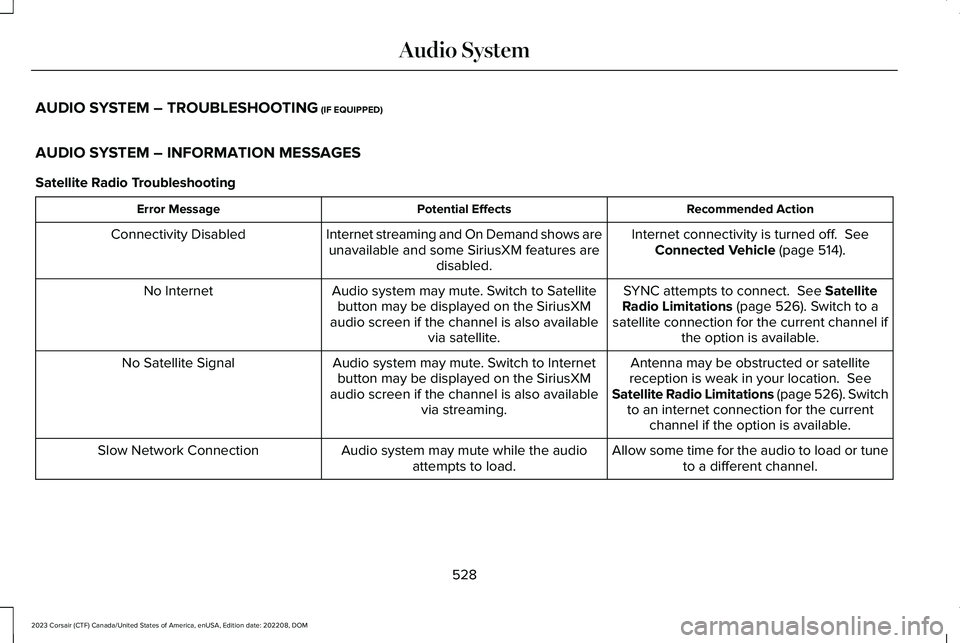
Satellite Radio Troubleshooting
Recommended ActionPotential EffectsError Message
Internet connectivity is turned off. SeeConnected Vehicle (page 514).Internet streaming and On Demand shows areunavailable and some SiriusXM features aredisabled.
Connectivity Disabled
SYNC attempts to connect. See SatelliteRadio Limitations (page 526). Switch to asatellite connection for the current channel ifthe option is available.
Audio system may mute. Switch to Satellitebutton may be displayed on the SiriusXMaudio screen if the channel is also availablevia satellite.
No Internet
Antenna may be obstructed or satellitereception is weak in your location. SeeSatellite Radio Limitations (page 526). Switchto an internet connection for the currentchannel if the option is available.
Audio system may mute. Switch to Internetbutton may be displayed on the SiriusXMaudio screen if the channel is also availablevia streaming.
No Satellite Signal
Allow some time for the audio to load or tuneto a different channel.Audio system may mute while the audioattempts to load.Slow Network Connection
528
2023 Corsair (CTF) Canada/United States of America, enUSA, Edition date: 202208, DOMAudio System
Page 533 of 690
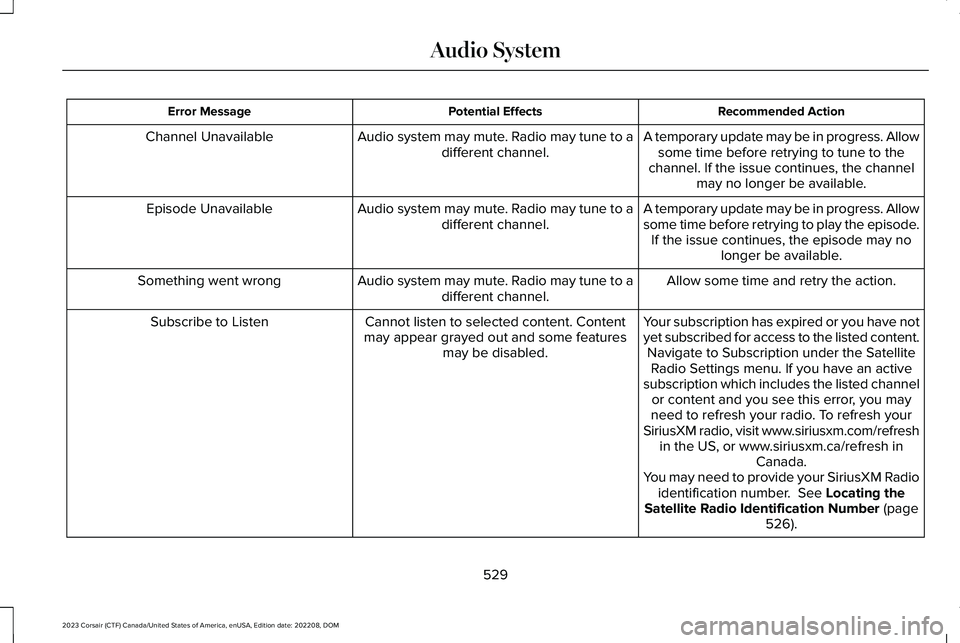
Recommended ActionPotential EffectsError Message
A temporary update may be in progress. Allowsome time before retrying to tune to thechannel. If the issue continues, the channelmay no longer be available.
Audio system may mute. Radio may tune to adifferent channel.Channel Unavailable
A temporary update may be in progress. Allowsome time before retrying to play the episode.If the issue continues, the episode may nolonger be available.
Audio system may mute. Radio may tune to adifferent channel.Episode Unavailable
Allow some time and retry the action.Audio system may mute. Radio may tune to adifferent channel.Something went wrong
Your subscription has expired or you have notyet subscribed for access to the listed content.Navigate to Subscription under the SatelliteRadio Settings menu. If you have an activesubscription which includes the listed channelor content and you see this error, you mayneed to refresh your radio. To refresh yourSiriusXM radio, visit www.siriusxm.com/refreshin the US, or www.siriusxm.ca/refresh inCanada.You may need to provide your SiriusXM Radioidentification number. See Locating theSatellite Radio Identification Number (page526).
Cannot listen to selected content. Contentmay appear grayed out and some featuresmay be disabled.
Subscribe to Listen
529
2023 Corsair (CTF) Canada/United States of America, enUSA, Edition date: 202208, DOMAudio System
Page 534 of 690
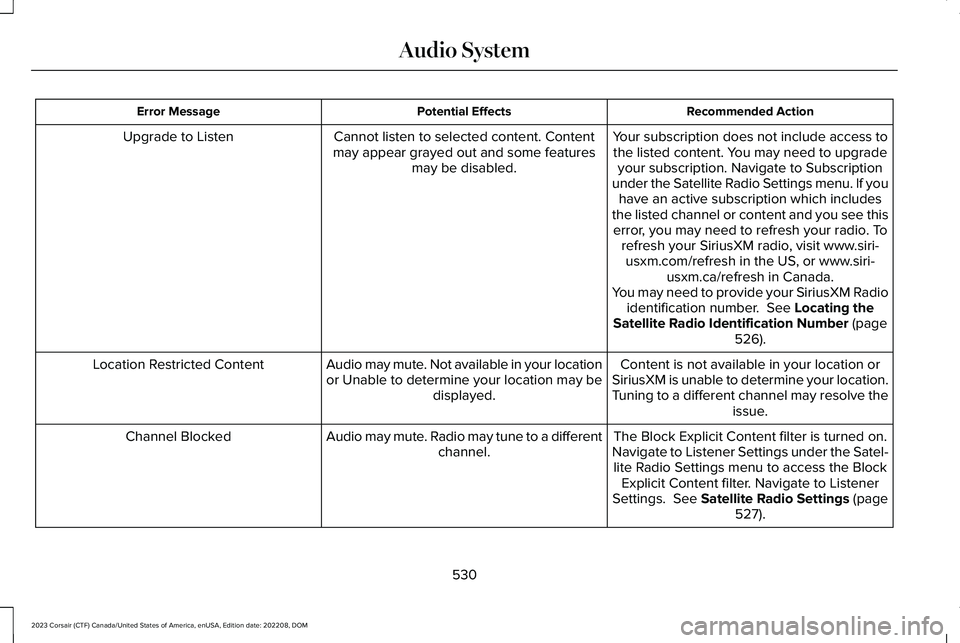
Recommended ActionPotential EffectsError Message
Your subscription does not include access tothe listed content. You may need to upgradeyour subscription. Navigate to Subscriptionunder the Satellite Radio Settings menu. If youhave an active subscription which includesthe listed channel or content and you see thiserror, you may need to refresh your radio. Torefresh your SiriusXM radio, visit www.siri-usxm.com/refresh in the US, or www.siri-usxm.ca/refresh in Canada.You may need to provide your SiriusXM Radioidentification number. See Locating theSatellite Radio Identification Number (page526).
Cannot listen to selected content. Contentmay appear grayed out and some featuresmay be disabled.
Upgrade to Listen
Content is not available in your location orSiriusXM is unable to determine your location.Tuning to a different channel may resolve theissue.
Audio may mute. Not available in your locationor Unable to determine your location may bedisplayed.
Location Restricted Content
The Block Explicit Content filter is turned on.Navigate to Listener Settings under the Satel-lite Radio Settings menu to access the BlockExplicit Content filter. Navigate to ListenerSettings. See Satellite Radio Settings (page527).
Audio may mute. Radio may tune to a differentchannel.Channel Blocked
530
2023 Corsair (CTF) Canada/United States of America, enUSA, Edition date: 202208, DOMAudio System
Page 535 of 690
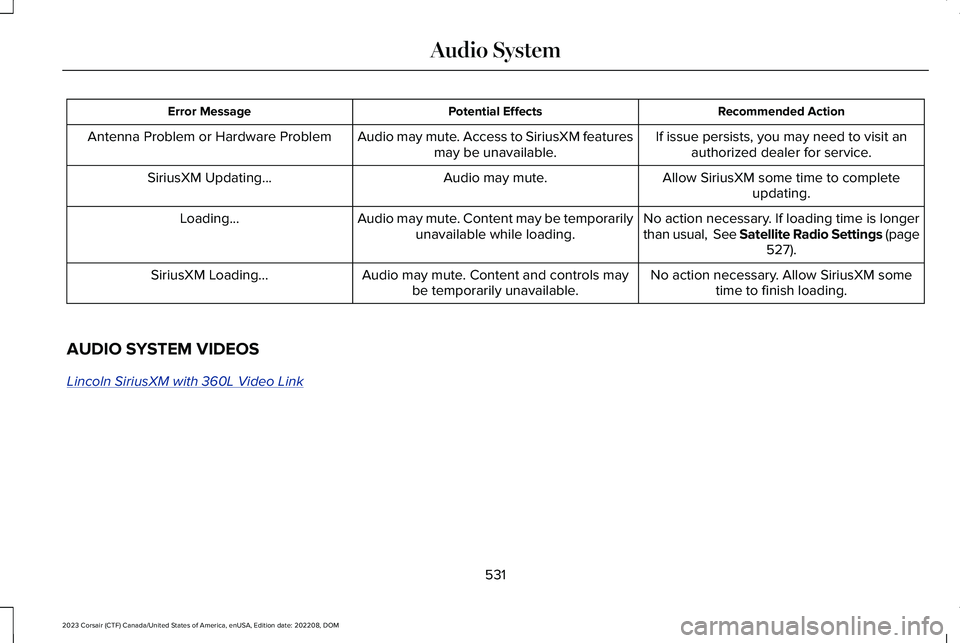
Recommended ActionPotential EffectsError Message
If issue persists, you may need to visit anauthorized dealer for service.Audio may mute. Access to SiriusXM featuresmay be unavailable.Antenna Problem or Hardware Problem
Allow SiriusXM some time to completeupdating.Audio may mute.SiriusXM Updating...
No action necessary. If loading time is longerthan usual, See Satellite Radio Settings (page527).
Audio may mute. Content may be temporarilyunavailable while loading.Loading...
No action necessary. Allow SiriusXM sometime to finish loading.Audio may mute. Content and controls maybe temporarily unavailable.SiriusXM Loading...
AUDIO SYSTEM VIDEOS
Lincoln SiriusXM with 360L Video Link
531
2023 Corsair (CTF) Canada/United States of America, enUSA, Edition date: 202208, DOMAudio System
Page 552 of 690
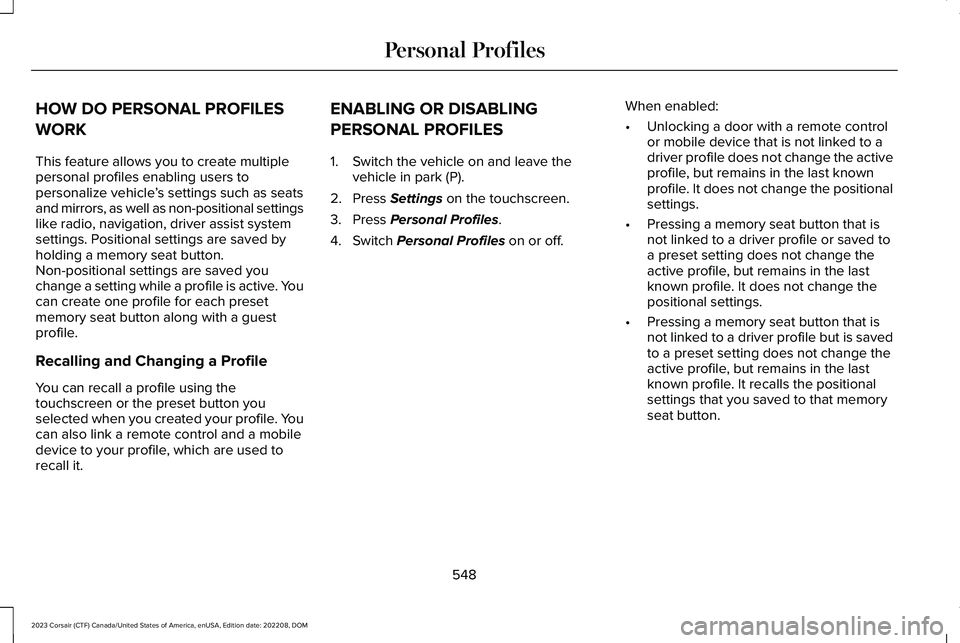
HOW DO PERSONAL PROFILES
WORK
This feature allows you to create multiplepersonal profiles enabling users topersonalize vehicle’s settings such as seatsand mirrors, as well as non-positional settingslike radio, navigation, driver assist systemsettings. Positional settings are saved byholding a memory seat button.Non-positional settings are saved youchange a setting while a profile is active. Youcan create one profile for each presetmemory seat button along with a guestprofile.
Recalling and Changing a Profile
You can recall a profile using thetouchscreen or the preset button youselected when you created your profile. Youcan also link a remote control and a mobiledevice to your profile, which are used torecall it.
ENABLING OR DISABLING
PERSONAL PROFILES
1.Switch the vehicle on and leave thevehicle in park (P).
2.Press Settings on the touchscreen.
3.Press Personal Profiles.
4.Switch Personal Profiles on or off.
When enabled:
•Unlocking a door with a remote controlor mobile device that is not linked to adriver profile does not change the activeprofile, but remains in the last knownprofile. It does not change the positionalsettings.
•Pressing a memory seat button that isnot linked to a driver profile or saved toa preset setting does not change theactive profile, but remains in the lastknown profile. It does not change thepositional settings.
•Pressing a memory seat button that isnot linked to a driver profile but is savedto a preset setting does not change theactive profile, but remains in the lastknown profile. It recalls the positionalsettings that you saved to that memoryseat button.
548
2023 Corsair (CTF) Canada/United States of America, enUSA, Edition date: 202208, DOMPersonal Profiles