Page 22 of 84
21
ES350_ES250_QG_OM06255U_(U)
*1: Shifting to the D position allows the system to select a gear suitable for the driving condi-
tions. Setting the shift lever to the D position is recommended for normal driving. You
can choose shift range suitable for your driving situation by operat ing the paddle shift
switches.
*2: Selecting shift ranges using S mode restricts the upper limit of the possible gear ranges,
controls engine braking force, and prevents unnecessary upshifting.
To drive using temporary shift range selection, operate the “-” paddle shift switch. The shift
range can then be selected by operating the “-” and “+” paddle shift switches.
1Upshifting
2Downshifting
The selected shift range, from D1 to D8, will
be displayed on the meter.
Shift position purpose and functions
Shift positionObjective or function
PParking the vehicle/starting the engine
RReversing
NNeutral
DNormal driving*1
SS mode driving*2 ( P.22)
Selecting shift ranges in the D position
Page 23 of 84
22
ES350_ES250_QG_OM06255U_(U)
To enter S mode, shift the shift lever to S. Shift ranges can be selected by operating the shift
lever or paddle shift switches, allowing yo u to drive in the gear of your choosing.
1Upshifting
2Downshifting
The initial shift range in S mode is set auto-
matically to S4, S5 or S6 according to vehi-
cle’s speed. However, the initial shift range
may be set to S3 if AI-SHIFT has operated
while the shift lever was in the D position.
( P.20)
A lower shift range will provide greater engine braking forces than a higher shift range.
Selecting shift ranges in S mode
Meter displayFunction
S2 - S8A gear in the range between S1 and the selected gear is automati-
cally chosen depending on vehicle speed and driving conditions
S1Setting the gear at S1
Page 33 of 84
32
ES350_ES250_QG_OM06255U_(U)
QTachometer
Displays the engine speed in revolutions per minute.
QEco Driving Indicator
Eco Driving Indicator Zone Display
Eco driving ratio based on accelera-
tion
Zone of Eco driving
Displayed content is the same as that
displayed on the multi-information dis-
play (Eco Driving Indicator).
Tachometer/Eco Driving Indicator display area
A
B
C
The head-up display may seem dark or hard to see when viewed through sunglasses,
especially polarized sunglasses. Adjust the brightness of the head-up display or remove
your sunglasses.
Page 39 of 84
38
ES350_ES250_QG_OM06255U_(U)
QDisplay procedure
1
Select on the main menu.
2Select “Trip information”.
3Select “Current”.
QDisplay
Resetting the history data
Fuel consumption in the past 15 min-
utes
Current fuel consumption
Average vehicle speed since the
engine was started.
Trip range
Elapsed time since the engine was
started.
QDisplay procedure
1 Select on the main menu.
2
Select “Trip information”.
3Select “History”.
QDisplay
Latest fuel consumption
Best recorded fuel consumption
Previous fuel consumption record
Resetting the history data
Updating the latest fuel consumption
data
Fuel Consumption Screen
Fuel consumption information can be displayed on the Center Display.
For details, refer to the “OWNER’S MANUAL”.
Current screen
A
B
C
D
E
F
History screen
A
B
C
D
E
Page 74 of 84
73
ES350_ES250_QG_OM06255U_(U)
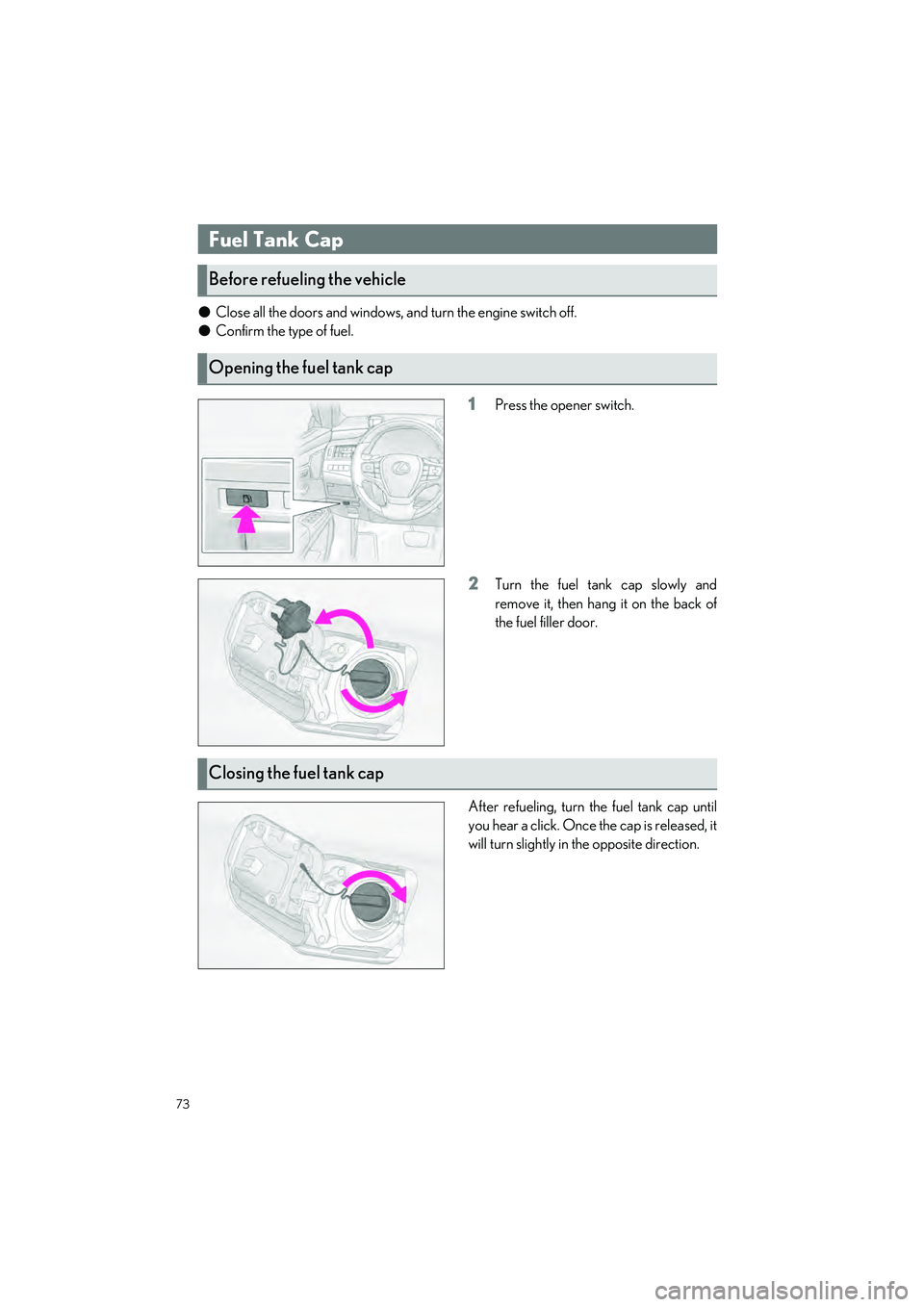
OClose all the doors and windows, and turn the engine switch off.
O Confirm the type of fuel.
1Press the opener switch.
2Turn the fuel tank cap slowly and
remove it, then hang it on the back of
the fuel filler door.
After refueling, turn the fuel tank cap until
you hear a click. Once the cap is released, it
will turn slightly in the opposite direction.
Fuel Tank Cap
Before refueling the vehicle
Opening the fuel tank cap
Closing the fuel tank cap
Page 76 of 84

What to do if...
75
ES350_ES250_QG_OM06255U_(U)
List of Warning/Indicator Lights
Immediately stop the vehicle in a safe place and contact your Lexus dealer. Continu-
ing to drive the vehicle may be dangerous.
(U.S.A.)
Brake system warning light
(Red)
(Canada)
Immediately stop the vehicle in a safe place and contact your Lexus dealer.
Low engine oil pressure warn-
ing light(U.S.A.)Malfunction
indicator lamp
Charging system warning light(Canada)
Have the vehicle inspected by your Lexus dealer immediately.
SRS warning light
(Flashes)
Brake hold operated indicator
(U.S.A.)
ABS warning light(Flashes)(U.S.A.)Parking brake
indicator
(Canada)
(Flashes)
(Canada)
(Red or yellow)
Electric power steering
system warning light
(Yellow)
Brake system warning light
(Flashes or
illuminates)PCS warning light
(Flashes)
RCTA OFF indicator
Slip indicator(Flashes or
illuminates)
RCD OFF indicator (if
equipped)
(Flashes)
Intuitive parking assist OFF
indicator (if equipped)
(Flashes)
PKSB OFF indicator (if
equipped)
For further information, refer to the “OWNER’S MANUAL”.
Page 81 of 84

80
What to do if...
ES350_ES250_QG_OM06255U_(U)
Turn the mechanical key clockwise to open.
1Ensure that the shift lever is in P and depress the brake pedal.
2Touch the Lexus emblem side of the
electronic key to the engine switch.
When the electronic key is detected, a
buzzer sounds and the engine switch
will turn to IGNITION ON mode.
When the smart access system with
pushbutton start is deactivated in cus-
tomization setting, the engine switch
will turn to ACCESSORY mode.
3Firmly depress the brake pedal and check that is shown on the multi-informa-
tion display.
4Press the engine switch shortly and firmly.
In the event that the engine still cannot be started, contact your Lexus dealer.
Opening the trunk
Starting the engine
If the electronic key battery becomes deplet ed, a warning message will be shown on the
multi-information display. Replace the battery with a new one. For instructions on replacing
the battery, refer to the “OWNER’S MANUAL”.
If you need further assistance, contact your Lexus dealer.
Page 82 of 84
What to do if...
81
ES350_ES250_QG_OM06255U_(U)
Make sure that the correct operating procedures have been followed.
Make sure that the brake pedal is firmly
depressed when attempting to start the
engine. (P.17)
If the engine will not start
Brake pedal
If the engine still does not start, see th e “OWNER’S MANUAL” for more information or
contact your Lexus dealer.