Page 111 of 356
5-3
l l Register your home, office or other frequently visited places as a favorite location to
making searching easier.
> See "Saving a frequently visited place as a favorite place."
m m The list of menu items appears.
� Reorder Icons: Can change the location of an icon on the Navigation Menu screen.
�Display Off: Turns off the screen. To switch the screen back on, press the screen or
briefly press the power button.
�User's Manual on Web (QR Code): Displays the QR code that provides access to the
online user manual for the system.
A
Available icons and their arrangement may differ depending on the vehicle model and
specifications.
Finding a route easily
ÝWarning
Driving while distracted may cause a loss of vehicle control that may lead to an accident,
severe bodily injury, or death. The driver's primary responsibility is the safe and legal
operation of the vehicle, and the use of any devices or systems that take the driver's attention
away from driving.
1 Perform any of the following methods:
�On the All Menus screen, press Navigation Menu
>
Places.
� On the map screen, press .
A
Press and hold the [ NAV] button on the control panel to enter into Places.
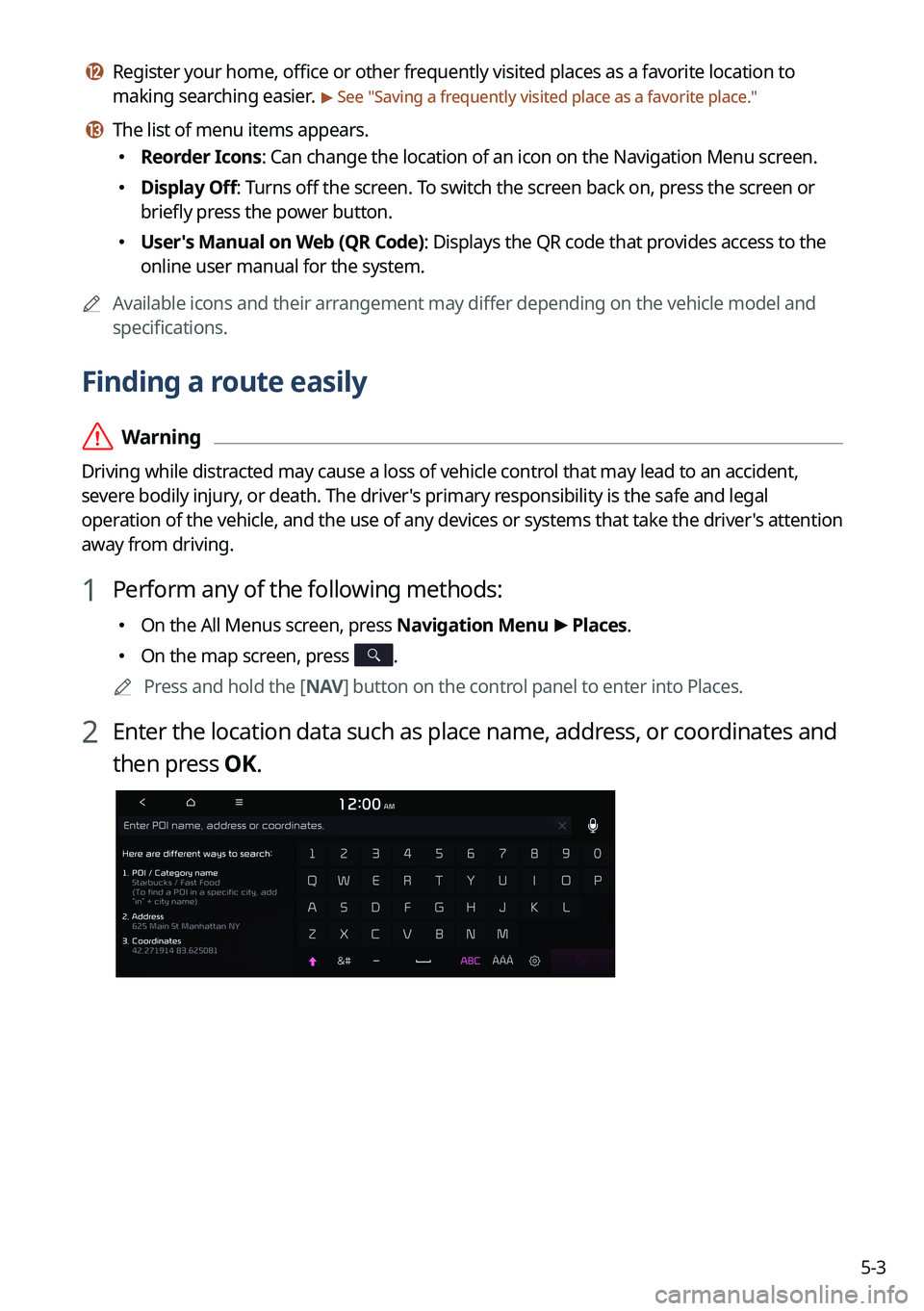
2 Enter the location data such as place name, address, or coordinates and
then press OK.
Page 174 of 356
7-10
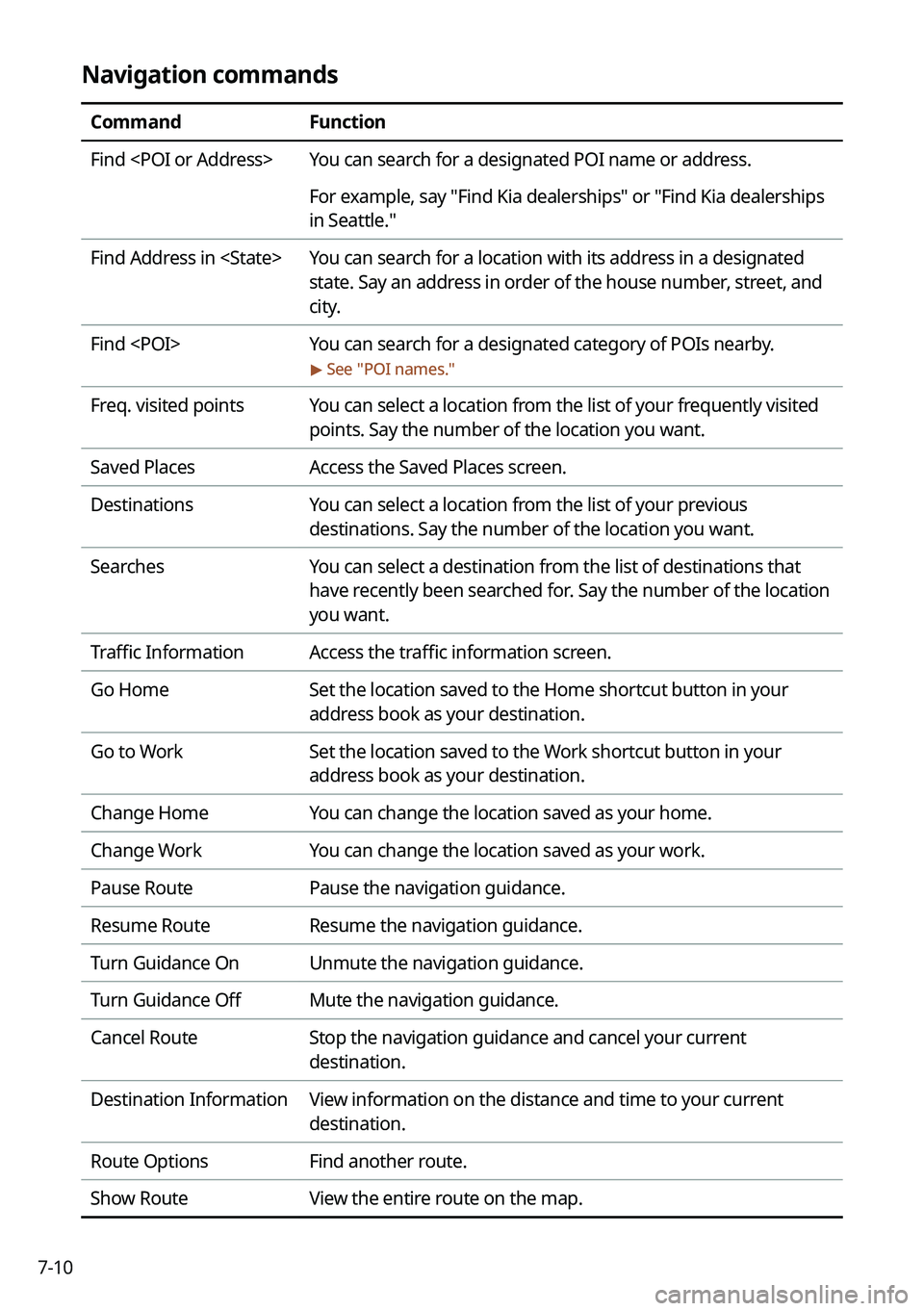
Navigation commands
CommandFunction
Find You can search for a designated POI name or address.
For example, say "Find Kia dealerships" or "Find Kia dealerships
in Seattle."
Find Address in You can search for a location with its address in a designated
state. Say an address in order of the house number, street, and
city.
Find You can search for a designated category of POIs nearby.
> See "POI names."
Freq. visited points You can select a location from the list of your frequently visited
points. Say the number of the location you want.
Saved Places Access the Saved Places screen.
Destinations You can select a location from the list of your previous
destinations. Say the number of the location you want.
Searches You can select a destination from the list of destinations that
have recently been searched for. Say the number of the location
you want.
Traffic Information Access the traffic information screen.
Go Home Set the location saved to the Home shortcut button in your
address book as your destination.
Go to Work Set the location saved to the Work shortcut button in your
address book as your destination.
Change Home You can change the location saved as your home.
Change Work You can change the location saved as your work.
Pause Route Pause the navigation guidance.
Resume Route Resume the navigation guidance.
Turn Guidance On Unmute the navigation guidance.
Turn Guidance Off Mute the navigation guidance.
Cancel Route Stop the navigation guidance and cancel your current
destination.
Destination Information View information on the distance and time to your current
destination.
Route Options Find another route.
Show Route View the entire route on the map.
Page 179 of 356

7-15
Navigation commands
CommandFunction
Find You can search for a designated POI name or address.
For example, say "Find Kia dealerships" or "Find Kia dealerships
in Seattle."
Find Address in You can search for a location with its address in a designated
state. Say an address in order of the house number, street, and
city.
Find You can search for a designated category of POIs nearby.
> See "POI names."
Freq. visited points You can select a location from the list of your frequently visited
points. Say the number of the location you want.
Saved Places Access the Saved Places screen.
Destinations You can select a location from the list of your previous
destinations. Say the number of the location you want.
Searches You can select a destination from the list of destinations that
have recently been searched for. Say the number of the location
you want.
Traffic Information Access the traffic information screen.
Go Home Set the location saved to the Home shortcut button in your
address book as your destination.
Go to Work Set the location saved to the Work shortcut button in your
address book as your destination.
Change Home You can change the location saved as your home.
Change Work You can change the location saved as your work.
Reroute Can perform routing again.
Pause Route Pause the navigation guidance.
Resume Route Resume the navigation guidance.
Cancel Route Stop the navigation guidance and cancel your current
destination.
Destination Information View information on the distance and time to your current
destination.
Route Options Find another route.