2023 KIA NIRO PHEV ad blue
[x] Cancel search: ad bluePage 100 of 172
6-12
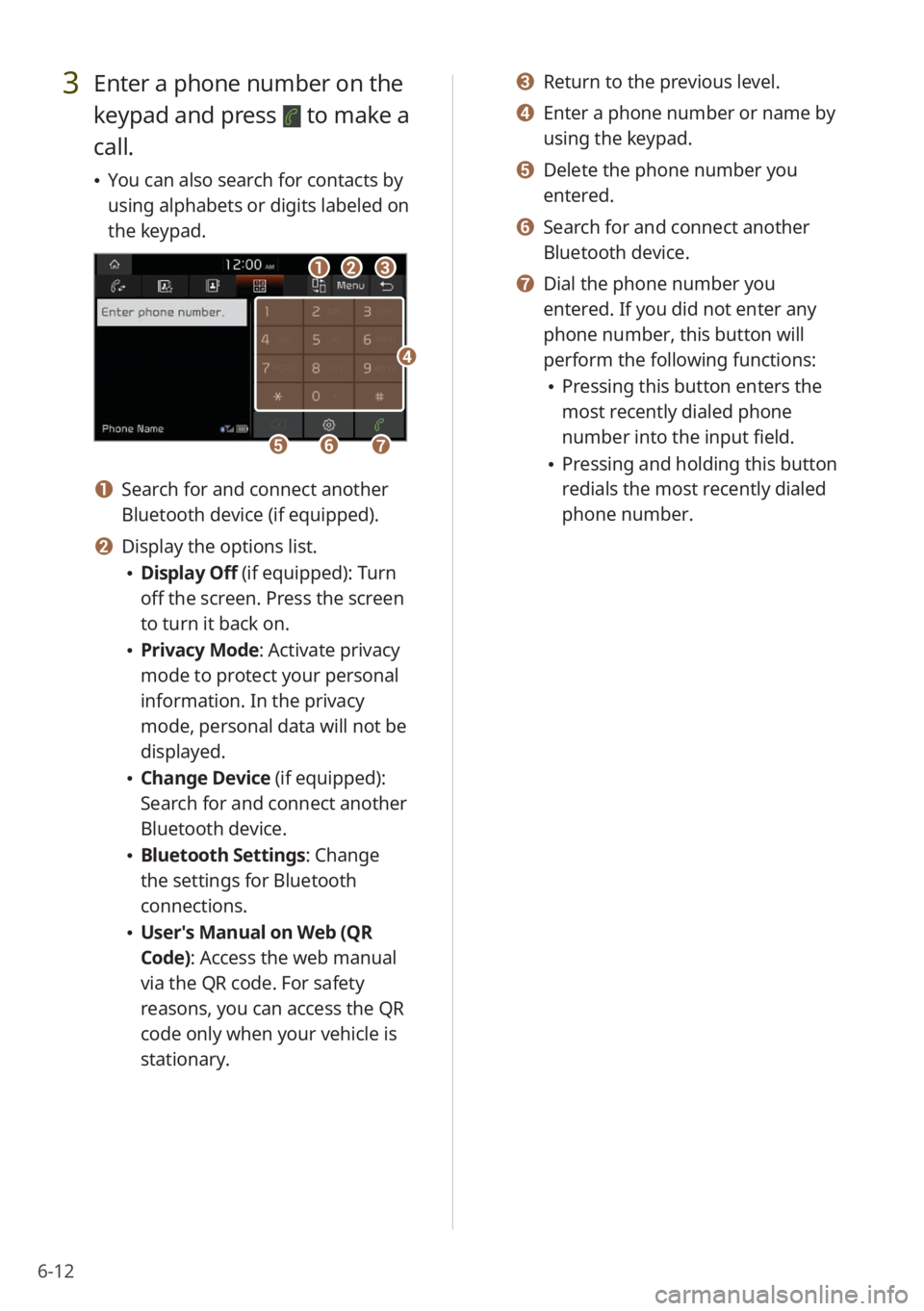
3 Enter a phone number on the
keypad and press
to make a
call.
\225 You can also search for contacts by
using alphabets or digits labeled on
the keypad.
bbaacc
ffggee
dd
a a Search for and connect another
Bluetooth device (if equipped).
b b Display the options list.
\225Display Off (if equipped): Turn
off the screen. Press the screen
to turn it back on.
\225Privacy Mode : Activate privacy
mode to protect your personal
information. In the privacy
mode, personal data will not be
displayed.
\225 Change Device (if equipped):
Search for and connect another
Bluetooth device.
\225Bluetooth Settings : Change
the settings for Bluetooth
connections.
\225 User′s Manual on Web (QR
Code): Access the web manual
via the QR code. For safety
reasons, you can access the QR
code only when your vehicle is
stationary.
c c Return to the previous level.
d d Enter a phone number or name by
using the keypad.
e e Delete the phone number you
entered.
f f Search for and connect another
Bluetooth device.
g g Dial the phone number you
entered. If you did not enter any
phone number, this button will
perform the following functions:
\225Pressing this button enters the
most recently dialed phone
number into the input field.
\225Pressing and holding this button
redials the most recently dialed
phone number.
Page 101 of 172

6-13
Answering a call via
Bluetooth
You can accept or reject calls and use
convenient functions during a call.
Accepting or rejecting a
call
When a call comes in, a notification pop-
up window of the incoming call appears
on the system screen.
To answer the call, press Accept.
\225Alternatively, press the Call/Answer
button on the steering wheel.
To reject the call, press Reject.
\334Warning
\225Park your vehicle in a safe location
before connecting any Bluetooth
devices. Distracted driving can cause
a traffic accident and lead to personal
injury or death.
\225Never pick up your mobile phone
while driving. Use of a mobile phone
may distract your attention, making it
difficult to recognize external conditions
and reducing the ability to cope with
unexpected situations, which may lead
to an accident.
\333 Note
\225Depending on the mobile phone type,
call rejection may not be supported.
\225Once your mobile phone is connected
to the system, the call sound may be
output through the vehicle′s speakers
even after you exit the vehicle if the
phone is within the connection range.
To end the connection, disconnect the
device from the system or deactivate
Bluetooth on the device.
\225You can activate privacy mode by
pressing Privacy Mode on the incoming
call pop-up window. In privacy mode,
contact information will not be
displayed. To deactivate privacy mode,
press Menu > Privacy Mode on the
Bluetooth phone screen.
Page 102 of 172
6-14
Using functions during a
call
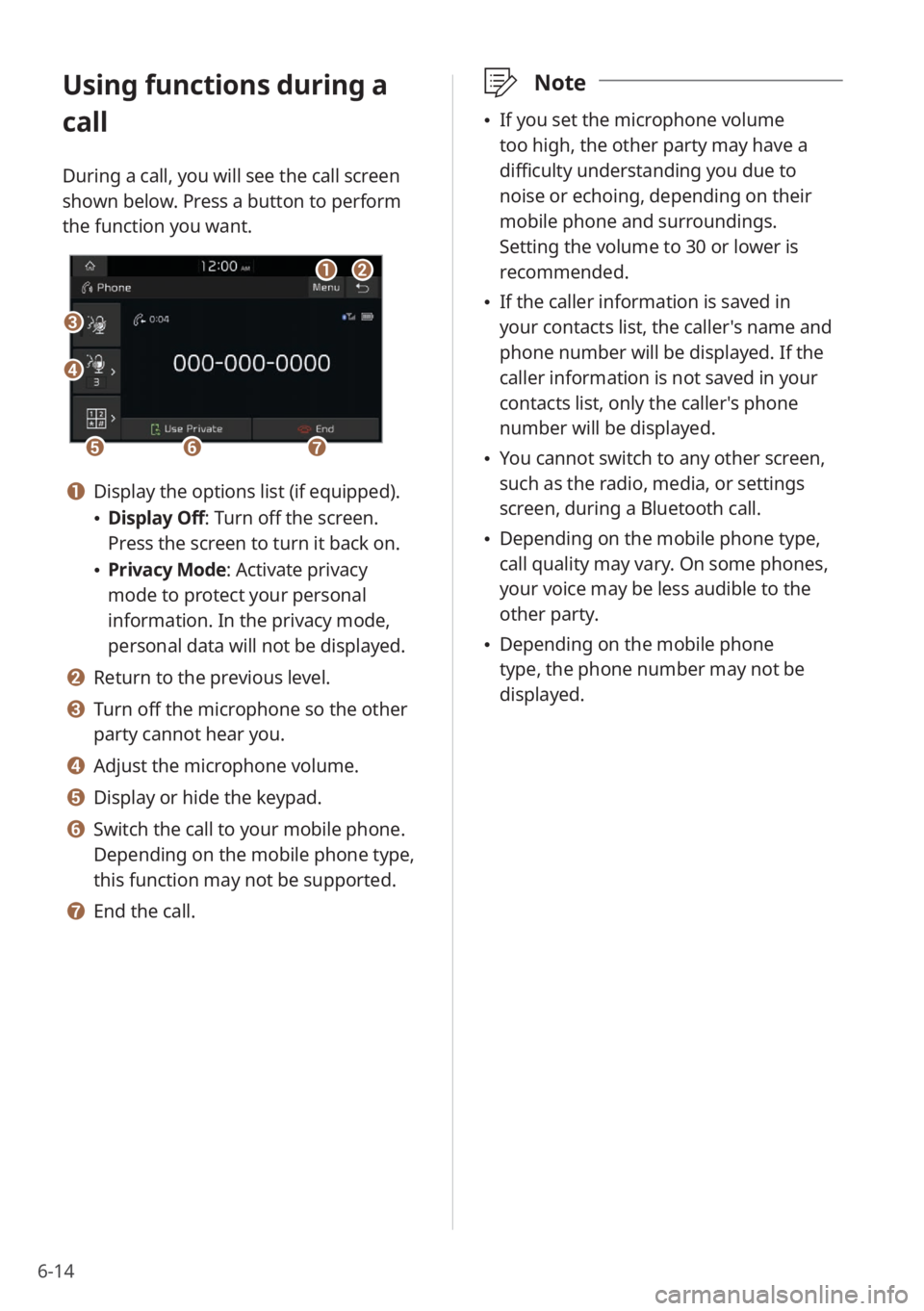
During a call, you will see the call screen
shown below. Press a button to perform
the function you want.
cc
bbaa
eeffgg
dd
a a Display the options list (if equipped).
\225Display Off: Turn off the screen.
Press the screen to turn it back on.
\225Privacy Mode : Activate privacy
mode to protect your personal
information. In the privacy mode,
personal data will not be displayed.
b b Return to the previous level.
c c Turn off the microphone so the other
party cannot hear you.
d d Adjust the microphone volume.
e e Display or hide the keypad.
f f Switch the call to your mobile phone.
Depending on the mobile phone type,
this function may not be supported.
g g End the call.
\333 Note
\225If you set the microphone volume
too high, the other party may have a
difficulty understanding you due to
noise or echoing, depending on their
mobile phone and surroundings.
Setting the volume to 30 or lower is
recommended.
\225If the caller information is saved in
your contacts list, the caller's name and
phone number will be displayed. If the
caller information is not saved in your
contacts list, only the caller's phone
number will be displayed.
\225You cannot switch to any other screen,
such as the radio, media, or settings
screen, during a Bluetooth call.
\225Depending on the mobile phone type,
call quality may vary. On some phones,
your voice may be less audible to the
other party.
\225Depending on the mobile phone
type, the phone number may not be
displayed.
Page 114 of 172
8-6
Checking maintenance
service intervals
You can view the service intervals
between your last and next scheduled
maintenance. This feature will help you
maintain your vehicle on a regular basis.
1 On the Home screen, press
All Menus > Kia Connect >
Maintenance .
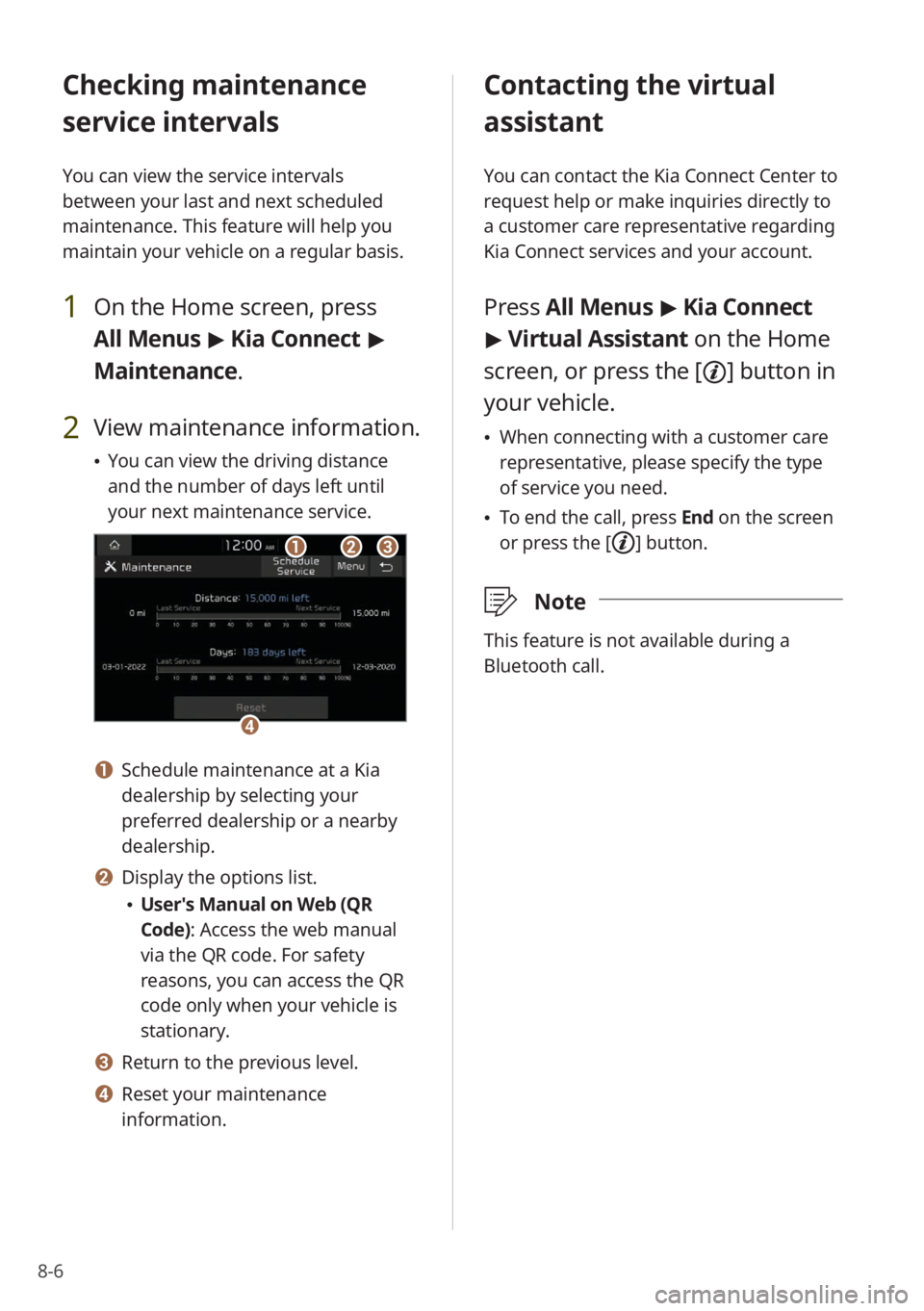
2 View maintenance information.
\225You can view the driving distance
and the number of days left until
your next maintenance service.
bbaacc
dd
a a Schedule maintenance at a Kia
dealership by selecting your
preferred dealership or a nearby
dealership.
b b Display the options list.
\225User′s Manual on Web (QR
Code): Access the web manual
via the QR code. For safety
reasons, you can access the QR
code only when your vehicle is
stationary.
c c Return to the previous level.
d d Reset your maintenance
information.
Contacting the virtual
assistant
You can contact the Kia Connect Center to
request help or make inquiries directly to
a customer care representative regarding
Kia Connect services and your account.
Press All Menus > Kia Connect
> Virtual Assistant on the Home
screen, or press the [
] button in
your vehicle.
\225 When connecting with a customer care
representative, please specify the type
of service you need.
\225To end the call, press End on the screen
or press the [
] button.
\333 Note
This feature is not available during a
Bluetooth call.
Page 122 of 172
9-6
Configuring the device
connection settings
You can manage Bluetooth devices or
customize your Bluetooth settings. You
can also enable phone projection to
control your smartphone apps via the
system screen.
Depending on the vehicle model or
specifications, displayed screens and
available options may vary.
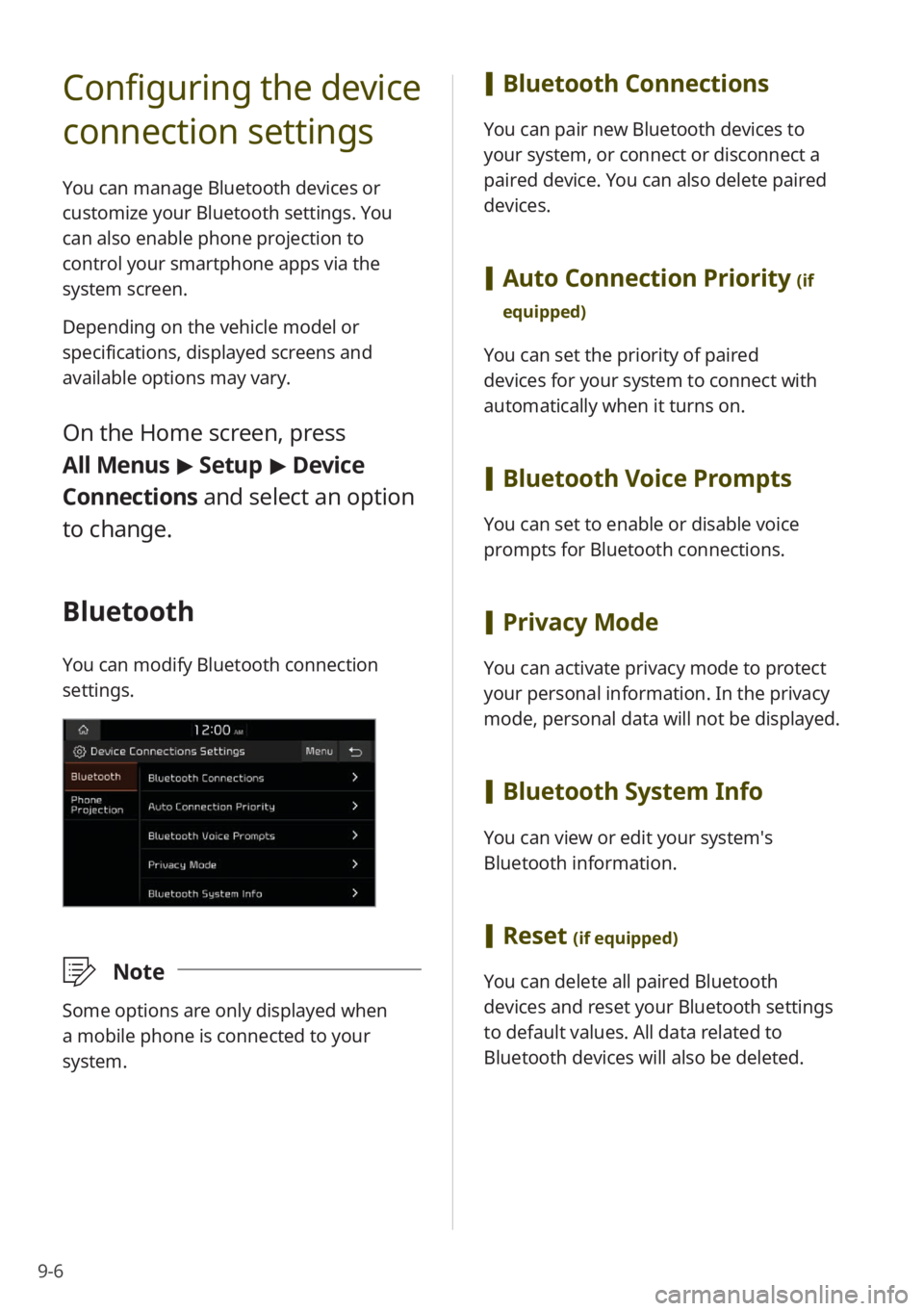
On the Home screen, press
All Menus > Setup > Device
Connections and select an option
to change.
Bluetooth
You can modify Bluetooth connection
settings.
\333 Note
Some options are only displayed when
a mobile phone is connected to your
system.
[Bluetooth Connections
You can pair new Bluetooth devices to
your system, or connect or disconnect a
paired device. You can also delete paired
devices.
[Auto Connection Priority (if
equipped)
You can set the priority of paired
devices for your system to connect with
automatically when it turns on.
[ Bluetooth Voice Prompts
You can set to enable or disable voice
prompts for Bluetooth connections.
[Privacy Mode
You can activate privacy mode to protect
your personal information. In the privacy
mode, personal data will not be displayed.
[Bluetooth System Info
You can view or edit your system′s
Bluetooth information.
[Reset (if equipped)
You can delete all paired Bluetooth
devices and reset your Bluetooth settings
to default values. All data related to
Bluetooth devices will also be deleted.
Page 137 of 172
9-21
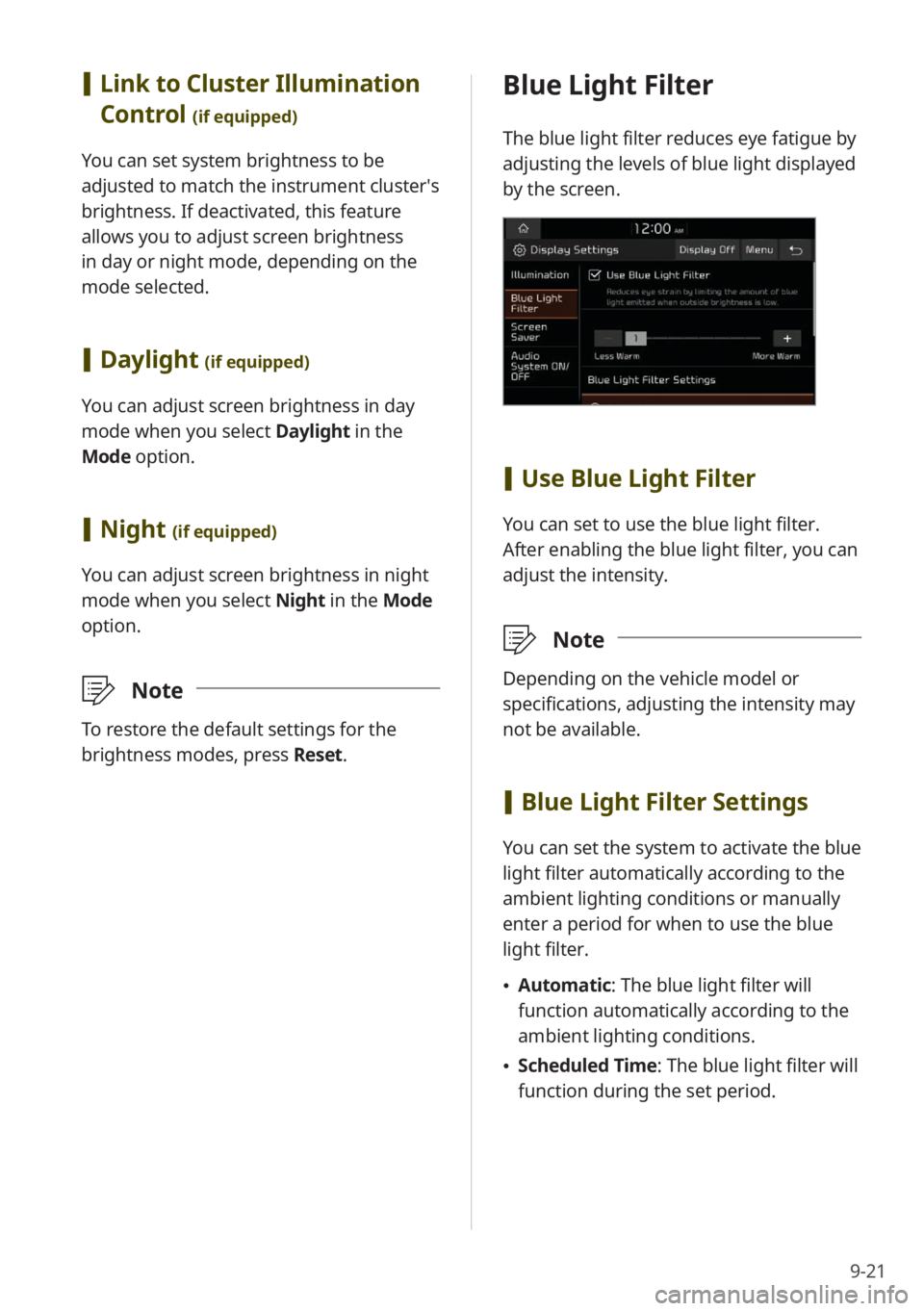
Blue Light Filter
The blue light filter reduces eye fatigue by
adjusting the levels of blue light displayed
by the screen.
[Use Blue Light Filter
You can set to use the blue light filter.
After enabling the blue light filter, you can
adjust the intensity.
\333 Note
Depending on the vehicle model or
specifications, adjusting the intensity may
not be available.
[Blue Light Filter Settings
You can set the system to activate the blue
light filter automatically according to the
ambient lighting conditions or manually
enter a period for when to use the blue
light filter.
\225 Automatic : The blue light filter will
function automatically according to the
ambient lighting conditions.
\225 Scheduled Time: The blue light filter will
function during the set period.
[Link to Cluster Illumination
Control
(if equipped)
You can set system brightness to be
adjusted to match the instrument cluster′s
brightness. If deactivated, this feature
allows you to adjust screen brightness
in day or night mode, depending on the
mode selected.
[Daylight (if equipped)
You can adjust screen brightness in day
mode when you select Daylight in the
Mode option.
[ Night (if equipped)
You can adjust screen brightness in night
mode when you select Night in the Mode
option.
\333 Note
To restore the default settings for the
brightness modes, press Reset.
Page 142 of 172
10-2
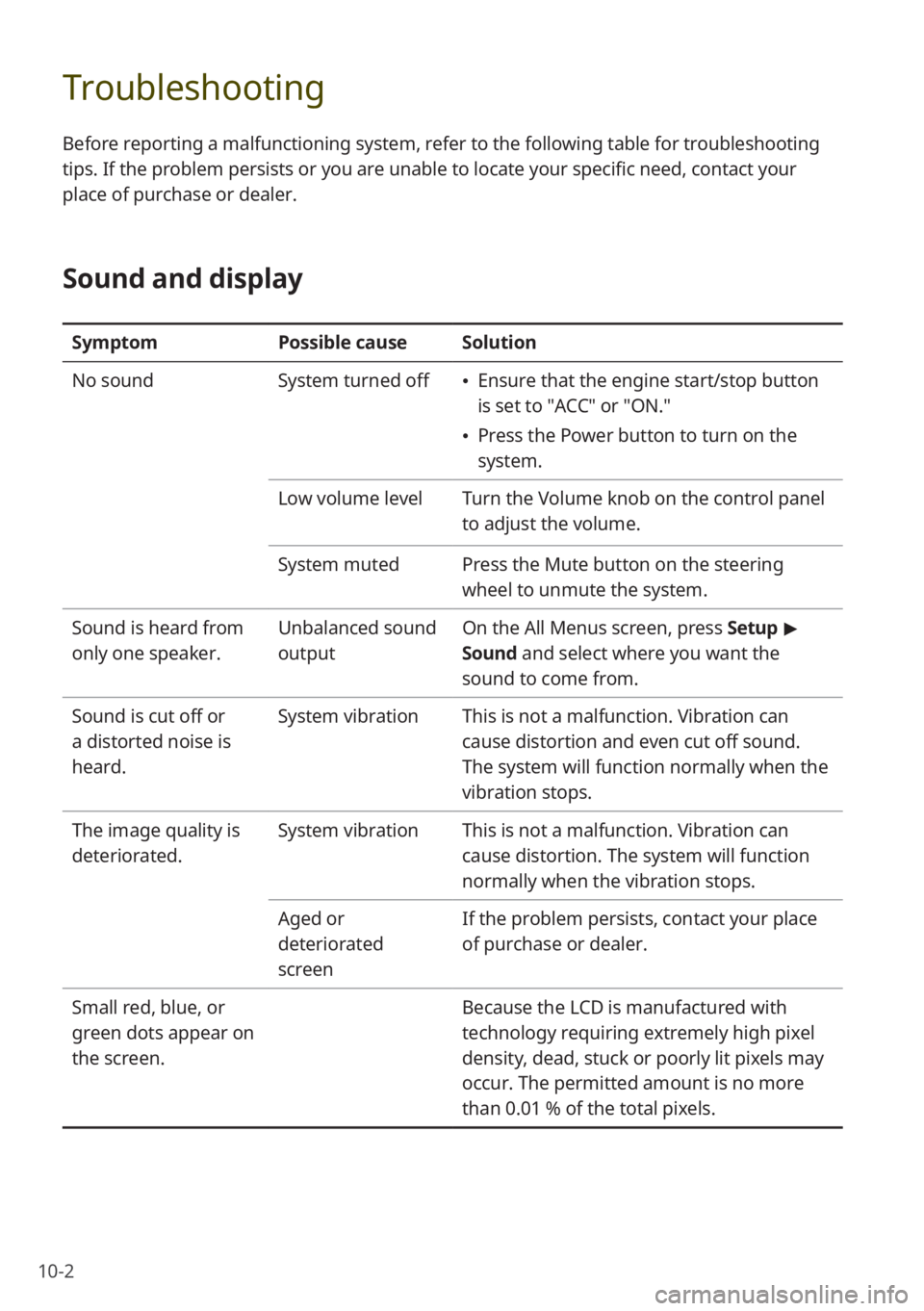
Troubleshooting
Before reporting a malfunctioning system, refer to the following table for troubleshooting
tips. If the problem persists or you are unable to locate your specific need, contact your
place of purchase or dealer.
Sound and display
SymptomPossible causeSolution
No sound System turned off
\225Ensure that the engine start/stop button
is set to ″ACC″ or ″ON.″
\225Press the Power button to turn on the
system.
Low volume level Turn the Volume knob on the control panel
to adjust the volume.
System muted Press the Mute button on the steering
wheel to unmute the system.
Sound is heard from
only one speaker. Unbalanced sound
outputOn the
All Menus screen, press Setup >
Sound and select where you want the
sound to come from.
Sound is cut off or
a distorted noise is
heard. System vibration
This is not a malfunction. Vibration can
cause distortion and even cut off sound.
The system will function normally when the
vibration stops.
The image quality is
deteriorated. System vibration
This is not a malfunction. Vibration can
cause distortion. The system will function
normally when the vibration stops.
Aged or
deteriorated
screen If the problem persists, contact your place
of purchase or dealer.
Small red, blue, or
green dots appear on
the screen. Because the LCD is manufactured with
technology requiring extremely high pixel
density, dead, stuck or poorly lit pixels may
occur. The permitted amount is no more
than 0.01 % of the total pixels.
Page 143 of 172
10-3
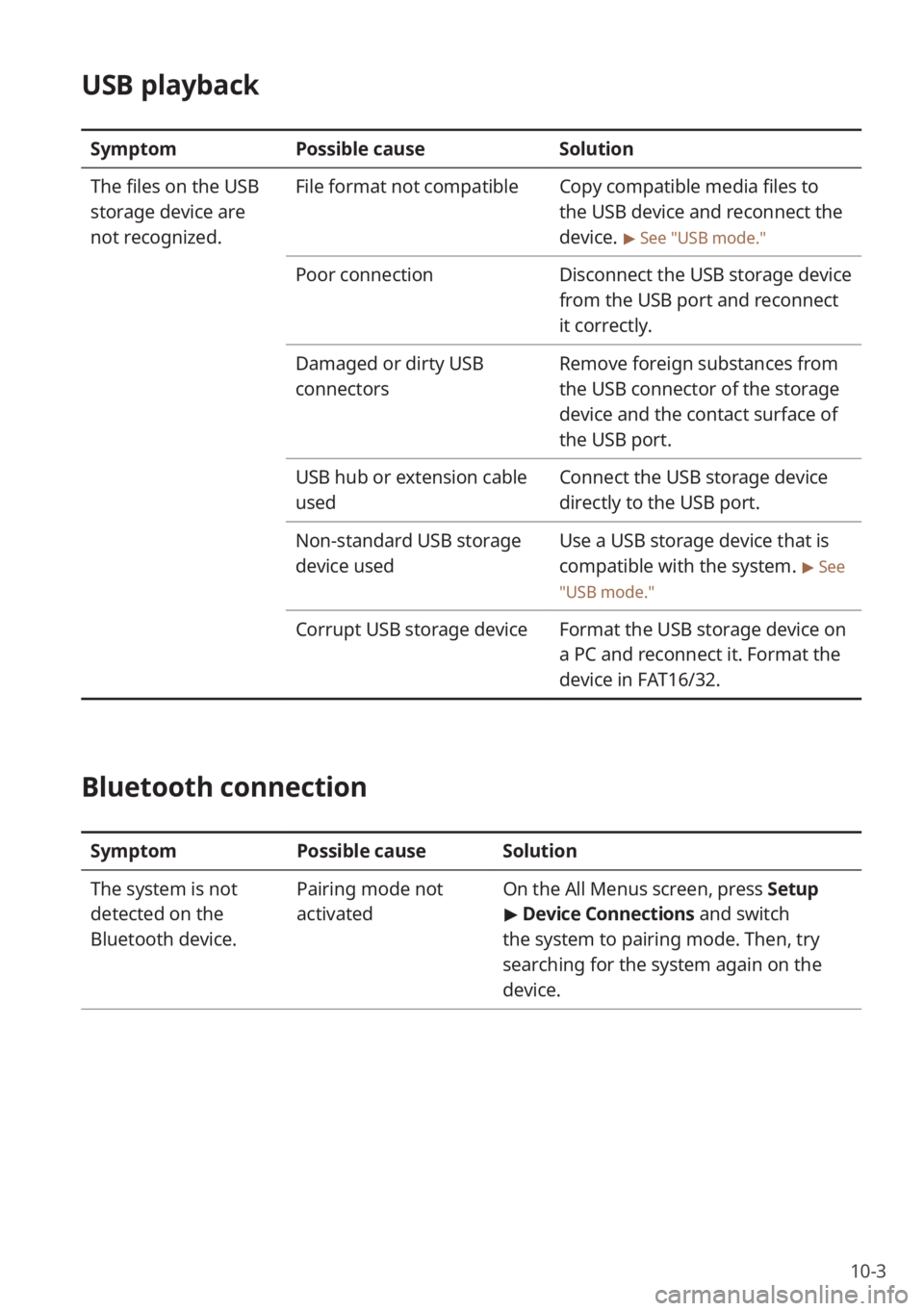
USB playback
SymptomPossible cause Solution
The files on the USB
storage device are
not recognized. File format not compatible
Copy compatible media files to
the USB device and reconnect the
device.
> See ″USB mode.″
Poor connectionDisconnect the USB storage device
from the USB port and reconnect
it correctly.
Damaged or dirty USB
connectors Remove foreign substances from
the USB connector of the storage
device and the contact surface of
the USB port.
USB hub or extension cable
used Connect the USB storage device
directly to the USB port.
Non-standard USB storage
device used Use a USB storage device that is
compatible with the system.
> See
″ USB mode.″
Corrupt USB storage device Format the USB storage device on
a PC and reconnect it. Format the
device in FAT16/32.
Bluetooth connection
SymptomPossible causeSolution
The system is not
detected on the
Bluetooth device. Pairing mode not
activated
On the
All Menus screen, press Setup
> Device Connections and switch
the system to pairing mode. Then, try
searching for the system again on the
device.