Page 257 of 340
9-57
Connected Devices (if equipped)
You can adjust the volume of the phone projection and initialize all volume settings.
Android Auto
Vary the volume of your Android smartphone, connected to the system, depending on the
function.
A
To initialize all system sound settings of the phone projection, press Reset.
Apple CarPlay
Vary the volume of your iPhone, connected to the system, depending on the function.
A
To initialize all system sound settings of the phone projection, press Reset.
Turning on/off the screen touch sound
To turn on or off the touch sound on the screen, press Beep at the top of
the screen.
Page 318 of 340
11-6
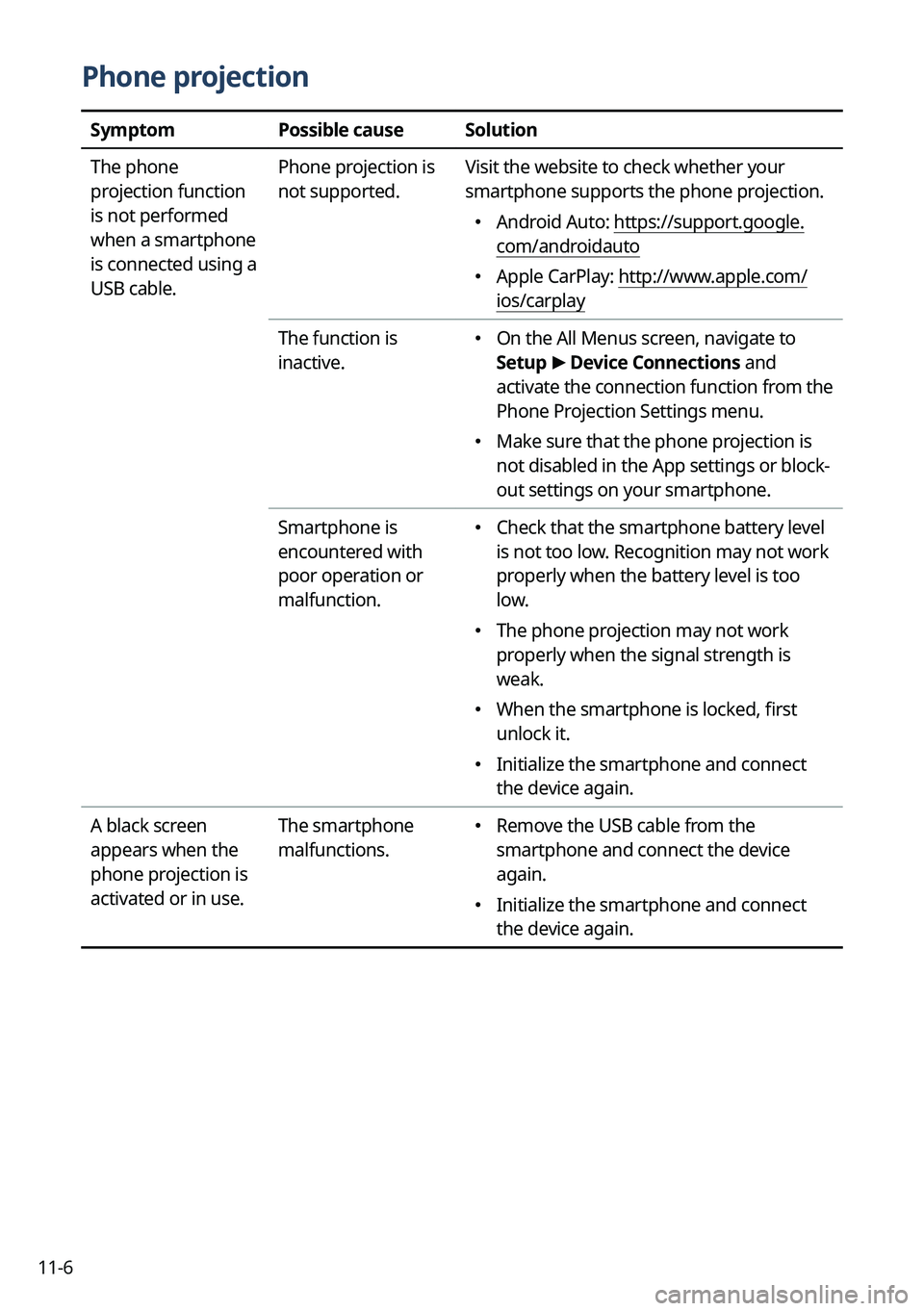
Phone projection
SymptomPossible causeSolution
The phone
projection function
is not performed
when a smartphone
is connected using a
USB cable. Phone projection is
not supported.
Visit the website to check whether your
smartphone supports the phone projection.
�
Android Auto: https://support.google.
com/androidauto
�Apple CarPlay: http://www.apple.com/
ios/carplay
The function is
inactive.
� On the All Menus screen, navigate to
Setup
>
Device Connections and
activate the connection function from the
Phone Projection Settings menu.
� Make sure that the phone projection is
not disabled in the App settings or block-
out settings on your smartphone.
Smartphone is
encountered with
poor operation or
malfunction.
� Check that the smartphone battery level
is not too low. Recognition may not work
properly when the battery level is too
low.
�The phone projection may not work
properly when the signal strength is
weak.
�When the smartphone is locked, first
unlock it.
�Initialize the smartphone and connect
the device again.
A black screen
appears when the
phone projection is
activated or in use. The smartphone
malfunctions.
�
Remove the USB cable from the
smartphone and connect the device
again.
�Initialize the smartphone and connect
the device again.
Page 333 of 340
11-21
C
ClimateClimate settings 9-9, 9-26
Climate control function 2-14
Component names and functions Control panel
Custom button 1-3
MAP button 1-2
MEDIA button 1-2
NAV button 1-2
POWER button/VOLUME knob 1-2
RADIO button 1-2
Search knob 1-3
SEEK/TRACK button 1-3
SETUP button 1-3
System Reset button 1-3
Steering wheel remote control
Call button 1-4, 1-5
Custom button 1-5
End Call button 1-4, 1-5
MODE button 1-4
Move lever/button 1-4
Voice Recognition button 1-4
Volume lever/Mute button 1-4
Contacts list 6-10
Control panel 1-2
D
Deleting a location 5-26
Destination search 5-3
Driving assistance screen 2-9
Driving Information 2-25
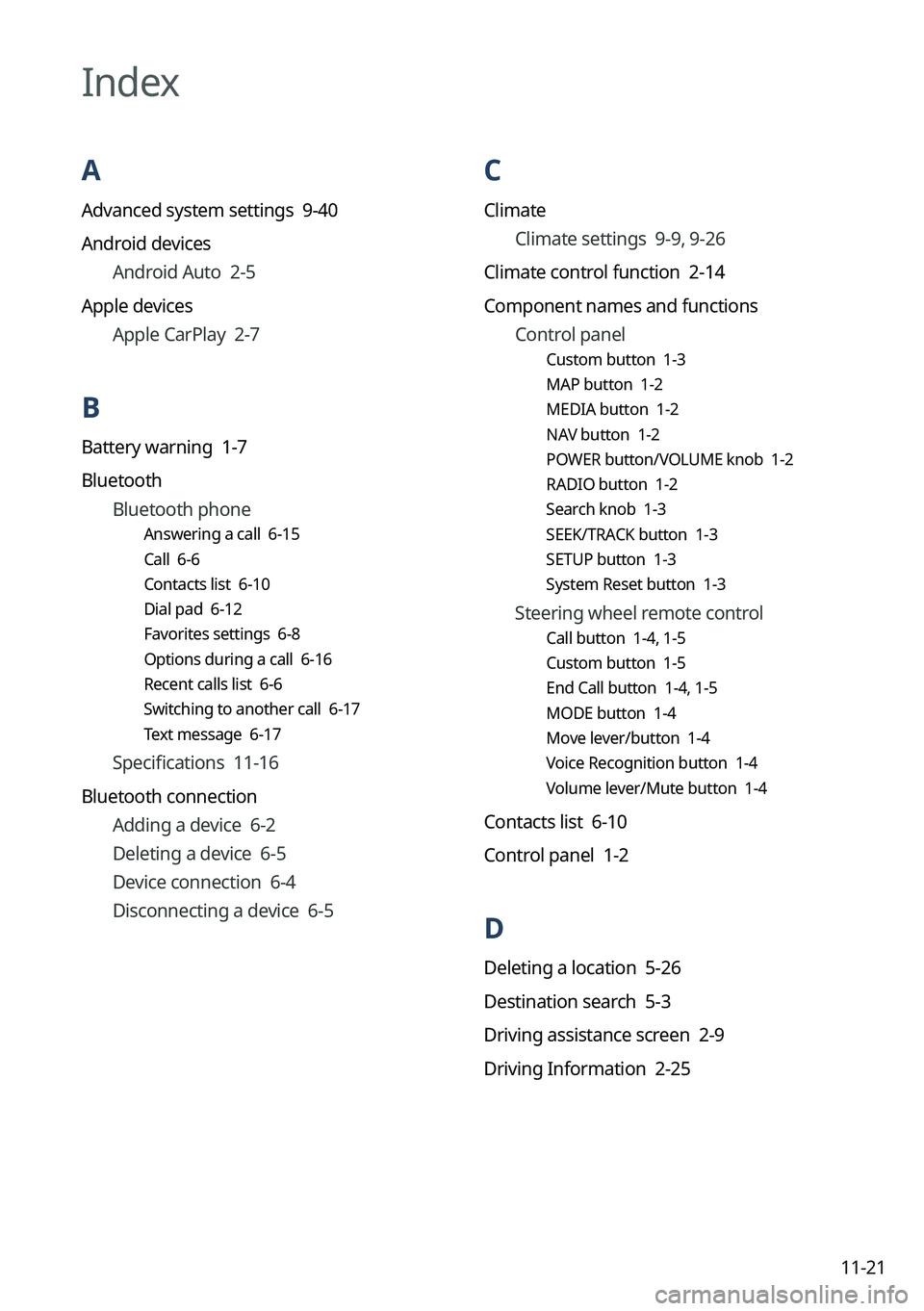
Index
A
Advanced system settings 9-40
Android devices
Android Auto 2-5
Apple devices Apple CarPlay 2-7
B
Battery warning 1-7
BluetoothBluetooth phone
Answering a call 6-15
Call 6-6
Contacts list 6-10
Dial pad 6-12
Favorites settings 6-8
Options during a call 6-16
Recent calls list 6-6
Switching to another call 6-17
Text message 6-17
Specifications 11-16
Bluetooth connection Adding a device 6-2
Deleting a device 6-5
Device connection 6-4
Disconnecting a device 6-5
Page 335 of 340
11-23
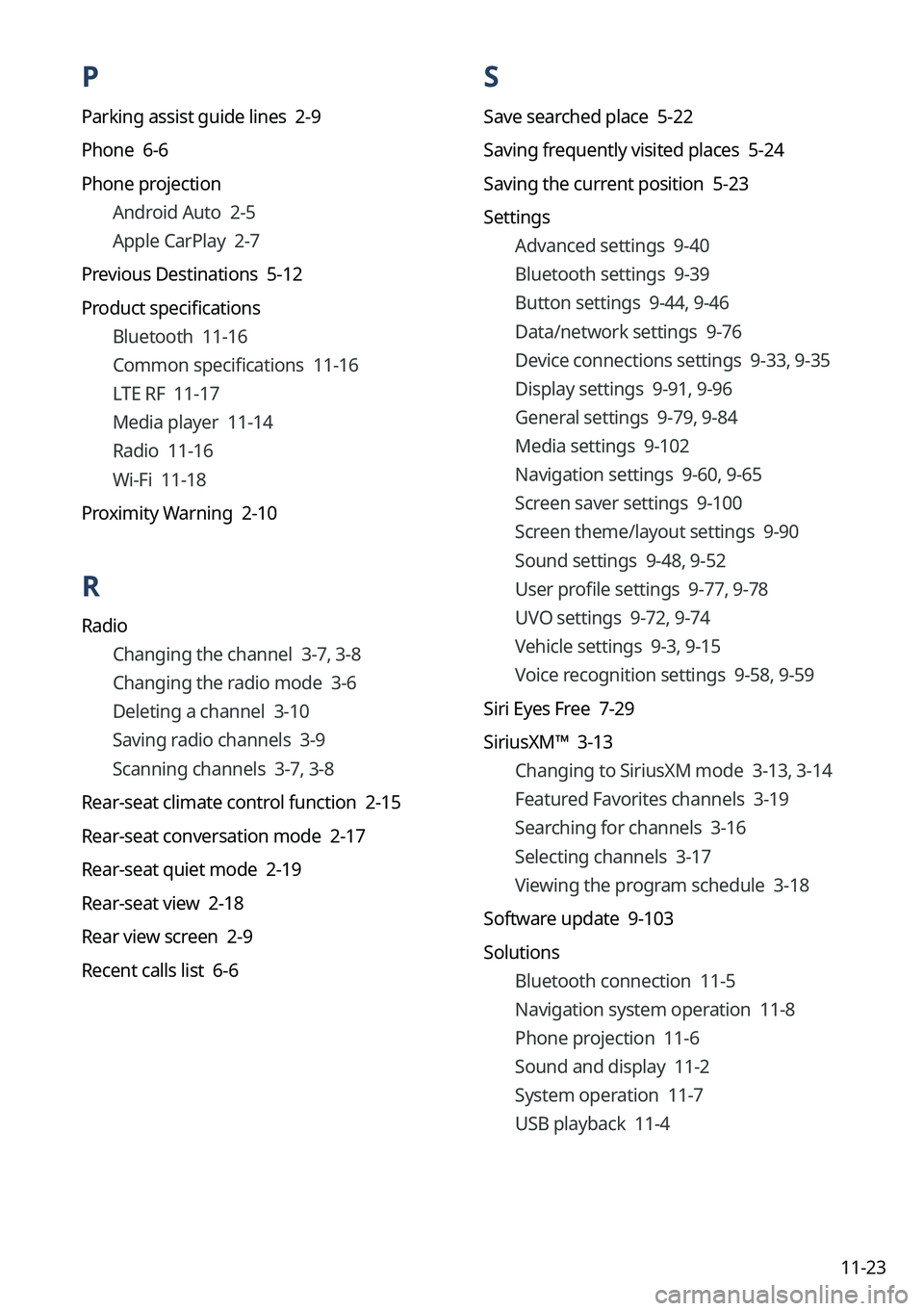
P
Parking assist guide lines 2-9
Phone 6-6
Phone projectionAndroid Auto 2-5
Apple CarPlay 2-7
Previous Destinations 5-12
Product specifications Bluetooth 11-16
Common specifications 11-16
LTE RF 11-17
Media player 11-14
Radio 11-16
Wi-Fi 11-18
Proximity Warning 2-10
R
Radio Changing the channel 3-7, 3-8
Changing the radio mode 3-6
Deleting a channel 3-10
Saving radio channels 3-9
Scanning channels 3-7, 3-8
Rear-seat climate control function 2-15
Rear-seat conversation mode 2-17
Rear-seat quiet mode 2-19
Rear-seat view 2-18
Rear view screen 2-9
Recent calls list 6-6
S
Save searched place 5-22
Saving frequently visited places 5-24
Saving the current position 5-23
Settings Advanced settings 9-40
Bluetooth settings 9-39
Button settings 9-44, 9-46
Data/network settings 9-76
Device connections settings 9-33, 9-35
Display settings 9-91, 9-96
General settings 9-79, 9-84
Media settings 9-102
Navigation settings 9-60, 9-65
Screen saver settings 9-100
Screen theme/layout settings 9-90
Sound settings 9-48, 9-52
User profile settings 9-77, 9-78
UVO settings 9-72, 9-74
Vehicle settings 9-3, 9-15
Voice recognition settings 9-58, 9-59
Siri Eyes Free 7-29
SiriusXM™ 3-13 Changing to SiriusXM mode 3-13, 3-14
Featured Favorites channels 3-19
Searching for channels 3-16
Selecting channels 3-17
Viewing the program schedule 3-18
Software update 9-103
Solutions Bluetooth connection 11-5
Navigation system operation 11-8
Phone projection 11-6
Sound and display 11-2
System operation 11-7
USB playback 11-4
Page 337 of 340

11-25
Trademarks
�Bluetooth®
Wireless Technology
A compatible Bluetooth
® Wireless Technology-enabled cell
phone is required to use Bluetooth® Wireless Technology. The
Bluetooth® word mark and logos are registered trademarks
owned by Bluetooth SIG, Inc. and any use of such marks by Kia
is under license. Other trademarks and trade names are those
of their respective owners. A Bluetooth
® enabled cell phone is
required to use Bluetooth® Wireless Technology. Bluetooth®
Wireless Technology phone compatibility can be checked by
visiting https://www.kia.com.
�Google, Android, Android Auto, and Google Play are registered trademarks of Google
LLC. Distracted driving can result in a loss of vehicle control. Never use a handheld device
or vehicle system that takes your focus away from safe vehicle operation.
�Apple®, Apple CarPlay™, iPad®, iPad mini™, iPhone®, iPod®, iPod classic®, iPod nano®,
iPod touch®, iTunes®, and Siri® are trademarks of Apple Inc. Distracted driving can result
in a loss of vehicle control. Never use a handheld device or vehicle system that takes your
focus away from safe vehicle operation.
� HD Radio Technology is manufactured under license from
iBiquity Digital Corporation. U.S. and Foreign Patents. For
patents, see https://dts.com/patents/. HD Radio and the HD,
HD Radio, and "ARC" logos are registered trademarks or
trademarks of iBiquity Digital Corporation in the United States
and/or other countries.
�Sirius, XM, SiriusXM and all related marks and logos are trademarks of SiriusXM Radio
Inc.
�Other trademarks and trade names are those of their respective owners.
