2023 JEEP WRANGLER lock
[x] Cancel search: lockPage 54 of 396

52GETTING TO KNOW YOUR VEHICLE
FRONT FOG LIGHTS — IF EQUIPPED
To activate the Front Fog Lights, turn on the parking lights
or low beam headlights and push the fog light switch.
Pushing the fog light switch a second time will turn the
front fog lights off.
Front Fog Light Switch
Front Fog Light Switch (Vehicles Sold In Canada)
TURN SIGNALS
Move the multifunction lever up or down to activate the
turn signals. The arrows on each side of the instrument
cluster flash to show proper operation.
NOTE:If either light remains on and does not flash, or there is a
very fast flash rate, check for a defective outside light
bulb.
LANE CHANGE ASSIST — IF EQUIPPED
Lightly push the multifunction lever up or down, without
moving beyond the detent, and the turn signal will flash
three times then automatically turn off.
INTERIOR LIGHTS
INTERIOR COURTESY LIGHTS
The courtesy lights will turn on when the front doors are
opened, by rotating the dimmer controls on the headlight
switch fully upward, or, if equipped, when the unlock
button is pushed on the key fob. The interior courtesy lights are located in the center of the
vehicle’s sport bar, and consist of one large center light
and four smaller reading lights. Each reading light can be
turned on by pushing the lens. Pushing the lens a second
time will turn the light off.
Dome Lights
When a door is open and the interior lights are on, rotating
the dimmer control to the extreme bottom position will
cause all the interior lights to turn off. This allows the
doors to stay open for extended periods of time without
discharging the vehicle’s battery.
23_JL_OM_EN_USC_t.book Page 52
Page 58 of 396

56GETTING TO KNOW YOUR VEHICLE
Driver And Passenger Temperature Up And
Down Buttons
Provides the driver and passenger with independent
temperature control.
Push the red button on the faceplate or
touchscreen or press and slide the
temperature bar towards the red arrow button
on the touchscreen for warmer temperature
settings.
Push the blue button on the faceplate or
touchscreen or press and slide the
temperature bar towards the blue arrow button
on the touchscreen for cooler temperature
settings.
NOTE:The numbers within the temperature display will only
appear if your vehicle is equipped with an Automatic
Climate Control system.
SYNC Button
Press the SYNC button on the touchscreen to
toggle the SYNC feature on/off. The SYNC
indicator illuminates when SYNC is on. SYNC
synchronizes the passenger temperature
setting with the driver temperature setting. Changing the
passenger’s temperature setting while in SYNC will
automatically exit this feature.
NOTE:The SYNC button is only available on the touchscreen.
Blower Control
Blower Control regulates the amount of air
forced through the Climate Control system.
Adjusting the blower will cause automatic
mode to switch to manual operation. There are
seven blower speeds available. The speeds can be
selected using either the blower control knob on the
faceplate or the buttons on the touchscreen.
Faceplate: The blower speed increases as you turn the
blower control knob clockwise from the lowest blower
setting. The blower speed decreases as you turn the
blower control knob counterclockwise.
Touchscreen: Use the small blower icon to reduce the
blower setting and the large blower icon to increase the
blower setting. The blower can also be selected by
pressing the blower bar area between the icons.
Mode Control
Select one of the Mode buttons on the
touchscreen or press the Mode button on the
faceplate to adjust the airflow distribution. The
airflow distribution can be adjusted so air
comes from the instrument panel outlets, floor outlets,
defrost outlets, and demist outlets.
Panel Mode
Air comes from the outlets in the instrument
panel. Each of these outlets can be individually
adjusted to direct the flow of air. The air vanes
of the center outlets and outboard outlets can
be moved up and down or side to side to regulate airflow
direction. There is a shut-off wheel located below the air
vanes to shut off or adjust the amount of airflow from
these outlets.
Bi-Level Mode
Air comes from the instrument panel outlets
and floor outlets. A slight amount of air is
directed through the defrost and side window
demister outlets.
NOTE:Bi-Level mode is designed under comfort conditions to
provide cooler air out of the panel outlets and warmer air
from the floor outlets.
Floor Mode
Air comes from the floor outlets. A slight
amount of air is directed through the defrost
and side window demister outlets.
Mix Mode
Air is directed through the floor, defrost, and
side window demister outlets. This setting
works best in cold or snowy conditions that
require extra heat to the windshield. This
setting is good for maintaining comfort while reducing
moisture on the windshield.
Climate Control OFF Button
Press and release the OFF button on the
touchscreen, or push the OFF button on the
faceplate to turn the Climate Control ON/OFF.
23_JL_OM_EN_USC_t.book Page 56
Page 60 of 396

58GETTING TO KNOW YOUR VEHICLE
Temperature Control
Temperature Control regulates the temperature of the air
forced through the climate system.
The temperature increases as you turn the
temperature control knob clockwise.
The temperature decreases as you turn the
temperature control knob counterclockwise.
Heater Only
Turning the temperature control knob clockwise increases
the heating temperature and turning the temperature
control knob counterclockwise decreases the heating
temperature.
NOTE:The numbers within the temperature display will only
appear if your vehicle is equipped with an Automatic
Climate Control system.
Blower Control
Blower Control regulates the amount of air
forced through the climate system. There are
seven blower speeds available. The blower
speeds increase as you turn the blower control
knob clockwise from the lowest blower setting. The blower
speed decreases as you turn the blower control knob
counterclockwise.
Mode Control
Turn the mode control knob to adjust airflow
distribution. The airflow distribution mode can
be adjusted so air comes from the instrument
panel outlets, floor outlets, defrost outlets and
demist outlets.
Panel Mode
Air comes from the outlets in the instrument
panel. Each of these outlets can be individually
adjusted to direct the flow of air. The air vanes
of the center outlets and outboard outlets can
be moved up and down or side to side to regulate airflow
direction. There is a shut-off wheel located below the air
vanes to shut off or adjust the amount of airflow from
these outlets.
Bi-Level Mode
Air comes from the instrument panel outlets
and floor outlets. A slight amount of air is
directed through the defrost and side window
demister outlets.
NOTE:Bi-Level mode is designed under comfort conditions to
provide cooler air out of the panel outlets and warmer air
from the floor outlets.
Floor Mode
Air comes from the floor outlets. A slight
amount of air is directed through the defrost
and side window demister outlets.
Mix Mode
Air is directed through the floor, defrost, and
side window demister outlets. This setting
works best in cold or snowy conditions that
require extra heat to the windshield. This
setting is good for maintaining comfort while reducing
moisture on the windshield.
Climate Control OFF
To turn the Climate Controls off, turn the blower
control knob to the OFF (O) position.
CAUTION!
Failure to follow these cautions can cause damage to
the heating elements:
Use care when washing the inside of the rear
window. Do not use abrasive window cleaners on the
interior surface of the window. Use a soft cloth and a
mild washing solution, wiping parallel to the heating
elements. Labels can be peeled off after soaking
with warm water.
Do not use scrapers, sharp instruments, or abrasive
window cleaners on the interior surface of the
window.
Keep all objects a safe distance from the window.
23_JL_OM_EN_USC_t.book Page 58
Page 68 of 396

66GETTING TO KNOW YOUR VEHICLE
AUTO-DOWN FEATURE
The driver door power and the passenger door power
window switches have an Auto-Down feature. Push the
window switch down to the second detent and release,
and the window will go down automatically.
To stop the window from going all the way down during the
Auto-Down operation, pull up on the switch briefly.
WINDOW LOCKOUT SWITCH
Window Lockout Switch
The window lockout switch allows you to disable the
window controls on the rear passenger doors. To disable
the window controls, rotate the switch downward. To
enable the window controls, rotate the switch upward.
WIND BUFFETING
Wind buffeting can be described as the perception of
pressure on the ears or a helicopter-type sound in the
ears. Your vehicle may exhibit wind buffeting with the
windows down in certain open or partially open positions.
This is a normal occurrence and can be minimized. If the
buffeting occurs with the rear windows open, open the
front and rear windows together to minimize the buffeting.
WRANGLER TOPS
PROVIDED TOOLS
For your convenience, a tool kit is provided with your
vehicle located in the center console. This kit includes the
necessary tools required for the operations described in
the following sections. All pieces fit into the ratchet for
easy use.
NOTE:The soft top and the hard top are to be used inde -
pendently. Your vehicle warranty will not cover damage
resulting from both tops being installed at the same time.
Provided Tools
If your vehicle is equipped with a Dual Top (four door
models only), the soft top system will be provided in a
separate box located in the rear of the vehicle for shipping
purposes only.
WARNING!
There is no anti-pinch protection when the window is
almost closed. Be sure to clear all objects from the
window before closing.
1 — Ratchet
2 — #T50 Torx Head Driver
3 — #T40 Torx Head Driver
4 — 15 mm Socket
23_JL_OM_EN_USC_t.book Page 66
Page 78 of 396

76GETTING TO KNOW YOUR VEHICLE
3. Locate the Sunrider® latch beneath the #6 Bow of
the soft top on the left side.
Step Three
4. Pull the latch to release the top, and allow the soft top to slide rearward freely in the guide tracks to the
stowed position.
Step Four
5. While pushing downward slightly on the folded soft top, slide the lock lever on the left and right side lift
assist mechanisms to the “lock” position.
Step Five (Locked Position)
6. Once the lock lever is in the “lock” position, push downward on each side of the folded soft top to
ensure it is secure. An audible “click” may be heard.
Step Six
NOTE:Secure the top by using the two hook-and-loop fasteners
provided in the center console.
Step Six
CAUTION!
Failure to follow the next steps could result in damage
to the Soft Top or vehicle.
23_JL_OM_EN_USC_t.book Page 76
Page 79 of 396

GETTING TO KNOW YOUR VEHICLE77
RAISING THE SOFT TOP
Use this QR code to access your digital
experience.
Raising The Soft Top From The Fully
Lowered Position
1. From the fully lowered position,
remove straps if previously
secured.
2. While pushing down on the rear of the top, slide the lock lever on the left and right side lift assist
mechanisms to the “unlock” position.
Step Two
3. Push up and forward from the #5 Bow along the guide track until it locks into the Sunrider® position with an
audible “click”.
Step Three
4. Gently pull rearward on the #6 Bow to ensure the top is locked in the Sunrider® position.
5. Using the side link, lift and push the soft top toward the front of the vehicle manually guiding the top into
the closed position.
Step Five
Step Five
CAUTION!
Failure to follow the next steps could result in damage
to the Soft Top or vehicle.
1 — Unlocked Position
2 — #5 Bow Location
2
23_JL_OM_EN_USC_t.book Page 77
Page 80 of 396
78GETTING TO KNOW YOUR VEHICLE
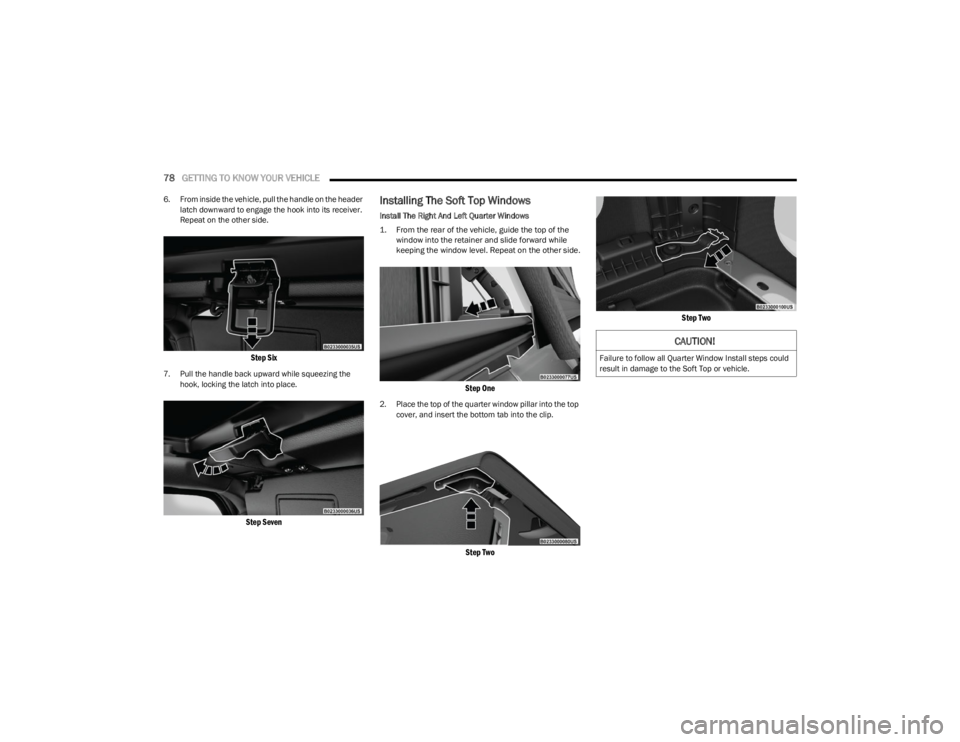
6. From inside the vehicle, pull the handle on the header
latch downward to engage the hook into its receiver.
Repeat on the other side.
Step Six
7. Pull the handle back upward while squeezing the hook, locking the latch into place.
Step Seven
Installing The Soft Top Windows
Install The Right And Left Quarter Windows
1. From the rear of the vehicle, guide the top of the window into the retainer and slide forward while
keeping the window level. Repeat on the other side.
Step One
2. Place the top of the quarter window pillar into the top cover, and insert the bottom tab into the clip.
Step Two Step Two
CAUTION!
Failure to follow all Quarter Window Install steps could
result in damage to the Soft Top or vehicle.
23_JL_OM_EN_USC_t.book Page 78
Page 82 of 396
80GETTING TO KNOW YOUR VEHICLE
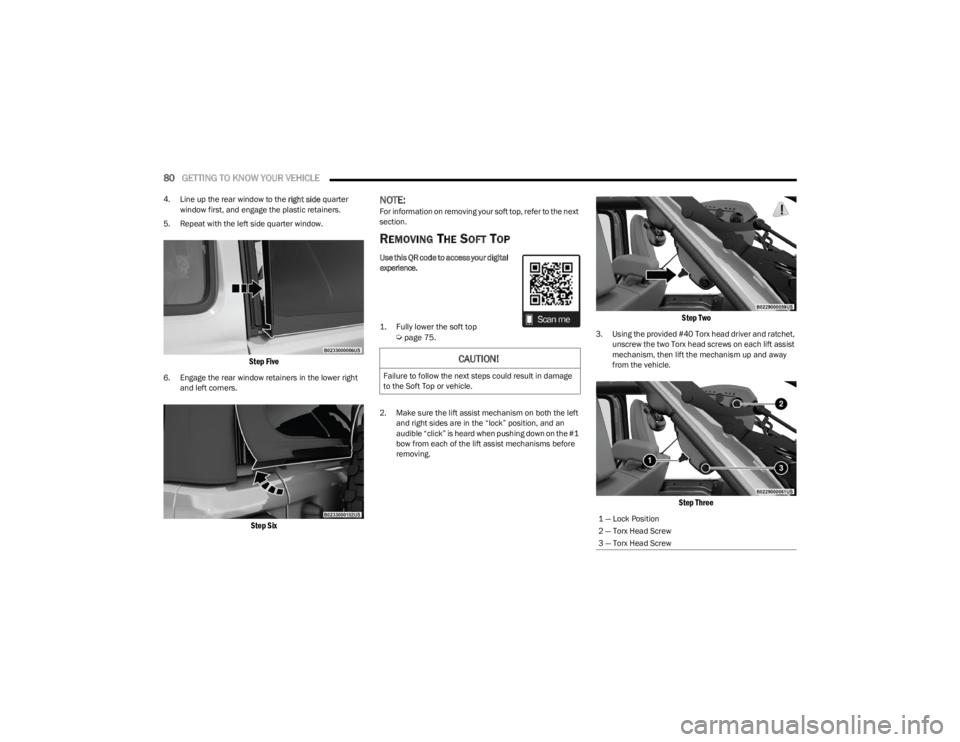
4. Line up the rear window to the right side quarter
window first, and engage the plastic retainers.
5. Repeat with the left side quarter window.
Step Five
6. Engage the rear window retainers in the lower right and left corners.
Step Six
NOTE:For information on removing your soft top, refer to the next
section.
REMOVING THE SOFT TOP Use this QR code to access your digital
experience.
1. Fully lower the soft top
Ú
page 75.
2. Make sure the lift assist mechanism on both the left and right sides are in the “lock” position, and an
audible “click” is heard when pushing down on the #1
bow from each of the lift assist mechanisms before
removing.
Step Two
3. Using the provided #40 Torx head driver and ratchet, unscrew the two Torx head screws on each lift assist
mechanism, then lift the mechanism up and away
from the vehicle.
Step Three
CAUTION!
Failure to follow the next steps could result in damage
to the Soft Top or vehicle.
1 — Lock Position
2 — Torx Head Screw
3 — Torx Head Screw
23_JL_OM_EN_USC_t.book Page 80