2023 JEEP WRANGLER fuel
[x] Cancel search: fuelPage 167 of 396
STARTING AND OPERATING165
NOTE:The system will stay active while in 4WD Low.
The TrailCam system has programmable settings that may
be selected through the Uconnect system
Úpage 184.
Manual Activation Of The TrailCam
TrailCam view can be activated via the below methods:
Press the FWD Camera button on the controls screen.
Press the Forward Facing Camera button on the apps
menu.
Press the TrailCam button on the Off Road Pages.
Press the Off Road+ button when “Auto Launch Off
Road+” (if equipped) has been selected under camera
settings.
The TrailCam view can also be activated by pressing the icon on the Back Up Camera view. The Back Up
Camera view can also be activated by pressing the
icon on the TrailCam view.
When the vehicle is shifted out of REVERSE with Camera
Delay turned off and TrailCam view is active, the TrailCam
mode is exited and the previous screen appears again.
When the vehicle is shifted out of REVERSE with Camera
Delay turned on and the TrailCam view is active, the
TrailCam image will be displayed for up to 10 seconds
unless the vehicle speed exceeds 8 mph (13 km/h), the
transmission is shifted into PARK, the ignition is placed in
the OFF position, or the touchscreen X button to disable
display of the TrailCam view is pressed.
Whenever the TrailCam image is activated through the
Manual Activation Methods, and the vehicle speed is
greater than or equal to 8 mph (13 km/h), a display timer for the image is initiated. The image will continue to be
displayed until the display timer exceeds 10 seconds.
NOTE:
If the vehicle speed remains below 8 mph (13 km/h)
while in 2WD or 4WD High, the TrailCam image will be
displayed continuously until deactivated via the touch -
screen X button, the transmission is shifted into PARK,
or the ignition is placed in the OFF position.
The touchscreen X button to disable the display of the
camera image is made available ONLY when the
vehicle is not in REVERSE.
The TrailCam view will stay active regardless of the
vehicle speed and time while in 4WD Low.
Cleaning The TrailCam
Press and hold the Clean Camera button located on the
TrailCam view to wash the TrailCam. Washer fluid will stop
when the button is released.
The camera can be washed up to 20 seconds at a time
while holding the button.
The Clean Camera system is not available when wind -
shield washing is in process.
When enabled, active dynamic tire lines are projected on
the ground plane of the TrailCam view based on the
steering wheel position.
REFUELING THE VEHICLE — GASOLINE
ENGINE (IF EQUIPPED)
FUEL FILLER CAP
The fuel filler cap is located on the driver's side of the
vehicle. If the fuel filler cap is lost or damaged, be sure the
replacement cap is the correct one for this vehicle.
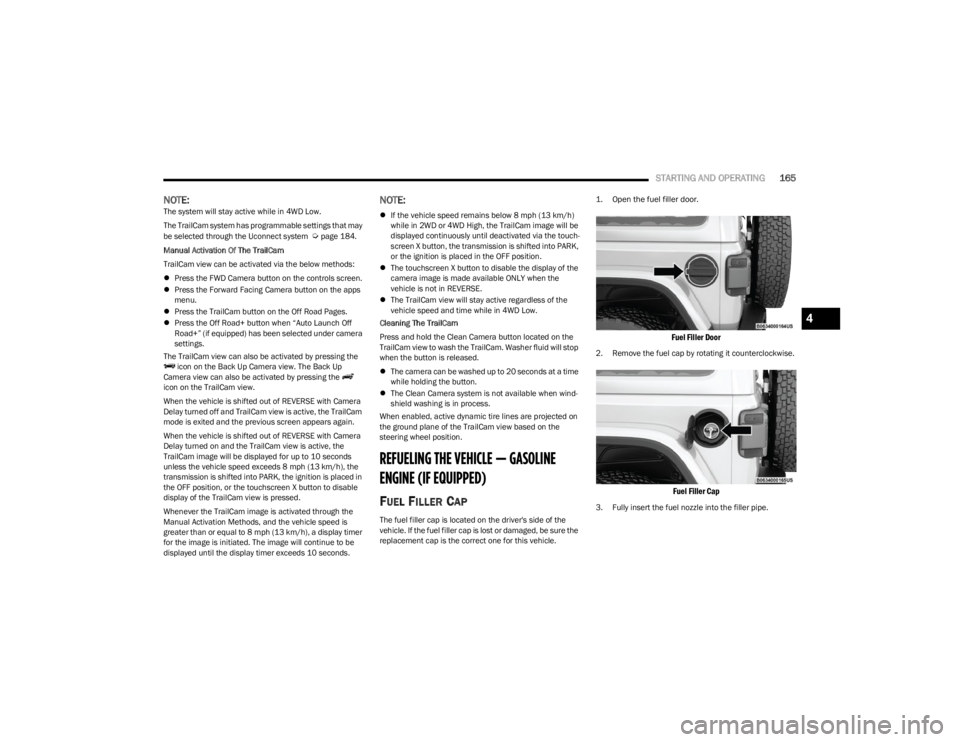
1. Open the fuel filler door.
Fuel Filler Door
2. Remove the fuel cap by rotating it counterclockwise.
Fuel Filler Cap
3. Fully insert the fuel nozzle into the filler pipe.
4
23_JL_OM_EN_USC_t.book Page 165
Page 168 of 396

166STARTING AND OPERATING
(Continued)
4. Fill the vehicle with fuel.
NOTE:
When the fuel nozzle “clicks” or shuts off, the fuel
tank is full.
Wait five seconds before removing the fuel nozzle
to allow excess fuel to drain from the nozzle.
5. Remove the fuel nozzle, reinstall fuel cap and close fuel filler door.
NOTE:
When the fuel nozzle “clicks” or shuts off, the fuel tank
is full.
Tighten the fuel filler cap about a quarter turn until you
hear one click. This is an indication that the cap is prop -
erly tightened.
If the fuel filler cap is not tightened properly, the MIL
will come on. Be sure the cap is tightened every time
the vehicle is refueled.
LOOSE FUEL FILLER CAP MESSAGE
After fuel has been added, the vehicle diagnostic system
can determine if the fuel filler cap is possibly loose,
improperly installed, or damaged. If the system detects a
malfunction, the “gASCAP” message will display in the
odometer display. Tighten the gas cap until a "clicking"
sound is heard. This is an indication that the gas cap is
properly tightened. Push the odometer reset button to turn
the message off. If the problem persists, the message will
appear the next time the vehicle is started. This might
indicate a damaged cap. If the problem is detected twice
in a row, the system will turn on the MIL. Resolving the
problem will turn the MIL off.
REFUELING THE VEHICLE — DIESEL ENGINE
(IF EQUIPPED)
The fuel filler cap is located on the driver's side of the
vehicle. If the fuel filler cap is lost or damaged, be sure the
replacement cap is the correct one for this vehicle.
1. Open the fuel filler door.
Fuel Filler Door
WARNING!
Never have any smoking materials lit in or near the
vehicle when the fuel door is open or the tank is being
filled.
Never add fuel when the engine is running. This is in
violation of most state and federal fire regulations and
may cause the Malfunction Indicator Light to turn on.
A fire may result if fuel is pumped into a portable
container that is inside of a vehicle. You could be
burned. Always place fuel containers on the ground
while filling.
CAUTION!
Damage to the fuel system or emission control
system could result from using an improper fuel filler
cap. A poorly fitting cap could let impurities into the
fuel system. Also, a poorly fitting aftermarket cap can
cause the Malfunction Indicator Light (MIL) to illumi -
nate, due to fuel vapors escaping from the system.
To avoid fuel spillage and overfilling, do not “top off”
the fuel tank after filling.
CAUTION!
23_JL_OM_EN_USC_t.book Page 166
Page 169 of 396

STARTING AND OPERATING167
2. Remove the fuel cap by rotating it counterclockwise.
Fuel and Diesel Exhaust Fluid (DEF) Fill Location
3. Fully insert the fuel nozzle into the filler pipe.
4. Fill the vehicle with fuel.
NOTE:
When the fuel nozzle “clicks” or shuts off, the fuel
tank is full.
Wait five seconds before removing the fuel nozzle
to allow excess fuel to drain from the nozzle.
5. Remove the fuel nozzle, reinstall fuel cap and close fuel filler door.
NOTE:Tighten the fuel filler cap about a quarter turn until you
hear one click. This is an indication that the cap is properly
tightened.
AVOID USING CONTAMINATED FUEL
Fuel that is contaminated by water or dirt can cause
severe damage to the engine fuel system. Proper
maintenance of the engine fuel filter and fuel tank is
essential see
Úpage 321.
BULK FUEL STORAGE — DIESEL FUEL
If you store quantities of fuel, good maintenance of the
stored fuel is also essential. Fuel contaminated with water
will promote the growth of “microbes.” These microbes
form “slime” that will clog the fuel filtration system and
lines. Drain condensation from the supply tank and
change the line filter on a regular basis.
NOTE:When a diesel engine is allowed to run out of fuel, air is
pulled into the fuel system.
If the vehicle will not start see
Úpage 323.
DIESEL EXHAUST FLUID
Your vehicle is equipped with a Selective Catalytic
Reduction (SCR) system to meet the very stringent diesel
emissions standards required by the Environmental
Protection Agency.
The purpose of the SCR system is to reduce levels of NOx
(oxides of nitrogen emitted from engines) that are harmful
to our health and the environment to a near-zero level. A
small quantity of Diesel Exhaust Fluid (DEF) is injected into
the exhaust upstream of a catalyst where, when
vaporized, it converts smog-forming nitrogen oxides (NOx)
into harmless nitrogen (N2) and water vapor (H2O), two
natural components of the air we breathe. You can
operate with the comfort that your vehicle is contributing
to a cleaner, healthier world environment for this and
generations to come.
1 — Diesel Fuel Filler
2 — DEF Filler
CAUTION!
For diesel engines, only use diesel fuel for motor
vehicles in accordance with ASTM D-975 Grade S15
specifications. The use of other products or mixtures
may damage the engine beyond repair and
consequently void the warranty, due to the damage
caused. If you accidentally introduce other types of fuel
into the tank, do not start the engine. Empty the tank. If
the engine has been run for even an extremely limited
amount of time, you must not only drain the fuel tank,
but the rest of the supply circuit as well.
WARNING!
Do not open the high pressure fuel system with the
engine running. Engine operation causes high fuel
pressure. High pressure fuel spray can cause serious
injury or death.
4
23_JL_OM_EN_USC_t.book Page 167
Page 170 of 396

168STARTING AND OPERATING
System Overview
This vehicle is equipped with a Diesel Exhaust Fluid (DEF)
injection system and a Selective Catalytic Reduction (SCR)
catalyst to meet the emission requirements.
The DEF injection system consists of the following
components:
DEF tank
DEF pump
DEF injector
Electronically-heated DEF Lines
NOx sensors
Temperature sensors
SCR catalyst
The DEF injection system and SCR catalyst enable the
achievement of diesel emission requirements; while
maintaining outstanding fuel economy, drivability, torque
and power ratings.
For system messages and warnings see
Úpage 108.
NOTE:
Your vehicle is equipped with a DEF injection system.
You may occasionally hear an audible clicking noise
from under the vehicle at a stop. This is normal opera -
tion.
The DEF pump will run for a period of time after engine
shutdown to purge the DEF system. This is normal
operation and may be audible from the rear of the
vehicle.
Diesel Exhaust Fluid Storage
Diesel Exhaust Fluid (DEF) is considered a very stable
product with a long shelf life. If DEF is kept in
temperatures between 10° and 90°F (-12° and 32°C), it
will last a minimum of one year.
DEF is subject to freezing at the lowest temperatures. For
example, DEF may freeze at temperatures at or below
12°F (-11°C). The system has been designed to operate
in this environment.
NOTE:When working with DEF, it is important to know that:
Any containers or parts that come into contact with DEF
must be DEF compatible (plastic or stainless steel).
Copper, brass, aluminum, iron or non-stainless steel
should be avoided as they are subject to corrosion by
DEF.
If DEF is spilled, it should be wiped up completely.
Adding Diesel Exhaust Fluid
The DEF gauge (located on the instrument cluster display)
will display the level of DEF remaining in the tank
Úpage 108.
NOTE:Driving conditions (altitude, vehicle speed, load, etc.) will
affect the amount of DEF that is used in your vehicle.
DEF FILL PROCEDURE
NOTE:
For the correct DEF fluid type see Úpage 374.
1. Remove cap from DEF fill inlet (located in fuel door).
Fuel and Diesel Exhaust Fluid Fill Location
2. Insert DEF fill adapter/nozzle into DEF fill inlet.
NOTE:
The DEF gauge may take up to five seconds to
update after adding a gallon or more of Diesel
Exhaust Fluid (DEF) to the DEF tank. If you have a
fault related to the DEF system, the gauge may not
update to the new level. See an authorized dealer
for service.
The DEF gauge may also not immediately update
after a refill if the temperature of the DEF fluid is
below 12°F (-11°C). The DEF tank heater will
1 — Diesel Fuel Filler
2 — Diesel Exhaust Fluid Filler
23_JL_OM_EN_USC_t.book Page 168
Page 171 of 396

STARTING AND OPERATING169
possibly warm up the DEF fluid and allow the
gauge to update after a period of run time. Under
very cold conditions, it is possible that the gauge
may not reflect the new fill level for several drives.
Excessive overfilling of the DEF tank can result in
a MIL lamp/fault code and inaccurate level read -
ings.
Refilling With Nozzles
You can fill up at any DEF distributor.
Proceed as follows:
Insert the DEF nozzle in the filler, start refilling and
stop refilling at the first shut-off (the shut-off indi -
cates that the DEF tank is full). Do not proceed
with the refilling, to prevent spillage of DEF.
Extract the nozzle.
Refilling With Containers
Proceed as follows:
Check the expiration date.
Read the advice for use on the label before
pouring the content of the bottle into the DEF tank.
If systems which cannot be screwed in (e.g. tanks)
are used for refilling, after the indication appears
on the instrument panel display
Úpage 104 fill
the DEF tank with no more than 2 gal (8 L).
If containers which can be screwed to the filler are
used, the reservoir is full when the DEF level in the
container stops pouring out. Do not proceed
further. 3. Stop filling the DEF tank immediately when any of the
following happen: DEF stops flowing from the fill
bottle into the DEF fill inlet, DEF splashes out the fill
inlet, or a DEF pump nozzle automatically shuts off.
4. Reinstall cap onto DEF fill inlet.
VEHICLE LOADING
CERTIFICATION LABEL
As required by National Highway Traffic Safety
Administration regulations, your vehicle has a certification
label affixed to the driver's side door or pillar.
This label contains the month and year of manufacture,
Gross Vehicle Weight Rating (GVWR), Gross Axle Weight
Rating (GAWR) front and rear, and Vehicle Identification
Number (VIN). A Month-Day-Hour (MDH) number is
included on this label and indicates the Month, Day and
Hour of manufacture. The bar code that appears on the
bottom of the label is your VIN.
Gross Vehicle Weight Rating (GVWR)
The GVWR is the total permissible weight of your vehicle
including driver, passengers, vehicle, options and cargo.
The label also specifies maximum capacities of front and
rear axle systems (GAWR). Total load must be limited so
GVWR and front and rear GAWR are not exceeded.
CAUTION!
To avoid DEF spillage, and possible damage to the
DEF tank from overfilling, do not “top off” the DEF
tank after filling.
DO NOT OVERFILL. DEF will freeze below 12ºF
(-11ºC). The DEF system is designed to work in
temperatures below the DEF freezing point, however,
if the tank is overfilled and freezes, the system could
be damaged.
When DEF is spilled, clean the area immediately with
water and use an absorbent material to soak up the
spills on the ground.
Do not attempt to start your engine if DEF is acciden -
tally added to the diesel fuel tank as it can result in
severe damage to your engine, including but not
limited to failure of the fuel pump and injectors.
Never add anything other than DEF to the tank –
especially any form of hydrocarbon such as diesel
fuel, fuel system additives, gasoline, or any other
petroleum-based product. Even a very small amount
of these, less than 100 parts per million or less than
1 oz. per 78 gal (295 L) will contaminate the entire
DEF system and will require replacement. If owners
use a container, funnel or nozzle when refilling the
tank, it should either be new or one that has only
been used for adding DEF. Mopar® provides an
attachable nozzle with its DEF for this purpose.
4
23_JL_OM_EN_USC_t.book Page 169
Page 172 of 396

170STARTING AND OPERATING
Payload
The payload of a vehicle is defined as the allowable load
weight a truck can carry, including the weight of the driver,
all passengers, options and cargo.
Gross Axle Weight Rating (GAWR)
The GAWR is the maximum permissible load on the front
and rear axles. The load must be distributed in the cargo
area so that the GAWR of each axle is not exceeded.
Each axle GAWR is determined by the components in the
system with the lowest load carrying capacity (axle,
springs, tires or wheels). Heavier axles or suspension
components sometimes specified by purchasers for
increased durability do not necessarily increase the
vehicle's GVWR.
Tire Size
The tire size on the Vehicle Certification Label represents
the actual tire size on your vehicle. Replacement tires
must be equal to the load capacity of this tire size.
Rim Size
This is the rim size that is appropriate for the tire size
listed.
Inflation Pressure
This is the cold tire inflation pressure for your vehicle for
all loading conditions up to full GAWR.
Curb Weight
The curb weight of a vehicle is defined as the total weight
of the vehicle with all fluids, including vehicle fuel, at full
capacity conditions, and with no occupants or cargo
loaded into the vehicle. The front and rear curb weight values are determined by weighing your vehicle on a
commercial scale before any occupants or cargo are
added.
Loading
The actual total weight and the weight of the front and rear
of your vehicle at the ground can best be determined by
weighing it when it is loaded and ready for operation.
The entire vehicle should first be weighed on a commercial
scale to ensure that the GVWR has not been exceeded.
The weight on the front and rear of the vehicle should then
be determined separately to be sure that the load is
properly distributed over the front and rear axle. Weighing
the vehicle may show that the GAWR of either the front or
rear axles has been exceeded but the total load is within
the specified GVWR. If so, weight must be shifted from
front to rear or rear to front as appropriate until the
specified weight limitations are met. Store the heavier
items down low and be sure that the weight is distributed
equally. Stow all loose items securely before driving.
Improper weight distributions can have an adverse effect
on the way your vehicle steers and handles and the way
the brakes operate.
TRAILER TOWING
In this section you will find safety tips and information on
limits to the type of towing you can reasonably do with your
vehicle. Before towing a trailer, carefully review this
information to tow your load as efficiently and safely as
possible.
To maintain the New Vehicle Limited Warranty coverage,
follow the requirements and recommendations in this
manual concerning vehicles used for trailer towing.
COMMON TOWING DEFINITIONS
The following trailer towing related definitions will assist
you in understanding the following information:
Gross Vehicle Weight Rating (GVWR)
The GVWR is the total allowable weight of your vehicle.
This includes driver, passengers, cargo and tongue
weight. The total load must be limited so that you do not
exceed the GVWR
Úpage 169.
Gross Trailer Weight (GTW)
The GTW is the weight of the trailer plus the weight of all
cargo, consumables and equipment (permanent or
temporary) loaded in or on the trailer in its "loaded and
ready for operation" condition.
The recommended way to measure GTW is to put your fully
loaded trailer on a vehicle scale. The entire weight of the
trailer must be supported by the scale.
WARNING!
Do not load your vehicle any heavier than the GVWR or
the maximum front and rear GAWR. If you do, parts on
your vehicle can break, or it can change the way your
vehicle handles. This could cause you to lose control.
Overloading can shorten the life of your vehicle.
23_JL_OM_EN_USC_t.book Page 170
Page 177 of 396

STARTING AND OPERATING175
Seven-Pin Connector
TOWING TIPS
Before setting out on a trip, practice turning, stopping and
backing the trailer in an area away from heavy traffic.
If using a manual transmission vehicle for trailer towing,
all starts must be in FIRST gear to avoid excessive clutch
slippage.
Automatic Transmission — If Equipped
Select the DRIVE range when towing. The transmission
controls include a drive strategy to avoid frequent shifting
when towing. However, if frequent shifting does occur
while in DRIVE, you can use the AutoStick shift control to
manually select a lower gear.
NOTE:Using a lower gear while operating the vehicle under heavy
loading conditions, will improve performance and extend
transmission life by reducing excessive shifting and heat
buildup. This action will also provide better engine
braking.
AutoStick — If Equipped
When using the AutoStick shift control, select the
highest gear that allows for adequate performance and
avoids frequent downshifts. For example, choose “5” if
the desired speed can be maintained. Choose “4” or
“3” if needed to maintain the desired speed.
To prevent excess heat generation, avoid continuous
driving at high RPM. Return to a higher gear or vehicle
speed when grade and road conditions allow.
Cruise Control — If Equipped
Do not use in hilly terrain or with heavy loads.
When using the Cruise Control, if you experience speed
drops greater than 10 mph (16 km/h), disengage until
you can get back to cruising speed.
Use Cruise Control in flat terrain and with light loads to
maximize fuel efficiency.
1 — Backup Lamps
2 — Running Lamps
3 — Left Stop/Turn
4 — Ground
5 — Battery
6 — Right Stop/Turn
7 — Electric Brakes4
23_JL_OM_EN_USC_t.book Page 175
Page 185 of 396

STARTING AND OPERATING183
CROSSING DITCHES, STREAMS, SHALLOW
RIVERS OR OTHER FLOWING WATER
Flowing water can be extremely dangerous. Never attempt
to cross a fast running stream or river even in shallow
water. Fast moving water can easily push your vehicle
downstream, sweeping it out of control. Even in very
shallow water, a high current can still wash the dirt out
from around your tires putting you and your vehicle in
jeopardy. There is still a high risk of personal injury and
vehicle damage with slower water currents in depths
greater than the vehicle's running ground clearance. You
should never attempt to cross flowing water which is
deeper than the vehicle's running ground clearance. Even
the slowest current can push the heaviest vehicle
downstream and out of control if the water is deep enough
to push on the large surface area of the vehicle's body.
Before you proceed, determine the speed of the current,
the water's depth, approach angle, bottom condition and
if there are any obstacles. Then cross at an angle heading
slightly upstream using the low and slow technique.
After Driving Off-Road
Off-road operation puts more stress on your vehicle than
does most on-road driving. After going off-road, it is always
a good idea to check for damage. That way you can get any
problems taken care of right away and have your vehicle
ready when you need it.
Completely inspect the underbody of your vehicle.
Check tires, body structure, steering, suspension, and
exhaust system for damage.
Inspect the radiator for mud and debris and clean as
required.
Check threaded fasteners for looseness, particularly
on the chassis, drivetrain components, steering, and
suspension. Retighten them, if required, and torque to
the values specified in the Service Manual.
Check for accumulations of plants or brush. These
things could be a fire hazard. They might hide damage
to fuel lines, brake hoses, axle pinion seals, and
propeller shafts.
After extended operation in mud, sand, water, or
similar dirty conditions, have the radiator, fan, brake
rotors, wheels, brake linings, and axle yokes inspected
and cleaned as soon as possible.
NOTE:Inspect the clutch vent holes in the manual transmission
bell housing for mud and debris and clean as required.
If you experience unusual vibration after driving in
mud, slush or similar conditions, check the wheels for
impacted material. Impacted material can cause a
wheel imbalance and freeing the wheels of it will
correct the situation.
WARNING!
Never drive through fast moving deep water. It can push
your vehicle downstream, sweeping it out of control.
This could put you and your passengers at risk of injury
or drowning.
WARNING!
Abrasive material in any part of the brakes may cause
excessive wear or unpredictable braking. You might not
have full braking power when you need it to prevent a
collision. If you have been operating your vehicle in dirty
conditions, get your brakes checked and cleaned as
necessary.
4
23_JL_OM_EN_USC_t.book Page 183