2023 JEEP WRANGLER warning lights
[x] Cancel search: warning lightsPage 121 of 396

GETTING TO KNOW YOUR INSTRUMENT PANEL119
Swing Gate Open Warning Light
This warning light will illuminate when the
swing gate is open.
NOTE:If the vehicle is moving, there will also be a single chime.
Transmission Temperature Warning Light —
If Equipped
This warning light will illuminate to warn of a
high transmission fluid temperature. This may
occur with strenuous usage such as trailer
towing. If this light turns on, stop the vehicle
and run the engine at idle or slightly faster, with the
transmission in PARK (P) or NEUTRAL (N), until the light
turns off. Once the light turns off, you may continue to
drive normally.
Vehicle Security Warning Light —
If Equipped
This light will flash at a fast rate for
approximately 15 seconds when the Vehicle
Security system is arming, and then will flash
slowly until the vehicle is disarmed.
YELLOW WARNING LIGHTS
Anti-Lock Brake System (ABS) Warning
Light
This warning light monitors the ABS. The light
will turn on when the ignition is placed in the
ON/RUN or ACC/ON/RUN position and may
stay on for as long as four seconds.
If the ABS light remains on or turns on while driving, then
the Anti-Lock portion of the brake system is not
functioning and service is required as soon as possible.
However, the conventional brake system will continue to
operate normally, assuming the Brake Warning Light is not
also on. If the ABS light does not turn on when the ignition is placed
in the ON/RUN or ACC/ON/RUN position, have the brake
system inspected by an authorized dealer.
Electronic Stability Control (ESC) Active
Warning Light — If Equipped
This warning light will indicate when the
Electronic Stability Control system is Active.
The ESC Indicator Light in the instrument
cluster will come on when the ignition is placed
in the ON/RUN or ACC/ON/RUN position, and when ESC is
activated. It should go out with the engine running. If the
ESC Indicator Light comes on continuously with the engine
running, a malfunction has been detected in the ESC
system. If this warning light remains on after several
ignition cycles, and the vehicle has been driven several
miles (kilometers) at speeds greater than 30 mph
(48 km/h), see an authorized dealer as soon as possible
to have the problem diagnosed and corrected.
The ESC OFF Indicator Light and the ESC Indicator Light
come on momentarily each time the ignition is placed
in the ON/RUN or ACC/ON/RUN position.
The ESC system will make buzzing or clicking sounds
when it is active. This is normal; the sounds will stop
when ESC becomes inactive.
This light will come on when the vehicle is in an ESC
event.
WARNING!
If you continue operating the vehicle when the
Transmission Temperature Warning Light is illuminated
you could cause the fluid to boil over, come in contact
with hot engine or exhaust components and cause a
fire. If you continue to operate the vehicle when the
“CLUTCH HOT” message is displayed, or the
Transmission Temperature Warning Light is illuminated,
you could cause the clutch to overheat and cause a fire.
CAUTION!
Continuous driving with the Transmission Temperature
Warning Light illuminated will eventually cause severe
transmission damage or transmission failure. If you
continue to operate the vehicle when the “CLUTCH
HOT” message is displayed, or the Transmission
Temperate Warning Light is illuminated, you could
cause the clutch to overheat and cause severe clutch
damage, transmission damage, or failure.
3
23_JL_OM_EN_USC_t.book Page 119
Page 124 of 396
122GETTING TO KNOW YOUR INSTRUMENT PANEL
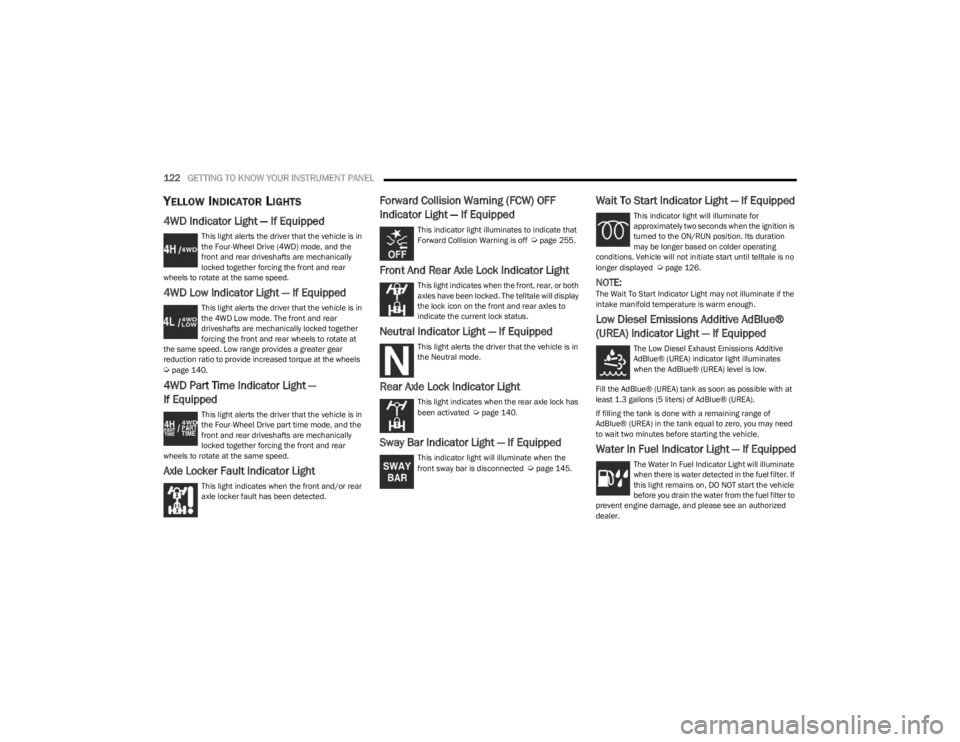
YELLOW INDICATOR LIGHTS
4WD Indicator Light — If Equipped
This light alerts the driver that the vehicle is in
the Four-Wheel Drive (4WD) mode, and the
front and rear driveshafts are mechanically
locked together forcing the front and rear
wheels to rotate at the same speed.
4WD Low Indicator Light — If Equipped
This light alerts the driver that the vehicle is in
the 4WD Low mode. The front and rear
driveshafts are mechanically locked together
forcing the front and rear wheels to rotate at
the same speed. Low range provides a greater gear
reduction ratio to provide increased torque at the wheels
Úpage 140.
4WD Part Time Indicator Light —
If Equipped
This light alerts the driver that the vehicle is in
the Four-Wheel Drive part time mode, and the
front and rear driveshafts are mechanically
locked together forcing the front and rear
wheels to rotate at the same speed.
Axle Locker Fault Indicator Light
This light indicates when the front and/or rear
axle locker fault has been detected.
Forward Collision Warning (FCW) OFF
Indicator Light — If Equipped
This indicator light illuminates to indicate that
Forward Collision Warning is off Úpage 255.
Front And Rear Axle Lock Indicator Light
This light indicates when the front, rear, or both
axles have been locked. The telltale will display
the lock icon on the front and rear axles to
indicate the current lock status.
Neutral Indicator Light — If Equipped
This light alerts the driver that the vehicle is in
the Neutral mode.
Rear Axle Lock Indicator Light
This light indicates when the rear axle lock has
been activated Úpage 140.
Sway Bar Indicator Light — If Equipped
This indicator light will illuminate when the
front sway bar is disconnected Úpage 145.
Wait To Start Indicator Light — If Equipped
This indicator light will illuminate for
approximately two seconds when the ignition is
turned to the ON/RUN position. Its duration
may be longer based on colder operating
conditions. Vehicle will not initiate start until telltale is no
longer displayed
Úpage 126.
NOTE:The Wait To Start Indicator Light may not illuminate if the
intake manifold temperature is warm enough.
Low Diesel Emissions Additive AdBlue®
(UREA) Indicator Light — If Equipped
The Low Diesel Exhaust Emissions Additive
AdBlue® (UREA) indicator light illuminates
when the AdBlue® (UREA) level is low.
Fill the AdBlue® (UREA) tank as soon as possible with at
least 1.3 gallons (5 liters) of AdBlue® (UREA).
If filling the tank is done with a remaining range of
AdBlue® (UREA) in the tank equal to zero, you may need
to wait two minutes before starting the vehicle.
Water In Fuel Indicator Light — If Equipped
The Water In Fuel Indicator Light will illuminate
when there is water detected in the fuel filter. If
this light remains on, DO NOT start the vehicle
before you drain the water from the fuel filter to
prevent engine damage, and please see an authorized
dealer.
23_JL_OM_EN_USC_t.book Page 122
Page 132 of 396

130STARTING AND OPERATING
NORMAL STARTING
Observe the instrument cluster lights when starting the
engine.
NOTE:Normal starting of either a cold or a warm engine is
obtained without pumping or pressing the accelerator
pedal.
1. Always apply the parking brake.
2. Press and hold the brake pedal while pushing the
ENGINE START/STOP button once.
NOTE:A delay of the start of up to five seconds is possible under
very cold conditions. The Wait to Start telltale will be illumi -
nated during the preheat process. When the engine Wait
To Start telltale goes off the engine will automatically
crank.
3. The system will automatically engage the starter to crank the engine. If the vehicle fails to start, the
starter will disengage automatically after 25 seconds.
4. If you wish to stop the cranking of the engine prior to the engine starting, push the ENGINE START/STOP
button again. 5. Check that the Oil Pressure Warning Light has turned
off.
6. Release the parking brake.
STARTING FLUIDS
The engine is equipped with a glow plug preheating
system. If the instructions in this manual are followed, the
engine should start in all conditions and no type of starting
fluid should be used.
NORMAL OPERATION — DIESEL ENGINE
Observe the following when the diesel engine is operating:
All message center lights are off.
Malfunction Indicator Light (MIL) is off.
Engine Oil Pressure telltale is not illuminated.
Voltmeter operation.
The voltmeter may show a gauge fluctuation at various
engine temperatures. This is caused by the glow plug
heating system. The number of cycles and the length of
the cycling operation is controlled by the engine control
module. Glow plug heater operation can run for several
minutes. Once the heater operation is complete, the
voltmeter needle will stabilize.
CAUTION!
If the Water in Fuel Indicator Light remains on, DO NOT
START the engine before you drain the water from the
fuel filters to avoid engine damage
Úpage 321.
WARNING!
Do not leave children or animals inside parked vehi -
cles in hot weather. Interior heat buildup may cause
serious injury or death.
When leaving the vehicle, always make sure the
keyless ignition node is in the OFF position, remove
the key fob from the vehicle and lock the vehicle.
Never leave children alone in a vehicle, or with
access to an unlocked vehicle. Allowing children to
be in a vehicle unattended is dangerous for a
number of reasons. A child or others could be seri -
ously or fatally injured. Children should be warned
not to touch the parking brake, brake pedal or the
gear selector.
Do not leave the key fob in or near the vehicle, or in
a location accessible to children, and do not leave
the ignition of a vehicle equipped with Keyless
Enter ‘n Go™ in the ACC or ON/RUN position. A child
could operate power windows, other controls, or
move the vehicle.
23_JL_OM_EN_USC_t.book Page 130
Page 146 of 396

144STARTING AND OPERATING
4H PART TIME/4H AUTO TO 4L OR 4L TO 4H
PART TIME/4H AUTO
With the vehicle rolling at 1 to 3 mph (2 to 5 km/h), shift
an automatic transmission into NEUTRAL (N), or press the
clutch pedal on a manual transmission. While the vehicle
is coasting at 1 to 3 mph (2 to 5 km/h), shift the transfer case lever firmly to the desired position. Do not pause with
the transfer case in N (Neutral). Once the shift is
completed, place the automatic transmission into DRIVE
or release the clutch pedal on a manual transmission.
NOTE:Shifting into or out of 4L is possible with the vehicle
completely stopped; however, difficulty may occur due to
the mating teeth not being properly aligned. Several
attempts may be required for clutch teeth alignment and
shift completion to occur. The preferred method is with the
vehicle rolling at 1 to 3 mph (2 to 5 km/h). Avoid attempting to engage or disengage 4L with the vehicle
moving faster than 1 to 3 mph (2 to 5 km/h).
TRAC-LOK REAR AXLE — IF EQUIPPED
The Trac-Lok rear axle provides a constant driving force to
both rear wheels and reduces wheel spin caused by the
loss of traction at one driving wheel. If traction differs
between the two rear wheels, the differential automatically proportions the usable torque by providing
more torque to the wheel that has traction.
Trac-Lok is especially helpful during slippery driving
conditions. With both rear wheels on a slippery surface, a
slight application of the accelerator will supply maximum
traction.
AXLE LOCK (TRU-LOK) FRONT AND
R
EAR — IF EQUIPPED
The AXLE LOCK switch is located on the instrument panel
(to the right of the steering column).
Axle Lock Switch Panel
This feature will only activate when the following
conditions are met:
Ignition in RUN position, vehicle in 4L.
Vehicle speed should be 10 mph (16 km/h) or less.
Both right and left wheels on axle are at the same
speed.
To activate the system, push the AXLE LOCK switch down
to lock the rear axle only (the “REAR ONLY” will illuminate),
push the switch up to lock the front axle and rear axle (the
“FRONT + REAR” will illuminate). When the rear axle is
locked, pushing the bottom of switch again will lock or
unlock the front axle.
NOTE:The indicator lights will flash until the axles are fully locked
or unlocked.
To unlock the axles, push the AXLE LOCK OFF button.
Axle Lock will disengage if the vehicle is taken out of 4L, or
the ignition switch is turned to the OFF position.
The Axle Lock disengages at speeds above 30 mph
(48 km/h), and will automatically re-lock once vehicle
speed is less than 10 mph (16 km/h).
AXLE LOCK (TRU-LOK) REAR ONLY —
I
F EQUIPPED
The rear axle may be locked in 4H if the proper conditions
are met.
WARNING!
Failure to engage a transfer case position completely
can cause transfer case damage or loss of power and
vehicle control. You could have a collision. Do not drive
the vehicle unless the transfer case is fully engaged.
WARNING!
On vehicles equipped with a limited-slip differential,
never run the engine with one rear wheel off the
ground. The vehicle may drive through the rear wheel
remaining on the ground and cause you to lose control
of your vehicle.
WARNING!
This mode is intended for off-highway or off-road use
only and should not be used on any public roadways.
23_JL_OM_EN_USC_t.book Page 144
Page 147 of 396

STARTING AND OPERATING145
The AXLE LOCK switch is located on the instrument panel
(to the right of the steering column).
Axle Lock Switch Panel
This feature will only activate when the following
conditions are met:
Ignition in RUN position, vehicle in 4H.
The vehicle must be in Off Road+ active
Úpage 146.
Vehicle must be in ESC “Full Off” mode Úpage 246.
Vehicle must not be actively in a high wheel slip or tight
cornering condition.
To activate the system, push the AXLE LOCK switch down
to lock the rear axle only (“REAR ONLY” will illuminate).
To unlock the rear axle, push the AXLE LOCK OFF button.
Axle Lock will disengage if the vehicle is taken out of 4H,
Off Road+ is turned off by the driver, ESC “Full Off” is
exited, or the ignition switch is turned to the OFF position.
NOTE:The indicator lights will flash until the rear axle is fully
locked or unlocked. The rear Axle Lock system may temporarily disengage the
rear locker under some conditions.
If this occurs, the rear axle will automatically re-lock as
soon as the system allows.
ELECTRONIC SWAY BAR DISCONNECT —
I
F EQUIPPED
Your vehicle may be equipped with an electronic
disconnecting stabilizer/sway bar. This system allows
greater front suspension travel in off-road situations.
This system is controlled by the SWAY BAR switch located
on the instrument panel (to the right of the steering
column).
SWAY BAR Switch
Push the SWAY BAR switch to activate the system. Push
the switch again to deactivate the system. The Sway Bar
Indicator Light (located in the instrument cluster) will
illuminate when the bar is disconnected. The Sway Bar
Indicator Light will flash during activation transition, or when activation conditions are not met. The stabilizer/
sway bar should remain in on-road mode during normal
driving conditions.
To disconnect the stabilizer/sway bar, shift to either 4H or
4L and push the SWAY BAR switch to obtain the off-road
position
Úpage 140. The Sway Bar Indicator Light will
flash until the stabilizer/sway bar has been fully
disconnected.
NOTE:The stabilizer/sway bar may be torque locked due to left
and right suspension height differences. This condition is
due to driving surface differences or vehicle loading. In
order for the stabilizer/sway bar to disconnect/reconnect,
the right and left halves of the bar must be aligned. This
alignment may require that the vehicle be driven onto level
ground or rocked from side to side.
WARNING!
Ensure the stabilizer/sway bar is reconnected before
driving on hard surfaced roads or at speeds above
18 mph (29 km/h); a disconnected stabilizer/sway bar may contribute to the loss of vehicle control, which
could result in serious injury. Under certain
circumstances, the front stabilizer/sway bar enhances
vehicle stability and assists with vehicle control. The
system monitors vehicle speed and will attempt to
reconnect the stabilizer/sway bar at speeds over
18 mph (29 km/h). This is indicated by a flashing or solid Sway Bar Indicator Light. Once vehicle speed is
reduced below 14 mph (22 km/h), the system will once
again attempt to return to off-road mode.
4
23_JL_OM_EN_USC_t.book Page 145
Page 158 of 396

156STARTING AND OPERATING
U.S. Speed (mph)
Pushing the SET (+), or SET (-) button once will result in
a 1 mph speed adjustment. Each subsequent tap of
the button results in an adjustment of 1 mph.
If the button is continually pushed, the set speed will
continue to adjust in 5 mph increments until the button
is released. The new set speed is reflected in the instru -
ment cluster display.
Metric Speed (km/h)
Pushing the SET (+), or SET (-) button once will result in
a 1 km/h speed adjustment. Each subsequent tap of
the button results in an adjustment of 1 km/h.
If the button is continually pushed, the set speed will
continue to adjust in 10 km/h increments until the
button is released. The new set speed is reflected in
the instrument cluster display.
NOTE:When you override and push the SET (+) button or SET (-)
buttons, the new set speed will be the current speed of the
vehicle.
When ACC Is Active
When you use the SET (-) button to decelerate, if the
engine’s braking power does not slow the vehicle suffi -
ciently to reach the set speed, the brake system will
automatically slow the vehicle.
The ACC system applies the brake down to a full stop
when following the vehicle in front. If your vehicle
follows the vehicle in front to a standstill, your vehicle
will release the brakes two seconds after coming to a
full stop.
The ACC system maintains set speed when driving
uphill and downhill. However, a slight speed change on moderate hills is normal. In addition, downshifting may
occur while climbing uphill or descending downhill. This
is normal operation and necessary to maintain set
speed. When driving uphill and downhill, the ACC
system will cancel if the braking temperature exceeds
normal range (overheated).
Setting The Following Distance In ACC
The specified following distance for ACC can be set by
varying the distance setting between four bars (longest),
three bars (long), two bars (medium) and one bar (short).
Using this distance setting and the vehicle speed, ACC
calculates and sets the distance to the vehicle ahead. This
distance setting displays in the instrument cluster display.
Distance Settings
To increase the distance setting, push the Distance
Setting Increase button and release. Each time the button
is pushed, the distance setting increases by one bar
(longer).
To decrease the distance setting, push the Distance
Setting Decrease button and release. Each time the
button is pushed, the distance setting decreases by one
bar (shorter).
If there is no vehicle ahead, the vehicle will maintain the
set speed. If a slower moving vehicle is detected in the
same lane, the instrument cluster displays the ACC Set
With Target Light. The system will then adjust vehicle
speed automatically to maintain the distance setting,
regardless of the set speed.
The vehicle will then maintain the set distance until:
The vehicle ahead accelerates to a speed above the
set speed
The vehicle ahead moves out of your lane or view of the
sensor
The distance setting is changed
The system disengages
Úpage 154
The maximum braking applied by ACC is limited; however,
the driver can always apply the brakes manually, if
necessary.
NOTE:The brake lights will illuminate whenever the ACC system
applies the brakes.
A Proximity Warning will alert the driver if ACC predicts that
its maximum braking level is not sufficient to maintain the
set distance. If this occurs, a visual alert “BRAKE!” will
1 — Longest Distance Setting (Four Bars)
2 — Medium Distance Setting (Two Bars)
3 — Long Distance Setting (Three Bars)
4 — Short Distance Setting (One Bar)
23_JL_OM_EN_USC_t.book Page 156
Page 176 of 396

174STARTING AND OPERATING
(Continued)
Towing Requirements — Tires
Proper tire inflation pressures are essential to the safe
and satisfactory operation of your vehicle.
Check the trailer tires for proper tire inflation pressures
before trailer usage.
Check for signs of tire wear or visible tire damage
before towing a trailer.
Replacing tires with a higher load carrying capacity will
not increase the vehicle's GVWR and GAWR limits.
For further information
Úpage 345.
Towing Requirements — Trailer Brakes
Do not interconnect the hydraulic brake system or
vacuum system of your vehicle with that of the trailer.
This could cause inadequate braking and possible
personal injury.
An electronically actuated trailer brake controller is
required when towing a trailer with electronically actu -
ated brakes. When towing a trailer equipped with a
hydraulic surge actuated brake system, an electronic
brake controller is not required.
Trailer brakes are recommended for trailers over 1,000
lb (453 kg) and required for trailers in excess of 2,000
lb (907 kg).
Towing Requirements — Trailer Lights And
Wiring
Whenever you pull a trailer, regardless of the trailer size,
stop lights and turn signals on the trailer are required for
motoring safety.
The Trailer Tow Package may include a four- and seven-pin
wiring harness. Use a factory approved trailer harness and
connector.
NOTE:Do not cut or splice wiring into the vehicle’s wiring
harness. The electrical connections are all complete to the vehicle
but you must mate the harness to a trailer connector.
Refer to the following illustrations.
NOTE:
Disconnect the trailer wiring connector from the vehicle
(or any other device plugged into the vehicle's electrical
connectors) before launching a boat into water.
Be sure to reconnect once clear from water area.
Four-Pin Connector
WARNING!
Do not connect trailer brakes to your vehicle's
hydraulic brake lines. It can overload your brake
system and cause it to fail. You might not have
brakes when you need them and could have an acci -
dent.
Towing any trailer will increase your stopping
distance. When towing, you should allow for addi -
tional space between your vehicle and the vehicle in
front of you. Failure to do so could result in an acci -
dent.
CAUTION!
If the trailer weighs more than 1,000 lb (453 kg)
loaded, it should have its own brakes and they should
be of adequate capacity. Failure to do this could lead to
accelerated brake lining wear, higher brake pedal
effort, and longer stopping distances.
WARNING!
1 — Ground
2 — Park
3 — Left Stop/Turn
4 — Right Stop/Turn
23_JL_OM_EN_USC_t.book Page 174
Page 181 of 396

STARTING AND OPERATING179
(Continued)
The Basics Of Off-Road Driving
You will encounter many types of terrain driving off-road.
You should be familiar with the terrain and area before
proceeding. There are many types of surface conditions:
hard-packed dirt, gravel, rocks, grass, sand, mud, snow
and ice. Every surface has a different effect on your
vehicle's steering, handling and traction. Controlling your
vehicle is one of the keys to successful off-road driving, so
always keep a firm grip on the steering wheel and
maintain a good driving posture. Avoid sudden
accelerations, turns or braking. In most cases, there are
no road signs, posted speed limits or signal lights.
Therefore, you will need to use your own good judgment on
what is safe and what is not. When on a trail, you should
always be looking ahead for surface obstacles and
changes in terrain. The key is to plan your future driving
route while remembering what you are currently driving
over.
NOTE:It is recommended that the Stop/Start system and the
Forward Collision Warning (FCW) system (if equipped) be
disabled during off-road use.
When To Use 4L Range
When off-road driving, shift into 4L for additional traction
and control on slippery or difficult terrain, ascending or
descending steep hills, and to increase low speed pulling
power. This range should be limited to extreme situations
such as deep snow, mud, steep inclines, or sand where
additional low speed pulling power is needed. Vehicle
speeds in excess of 25 mph (40 km/h) should be avoided
when in 4L.
Simultaneous Brake And Throttle
Operation
Many off-road driving conditions require the simultaneous
use of the brake and throttle (two-footed driving). When
climbing rocks, logs, or other stepped objects, using light
brake pressure with light throttle will keep the vehicle from
jerking or lurching. This technique is also used when you
need to stop and restart a vehicle on a steep incline.
Driving In Snow, Mud And Sand
SNOW
In heavy snow or for additional control and traction at
slower speeds, shift the transmission into a low gear and
the transfer case into 4L if necessary. Do not shift to a
lower gear than necessary to maintain headway.
Over-revving the engine can spin the wheels and traction
will be lost. If you start to slow to a stop, try turning your
steering wheel no more than a 1/4 turn quickly back and
forth, while still applying throttle. This will allow the tires to
get fresh traction and help maintain your momentum.
MUD
Deep mud creates a great deal of suction around the tires
and is very difficult to get through. You should use DRIVE,
with the transfer case in the 4L position to maintain your
momentum. If you start to slow to a stop, try turning your
steering wheel no more than a 1/4 turn quickly back and
forth for additional traction. Mud holes pose an increased
threat of vehicle damage and getting stuck. They are
normally full of debris from previous vehicles getting
stuck. As a good practice before entering any mud hole,
get out and determine how deep it is, if there are any
hidden obstacles and if the vehicle can be safely
recovered if stuck.
WARNING!
Always wear your seat belt and firmly tie down cargo.
Unsecured cargo can become projectiles in an
off-road situation.
A malfunctioning catalytic converter can reach higher
temperatures than in normal operating conditions.
This can cause a fire if you drive slowly or park over
flammable substances such as dry plants, wood,
cardboard, etc. This could result in death or serious
injury to the driver, occupants or others.
CAUTION!
Do not use 4L when operating the vehicle on dry
pavement. Driveline hardware damage can result.
WARNING!
CAUTION!
On icy or slippery roads, do not downshift at high engine
RPM or vehicle speeds, because engine braking may
cause skidding and loss of control.
4
23_JL_OM_EN_USC_t.book Page 179