2023 JEEP WAGONEER ECU
[x] Cancel search: ECUPage 40 of 396

38GETTING TO KNOW YOUR VEHICLE
To raise the seat, pull the seatback up and push back to
lock it into place. You can also use the return straps in the
rear cargo area, on the back of the seat.
Return Straps
To recline the seat, pull the recline straps, located on the
sides of the seat.
Recline Straps
POWER ADJUSTMENT (FRONT SEATS) —
I
F EQUIPPED
Wagoneer models will be equipped with 8-way power
driver and front passenger seats. The power seat switches
are located on the outboard side of the seat. There are two
switches that control the movement of the seat cushion
and the seatback.
Wagoneer Power Seat Switches
Grand Wagoneer models will be equipped with 20-way
power driver and front passenger seats. The power seat
switches are located on the driver and front passenger
door panels near the door handles. These switches control
the movement of the seat cushion and the seatback.
Grand Wagoneer Power Seat Switches
WARNING!
Be certain that the seatback is securely locked into
position. If the seatback is not securely locked into
position the seat will not provide the proper stability for
child seats and/or passengers. An improperly latched
seat could cause serious injury.
1 — Seat Switch
2 — Seatback Switch
1 — Front Headrest Adjustment Switch
2 — Power Massage Switch
3 — Decrease Back/Thigh Bolster & Lumbar Switch
4 — Increase Back/Thigh Bolster & Lumbar Switch
5 — Upper Seatback Switch
6 — Seatback Recline Switch
7 — Seat Switch (Multiple Functions)
8 — Cushion Extender Switch
23_WS_OM_EN_USC_t.book Page 38
Page 55 of 396

GETTING TO KNOW YOUR VEHICLE53
NOTE:If the mirrors were folded manually by using the power
folding mirror switch on the driver’s door panel, they will
not automatically unfold.
HEATED MIRRORS
These mirrors are heated to melt frost or ice.
This feature will be activated whenever you
turn on the rear window defroster (if equipped)
Úpage 64.
TILT SIDE MIRRORS IN REVERSE
Tilt Side Mirrors In Reverse provides automatic outside
mirror positioning which will aid the driver’s view of the
ground rearward of the front doors. Outside mirrors will
move slightly downward from the present position when
the vehicle is shifted into REVERSE. Outside mirrors will
then return to the original position when the vehicle is
shifted out of REVERSE position. Each stored memory
setting will have an associated Tilt Side Mirrors In Reverse
position.
NOTE:The Tilt Side Mirrors In Reverse feature can be turned on
and off using the Uconnect system Úpage 197.
UNIVERSAL GARAGE DOOR OPENER
(HOMELINK®)
HomeLink® Buttons And Indicator Light
Use this QR code to access your digital
experience.
HomeLink® replaces up to three
hand-held transmitters that operate
devices such as garage door
openers, motorized gates, lighting,
or home security systems. The
HomeLink® unit is powered by your
vehicle’s 12 Volt battery.
The HomeLink® buttons that are located in the over -
head console or sun visor designate the three different
HomeLink® channels.
To operate HomeLink®, push and release any of the
programmed HomeLink® buttons. These buttons will
activate the devices they are programmed to with each
press of the corresponding HomeLink® button.
The HomeLink® indicator light is located above the
center button.
NOTE:HomeLink® is disabled when the Vehicle Security system
is active Úpage 382.
BEFORE YOU BEGIN PROGRAMMING
H
OMELINK®
For efficient programming and accurate transmission of
the Radio Frequency (RF) signal, it is recommended that a
new battery be placed in the hand-held transmitter of the
device that is being programmed to the HomeLink®
system. Make sure your hand-held transmitter is
programmed to activate the device you are trying to
program your HomeLink® button to.
Ensure that your vehicle is parked outside of the garage
before you begin programming.
It is recommended that you erase all the channels of your
HomeLink® before you use it for the first time.
2
23_WS_OM_EN_USC_t.book Page 53
Page 58 of 396

56GETTING TO KNOW YOUR VEHICLE
4. Watch for the HomeLink® indicator to change flash
rates. When it changes, it is programmed. It may take
up to 30 seconds or longer in rare cases. The garage
door may open and close while you are programming.
5. Push and hold the programmed HomeLink® button and observe the indicator light.
NOTE:
If the indicator light stays on constantly, program -
ming is complete and the garage door/device
should activate when the HomeLink® button is
pushed.
To program the two remaining HomeLink®
buttons, repeat each step for each remaining
button. DO NOT erase the channels.
If you unplugged the garage door opener/device for
programming, plug it back in at this time.
Reprogramming A Single HomeLink® Button
(Canadian/Gate Operator)
To reprogram a channel that has been previously trained,
follow these steps:
1. Place the ignition in the ON/RUN position.
2. Press and hold the desired HomeLink® button until the indicator light begins to flash after 20 seconds.
Do not release the button. 3. Without releasing the button, proceed with
“Canadian/Gate Operator Programming” Step 2 and
follow all remaining steps.
SECURITY
It is advised to erase all channels before you sell or turn in
your vehicle.
To do this, push and hold the two outside buttons for
20 seconds until the indicator flashes. Note that all
channels will be erased. Individual channels cannot be
erased.
The HomeLink® universal transmitter is disabled when
the Vehicle Security system is active.
TROUBLESHOOTING TIPS
If you are having trouble programming HomeLink®, here
are some of the most common solutions:
Replace the battery in the garage door opener
hand-held transmitter.
Push the LEARN button on the garage door opener to
complete the training for a rolling code.
Did you unplug the device for programming and
remember to plug it back in? If you have any problems, or require assistance, please
call toll-free 1-800-355-3515 or on the Internet at
HomeLink.com for information or assistance.
WARNING!
Vehicle exhaust contains carbon monoxide, a
dangerous gas. Do not run your vehicle in the garage
while programming the transmitter. Exhaust gas can
cause serious injury or death.
Your motorized door or gate will open and close while
you are programming the universal transmitter. Do
not program the transmitter if people, pets or other
objects are in the path of the door or gate. Only use
this transmitter with a garage door opener that has a
“stop and reverse” feature as required by Federal
safety standards. This includes most garage door
opener models manufactured after 1982. Do not use
a garage door opener without these safety features.
23_WS_OM_EN_USC_t.book Page 56
Page 61 of 396

GETTING TO KNOW YOUR VEHICLE59
PARKING LIGHTS AND PANEL LIGHTS
To turn on the parking lights and instrument panel lights,
rotate the headlight switch clockwise. To turn off the
parking lights, rotate the headlight switch back to the O
(off) position.
NOTE:Vehicles sold in Canada are equipped with a headlight
switch with an AUTO and ON detent but without an OFF
detent. Headlights will be deactivated when the headlight
switch is placed in the parking lights position. However,
the Daytime Running Lights (DRLs) will be activated along
with the front and rear marker lights. The DRLs may be
deactivated when the parking brake is engaged.
HEADLIGHTS ON AUTOMATICALLY WITH
W
IPERS
If your vehicle is equipped with Automatic Headlights, it
also has this customer-programmable feature. When your
headlights are in the automatic mode and the engine is
running, they will automatically turn on when the wiper
system is on. This feature is programmable through the
Uconnect system
Úpage 197.
NOTE:When your headlights come on during the daytime, the
vehicle will monitor outside brightness and decide if the
instrument panel needs to be dimmed or not
Úpage 60.
HEADLIGHT ILLUMINATION ON
A
PPROACH
When enabled, the headlights, exterior door handle
pocket lights (if equipped), and interior lights will
illuminate when the unlock button on the key fob is
pushed as the operator is approaching the vehicle. This
feature can be turned on/off, and the length of time the
headlights stay on can be programmed for up to
90 seconds within Uconnect Settings
Úpage 197.
Proximity Wake-Up — If Equipped
This feature is enabled/disabled within the Uconnect
system, and is activated when the operator approaches
the driver’s door, passenger’s door, or liftgate with a valid
key fob on their person. Some exterior and interior lights
will illuminate in order to provide an increased sense of
welcome and security as the operator approaches the
vehicle in the dark. “Headlight Illumination On Approach”
must be selected and set to a time value other than zero
within Uconnect Settings for Proximity Wake-Up to
activate.
The doors may be locked or unlocked for this feature to
activate, as long as the ignition is in the OFF position, or
during a Remote Start event. It will not activate if the doors
are locked and the ignition was placed in the ON/RUN
position.
NOTE:Proximity Wake-Up may not activate under the following
conditions:
After numerous consecutive activations, in order to
conserve the vehicle’s battery
After the vehicle’s engine has been off for several days Headlight Animation — If Equipped
When “Headlight Illumination On Approach” is turned on,
and set to a time value above zero, the exterior lights
illuminate in a theatrical manner during approach to the
vehicle. This feature is activated in the following
situations:
Proximity Wake-Up (if equipped) is activated
Remote Start is activated
The unlock button on the key fob is pushed
NOTE:For Headlight Animation to activate with Remote Start or
with the push of the unlock button, “Greeting Lights” must
also be selected within the Uconnect system.
HEADLIGHT DELAY
To aid in your exit, your vehicle is equipped with a
headlight delay that will leave the headlights on for
approximately 90 seconds. This delay is initiated when the
ignition is placed in the OFF position while the headlight
switch is on, and then the headlight switch is cycled off.
Headlight delay can be canceled by either turning the
headlight switch on then off, or by placing the ignition in
the ON position.
NOTE:The headlight delay time is programmable through
Uconnect Settings Úpage 197.
LIGHTS-ON REMINDER
If the headlights or parking lights are left on after the
ignition is placed in the OFF position, a chime will sound
when the driver’s door is opened.
2
23_WS_OM_EN_USC_t.book Page 59
Page 86 of 396

84GETTING TO KNOW YOUR VEHICLE
Opening And Closing The Sunroof
The sunroof has two programmed automatic stops for the
sunroof open position: a comfort stop position and a full
open position. The comfort stop position will minimize
wind buffeting in the interior. Express Open/Close
To open the sunroof, push OPEN on the sunroof switch
and release it within one-half second. The sunroof will
open to the comfort stop position and stop automatically.
Push and release OPEN again to continue to the full open
position.
To close the sunroof, push CLOSE on the sunroof switch
and release it within one-half second. The sunroof will
close automatically from any position.
During Express Open or Express Close operation, any
other actuation of the sunroof switch will stop the sunroof.
Manual Open/Close
To open the sunroof, push and hold OPEN on the sunroof
switch. The sunroof will open to the comfort stop position,
then automatically stop. Release the switch then push and
hold again to continue to the full open position.
To close the sunroof, push and hold CLOSE on the sunroof
switch.
Any release of the switch during open or close operation
will stop the sunroof movement in a partially open
position.
Express Venting The Sunroof
To vent the sunroof, push TILT on the vent switch and
release within one half second. The sunroof will open to
the vent position regardless of its initial position. During
Express Vent operation, any other actuation of the switch
will stop the sunroof.
NOTE:If the sunshade is in the closed position when Express/
Manual Open or Vent operation is initiated, the sunshade
will automatically open to the half open position prior to
the sunroof opening.
Opening And Closing The Power Sunshade
The sunshade has two programmed open positions: half
open and full open positions. When operating the
sunshade from the closed position, the sunshade will
always stop at the half open position regardless of express
or manual open operation. The switch must be pushed
again to continue on to full open position.
If the sunroof is open or vented, the sunshade cannot be
closed beyond the half open position. Pushing the
sunshade close switch when the sunroof is open/vented
and the sunshade is at half open position will first
automatically close the sunroof prior to the sunshade
closing.
Express Open/Close
To open the sunshade, push OPEN on the sunshade
switch and release it within one-half second, the
sunshade will open to the half open position and stop
automatically. Push and release OPEN again to continue
to open the sunshade to the full open position.
To close the sunshade, push CLOSE on the sunshade
switch and release it within one-half second.
During Express Open or Express Close operation, any
other actuation of the sunroof switches will stop the
sunshade in a partially open position.
WARNING!
Never leave children unattended in a vehicle, or with
access to an unlocked vehicle. Never leave the key
fob in or near the vehicle, or in a location accessible
to children. Do not leave the Keyless Enter ‘n Go™
Ignition in the ON/RUN position. Occupants, particu -
larly unattended children, can become entrapped by
the power sunroof while operating the power sunroof
switch. Such entrapment may result in serious injury
or death.
In a collision, there is a greater risk of being thrown
from a vehicle with an open sunroof. You could also
be seriously injured or killed. Always fasten your seat
belt properly and make sure all passengers are also
properly secured.
Do not allow small children to operate the sunroof.
Never allow your fingers, other body parts, or any
object, to project through the sunroof opening. Injury
may result.
23_WS_OM_EN_USC_t.book Page 84
Page 87 of 396

GETTING TO KNOW YOUR VEHICLE85
Manual Open/Close
To open the sunshade, push and hold OPEN on the
sunshade switch, the sunshade will open to the half open
position and stop automatically. Push and hold OPEN
again to continue to open the sunshade to the full open
position.
To close the sunshade, push and hold CLOSE on the
sunshade switch.
Releasing the switch while the sunshade is in motion will
stop the sunshade in a partially open position.
Pinch Protect Feature
This feature will detect an obstruction in the opening of
the sunroof during Express Close operation. If an
obstruction in the path of the sunroof is detected, the
sunroof will automatically retract. Remove the obstruction
if this occurs.
NOTE:If three consecutive sunroof close attempts result in Pinch
Protect reversals, Pinch Protect will disable and the
sunroof must be closed in Manual Mode.
Ignition Off Operation — If Equipped
The power sunroof switch will remain active for up to
approximately 10 minutes after the ignition switch is
placed in the OFF position. Opening either front door will
cancel this feature.
NOTE:If equipped with this setting, the Ignition Off timing is
programmable through the Uconnect system
Úpage 197.
Third Row Sunroof
The sunroof over the third row seating has a single fixed
glass pane with a manual sunshade. To open the
sunshade, pull the handle toward the front of the vehicle.
To close the sunshade, pull the handle toward the rear of
the vehicle.
Sunroof Maintenance
Use only a non-abrasive cleaner and a soft cloth to clean
the glass panel. Periodically check for and clear out any
debris that may have collected in the tracks.
HOOD
OPENING THE HOOD
To open the hood, two latches must be released.
1. Pull the release lever located underneath the
driver’s side of the instrument panel.
Hood Release
2. Reach under the hood from outside the vehicle, move the safety latch to the left and lift the hood.
Safety Latch Location
NOTE:
Vehicle must be at a stop and the gear selector must
be in PARK.
While lifting the hood, use both hands.
Before lifting the hood, check that the wiper arms are
not in motion and not in the lifted position.
2
23_WS_OM_EN_USC_t.book Page 85
Page 91 of 396
GETTING TO KNOW YOUR VEHICLE89
(Continued)
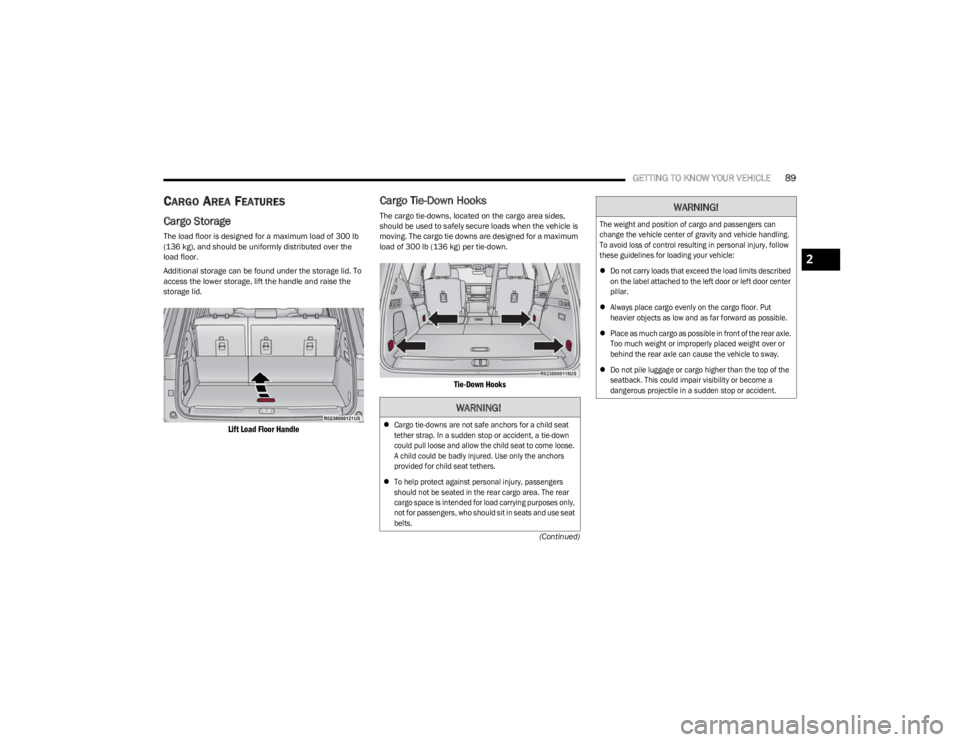
CARGO AREA FEATURES
Cargo Storage
The load floor is designed for a maximum load of 300 lb
(136 kg), and should be uniformly distributed over the
load floor.
Additional storage can be found under the storage lid. To
access the lower storage, lift the handle and raise the
storage lid.
Lift Load Floor Handle
Cargo Tie-Down Hooks
The cargo tie-downs, located on the cargo area sides,
should be used to safely secure loads when the vehicle is
moving. The cargo tie downs are designed for a maximum
load of 300 lb (136 kg) per tie-down.
Tie-Down Hooks
WARNING!
Cargo tie-downs are not safe anchors for a child seat
tether strap. In a sudden stop or accident, a tie-down
could pull loose and allow the child seat to come loose.
A child could be badly injured. Use only the anchors
provided for child seat tethers.
To help protect against personal injury, passengers
should not be seated in the rear cargo area. The rear
cargo space is intended for load carrying purposes only,
not for passengers, who should sit in seats and use seat
belts.
The weight and position of cargo and passengers can
change the vehicle center of gravity and vehicle handling.
To avoid loss of control resulting in personal injury, follow
these guidelines for loading your vehicle:
Do not carry loads that exceed the load limits described
on the label attached to the left door or left door center
pillar.
Always place cargo evenly on the cargo floor. Put
heavier objects as low and as far forward as possible.
Place as much cargo as possible in front of the rear axle.
Too much weight or improperly placed weight over or
behind the rear axle can cause the vehicle to sway.
Do not pile luggage or cargo higher than the top of the
seatback. This could impair visibility or become a
dangerous projectile in a sudden stop or accident.
WARNING!
2
23_WS_OM_EN_USC_t.book Page 89
Page 92 of 396
90GETTING TO KNOW YOUR VEHICLE
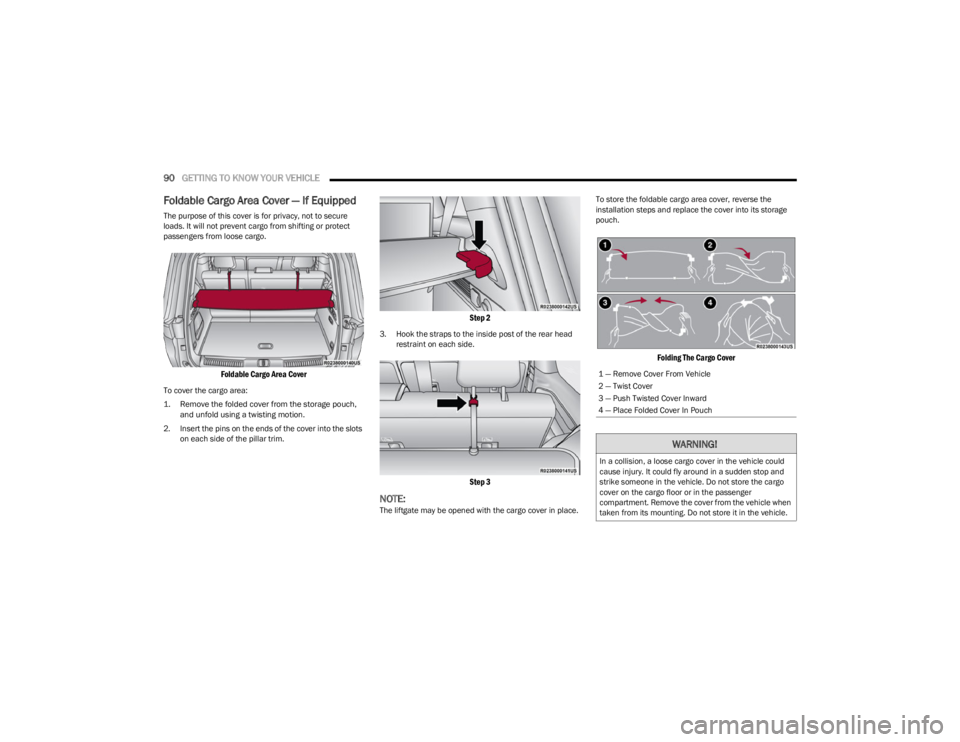
Foldable Cargo Area Cover — If Equipped
The purpose of this cover is for privacy, not to secure
loads. It will not prevent cargo from shifting or protect
passengers from loose cargo.
Foldable Cargo Area Cover
To cover the cargo area:
1. Remove the folded cover from the storage pouch,
and unfold using a twisting motion.
2. Insert the pins on the ends of the cover into the slots on each side of the pillar trim.
Step 2
3. Hook the straps to the inside post of the rear head restraint on each side.
Step 3
NOTE:The liftgate may be opened with the cargo cover in place. To store the foldable cargo area cover, reverse the
installation steps and replace the cover into its storage
pouch.
Folding The Cargo Cover
1 — Remove Cover From Vehicle
2 — Twist Cover
3 — Push Twisted Cover Inward
4 — Place Folded Cover In Pouch
WARNING!
In a collision, a loose cargo cover in the vehicle could
cause injury. It could fly around in a sudden stop and
strike someone in the vehicle. Do not store the cargo
cover on the cargo floor or in the passenger
compartment. Remove the cover from the vehicle when
taken from its mounting. Do not store it in the vehicle.
23_WS_OM_EN_USC_t.book Page 90