2023 JEEP WAGONEER Exit lock
[x] Cancel search: Exit lockPage 33 of 396

GETTING TO KNOW YOUR VEHICLE31
Use the four-way control to adjust the steering column.
NOTE:For vehicles equipped with Driver Memory Settings, use
the key fob or the memory switch on the driver's door trim
panel to return the tilt/telescopic steering column to
saved positions
Úpage 31.
HEATED STEERING WHEEL
The steering wheel contains a heating element
that helps warm your hands in cold weather.
The heated steering wheel has three
temperature settings. Once the heated
steering wheel has been turned on, it will stay on until the
operator turns it off. The heated steering wheel may not
turn on when it is already warm. The heated steering wheel control button is located on the
left side of the radio screen or within the Uconnect system.
You can gain access to the control button on the top left
side of the screen by tapping the temperature controls,
which will provide a quick drop-down menu containing the
controls, or through the controls screen of the
touchscreen. If your vehicle is not equipped with the
button on the side of the radio, you can also access the
control button through the climate screen.
Press the heated steering wheel button once to turn
the HI setting on.
Press the heated steering wheel button a second time
to turn the MED setting on.
Press the heated steering wheel button a third time to
turn the LO setting on.
Press the heated steering wheel button a fourth time to
turn the heating elements off.NOTE:The engine must be running for the heated steering wheel
to operate.
For information on use with the Remote Start system, see
Úpage 23.
DRIVER AND PASSENGER MEMORY
SETTINGS — IF EQUIPPED
This feature allows the driver, and if equipped, also the
front passenger to save up to two different memory
profiles for easy recall through a memory switch. Each
memory profile saves desired position settings for the
following features:
Driver’s Side
Seat position
Easy entry/exit seat (if equipped)
Side mirrors
Power tilt and telescopic steering column (if equipped)
Power adjustable pedals (if equipped)
A set of desired radio station presets
WARNING!
Do not adjust the steering column while driving.
Adjusting the steering column while driving or driving
with the steering column unlocked, could cause the
driver to lose control of the vehicle. Failure to follow this
warning may result in serious injury or death.
WARNING!
Persons who are unable to feel pain to the skin
because of advanced age, chronic illness, diabetes,
spinal cord injury, medication, alcohol use, exhaus -
tion, or other physical conditions must exercise care
when using the steering wheel heater. It may cause
burns even at low temperatures, especially if used
for long periods.
Do not place anything on the steering wheel that
insulates against heat, such as a blanket or steering
wheel covers of any type and material. This may
cause the steering wheel heater to overheat.
2
23_WS_OM_EN_USC_t.book Page 31
Page 37 of 396
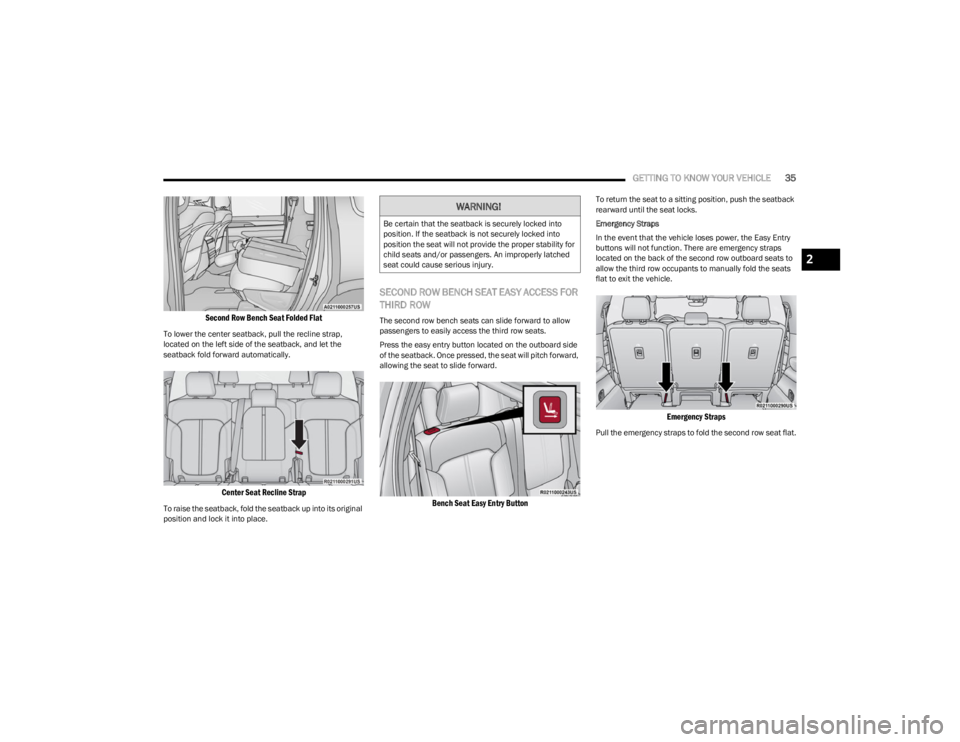
GETTING TO KNOW YOUR VEHICLE35
Second Row Bench Seat Folded Flat
To lower the center seatback, pull the recline strap,
located on the left side of the seatback, and let the
seatback fold forward automatically.
Center Seat Recline Strap
To raise the seatback, fold the seatback up into its original
position and lock it into place.
SECOND ROW BENCH SEAT EASY ACCESS FOR
THIRD ROW
The second row bench seats can slide forward to allow
passengers to easily access the third row seats.
Press the easy entry button located on the outboard side
of the seatback. Once pressed, the seat will pitch forward,
allowing the seat to slide forward.
Bench Seat Easy Entry Button
To return the seat to a sitting position, push the seatback
rearward until the seat locks.
Emergency Straps
In the event that the vehicle loses power, the Easy Entry
buttons will not function. There are emergency straps
located on the back of the second row outboard seats to
allow the third row occupants to manually fold the seats
flat to exit the vehicle.
Emergency Straps
Pull the emergency straps to fold the second row seat flat.
WARNING!
Be certain that the seatback is securely locked into
position. If the seatback is not securely locked into
position the seat will not provide the proper stability for
child seats and/or passengers. An improperly latched
seat could cause serious injury.
2
23_WS_OM_EN_USC_t.book Page 35
Page 39 of 396

GETTING TO KNOW YOUR VEHICLE37
SECOND ROW CAPTAIN’S CHAIR EASY ACCESS
FOR THIRD ROW
The second row captain’s chairs can slide forward to allow
passengers to easily access the third row seats.
Press the easy entry button located on the outboard side
of the seatback. Once pressed, the entire seat will pitch
forward, allowing the seat to slide forward.
Captain’s Chair Easy Entry Button
To return the seat to a sitting position, push the seatback
rearward until the seat locks. Emergency Straps
In the event that the vehicle loses power, the Easy Entry
buttons will not function. There are emergency straps
located on the back of the second row outboard seats to
allow the third row occupants to manually fold the seats
flat to exit the vehicle.
Emergency Straps
Pull the emergency straps to fold the second row seat flat.
Manual Folding Third Row — If Equipped
Both third row seats can be folded flat to increase the
cargo area. To lower either seat, pull on the release straps
located on both sides of the rear cargo area, near the
bottom of the seat.
NOTE:The second row seats must be in their full upright position
or folded flat when folding the third row seats.
Release Straps
Third Row Folded
2
23_WS_OM_EN_USC_t.book Page 37
Page 54 of 396

52GETTING TO KNOW YOUR VEHICLE
POWER MIRRORS
The power mirror control switch is located on the driver's
side door trim panel.
To adjust a mirror, rotate the control switch to the desired
mirror: (L) or (R). Then push the switch in the direction that
you want the mirror to move.
Power Mirror Switch
NOTE:Once adjustment is complete, rotate the knob to the
neutral position to prevent accidental movements.
Power Folding — If Equipped
To fold the door mirrors in using the Power Folding Mirror
function, rotate the control switch to the power folding
position. Rotating the control to the left, right, or neutral
position will return the mirrors to the driving position.
If the power mirror control switch is moved again during
door mirror folding (from closed to open position and vice
versa), the movement direction is reversed.
NOTE:The Power Folding Mirror function is only available when
the ignition is in the ON/RUN position.
Resetting The Power Folding Outside Mirrors
You may need to reset the power folding mirrors if the
following occurs:
The mirrors are accidentally blocked while folding.
The mirrors are accidentally manually folded/unfolded
(by hand or by pushing the power folding mirror switch).
The mirrors come out of the unfolded position.
The mirrors shake and vibrate at normal driving
speeds.
To reset the power folding mirrors: Fold and unfold them
by turning the switch (this may require multiple switch
activations to synchronize the driver and passenger
mirror). This resets them to their normal position.
Power mirror position can be saved as part of the Driver
Memory Settings (if equipped)
Úpage 31.
AUTOMATIC POWER FOLDING
M
IRRORS — IF EQUIPPED
When enabled within Uconnect Settings Úpage 197, the
exterior mirrors will automatically fold when the vehicle’s
ignition is placed in the OFF position, and after the doors
are locked and closed.
The exterior mirrors will auto-fold in the following
situations after the ignition is placed in the OFF position:
Pushing the lock button on the door panel before the
door is opened.
NOTE:If the doors are already locked, push the lock button again.
Opening the door, then pushing the lock button on the
door panel, followed by closing the door.
After exiting the vehicle, close the doors then push the
lock button on the key fob.
After exiting the vehicle, close the doors then touch the
lock icon on the Passive Entry door handle.
Automatic Unfolding
If the exterior mirrors were folded automatically, they will
unfold based on the selection with the Uconnect system:
When the vehicle is unlocked using the key fob
When the vehicle is unlocked using a Passive Entry
door handle
When Proximity Wake-Up is activated
Úpage 59
When the ignition is placed in the ON/RUN position
1 — Neutral Position
2 — Left Mirror
3 — Control Switch
4 — Right Mirror
5 — Power Folding Position (If Equipped)
23_WS_OM_EN_USC_t.book Page 52
Page 61 of 396

GETTING TO KNOW YOUR VEHICLE59
PARKING LIGHTS AND PANEL LIGHTS
To turn on the parking lights and instrument panel lights,
rotate the headlight switch clockwise. To turn off the
parking lights, rotate the headlight switch back to the O
(off) position.
NOTE:Vehicles sold in Canada are equipped with a headlight
switch with an AUTO and ON detent but without an OFF
detent. Headlights will be deactivated when the headlight
switch is placed in the parking lights position. However,
the Daytime Running Lights (DRLs) will be activated along
with the front and rear marker lights. The DRLs may be
deactivated when the parking brake is engaged.
HEADLIGHTS ON AUTOMATICALLY WITH
W
IPERS
If your vehicle is equipped with Automatic Headlights, it
also has this customer-programmable feature. When your
headlights are in the automatic mode and the engine is
running, they will automatically turn on when the wiper
system is on. This feature is programmable through the
Uconnect system
Úpage 197.
NOTE:When your headlights come on during the daytime, the
vehicle will monitor outside brightness and decide if the
instrument panel needs to be dimmed or not
Úpage 60.
HEADLIGHT ILLUMINATION ON
A
PPROACH
When enabled, the headlights, exterior door handle
pocket lights (if equipped), and interior lights will
illuminate when the unlock button on the key fob is
pushed as the operator is approaching the vehicle. This
feature can be turned on/off, and the length of time the
headlights stay on can be programmed for up to
90 seconds within Uconnect Settings
Úpage 197.
Proximity Wake-Up — If Equipped
This feature is enabled/disabled within the Uconnect
system, and is activated when the operator approaches
the driver’s door, passenger’s door, or liftgate with a valid
key fob on their person. Some exterior and interior lights
will illuminate in order to provide an increased sense of
welcome and security as the operator approaches the
vehicle in the dark. “Headlight Illumination On Approach”
must be selected and set to a time value other than zero
within Uconnect Settings for Proximity Wake-Up to
activate.
The doors may be locked or unlocked for this feature to
activate, as long as the ignition is in the OFF position, or
during a Remote Start event. It will not activate if the doors
are locked and the ignition was placed in the ON/RUN
position.
NOTE:Proximity Wake-Up may not activate under the following
conditions:
After numerous consecutive activations, in order to
conserve the vehicle’s battery
After the vehicle’s engine has been off for several days Headlight Animation — If Equipped
When “Headlight Illumination On Approach” is turned on,
and set to a time value above zero, the exterior lights
illuminate in a theatrical manner during approach to the
vehicle. This feature is activated in the following
situations:
Proximity Wake-Up (if equipped) is activated
Remote Start is activated
The unlock button on the key fob is pushed
NOTE:For Headlight Animation to activate with Remote Start or
with the push of the unlock button, “Greeting Lights” must
also be selected within the Uconnect system.
HEADLIGHT DELAY
To aid in your exit, your vehicle is equipped with a
headlight delay that will leave the headlights on for
approximately 90 seconds. This delay is initiated when the
ignition is placed in the OFF position while the headlight
switch is on, and then the headlight switch is cycled off.
Headlight delay can be canceled by either turning the
headlight switch on then off, or by placing the ignition in
the ON position.
NOTE:The headlight delay time is programmable through
Uconnect Settings Úpage 197.
LIGHTS-ON REMINDER
If the headlights or parking lights are left on after the
ignition is placed in the OFF position, a chime will sound
when the driver’s door is opened.
2
23_WS_OM_EN_USC_t.book Page 59
Page 70 of 396

68GETTING TO KNOW YOUR VEHICLE
Controlling The Rear Climate Controls
From The Front Climate Screen
Four-Zone Rear Climate Controls From Front Climate Screen
The Three-Zone and Four-Zone Climate Control system
allows for adjustment of the rear climate controls from the
front screen. This can be done through either the main
Uconnect display, or the Front Comfort And Convenience
Display (if equipped).
NOTE:If equipped with a Four-Zone Climate Control system, the
temperature of left and right sides of the rear passenger
zones can be adjusted separately from the front or rear
climate screens. To change to the rear climate control screen:
Press the “Rear” icon on the touchscreen to display the
rear climate controls. The control functions now
operate the rear system.
Press the “Front” icon on the touchscreen to return to
the front climate controls.
LOCK REAR CLIMATE
Press and release the “Lock Rear” icon to lock
out manual control of the rear temperature and
blower settings made from the rear climate
control display. The “Lock Rear” icon will
illuminate and the text will update to “Unlock Rear” when
this feature is selected. When the feature is deselected,
the text will change back to “Lock Rear” and will no longer
be illuminated.
REAR AUTO BUTTON
Press and release “Auto” on the rear climate
control screen to control the selected rear
passenger temperature by automatically
adjusting airflow distribution and amount. The
“Auto” icon will illuminate when this feature is selected,
and will turn off when deselected. Pressing any other
climate control function for the rear system will cause the
rear system to switch between manual mode and
automatic modes
Úpage 71.
SYNC BUTTON
Press the SYNC To Driver icon on the rear
climate control screen to turn the SYNC feature
on/off. SYNC is used to synchronize all front
and rear passenger zones to the driver’s set
temperature, mode, and blower settings. The SYNC
indicator will illuminate when SYNC is on. Changing the
front driver climate settings will adjust all passenger
settings automatically. If the front passenger or rear
climate settings are adjusted while SYNC is on, SYNC will
automatically exit.
NOTE:When SYNC is not active, the rear passenger climate
control settings will need to be adjusted manually to
achieve desired comfort. See
Úpage 68 and Úpage 69
for more information.
REAR BLOWER CONTROL
Rear Blower Control is used to regulate the
amount of air forced through the rear climate
system. There are several blower speeds
available. The speeds can be selected using
the buttons on the touchscreen. Use the small blower icon
(or blower icon with the downward arrow) to reduce the
blower setting, and the large blower icon (or blower icon
with the upward arrow) to increase the blower setting.
Blower can also be selected by pressing the blower bar
area between the icons.
23_WS_OM_EN_USC_t.book Page 68
Page 121 of 396

119
STARTING AND OPERATING
STARTING THE ENGINE
Before starting your vehicle, adjust your seat, adjust the inside
and outside mirrors, fasten your seat belt, and if present,
instruct all other occupants to buckle their seat belts.
AUTOMATIC TRANSMISSION
The gear selector must be in the NEUTRAL (N) or PARK (P)
position before you can start the engine. Apply the brakes
before shifting into any driving gear.
KEYLESS ENTER ‘N GO™ — IGNITION
This feature allows the driver to operate the ignition
switch with the push of a button, as long as the Remote
Start/Keyless Enter ‘n Go™ key fob is in the passenger
compartment.
NORMAL STARTING
To Turn On The Engine Using The ENGINE START/STOP
Button
1. The transmission must be in PARK (P).
2. Press and hold the brake pedal while pushing the ENGINE START/STOP button once.
3. The system takes over and attempts to start the vehicle. If the vehicle fails to start, the starter will
disengage automatically after 10 seconds.
4. If you wish to stop the cranking of the engine prior to the engine starting, push the ENGINE START/STOP
button again.
To Turn Off The Engine Using The ENGINE START/STOP
Button
1. Place the gear selector in PARK, then push and release the ENGINE START/STOP button.
2. The ignition will return to the OFF position.
3. If the gear selector is not in PARK, the ENGINE START/STOP button must be held for two seconds or
three short pushes in a row with the vehicle speed
above 5 mph (8 km/h) before the engine will shut off.
The ignition will remain in the ON/RUN position until
the gear selector is in PARK and the button is pushed
twice to the OFF position.
WARNING!
Before exiting a vehicle, always come to a complete
stop, then shift the automatic transmission into PARK
and apply the parking brake.
Always make sure the keyless ignition node is in the
OFF position, key fob is removed from the vehicle and
vehicle is locked.
Never leave children alone in a vehicle, or with access
to an unlocked vehicle. Leaving children in a vehicle
unattended is dangerous for a number of reasons. A
child or others could be seriously or fatally injured.
Children should be warned not to touch the parking
brake, brake pedal or the gear selector.
Do not leave the key fob in or near the vehicle, or in a
location accessible to children, and do not leave the
ignition of a vehicle equipped with Keyless
Enter ‘n Go™ in the ON/RUN position. A child could
operate power windows, other controls, or move the
vehicle.
Do not leave children or animals inside parked vehi -
cles in hot weather. Interior heat build-up may cause
serious injury or death.
CAUTION!
Damage to the transmission may occur if the following
precautions are not observed:
Do not shift from REVERSE (R), PARK, or NEUTRAL
into any forward gear when the engine is above idle
speed.
Shift into PARK only after the vehicle has come to a
complete stop.
Shift into or out of REVERSE only after the vehicle has
come to a complete stop and the engine is at idle
speed.
Before shifting into any gear, make sure your foot is
firmly on the brake pedal.4
23_WS_OM_EN_USC_t.book Page 119
Page 125 of 396

STARTING AND OPERATING123
The EPB switch is located on the instrument panel to the
left of the steering wheel (below the headlamp switch).
Electric Park Brake Switch
To apply the parking brake manually, pull up on the switch
momentarily. You may hear a sound from the back of the
vehicle while the parking brake engages. Once the parking
brake is fully engaged, the Brake Warning Light in the
instrument cluster and an indicator on the switch will
illuminate. If your foot is on the brake pedal while you
apply the parking brake, you may notice a small amount of
brake pedal movement. The parking brake can be applied
even when the ignition switch is OFF but the Brake
Warning Light will not illuminate, however, it can only be
released when the ignition is in the ON/RUN position.
NOTE:The EPB Warning Light will illuminate if the EPB switch is
held for longer than 20 seconds in either the released or
applied position. The light will extinguish upon releasing
the switch. If the Auto Park Brake feature is enabled, the parking
brake will automatically engage whenever the
transmission is placed in PARK. If your foot is on the brake
pedal, you may notice a small amount of brake pedal
movement while the parking brake is engaging.
The parking brake will release automatically when the
ignition is ON, the transmission is in DRIVE or REVERSE,
the driver’s seat belt is buckled, and an attempt is made
to drive away.
To release the parking brake manually, the ignition switch
must be in the ON/RUN position. Put your foot on the
brake pedal, then push the EPB switch down momentarily.
You may hear a sound from the back of the vehicle while
the parking brake disengages. You may also notice a small
amount of movement in the brake pedal. Once the parking
brake is fully disengaged, the Brake Warning Light in the
instrument cluster and the LED indicator on the switch will
extinguish.
NOTE:When parking on a hill, it is important to turn the front
wheels toward the curb on a downhill grade and away from
the curb on an uphill grade. Apply the parking brake before
placing the gear selector in PARK, otherwise the load on
the transmission locking mechanism may make it difficult
to move the gear selector out of PARK.
WARNING!
Never use the PARK position as a substitute for the
parking brake. Always apply the parking brake fully
when parked to guard against vehicle movement and
possible injury or damage.
When exiting the vehicle, always turn the ignition off,
secure the key fob, and lock your vehicle.
Never leave children alone in a vehicle, or with
access to an unlocked vehicle. Allowing children to
be in a vehicle unattended is dangerous for a
number of reasons. A child or others could be seri -
ously or fatally injured. Children should be warned
not to touch the parking brake, brake pedal or the
gear selector.
Do not leave the key fob in or near the vehicle, or in
a location accessible to children, and do not leave a
vehicle equipped with Keyless Enter ‘n Go™ in the
ON/RUN position. A child could operate power
windows, other controls, or move the vehicle.
Be sure the parking brake is fully disengaged before
driving; failure to do so can lead to a brake failure
and a collision.
Always fully apply the parking brake when leaving
your vehicle, or it may roll and cause damage or
injury. Also be certain to leave the transmission in
PARK. Failure to do so may allow the vehicle to roll
and cause damage or injury.
4
23_WS_OM_EN_USC_t.book Page 123