2023 JEEP RENEGADE reset
[x] Cancel search: resetPage 87 of 364

STARTING AND OPERATING 85
(Continued)
menu based system will guide you through the
steps necessary to retract the EPB actuator in
order to perform rear brake service.
Service Mode has requirements that must be met
in ord e
r to be activated:
The vehicle must be at a standstill.
The parking brake must be disabled.
The transmission must be in park or neutral.
The EPB switch not activated.
The vehicle in ignition RUN position.
The brake pedal not pressed.
While in service mode, the EPB fault lamp will flash
c on t
in
u
ously while the ignition is in the RUN
position.
NOTE:
A dedicated message will appear in the instrument
clust e
r if Brake Service Mode cannot be activated.
When brake service work is complete, the following
steps
must be followed to reset the parking brake
system to normal operation:
Ensure the vehicle is at a standstill.
Press the brake pedal with moderate force.
Apply the EPB Switch.
NOTE:
A dedicated message will appear in the instrument
clust e
r if Brake Service Mode cannot be deacti -
vated.
9-SPEED AUTOMATIC TRANSMISSION
NOTE:
You must press and hold the brake pedal while
shift i
ng out of PARK.
The transmission gear range (PRND) is displayed
beside
the gear selector and in the instrument
cluster display. To select a gear range, push the
lock button on the gear selector and move the
selector rearward or forward. You must also press
the brake pedal to shift the transmission out of
PARK, or to shift from NEUTRAL into DRIVE or
REVERSE when the vehicle is stopped or moving at
low speeds Ú page 90. Select the DRIVE range for
normal driving.
The electronically-controlled transmission adapts
i ts s h
ift schedule based on driver inputs, along
with environmental and road conditions. The
transmission electronics are self-calibrating;
therefore, the first few shifts on a new vehicle may be somewhat abrupt. This is a normal condition,
and precision shifts will develop within a few
hundred miles (kilometers).
WARNING!
You can be badly injured working on or around a
motor vehicle. Do only that service work for
which you have the knowledge and the right
equipment. If you have any doubt about your
ability to perform a service job, take your vehicle
to a competent mechanic.
WARNING!
It is dangerous to shift out of PARK or
NEUTRAL if the engine speed is higher than
idle speed. If your foot is not firmly pressing
the brake pedal, the vehicle could accelerate
quickly forward or in reverse. You could lose
control of the vehicle and hit someone or
something. Only shift into gear when the
engine is idling normally and your foot is firmly
pressing the brake pedal.
Unintended movement of a vehicle could
injure those in or near the vehicle. As with all
vehicles, you should never exit a vehicle while
the engine is running. Before exiting a vehicle,
always come to a complete stop, then apply
the parking brake, shift the transmission into
PARK, and turn the ignition OFF. When the
ignition is in the OFF position, the transmis
-
sion is locked in PARK, securing the vehicle
a gain s
t unwanted movement.
When leaving the vehicle, always make sure
the ignition is in the OFF position, remove the
key fob from the vehicle, and lock the vehicle.
4
Page 92 of 364

90 STARTING AND OPERATING
TRANSMISSION LIMP HOME MODE
Transmission function is electronically monitored
for abnormal conditions. If a condition is detected
that could result in transmission damage,
Transmission Limp Home Mode is activated. In this
mode, the transmission may operate only in a fixed
gear, or may remain in neutral. The Malfunction
Indicator Light (MIL) may be illuminated. Limp
Home Mode may allow the vehicle to be driven to
an authorized dealer for service without damaging
the transmission.
In the event of a momentary problem, the
trans m
ission can be reset to regain all forward
gears by performing the following steps:
1. Stop the vehicle.
2. S hif
t the transmission into PARK, if possible. If
n ot
,
s
hift the transmission to NEUTRAL.
3. Push and hold the ignition switch until the engin
e turns off.
4. Wait approximately 30 seconds.
5. Res
tart the engine.
6. S hif
t into the desired gear range. If the
p r
ob l
e
m is no longer detected, the
transmission will return to normal operation.
NOTE:
Even if the transmission can be reset, we
recomm e
nd that you visit an authorized dealer at your earliest possible convenience. An authorized
dealer has diagnostic equipment to determine if
the problem could recur. If the transmission
cannot be reset, authorized dealer service is
required.
IGNITION PARK INTERLOCK
(K
EYLESS VEHICLE)
This vehicle is equipped with an Ignition Park
Interlock, which requires the transmission to be in
PARK before the ignition can be turned to the OFF
position. Also, the transmission is locked in PARK
whenever the ignition is in the OFF position.
BRAKE TRANSMISSION SHIFT
I
NTERLOCK (BTSI) SYSTEM
This vehicle is equipped with a BTSI that holds the
transmission gear selector in PARK unless the
brakes are applied. To shift the transmission out of
PARK, the ignition must be in the RUN position
(engine running or not) and the brake pedal must
be pressed.
The brake pedal must also be pressed before
pushi n
g the button on the gear selector to shift
from NEUTRAL into DRIVE or REVERSE when the
vehicle is stopped or moving at low speeds.
FOUR-WHEEL DRIVE
Active Drive (4WD) And Active Drive Low (4WD
LOW)
Your vehicle may be equipped with a Power
Transf
er Unit (PTU). This system is automatic with
no driver inputs or additional driving skills
required. Under normal driving conditions, the
front wheels provide most of the traction. If the
front wheels begin to lose traction, power is shifted
automatically to the rear wheels. The greater the
front wheel traction loss, the greater the power
transfer to the rear wheels.
Additionally, on dry pavement under heavy throttle
input
(where one may have no wheel spin), torque
will be sent to the rear in a preemptive effort to
improve vehicle launch and performance
characteristics.
CAUTION!
All wheels must have the same size and type
tires. Unequal tire sizes must not be used.
Unequal tire size may cause failure of the power
transfer unit.
Page 97 of 364
STARTING AND OPERATING 95
TO MANUALLY TURN OFF THE STOP/
S
TART SYSTEM
Stop/Start OFF Switch
Push the Stop/Start OFF switch (located on the
center
console). The light on the switch will
illuminate. The “STOP/START OFF” message will
appear in the instrument cluster display and the
Autostop mode will be disabled Ú page 64.
NOTE:
The Stop/Start system will reset itself back to an
ON con d
ition every time the ignition is turned off
and back on.
TO MANUALLY TURN ON THE STOP/
S
TART SYSTEM
Push the Stop/Start OFF switch (located on the
switch bank). The light on the switch will turn off.
SYSTEM MALFUNCTION
If there is a malfunction in the Stop/Start system,
the system will not shut down the engine. A
“SERVICE STOP/START SYSTEM” message and a
yellow Stop/Start telltale will appear in the
instrument cluster display Ú page 64.
If the “SERVICE STOP/START SYSTEM” message
appea r
s in the instrument cluster display, have the
system checked by an authorized dealer.
CRUISE CONTROL SYSTEMS — IF EQUIPPED
Your vehicle may be equipped with the Cruise
Control system, or the Adaptive Cruise Control
(ACC) system:
Cruise Control for cruising at a constant preset
speed.
Adaptive Cruise Control (ACC) for maintaining a
set distance between you and the vehicle ahead
using Fixed Speed Cruise Control to automati -
cally adjust the preset speed.
NOTE:
In vehicles equipped with ACC, if ACC is not
enabled, Fixed Speed Cruise Control will not
detect vehicles directly ahead of you. Always be
aware of the feature selected.
Only one Cruise Control feature can operate at a
time. For example, if Fixed Speed Cruise Control is enabled, Adaptive Cruise Control will be
unavailable, and vice versa.
CRUISE CONTROL
When engaged, the Cruise Control takes over
accelerator operations at speeds greater than
20
mph (32 km/h).
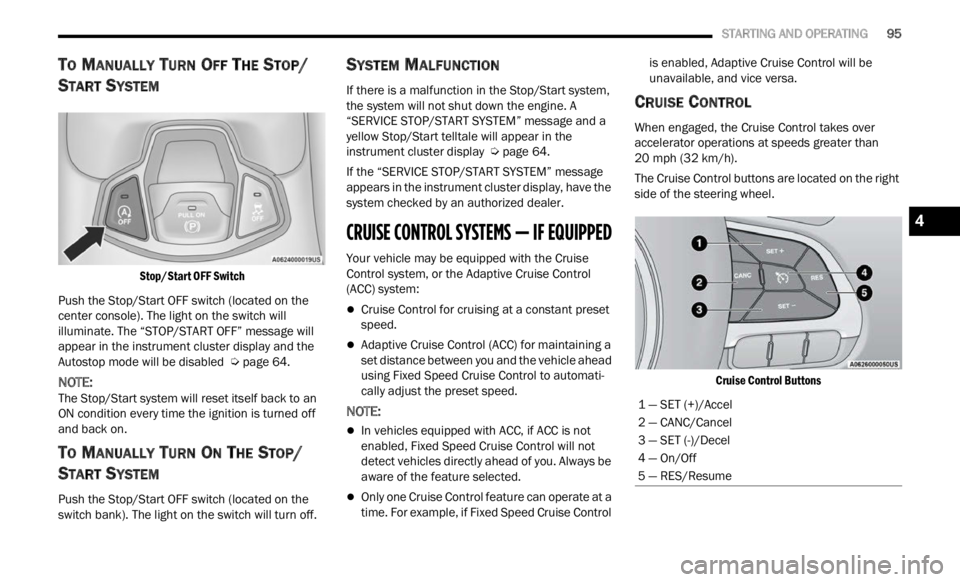
The Cruise Control buttons are located on the right
side of
the steering wheel.
Cruise Control Buttons
1 — SET (+)/Accel
2 — CANC/Cancel
3 — SET (-)/Decel
4 — On/Off
5 — RES/Resume
4
Page 99 of 364

STARTING AND OPERATING 97
(Continued)
Resume Speed
To resume a previously set speed, push the RES
button and release. Resume can be used at any
speed above 20 mph (32 km/h).
Deactivation
A soft tap on the brake pedal, pushing the CANC
button, or normal brake pressure while slowing the
vehicle will deactivate the Cruise Control without
erasing the set speed from memory.
Pushing the on/off button or placing the ignition in
the OF
F position erases the set speed from
memory.
ADAPTIVE CRUISE CONTROL (ACC)
Adaptive Cruise Control (ACC) increases the driving
convenience provided by Cruise Control while
traveling on highways and major roadways.
However, it is not a safety system and not designed
to prevent collisions. The Cruise Control function
performs differently if your vehicle is not equipped
with ACC Ú page 95.
ACC will allow you to keep Cruise Control engaged
in li g
ht to moderate traffic conditions without the
constant need to reset your speed. ACC utilizes a
radar sensor and a forward facing camera
designed to detect a vehicle directly ahead of you
to maintain a set speed.
NOTE:
If the ACC sensor detects a vehicle ahead, ACC
will apply limited braking or accelerate (not to
exceed the original set speed) automatically to
maintain a preset following distance, while
matching the speed of the vehicle ahead.
Any chassis/suspension or tire size modifica -
tions to the vehicle will affect the performance
of t
h e
Adaptive Cruise Control and Forward Colli -
sion Warning system.
Fixed Speed Cruise Control (ACC not enabled)
will not detect vehicles directly ahead of you.
Always be aware of the feature selected
Ú page 349.
WARNING!
Adaptive Cruise Control (ACC) is a convenience
system. It is not a substitute for active driver
involvement. It is always the driver’s responsi
-
bility to be attentive of road, traffic, and weather
condi t
ions, vehicle speed, distance to the
vehicle ahead and, most importantly, brake
operation to ensure safe operation of the
vehicle under all road conditions. Your
complete attention is always required while
driving to maintain safe control of your vehicle.
Failure to follow these warnings can result in a
collision and death or serious personal injury.
The ACC system:
Does not react to pedestrians, oncoming
vehicles, and stationary objects (e.g., a
stopped vehicle in a traffic jam or a
disabled vehicle).
Cannot take street, traffic, and weather
conditions into account, and may be
limited upon adverse sight distance condi -
tions.
Does not always fully recognize complex
driving conditions, which can result in
wrong or missing distance warnings.
You should turn the ACC system off:
When driving in fog, heavy rain, heavy snow,
sleet, heavy traffic, and complex driving situa -
tions (i.e., in highway construction zones).
When entering a turn lane or highway
off-ramp; when driving on roads that are
winding, icy, snow-covered, slippery, or have
steep uphill or downhill slopes.
When towing a trailer up or down steep slopes.
When circumstances do not allow safe driving
at a constant speed.
WARNING!
4
Page 147 of 364

MULTIMEDIA 145
Phone/Bluetooth®
SiriusXM® Setup
When the Phone/Bluetooth® button is pressed on the touchscreen, the system displays the options related to Bluetooth® connectivity from an external audio
device or smartphone. The list of paired audio devices or smartphones can be accessed from this menu.
NOTE:
Depending on the vehicle’s options, feature settings may vary.
Setting Name Description
Phone Pop-Ups Displayed In Cluster This setting will activate phone message pop-ups in the Instrument Cluster
Displ
a
y.
Do Not Disturb This setting will open the Do Not Disturb settings menu. The settings are “Auto
R
eply
”
(both, text, call), “Auto Reply Message” (custom, default), and “Custom
Auto Reply Message” (create message).
Paired Phones This setting will show the list of paired phones.
Paired Phones And Audio Devices This setting will show the list of paired phones and audio devices.
NOTE:
A subscription to SiriusXM® Satellite Radio is required for these settings to be functional.
When the SiriusXM® Setup button is pressed on the touchscreen, the system displays options related to SiriusXM® Satellite Radio. These settings can be used
t o ski p
specific radio channels and restart favorite songs from the beginning.
NOTE:
Depending on the vehicle’s options, feature settings may vary.
Setting Name Description
Tune Start This setting will play the current song from the beginning when you tune to a
music
channel using one of the 12 presets.
5
Page 148 of 364

146 MULTIMEDIA
Reset
Channel Skip This setting will allow you to set channels that you wish to skip. A channel list
will
d
isplay of the skipped channels.
Subscription Information This menu provides SiriusXM® subscription information. SiriusXM® Travel
Link i
s
a separate subscription.
Setting Name Description
When the Reset button is pressed on the touchscreen, the system displays the options related to resetting the Uconnect system back to its default settings.
These settings can clear personal data and reset selected settings from other menus.
NOTE:
Depending on the vehicle’s options, feature settings may vary.
Setting Name Description
Restore Settings This setting will return all the previously changed settings to their factory
defau
l
t.
Restore Apps This setting will reset the apps to their factory default.
Clear Personal Data This setting will display a pop-up that gives you the option to clear all personal
data
f
rom the system, including Bluetooth® devices and presets.
Page 150 of 364

148 MULTIMEDIA
Feature Description
Radio/MediaPress/Push the Radio button or Media button to enter Radio Mode/Media
Mode a
n
d access the radio functions and external audio sources
Ú page 150.
Phone Press/Push the Phone button to enter Phone Mode and access the
h
ands-
free phone system Ú page 164.
Settings Press/Push the Settings button to access the Uconnect Settings Ú page 133.
Push the ENTER/BROWSE button on the faceplate to accept a highlighted
s elec t
ion on the screen. Rotate the TUNE/SCROLL rotary knob to scroll
through a list or tune a radio station.
Push the SCREEN OFF button on the faceplate to turn the screen on or off.
Push the MUTE button on the faceplate to turn the audio of the radio system
off. Pu
sh it again to turn the audio back on.
Rotate the rotary knob to adjust the volume. Push the VOLUME & On/Off
button
on the faceplate to turn the system on or off.
NOTE:
Push and hold the VOLUME & On/Off button for approximately 10 seconds to
reset
the radio manually. Doing this can also recover the radio screen from
freezing or being stuck.
Controls — If Equipped Press the Controls button to access vehicle-specific features like heated seats
and st
eering wheel.
Apps Press the Apps button to access a list of the available Mobile apps.
Page 152 of 364

150 MULTIMEDIA
Safe Usage Of The Uconnect System
The Uconnect system is a sophisticated elec -
tronic device. Do not let young children use the
syste m
.
Permanent hearing loss may occur if you play
your music or sound system at loud volumes.
Exercise caution when setting the volume on the
system.
Keep drinks, rain and other sources of moisture
away from the system. Besides damage to the
system, moisture can cause electric shocks as
with any electronic device.
NOTE:
Many features of this system are speed
depen d
ent. For your own safety, it is not possible to
use some of the touchscreen features while the
vehicle is in motion.
Care And Maintenance
Do not press the touchscreen with any hard or
sharp objects (pen, USB stick, jewelry, etc.),
which could scratch the surface.
Do not spray any liquid or chemicals directly on
the screen! Use a clean and dry microfiber lens
cleaning cloth in order to clean the touchscreen.
If necessary, use a lint-free cloth dampened
with a cleaning solution, such as isopropyl
alcohol or an isopropyl alcohol and water solu -tion ratio of 50:50. Be sure to follow the solvent
manuf
a
cturer's precautions and directions
Ú page 349.
UCONNECT MODES
STEERING WHEEL AUDIO CONTROLS
The remote sound system controls are located on
the rear surface of the steering wheel at the three
and nine o’clock positions.
Remote Sound System Controls
The right-hand control is a rocker-type switch with
a pus h
button in the center and controls the
volume and mode of the sound system. Pushing
the top of the rocker switch will increase the
volume, and pushing the bottom of the rocker
switch will decrease the volume. Pushing the center button will make the radio
switc
h
between the various modes available (AM/
FM/SXM or Media, etc.).
The left-hand control is a rocker-type switch with a
push b
utton in the center. The function of the
left-hand control is different depending on which
mode you are in.
The following describes the left-hand control
operati
on in each mode:
Radio Operation
Pushing the top of the switch will Seek Up for the
next available station and pushing the bottom of
the switch will Seek Down for the next available
station.
The button located in the center of the left-hand
control
will tune to the next preset station that you
have programmed in the radio presets.
Media Mode
Pushing the top of the switch skips to the next
track on the selected media (AUX/USB/
Bluetooth®). Pushing the switch up twice will go
forward two tracks. Pushing the bottom switch
goes to the beginning of the current track, or the
beginning of the previous track if it is within eight
seconds after the current track begins to play.
Double pressing the bottom button switch will skip
to the previous track if it is after eight seconds into
the current track.