2023 JEEP COMPASS lock
[x] Cancel search: lockPage 26 of 344
24GETTING TO KNOW YOUR VEHICLE
If wearing gloves, or if it has been raining/
snowing on the Passive Entry door handle, the
unlock sensitivity can be affected, resulting in a
slower response time.
If the vehicle is unlocked by Passive Entry and
no door is opened within 60 seconds, the
vehicle will relock and, if equipped, will arm the
Vehicle Security system.
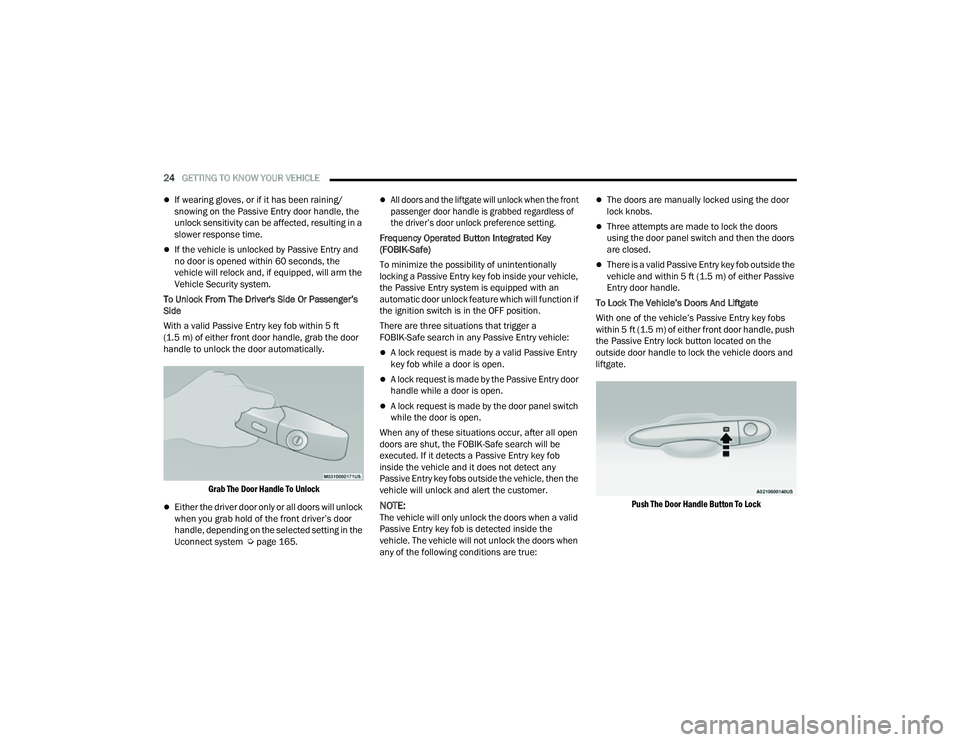
To Unlock From The Driver's Side Or Passenger’s
Side
With a valid Passive Entry key fob within 5 ft
(1.5 m) of either front door handle, grab the door
handle to unlock the door automatically.
Grab The Door Handle To Unlock
Either the driver door only or all doors will unlock
when you grab hold of the front driver’s door
handle, depending on the selected setting in the
Uconnect system Ú page 165.
All doors and the liftgate will unlock when the front
passenger door handle is grabbed regardless of
the driver’s door unlock preference setting.
Frequency Operated Button Integrated Key
(FOBIK-Safe)
To minimize the possibility of unintentionally
locking a Passive Entry key fob inside your vehicle,
the Passive Entry system is equipped with an
automatic door unlock feature which will function if
the ignition switch is in the OFF position.
There are three situations that trigger a
FOBIK-Safe search in any Passive Entry vehicle:
A lock request is made by a valid Passive Entry
key fob while a door is open.
A lock request is made by the Passive Entry door
handle while a door is open.
A lock request is made by the door panel switch
while the door is open.
When any of these situations occur, after all open
doors are shut, the FOBIK-Safe search will be
executed. If it detects a Passive Entry key fob
inside the vehicle and it does not detect any
Passive Entry key fobs outside the vehicle, then the
vehicle will unlock and alert the customer.
NOTE:The vehicle will only unlock the doors when a valid
Passive Entry key fob is detected inside the
vehicle. The vehicle will not unlock the doors when
any of the following conditions are true:
The doors are manually locked using the door
lock knobs.
Three attempts are made to lock the doors
using the door panel switch and then the doors
are closed.
There is a valid Passive Entry key fob outside the
vehicle and within 5 ft (1.5 m) of either Passive
Entry door handle.
To Lock The Vehicle’s Doors And Liftgate
With one of the vehicle’s Passive Entry key fobs
within 5 ft (1.5 m) of either front door handle, push
the Passive Entry lock button located on the
outside door handle to lock the vehicle doors and
liftgate.
Push The Door Handle Button To Lock
22_MP_OM_EN_USC_t.book Page 24
Page 27 of 344

GETTING TO KNOW YOUR VEHICLE25
NOTE:
DO NOT grab the door handle when pushing the door
handle lock button. This could unlock the door(s).
DO NOT Grab The Door Handle When Locking
NOTE:
After pushing the door handle button, you must
wait two seconds before you can lock or unlock
the doors, using either Passive Entry door
handle. This is done to allow you to check if the
vehicle is locked by pulling the door handle
without the vehicle unlocking.
If Passive Entry is disabled using the Uconnect
settings, the key protection described in
"Frequency Operated Button Integrated Key
(FOBIK-Safe)" remains active/functional.
The Passive Entry system will not operate if the
key fob battery is depleted. To Unlock/Enter The Liftgate
The liftgate Passive Entry unlock feature is built
into the electronic liftgate release handle. With a
valid Passive Entry key fob within 5 ft (1.5 m) of the
liftgate, push the electronic liftgate release handle
to open.
Electronic Liftgate Release/Liftgate Passive Entry Location
To Lock The Liftgate
With a valid Passive Entry key fob within 5 ft
(1.5 m) of the liftgate, push the Passive Entry lock
button located to the right of the electronic liftgate
release handle.
NOTE:The liftgate Passive Entry lock button will lock all
doors and the liftgate Ú page 328.
AUTOMATIC UNLOCK DOORS ON EXIT
The doors will unlock automatically on vehicles
with power door locks if:
1. The Automatic Unlock Doors On Exit feature is
enabled.
2. All doors are closed.
3. The gear selector was not in PARK, then is placed in PARK.
4. Any door is opened.
CHILD-PROTECTION DOOR LOCK
S
YSTEM — REAR DOORS
To provide a safer environment for small children
riding in the rear seats, the rear doors are
equipped with a Child-Protection Door Lock
system.
To use the system, open each rear door, use a flat
blade screwdriver (or emergency key) and rotate
the dial to the lock or unlock position. When the
system on a door is engaged, that door can only be
opened by using the outside door handle even if
the inside door lock is in the unlocked position.
2
22_MP_OM_EN_USC_t.book Page 25
Page 28 of 344

26GETTING TO KNOW YOUR VEHICLE
Child-Protection Door Lock Function
NOTE:
When the Child-Protection Door Lock system is
engaged, the door can be opened only by using
the outside door handle even though the inside
door lock is in the unlocked position.
After disengaging the Child-Protection Door
Lock system, always test the door from the
inside to make certain it is in the desired posi -
tion.
After engaging the Child-Protection Door Lock
system, always test the door from the inside to
make certain it is in the desired position.
For emergency exit with the system engaged,
rotate the door lock button until the lock indi -
cator is hidden (unlocked position), roll down
the window, and open the door with the outside
door handle.
NOTE:Always use this device when carrying children.
After engaging the child lock on both rear doors,
check for effective engagement by trying to open a
door with the internal handle. Once the
Child-Protection Door Lock system is engaged, it is
impossible to open the doors from inside the
vehicle. Before getting out of the vehicle, be sure to
check that there is no one left inside.
STEERING WHEEL
TILT/TELESCOPING STEERING COLUMN
This feature allows you to tilt the steering column
upward or downward. It also allows you to lengthen
or shorten the steering column. The tilt/
telescoping lever is located below the steering
wheel at the end of the steering column.
Tilt/Telescoping Lever
To unlock the steering column, push the control
handle downward (toward the floor). To tilt the
steering column, move the steering wheel upward
or downward as desired. To lengthen or shorten
the steering column, pull the steering wheel
outward or push it inward as desired. To lock the
steering column in position, push the control
handle upward until fully engaged.
WARNING!
Avoid trapping anyone in a vehicle in a collision.
Remember that the rear doors can only be
opened from the outside when the
Child-Protection locks are engaged (locked).
WARNING!
Do not adjust the steering column while driving.
Adjusting the steering column while driving or
driving with the steering column unlocked, could
cause the driver to lose control of the vehicle.
Failure to follow this warning may result in
serious injury or death.
22_MP_OM_EN_USC_t.book Page 26
Page 30 of 344

28GETTING TO KNOW YOUR VEHICLE
PROGRAMMING THE MEMORY FEATURE
To create a new memory profile, perform the
following:
NOTE:Saving a new memory profile will erase an existing
profile from memory.
1. Place the vehicle’s ignition in the ON position.
2. Adjust all memory profile settings to desired
preferences (i.e., seat and radio station
presets).
3. Push the set (S) button on the memory switch, and then push the desired memory button
(1 or 2) within five seconds. The instrument
cluster display will display which memory
position is being set.
NOTE:Memory profiles can be set without the vehicle in
PARK, but the vehicle must be in PARK to recall a
memory profile.
LINKING AND UNLINKING THE REMOTE
K
EYLESS ENTRY KEY FOB TO MEMORY
Your remote keyless entry key fob can be
programmed to recall one of two saved memory
profiles.
NOTE:Before programming your key fob you must select
the “Memory Linked To FOB” feature through the
Uconnect Settings Ú page 165.
To program your key fob, perform the following:
1. Place the vehicle’s ignition in the OFF position.
2. Select the desired memory profile (1) or (2).
3. Push and release the set (S) button on the memory switch, then within five seconds push
and release the button labeled (1) or (2)
accordingly. “Memory Profile Set” (1 or 2) will
display in the instrument cluster display.
4. Push and release the lock button on the key fob within 10 seconds.
NOTE:Your key fob can be unlinked from your memory
settings by pushing the set (S) button, followed by
pushing the unlock button on the key fob within
10 seconds.
MEMORY POSITION RECALL
NOTE:The vehicle must be in PARK to recall memory posi -
tions. If a recall is attempted when the vehicle is
not in PARK, a message will display in the
instrument cluster display. To recall the memory settings for driver one or two,
push the desired memory button number (1 or 2)
or the unlock button on the key fob linked to the
desired memory position.
A recall can be canceled by pushing any of the
memory buttons (S, 1, or 2) during a recall. When
a recall is canceled, the driver seat will stop
moving. A delay of one second will occur before
another recall can be selected.
SEATS
Seats are a part of the Occupant Restraint system
of the vehicle.
WARNING!
It is dangerous to ride in a cargo area, inside
or outside of a vehicle. In a collision, people
riding in these areas are more likely to be seri
-
ously injured or killed.
Do not allow people to ride in any area of your
vehicle that is not equipped with seats and
seat belts. In a collision, people riding in these
areas are more likely to be seriously injured or
killed.
Be sure everyone in your vehicle is in a seat
and using a seat belt properly.
22_MP_OM_EN_USC_t.book Page 28
Page 33 of 344

GETTING TO KNOW YOUR VEHICLE31
TO LOWER THE REAR SEAT
1. Pull the seatback release lever located on
either side of the upper outer edge of the
seat.
Rear Seat Release Lever
2. Fold that side of the rear seatback completely forward.
TO RAISE THE REAR SEAT
NOTE:
If interference from the cargo area prevents the
seatback from fully locking, you will have difficulty
returning the seat to its proper position.
Raise the seatback and lock it into place.
The release lever will show a red indicator while in
the unlocked position. Once the seat is locked in,
the red indicator will no longer be visible.
WARNING!
It is extremely dangerous to ride in a cargo
area, inside or outside of a vehicle. In a colli -
sion, people riding in these areas are more
likely to be seriously injured or killed.
Do not allow people to ride in any area of your
vehicle that is not equipped with seats and
seat belts.
Be sure everyone in your vehicle is in a seat
and using a seat belt properly.
1 — Seat Belt Guide
2 — Seatback Release LeverWARNING!
Be certain that the seatback is securely locked
into position. If the seatback is not securely
locked into position the seat will not provide the
proper stability for child seats and/or
passengers. An improperly latched seat could
cause serious injury.
2
22_MP_OM_EN_USC_t.book Page 31
Page 37 of 344

GETTING TO KNOW YOUR VEHICLE35
Front Head Restraint Adjustment
Your vehicle is equipped with front four way driver
and passenger head restraints.
To raise the head restraint, pull upward on the
head restraint. To lower the head restraint, push
the adjustment button, located at the base of the
head restraint, and push downward on the head
restraint.
Head Restraint Adjustment Button
To tilt the head restraint forward, pull the top of the
head restraint toward the front of the vehicle as
desired and release. To tilt the head restraint
rearward, pull the top of the head restraint to the
forward most position and release. The head
restraint will return to the rear most position.
Forward Adjustment
NOTE:Four-way head restraints have seven tilt/locking
positions. When pulling fully forward, the head
restraint will spring back to the untilted, rearward
most position when released.
NOTE:The head restraints should only be removed by
qualified technicians, for service purposes only. If
either of the head restraints require removal, see
an authorized dealer.
Rear Head Restraints
The rear head restraints have two positions: up or
down. When the center seat is being occupied, the
head restraint should be in the raised position.
When there is no occupant in the center seat, the
head restraint can be lowered for maximum
visibility for the driver.
To raise the head restraint, pull upward on the
head restraint. To lower the head restraint, push
the adjustment button, located at the base of the
head restraint, and push downward on the head
restraint.
Outboard Head Restraint Adjustment Button
WARNING!
All occupants, including the driver, should not
operate a vehicle or sit in a vehicle’s seat until
the head restraints are placed in their proper
positions in order to minimize the risk of neck
injury in the event of a crash.
Head restraints should never be adjusted
while the vehicle is in motion. Driving a vehicle
with the head restraints improperly adjusted
or removed could cause serious injury or
death in the event of a collision.
2
22_MP_OM_EN_USC_t.book Page 35
Page 39 of 344

GETTING TO KNOW YOUR VEHICLE37
Uconnect Voice Command Buttons
ADDITIONAL INFORMATION
© 2021 FCA US LLC. All rights reserved. Mopar and
Uconnect are registered trademarks and Mopar
Owner Connect is a trademark of FCA US LLC.
Android™ is a trademark of Google Inc. SiriusXM®
and all related marks and logos are trademarks of
SiriusXM® Radio Inc. Ú page 328.
For Uconnect system support, call
1-877-855-8400 (24 hours a day 7 days a week)
or visit
DriveUconnect.com (US) or DriveUconnect.ca (Canada).
MIRRORS
INSIDE REARVIEW MIRROR
Manual Mirror — If Equipped
This is a single ball joint mirror that fixes to the
windshield with a counter clockwise rotation. No
tools are needed for mounting. The rearview mirror
can be adjusted left and right, or tilted up and
down. The mirror should be adjusted to center on
the view through the rear window. Headlight glare from vehicles behind you can be
reduced by moving the small control under the
mirror to the night position (toward the rear of the
vehicle). The mirror should be adjusted while set in
the day position (toward the windshield).
Adjusting Rearview Mirror
Automatic Dimming Mirror — If Equipped
This is a single ball joint mirror that fixes to the
windshield button with a counter clockwise
rotation. No tools are needed for mounting. The
rearview mirror can be adjusted left and right, or
tilted up and down. The mirror should be adjusted
to center on the view through the rear window.
This mirror automatically adjusts for headlight
glare from vehicles behind you.
1 — For Vehicles Equipped With Navigation:
Push The Voice Recognition Button To Begin
Radio, Media, Navigation, Climate, Start Or
Answer A Phone Call, And Send Or Receive A Text
1 — For Vehicles Not Equipped With Navigation:
Push The Phone Button To Answer An Incoming
Phone Call
2 — Push To Access The Tile Feature
2
22_MP_OM_EN_USC_t.book Page 37
Page 40 of 344

38GETTING TO KNOW YOUR VEHICLE
NOTE:The Automatic Dimming Mirror feature is disabled
when the vehicle is in REVERSE to improve the
driver’s rear view. If your vehicle is equipped with
an on/off button on the mirror, the mirror will
default to on and can be turned on/off through the
touchscreen.
You can turn the Automatic Dimming Mirror
feature on or off by pushing the button at the base
of the mirror (if equipped). If your vehicle is not
equipped with an on/off button, the auto dimming
feature is always on.
Automatic Dimming Button
ILLUMINATED VANITY MIRRORS
To access an illuminated vanity mirror, flip down
one of the visors and lift the mirror cover.
Illuminated Vanity Mirror Cover
Sun Visor “Slide-On-Rod” Feature —
If Equipped
The sun visor “Slide-On-Rod” feature allows for
additional flexibility in positioning the sun visor to
block out the sun.
1. Fold down the sun visor.
2. Unclip the visor from the center clip.
3. Pivot the sun visor toward the side window.
4. Extend the sun visor for additional sun blockage.
NOTE:The sun visor can also be extended while the sun
visor is against the windshield for additional sun
blockage through the front of the vehicle.
OUTSIDE MIRRORS
The outside mirror(s) can be adjusted to the center
of the adjacent lane of traffic to achieve the
optimal view.
NOTE:The passenger side convex outside mirror will give
a much wider view to the rear, and especially of the
lane next to your vehicle.
CAUTION!
To avoid damage to the mirror during cleaning,
never spray any cleaning solution directly onto
the mirror. Apply the solution onto a clean cloth
and wipe the mirror clean.
WARNING!
Vehicles and other objects seen in the
passenger side convex mirror will look smaller
and farther away than they really are. Relying too
much on your passenger side convex mirror
could cause you to collide with another vehicle
or other object. Use your inside mirror when
judging the size or distance of a vehicle seen in
the passenger side convex mirror.
22_MP_OM_EN_USC_t.book Page 38