2023 JEEP COMPASS climate settings
[x] Cancel search: climate settingsPage 57 of 344

GETTING TO KNOW YOUR VEHICLE55
Temperature Control
Temperature Control regulates the temperature of
the air forced through the climate system.
Push the red button on the faceplate or
touchscreen or press and slide the
temperature bar towards the red arrow
button on the touchscreen for warmer
temperature settings.
Push the blue button on the faceplate or
touchscreen or press and slide the
temperature bar towards the blue arrow
button on the touchscreen for cooler
temperature settings.
Blower Control
Blower Control is used to regulate the
amount of air forced through the Climate
Control system. There are seven blower
speeds available. Adjusting the blower
will cause automatic mode to switch to manual
operation. The speeds can be selected using either
the blower control knob on the faceplate or the
buttons on the touchscreen.
Faceplate
The blower speed increases as you turn the blower
control knob clockwise from the lowest blower
setting. The blower speed decreases as you turn
the blower control knob counterclockwise. Touchscreen
Use the small blower icon to reduce the blower
setting and the large blower icon to increase the
blower setting. Blower can also be selected by
pressing the blower bar area between the icons.
Mode Control
Push the Mode Control button to change
the airflow distribution mode. The airflow
distribution mode can be adjusted so air
comes from the instrument panel
outlets, floor outlets, defrost outlets and demist
outlets.
Panel Mode
Air comes from the outlets in the
instrument panel. Each of these outlets
can be individually adjusted to direct the
flow of air. The air vanes of the center
outlets and outboard outlets can be moved up and
down or side to side to regulate airflow direction.
There is a shut-off wheel located below the air
vanes to shut off or adjust the amount of airflow
from these outlets.
Bi-Level Mode
Air comes from the instrument panel
outlets and floor outlets. A slight amount
of air is directed through the defrost and
side window demister outlets.
NOTE:Bi-Level mode is designed under comfort condi -
tions to provide cooler air out of the panel outlets
and warmer air from the floor outlets.
Floor Mode
Air comes from the floor outlets. A slight
amount of air is directed through the
defrost and side window demister
outlets.
Defrost Mode
Air comes from the windshield and side
window demist outlets. When the defrost
button is selected, the blower level may
increase. Use Defrost mode with
maximum temperature settings for best
windshield and side window defrosting and
defogging. When toggling the front defrost mode
button, the Climate Control system will return to
the previous setting.
Mix Mode
Air is directed through the floor, defrost,
and side window demister outlets. This
setting works best in cold or snowy
conditions that require extra heat to the
windshield. This setting is good for maintaining
comfort while reducing moisture on the
windshield.
2
22_MP_OM_EN_USC_t.book Page 55
Page 58 of 344

56GETTING TO KNOW YOUR VEHICLE
Climate Control OFF
Press and release this button on the
touchscreen, or push and release the
button on the faceplate to turn the
Climate Control ON/OFF.
AUTOMATIC TEMPERATURE CONTROL
(ATC)
Automatic Operation
1. Push the AUTO button on the faceplate, or the
AUTO button on the touchscreen (if equipped)
on the Automatic Temperature Control (ATC)
Panel.
2. Next, adjust the temperature you would like the system to maintain by adjusting the
temperature control buttons. Once the desired
temperature is displayed, the system achieves
and automatically maintains that comfort level.
3. When the system is set up for your comfort level, it is not necessary to change the
settings. You experience the greatest
efficiency by simply allowing the system to
function automatically.
NOTE:
It is not necessary to move the temperature
settings for cold or hot vehicles. The system
automatically adjusts the temperature, mode,
and blower speed to provide comfort as quickly
as possible.
The temperature can be displayed in US or
Metric units by selecting the US/Metric
customer-programmable feature.
To provide you with maximum comfort in the
Automatic mode during cold start-ups, the blower
fan remains on low until the engine warms up.
The blower increases in speed and transition into
Auto mode.
Manual Operation Override
This system offers a full complement of manual
override features. The AUTO symbol in the front
ATC display will be turned off when the system is
being used in the manual mode.
CLIMATE VOICE COMMANDS
Adjust vehicle temperatures hands-free and keep
everyone comfortable while you keep moving ahead.
Push the VR button on the steering wheel. After the
beep, say one of the following commands:
“ Set the driver temperature to 70 degrees ”
“Set the passenger temperature to 70 degrees ”Did You Know:
Voice Command for Climate may
only be used to adjust the interior temperature of
your vehicle. Voice Command will not work to
adjust the heated seats or steering wheel if
equipped.
OPERATING TIPS
Refer to the chart at the end of this section for
suggested control settings for various weather
conditions.
Summer Operation
The engine cooling system must be protected with
a high-quality antifreeze coolant to provide proper
corrosion protection and to protect against engine
overheating. OAT coolant (conforming to
MS.90032) is recommended.
Winter Operation
To ensure the best possible heater and defroster
performance, make sure the engine cooling
system is functioning properly and the proper
amount, type, and concentration of coolant is
used. Use of the Air Recirculation mode during
Winter months is not recommended, because it
may cause window fogging.
Vacation/Storage
For information on maintaining the Climate Control
system when the vehicle is being stored for an
extended period of time, see Ú page 315.
22_MP_OM_EN_USC_t.book Page 56
Page 59 of 344

GETTING TO KNOW YOUR VEHICLE57
Window Fogging
Vehicle windows tend to fog on the inside in mild,
rainy, and/or humid weather. To clear the
windows, select Defrost or Mix mode and increase
the front blower speed. Do not use the
Recirculation mode without A/C for long periods,
as fogging may occur.
Outside Air Intake
Make sure the air intake, located directly in front of
the windshield, is free of obstructions, such as
leaves. Leaves collected in the air intake may
reduce airflow, and if they enter the air distribution
box, they could plug the water drains. In Winter
months, make sure the air intake is clear of ice,
slush, and snow.
Cabin Air Filter
The Climate Control system filters out dust and
pollen from the air. Contact an authorized dealer to
service your cabin air filter, and to have it replaced
when needed.
Stop/Start System — If Equipped
While in an Autostop, the Climate Control system
may automatically adjust airflow to maintain cabin
comfort. Customer settings will be maintained
upon return to an engine running condition.
Windshield Wiper De-Icer — If Equipped
The windshield wiper De-Icer is a heating element
located at the base of the windshield.
It operates automatically once the following
conditions are met:
Activation By Front Defrost
The wiper De-Icer activates automatically during
a cold weather manual start with full defrost,
and when the ambient temperature is below
33°F (6°C) .
Activation By Rear Defrost
The wiper De-Icer activates automatically when
the Rear Defrost is operating and the ambient
temperature is below 33°F (6°C) .
Activation By Remote Start Operation
When Remote Start is activated and the outside
ambient temperature is less than 33°F (6°C)
the windshield wiper De-Icer is activated. Exiting
Remote Start will resume its previous operation.
If the Windshield Wiper De-Icer was active, the
timer and operation will continue.
Operating Tips Chart
WEATHER CONTROL SETTINGS
Hot Weather And
Vehicle Interior Is Very Hot Set the mode control to
(Panel Mode),
(MAX A/C) on, and
blower on high. Roll
down the windows for a minute to flush out the hot air. Adjust the
controls as needed to achieve comfort.
Warm Weather Turn (A/C) on and
set the mode control to
(Panel Mode).
Cool Sunny Operate in (Bi-Level
Mode).
Cool & Humid Conditions Set the mode control to
(Mix Mode) and
turn (A/C) on to
keep windows clear.
Cold Weather Set the mode control to
(Floor Mode). If
windshield fogging
starts to occur, move
the control to (Mix Mode).
2
22_MP_OM_EN_USC_t.book Page 57
Page 71 of 344
GETTING TO KNOW YOUR VEHICLE69
(Continued)
HANDS-FREE LIFTGATE — IF EQUIPPED
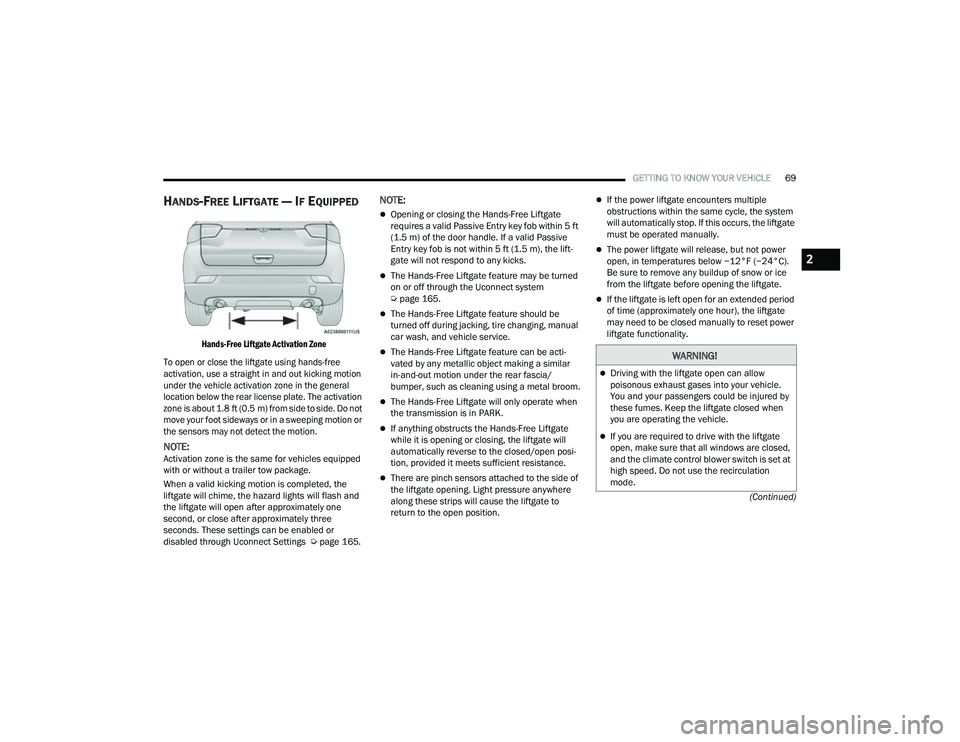
Hands-Free Liftgate Activation Zone
To open or close the liftgate using hands-free
activation, use a straight in and out kicking motion
under the vehicle activation zone in the general
location below the rear license plate. The activation
zone is about 1.8 ft (0.5 m) from side to side. Do not move your foot sideways or in a sweeping motion or
the sensors may not detect the motion.
NOTE:Activation zone is the same for vehicles equipped
with or without a trailer tow package.
When a valid kicking motion is completed, the
liftgate will chime, the hazard lights will flash and
the liftgate will open after approximately one
second, or close after approximately three
seconds. These settings can be enabled or
disabled through Uconnect Settings Ú page 165.
NOTE:
Opening or closing the Hands-Free Liftgate
requires a valid Passive Entry key fob within 5 ft
(1.5 m) of the door handle. If a valid Passive
Entry key fob is not within 5 ft (1.5 m), the lift -
gate will not respond to any kicks.
The Hands-Free Liftgate feature may be turned
on or off through the Uconnect system
Ú page 165.
The Hands-Free Liftgate feature should be
turned off during jacking, tire changing, manual
car wash, and vehicle service.
The Hands-Free Liftgate feature can be acti -
vated by any metallic object making a similar
in-and-out motion under the rear fascia/
bumper, such as cleaning using a metal broom.
The Hands-Free Liftgate will only operate when
the transmission is in PARK.
If anything obstructs the Hands-Free Liftgate
while it is opening or closing, the liftgate will
automatically reverse to the closed/open posi -
tion, provided it meets sufficient resistance.
There are pinch sensors attached to the side of
the liftgate opening. Light pressure anywhere
along these strips will cause the liftgate to
return to the open position.
If the power liftgate encounters multiple
obstructions within the same cycle, the system
will automatically stop. If this occurs, the liftgate
must be operated manually.
The power liftgate will release, but not power
open, in temperatures below −12°F (−24°C).
Be sure to remove any buildup of snow or ice
from the liftgate before opening the liftgate.
If the liftgate is left open for an extended period
of time (approximately one hour), the liftgate
may need to be closed manually to reset power
liftgate functionality.
WARNING!
Driving with the liftgate open can allow
poisonous exhaust gases into your vehicle.
You and your passengers could be injured by
these fumes. Keep the liftgate closed when
you are operating the vehicle.
If you are required to drive with the liftgate
open, make sure that all windows are closed,
and the climate control blower switch is set at
high speed. Do not use the recirculation
mode.
2
22_MP_OM_EN_USC_t.book Page 69
Page 89 of 344

GETTING TO KNOW YOUR INSTRUMENT PANEL87
Active Lane Management Warning (If
Equipped): a selection of the “readiness” of
intervention of Active Lane Management
Buzzer Volume: There are 4 options: Off, Low,
Medium, Loud
Brake Service (If Equipped): activation of the
procedure to carry out braking system mainte-
nance
Auto Park Brake (If Equipped): enable/disable
auto insertion of the Electric Park Brake
Hill Start Assist: Activation/Deactivation of the
Hill Start Assist system
Lights — If Equipped
By selecting Lights, the following adjustments can
be made:
Ambient Lights (If Equipped): adjust the sensi -
tivity of lighting in the doors and overhead
console
Lights Off Delay: set the delay for headlight
shutoff after engine shutoff
Headlight Sensitivity: adjust the sensitivity of
headlight brightness
Greeting Lights: activate the direction indicators
when unlocking the doors
Daytime Lights (If Equipped): activate/deacti -
vate the daytime running lights
Cornering Lights (If Equipped): activate/deacti-
vate the cornering lights
Auto High Beam (If Equipped): activate/deacti -
vate the automatic high beam headlights
Doors And Locks
By selecting Doors and Locks, the following
adjustments can be made:
Auto Unlock Doors: automatic unlocking of the
doors when exiting the vehicle
Lights with Lock: activate the direction indica -
tors when locking the doors
Horn With Remote Lock: activate/deactivate the
horn when pressing the lock button on the key.
The options are “Off”, “First Press”, and
“Second Press”
Horn With Remote Start (If Equipped): activate/
deactivate the horn at the Remote Starting of
the engine with the key
Door Unlock: allow you to choose whether to
unlock all the doors or only the driver’s side door
on the first push of the unlock button on the key
Auto Driver Comfort (If Equipped): activate/
deactivate automatic climate control during
vehicle starts
Key in Memory (If Equipped): activate/deacti -
vate memory linked to a key
Compass
By selecting Compass, the following settings can
be changed:
Calibration (If Equipped)
This compass is self-calibrating, which eliminates
the need to set the compass manually. When the
vehicle is new, the compass may appear erratic,
and the cluster will display dashes (- -) until the
compass is calibrated. You may also calibrate the
compass by completing one or more 360 degree
turns (in an area free from large metal or metallic
objects) until the dashes (- -) displayed in the
instrument cluster display turns off. The compass
will now function normally.
3
22_MP_OM_EN_USC_t.book Page 87
Page 105 of 344

STARTING AND OPERATING103
While cruising, brief full-throttle acceleration within
the limits of local traffic laws contributes to a good
break-in. Wide-open throttle acceleration in low
gear can be detrimental and should be avoided.
The engine oil installed in the engine at the factory
is a high-quality energy conserving type lubricant.
Oil changes should be consistent with anticipated
climate conditions under which vehicle operations
will occur. For the recommended viscosity and
quality grades Ú page 323.
NOTE:A new engine may consume some oil during its first
few thousand miles (kilometers) of operation. This
should be considered a normal part of the break-in
and not interpreted as a problem.
PARK BRAKE
ELECTRIC PARK BRAKE (EPB)
Your vehicle is equipped with an EPB system that
offers simple operation, and some additional
features that make the parking brake more
convenient and useful. The parking brake is primarily intended to prevent
the vehicle from rolling while parked. Before
leaving the vehicle, make sure that the parking
brake is applied. Also, be certain to leave the
transmission in PARK.
You can engage the parking brake in two ways:
Manually, by applying the EPB switch.
Automatically, by enabling the Auto Park Brake
feature in the Customer Programmable
Features section of the Uconnect settings
Ú
page 165.
The EPB switch is located in the center console.
Electric Park Brake Switch
To apply the parking brake manually, pull up on the
switch momentarily. You may hear a sound from
the back of the vehicle while the parking brake
engages. Once the parking brake is fully engaged,
the BRAKE warning lamp in the instrument cluster and an indicator on the switch will illuminate. If
your foot is on the brake pedal while you apply the
parking brake, you may notice a small amount of
brake pedal movement. The parking brake can be
applied even when the ignition switch is OFF. The
Brake Warning Light will not illuminate and can
only be released when the ignition switch is in the
ON/RUN position.NOTE:The EPB fault lamp will illuminate if the EPB switch
is held for longer than 60 seconds in either the
released or applied position. The light will extin
-
guish upon releasing the switch.
If the Auto Park Brake feature is enabled, the
parking brake will automatically engage whenever
the transmission is placed into PARK. If your foot is
on the brake pedal, you may notice a small amount
of brake pedal movement while the parking brake
is engaging.
The parking brake will release automatically when
the ignition switch is ON/RUN, the transmission is
in DRIVE or REVERSE, the driver’s seat belt is
buckled, and an attempt is made to drive away.
To release the parking brake manually, the ignition
switch must be in the ON/RUN position. Put your
foot on the brake pedal, then push the EPB switch
down momentarily. You may hear a sound from the
back of the car while the parking brake
disengages. You may also notice a small amount of
movement in the brake pedal. Once the parking
CAUTION!
Never use Non-Detergent Oil or Straight Mineral
Oil in the engine or damage may result.
4
22_MP_OM_EN_USC_t.book Page 103