2023 INFINITI QX60 Headlight control
[x] Cancel search: Headlight controlPage 22 of 636

1. Vent (P. 4-28)
2. Headlight/turn signal switch (P. 2-77)Instrument brightness control (P. 2-83) 3. Meters and gauges (P. 2-6)
Warning and indicator lights (P. 2-12)
Vehicle information display (P. 2-22 or
2-44) 4. Driver supplemental air bag (P. 1-54)
Horn (P. 2-84)
5. Wiper and washer switch (P. 2-73) Rear wiper and washer switch (P. 2-76)
6. Driver side heated seat switch
(if so equipped) (P. 2-85)
Driver side climate controlled seat switch
(if so equipped) (P. 2-84)
Audio system controls*
7. Center display* Navigation system* (if so equipped)
8. Heated steering wheel switch
(if so equipped) (P. 2-87)
9. Automatic heater and air conditioner
controls (P. 4-29)
10. Hazard warning flasher switch (P. 6-2)
11. Front passenger air bag status light
(P. 1-65)
12. Passenger side heated seat switch
(if so equipped) (P. 2-85)
Passenger side climate controlled seat
switch (if so equipped) (P. 2-84)
13. Front passenger supplemental air bag
(P. 1-69)
14. Front passenger supplemental knee air
bag (P. 1-72)
15. Glove box (P. 2-101)
16. Wireless charger (P. 2-97)
17. Rear window and outside mirror
defroster switch (if so equipped) (P. 2-77)
18. Shift lever (P. 5-19)
LII2702
INSTRUMENT PANEL
0-6Illustrated table of contents
Page 26 of 636

Warning/Indicator light
(yellow) Name Page
Front passenger
air bag status light 2-18
Low tire pressure
warning light (if so equipped) 2-18
Malfunction Indi-
cator Light (MIL) (if so equipped) 2-19
Master warning
light (if soequipped) 2-20
Rear Automatic
Braking (RAB)
warning light (if so equipped) 2-20
Warning/
Indicator light
(yellow) Name Page
Slip indicator light 2-20
Vehicle Dynamic
Control (VDC)
OFF indicator light 2-20
Warning/
Indicator light
(other) Name Page
Automatic brake
hold indicator light
(white/green) (if so equipped) 2-21
High Beam Assist
indicator light(green) (if so equipped) 2-21
Warning/
Indicator light
(other) Name Page
High beam indica-
tor light (blue)
(if so equipped) 2-21
Low beam indica-
tor light (green)(if so equipped) 2-21
Side light and
headlight indicator light (green) (if so equipped) 2-21
Turn signal/hazard
indicator lights(green) (if so equipped) 2-21
0-10Illustrated table of contents
Page 103 of 636

2 Instruments and controls
Instrument panel.................................2-4
Meters and gauges ..............................2-6
Speedometer and odometer ...................2-6
Tachometer ..................................2-8
Engine coolant temperature gauge ............2-9
Fuel gauge ................................. 2-10
Distance To Empty (DTE) ...................2-10
Warning lights, indicator lights and audible
reminders ....................................... 2-12
Checking lights .............................. 2-14
Warning/Indicator lights (red) ...............2-14
Warning/Indicator lights (yellow) ............2-16
Warning/Indicator lights (other) ..............2-21
Audible reminders ........................... 2-22
Vehicle information display 7 inch (18 cm) Type
A (if so equipped) .............................. 2-22
How to use the vehicle information
display ...................................... 2-23
Startup display .............................. 2-23
Trip computer .............................. 2-24
Oil control system (if so equipped) ...........2-27
Settings .................................... 2-27
Vehicle information display warnings and
indicators ................................... 2-37
Vehicle information display 12.3 inch (31 cm)
Type B (if so equipped) ......................... 2-44How to use the vehicle information
display
...................................... 2-44
Startup display .............................. 2-45
Trip computer .............................. 2-46
Changing the meter screen view .............2-49
Oil control system (if so equipped) ...........2-49
Settings .................................... 2-50
Vehicle information display warnings and
indicators ................................... 2-60
Security systems ................................ 2-71
Vehicle security system .......................2-71
INFINITI Vehicle Immobilizer System .........2-72
Wiper and washer switch ......................2-73
Switch operation ............................ 2-73
Rain-sensing auto wiper system .............2-75
Rear switch operation ....................... 2-76
Rear
window and outside mirror
(if so equipped) defroster switch .................2-77
Headlight and turn signal switch .................2-77
Headlight control switch .....................2-77
LED Daytime Running Lights (DRL)
system ..................................... 2-82
Instrument brightness control ................2-83
Turn signal switch ........................... 2-83
Horn .......................................... 2-84
Page 106 of 636

1. Vent (P. 4-28)
2. Headlight/turn signal switch (P. 2-77)Instrument brightness control (P. 2-83) 3. Meters and gauges (P. 2-6)
Warning and indicator lights (P. 2-12)
Vehicle information display (P. 2-22 or
2-44) 4. Driver supplemental air bag (P. 1-54)
Horn (P. 2-84)
5. Wiper and washer switch (P. 2-73) Rear wiper and washer switch (P. 2-76)
6. Driver side heated seat switch
(if so equipped) (P. 2-85)
Driver side climate controlled seat switch
(if so equipped) (P. 2-84)
Audio system controls*
7. Center display* Navigation system* (if so equipped)
8. Heated steering wheel switch
(if so equipped) (P. 2-87)
9. Automatic heater and air conditioner
controls (P. 4-29)
10. Hazard warning flasher switch (P. 6-2)
11. Front passenger air bag status light
(P. 1-65)
12. Passenger side heated seat switch
(if so equipped) (P. 2-85)
Passenger side climate controlled seat
switch (if so equipped) (P. 2-84)
13. Front passenger supplemental air bag
(P. 1-69)
14. Front passenger supplemental knee air
bag (P. 1-72)
15. Glove box (P. 2-101)
16. Wireless charger (P. 2-97)
17. Rear window and outside mirror
defroster switch (if so equipped) (P. 2-77)
18. Shift lever (P. 5-19)
LII2702
INSTRUMENT PANEL
2-4Instruments and controls
Page 114 of 636

Warning/Indicator light (red)Warning/Indicator light (yellow) Warning/Indicator light (other)
orBrake warning lightorAnti-lock Braking System (ABS)
warning lightAutomatic brake hold indicator light
(white/green) (if so equipped)
Charge warning lightElectric power steering warning lightHigh Beam Assist indicator light (green)
(if so equipped)
Electric shift control system warning light
(if so equipped)Electronic parking brake warning light
(if so equipped)High beam indicator light (blue)
(if so equipped)
orElectronic parking brake
indicator lightForward Emergency Braking (FEB) with
Pedestrian Detection system warning lightLow beam indicator light (green)
(if so equipped)
Engine oil pressure warning light
(if so equipped)Front passenger air bag status lightSide light and headlight indicator light
(green) (if so equipped)
Master warning light (if so equipped)Low tire pressure warning light
(if so equipped)Turn signal/hazard indicator lights (green)
(if so equipped)
Seat belt warning light (if so equipped)Malfunction Indicator Light (MIL)
(if so equipped)
WARNING LIGHTS, INDICATOR
LIGHTS AND AUDIBLE REMINDERS
2-12Instruments and controls
Page 123 of 636

Enable the VDC system in the vehicle infor-
mation display again or restart the engine and
the system will be reactivated. For additional
information, see “Vehicle Dynamic Control
(VDC) system” (P. 5-168).
The VDC light also comes on when the igni-
tion switch is placed in the ON position. The
light will turn off after about 2 seconds if the
system is operational. If the light stays on or
comes on along with the
indicator light
while you are driving, have the VDC system
checked. It is recommended that you visit an
INFINITI retailer for this service.
WARNING
VDC should remain on unless freeing a ve-
hicle from mud or snow.
While the VDC system is operating, you
might feel a slight vibration or hear the sys-
tem working when starting the vehicle or ac-
celerating, but this is normal.
WARNING/INDICATOR LIGHTS
(other)
For additional information on warnings and
indicators, see “Vehicle information display–7
inch (18 cm) Type A” (P. 2-22) or “Vehicle
information display—12.3 inch (31 cm) Type
B” (P. 2-44).
Automatic brake hold
indicator light (white/green)
(if so equipped)
The automatic brake hold indicator light
(white) illuminates when the automatic brake
hold system is on standby.
The automatic brake hold indicator light
(green) illuminates when the automatic brake
hold system is operating.
For additional information, see “Automatic
brake hold” (P. 5-27).
High Beam Assist indicator
light (green) (if so equipped)
This indicator light illuminates when the
headlights come on while the headlight
switch is in the AUTO position with the high
beams selected. This indicates that the high
beam assist is operational.
For additional information, see “Headlight
and turn signal switch” (P. 2-77).
High beam indicator light
(blue) (if so equipped)
This blue light comes on when the headlight
high beams are on and goes out when the
low beams are selected. The high beam indicator light also comes on
when the passing signal is activated.
Low beam indicator light
(green) (if so equipped)
This light comes on when the switch is turned
to theposition. The headlights will come
on; and the front side, tail, number plate, and
instrument lights remain on.
Side light and headlight
indicator light (green) (if so
equipped)
The side light and headlight indicator light
illuminates when the side light or headlight
position is selected. For additional informa-
tion, see “Headlight and turn signal switch”
(P. 2-77).
Turn signal/hazard indicator
lights (green) (if so equipped)
The appropriate light flashes when the turn
signal switch is activated.
Both lights flash when the hazard switch is
turned on.
Instruments and controls2-21
Page 124 of 636

AUDIBLE REMINDERS
Brake pad wear warning
The disc brake pads have audible wear warn-
ings. When a disc brake pad requires replace-
ment, it makes a high pitched scraping sound
when the vehicle is in motion, whether or not
the brake pedal is depressed. Have the brakes
checked as soon as possible if the warning
sound is heard.
Lane Departure Warning (LDW)
and Lane Departure Prevention
(LDP) warning chime (if so
equipped)
When the LDW or LDP system is on, the
chime sounds if the vehicle is traveling close
to either the left or the right of a traveling
lane with detectable lane markers.
For additional information, see “Lane Depar-
ture Warning (LDW) system” (P. 5-36) or
“Lane Departure Prevention (LDP) system”
(P. 5-43).
Light reminder chime
With the ignition switch placed in the OFF
position, a chime sounds when the driver's
door is opened if the headlights or parking
lights are on.
Turn the headlight control switch off before
leaving the vehicle.
Door lock warning chime
When the chime sounds, be sure to check
both the vehicle and the Intelligent Key.
For additional information, see “Trouble-
shooting guide” (P. 3-16).The vehicle information display is located to
the left of the speedometer. It displays such
items as:
• Vehicle settings
• Indicators and warnings
• Information/warning messages
• Tire pressure information
• Drive computer information
• Cruise control system information
• Driving Aids (if so equipped)
• ProPILOT Assist (if so equipped)
• INFINITI Intelligent Key operationinformation
LIC3224
VEHICLE INFORMATION DISPLAY 7
INCH (18 cm) TYPE A (if so equipped)
2-22Instruments and controls
Page 133 of 636
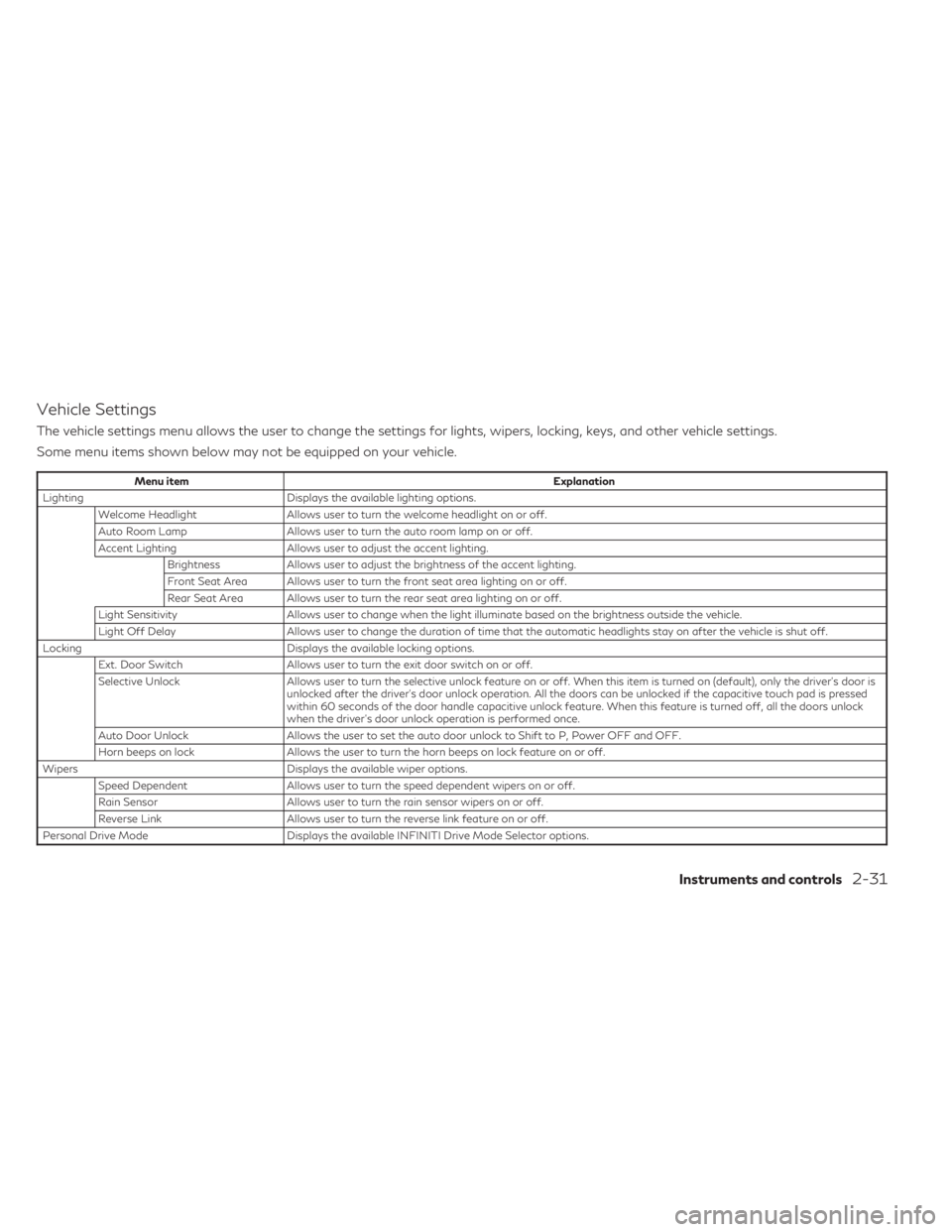
Vehicle Settings
The vehicle settings menu allows the user to change the settings for lights, wipers, locking, keys, and other vehicle settings.
Some menu items shown below may not be equipped on your vehicle.
Menu itemExplanation
Lighting Displays the available lighting options.
Welcome Headlight Allows user to turn the welcome headlight on or off.
Auto Room Lamp Allows user to turn the auto room lamp on or off.
Accent Lighting Allows user to adjust the accent lighting.
Brightness Allows user to adjust the brightness of the accent lighting.
Front Seat Area Allows user to turn the front seat area lighting on or off.
Rear Seat Area Allows user to turn the rear seat area lighting on or off.
Light Sensitivity Allows user to change when the light illuminate based on the brightness outside the vehicle.
Light Off Delay Allows user to change the duration of time that the automatic headlights stay on after the vehicle is shut off.
Locking Displays the available locking options.
Ext. Door Switch Allows user to turn the exit door switch on or off.
Selective Unlock Allows user to turn the selective unlock feature on or off. When this item is turned on (default), only the driver’s door is
unlocked after the driver’s door unlock operation. All the doors can be unlocked if the capacitive touch pad is pressed
within 60 seconds of the door handle capacitive unlock feature. When this feature is turned off, all the doors unlock
when the driver’s door unlock operation is performed once.
Auto Door Unlock Allows the user to set the auto door unlock to Shift to P, Power OFF and OFF.
Horn beeps on lock Allows the user to turn the horn beeps on lock feature on or off.
Wipers Displays the available wiper options.
Speed Dependent Allows user to turn the speed dependent wipers on or off.
Rain Sensor Allows user to turn the rain sensor wipers on or off.
Reverse Link Allows user to turn the reverse link feature on or off.
Personal Drive Mode Displays the available INFINITI Drive Mode Selector options.
Instruments and controls2-31