2023 INFINITI QX60 lock
[x] Cancel search: lockPage 78 of 636

Booster seats of various sizes are offered by
several manufacturers. When selecting any
booster seat, keep the following points in
mind:
• Choose only a booster seat with a labelcertifying that it complies with Federal Mo-
tor Vehicle Safety Standard 213 or Cana-
dian Motor Vehicle Safety Standard 213.
• Check the booster seat in your vehicle to be sure it is compatible with the vehicle’s seat
and seat belt system. • Make sure the child’s head will be properly
supported by the booster seat or vehicle
seat. The seatback must be at or above the
center of the child’s ears. For example, if a
low back booster seat is chosen, the vehicle
seatback must be at or above the center of
the child’s ears. If the seatback is lower than
the center of the child’s ears, a high back
booster seat should be used.
• If the booster seat is compatible with your vehicle, place the child in the booster seat
and check the various adjustments to be
sure the booster seat is compatible with the
child. Always follow all recommended
procedures. All U.S. states and Canadian provinces or
territories require that infants and small
children be restrained in an approved child
restraint at all times while the vehicle is be-
ing operated.
The instructions in this section apply to
booster seat installation in the rear seats or
the front passenger seat.
Booster seat installation
WARNING
To avoid injury to child, do not use the lap/
shoulder belt in the Automatic Locking Re-
tractor (ALR) mode when using a booster
seat with the seat belts.
For additional information, see “Child safety”
(P. 1-25), “Child restraints” (P. 1-28) and
“Booster seats” (P. 1-51) before installing a
child restraint.
Follow these steps to install a booster seat in
the 2nd or 3rd rows or in the front passenger
seat:
LRS0453LRS0464
1-52Safety-Seats, seat belts and supplemental restraint system
Page 94 of 636

Steps
1. Adjust the seat as outlined in “Seats”(P. 1-2). Sit upright, leaning against the
seatback, and centered on the seat cush-
ion with your feet comfortably extended
to the floor.
2. Make sure there are no objects on your lap.
3. Fasten the seat belt as outlined in “Seat belts” (P. 1-17). Front passenger seat belt
buckle status is monitored by the occu-
pant classification system, and is used as
an input to determine occupancy status.
So, it is highly recommended that the
front passenger fasten their seat belt.
4. Remain in this position for 30 seconds allowing the system to classify the front
passenger before the vehicle is put into
motion.
5. Ensure proper classification by checking the front passenger air bag status light.NOTE:
This vehicle’s occupant classification sensor
system generally keeps the classification
locked during driving, so it is important that
you confirm that the front passenger is
properly classified prior to driving. However,
the occupant classification sensor may re-
calculate the weight of the occupant under
some conditions (both while driving and
when stopped), so front passenger seat oc-
cupants should continue to remain seated as
outlined above.
Troubleshooting
If you think the front passenger air bag status
light is incorrect:
1. If the light is ON with an adult occupyingthe front passenger seat:
• Occupant is a small adult — the front pas- senger air bag status light is functioning as
intended. The front passenger air bag and
front passenger supplemental knee air bag
are suppressed.
However, if the occupant is not a small adult,
then this may be due to the following condi-
tions that may be interfering with the weight
sensors: • Occupant is not sitting upright, leaning
against the seatback, and centered on the
seat cushion with his/her feet comfortably
extended to the floor.
• A child restraint or other object pressing against the rear of the seatback.
• A rear passenger pushing or pulling on the back of the front passenger seat.
• Forcing the front seat or seatback against an object on the seat or floor behind it.
• An object placed under the front passenger seat.
• An object placed between the seat cushion and center console or between the seat
cushion and the door.
If the vehicle is moving, please come to a stop
when it is safe to do so. Check and correct
any of the above conditions. Restart the ve-
hicle and wait 1 minute.
NOTE:
A system check will be performed during
which the front passenger air bag status
light will remain lit for about 7 seconds
initially.
1-68Safety-Seats, seat belts and supplemental restraint system
Page 101 of 636

SUPPLEMENTAL AIR BAG
WARNING LIGHT
The supplemental air bag warning light, dis-
playingin the instrument panel, moni-
tors the circuits for the air bag systems, pre-
tensioner(s) and all related wiring. When the
ignition switch is placed in the ON position,
the supplemental air bag warning light illumi-
nates for about 7 seconds and then turns
OFF. This means the system is operational. If any of the following conditions occur, the
front air bag, side air bag, knee air bag, cur-
tain air bag and pretensioner systems need
servicing:
• The supplemental air bag warning light re-
mains on after approximately 7 seconds.
• The supplemental air bag warning light does not come on at all.
Under these conditions, the front air bag, side
air bag, knee air bag, curtain air bag or pre-
tensioner systems may not operate properly.
They must be checked and repaired. It is rec-
ommended that you visit an INFINITI retailer
for this service.
WARNING
If the supplemental air bag warning light is
on, it could mean that the front air bag, side
air bag, knee air bag, curtain air bag and/or
pretensioner systems will not operate in an
accident. To help avoid injury to yourself or
others, have your vehicle checked as soon
as possible. It is recommended that you
visit an INFINITI retailer for this service.
Repair and replacement procedure
The front air bags, side air bags, knee air
bags, curtain air bags and pretensioner(s) are
designed to inflate on a one-time-only basis.
As a reminder, unless it is damaged, the
supplemental air bag warning light remains
illuminated after inflation has occurred.
These systems should be repaired and/or re-
placed as soon as possible. It is recom-
mended that you visit an INFINITI retailer for
this service.
When maintenance work is required on the
vehicle, the front air bags, side air bags, knee
air bags, curtain air bags, pretensioner(s) and
related parts should be pointed out to the
person performing the maintenance. The ig-
nition switch should always be in the LOCK
position when working under the hood or
inside the vehicle.
LRS0100
Safety-Seats, seat belts and supplemental restraint system1-75
Page 114 of 636

Warning/Indicator light (red)Warning/Indicator light (yellow) Warning/Indicator light (other)
orBrake warning lightorAnti-lock Braking System (ABS)
warning lightAutomatic brake hold indicator light
(white/green) (if so equipped)
Charge warning lightElectric power steering warning lightHigh Beam Assist indicator light (green)
(if so equipped)
Electric shift control system warning light
(if so equipped)Electronic parking brake warning light
(if so equipped)High beam indicator light (blue)
(if so equipped)
orElectronic parking brake
indicator lightForward Emergency Braking (FEB) with
Pedestrian Detection system warning lightLow beam indicator light (green)
(if so equipped)
Engine oil pressure warning light
(if so equipped)Front passenger air bag status lightSide light and headlight indicator light
(green) (if so equipped)
Master warning light (if so equipped)Low tire pressure warning light
(if so equipped)Turn signal/hazard indicator lights (green)
(if so equipped)
Seat belt warning light (if so equipped)Malfunction Indicator Light (MIL)
(if so equipped)
WARNING LIGHTS, INDICATOR
LIGHTS AND AUDIBLE REMINDERS
2-12Instruments and controls
Page 119 of 636

orAnti-lock Braking
System (ABS)
warning light
When the ignition switch is placed in the ON
position, the ABS warning light illuminates
and then turns off. This indicates the ABS is
operational.
If the ABS light comes on while the engine is
running, it may indicate the anti-lock braking
system is not functioning properly. Have the
system checked. It is recommended that you
visit an INFINITI retailer for this service.
If an ABS malfunction occurs, the anti-lock
function is turned off. The brake system then
operates normally, but without anti-lock as-
sistance. For additional information, see
“Brake system” (P. 5-165).
Electric power steering
warning light
WARNING
• If the engine is not running or is turned
off while driving, the power assist for the
steering will not work. Steering will be
harder to operate. •
When the electric power steering
warning light illuminates with the engine
running, there will be no power assist for
the steering. You will still have control of
the vehicle but the steering will be harder
to operate. Have the power steering sys-
tem checked. It is recommended that you
visit an INFINITI retailer for this service.
When the ignition switch is placed in the ON
position, the electric power steering warning
light illuminates. After starting the engine, the
electric power steering warning light turns
off. This indicates that the electric power
steering system is operational.
If the electric power steering warning light
illuminates while the engine is running, it may
indicate the power steering system is not
functioning properly and may need servicing.
Have the hydraulic pump electric power
steering system checked. It is recommended
that you visit an INFINITI retailer for this
service.
When the electric power steering warning
light illuminates with the engine running,
there will be no power assist for the steering
but you will still have control of the vehicle. At
this time, greater steering effort is required to
operate the steering wheel, especially in
sharp turns and at low speeds. For additional information, see “Power steer-
ing” (P. 5-164).
Electronic parking brake
warning light (if so equipped)
When the ignition switch is in the ON posi-
tion, the electronic parking brake warning
light illuminates and then turns off.
The electronic parking brake system warning
light functions for the electronic parking
brake system. If the warning light illuminates,
it may indicate the electronic parking brake
system is not functioning properly. Have the
system checked. It is recommended that you
visit an INFINITI retailer for this service.
For additional information, see “Parking
brake” (P. 5-25).
Forward Emergency Braking
(FEB) with Pedestrian
Detection system warning
light
This light comes on when the ignition switch
is placed in the ON position. It turns off after
the engine is started.
This light illuminates when the FEB with Pe-
destrian Detection system or the Predictive
Instruments and controls2-17
Page 124 of 636

AUDIBLE REMINDERS
Brake pad wear warning
The disc brake pads have audible wear warn-
ings. When a disc brake pad requires replace-
ment, it makes a high pitched scraping sound
when the vehicle is in motion, whether or not
the brake pedal is depressed. Have the brakes
checked as soon as possible if the warning
sound is heard.
Lane Departure Warning (LDW)
and Lane Departure Prevention
(LDP) warning chime (if so
equipped)
When the LDW or LDP system is on, the
chime sounds if the vehicle is traveling close
to either the left or the right of a traveling
lane with detectable lane markers.
For additional information, see “Lane Depar-
ture Warning (LDW) system” (P. 5-36) or
“Lane Departure Prevention (LDP) system”
(P. 5-43).
Light reminder chime
With the ignition switch placed in the OFF
position, a chime sounds when the driver's
door is opened if the headlights or parking
lights are on.
Turn the headlight control switch off before
leaving the vehicle.
Door lock warning chime
When the chime sounds, be sure to check
both the vehicle and the Intelligent Key.
For additional information, see “Trouble-
shooting guide” (P. 3-16).The vehicle information display is located to
the left of the speedometer. It displays such
items as:
• Vehicle settings
• Indicators and warnings
• Information/warning messages
• Tire pressure information
• Drive computer information
• Cruise control system information
• Driving Aids (if so equipped)
• ProPILOT Assist (if so equipped)
• INFINITI Intelligent Key operationinformation
LIC3224
VEHICLE INFORMATION DISPLAY 7
INCH (18 cm) TYPE A (if so equipped)
2-22Instruments and controls
Page 125 of 636
• Audio information
• Compass and navigation information (if soequipped)
• Shift position
• Distance to empty
• Odometer
• Clock and outside temperature
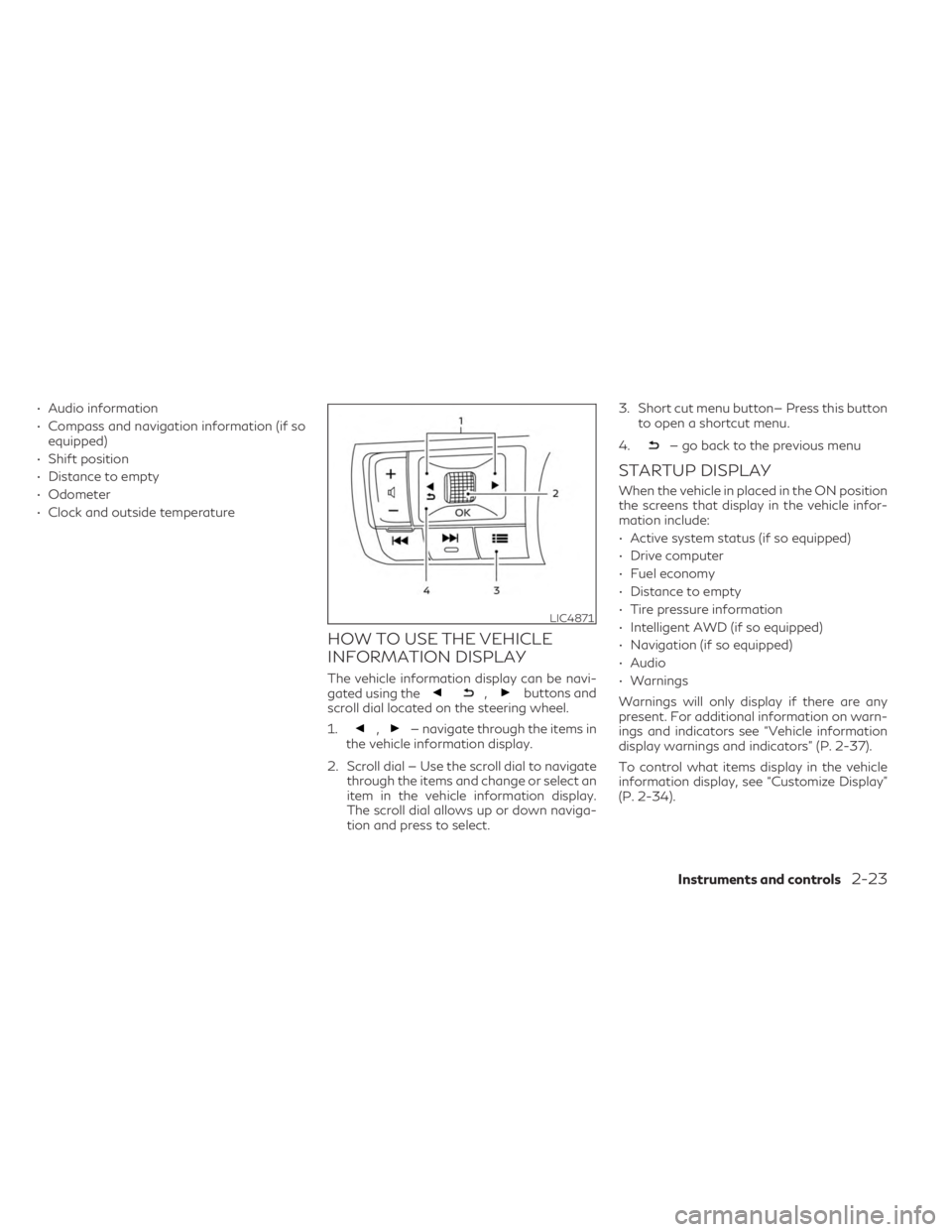
HOW TO USE THE VEHICLE
INFORMATION DISPLAY
The vehicle information display can be navi-
gated using the,buttons and
scroll dial located on the steering wheel.
1.
,— navigate through the items in
the vehicle information display.
2. Scroll dial — Use the scroll dial to navigate through the items and change or select an
item in the vehicle information display.
The scroll dial allows up or down naviga-
tion and press to select. 3. Short cut menu button— Press this button
to open a shortcut menu.
4.
— go back to the previous menu
STARTUP DISPLAY
When the vehicle in placed in the ON position
the screens that display in the vehicle infor-
mation include:
• Active system status (if so equipped)
• Drive computer
• Fuel economy
• Distance to empty
• Tire pressure information
• Intelligent AWD (if so equipped)
• Navigation (if so equipped)
• Audio
• Warnings
Warnings will only display if there are any
present. For additional information on warn-
ings and indicators see “Vehicle information
display warnings and indicators” (P. 2-37).
To control what items display in the vehicle
information display, see “Customize Display”
(P. 2-34).
LIC4871
Instruments and controls2-23
Page 129 of 636

14. Idling Stop System
The Idling Stop System provides the driver
with information about the amount of fuel
saved while using the system.
For additional information, see “Idling Stop
System” (P. 5-178).
OIL CONTROL SYSTEM (if so
equipped)
The oil control system can be accessed in the
Maintenance portion of the vehicle informa-
tion display settings.
Engine oil information informs the distance
to oil change. Never exceed one year or
10,000 miles (16,000 km) between oil
change intervals for the 3.5L 6 cylinder
(VQ35DD engine model).
Display when
ignition is ONDisplay timing Action Required
Engine Oil Ser-
vice due in xxx
miles Remaining oil
life is less than
940 miles
(1500 km). Plan to have
your vehicle
serviced.
Engine Oil Ser-
vice due Remaining oil
life is 0 miles (0
km). Have your ve-
hicle serviced
within two
weeks or less
than 500 miles
(800 km).
The oil change interval cannot be adjusted
manually.
The distance to oil change interval is calcu-
lated depending on the driving conditions and
set automatically by the oil control system. A
reminder will be displayed when approaching
the end of the service interval.
When the Factory Reset option is selected in
the vehicle information display, the oil control
system will also be reset to initial value.
Please change the engine oil when Factory
Reset is selected.
CAUTION
If the oil replacement indicator is displayed,
change the engine oil within two weeks or
less than 500 miles (800 km).
Operating the vehicle with deteriorated oil
can damage the engine.
To reset oil control system:
1. Place the ignition switch in the ON position.
2. Push the
andbuttons located
on the steering wheel until “Settings” dis-
plays in the vehicle information display.
Use the scroll dial to select “Maintenance”.
Then, press the scroll dial. 3. Select “Service” and press the scroll dial.
4. Press the scroll dial according to the reset
instructions displayed at the bottom of
the “Service” maintenance screen.
For additional information, see “Mainte-
nance” (P. 2-33).
SETTINGS
The setting mode allows you to change the
information displayed in the vehicle informa-
tion display:
• VDC Setting
• Driver Assistance
• ECO Mode Setting
• TPMS Setting
• Clock
• Vehicle Settings
• Maintenance
• Customize Display
• Unit/Language
• Key-Linked Settings (if so equipped)
• Factory Reset
Instruments and controls2-27