2023 INFINITI QX60 oil
[x] Cancel search: oilPage 266 of 636

• Close the sunshade (if so equipped) whenthe Smart Rear View Mirror display screen
is unclear due to the strong external light.
• When LED headlights are viewed on the Smart Rear View Mirror display, the im-
ages may flicker. This is normal.
• Due to diffuse reflection from external en- vironment, images on the screen may
flicker. This is not a malfunction.
• A quick movement of an object may not be able to display on the camera view screen.
This is not a malfunction.
• Turn on the headlights at twilight or in a tunnel, etc.
• The Smart Rear View Mirror mode (cam- era view mode) display is different from
the conventional rearview mirror. Objects
in the display may differ from actual dis-
tance. Do not solely rely on the Smart Rear
View Mirror. Always rely on your own op-
eration to avoid accidents.
• Eyestrain may occur if he brightness of the camera view display is adjusted to an ex-
cessively bright level. Adjust the bright-
ness properly to avoid eyestrain. • Use the rear window wiper when it rains. If
the camera view image is still unclear when
the rear window wiper is in operation,
check the deterioration of the rear win-
dow wiper blade.
• When using the rear window wiper, image on the screen may flicker. This is not a
malfunction.
• Defog rear window with defroster when rear window is fogged. Use the conven-
tional rearview mirror mode until the rear
window is fully defogged.
• The display of the Smart Rear View Mirror may become hot. This is not a malfunction.
• The color of an object in the distance or in the dark may be difficult to recognize. This
is not a malfunction.
System maintenance (Smart Rear View Mir-
ror):
• Always keep the mirror and camera area of the rear window clean.
• Clean the mirror and the camera lens with dry soft cloth.
• When cleaning the camera area of the rear window, use a soft cloth dampened with a
little neutral detergent. Dry with a soft
cloth. • If the image on the Smart Rear View Mirror
display screen is still unclear even after
cleaning the camera area of the rear win-
dow, an oil film may be adhering to the rear
window glass. Clean the rear window glass
with an oil film remover.
• Never use alcohol, benzine, thinner, or any similar material to clean the mirror or cam-
era lens. It will cause a discoloration, dete-
rioration or a system malfunction.
• Do not attach a sticker (including transpar- ent material) on the camera area of the rear
window.
3-40Pre-driving checks and adjustments
Page 306 of 636

•Heated 2nd row seat switches (if so
equipped) For additional information, see
“Heated 2nd row seat switches” (P. 2-86).
• Air flow control buttons controls air flow
and selects the air outlet.
• AUTO button Turns rear automatic air
conditioning system on, AUTO mode on.
• Temperature
increase andde-
crease buttons Adjusts the rear tempera-
ture up or down. The air conditioner system in your INFINITI
vehicle is charged with a refrigerant designed
with the environment in mind.
This refrigerant does not harm the earth's
ozone layer.
Special charging equipment and lubricant is
required when servicing your INFINITI air
conditioner. Using improper refrigerants or
lubricants will cause severe damage to your
air conditioner system. For additional infor-
mation, see “Air conditioner system refriger-
ant and oil recommendations” (P. 10-7).
It is recommended that you visit an INFINITI
retailer to service your “environmentally
friendly” air conditioner system.
WARNING
The air conditioner system contains refrig-
erant under high pressure. To avoid per-
sonal injury, any air conditioner service
should be done only by an experienced
technician with proper equipment. The vehicle is equipped with a shark fin an-
tenna and an antenna pattern is printed in-
side the rear window.
CAUTION
• Do not place metalized film near the rear
window glass or attach any metal parts
to it. This may cause poor reception or
noise.
• When cleaning the inside of the rear win-
dow, be careful not to scratch or damage
the rear window antenna. Lightly wipe
along the antenna with a dampened soft
cloth.
SERVICING AIR CONDITIONER ANTENNA
4-36Monitor, climate, audio, phone and voice recognition systems
Page 324 of 636

FCC Notice:
For USA:
This device complies with Part 15 of the FCC
Rules. Operation is subject to the following
two conditions: (1) This device may not
cause harmful interference, and (2) this de-
vice must accept any interference received,
including interference that may cause unde-
sired operation.
NOTE:
Changes or modifications not expressly ap-
proved by the party responsible for compli-
ance could void the user’s authority to oper-
ate the equipment.
For Canada:
This device contains licence-exempt
transmitter(s)/receiver(s) that comply with
Innovation, Science and Economic Develop-
ment Canada’s licence-exempt RSS(s). Op-
eration is subject to the following two con-
ditions: (1) This device may not cause
interference. (2) This device must accept any
interference, including interference that
may cause undesired operation of the
device.• Make sure the area around the vehicle is
clear.
• Check fluid levels such as engine oil, cool- ant, brake fluid, and windshield-washer
fluid as frequently as possible, or at least
whenever you refuel.
• Check that all windows and lights are clean.
• Visually inspect tires for their appearance and condition. Also check tires for proper
inflation.
• Check that all doors are closed.
• Position seat and adjust head restraints/headrests.
• Adjust inside and outside mirrors.
• Fasten seat belts and ask all passengers to do likewise.
• Check the operation of warning lights when the ignition switch is placed in the ON
position. For additional information, see
“Warning lights, indicator lights and audible
reminders” (P. 2-12). 1. Apply the parking brake.
2. Confirm that the vehicle is in the P (Park)
position.
The starter is designed not to operate if
the shift lever is in any of the driving
positions.
3. Push the ignition switch to the ON posi- tion. Depress the brake pedal and push
the ignition switch to start the engine.
To start the engine immediately, push and
release the ignition switch while depress-
ing the brake pedal with the ignition
switch in any position.
• If the engine is very hard to start in extremely cold weather or when re-
starting, depress the accelerator pedal a
little (approximately 1/3 to the floor)
and while holding, crank the engine. Re-
lease the accelerator pedal when the
engine starts.
• If the engine is very hard to start be- cause it is flooded, depress the accel-
erator pedal all the way to the floor and
hold it. Push the ignition switch to the
ON position to start cranking the en-
gine. After 5 or 6 seconds, stop cranking
by pushing the ignition switch to the
LOCK position. After cranking the en-
gine, release the accelerator pedal.
BEFORE STARTING THE ENGINE STARTING THE ENGINE
5-16Starting and driving
Page 422 of 636

If the driver does not operate the steering
wheel after the warning has been displayed,
an audible alert sounds and the warning
flashes in the vehicle information display, fol-
lowed by a quick brake application to request
the driver to take control of the vehicle again.
If the driver still does not respond, the ProPI-
LOT Assist turns on the hazard flasher and
slows the vehicle to a complete stop.
The driver can cancel the deceleration at any
time by steering, braking, accelerating, or op-
erating the ProPILOT Assist switch.
WARNING
Steering Assist is not a system for hands-
free driving. Always keep your hands on
the steering wheel and drive your vehicle
safely. Failure to do so could cause a colli-
sion resulting in serious personal injury or
death.
NOTE:
If the driver lightly touches (instead of firmly
grips) the steering wheel, the steering
torque sensor may not detect the driver’s
hand(s) on the wheel and a sequence of
warnings may occur. When the driver holds
and operates the steering wheel again, the
warnings turn off.
Steering Assist limitations
WARNING
• In the following situations, the camera
may not detect lane markers correctly or
may detect lane markers incorrectly and
the Steering Assist may not operate
properly:
– When driving on roads where there
are multiple parallel lane markers,
lane markers that are faded or not
painted clearly, nonstandard lane
markers, or lane markers covered
with water, dirt, snow, etc.
– When driving on roads with discon-
tinued lane markers
– When driving on roads with a widen-
ing or narrowing lane width
– When driving on roads where there
are multiple lanes or unclear lane
markers due to road construction
– When driving on roads where there
are sharply contrasting objects, such
as shadows, snow, water, wheel ruts,
seams, or lines remaining after road
repairs (the Steering Assist could de-
tect these items as lane markers)
– When driving on roads where the
traveling lane merges or separates •
Do not use the Steering Assist under the
following conditions because the system
may not properly detect lane markers.
Doing so could cause a loss of vehicle
control and result in an accident.
– During bad weather (rain, fog, snow,
dust, etc.)
– When rain, snow, sand, etc., is thrown
up by the wheels of other vehicles
– When dirt, oil, ice, snow, water, or an-
other object adheres to the camera
unit
– When the lens of the camera unit is
foggy
– When strong light (for example, sun-
light or high beams from oncoming
vehicles) shines on the camera
– When the headlights are not bright
due to dirt on the lens or the head-
lights are off in tunnels or darkness
– When a sudden change in brightness
occurs (for example, when the vehicle
enters or exits a tunnel or is under a
bridge)
–
When driving on roads where the trav- eling lane merges or separates or
where there are temporary lane mark-
ers because of road construction
5-114Starting and driving
Page 468 of 636

Follow these easy-to-use Fuel Efficient Driv-
ing Tips to help you achieve the most fuel
economy from your vehicle.
1.Use Smooth Accelerator and Brake Pedal
Application
• Avoid rapid starts and stops.
• Use smooth, gentle accelerator and brake application whenever possible.
• Maintain constant speed while com- muting and coast whenever possible.
2. Maintain Constant Speed
• Look ahead to try and anticipate and minimize stops.
• Synchronizing your speed with traffic lights allows you to reduce your number
of stops.
• Maintaining a steady speed can mini- mize red light stops and improve fuel
efficiency.
3. Use Air Conditioning (A/C) at Higher Ve-
hicle Speeds
• Below 40 mph (64 km/h), it is more efficient to open windows to cool the
vehicle due to reduced engine load.
• Above 40 mph (64 km/h), it is more efficient to use A/C to cool the vehicle
due to increased aerodynamic drag. • Recirculating the cool air in the cabin
when the A/C is on reduces cooling
load.
4. Drive at Economical Speeds and
Distances
• Observing the speed limit and not ex- ceeding 60 mph (97 km/h) (where le-
gally allowed) can improve fuel effi-
ciency due to reduced aerodynamic
drag.
• Maintaining a safe following distance behind other vehicles reduces unneces-
sary braking.
• Safely monitoring traffic to anticipate changes in speed permits reduced brak-
ing and smooth acceleration changes.
• Select a gear range suitable to road conditions.
5. Use Cruise Control
• Using cruise control during highway driving helps maintain a steady speed.
• Cruise control is particularly effective in providing fuel savings when driving on
flat terrains.
6. Plan for the Shortest Route
• Utilize a map or navigation system to determine the best route to save time. 7.
Avoid Idling
• Shutting off your engine when safe for stops exceeding 30–60 seconds saves
fuel and reduces emissions.
8. Buy an Automated Pass for Toll Roads
• Automated passes permit drivers to use special lanes to maintain cruising speed
through the toll and avoid stopping and
starting.
9. Winter Warm Up
• Limit idling time to minimize impact to fuel economy.
• Vehicles typically need no more than 30 seconds of idling at start-up to effec-
tively circulate the engine oil before
driving.
• Your vehicle will reach its ideal operat- ing temperature more quickly while driv-
ing versus idling.
10. Keeping your Vehicle Cool
• Park your vehicle in a covered parking area or in the shade whenever possible.
• When entering a hot vehicle, opening the windows will help to reduce the in-
side temperature faster, resulting in re-
duced demand on your A/C system.
FUEL EFFICIENT DRIVING TIPS
5-160Starting and driving
Page 469 of 636
• Keep your engine tuned up.
• Follow the recommended scheduledmaintenance.
• Keep the tires inflated to the correct pres- sure. Low tire pressure increases tire wear
and lowers fuel economy.
• Keep all the wheels in correct alignment. Improper alignment increases tire wear and
lowers fuel economy.
• Use the recommended viscosity engine oil. For additional information, see “Engine oil
and oil filter recommendations” (P. 10-6).
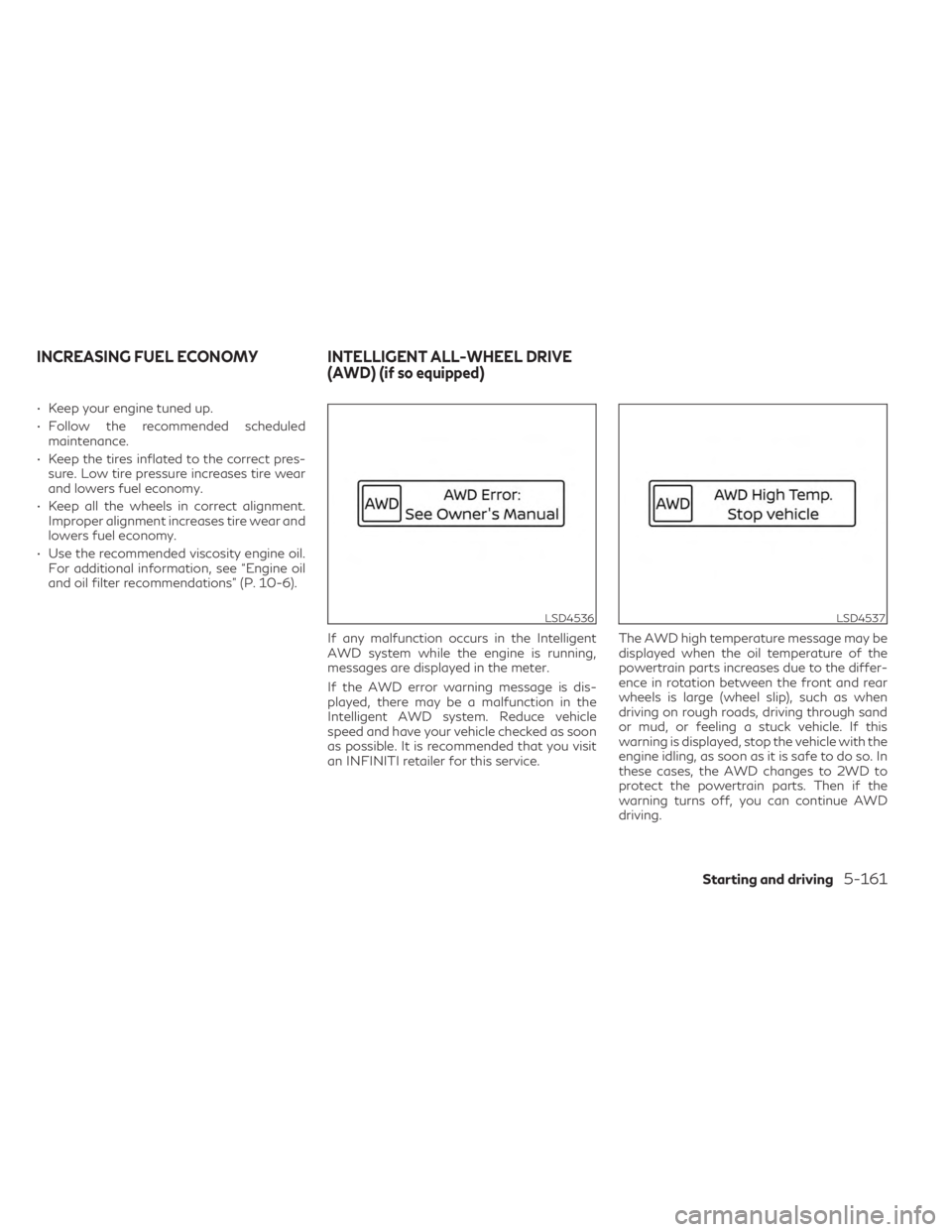
If any malfunction occurs in the Intelligent
AWD system while the engine is running,
messages are displayed in the meter.
If the AWD error warning message is dis-
played, there may be a malfunction in the
Intelligent AWD system. Reduce vehicle
speed and have your vehicle checked as soon
as possible. It is recommended that you visit
an INFINITI retailer for this service. The AWD high temperature message may be
displayed when the oil temperature of the
powertrain parts increases due to the differ-
ence in rotation between the front and rear
wheels is large (wheel slip), such as when
driving on rough roads, driving through sand
or mud, or feeling a stuck vehicle. If this
warning is displayed, stop the vehicle with the
engine idling, as soon as it is safe to do so. In
these cases, the AWD changes to 2WD to
protect the powertrain parts. Then if the
warning turns off, you can continue AWD
driving.
LSD4536LSD4537
INCREASING FUEL ECONOMY INTELLIGENT ALL-WHEEL DRIVE
(AWD) (if so equipped)
Starting and driving5-161
Page 501 of 636

CAUTION
• Make sure safety cable is coiled above
spare tire when reinstalling spare
tire/wheel.
• When re-installing the spare tire under
the vehicle after use, be sure to secure it
with the tire stem facing down toward
the ground. If the spare tire is improperly
secured with the stem facing up towards
the bottom of the vehicle, there is an in-
creased risk of separating from the ve-
hicle in the event of a crash which may
pose a hazard in traffic or risk of injury to
others.
LCE2488
In case of emergency6-7
Page 506 of 636

4. Lower the vehicle slowly until the tiretouches the ground. Then, with the wheel
nut wrench, tighten the wheel nuts se-
curely in the sequence illustrated (
OA,OB,
OC,OD,OE). Lower the vehicle completely.
WARNING
• Incorrect wheel nuts or improperly tight-
ened wheel nuts can cause the wheel to
become loose or come off. This could
cause an accident.
• Do not use oil or grease on the wheel
studs or nuts. This could cause the nuts
to become loose.
• Retighten the wheel nuts when the ve-
hicle has been driven for 621 miles
(1,000 km) (also in cases of a flat tire,
etc.).
As soon as possible, tighten the wheel nuts
to the specified torque with a torque wrench.
Wheel nut tightening torque: 83 ft-lb (113 N·m) The wheel nuts must be kept tightened to
specification at all times. It is recommended
that wheel nuts be tightened to specifica-
tions at each lubrication interval.
Adjust tire pressure to the COLD pressure.
COLD pressure: After vehicle has been
parked for 3 hours or more or driven less
than 1 mile (1.6 km).
COLD tire pressures are shown on the Tire
and Loading Information label affixed to the
driver side center pillar.
5. Securely store the flat tire, tools and jack-
ing equipment in the vehicle.
6. Close the liftgate.
WARNING
• Always make sure that the spare tire and
jacking equipment are properly secured
after use. Such items can become dan-
gerous projectiles in an accident or sud-
den stop.
• The spare tire is designed for emergency
use. For additional information, see
“Wheels and tires” (P. 8-28). To start your engine with a booster battery,
the instructions and precautions below must
be followed.
WARNING
• If done incorrectly, jump starting can
lead to a battery explosion, resulting in
severe injury or death. It could also dam-
age your vehicle.
• Explosive hydrogen gas is always pres-
ent in the vicinity of the battery. Keep all
sparks and flames away from the
battery.
• Do not allow battery fluid to come into
contact with eyes, skin, clothing or
painted surfaces. Battery fluid is a corro-
sive sulfuric acid solution which can
cause severe burns. If the fluid should
come into contact with anything, imme-
diately flush the contacted area with
water.
• Keep battery out of the reach of children.
• The booster battery must be rated at 12
volts. Use of an improperly rated battery
can damage your vehicle.
JUMP STARTING
6-12In case of emergency