Page 199 of 636

The wireless charger is located on the front
of the center console. Lay the smartphone on
the pad of the wireless charger. Charging will
start automatically. The smartphone will be
charged continuously while the ignition
switch is in the ON position.
WARNING
• Never put metallic materials between
the wireless charger and a smartphone. •
Those who use a pacemaker or other medi-
cal equipment should contact the electric
medical equipment manufacturer for the
possible influences before use.
• Never put cloth over the smartphone
during charging process.
• Never charge a smartphone when it is
wet.
• Never put metallic materials or small
goods such as a cigarette lighter, Intelli-
gent Key or memory drive.
CAUTION
• Do not put an RFID/NFC/credit card
between the wireless charger and a
smartphone. This could cause data cor-
ruption in the card.
• Do not use the wireless charger with dust
accumulated or dirt on the pad.
• Do not hit the surface of the wireless
charger.
• Do not spill liquid (water, drinks, etc.) on
the charging pad.
• Do not use grease, oil or alcohol for
cleaning charging pad.LIC5032
3rd row
LIC4868
1. Indicator
2. Charging pad
WIRELESS CHARGER
Instruments and controls2-97
Page 204 of 636
CONSOLE BOX
To open the console box, press down on the
latch. The latch will release.
To close, push the lid down until the lock
latches.
SECOND ROW CONSOLE (if so
equipped)
The second row console is removable. In or-
der to remove, locate the front panel opening
at the front of the center console.Remove the front panel of the center console.
LIC3836LIC4715LIC4716
2-102Instruments and controls
Page 205 of 636
Pull up on the lever and lift up to remove
center console.OVERHEAD SUNGLASSES
STORAGE
To open the sunglasses holder, pushO1and
release.
Only store one pair of sunglasses in the
holder.
WARNING
Keep the sunglasses holder closed while
driving to avoid obstructing the driver’s
view and to help prevent an accident.
CAUTION
• Do not use for anything other than
sunglasses.
• Do not leave sunglasses in the sunglasses
holder while parking in direct sunlight.
The heat may damage the sunglasses.
LIC4717LIC3837
Instruments and controls2-103
Page 305 of 636
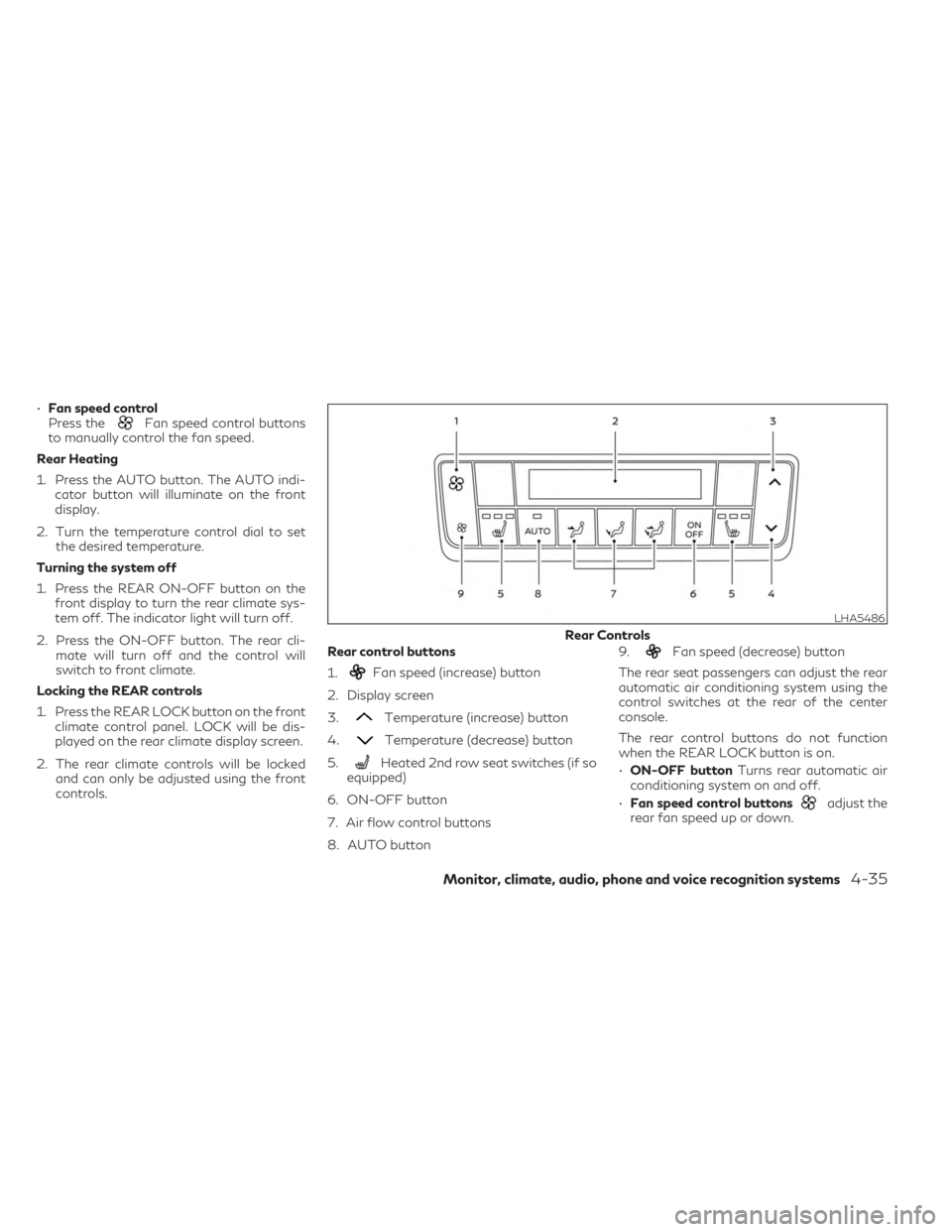
•Fan speed control
Press theFan speed control buttons
to manually control the fan speed.
Rear Heating
1. Press the AUTO button. The AUTO indi- cator button will illuminate on the front
display.
2. Turn the temperature control dial to set the desired temperature.
Turning the system off
1. Press the REAR ON-OFF button on the front display to turn the rear climate sys-
tem off. The indicator light will turn off.
2. Press the ON-OFF button. The rear cli- mate will turn off and the control will
switch to front climate.
Locking the REAR controls
1. Press the REAR LOCK button on the front climate control panel. LOCK will be dis-
played on the rear climate display screen.
2. The rear climate controls will be locked and can only be adjusted using the front
controls. Rear control buttons
1.
Fan speed (increase) button
2. Display screen
3.
Temperature (increase) button
4.
Temperature (decrease) button
5.
Heated 2nd row seat switches (if so
equipped)
6. ON-OFF button
7. Air flow control buttons
8. AUTO button 9.
Fan speed (decrease) button
The rear seat passengers can adjust the rear
automatic air conditioning system using the
control switches at the rear of the center
console.
The rear control buttons do not function
when the REAR LOCK button is on.
• ON-OFF button Turns rear automatic air
conditioning system on and off.
• Fan speed control buttons
adjust the
rear fan speed up or down.
LHA5486
Rear Controls
Monitor, climate, audio, phone and voice recognition systems4-35
Page 516 of 636

• Wipe off excess tire dressing using a drytowel. Make sure the tire dressing is com-
pletely removed from the tire tread/
grooves.
• Allow the tire dressing to dry as recom- mended by tire dressing manufacturer. This vehicle has new and unique surfaces on
the center console and door pull finishers. If
cleaning is required use mild soap and water.
However if mild soap and water won’t clean
the center console and door pull finishers, use
Genuine INFINITI Vinyl and Leather Cleaner
(or equivalent).
Occasionally remove loose dust from the in-
terior trim, plastic parts and seats using a
vacuum cleaner or soft bristled brush. Wipe
the vinyl and leather surfaces with a clean,
soft cloth dampened in mild soap solution,
then wipe clean with a dry, soft cloth.
Regular care and cleaning is required in order
to maintain the appearance of the leather.
Before using any fabric protector, read the
manufacturer's recommendations. Some
fabric protectors contain chemicals that may
stain or bleach the seat material.
Use a cloth dampened only with water to
clean the meter and gauge lens.
WARNING
Do not use water or acidic cleaners (hot
steam cleaners) on the seat. This can dam-
age the seat or occupant classification sen-
sor. This can also affect the operation of
the air bag system and result in serious per-
sonal injury.
CAUTION
• Never use benzine, thinner, or any similar
material on the interior surfaces or sur-
face damage may occur. Such damage
is not covered under the INFINITI
warranty.
• Small dirt particles can be abrasive and
damaging to leather surfaces (if so
equipped) and should be removed
promptly. Do not use saddle soap, car
waxes, polishes, oils, cleaning fluids, sol-
vents, detergents or ammonia-based
cleaners as they may damage the leath-
er’s natural finish.
• Never use fabric protectors unless rec-
ommended by the manufacturer.
• Do not use glass or plastic cleaner on me-
ter or gauge lens covers. It may damage
the lens cover.
• Never use Chloride solutions for cleaning
aluminum decoratives (if so equipped),
damage may occur.
CLEANING INTERIOR
7-4Appearance and care

