2023 INFINITI QX55 mirror
[x] Cancel search: mirrorPage 163 of 526

3 Pre-driving checks and adjustments
Keys.............................................3-2
INFINITI Intelligent Key .......................3-2
INFINITI Vehicle Immobilizer System
keys ..........................................3-4
Doors ...........................................3-4
Locking with key ..............................3-5
Locking with inside lock knob ..................3-5
Locking with power door lock switch ..........3-5
Automatic door locks .........................3-6
Child safety rear door lock .....................3-6
INFINITI Intelligent Key System ...................3-6
Operating range ..............................3-8
Door locks/unlocks precaution ................3-9
INFINITI Intelligent Key operation .............3-9
How to use the remote keyless entry
function .................................... 3-14
Warning signals ............................. 3-16
Troubleshooting guide ......................3-16
Log-in function ............................. 3-18
Remote Engine Start ........................... 3-18
Remote Engine Start operating range ........3-19
Remote starting the vehicle ..................3-19
Extending engine run time ...................3-20
Canceling a Remote Engine Start ............3-20
Conditions the Remote Engine Start will
not work ................................... 3-20Hood
.......................................... 3-21
Liftgate ....................................... 3-22
Operating the power liftgate ................3-22
Motion-Activated Liftgate
(if so equipped) ............................. 3-25
Power liftgate main switch ..................3-27
Liftgate release ............................. 3-27
Liftgate position setting .....................3-28
Fuel-filler door ................................. 3-29
Opening the fuel-filler door ..................3-29
Fuel-filler cap ............................... 3-29
Steering wheel ................................. 3-32
Manual operation (if so equipped) ...........3-32
Automatic operation (if so equipped) .........3-32
Sun visors ..................................... 3-33
Vanity mirrors .............................. 3-34
Card holder ................................. 3-34
Mirrors ........................................ 3-34
Automatic
anti-glare rearview mirror ........3-34
Outside mirrors ............................. 3-35
Memory Seat (if so equipped) ...................3-37
Memory storage function ...................3-37
Entry/exit function .......................... 3-38
Setting memory function ....................3-38
System operation ........................... 3-39
Page 196 of 526

VANITY MIRRORS
To access the vanity mirror, pull the sun visor
down and flip open the mirror cover. The
vanity mirror will illuminate when the mirror
cover is open.
CARD HOLDER
To use the card holder, slide card into the clip.
Do not view information while operating the
vehicle.
AUTOMATIC ANTI-GLARE
REARVIEW MIRROR
The inside mirror is designed so that it auto-
matically dims during nighttime conditions
and according to the intensity of the head-
lights of the vehicle following you. The auto-
matic anti-glare feature is activated when
the ignition switch is in the ON position.
The indicator light
O2will illuminate when the
automatic anti-glare feature is operating.
LPD2583
Driver’s and passenger’s side
LPD2340
Driver’s and passenger’s side
LPD0469
MIRRORS
3-34Pre-driving checks and adjustments
Page 197 of 526

NOTE:
Do not hang any objects over the sensorsO1
or apply glass cleaner to the sensors. Doing
so will reduce the sensitivity of the sensors,
resulting in improper operation.
The indicator light
O2will illuminate when the
automatic anti-glare feature is operating.
To turn off the automatic anti-glare feature,
press the O button. The indicator light will
turn off.
To turn on the automatic anti-glare feature
again, press the | button again. The indica-
tor light will turn on.
For additional information on HomeLink®
Universal Transceiver operation, see
“HomeLink® Universal Transceiver” (P. 2-71).
OUTSIDE MIRRORS
The outside mirror remote control will oper-
ate only when the ignition switch is in the ON
position.
Move the small switch
O1to select the left or
right mirror. Adjust each mirror to the desired
position using the large switch
O2. Move the
small switch
O1to the center (neutral) posi-
tion to prevent accidentally moving the
mirror.
WARNING
• Objects viewed in the outside mirror on
the passenger side are closer than they
appear. Be careful when moving to the
right. Using only this mirror could cause
an accident. Use the inside mirror or
glance over your shoulder to properly
judge distances to other objects.
• Do not adjust the mirrors while driving.
You could lose control of your vehicle and
cause an accident.
LPD3035
Pre-driving checks and adjustments3-35
Page 198 of 526

Power folding outside mirrors
CAUTION
• Do not touch the mirrors while they are
moving. Your hand may be pinched, and
the mirror may malfunction.
• Do not drive with the mirrors stored. You
will be unable to see behind the vehicle. Push the switch
O2to open or the switchO1
to close the mirrors.
If one of the mirrors are manually operated or
bumped, the mirror body can become loose
at the pivot point. To correct electronic mirror
operation, cycle the mirrors by pushing the
switch
O1until completely closed, then push
the switch
O2until the mirrors are in the open
position.
Automatic folding outside mirrors
The outside mirrors fold automatically when
the vehicle is locked with the Intelligent Key
or by using the request switch. The outside
mirrors unfold automatically when the igni-
tion switch is placed in the ON position.
Heated mirrors
The electric control type outside mirrors can
be heated to defrost, defog, or de-ice for
improved visibility. Push the rear window de-
froster switch to activate the heating func-
tion. Push the switch again to deactivate, or
the heating function will automatically turn
off after approximately 15 minutes. For ad-
ditional information, see “Rear window de-
froster, outside mirror defroster and wiper
deicer (if so equipped) switch” (P. 2-39).
Reverse tilt-down feature (if so
equipped)
The reverse tilt-down feature will turn both
outside mirror surfaces downward to provide
better rear visibility close to the vehicle when
the mirror control switch is in either the L or R
position.
The mirrors automatically return to their
original position when you shift out of R
(Reverse).
The outside mirror surfaces will return to
their original position when one of the fol-
lowing has occurred:
• The shift lever is moved to any position other than R (Reverse).
• The outside mirror control switch is set to the neutral or center position.
• The ignition switch is placed in the OFF position.
NOTE:
If the outside mirror control switch is in the
center (neutral) position, mirror surface will
NOT turn downward when the shift lever is
moved to R (Reverse).
For additional information regarding this fea-
ture, see “Memory seat” (P. 3-37).
LPD2303
3-36Pre-driving checks and adjustments
Page 199 of 526
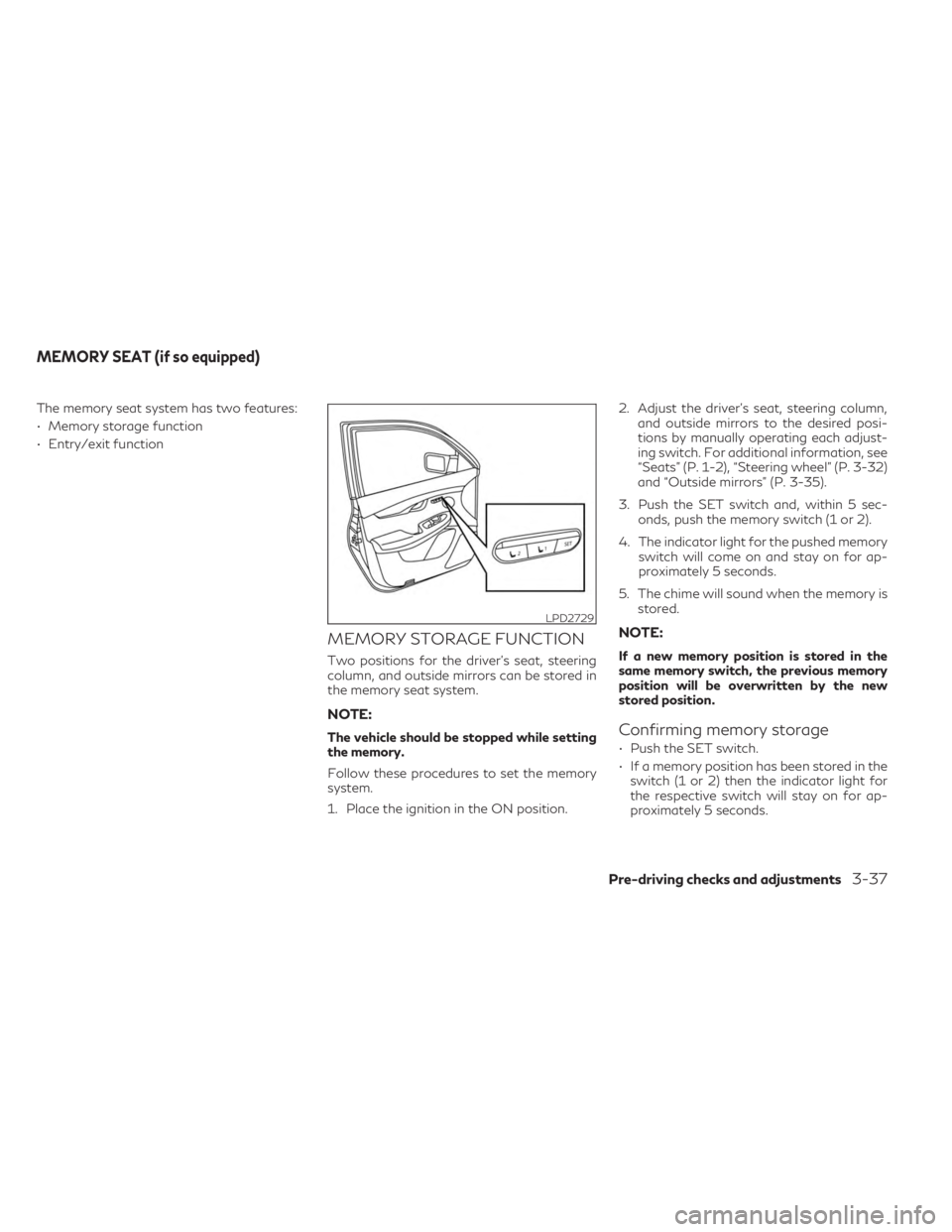
The memory seat system has two features:
• Memory storage function
• Entry/exit function
MEMORY STORAGE FUNCTION
Two positions for the driver's seat, steering
column, and outside mirrors can be stored in
the memory seat system.
NOTE:
The vehicle should be stopped while setting
the memory.
Follow these procedures to set the memory
system.
1. Place the ignition in the ON position.2. Adjust the driver's seat, steering column,
and outside mirrors to the desired posi-
tions by manually operating each adjust-
ing switch. For additional information, see
“Seats” (P. 1-2), “Steering wheel” (P. 3-32)
and “Outside mirrors” (P. 3-35).
3. Push the SET switch and, within 5 sec- onds, push the memory switch (1 or 2).
4. The indicator light for the pushed memory switch will come on and stay on for ap-
proximately 5 seconds.
5. The chime will sound when the memory is stored.
NOTE:
If a new memory position is stored in the
same memory switch, the previous memory
position will be overwritten by the new
stored position.
Confirming memory storage
• Push the SET switch.
• If a memory position has been stored in theswitch (1 or 2) then the indicator light for
the respective switch will stay on for ap-
proximately 5 seconds.
LPD2729
MEMORY SEAT (if so equipped)
Pre-driving checks and adjustments3-37
Page 200 of 526

Linking log-in function to a stored
memory position
The log-in function can be linked to a stored
memory position with the following
procedure.
1. Place the ignition switch in the ON posi-tion while carrying the Intelligent Key that
was registered to the vehicle with a log-in
function.
NOTE:Make sure the Intelligent Keys are far apart.
Otherwise, the vehicle may detect the
wrong Intelligent Key.
2. Adjust the position of the driver’s seat, steering column and outside mirrors. For
additional information, see “Seats”
(P. 1-2), “Steering wheel” (P. 3-32) and
“Outside mirrors” (P. 3-35).
3. Place the ignition switch in the OFF position.
The next time you log in (selecting the user on
the display) after placing the ignition switch in
the ON position while carrying the Intelligent
Key, the system will automatically adjust to
the memorized driving position. For additional information, see the separate
INFINITI InTouch™ Owner’s Manual and
“Log-in function” (P. 3-18).
ENTRY/EXIT FUNCTION
This system is designed so that the driver's
seat and steering column will automatically
move when the vehicle is engaged in the P
(Park) position. This allows the driver to easily
get in and out of the driver’s seat.
The driver’s seat will slide backward and the
steering column will move up when the igni-
tion is switched to OFF and the driver’s door
is opened.
The driver’s seat and steering wheel will re-
turn to the previous position when the igni-
tion is switched to ON.
The entry/exit function can be adjusted or
canceled through the “Comfort & Conve-
nience” options of the “Settings” menu in the
lower touch-screen display by performing the
following:
• Switch the Lift Steering upon Exit from ON
to OFF.
• Switch the Slide Driver Seat Back on Exit from ON to OFF.
For additional information, refer to the sepa-
rate INFINITI InTouch™ Owner’s Manual.
Restarting the entry/exit function
If the battery cable is disconnected, or if the
fuse opens, the stored memory positions will
be lost and some of the functions will be
restricted:
1. Drive the vehicle over 25 mph (40 km/h).
OR
2. Open and close the driver's door more than two times with the ignition switch in
the OFF position.
The entry/exit function should now work
properly.
SETTING MEMORY FUNCTION
The position of the following settings can be
linked to the Intelligent Key and the memo-
rized settings can be available for each Intel-
ligent Key.
• Climate control system
• Navigation system
• Audio system
3-38Pre-driving checks and adjustments
Page 205 of 526

1. Upper touch-screen display (upperdisplay)
2. Lower touch-screen display (lower display)
3. MENU button
4.
button
WARNING
• Failure to follow the warnings and in-
structions for proper use of the Rear-
View Monitor system could result in se-
rious injury or death. •
RearView Monitor is a convenience fea-
ture and is not a substitute for proper
backing. Always turn and look out the
windows and check mirrors to be sure
that it is safe to move before operating
the vehicle. Always back up slowly.
LHA5414
REARVIEW MONITOR (if so
equipped)
Monitor, climate, audio, phone and voice recognition systems4-3
Page 211 of 526

HOW TO TURN ON AND OFF
PREDICTED COURSE LINES
To toggle on and off the predicted course
lines while in the P (Park) position:
1. Press the MENU button.
2. Touch the “Settings” key.
3. Touch the “Camera” key.
4. Touch the “Predicted Course Lines” key toturn the feature on or off.
When the predicted course lines are
turned on, the indicator light is on.
REARVIEW MONITOR SYSTEM
LIMITATIONS
WARNING
Listed below are the system limitations for
RearView Monitor. Failure to operate the
vehicle in accordance with these system
limitations could result in serious injury or
death.
• The system cannot completely eliminate
blind spots and may not show every
object. •
Underneath the bumper and the corner
areas of the bumper cannot be viewed on
the RearView Monitor because of its
monitoring range limitation. The system
will not show small objects below the
bumper, and may not show objects close
to the bumper or on the ground.
• Objects viewed in the RearView Monitor
differ from actual distance because a
wide-angle lens is used.
• Objects in the RearView Monitor will ap-
pear visually opposite compared to when
viewed in the rearview and outside
mirrors.
• Use the displayed lines as a reference.
The lines are highly affected by the num-
ber of occupants, fuel level, vehicle posi-
tion, road conditions and road grade.
• Make sure that the liftgate is securely
closed when backing up.
• Do not put anything on the rearview
camera. The rearview camera is installed
above the license plate.
• When washing the vehicle with high
pressure water, be sure not to spray it
around the camera. Otherwise, water
may enter the camera unit causing water
condensation on the lens, a malfunction,
fire or an electric shock. •
Do not strike the camera. It is a precision
instrument. Otherwise, it may malfunc-
tion or cause damage resulting in a fire or
an electric shock.
The following are operating limitations and
do not represent a system malfunction:
• When the temperature is extremely high or low, the screen may not clearly display
objects.
• When strong light directly shines on the camera, objects may not be displayed
clearly.
• Vertical lines may be seen in objects on the screen. This is due to strong reflected light
from the bumper.
• The screen may flicker under fluorescent light.
• The colors of objects on the RearView Monitor may differ somewhat from the ac-
tual color of objects.
• Objects on the monitor may not be clear in a dark environment.
• There may be a delay when switching be- tween views.
• If dirt, rain or snow accumulate on the cam- era, the RearView Monitor may not display
objects clearly. Clean the camera.
Monitor, climate, audio, phone and voice recognition systems4-9