2023 INFINITI QX50 steering wheel
[x] Cancel search: steering wheelPage 216 of 548

3. Slowly back up the vehicle adjusting thesteering wheel so that the predicted
course lines
OBenter the parking space
OC. 4. Maneuver the steering wheel to make the
vehicle width guide lines
ODparallel to the
parking space
OCwhile referring to the
predicted course lines.
5. When the vehicle is parked in the space completely, press the P (Park) button lo-
cated near the shift lever to place the
vehicle in the P (Park) position and apply
the parking brake.
ADJUSTING THE SCREEN
The RearView Monitor settings can be
changed with the following procedure on the
upper display.
1. Press the MENU button while the Rear-View Monitor screen is shown on the up-
per display.
2. Touch the “Settings” key and then the “Camera” key.
LHA4770
LHA5228
4-8Monitor, climate, audio, phone and voice recognition systems
Page 222 of 548
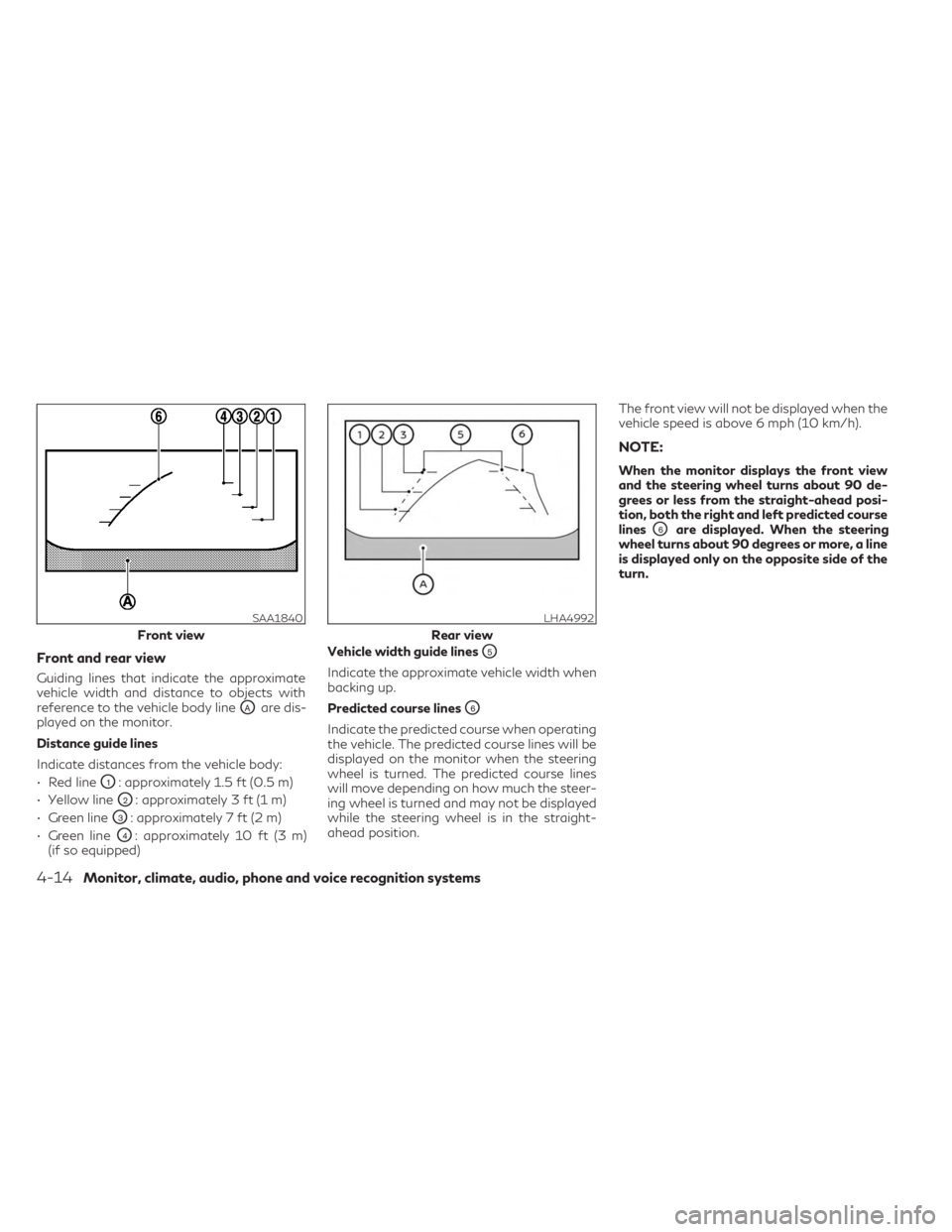
Front and rear view
Guiding lines that indicate the approximate
vehicle width and distance to objects with
reference to the vehicle body line
OAare dis-
played on the monitor.
Distance guide lines
Indicate distances from the vehicle body:
• Red line
O1: approximately 1.5 ft (0.5 m)
• Yellow line
O2: approximately 3 ft (1 m)
• Green line
O3: approximately 7 ft (2 m)
• Green line
O4: approximately 10 ft (3 m)
(if so equipped) Vehicle width guide lines
O5
Indicate the approximate vehicle width when
backing up.
Predicted course lines
O6
Indicate the predicted course when operating
the vehicle. The predicted course lines will be
displayed on the monitor when the steering
wheel is turned. The predicted course lines
will move depending on how much the steer-
ing wheel is turned and may not be displayed
while the steering wheel is in the straight-
ahead position. The front view will not be displayed when the
vehicle speed is above 6 mph (10 km/h).
NOTE:
When the monitor displays the front view
and the steering wheel turns about 90 de-
grees or less from the straight-ahead posi-
tion, both the right and left predicted course
lines
O6are displayed. When the steering
wheel turns about 90 degrees or more, a line
is displayed only on the opposite side of the
turn.
SAA1840
Front view
LHA4992
Rear view
4-14Monitor, climate, audio, phone and voice recognition systems
Page 223 of 548

Bird’s-eye view
The bird's-eye view shows the overhead view
of the vehicle, which helps confirm the vehicle
position and the predicted course to a park-
ing space.
The vehicle icon
O1shows the position of the
vehicle. Note that the apparent distance be-
tween objects viewed in the bird's-eye view
may differ somewhat from the actual dis-
tance to the vehicle.
The areas that the cameras cannot cover
O2
are indicated in black. The non-viewable area
O2is highlighted in
yellow for several seconds after the bird’s-
eye view is displayed. It will be shown only the
first time after the ignition switch is placed in
the ON position.
In addition, the non-viewable corners are dis-
played in red and will blink for the first 3 sec-
onds
O3to remind the drivers to be cautious.
Predicted course linesO4indicate the pre-
dicted course when operating the vehicle.
The predicted course lines will be displayed
on the monitor when the steering wheel is turned. The predicted course lines will move
depending on how much the steering wheel is
turned.
When the monitor displays the front view and
the steering wheel turns about 90 degrees or
less from the neutral position, the two green
predicted course lines are shown in front of
the vehicle.
When the steering wheel turns about 90 de-
grees or more, one green predicted course
line is shown in front of the vehicle and the
other predicted course line is shown at the
side of the vehicle.
When the monitor displays the rear view, the
predicted course lines are shown at the back
of the vehicle.
WARNING
• Objects in the bird's-eye view will appear
further than the actual distance.
• Tall objects, such as a curb or vehicle,
may be misaligned or not displayed at
the seam of the views.
• Objects that are above the camera can-
not be displayed.
LHA4534
Front view
LHA4535
Rear view
Monitor, climate, audio, phone and voice recognition systems4-15
Page 227 of 548

when backing up to the positionOAif the
object projects over the actual backing up
course.
HOW TO PARK WITH
PREDICTED COURSE LINES
WARNING
• If the tires are replaced with different
sized tires, the predicted course lines
may be displayed incorrectly.
• On a snow-covered or slippery road,
there may be a difference between the
predicted course line and the actual
course line.
•
If the battery is disconnected or becomes
discharged, the predicted course lines may
be displayed incorrectly. If this occurs,
please perform the following procedures:
– Turn the steering wheel from lock to
lock while the engine is running.
– Drive the vehicle on a straight road
for more than 5 minutes.
• When the steering wheel is turned with
the ignition switch in the ON position,
the predicted course lines may be dis-
played incorrectly. 1. Visually check that the parking space is
safe before parking your vehicle.
2. The rear view of the vehicle is displayed on the screen
OAwhen the shift lever is
moved to the R (Reverse) position. When
activating the Around View® Monitor, the
guide lines, the icons and the messages
may not be displayed immediately. 3. Slowly back up the vehicle adjusting the
steering wheel so that the predicted
course linesOBenter the parking space
OC.
LHA5043LHA4770
Monitor, climate, audio, phone and voice recognition systems4-19
Page 228 of 548

4. Maneuver the steering wheel to make thevehicle width guide lines
ODparallel to the
parking space
OCwhile referring to the
predicted course lines.
5. When the vehicle is parked in the space completely, press the P (Park) button lo-
cated near the shift lever to place the
vehicle in the P (Park) position and apply
the parking brake.
HOW TO SWITCH THE DISPLAY
With the ignition switch in the ON position,
press theCAMERA button or with the
engine running, move the shift lever to the R
(Reverse) position to operate the Around
View® Monitor.
The Around View® Monitor displays differ-
ent split screen views depending on the posi-
tion of the shift lever. When activating the
Around View® Monitor, the guide lines, the
icons and the messages may not be displayed
immediately. Press the
CAMERA but-
ton or touch the “Change View” key to switch
between the available views. If the shift lever is in the R (Reverse) position,
the available views are:
• Rear view/bird’s-eye view split screen
• Rear view/front-side view split screen
• Rear-wide view
If the shift position is in the P (Park) or D
(Drive) position, the available views are:
• Front view/bird’s-eye view split screen
• Front view/front-side view split screen
• Front-wide view
The display will switch from the Around
View® Monitor screen when:
• The shift lever is in the D (Drive) position
and the vehicle speed increases above ap-
proximately 6 mph (10 km/h).
• A different screen is selected.
AROUND VIEW® MONITOR
SETTINGS
To set up the Around View® Monitor to your
preferred settings, press the MENU button,
touch the “Settings” key, then touch the
“Camera” key on the lower display then touch
the “Camera” key again.
For additional information about the sonar,
see “Camera aiding sonar (parking sensor)”
(P. 4-24). For information about the display
screen adjustment, see “Adjusting the screen”
(P. 4-21).
LHA5460
4-20Monitor, climate, audio, phone and voice recognition systems
Page 244 of 548

Start the engine and operate the controls to
activate the air conditioner.
NOTE:
• Odors from inside and outside the vehiclecan build up in the air conditioner unit.
Odor can enter the passenger compart-
ment through the vents.
• When parking, set the heater and air con- ditioner controls to turn off air recircula-
tion to allow fresh air into the passenger
compartment. This should help reduce
odors inside the vehicle
AUTOMATIC OPERATION
Press the AUTO button to set the automatic
control mode that keeps the air distribution,
temperature and the fan speed auto-
matically.
Cooling and/or dehumidified
heating (AUTO)
This mode may be used all year round as the
system automatically works to keep a con-
stant temperature. Air flow distribution, air
intake control, and fan speed are also con-
trolled automatically.
1. Press the
CLIMATE button on the
lower display menu. The CLIMATE screen
will display on the lower display. 2. Press the AUTO button on. (The indicator
on the button will illuminate and AUTO
will be displayed on the CLIMATE screen.)
3. Press the
temperature control
buttons on the driver’s side to set the de-
sired temperature.
• The temperature of the passenger com- partment will be maintained automatically.
Air flow distribution, air intake control and
fan speed are also controlled automatically.
• A visible mist may be seen coming from the vents in hot, humid conditions as the air is
cooled rapidly. This does not indicate a
malfunction.
Dehumidified defrosting or
defogging
1. Press thefront defroster button on.
(The indicator light on the button will
come on.)
2. Operate the
temperature con-
trol buttons to set the desired
temperature.
• To quickly remove ice from the outside of the windows, use the
fan speed con-
trol button or the “” key to set the fan
speed to maximum. • As soon as possible after the windshield is
clean, press the AUTO button to return to
the automatic mode.
•
When thefront defroster button is
pressed, the air conditioner will automatically
be turned on at outside temperatures ap-
proximately 32°F (0°C) to defog the wind-
shield. The air recirculate mode automatically
turns off, allowing outside air to be drawn
into the passenger compartment to further
improve the defogging performance.
Remote Engine Start with
Intelligent Climate Control (if so
equipped)
Vehicles equipped with automatic climate con-
trols and Remote Engine Start function may go
into automatic heating or cooling mode when
Remote Engine Start is activated depending on
outside and cabin temperatures. During this
period, the climate control display and buttons
will be inoperable until the ignition switch is
placed in the ON position. In Remote Engine
Start defrosting mode, the rear window de-
froster, heated seat (if so equipped) and heated
steering wheel (if so equipped) may be acti-
vated automatically. In Remote Engine Start
cooling mode, the climate controlled seat (if so
equipped) may be activated automatically.
4-36Monitor, climate, audio, phone and voice recognition systems
Page 248 of 548

Sync mode setting
The driver’s, passenger’s and rear (if so
equipped) temperature setpoints can be syn-
chronized using the “
SYNC” key on the
lower display. When the key is touched, tem-
perature settings become synchronized and
the SYNC indicator turns on.
• If the driver’s side temperature buttons are pressed, the driver’s side, passenger’s side,
and rear (if so equipped) temperature set-
tings will update simultaneously.
•
If the passenger’s side or rear (if so equipped)
temperature buttons are pressed, Sync mode
will exit, the indicator light will go off, and the
temperature will update based on the button
pressed. Driver’s side temperature will re-
main the same until manually changed.
Steering wheel heater (if so
equipped)
The heated steering wheel system is de-
signed to operate only when the surface tem-
perature of the steering wheel is below 68°F
(20°C).
If the surface temperature of the steering
wheel is below 68°F (20°C), the system will
heat the steering wheel and cycle off and
on to maintain a temperature above 68°F (20°C). The indicator light will remain on as
long as the system is on.
Touch the “
Steering Heater” key on the
CLIMATE screen on the lower display to turn
the steering wheel heater on or off. When the
steering wheel heater is on, the indicator light
is on.
NOTE:
• Once activated, your heated steering
wheel will automatically turn on and off to
maintain a temperature above 68°F
(20°C). The heated steering wheel will turn
off automatically after 30 minutes of use.
• When the temperature of the steering
wheel is above 122°F (50°C) and the
heated steering wheel is turned on, the
system will not heat the steering wheel.
This does not indicate a malfunction.
Automatic Climate Control System
(if so equipped)
The Automatic Climate Control System
keeps the air inside of the vehicle clean, using
the automatic air recirculation control with
the exhaust gas/outside odor detecting sen-
sor with ion control.
O1“Auto Recirc” key
Touch to turn on the automatic recirculation
mode.
O2Plasmacluster® icon
Indicates the Plasmacluster® ion emission
status.
Ion control:
The Automatic Climate Control System unit
generates highly concentrated Plasmaclus-
ter® ions into the air blown from the ventila-
tors to reduce odor absorbed into the interior
LHA5458
4-40Monitor, climate, audio, phone and voice recognition systems
Page 250 of 548

Press theto decrease the rear
temperature.
If front passengers touch the “
SYNC”
key on the Climate screen, the rear tempera-
ture settings will synchronize with the driver’s
and passenger’s side settings.
Heated 2nd row seat switches
(if so equipped)
For additional information, see “Heated 2nd
row seat switches” (P. 2-50).
Heater and air conditioner settings can be
changed on the screen.
1. Press the
MENU button on the
lower display menu.
2. Using the arrow, tab over to the next screen and touch the “Settings” key.
Touch the arrow again to get to the next
screen and touch “Others”.
3. Touch the “CLIMATE” key.
Available setting items may vary depending
on models and specifications. Available settings
•
Use A/C While Idle (if so equipped)
Touch to turn on/off the Idling Stop Prior-
ity mode. While this item is turned on and
the engine is on, the Climate Control will
not be affected by the Idling Stop activa-
tion. Otherwise, when the engine is off by
the Idle Stop function, the Climate Control
System will be able to heat and cool the
cabin.
• Steering Wheel Heater
Touch to turn the steering wheel heater on
and off.
• Auto Steering Wheel Heater
The automatic control mode for the
steering-wheel heating can be turned on
and off. When the item is turned on, the
steering-wheel heating will turn on auto-
matically if the temperature inside the ve-
hicle compartment is low at the time when
the ignition switch is placed in the ON
position. Regardless of the temperature,
the steering-wheel heating will turn off
after 30 minutes. If the steering-wheel
heater is turned on or off manually by
touching
on the CLIMATE screen,
the automatic steering-wheel heating
control mode will be canceled and will re-
turn to the manual mode.
LHA5459
HEATER AND AIR CONDITIONER
SETTINGS (if so equipped)
4-42Monitor, climate, audio, phone and voice recognition systems