2023 HYUNDAI TUCSON rear liftgate
[x] Cancel search: rear liftgatePage 15 of 638
2-3
02
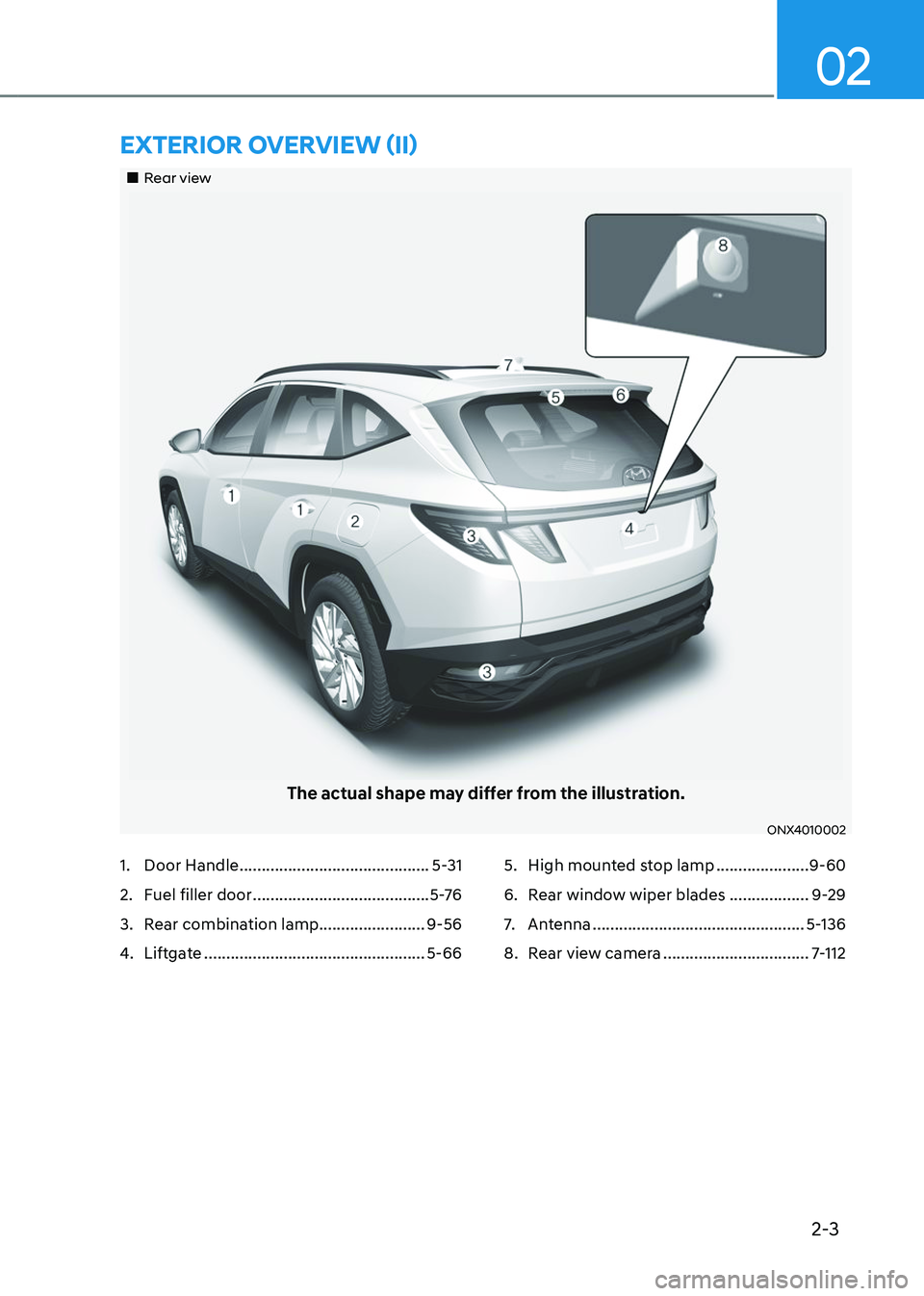
„„Rear view
The actual shape may differ from the illustration.
ONX4010002
EXTERIOR OVERVIEW (II)
1. Door Handle ...........................................5-31
2. Fuel filler door ........................................5 -76
3. Rear combination lamp........................9-56
4. Liftgate ..................................................5-66
5. High mounted stop lamp .....................9-60
6. Rear window wiper blades ..................9-29
7. Antenna ................................................5-136
8. Rear view camera .................................7-112
Page 16 of 638
2-4
Vehicle Information, Consumer Information and Reporting Safety Defects
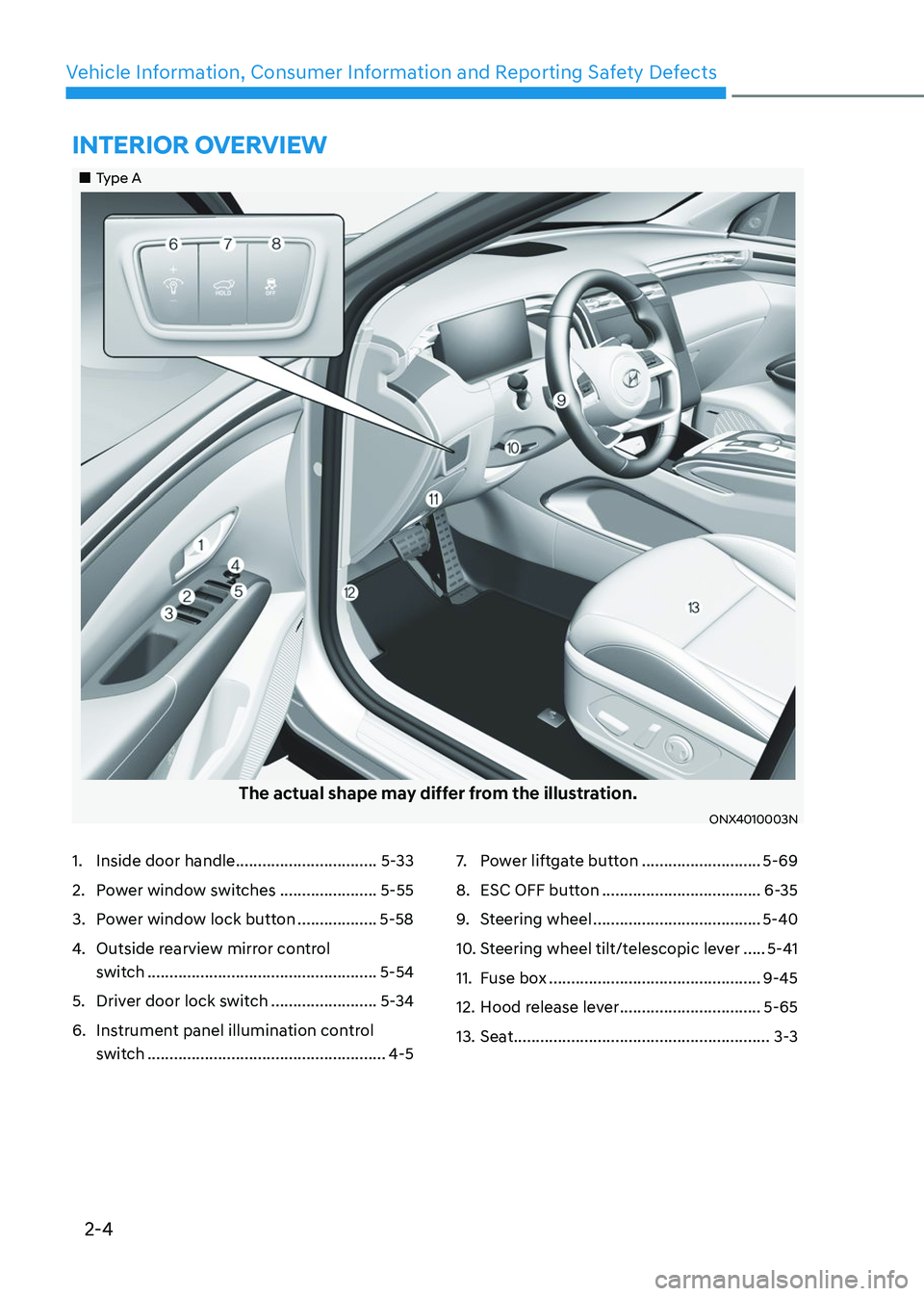
1. Inside door handle ................................5-33
2. Power window switches ......................5-55
3. Power window lock button ..................5-58
4. Outside rearview mirror control
switch
....................................................5-54
5. Driver door lock switch ........................5-34
6. Instrument panel illumination control
switch
......................................................4-5
7. Power liftgate button ...........................5-69
8. ESC OFF button ....................................6-35
9. Steering wheel ......................................5-40
10. Steering wheel tilt/telescopic lever .....5-41
11. Fuse box ................................................9-45
12. Hood release lever ................................5-65
13. Seat ..........................................................3-3
INTERIOR OVERVIEW
„„Type A
The actual shape may differ from the illustration.
ONX4010003N
Page 17 of 638
2-5
02
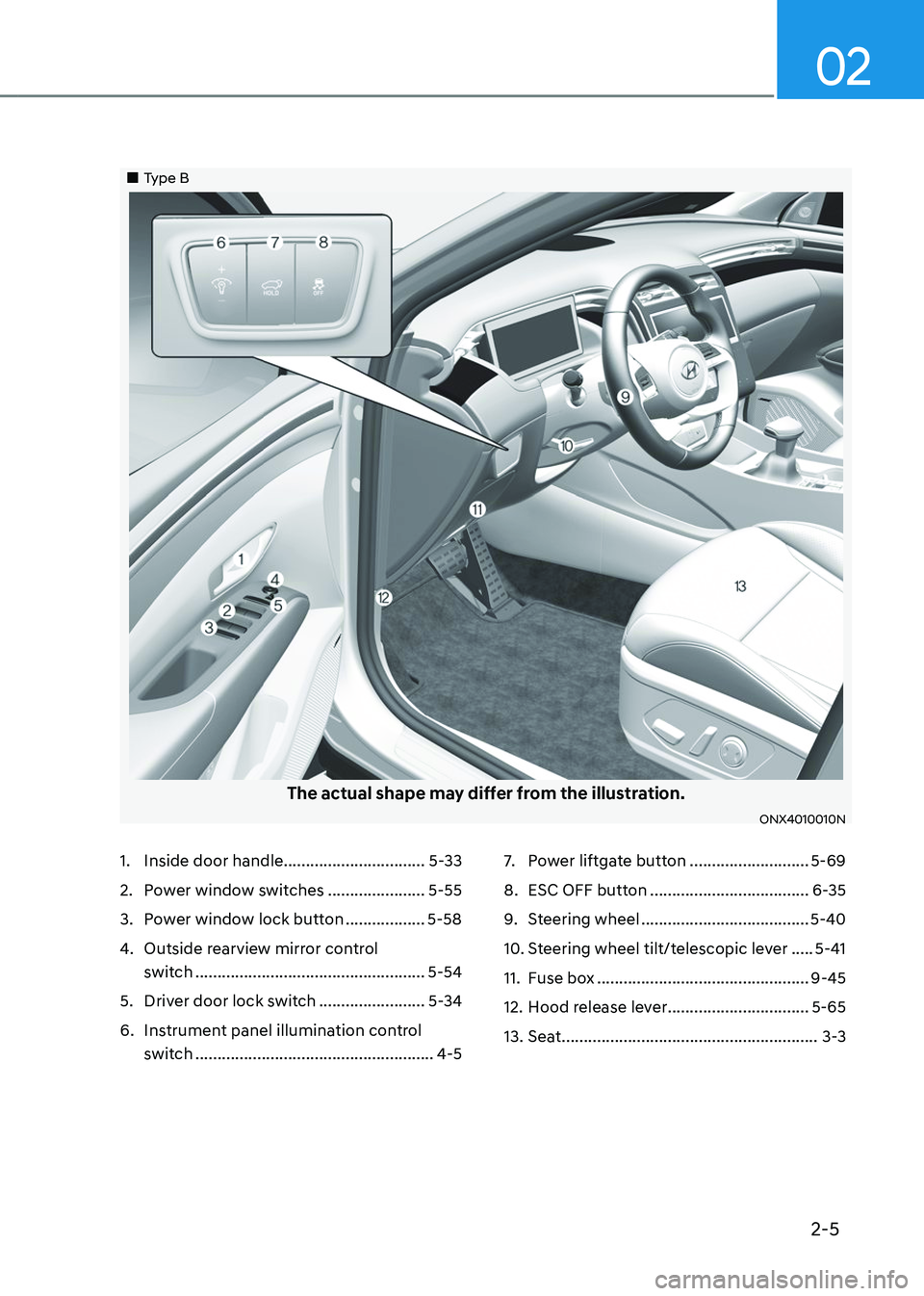
1. Inside door handle ................................5-33
2. Power window switches ......................5-55
3. Power window lock button ..................5-58
4. Outside rearview mirror control
switch
....................................................5-54
5. Driver door lock switch ........................5-34
6. Instrument panel illumination control
switch
......................................................4-5
7. Power liftgate button ...........................5-69
8. ESC OFF button ....................................6-35
9. Steering wheel ......................................5-40
10. Steering wheel tilt/telescopic lever .....5-41
11. Fuse box ................................................9-45
12. Hood release lever ................................5-65
13. Seat ..........................................................3-3
„„Type B
The actual shape may differ from the illustration.
ONX4010010N
Page 53 of 638

Seats & Safety System
3-22
Rear Occupant Alert (ROA) (if
equipped)
Rear Occupant Alert is provided to
prevent a driver from leaving a vehicle
with a rear passenger left in the vehicle.
System setting
To use Rear Occupant Alert, it must be
enabled from the Settings menu in the
infotainment system screen. Select:
-Setup → Vehicle Settings → Convenience → Rear Occupant Alert
For detailed information, scan the QR
code in the separately supplied simple
manual.
System operation
• First alert
When you turn off the engine and
open the driver’s door after opening
and closing the rear door or liftgate,
the ‘Check rear seats’ warning
message appears on the cluster.
• Second alert
After the first alert, the second alert
operates when any movement is
detected in the vehicle after the
driver’s door is closed and all the
doors are locked. The horn will sound
for approximately 25 seconds. If
the system continues to detect a
movement, the alert operates up to 8
times.
Unlock the doors with the smart key
to stop the alert.
• The system detects movement in the
vehicle for 8 hours after the door is
locked.
• The second alert is activated only after
the prior activation of the first alert.
System precautions
• Make sure that all the windows are
closed. If the window is open, the
alert may operate by the sensor
detecting an unintended movement
(e.g. wind or bugs).
• „„Cluster„„Steering wheel
OTM048165LOCN7050079
If you do not want to use Rear
Occupant Alert, press the OK button
on the steering wheel when the first
alert is displayed on the cluster. Doing
so will deactivate the second alert one
time.
• An alert can occur if there is an impact
on the roof.
• If boxes or objects are stacked in the
vehicle, the system may not detect
the boxes or objects. Or, the alert may
operate if the boxes or objects fall off.
• The sensor may not operate normally
if the sensor is blocked with foreign
substances.
• The alert may operate if movement
in the driver or passenger seat is
detected.
• The alert may operate with the doors
locked due to car wash or surrounding
vibration or noise.
• If the vehicle is started remotely (if
equipped with Remote Start), inside
movement detection will stop.
• When the scheduled ventilation
function is in operation, inside
movement detection will stop.
Page 136 of 638

Instrument cluster
4-38
4. Door
ItemsExplanation
Automatically
Lock
• Enable on Shift : All doors will be automatically locked if the shift button
is shifted from the P (Park) position to the R (Reverse), N (Neutral), or D
(Drive) position. (only when the engine is running.)
• Enable on Speed : All doors will be automatically locked when the vehicle
speed exceeds 9.3mph (15km/h).
• Off : The auto door lock operation will be deactivated.
Automatically Unlock
• On Shift to P: All doors will be automatically unlocked if the shift button is
shifted to the P (Park) position. (only when the engine is running.)
• On key out/On vehicle off : All doors will be automatically unlocked when
the ignition key is removed from the ignition switch or the Engine Start/
Stop button is set to the OFF position.
• Off : The auto door unlock operation will be canceled.
Power
LiftgateIf this item is checked, the power liftgate function will be activated.
For more details, refer to "Power liftgate" in chapter 5.
Power
Liftgate
Opening SpeedTo adjust the power liftgate speed.• Fast/Normal
For more details, refer to "Power liftgate" in chapter 5.
Smart
LiftgateTo activate or deactivate the smart liftgate.
For more details, refer to "Smart liftgate" in chapter 5.
5. Convenience
Items Explanation
Seat Easy
Access
• Off : The seat easy access function is deactivated.
• Normal/Extended : When you turn off the engine, the driver's seat will
automatically move rearward short (Normal) or long (Extended) for you to
enter or exit the vehicle more comfortably.
For more details, refer to "Driver Position Memory System" in chapter 5.
Rear
Occupant AlertTo activate or deactivate the Rear Occupant Alert.
For more details, refer to "Rear Occupant Alert (ROA) system" in chapter
5.
Welcome
Mirror/Light
• On door unlock : The side view mirrors are unfolded and the welcome
light turns on automatically when the doors are unlocked.
• On driver approach : The side view mirrors are unfolded and the welcome
light turns on automatically when the vehicle is approached with the
smart key.
For more details, refer to ''Welcome System'' in chapter 5."
Page 145 of 638

Convenient features
Accessing your vehicle ........................................................................\
.............5-4Remote key ........................................................................\
...........................................5-4
Smart key ........................................................................\
..............................................5 -7
Immobilizer system ........................................................................\
............................5-14
Hyundai Digital Key ........................................................................\
.............................5-15
Door locks........................................................................\
................................. 5-31Operating door locks from outside the vehicle.........................................................5-31
Operating door unlocks from inside the vehicle ......................................................5-33
Auto door lock/unlock features ........................................................................\
......... 5-35
Child-protector rear door locks
........................................................................\
.........5-35
Theft-alarm system ........................................................................\
.................5-36
Integrated memory system
........................................................................\
.....5-37Storing memory positions ........................................................................\
.................5-37
Recalling memory positions ........................................................................\
..............5-38
Resetting the system ........................................................................\
.........................5-38
Seat Easy Access Operation ........................................................................\
..............5-39
Steering wheel ........................................................................\
........................5-40Electric Power Steering (EPS) ........................................................................\
...........5-40
Tilt / Telescopic steering ........................................................................\
....................5-41
Heated steering wheel ........................................................................\
.......................5-41
Horn ........................................................................\
..................................................... 5-42
Mirrors ........................................................................\
.....................................5-43Inside rearview mirror ........................................................................\
........................5-43
Side View mirrors ........................................................................\
...............................5-53
Windows ........................................................................\
..................................5-55Power windows ........................................................................\
..................................5-56
Panoramic sunroof ........................................................................\
..................5-60Power sunshade ........................................................................\
...............................5-60
Tilt open/close ........................................................................\
...................................5-61
Slide open/close ........................................................................\
................................5-61
Automatic reversal ........................................................................\
............................5-62
Resetting the sunroof ........................................................................\
........................5-63
Sunroof open warning ........................................................................\
......................5-64
Exterior features ........................................................................\
......................5-65Hood ........................................................................\
....................................................5-65
Liftgate ........................................................................\
...............................................5-66
Power liftgate ........................................................................\
....................................5-68
Smart liftgate ........................................................................\
......................................5 -74
Fuel filler door ........................................................................\
..................................... 5 -76
5. Convenient features
5
Page 151 of 638
05
5 -7
Smart key (if equipped)
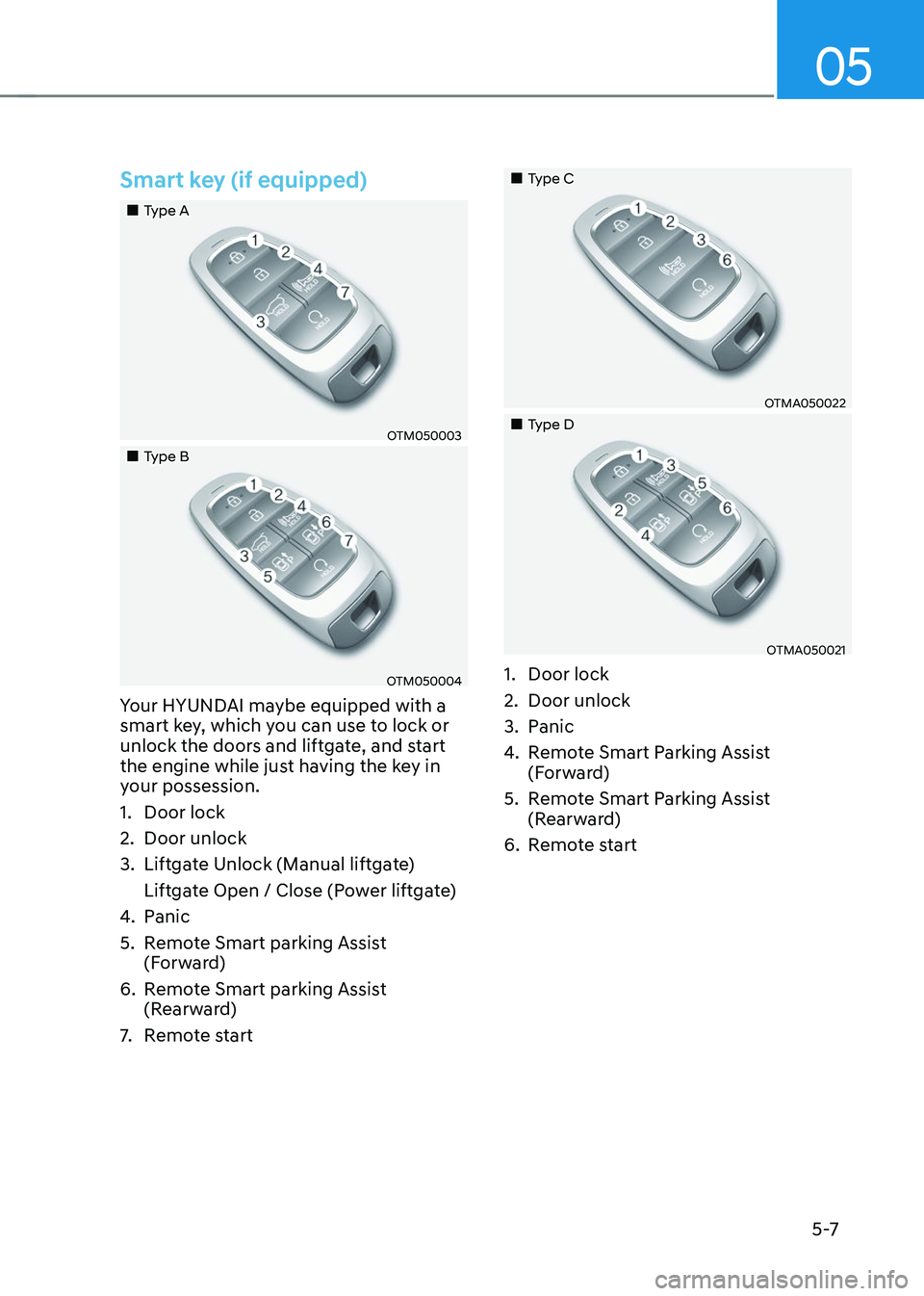
„„Type A
OTM050003
„„Type B
OTM050004
Your HYUNDAI maybe equipped with a
smart key, which you can use to lock or
unlock the doors and liftgate, and start
the engine while just having the key in
your possession.
1. Door lock
2. Door unlock
3. Liftgate Unlock (Manual liftgate)
Liftgate Open / Close (Power liftgate)
4. Panic
5. Remote Smart parking Assist
(Forward)
6. Remote Smart parking Assist
(Rearward)
7. Remote start
„„Type C
OTMA050022
„„Type D
OTMA050021
1. Door lock
2. Door unlock
3. Panic
4. Remote Smart Parking Assist
(Forward)
5. Remote Smart Parking Assist
(Rearward)
6. Remote start
Page 180 of 638
Convenient features
5-36
This system helps to protect your vehicle
and valuables. The horn will sound and
the hazard warning lights will blink
continuously if any of the following
occur:
-A door is opened without using the
smart key.
-The liftgate is opened without using
the smart key.
-The engine hood is opened.
The alarm continues for 30 seconds, then
the system resets. To turn off the alarm,
unlock the doors with the smart key.
The Theft Alarm System automatically
sets 30 seconds after you lock the
doors and the liftgate. For the system to
activate, you must lock the doors and
the liftgate from outside the vehicle with
the smart key or by touching the touch
sensor on the outside of the door handle
with the smart key in your possession.
The hazard warning lights will blink and
the chime will sound once to indicate the
system is armed.
Once the security system is set, opening
any door, the liftgate, or the hood
without using the smart key will cause
the alarm to activate.
The Theft Alarm System will not set if the
hood, the liftgate, or any door is not fully
closed. If the system will not set, check
the hood, the liftgate, or the doors are
fully closed.
Do not attempt to alter this system or
add other devices to it.
Information
• Do not lock the doors until all
passengers have left the vehicle. If the
remaining passenger leaves the vehicle
when the system is armed, the alarm
will be activated.
• If the vehicle is not disarmed with the
smart key, open the doors by using the
mechanical key and start the engine by
directly pressing the Engine Start/Stop
button with the smart key.
• If the system is disarmed by unlocking
the vehicle, but neither a door or the
liftgate is opened within 30 seconds, the
doors will relock and the system will
rearm automatically.
Information
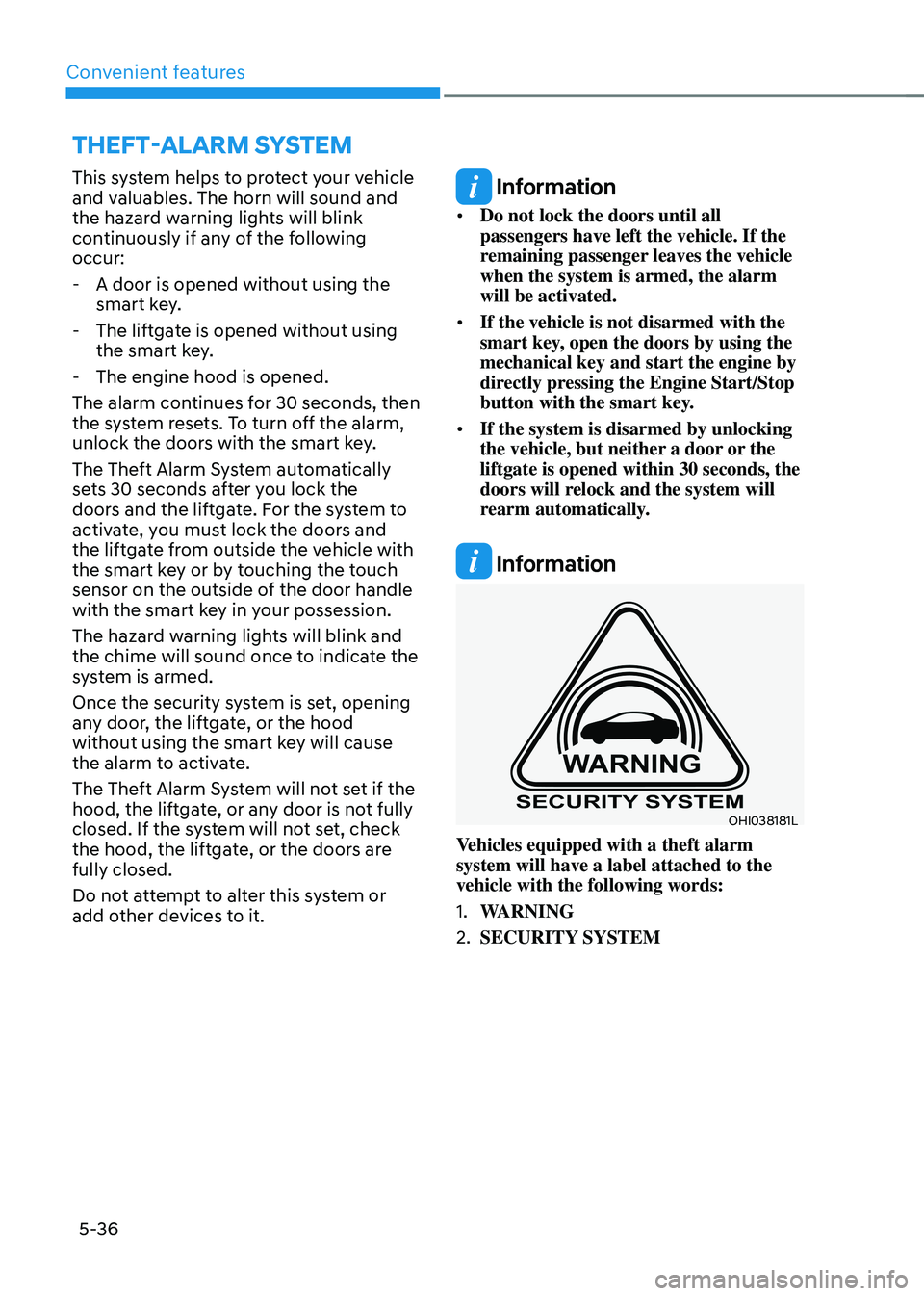
OHI038181L
Vehicles equipped with a theft alarm
system will have a label attached to the
vehicle with the following words:
1. WARNING
2. SECURITY SYSTEM
THEFT-ALARM SYSTEM