2023 HYUNDAI TUCSON parking safety button
[x] Cancel search: parking safety buttonPage 476 of 638
07
7-113
Rear View Monitor Settings
Camera settings
OTM070210L
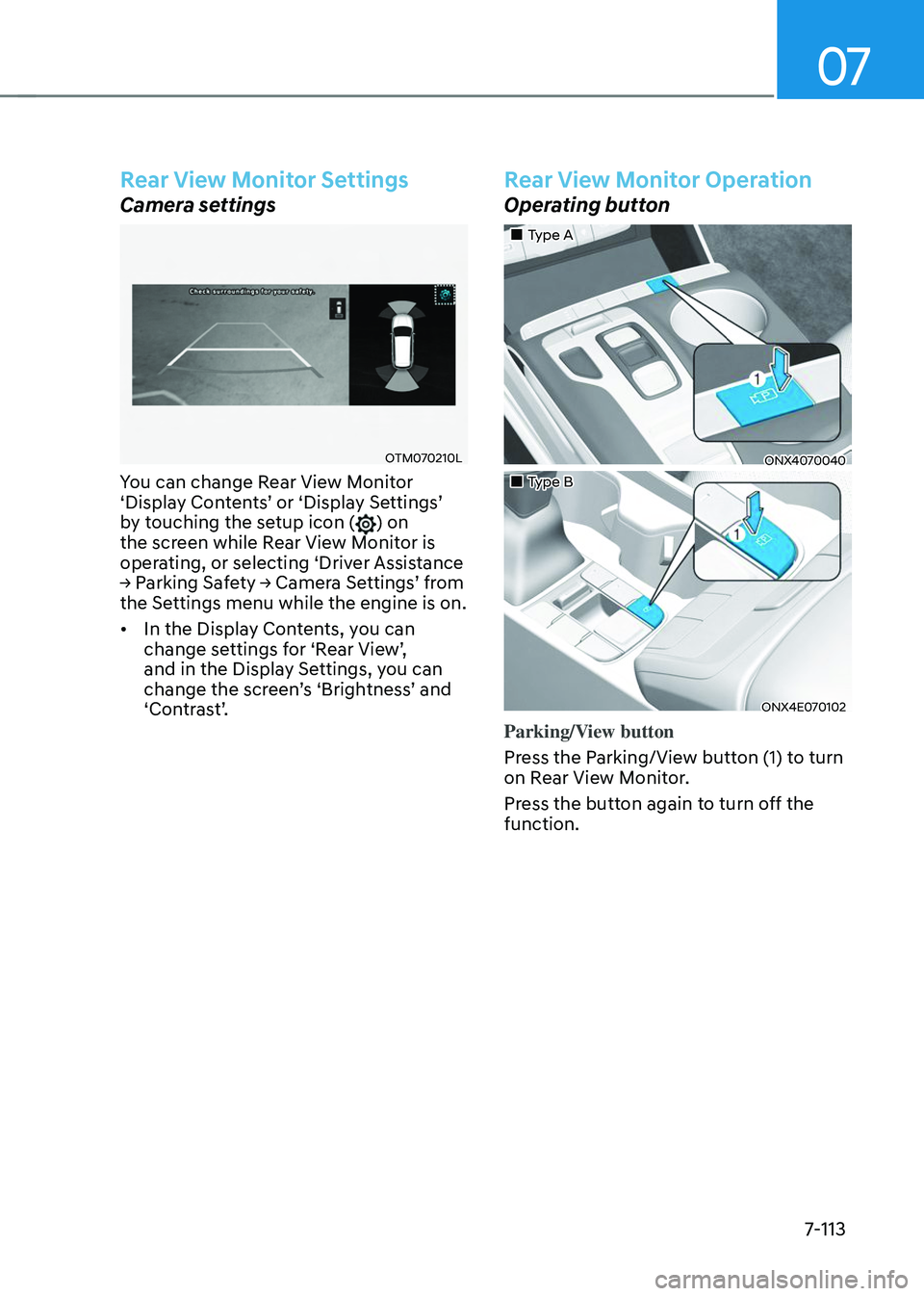
You can change Rear View Monitor ‘Display Contents’ or ‘Display Settings’ by touching the setup icon () on
the screen while Rear View Monitor is
operating, or selecting ‘Driver Assistance
→ Parking Safety → Camera Settings’ from the Settings menu while the engine is on.
• In the Display Contents, you can
change settings for ‘Rear View’, and in the Display Settings, you can change the screen’s ‘Brightness’ and ‘Contrast’.
Rear View Monitor Operation
Operating button
„„Type A
ONX4070040
„„Type B
ONX4E070102
Parking/View button
Press the Parking/View button (1) to turn
on Rear View Monitor.
Press the button again to turn off the
function.
Page 482 of 638
07
7-119
Surround View Monitor
Operation
Operating button
„„Type A„„Type B
ONX4070040ONX4E070102
ONX4E070132
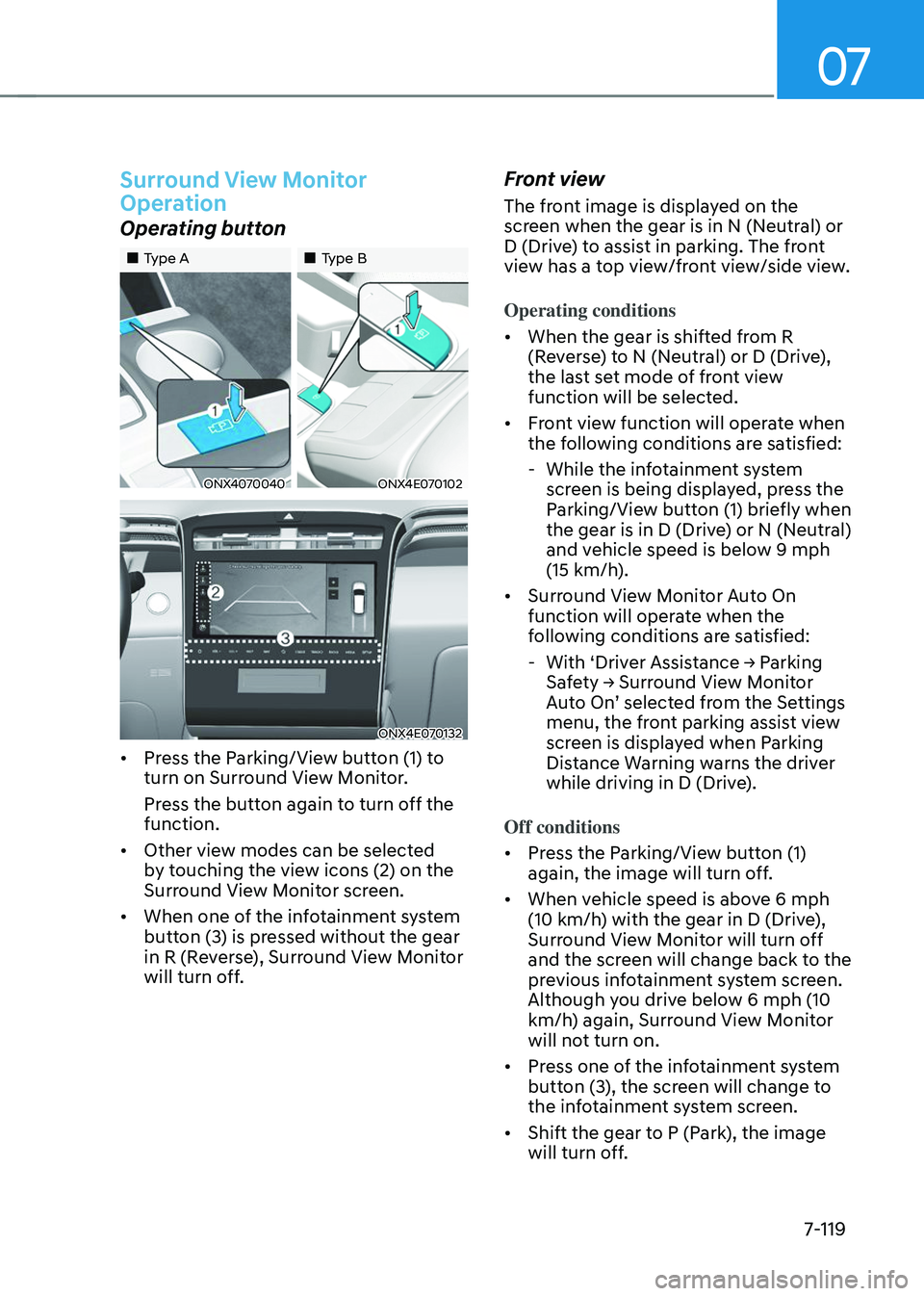
• Press the Parking/View button (1) to
turn on Surround View Monitor.
Press the button again to turn off the
function.
• Other view modes can be selected
by touching the view icons (2) on the
Surround View Monitor screen.
• When one of the infotainment system
button (3) is pressed without the gear
in R (Reverse), Surround View Monitor
will turn off.
Front view
The front image is displayed on the
screen when the gear is in N (Neutral) or
D (Drive) to assist in parking. The front
view has a top view/front view/side view.
Operating conditions
• When the gear is shifted from R
(Reverse) to N (Neutral) or D (Drive),
the last set mode of front view
function will be selected.
• Front view function will operate when
the following conditions are satisfied:
-While the infotainment system
screen is being displayed, press the
Parking/View button (1) briefly when
the gear is in D (Drive) or N (Neutral)
and vehicle speed is below 9 mph
(15 km/h).
• Surround View Monitor Auto On
function will operate when the
following conditions are satisfied:
-With ‘Driver Assistance → Parking Safety → Surround View Monitor Auto On’ selected from the Settings menu, the front parking assist view
screen is displayed when Parking
Distance Warning warns the driver
while driving in D (Drive).
Off conditions
• Press the Parking/View button (1)
again, the image will turn off.
• When vehicle speed is above 6 mph
(10 km/h) with the gear in D (Drive),
Surround View Monitor will turn off
and the screen will change back to the
previous infotainment system screen.
Although you drive below 6 mph (10
km/h) again, Surround View Monitor
will not turn on.
• Press one of the infotainment system
button (3), the screen will change to
the infotainment system screen.
• Shift the gear to P (Park), the image
will turn off.
Page 496 of 638

07
7-133
REVERSE PARKING DISTANCE WARNING (PDW)
(IF EQUIPPED)
Reverse Parking Distance Warning will
help warn the driver if an obstacle is
detected within a certain distance when
the vehicle is moving in reverse at low
speeds.
Detecting sensor
ONX4070060[2] : Rear ultrasonic sensors
Refer to the picture above for the
detailed location of the detecting
sensors.
Reverse Parking Distance
Warning Settings
Warning Volume
OTM070141NSelect ‘Driver Assistance → Warning Volume’ from the cluster or infotainment system Settings menu to change the Warning Volume to ‘High’, ‘Medium’, or ‘Low’ for Reverse Parking Distance Warning. If you change the Warning
Volume, the Warning Volume of other
Driver Assistance systems may change.
Reverse Parking Distance
Warning
Operating button
Parking Safety button (if equipped)
• Press the Parking Safety (
) button
to turn on Reverse Parking Distance
Warning. Press the button again to
turn off the function.
• When Reverse Parking Distance
Warning is off (button indicator
light on), if you shift the gear to R
(Reverse), Reverse Parking Distance
Warning will automatically turn on.
Page 500 of 638
07
7-137
Forward/Reverse Parking
Distance Warning Operation
Operating button
„„Type A
ONX4070061
„„Type B
ONX4E070106
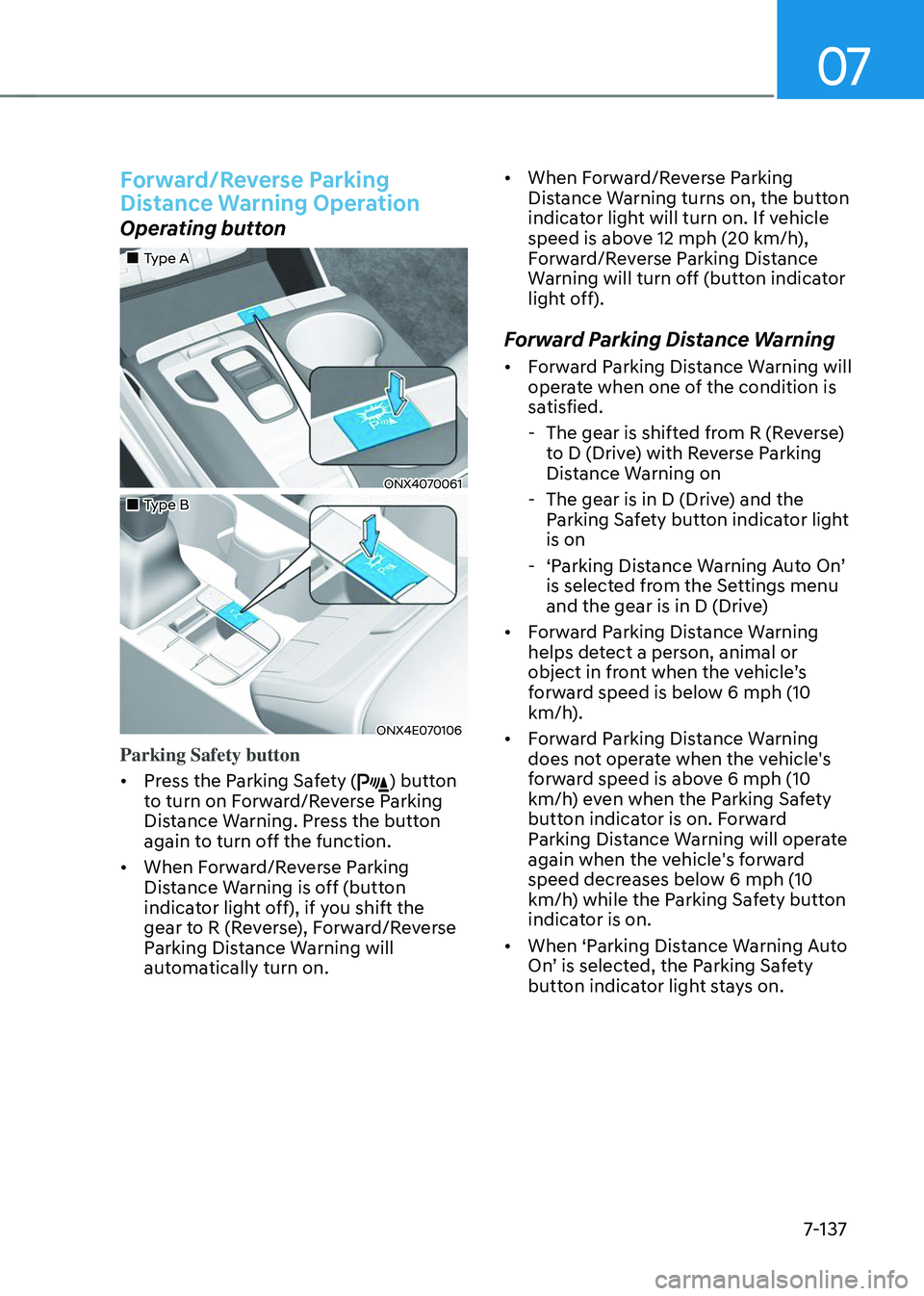
Parking Safety button
• Press the Parking Safety (
) button
to turn on Forward/Reverse Parking
Distance Warning. Press the button
again to turn off the function.
• When Forward/Reverse Parking
Distance Warning is off (button
indicator light off), if you shift the
gear to R (Reverse), Forward/Reverse
Parking Distance Warning will
automatically turn on. •
When Forward/Reverse Parking
Distance Warning turns on, the button
indicator light will turn on. If vehicle
speed is above 12 mph (20 km/h),
Forward/Reverse Parking Distance
Warning will turn off (button indicator
light off).
Forward Parking Distance Warning
• Forward Parking Distance Warning will
operate when one of the condition is
satisfied.
-The gear is shifted from R (Reverse)
to D (Drive) with Reverse Parking
Distance Warning on
-The gear is in D (Drive) and the
Parking Safety button indicator light
is on
-‘Parking Distance Warning Auto On’ is selected from the Settings menu
and the gear is in D (Drive)
• Forward Parking Distance Warning
helps detect a person, animal or
object in front when the vehicle’s forward speed is below 6 mph (10
km/h).
• Forward Parking Distance Warning
does not operate when the vehicle's
forward speed is above 6 mph (10
km/h) even when the Parking Safety
button indicator is on. Forward
Parking Distance Warning will operate
again when the vehicle's forward
speed decreases below 6 mph (10
km/h) while the Parking Safety button
indicator is on.
• When ‘Parking Distance Warning Auto
On’ is selected, the Parking Safety button indicator light stays on.
Page 501 of 638

Driver assistance system
7-138
• When ‘Parking Distance Warning Auto On’ is deselected, and the vehicle’s forward speed is above 12 mph (20
km/h), the Parking Safety button
indicator will turn off. Although you
drive below 6 mph (10 km/h), Forward
Parking Distance Warning will not turn
on.
Distance
from object Warning
indicator Warning
sound
Driving
forward
24~40 in.
(60~100 cm)
Buzzer beeps intermittently
12~24 in.
(30~60 cm)
Beeps more frequently
within 12 in. (30 cm)
Beeps continuously
• The corresponding indicator will
illuminate whenever each ultrasonic
sensor detects a person, animal or
object in its sensing range. Also an
audible warning will sound.
• When more than two objects are
detected at the same time, the closest
one will be warned with an audible
warning.
• The shape of the indicator in the
illustration may differ from the actual
vehicle.
Reverse Parking Distance Warning
• Reverse Parking Distance Warning
will operate when the gear is in R
(Reverse).
• Reverse Parking Distance Warning
helps detect a person, animal or
object in the rear when the vehicle’s rearward speed is below 6 mph (10
km/h).
•
When the vehicle’s rearward speed is below 6 mph (10 km/h), both the front
and rear ultrasonic sensors will helps
detect objects. However, the front
ultrasonic sensors can helps detect
a person, animal or object when it is
within 24 in. (60 cm) from the sensors.
Distance
from object Warning
indicator Warning
sound
Driving
rearward
24~48 in.
(60~120 cm)
Buzzer beeps intermittently
12~24 in.
(30~60 cm)
Beeps more frequently
within 12 in. (30 cm)
Beeps continuously
• The corresponding indicator will
illuminate whenever each ultrasonic
sensor detects a person, animal or
object in its sensing range. Also an
audible warning will sound.
• When more than two objects are
detected at the same time, the closest
one will be warned with an audible
warning.
• The shape of the indicator in the
illustration may differ from the actual
vehicle.
Page 515 of 638
Driver assistance system
7-152
LocationNameSymbol Description
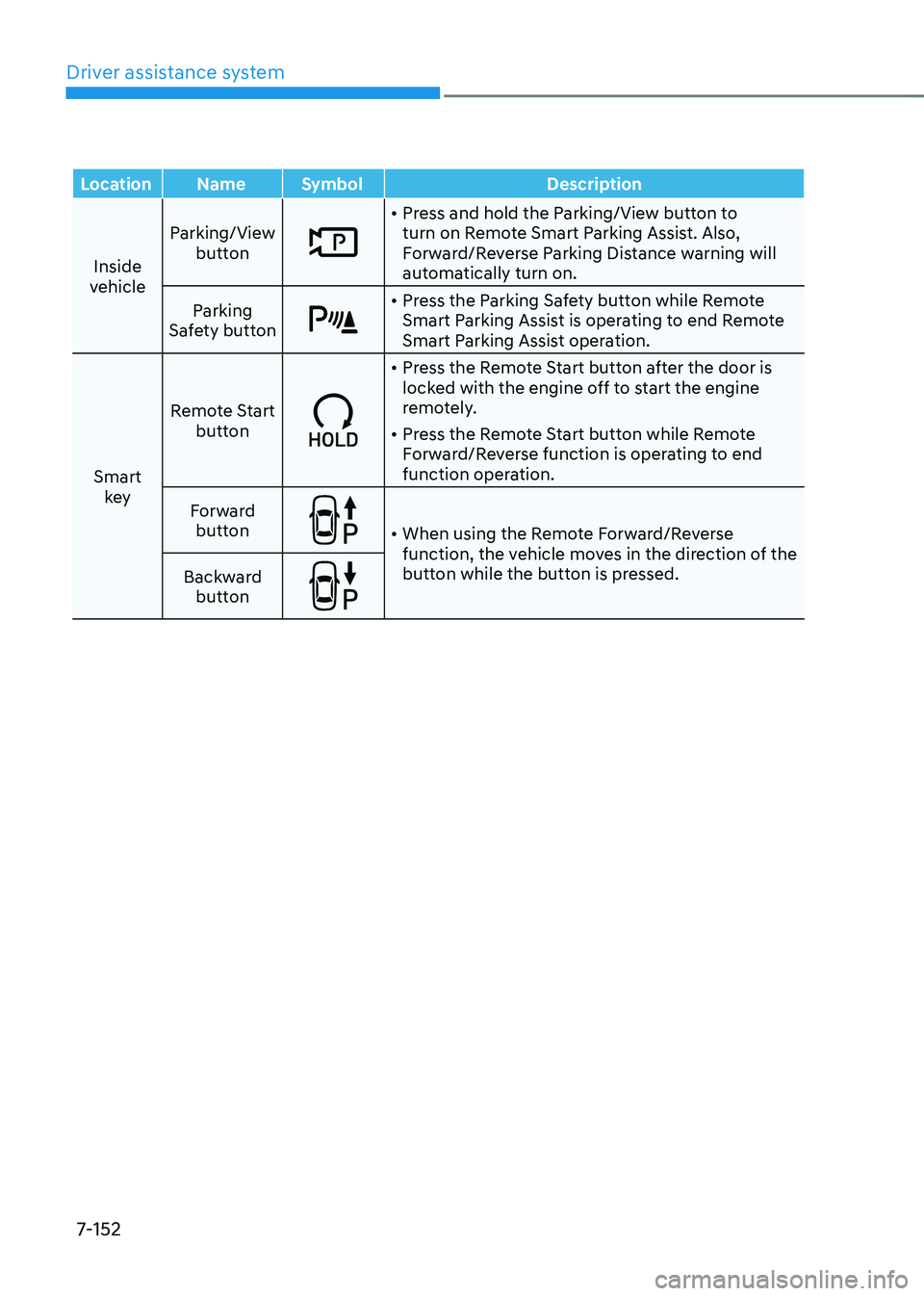
Inside
vehicle Parking/View
button
• Press and hold the Parking/View button to
turn on Remote Smart Parking Assist. Also,
Forward/Reverse Parking Distance warning will
automatically turn on.
Parking
Safety button
• Press the Parking Safety button while Remote
Smart Parking Assist is operating to end Remote
Smart Parking Assist operation.
Smart key Remote Start
button
• Press the Remote Start button after the door is
locked with the engine off to start the engine
remotely.
• Press the Remote Start button while Remote
Forward/Reverse function is operating to end
function operation.
Forward button
• When using the Remote Forward/Reverse
function, the vehicle moves in the direction of the
button while the button is pressed.
Backward
button
Page 519 of 638
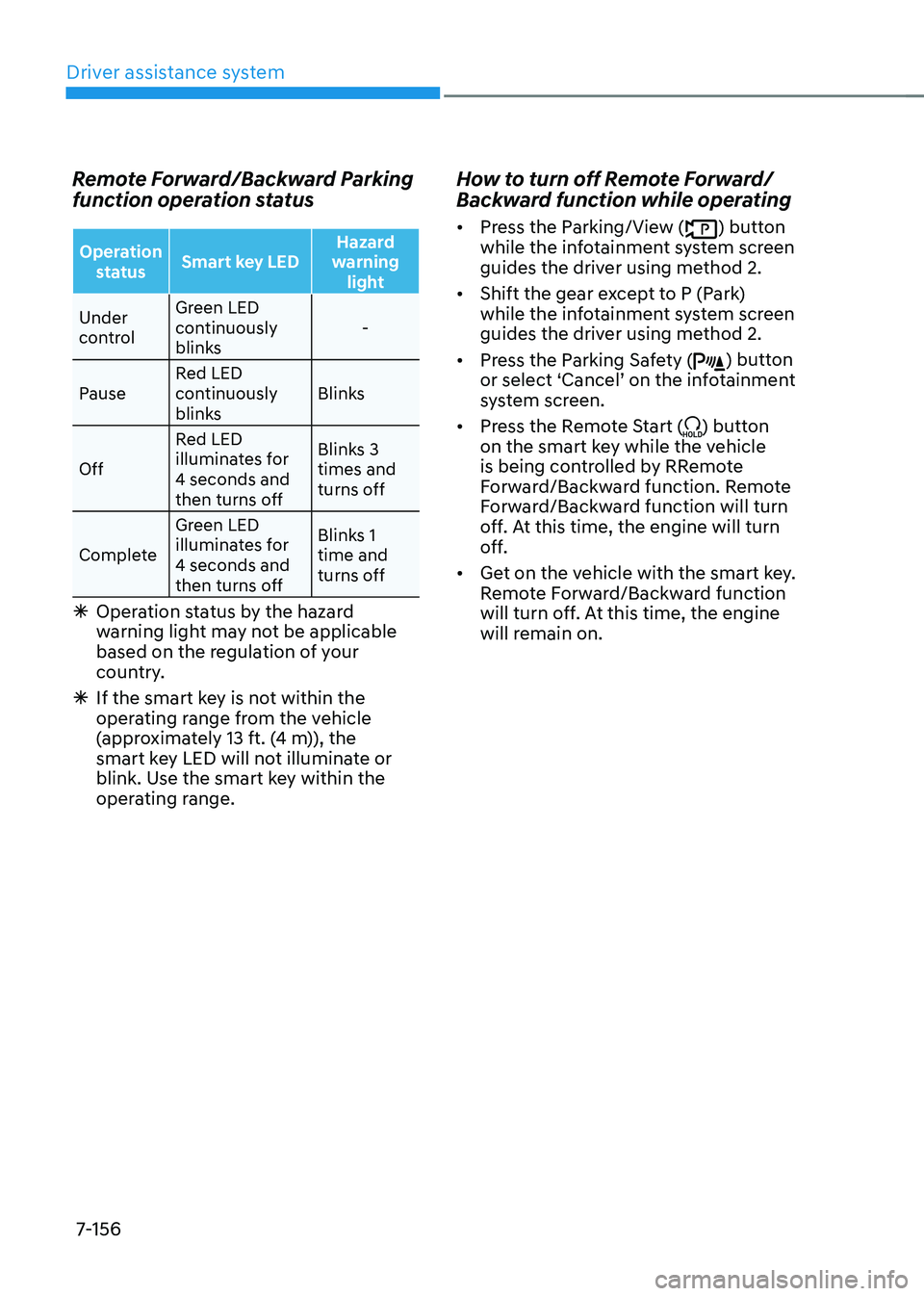
Driver assistance system
7-156
Remote Forward/Backward Parking
function operation status
Operation status Smart key LED Hazard
warning light
Under
control Green LED
continuously
blinks
-
Pause Red LED
continuously
blinks Blinks
Off Red LED
illuminates for
4 seconds and
then turns off Blinks 3
times and
turns off
Complete Green LED
illuminates for
4 seconds and
then turns off Blinks 1
time and
turns off
Ã
Operation status by the hazard
warning light may not be applicable
based on the regulation of your
country.
ÃIf the smart key is not within the
operating range from the vehicle
(approximately 13 ft. (4 m)), the
smart key LED will not illuminate or
blink. Use the smart key within the
operating range.
How to turn off Remote Forward/
Backward function while operating
• Press the Parking/View () button
while the infotainment system screen
guides the driver using method 2.
• Shift the gear except to P (Park)
while the infotainment system screen
guides the driver using method 2.
• Press the Parking Safety (
) button or select ‘Cancel’ on the infotainment system screen.
• Press the Remote Start (
) button
on the smart key while the vehicle
is being controlled by RRemote
Forward/Backward function. Remote
Forward/Backward function will turn
off. At this time, the engine will turn
off.
• Get on the vehicle with the smart key.
Remote Forward/Backward function
will turn off. At this time, the engine
will remain on.
Page 541 of 638

08
8-15
Changing tires
WARNING
A vehicle can slip or roll off of a jack
causing serious injury or death to you or
those nearby. Take the following safety
precautions:
• Do not get under a vehicle that is
supported by a jack.
• NEVER attempt to change a tire in
the lane of traffic. ALWAYS move the
vehicle completely off the road on
level, firm ground away from traffic
before trying to change a tire. If you
cannot find a level, firm place off
the road, call a towing service for
assistance.
• Be sure to use the jack provided with
the vehicle.
• ALWAYS place the jack on the
designated jacking positions on the
vehicle and NEVER on the bumpers
or any other part of the vehicle for
jacking support.
• Do not start or run the engine while
the vehicle is on the jack.
• Do not allow anyone to remain in the
vehicle while it is on the jack.
• Keep children away from the road
and the vehicle. Follow these steps to change your
vehicle’s tire:
1. Park on a level, firm surface.
2. Shift the gear to P (Park), apply the
parking brake, and press the Engine
Start/Stop button to the OFF position.
3. Press the hazard warning flasher
button.
4. Remove the wheel lug wrench, jack,
jack handle, and spare tire from the
vehicle.
ONX4080025L[A] : Block
5. Block both the front and rear of the
tire diagonally opposite of the tire you
are changing.