Page 43 of 548
Foreword / Electric Vehicle System Overview
1-38
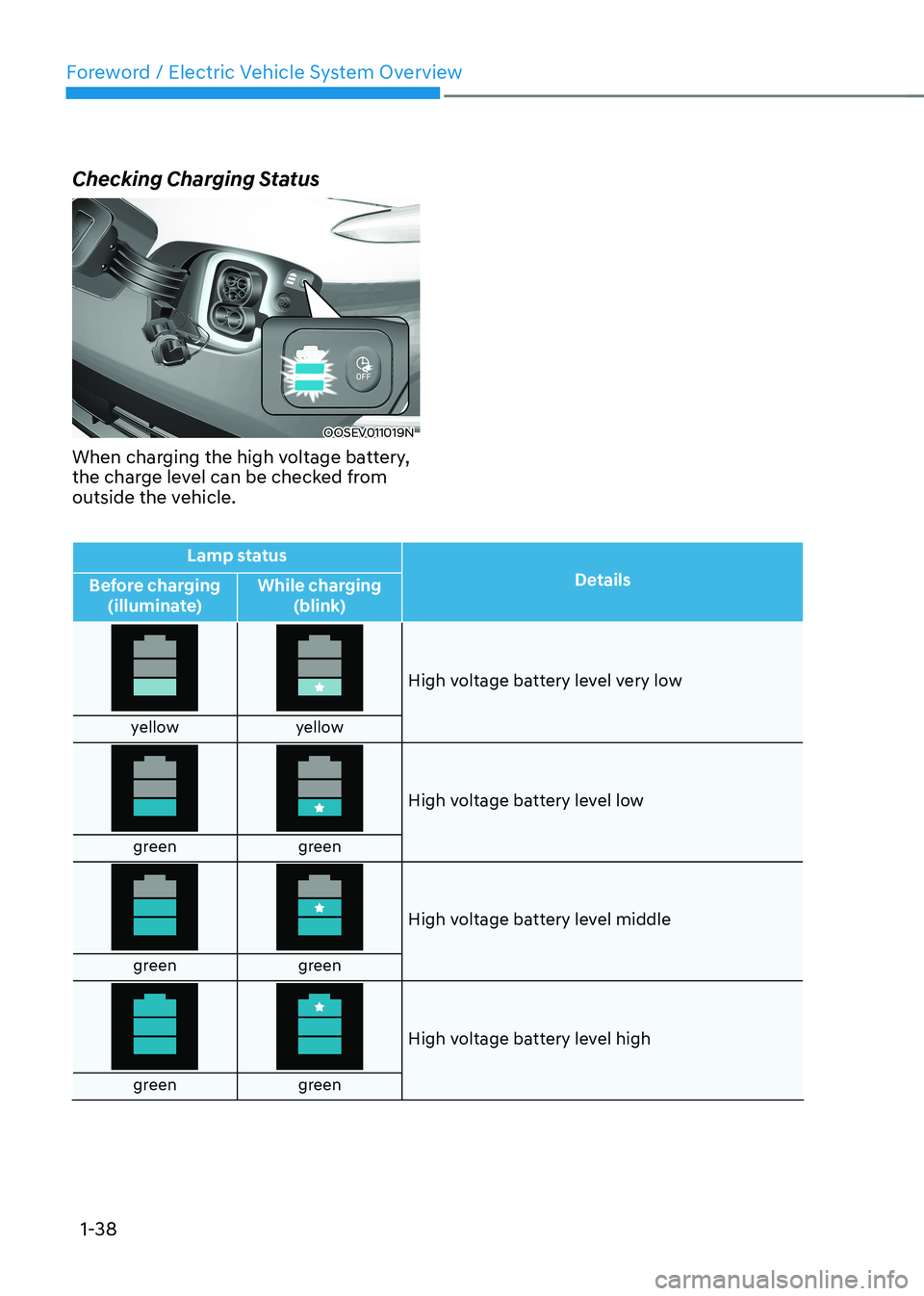
Checking Charging Status
OOSEV011019N
When charging the high voltage battery,
the charge level can be checked from
outside the vehicle.
Lamp status Details
Before charging
(illuminate) While charging
(blink)
High voltage battery level very low
yellow yellow
High voltage battery level low
green green
High voltage battery level middle
green green
High voltage battery level high
green green
Page 44 of 548
01
1-39
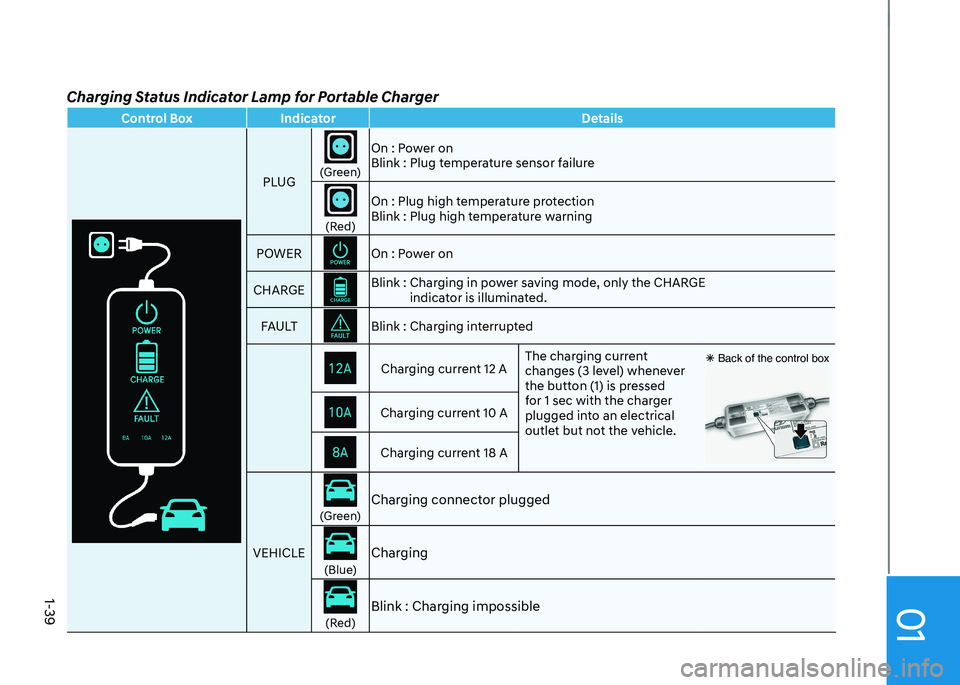
Charging Status Indicator Lamp for Portable Charger
Control Box IndicatorDetails
PLUG
(Green)On : Power on
Blink : Plug temperature sensor failure(Red)On : Plug high temperature protection
Blink : Plug high temperature warning
POWER
On : Power on
CHARGEBlink : Charging in power saving mode, only the CHARGE indicator is illuminated.
FA U LTBlink : Charging interruptedCharging current 12 A The charging current
changes (3 level) whenever
the button (1) is pressed
for 1 sec with the charger
plugged into an electrical
outlet but not the vehicle. Ã
Back of the control boxCharging current 10 ACharging current 18 A
VEHICLE
(Green) Charging connector plugged(Blue)Charging(Red)
Blink : Charging impossible
Page 45 of 548
Foreword / Electric Vehicle System Overview
1-40
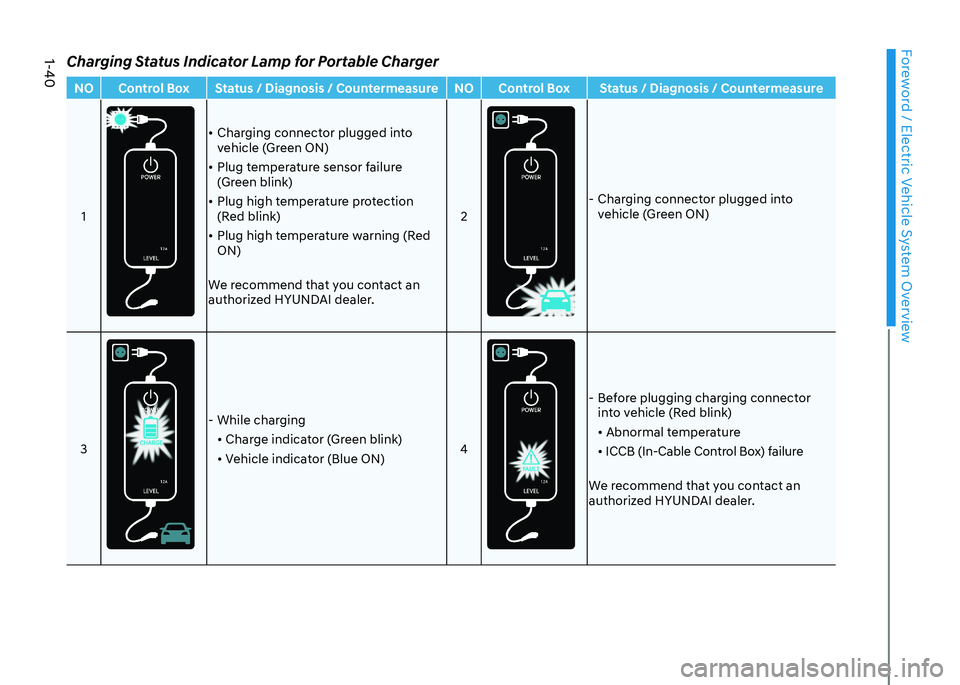
Charging Status Indicator Lamp for Portable ChargerNO Control Box Status / Diagnosis / Countermeasure NO Control Box Status / Diagnosis / Countermeasure1
• Charging connector plugged into
vehicle (Green ON)
• Plug temperature sensor failure
(Green blink)
• Plug high temperature protection
(Red blink)
• Plug high temperature warning (Red ON)
We recommend that you contact an
authorized HYUNDAI dealer. 2
- Charging connector plugged into
vehicle (Green ON)
3
- While charging • Charge indicator (Green blink)
• Vehicle indicator (Blue ON) 4
- Before plugging charging connector
into vehicle (Red blink)
• Abnormal temperature
• ICCB (In-Cable Control Box) failure
We recommend that you contact an
authorized HYUNDAI dealer.
Page 46 of 548
01
1-41
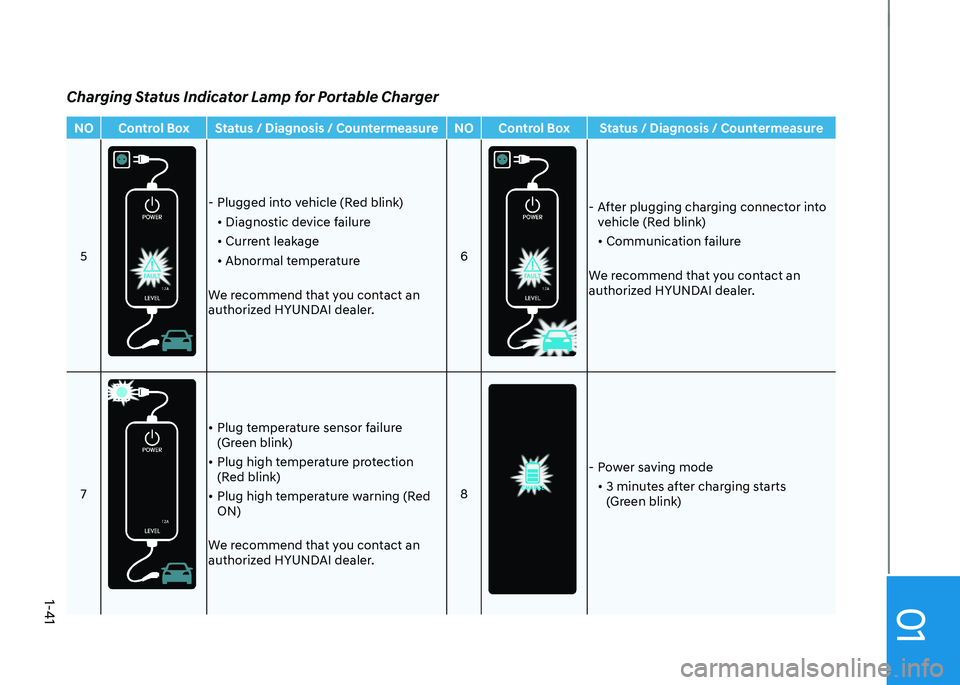
NO Control Box Status / Diagnosis / Countermeasure NO Control Box Status / Diagnosis / Countermeasure5
- Plugged into vehicle (Red blink)• Diagnostic device failure
• Current leakage
• Abnormal temperature
We recommend that you contact an
authorized HYUNDAI dealer. 6
- After plugging charging connector into
vehicle (Red blink)
• Communication failure
We recommend that you contact an
authorized HYUNDAI dealer.
7
• Plug temperature sensor failure
(Green blink)
• Plug high temperature protection
(Red blink)
• Plug high temperature warning (Red ON)
We recommend that you contact an
authorized HYUNDAI dealer. 8
- Power saving mode
• 3 minutes after charging starts
(Green blink)
Charging Status Indicator Lamp for Portable Charger
Page 47 of 548
Foreword / Electric Vehicle System Overview
1-42
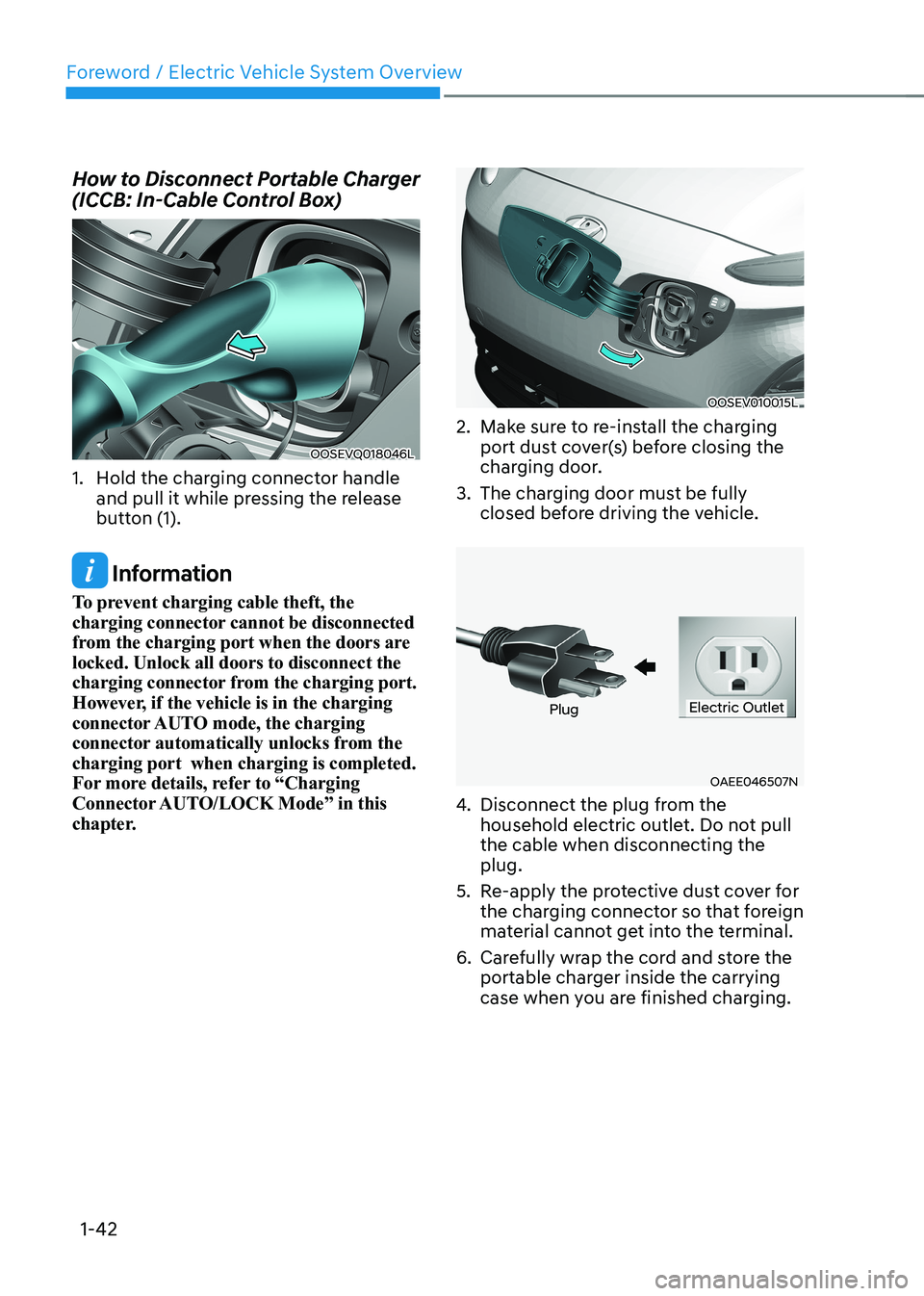
How to Disconnect Portable Charger
(ICCB: In-Cable Control Box)
OOSEVQ018046L
1. Hold the charging connector handle and pull it while pressing the release
button (1).
Information
To prevent charging cable theft, the
charging connector cannot be disconnected
from the charging port when the doors are
locked. Unlock all doors to disconnect the
charging connector from the charging port.
However, if the vehicle is in the charging
connector AUTO mode, the charging
connector automatically unlocks from the
charging port when charging is completed.
For more details, refer to “Charging
Connector AUTO/LOCK Mode” in this
chapter.
OOSEV010015L
2. Make sure to re-install the charging port dust cover(s) before closing the
charging door.
3. The charging door must be fully closed before driving the vehicle.
OAEE046507N
PlugElectric Outlet
4. Disconnect the plug from the
household electric outlet. Do not pull the cable when disconnecting the plug.
5. Re-apply the protective dust cover for the charging connector so that foreign
material cannot get into the terminal.
6. Carefully wrap the cord and store the portable charger inside the carrying
case when you are finished charging.
Page 48 of 548
01
1-43
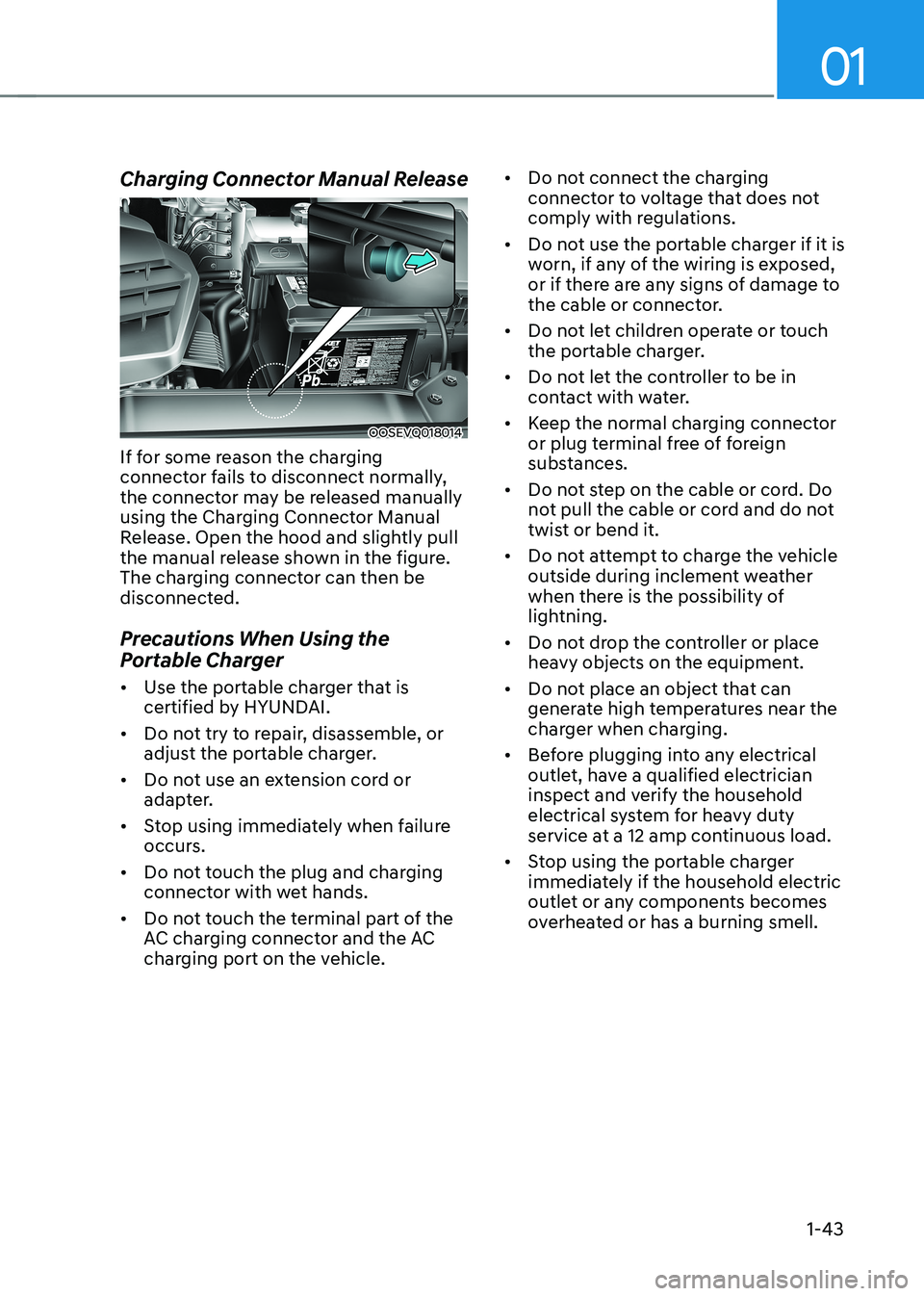
Charging Connector Manual Release
OOSEVQ018014
If for some reason the charging
connector fails to disconnect normally,
the connector may be released manually
using the Charging Connector Manual
Release. Open the hood and slightly pull
the manual release shown in the figure.
The charging connector can then be
disconnected.
Precautions When Using the
Portable Charger • Use the portable charger that is
certified by HYUNDAI.
• Do not try to repair, disassemble, or
adjust the portable charger.
• Do not use an extension cord or
adapter.
• Stop using immediately when failure
occurs.
• Do not touch the plug and charging
connector with wet hands.
• Do not touch the terminal part of the
AC charging connector and the AC
charging port on the vehicle. •
Do not connect the charging
connector to voltage that does not
comply with regulations.
• Do not use the portable charger if it is
worn, if any of the wiring is exposed,
or if there are any signs of damage to
the cable or connector.
• Do not let children operate or touch
the portable charger.
• Do not let the controller to be in
contact with water.
• Keep the normal charging connector
or plug terminal free of foreign
substances.
• Do not step on the cable or cord. Do
not pull the cable or cord and do not
twist or bend it.
• Do not attempt to charge the vehicle
outside during inclement weather
when there is the possibility of
lightning.
• Do not drop the controller or place
heavy objects on the equipment.
• Do not place an object that can
generate high temperatures near the
charger when charging.
• Before plugging into any electrical
outlet, have a qualified electrician
inspect and verify the household
electrical system for heavy duty
service at a 12 amp continuous load.
• Stop using the portable charger
immediately if the household electric
outlet or any components becomes
overheated or has a burning smell.
Page 49 of 548
Foreword / Electric Vehicle System Overview
1-44
EV Charging - trOUBlEShOOting
EV Charging Troubleshooting - Steps to Consider
If the vehicle fails to charge after being plugged in to a charging station or if plugged in
when using the portable charger, check the following:
1. Verify the charge mode is set to immediate. (i.e. confirm that scheduled charging is turned OFF)
2. Check the operation status of the charging station or the portable charger.
3. Check to see if there are any warning messages in the LCD cluster. Refer to “LCD Display Messages” in this section.
4. If there is an error message on the charging station display screen, there may be
a problem with the charging station. Try to charge the vehicle with a different
charging station.
5. If the vehicle fails to charge with different charging station equipment, there may be a problem with the vehicle. Contact an authorized HYUNDAI dealer for inspection.
6. If charging fails and the service warning light (
) is lit in the cluster,
Contact an authorized HYUNDAI dealer.
Page 50 of 548
01
1-45
driVing and operaTing inFormaTion
How to Start the Vehicle
1. Holding the smart key, sit in the driver’s seat.
2. Fasten the seat belt before starting the vehicle.
3. Make sure to engage the parking brake.
4. Turn OFF all electrical devices.
5. Make sure to depress and hold the brake pedal.
6. While depressing the brake pedal, shift to P (Park).
7. Depress and hold the brake pedal
while pressing the Start/Stop button.
8. When the “
” indicator is ON, you
can drive the vehicle. When the “
” indicator is OFF, you
cannot drive the vehicle. Start the
vehicle again.
9. Depress and hold the brake pedal and
shift to the desired position.
Information
While the charging cable is connected, the
gear cannot be shift from P (Park) to any
other gear for safety reasons.
10. Release the parking brake and slowly release the brake pedal. Check if the
vehicle slowly moves forward, then
depress the accelerator pedal.
How to Stop the Vehicle
1. Hold down the brake pedal while the
vehicle is parked.
2. While depressing the brake pedal, shift to P (Park).
3. While depressing the brake pedal, engage the parking brake.
4. While depressing the brake pedal,
press the Start/Stop button and turn
off the vehicle.
5. Check if the “
” indicator is turned
OFF on the instrument cluster. When the “
” indicator is ON and
the gear is in a position other than
P (Park), the driver can accidently
depress the accelerator pedal, causing
the vehicle to move unexpectedly.