2023 HYUNDAI IONIQ 5 wheel nut
[x] Cancel search: wheel nutPage 80 of 680

Vehicle Information, Consumer Information and Reporting Safety Defects
2-10
Items Tire sizeWheel
size Battery
type Inflation pressure kPa (psi)
Wheel lug nut
torque lbf-ft
(kgf-m, N-m)
Normal load
Maximum
load
Front RearFront Rear
Full size
tire
235/55R 19 7.5J X 19 2WD
Standard250
(36) 250
(36) 250
(36) 250
(36)
79~94
(11~13, 108~127)235/55R 19 7.5J X 19 2WD
Extended260
(38) 260
(38) 260
(38) 260
(38)
235/55R 19 7.5J X 19 AWD
Extended250
(36) 250
(36) 250
(36) 250
(36)
255/45R20 8.5J X 20 AWD
Extended235
(34) 235
(34) 235
(34) 235
(34)
NOTICE
• Ambient temperature affects the tire pressure (about 7kPa (1 psi) for every
12°F (7°C) change). If colder temperatures are anticipated, it is permissible to
increase cold tire inflation pressure by up to 20 kPa (3 psi) over the specification.
If extreme temperature changes are expected, be sure to check and adjust tire
pressure accordingly.
• Tire inflation pressure decreases with higher elevation, and increases with lower
elevation (about 10 kPa (2.4 psi) for every mile (or kilometer) elevation change).
Be sure to check and adjust tire pressure accordingly when driving through
changing elevations.
• Do not exceed the maximum inflation pressure, as found on the sidewall of the
tire(s).
CAUTION
When replacing tires, ALWAYS use the same size, type, brand, construction and
tread pattern supplied with the vehicle. If not, it can damage the related parts or
make it work irregularly.
tIres anD wheels
Page 338 of 680

Driving Your Vehicle
6-12
4. Press and hold the OK button on
the steering wheel for more than 1 second.
5. When the message ‘Vehicle will stay in (N). Change gear to cancel’ (or ‘N will
stay engaged when the vehicle is Off’)
will appear on the cluster LCD display,
press the Start/Stop button while
depressing the brake pedal.
However, if you open the driver’s door
within 3 minutes in the ACC state, the
gear will automatically shift to P (Park)
and the Start/Stop button will change
to the OFF position.
NOTICE
With the gear in N (Neutral) the Start/
Stop button will be in the ACC position.
Note that the doors cannot be locked
in the ACC position or the battery (12V)
may discharge if left in the ACC position
for a long period.
D (Drive)
This is the normal driving position.
The reduction gear automatically
activates the regenerative braking
system according to the road conditions.
ONE1061055
To shift the gear to D (Drive), rotate the
rotary gear shift dial to D (Drive) while
depressing the brake pedal.
When the vehicle is stopped in the D
(Drive) position, if you open the driver's
door, the gear will automatically shift to
P (Park).
However, if the vehicle is in motion, the
gear may not automatically shift to P
(Park) to prevent reduction gear damage.
NOTICE
Always come to a complete stop before
shifting into D (Drive).
CAUTION
When you start after stopping on a steep
incline, even if the gear is in D (Drive),
if you do not depress the accelerator
or brake pedal, the vehicle may roll
backwards, which can cause an accident.
Page 559 of 680
07
7-157
•
The vehicle moves 22 ft. (7 m) while
the smart key is pressed with Remote
Operation function (maximum travel
distance per button press)
When Remote Operation function is
paused, the vehicle will stop. If the
condition that made the function to
pause disappears, the function may
operate again.
The function will cancel in the
following conditions when: • The steering wheel is steered
• The gear is shifted while the vehicle is
moving
• Operating EPB while the vehicle is
moving
• The vehicle hood is open
• The brake pedal or accelerator pedal
is depressed when all the doors are closed
• The smart key is outside the vehicle
when the brake pedal is depressed
while the driver's door is open
• Rapid acceleration occurs
• Vehicle skid occurs
• The wheel is stuck by an obstacle and
cannot move •
Approximately 3 minutes and 50
seconds has passed after Remote
Operation function has started to
operate
• The slope of the road exceeds the
operational range
• The function is paused for more than
1 minute
• The total travel distance of the vehicle
has exceeded 45 ft. (14 m) after
Remote Operation function operation
• The steering wheel, gearshift, braking,
and drive controls are not working
properly
• There is a problem with the smart key
or the smart key battery is low
• ABS, TCS or ESC system operates due
to slippery road conditions
• The alarm of the Theft Alarm System sounds
• The Charging door opens
• The EV mode is utility mode
When Remote Operation function is
canceled, the vehicle will automatically
stop, shift the gear to P (Park) and
engage EPB (Electronic Parking Brake).
Page 567 of 680
07
7-165
The function will pause in the
following conditions when: •
Smart Parking
- There is a pedestrian, animal or object in the direction the vehicle is
moving
- The door or liftgate is open
- The driver’s seat belt is not fastened
- Blind-Spot Collision-Avoidance Assist or Rear-Cross Traffic Collision
Assist operates while the vehicle
is being controlled in the reverse
direction
- The Parking/View (
) button is not
continuously pressed
- The vehicle is stopped by depressing the brake pedal
• Remote Smart Parking
- There is a pedestrian, animal or object in the direction the vehicle is
moving
- The door or liftgate is open
- The Forward (
) or Backward ()
button is not continuously pressed
- Simultaneously pressing multiple buttons on a smart key
- The smart key is not operated within 13 ft. (4 m) from the vehicle
- Button of another smart key is pressed in addition to the operating
smart key
- Blind-Spot Collision-Avoidance Assist or Rear-Cross Traffic Collision
Assist operates while the vehicle
is being controlled in the reverse
direction
When Parking function is paused, the
vehicle will automatically stop. If the
condition that made the function to
pause disappears, the function may
operate again. The function will cancel in the
following conditions when: •
Smart Parking
- The steering wheel is steered
- The gear is shifted while the vehicle is moving
- Operating EPB while the vehicle is moving
- The hood is open
- The driver opens the door with the seatbelt unfastened
- Rapid acceleration occurs
- Vehicle skid occurs
- The wheel is stuck by an obstacle and cannot move
- There are pedestrians, animals or objects at the front and rear of the
vehicle at the same time
- Approximately 3 minutes and 50 seconds have past after Smart
Parking function has started to
operate
- The slope of the road exceeds the operational range
- The function is paused for more than 1 minute
- The steering wheel, gearshift, braking, and drive controls are not
working properly
- ABS, TCS or ESC system operates due to slippery road conditions
- The Charging door opens
- The EV mode is utility mode
When Smart Parking function is
canceled, the vehicle will automatically
stop, shift the gear to P (Park) and
engage EPB (Electronic Parking Brake).
Page 568 of 680
Driver Assistance System
7-166
•
Remote Smart Parking
- The steering wheel is steered
- The gear is shifted
- Operating EPB while the vehicle is moving
- The hood is open
- The brake pedal or accelerator pedal is depressed when all the
doors are closed
- The smart key is outside the vehicle when the brake pedal is depressed
while the driver's door is open.
- Rapid acceleration occurs
- Vehicle skid occurs
- The wheel is stuck by an obstacle and cannot move
- There are pedestrians, animals or objects at the front and rear of the
vehicle at the same time
- Approximately 3 minutes and 50 seconds have past after Remote
Smart Parking function has started
to operate
- The slope of the road exceeds the operational range
- The function is paused for more than 1 minute
- The steering wheel, gearshift, braking, and drive controls are not
working properly
- There is a problem with the smart key or the smart key battery is low
- ABS, TCS or ESC system operates due to slippery road conditions
- The alarm of the Theft Alarm System sounds
- The Charging door opens
- The EV mode is utility mode
When Remote Smart Parking function is
canceled, the vehicle will automatically
stop, shift the gear to P (Park) and
engage EPB (Electronic Parking Brake). Smart Exit
Operating order
Smart Exit function operates in the
following order:
1. Getting ready for exit
2. Checking space
3. Select exit direction
4.
Smart Exit
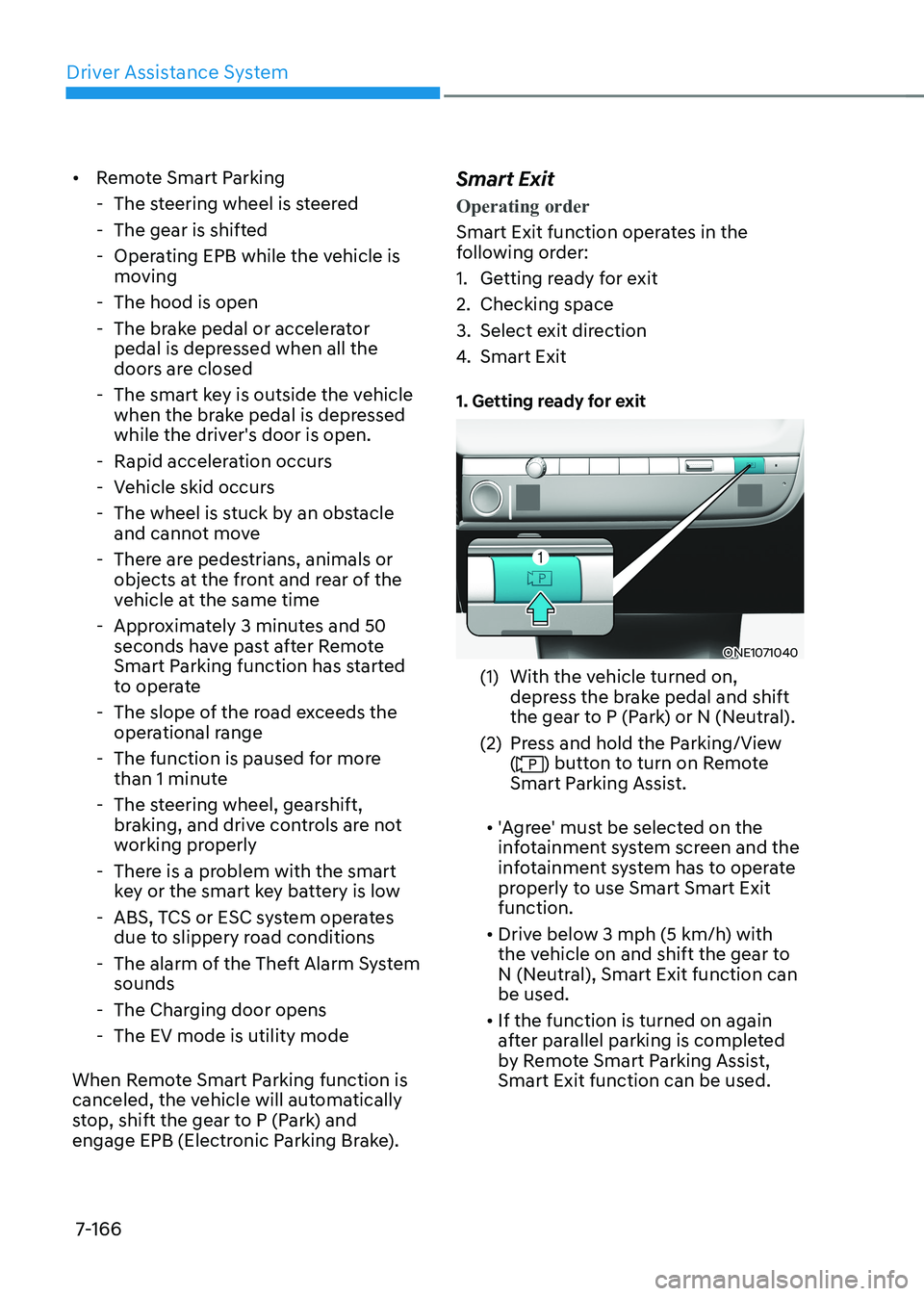
1. Getting ready for exit
ONE1071040
(1) With the vehicle turned on, depress the brake pedal and shift
the gear to P (Park) or N (Neutral).
(2) Press and hold the Parking/View (
) button to turn on Remote
Smart Parking Assist.
• 'Agree' must be selected on the
infotainment system screen and the
infotainment system has to operate
properly to use Smart Smart Exit function.
• Drive below 3 mph (5 km/h) with
the vehicle on and shift the gear to
N (Neutral), Smart Exit function can be used.
• If the function is turned on again
after parallel parking is completed
by Remote Smart Parking Assist, Smart Exit function can be used.
Page 571 of 680
07
7-169
How to turn off Smart function while operating
• Press the Parking/View () button in
the following stage:
- Checking space
- Select exit direction
• Shift the gear to R (Reverse) in the
following stage:
- Checking space
- Select exit direction
• Press the Parking Safety (
) button
or select ‘Cancel’ on the infotainment
system screen to turn off Exit function.
• While Smart Exit function is operating,
if the vehicle is stopped by depressing
the brake pedal, and the gear is
shifted, Exiting function will turn off.
At this time, EPB (Electronic Parking
Brake) will not be engaged.
The function will pause in the following conditions when:
• There is a pedestrian, animal or object
in the direction the vehicle is moving
• The door or liftgate is open
• The driver’s seat belt is not fastened
• Blind-Spot Collision-Avoidance Assist
or Rear-Cross Traffic Collision Assist
operates while the vehicle is being
controlled in the reverse direction
• The Parking/View (
) button is not
continuously pressed
• The vehicle is stopped by depressing
the brake pedal
When Exit function is paused, the vehicle
will stop. If the condition that made
the function to pause disappears, the
function may operate again.
The function will cancel in the following conditions when:
• Smart Exit
- The steering wheel is steered
- The gear is shifted while the vehicle is moving
- Operating EPB while the vehicle is moving
- The hood is open
- The driver opens the door with the seatbelt unfastened
- Rapid acceleration occurs
- Vehicle skid occurs
- The wheel is stuck by an obstacle and cannot move
- There are pedestrians, animals or objects at the front and rear of the
vehicle at the same time
- Approximately 3 minutes and 50 seconds have past after Smart Exit
function has started to operate
- The slope of the road exceeds the operational range
- The function was paused for more than 1 minute
- The steering wheel, gearshift, braking, and drive controls are not
working properly
- ABS, TCS or ESC system operates due to slippery road conditions
- The Charging door opens
When Smart Exit function is canceled,
the vehicle will automatically stop, shift
the gear to P (Park) and engage EPB
(Electronic Parking Brake).
Page 586 of 680

Emergency Situations
8-8
Tire Pressure Monitoring System
WARNING
Over-inflation or under-inflation can
reduce tire life, adversely affect vehicle
handling, and lead to sudden tire failure
that may cause loss of vehicle control
resulting in an accident.
Each tire, including the spare (if
provided), should be checked monthly
when cold and inflated to the inflation
pressure recommended by the vehicle
manufacturer on the vehicle placard
or tire inflation pressure label. (If your
vehicle has tires of a different size than
the size indicated on the vehicle placard
or tire inflation pressure label, you should
determine the proper tire inflation
pressure for those tires.)
As an added safety feature, your
vehicle has been equipped with a tire
pressure monitoring system (TPMS)
that illuminates a low tire pressure
telltale when one or more of your tires is
significantly under-inflated. Accordingly,
when the low tire pressure telltale
illuminates, you should stop and check
your tires as soon as possible, and inflate
them to the proper pressure. Driving on
a significantly under-inflated tire causes
the tire to overheat and can lead to tire
failure.
Under-inflation also reduces fuel
efficiency and tire tread life, and may
affect the vehicle’s handling and
stopping ability.
Please note that the TPMS is not a
substitute for proper tire maintenance,
and it is the driver’s responsibility to
maintain correct tire pressure, even if
under-inflation has not reached the level
to trigger illumination of the TPMS low
tire pressure telltale.
Your vehicle has also been equipped with
a TPMS malfunction indicator to indicate
when the system is not operating
properly. The TPMS malfunction
indicator is combined with the low
tire pressure telltale. When the system
detects a malfunction, the telltale will
flash for approximately one minute and
then remain continuously illuminated.
This sequence will continue upon
subsequent vehicle start-ups as long as
the malfunction exists.
When the malfunction indicator is
illuminated, the system may not be able
to detect or signal low tire pressure as
intended. TPMS malfunctions may occur
for a variety of reasons, including the
installation of replacement or alternate
tires or wheels on the vehicle that
prevent the TPMS from functioning
properly.
Always check the TPMS malfunction
telltale after replacing one or more tires
or wheels on your vehicle to ensure that
the replacement or alternate tires and
wheels allow the TPMS to continue to
function properly.
NOTICE
If any of the below happens, have
the system checked by an authorized
HYUNDAI dealer.
1. The Low Tire Pressure Telltale/ TPMS Malfunction Indicator does not
illuminate for 3 seconds when the
Start/Stop button is pressed to the
ON position or when the vehicle is running.
2. The TPMS Malfunction Indicator remains illuminated after blinking for
approximately 1 minute.
3. The Low Tire Pressure Position Telltale remains illuminated.
Page 588 of 680

Emergency Situations
8-10
TPMS (Tire Pressure
Monitoring System)
Malfunction Indicator
The TPMS Malfunction Indicator
will illuminate after it blinks for
approximately one minute when there
is a problem with the Tire Pressure
Monitoring System.
Have the system checked by an
authorized HYUNDAI dealer as soon as possible.
NOTICE
If there is a malfunction with the TPMS,
the Low Tire Pressure Position Telltale
will not be displayed even though the
vehicle has an under-inflated tire.
NOTICE
The TPMS Malfunction Indicator may
illuminate after blinking for one minute
if the vehicle is near electric power
supply cables or radio transmitters
such as police stations, government
and public offices, broadcasting
stations, military installations, airports,
transmitting towers, etc.
Additionally, the TPMS Malfunction
Indicator may illuminate if snow chains
are used or electronic devices such as
computers, chargers, remote starters,
navigation, etc. This may interfere with
normal operation of the TPMS.
Changing a Tire with TPMS
If you have a flat tire, the Low Tire
Pressure and Position telltales will come
on. Have the flat tire repaired by an
authorized HYUNDAI dealer as soon as
possible or replace the flat tire with the
spare tire.
NOTICE
It is recommended that you do not use a
puncture-repairing agent not approved
by an authorized HYUNDAI dealer or the
equivalent specified for your vehicle
to repair and/or inflate a low pressure
tire. Tire sealant not approved by an
authorized HYUNDAI dealer or the
equivalent specified for your vehicle
may damage the tire pressure sensor.
The spare tire (if equipped) does not
come with a tire pressure monitoring
sensor. When the low pressure tire or
the flat tire is replaced with the spare
tire, the Low Tire Pressure Telltale will
remain on. Also, the TPMS Malfunction
Indicator will illuminate after blinking
for one minute if the vehicle is driven
at speed above 25 km/h (15.5 mph) for
approximately 10 minutes. Once the original wheel equipped with
a tire pressure monitoring sensor is
reinflated to the recommended pressure
and reinstalled on the vehicle, the
Low Tire Pressure Telltale and TPMS
Malfunction Indicator will go off within a
few minutes of driving.
If the indicators do not extinguish after
a few minutes, consult an authorized
HYUNDAI dealer.